How to build an intranet: steps, best practices, & design examples


Ever thought about how to build an intranet? It's like designing your perfect workplace.
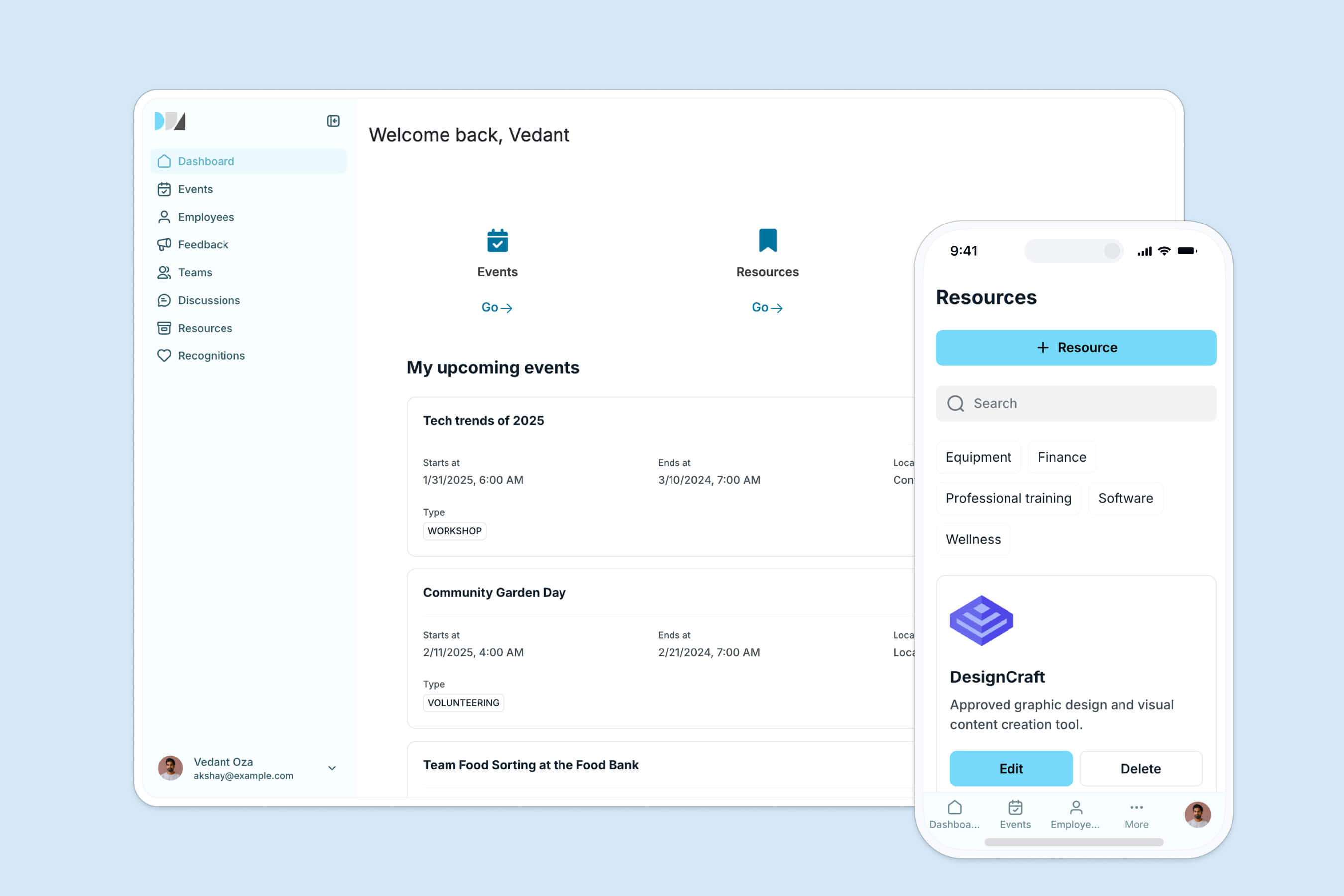
Picture an office where everything is in its place, signs are clear, and everyone knows exactly where to find what they need. Employees can focus on their work without wasting time searching for documents. A 2022 MDPI study even found that a well-designed office layout significantly boosts productivity.
A well-designed intranet provides the same benefits. It helps employees quickly find important information and resources, increasing productivity. But then come the burning questions: Where do you start? Can you make it both functional and visually appealing? How do you balance different employee needs and preferences?
Ahead, we'll walk you through building and designing a company intranet. Plus, highlight key intranet design features to make it a business-critical tool for your employees.
But first, let's cover the basics.
What is an intranet?
An intranet is a private network for an organization's employees. It securely shares company information and computing resources, and fosters team communication and collaboration. Think of it as an internal, protected version of the internet, accessible only to authorized users within your organization.
Importance of an intranet

Investing in a team intranet is a strategic decision that leads to several positive advantages for your company. This includes:
Streamlined communication and collaboration
As your company grows, maintaining clear communication and seamless collaboration can become challenging. An intranet solves this by serving as a central hub for all updates, news, and crucial information, reducing email overload and keeping everyone in the loop.
With built-in tools like chat rooms, forums, and project management software, your team can collaborate efficiently, no matter where they are. This leads to quicker decisions, higher productivity, and a stronger sense of teamwork.
Centralized information repository
From HR policies and company news to project documents and training materials, everything is stored in one place. This saves employees time searching for documents and reduces the risk of using outdated information. Intranets also help geographically dispersed teams align their goals and processes, maintaining consistency across the organization.
Employee engagement
Intranets boost engagement by offering platforms for recognition, feedback, and community-building. Think: employee recognition programs, social forums, and interactive content, all helping your employees feel valued and connected to the company culture.
You also set it up to host surveys and feedback forms, ensuring every team member has a voice.
Knowledge management
Your intranet captures and organizes best practices, how-to guides, industry insights, and competitive analysis. And as employees can easily access and use this knowledge, they perform better. For new hires, the portal speeds up onboarding with a comprehensive knowledge base, plus it retains valuable knowledge within the company. Even when employees leave.
Industries like consulting, legal services, and research, which rely on expertise and information, benefit greatly from centralized knowledge management. In addition, sectors that need strict compliance (e.g., healthcare and finance) can also ensure teams always have access to the latest procedures and compliance information, lowering non-compliance risks.
Enhanced security
Security is a must, especially for sensitive information. Your intranet provides a secure environment for storing and sharing company data. With access controls, only authorized personnel can see specific information.
Plus, you can equip your company intranet with encryption, firewalls, and regular security audits to guard against breaches and cyber threats. This ensures data protection and compliance with industry regulations.
Types of intranets
Choosing the right intranet depends on your company's size, structure, and specific needs. Each type offers unique features and benefits that can enhance collaboration and knowledge management within your company.
Here are the main types of intranets:
1. Corporate intranets
Corporate intranets are all-in-one platforms designed to serve every department in large organizations. They unify various tools and resources to boost communication, collaboration, and document management.
Features like centralized document storage, internal messaging, and shared calendars help reduce the time your employees spend searching for documents and enable real-time communication. IBM popularly uses W3 (its company intranet) to keep workflows smooth and its global team in sync.

2. Departmental intranets
Departmental intranets are designed to meet the specific needs of each department within a company. They provide tools and resources tailored to unique departmental functions. For example, task management tools help marketing or finance teams streamline projects and daily tasks, ensuring nothing falls through the cracks.
Key features include customized content, task management tools, and collaboration aids like shared folders and discussion boards. Large corporations often use departmental intranets to keep their various departments running smoothly.
3. Social intranets
Social intranets focus on boosting employee engagement and communication through social features. They’re designed to build a sense of community and collaboration within your company.
Some of its key features include:
- Social networking elements like profiles, status updates, and activity feeds
- Interactive tools like discussion forums and blogs
- Collaboration tools such as wikis and shared documents
4. Project-based intranets
Project-based intranets are like the ultimate team playbooks for your projects. They provide tools to help you plan, track, and manage projects efficiently.
For instance, shared workspaces let teams collaborate in real-time, keeping everyone on the same page. Whereas resource management tools give easy access to project documents, so you can find what you need when you need it.
Consulting firms and construction companies often use these intranets to handle complex projects.
5. Knowledge management intranets
Knowledge management intranets are your organization's brain trust, focusing on capturing, organizing, and sharing valuable knowledge.
These intranets act as a repository for information and expertise, featuring a central knowledge base for articles, manuals, and best practices. Advanced search functionality helps you find information quickly, while collaboration tools like wikis and forums facilitate knowledge sharing.
Tech companies and research organizations often use knowledge management intranets to store and share valuable information and insights, even retaining knowledge within the organization when employees leave.
This is exactly what Celonis did. The process mining company had thousands of customer implementations worth of go-to-market knowledge buried in an unwieldy Google Slides deck, so they built a searchable knowledge base on Softr (on top of Airtable).
"Our users love it. They think it's the perfect way to connect knowledge we are building up across our customer interactions, structure it, and make it easily accessible."
Celonis GTM team, Softr customer story
The first version was live in under five days, and within two to three months it became one of the top three core tools used by 1,500+ team members.
6. Custom intranets
Custom intranets are tailor-made to fit your company's unique needs and requirements. They are highly flexible and typically designed using features from various types of intranets.
These intranets seamlessly integrate with your existing systems and tools, ensuring everything works together smoothly. They are also scalable, allowing your intranet to grow and evolve with your company.
Startups and innovative companies often choose custom intranets to create a platform that supports their specific business processes and culture, providing a unique solution that's as dynamic as they are.
Types of intranet solutions
Intranet solutions come in all shapes and sizes, each with its own unique flair and functionality. Knowing the different types can help you pick the one that fits your organization like a glove.
On-premise
These are hosted on your company’s internal servers, giving you top-notch control over data and security. This is perfect for organizations with strict security needs, like financial institutions or government agencies. Additionally, they offer complete customization, allowing you to tweak the platform to fit your exact requirements and integrate seamlessly with existing systems.
The catch? Setup and maintenance can be heavy on resources, requiring a large investment in your IT infrastructure and personnel.
Cloud-based
Hosted on external servers managed by third-party providers, cloud-based intranets offer flexibility and scalability that on-premises solutions can't match. You can deploy them quickly and adjust as your needs change, without worrying about the underlying infrastructure. And enjoy features like automatic updates, data backup, and disaster recovery.
Ideal for companies with remote or distributed teams, these solutions let employees access the intranet from anywhere with an internet connection. But you do need to keep an eye on data privacy and industry regulations.
Open-source
With open-source solutions, you get the source code to customize and modify your intranet as needed. These are cost-effective (no licensing fees) and benefit from a community of developers enhancing the software.
While open-source intranets offer high flexibility and integrate well with existing tools, they require solid technical know-how to implement and maintain. Security and stability are also your responsibility.
Off-the-shelf
These pre-built platforms are ready to go right out of the box. Designed to meet the common needs of many organizations, they offer a quick and easy implementation. Standard features include document management, communication tools, and collaboration spaces.
Off-the-shelf intranets are great for small to medium-sized businesses that need an efficient solution without extensive customization. However, they may not be flexible enough to meet the unique requirements of every organization.
Custom-built
Tailored to your specific needs, custom-built intranets offer unmatched flexibility. You can design features that align perfectly with your workflows and integrate with various internal and external systems.
While this level of personalization is great, be ready to put in serious investments in development, time, and resources. Naturally, custom intranets are more suited to large organizations with complex needs and the budget to match.
Mobile intranet
Designed for access on smartphones and tablets, mobile intranets cater to the growing trend of remote and mobile work. They ensure continuous connectivity and productivity by offering a responsive design for seamless use across devices. Ideal for mobile workforces, such as sales teams and remote employees, these solutions make it easier for everyone to stay connected and informed, no matter where they are.
How to build an intranet with Softr
Softr is the first AI-native no-code platform for building production-ready business software. You describe the intranet you need, and the AI Co-Builder generates the database, the pages, and the permissions for you. From there you keep refining visually, with no code and no fragile, "vibe-coded" output that breaks the moment real employees start using it. Your app is secure and production-ready from day one.
You get three ways to start, and they are AI-first rather than AI-only:
- Generate with the AI Co-Builder (primary): Describe your intranet in plain language and let it scaffold a complete app, database tables, user groups, and pages included.
- Start from a template: Pick a ready-made intranet template and adapt it.
- Build from scratch: Start from a blank canvas and design every table and page manually.
Softr is a full-stack platform, not just a frontend. You can store everything in Softr Databases, the native database, or connect to 17+ external sources like Airtable, Google Sheets, and HubSpot if your data already lives there. You then automate the busywork with Softr Workflows, triggered directly from buttons and forms inside your app.
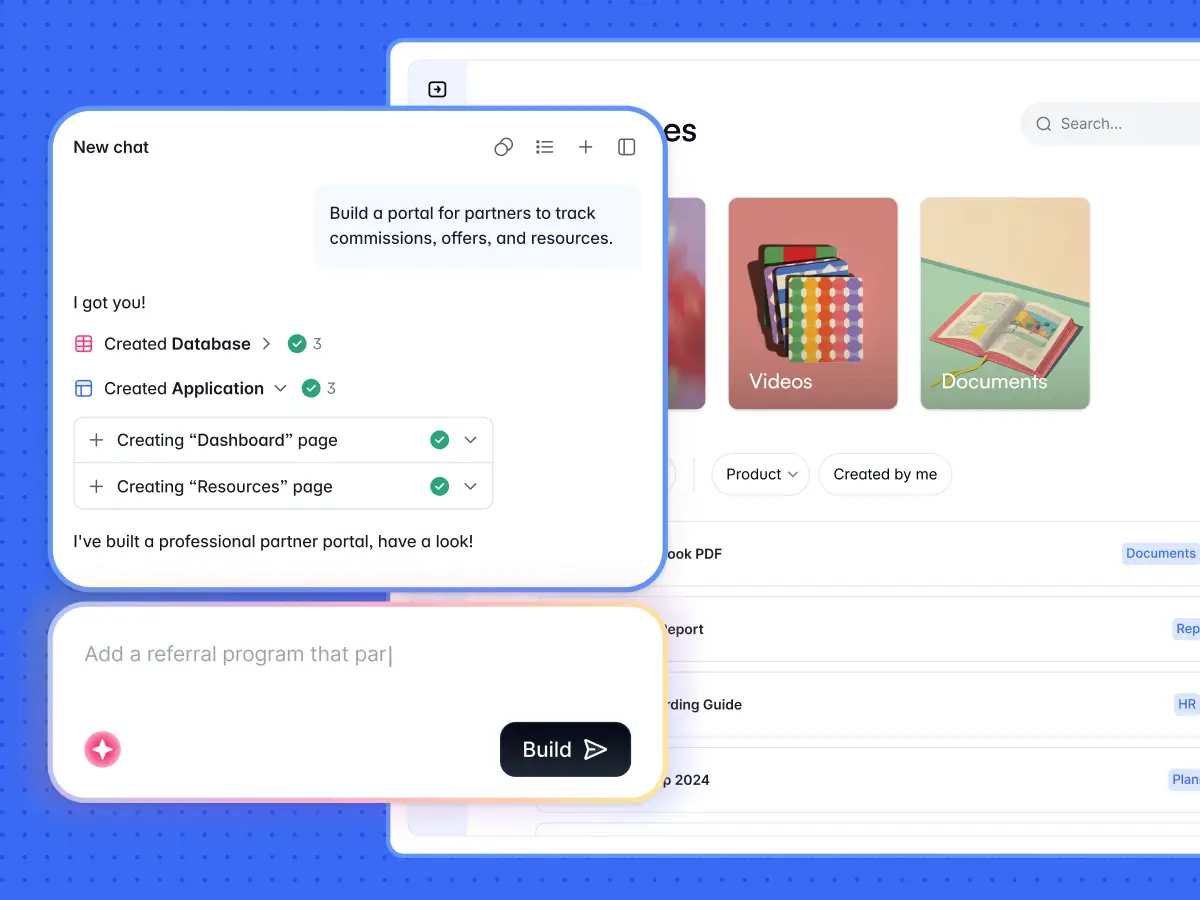
The 6-step checklist to build an intranet with Softr
- Structure your data. Map out the core tables (employees, announcements, documents, departments, projects). Keep all users in a single table with a Role field so permissions stay simple.
- Generate with the AI Co-Builder (or a template). Describe your intranet and let Softr scaffold the database, pages, and user groups. Or start from an intranet template. The Database AI Co-Builder can also add tables and fields from a plain-language description.
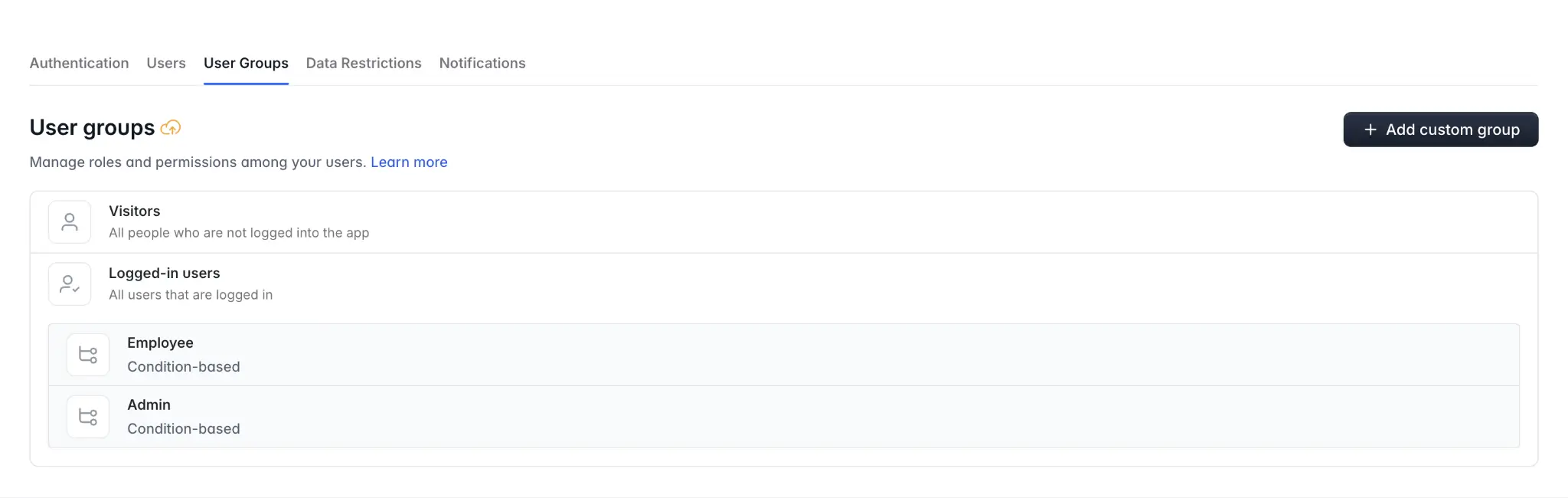
- Set up user groups and data restrictions. Define dynamic user groups (for example,
Role is AdminorRole is Employee) and enforce global Data Restrictions so each person only sees what they should, even if a block filter is ever forgotten. - Build your pages. Create the hub homepage, an employee directory, and a knowledge base. The AI Co-Builder can add and configure these blocks from a prompt, or you can drag and drop them yourself.
- Automate with Softr Workflows. Trigger onboarding emails, announcement notifications, or approval flows directly from UI actions. Describe the automation to the Workflow AI Co-Builder and it builds the logic for you.
- Publish and invite. Test with user impersonation in Preview mode, then publish in one click and invite your team.
The rest of this section walks through these steps in more detail.
Step 1: Define your objectives
First, let’s nail down what you want your intranet to achieve. Are you aiming for better communication? Maybe streamlined document management or boosted employee engagement?
Clearly defining your goals will shape the design and functionality of your intranet. You can also get input from various departments to understand their specific needs, ensuring your intranet is practical and user-focused.
Step 2: Plan your intranet structure
Next, plan how your intranet will be organized to meet your organization’s needs. Think about the sections and features required:
- Homepage: A central hub for company news, key announcements, and quick access to essential resources.
- Departmental pages: Dedicated sections for each department with specific resources, updates, and tools.
- Document management: A robust system for storing, categorizing, and retrieving documents with version control and access permissions.
- Collaboration spaces: Areas for project management, team discussions, and collaborative workspaces.
- Employee directory: A searchable directory with profiles including contact information, roles, and other details.
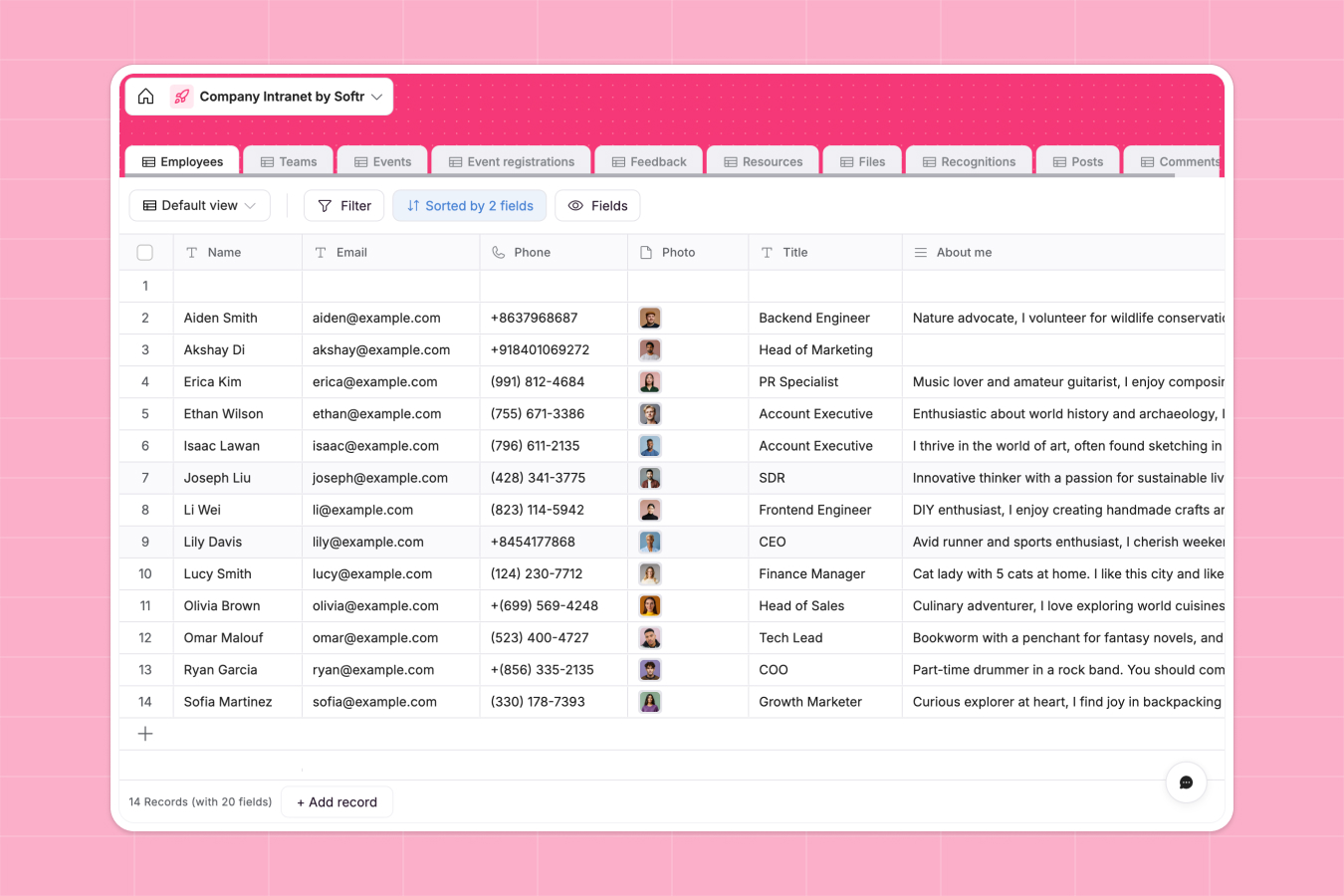
Step 3: Set up your data structure
A successful intranet is mostly about good data structure. You can use Softr Databases, the native database, or connect to Airtable, Google Sheets, HubSpot, or other data sources if your data already lives there. Start by organizing your base with tables for different types of data, avoiding an overload of text. The Database AI Co-Builder can generate these tables and fields for you from a plain-language description, or you can add them manually.
Include tables for:
- News and Announcements: Manage company news with fields for titles, dates, content, and categories.
- Documents: Store documents by department or project with fields for titles, upload links, descriptions, and permissions.
- Employees: Maintain an employee directory with fields for names, roles, departments, contact info, and profile pictures. Keep all users in this single table with a Role field so permissions stay simple.
- Projects: Track projects with fields for names, descriptions, team members, tasks, deadlines, and status updates.
Step 4: Set user groups and data restrictions
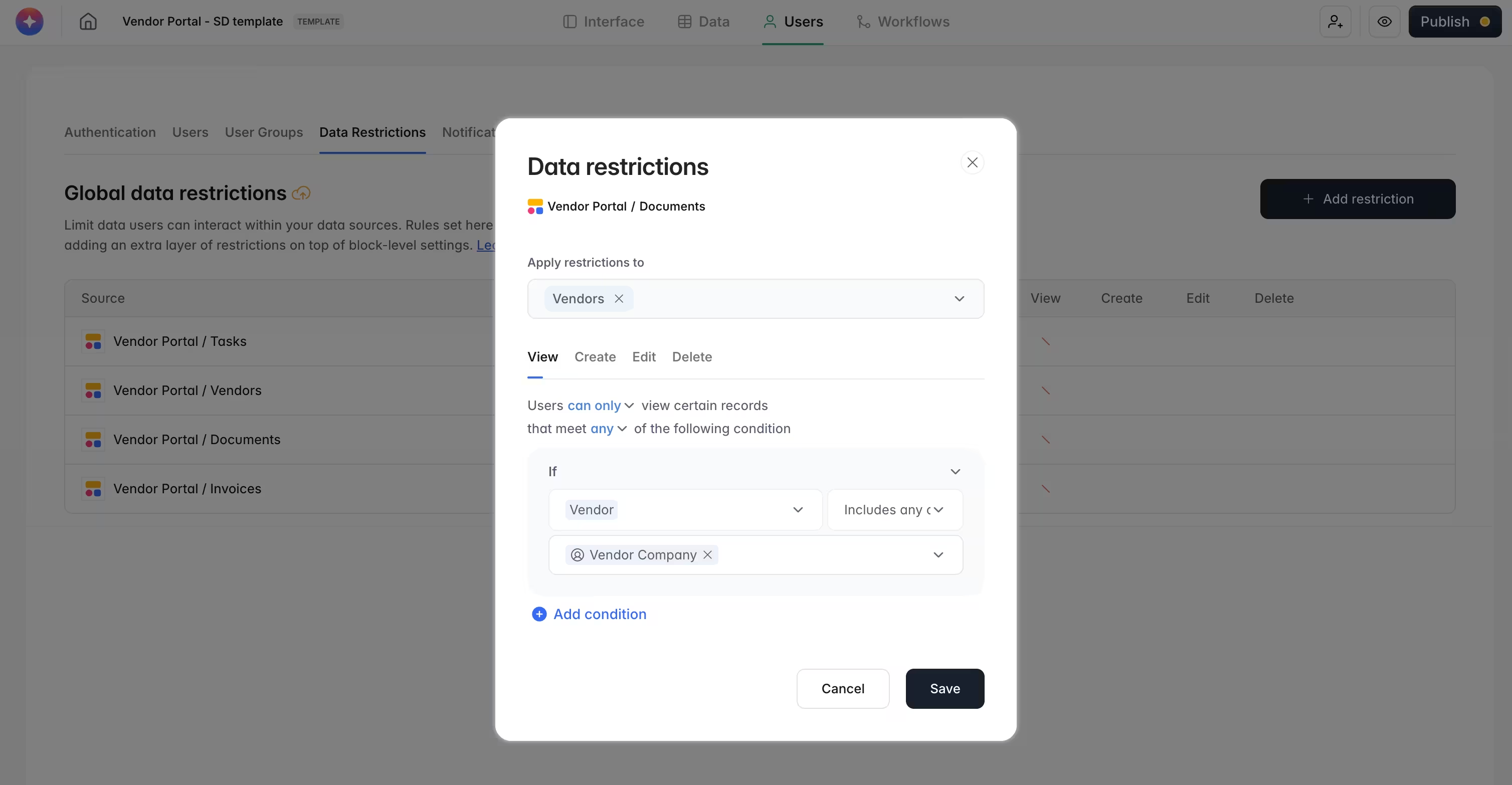
Before you design a single page, secure your data. Define dynamic user groups using conditions (for example, Role is Admin or Role is Employee) so membership updates automatically from your database. Then enforce global Data Restrictions so each person only sees the records they should, even if a block filter is ever forgotten. This is your security firewall, and it protects sensitive HR or finance information by default.
Step 5: Build your pages
With Softr, you build your intranet pages by connecting blocks to your database. You can drag and drop blocks yourself, or ask the AI Co-Builder to add and configure them by describing what you need. Here's how to create the key sections:
- Home page: Embed a dynamic list linked to the News and Announcements table. Add buttons or links to HR portals, IT support, and company policies. A personalized welcome message or video from the CEO can also foster a sense of connection and engagement.
Top tip: Add a high-quality hero image to grab employee attention. It'll also make your intranet look more appealing.
- Department pages: Design department-specific pages that reflect each team's needs and workflows. Add widgets for recent updates, key documents, and departmental news, and integrate a shared calendar from your database or Google Calendar to manage events, meetings, and deadlines.
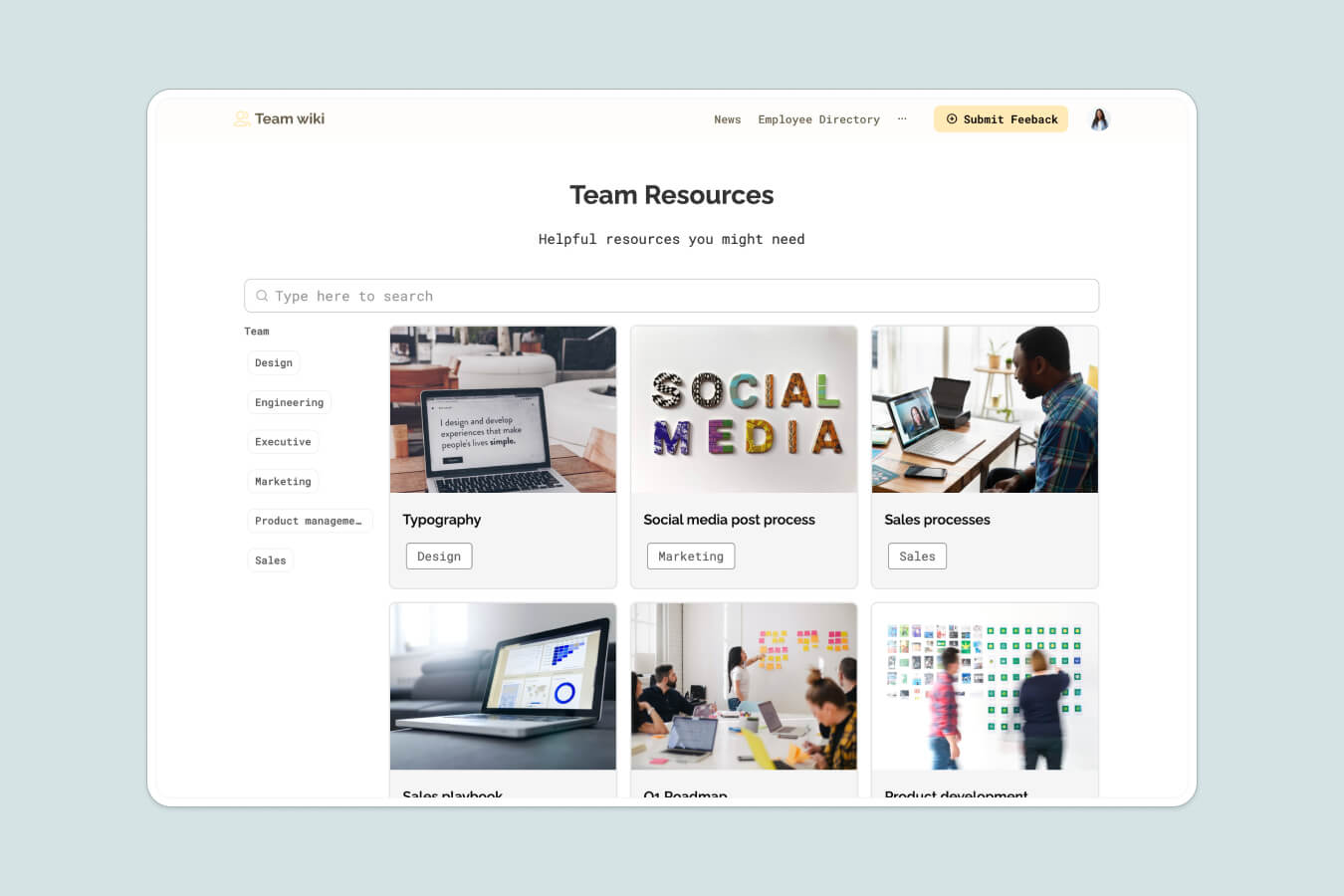
- Document management: Display categorized document lists with filters and sorting options. Be sure to implement a robust search feature so users can quickly find documents by title, category, or keywords.
- Collaboration spaces: Create dedicated project pages with sections for tasks, updates, and team collaboration, and use linked records to track task dependencies and milestones. Next, embed forums or integrate third-party chat tools like Slack or Microsoft Teams for real-time discussions and idea sharing.
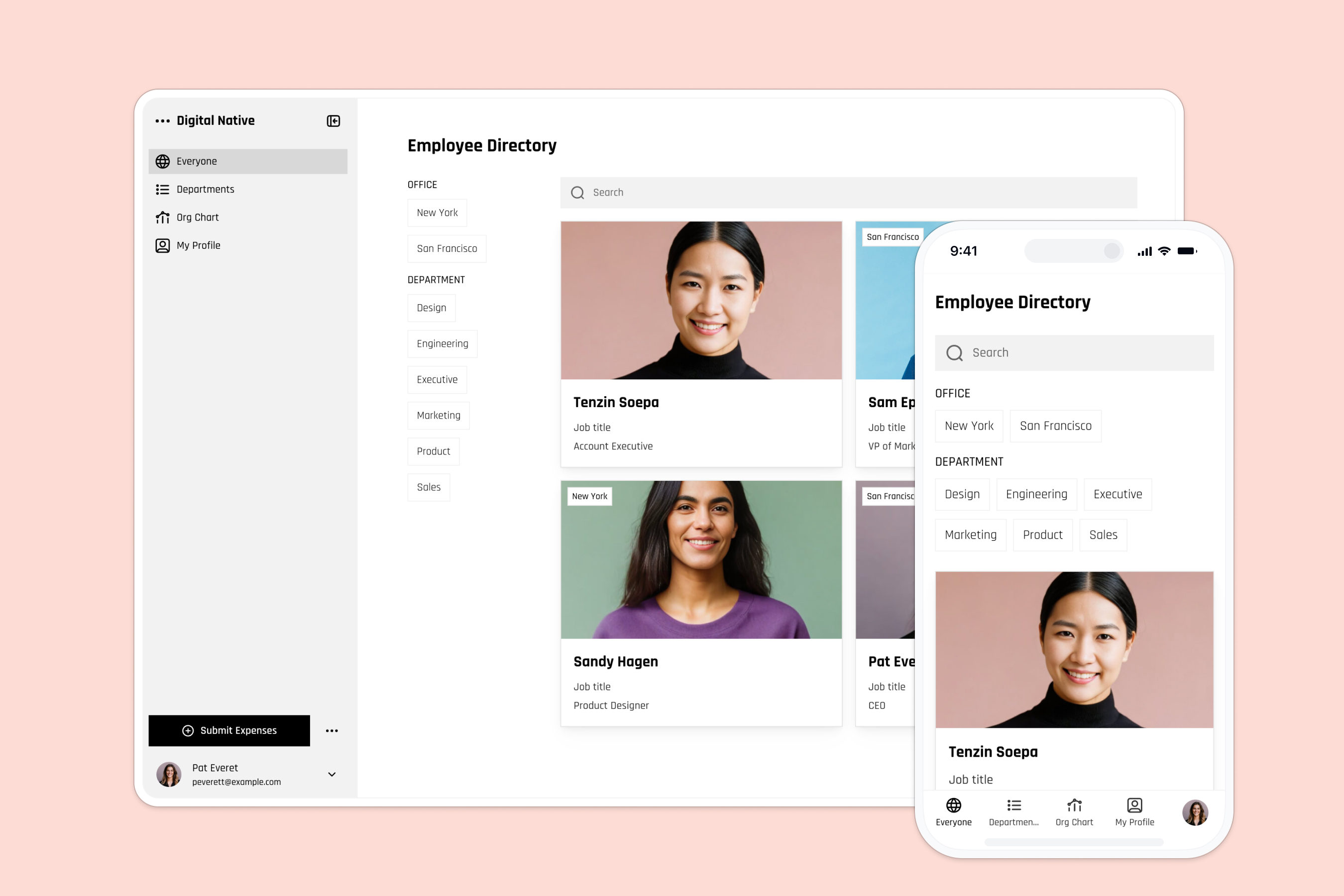
- Employee directory: Design visually appealing profile cards for each employee, linked to detailed profiles with contact information, roles, and personal bios. Enable search and filter options to help users look up colleagues by department, role, or name.
Step 6: Customize and enhance
Customization is key, even for company intranets.
Softr lets you adjust colors, fonts, and layouts to align with your company’s branding. Beyond aesthetics, you can automate the busywork with Softr Workflows, triggered directly from buttons and forms inside your app, so an announcement automatically notifies the right team or a new hire receives an onboarding email. Describe the automation to the Workflow AI Co-Builder and it builds the logic for you. You can also integrate third-party tools to boost functionality:
- Google Workspace: Embed Google Docs, Sheets, and Slides for real-time collaboration.
- Slack/Microsoft Teams: Integrate chat platforms to streamline communication.
- Calendly: Embed scheduling tools for meeting bookings.
Step 7: Test and launch
Before you launch, test your intranet thoroughly to ensure all features work smoothly.
In Preview mode, use Softr's user impersonation to view your intranet exactly as an Admin or an Employee would, verifying that your permissions and Data Restrictions work before anyone logs in. Form a small focus group from different departments to gather feedback on usability and functionality. Use their input to fix any issues. Then, prepare a launch plan that includes training sessions and user guides to help employees navigate and use the new company intranet effectively. Consider using mentoring software to provide personalized support and guidance to employees and address any questions they may have about the intranet. When you are ready, publish in one click and invite your team.
Step 8: Maintain and update
Keep your intranet fresh and useful with regular maintenance. Update content, add new features, and incorporate user feedback. Additionally, monitor how employees use the intranet (think: usage patterns and analytics) to identify areas for improvement.
Top tip: Check out our How to Build a Team Intranet with Softr YouTube video for a practical demonstration:
5 intranet design best practices (with examples)
1. Design from your employees' perspective
A successful intranet design aligns with your organizational structure and meets your team’s specific needs. While design options are vast, the most effective intranets adhere to these simple yet powerful principles:
- Maintain consistent layout and style: Use clear, intuitive design guidelines for consistency when adding new information.
- Use descriptive labels: Choose familiar terms like "Help Desk" instead of "I.T." to make navigation simpler.
- Incorporate plenty of white space: Avoid cluttering the intranet with excessive widgets and content. Use ample white space to create a clean, user-friendly interface.
- Ensure strong company branding: Select two complementary colors that reflect your organization’s identity for easy recognition. Add a neutral accent color, avoiding neon tones for a timeless look.
- Use readable fonts: Apply consistent typography, alignment, and spacing. Opt for sans-serif fonts for screens and serif fonts for long text passages.
- Provide clear CTAs: Use straightforward CTAs to guide employees on what to do next.
Microsoft sets a great example with its UX-focused intranet portal. It features well-organized sections with descriptive labels, strong company branding, and a visually appealing design.

2. Create and test site structure to simplify intranet navigation
A well-organized intranet structure is essential for smooth navigation. When users can easily find what they need, they’re more likely to engage and use the intranet effectively.
Here’s how to achieve a streamlined intranet structure:
- Define purpose and goals: Clarify what you want your intranet to achieve. Is it for communication, resource sharing, or project management?
- Identify audience needs: Understand who will use the intranet and what they require from it.
- Gather and organize content: Collect necessary information and categorize it logically.
- Create a visual site map: Develop a blueprint showing how all the pages and sections connect.
- Test and refine: Use feedback from test users to improve the layout and navigation.
When it comes to intranet navigation, less is more. Avoid overwhelming users with too many options. Keep top menus concise and use sub-menus effectively to avoid clutter.
For instance, if the top menu has main options like Home, Projects, HR, IT Support, News, and Events, then under HR the sub-menus could include Policies, Benefits, Training, and Forms.
Example of an easily navigable intranet:

This intranet makes navigation easy with a few key features:
- Clear sidebar: The sidebar has main sections like Home, Activity Stream, Info, and People. This helps users quickly find important areas.
- Top menu: Options like Browse, Create, and Spaces are available in the top menu, making it easy to access various functions without hunting through the site.
- Quick navigation buttons: Buttons for Discussions and Training Videos are right on the main page, providing fast access to frequently used resources.
3. Don't forget mobile accessibility
With remote work becoming more common, making sure your intranet is mobile-friendly is essential. Design a responsive intranet that works seamlessly on all devices to keep everyone engaged and productive.
For example, check out this mobile app intranet:

Best practices include:
- Bite-sized content: Break up your content into small paragraphs, use headings, bullet points, and images to make it easy to read on small screens.
- Simple menus: Keep menus short to save space and highlight important content.
- Essential page elements: Include only the most valuable elements like the home icon, notifications, and main menu.
- Use filters: Reduce scrolling by allowing users to filter content and quickly find what they need.
4. Personalize and customize
Personalization makes your intranet more user-centric, engaging, and productive. Allow employees to personalize their dashboards, displaying relevant widgets and content.
Here’s how to do it right:
- Favorites section: Let users save and organize frequently accessed links and resources.
- Role-based content: Deliver content based on job functions to keep it relevant.
- User feedback: Regularly ask for feedback and make iterative improvements.
- AI-powered recommendations: Use AI to suggest relevant content, enhancing productivity and engagement.
- User-friendly customization: Ensure all features are easy to use, with clear instructions and support.
Top tip: Softr’s user permissions and membership options let you customize your company intranet for every team member. Use our easy templates to create intuitive portals that give employees exactly what they need.
"I created a centralized hub that links all of our data together, so nothing is separate unless it truly needs to be. Softr gave me great options to integrate my database with an external interface for non-technical staff at an extremely reasonable cost."
Verified User, Professional Training & Coaching, G2 review
5. Allow integrations with third-party tools
A great intranet isn't just pretty. It needs to be functional too, providing employees with the tools they need the most.
Integrate essential tools like MS Office, Google Drive, and Slack to make the platform easy to use and efficient. These integrations help save time by allowing employees to access everything they need from one place, streamlining workflows, and reducing the hassle of switching between different applications.
Take this company intranet, for instance:

It integrates with Dropbox, Zoom, and Office 365, centralizing access. Employees can complete tasks more efficiently without constantly switching between apps, boosting productivity through simplified workflows and better collaboration.
Drive intranet success through employee feedback
Creating an intranet is just the beginning. The next step is maintenance, and that means listening to your team.
Gathering and using employee feedback ensures your intranet stays relevant and useful. This way, it grows with your team's needs, supporting their daily tasks and collaboration. A constantly improving intranet aligns perfectly with your organization's goals.
With Softr, managing your intranet is a breeze. In minutes, you can tweak sections using our no-code, drag-and-drop interface. Need more help? Our 24/7 customer support is always here for customization and app connections.
Switch to no-code with Softr and leave outdated systems behind. Sign up for free today!