
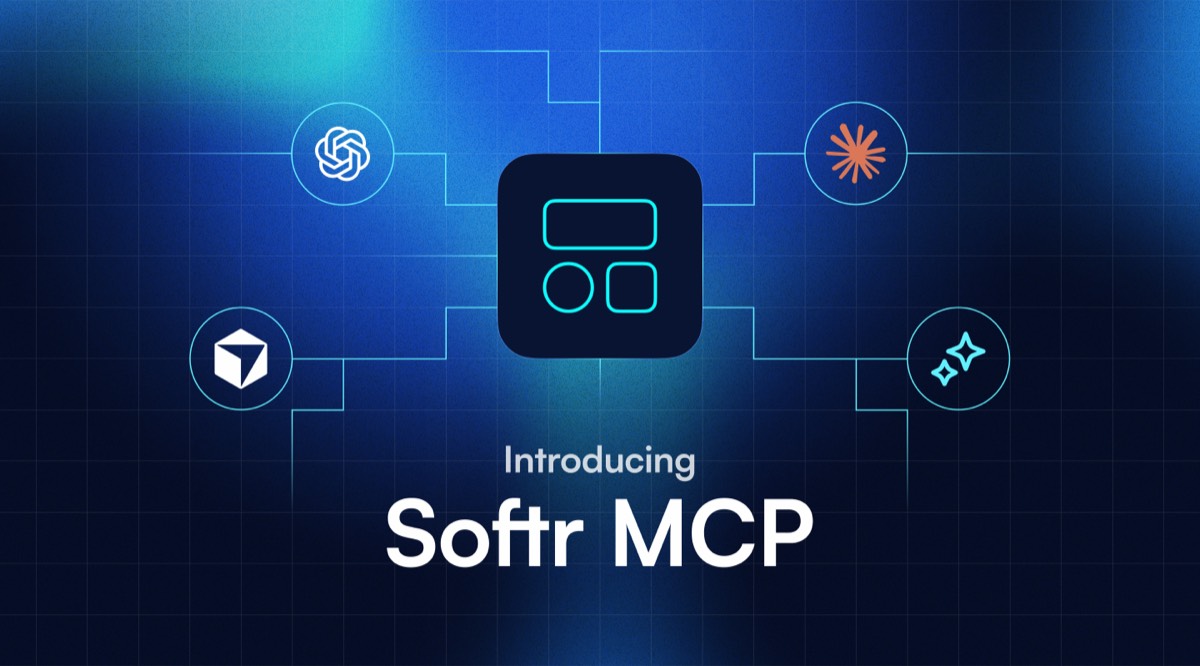
Starting today, you can build in Softr from Claude, ChatGPT, Codex, or Cursor. Connect the Softr MCP server to your AI tool and prompt it to create databases, apps, Vibe Coding blocks, and workflows, all housed and secured by Softr.
What is the Softr MCP server?
The Softr MCP server gives your AI assistant direct access to your Softr workspace. Everything the AI does follows the permissions you've granted it, and lands in the builder for you to edit as needed. There's no separate AI layer holding a copy of your work, and you aren't locked to a chat window.
A single connection covers four areas of the workspace:
- Databases MCP: Create Softr Databases, then add, update, read, and analyze the data inside them.
- App-building MCP: Create an app, add pages and user groups, manage the people who log in, then preview and publish.
- Vibe code block MCP: Generate custom UI blocks inside Softr apps and manage their settings, visibility, and version history.
- Workflows MCP: Build and test end-to-end workflows, then turn them on.
There's also the App MCP Server, which lets your users work with a Softr app through their own AI assistant. They can see outstanding tasks, update a status, or add a record without ever opening the app. Each request runs as that person, so they see and change only what their permissions allow.
The Softr MCP server is for you as a builder. The App MCP Server is for your users. Both are free to use on any plan, and they don't consume Softr AI credits (so no double-token costs).
Softr also works the other way around. A Softr Agent can connect to an external MCP server, either one of Softr's ready-made connections (such as Airtable, Notion, monday.com, Linear, or Supabase) or a custom server by URL. You choose Allow, Ask, or Deny for each tool. Learn more in our guide to Softr Agents.
Databases MCP
You can't have a good app without good data, so most builds will start here. Databases MCP works on Softr Databases, from the overall structure down to the records inside it.
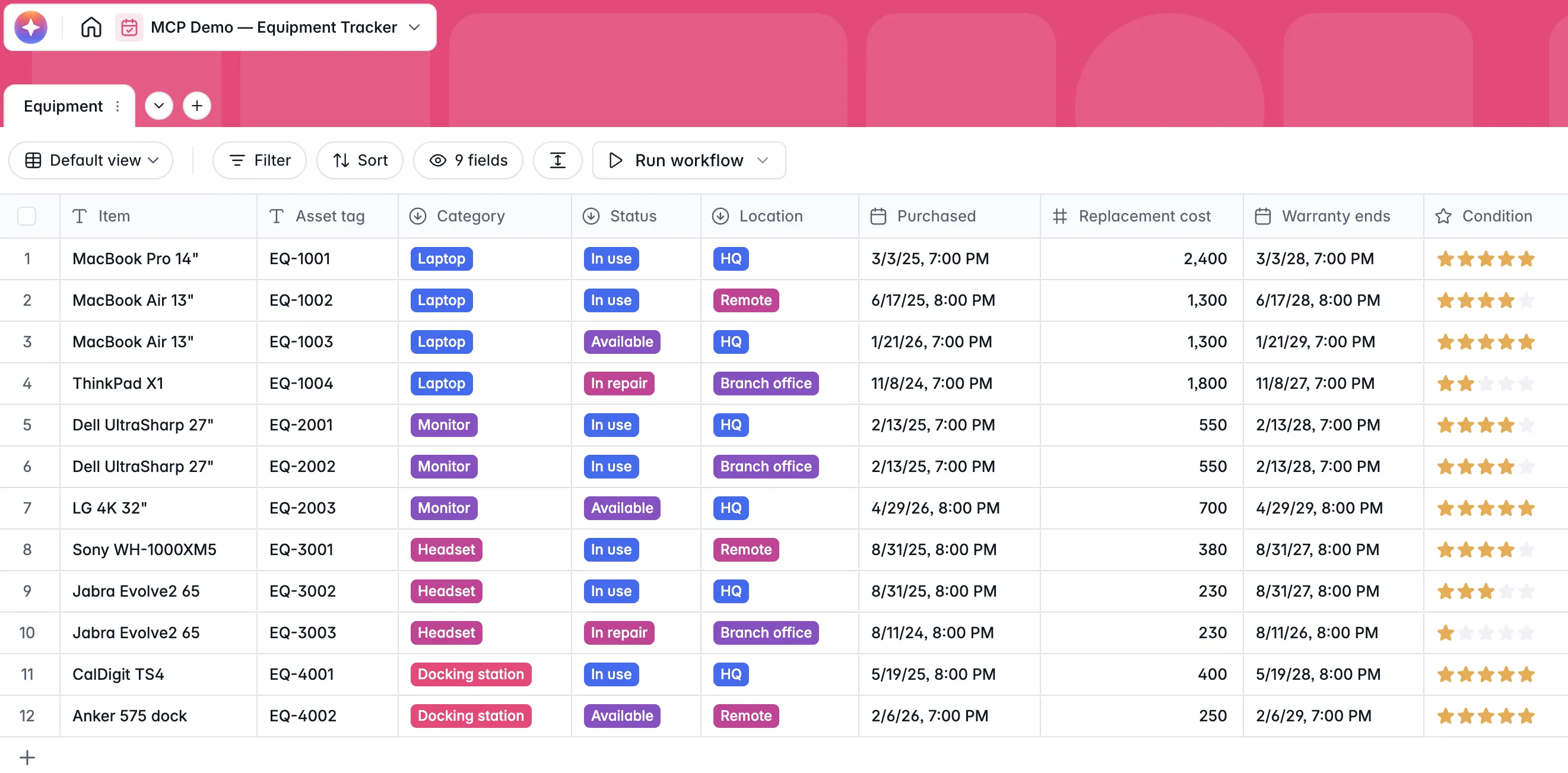
Describe what you want and your AI assistant creates the databases and tables for you. It handles the full range of field types, from text and dates to attachments, linked records, formulas, and rollups.
When you're ready to bring in real data, give Claude or Codex a CSV and it can add every record for you. Ask a question in plain language and the assistant filters, sorts, and summarizes to answer it. This makes data analysis possible without even opening your database.
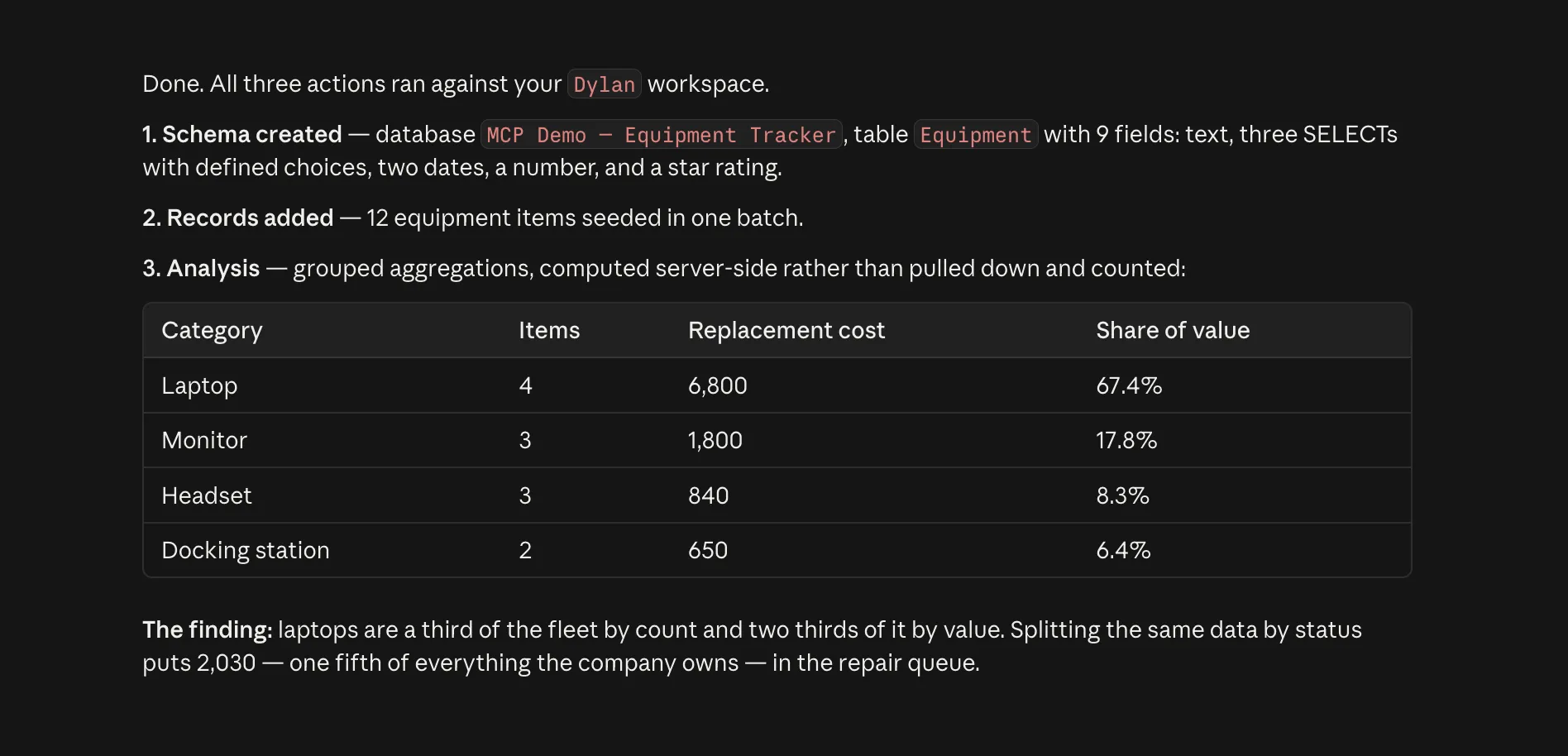
And if you're worried about accidentally erasing records, Softr MCP rejects the first attempt to delete a database or table that still holds data. Also, a connection set to View only can't delete at all.
App-building MCP
Once your data's in place, it's time to generate the app on top of it. Softr's app-building MCP creates the app, adds pages, and manages who can access it.
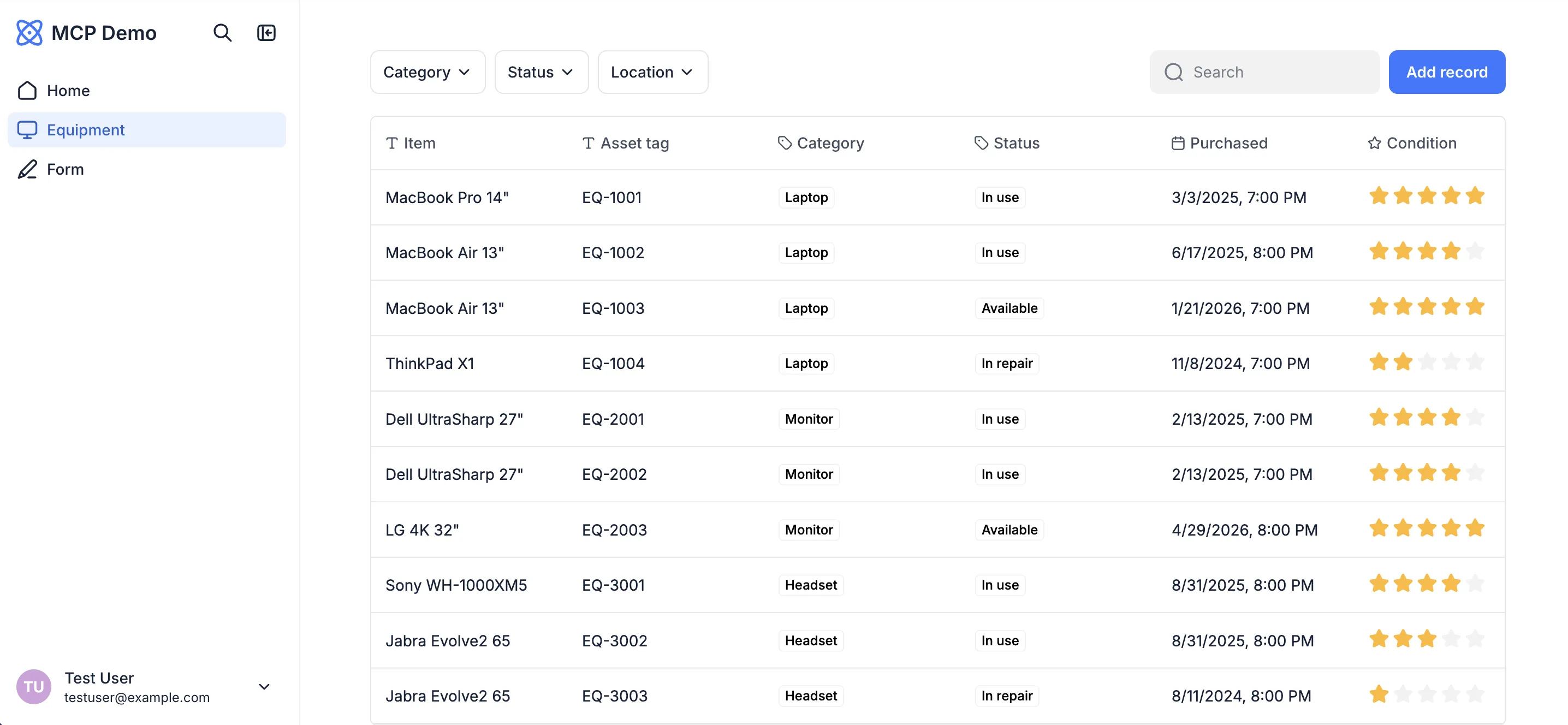
For this example, I asked Claude (connected to Softr MCP) to spin up an asset management portal. Claude built it right inside my Softr workspace, complete with core pages, login flows, and test users.
The MCP also lets you manage who logs in to your app. It can create user groups, then add people by name and email, remove them, or deactivate them, which blocks sign-in while keeping the account and its data intact.
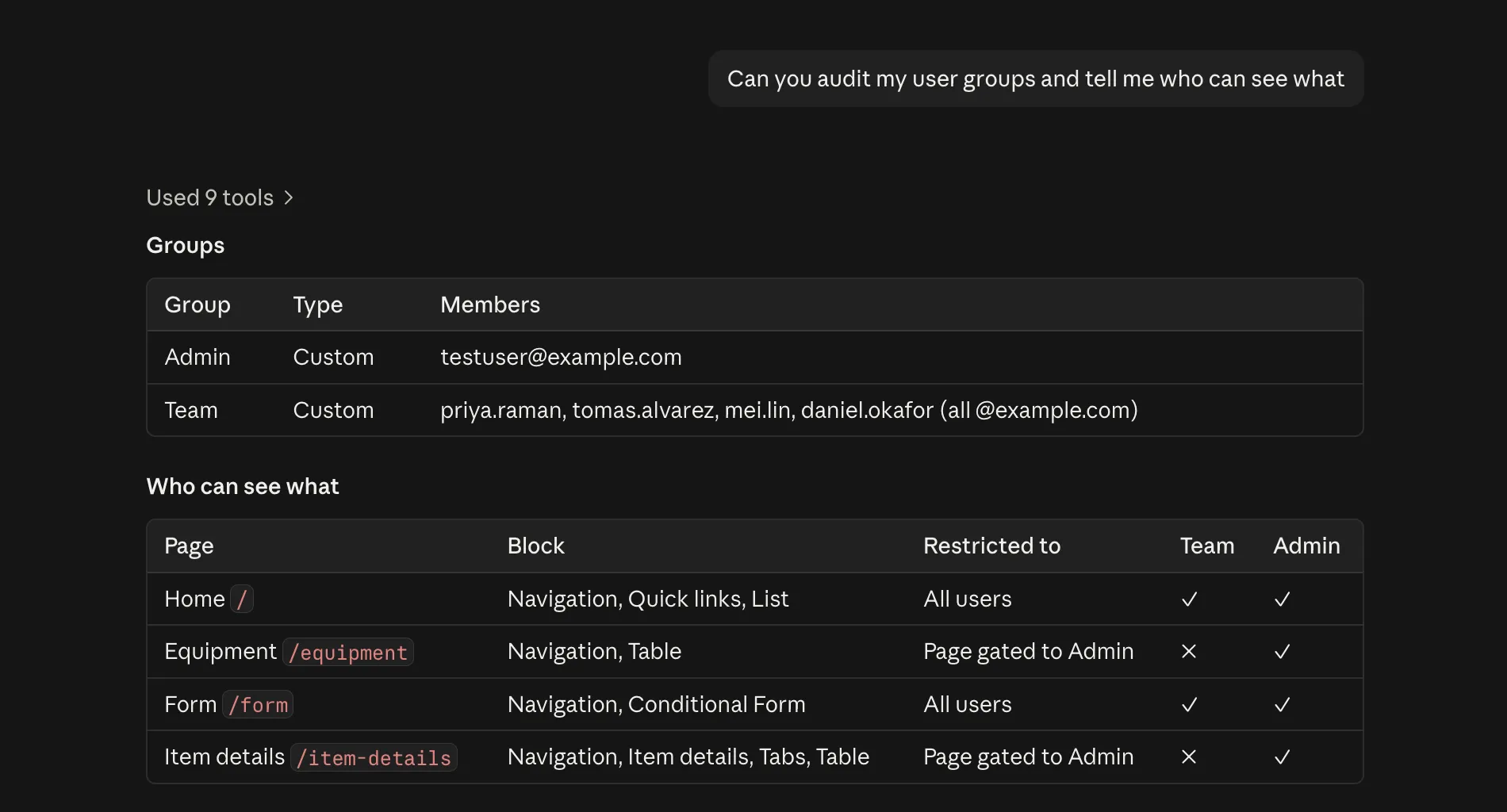
If you want to quickly audit your app's access control, an AI assistant can view your pages, blocks, user groups, and page permissions and tell you which groups can do what, directly inside your chat.
Vibe code block MCP
If you need a custom UI component, just ask Claude or ChatGPT for a Vibe Coding block. Your assistant writes the component, wires it to a data source, and adds it to the page you name.
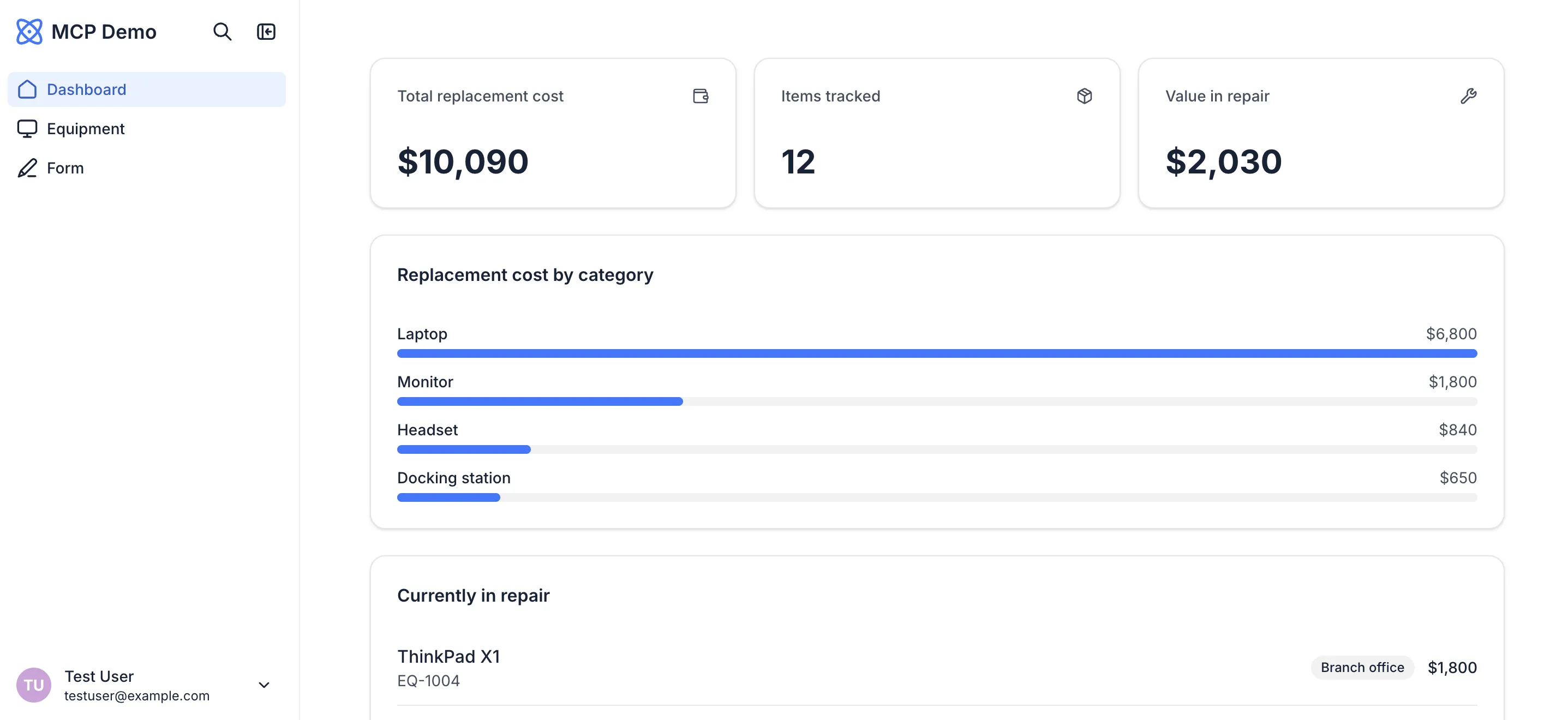
Vibe Coding blocks cover everything from dashboards and calculators to custom forms and workflow screens. If you need to iterate, every code change saves a version capturing the whole block (settings, visibility, and data connections included). You can roll back to any earlier point, or make a copy and keep the original running.
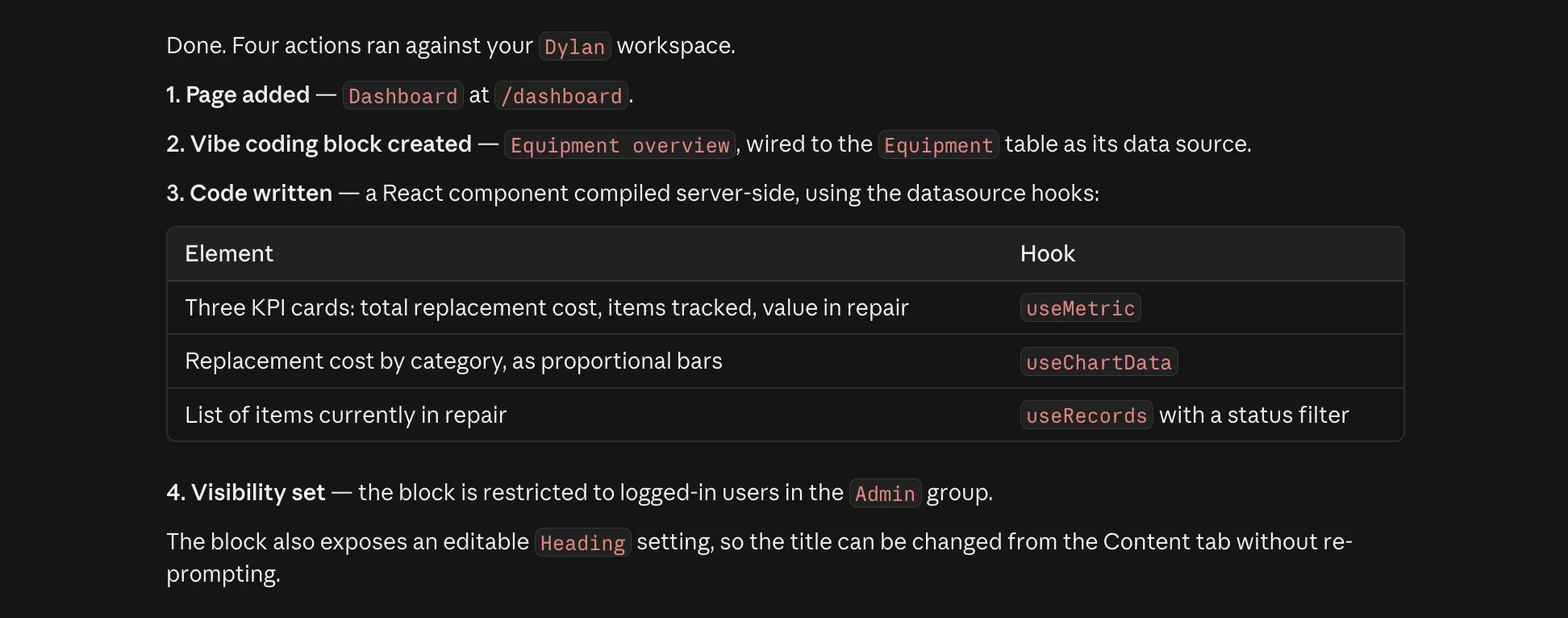
The MCP handles visibility, too. Ask for a Vibe Coding block only admins can see, or an action only one user group can perform, and the assistant sets those permissions.
Workflows MCP
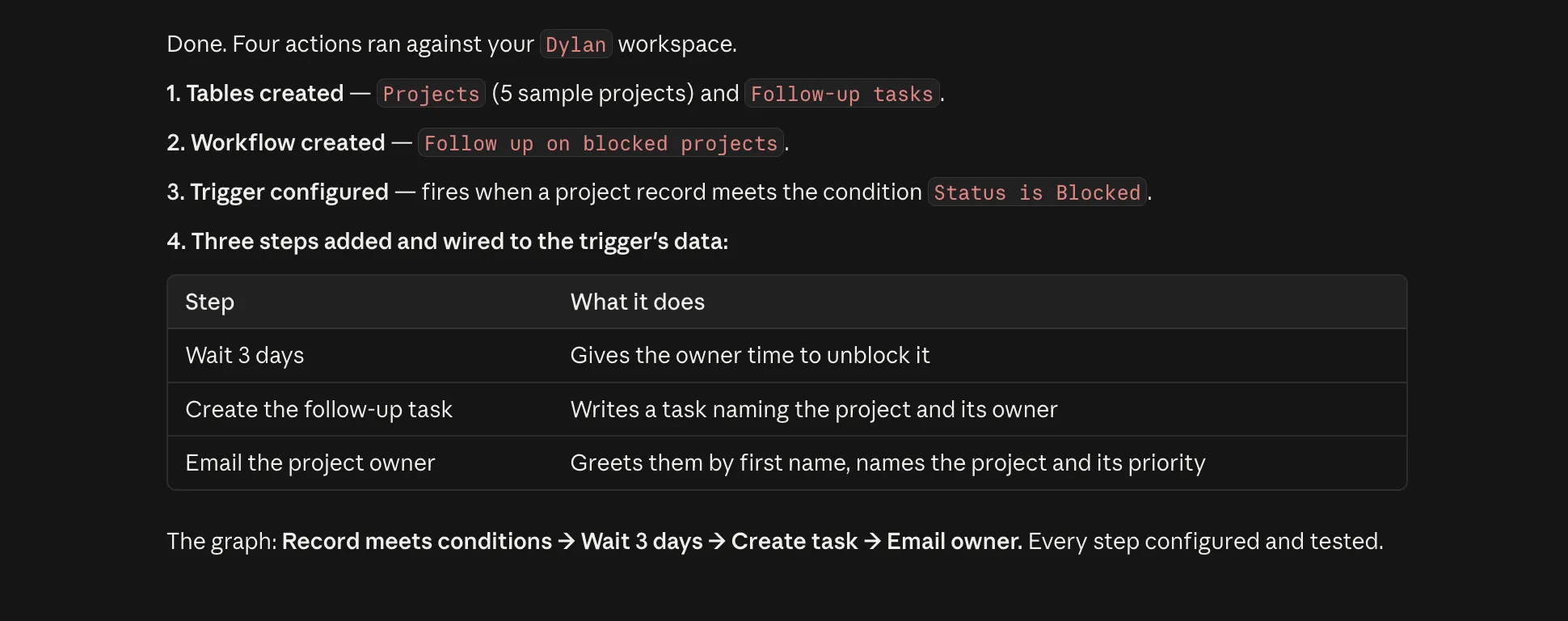
Rather than build workflows one step at a time, describe the whole flow in one prompt and let your AI assemble it. Say what should happen and the assistant picks a trigger, adds the steps, and wires each one to the output of the step before it.
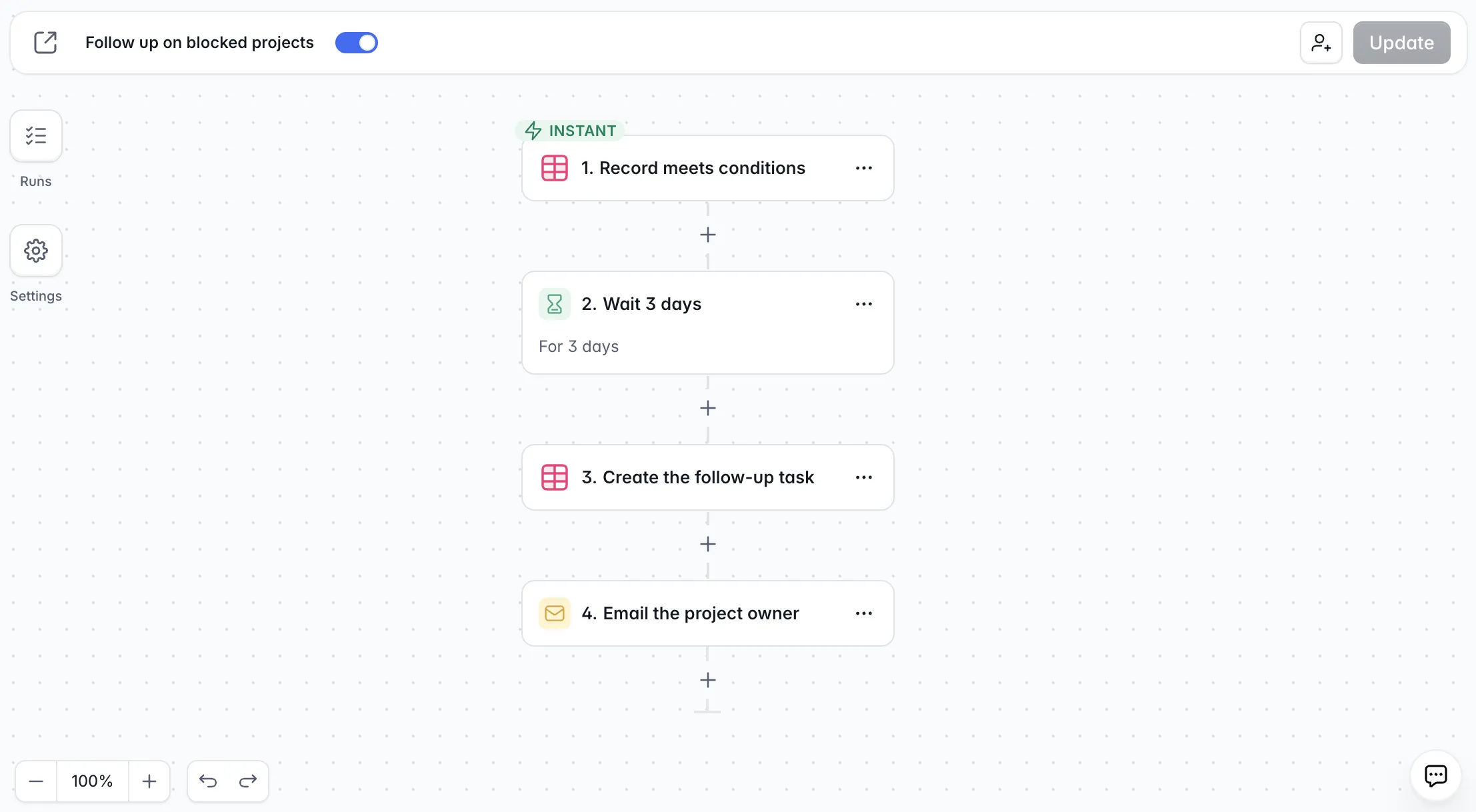
For this example, I gave Claude a simple prompt: "Whenever a project becomes blocked, message the owner and create a follow-up task three days later." Softr supports hundreds of trigger and action types, and Claude searches them and reads what each one needs instead of guessing.
It also tests as it builds, so you'll be flagged if something goes awry. If everything functions as intended, your assistant can then switch the workflow on.
Editing a workflow works the same way as building one. Add a note like "only do this for high-priority projects" and watch your AI edit the steps in place. You can see the result in the Softr Workflows interface, laid out as if you'd built it by hand.
App MCP Server
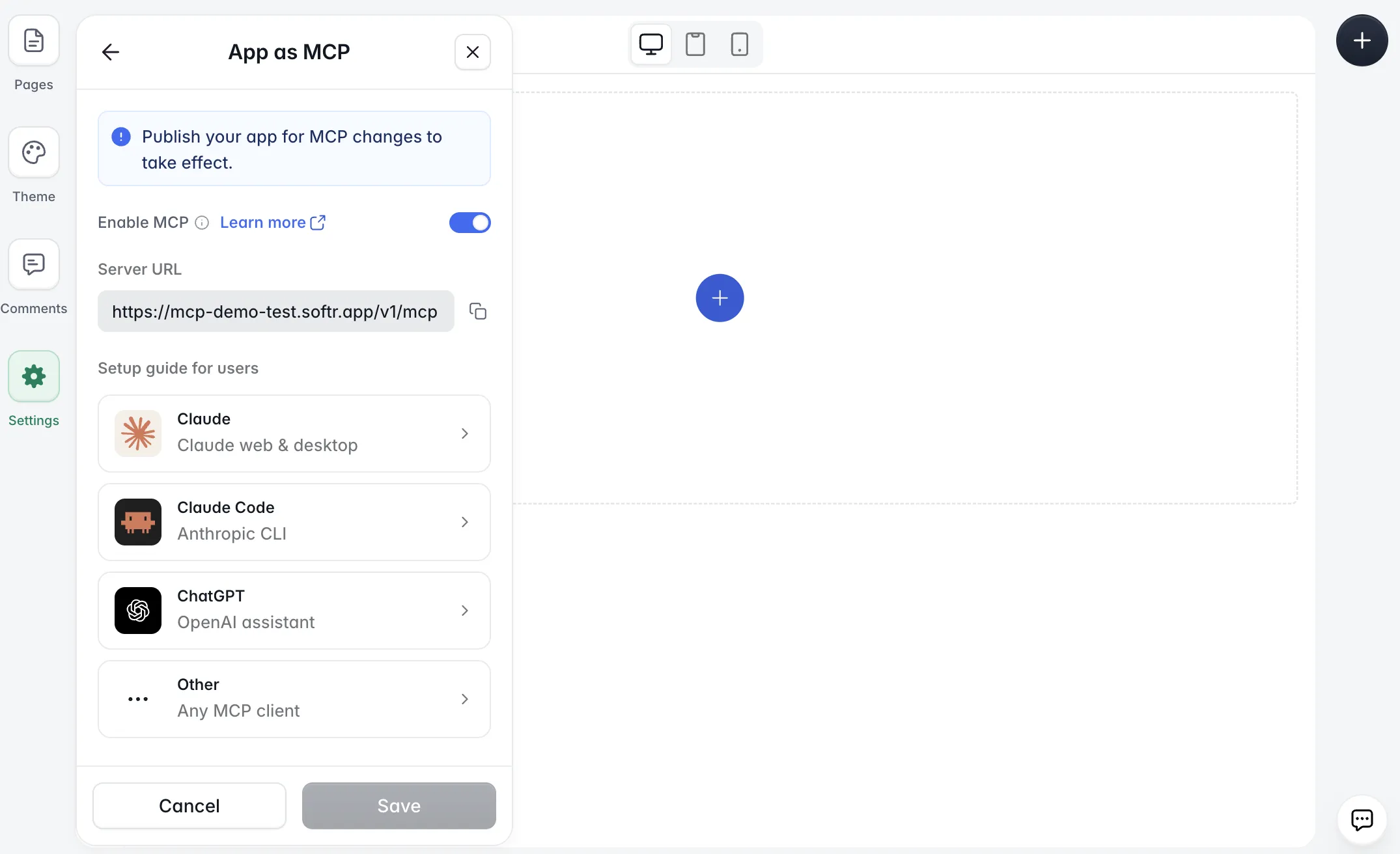
While the four surfaces above are for building, the App MCP Server is for the people who use what you built. Turn it on under Settings > App as MCP, and your app gets its own server at its domain. When you share that URL with your users, their AI tool opens the app's sign-in screen, and logging in as usual authorizes the connection.
Anything a user could do by clicking through the app, they can now ask for in plain language.
The App MCP Server is secure, too, since every request runs as a specific user. Their user group, page visibility, and data restrictions apply exactly as they do in the app interface.
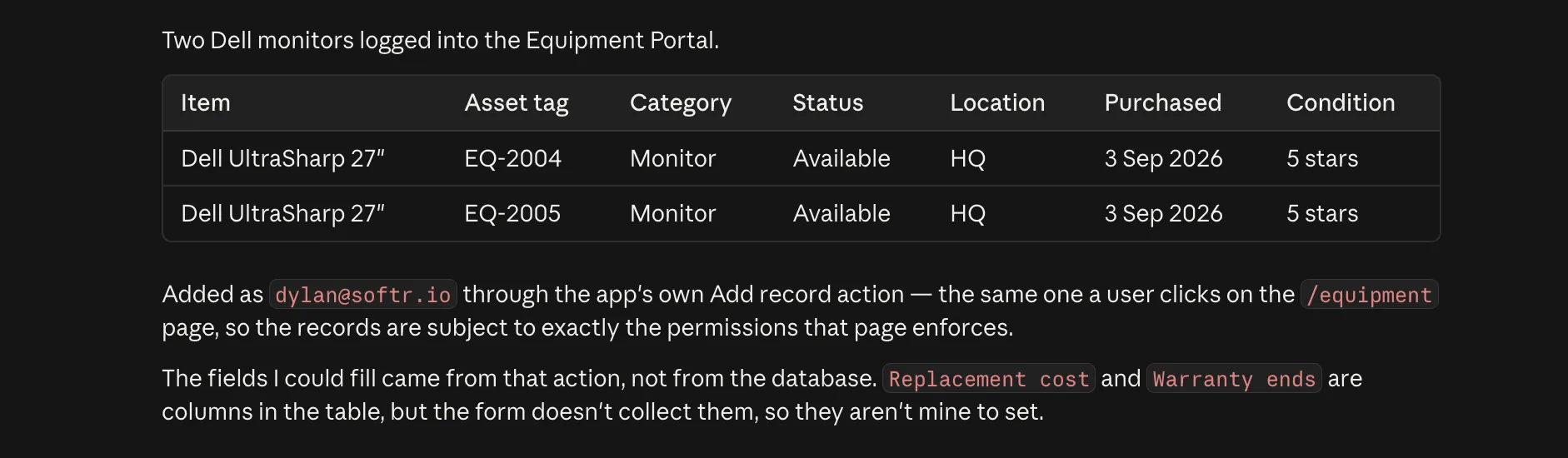
The blocks in your app determine what actions an AI can take:
- A list, grid, or table block lets the assistant read records.
- A form or sign-up block lets it create them using the fields the form shows.
- A profile block or inline editing lets it update records.
- A delete action lets it delete them.
If no block in the app points at a table, the assistant can't reach that table, even when the data source holds it. To widen or narrow what your users can do through MCP, simply change what the app shows.
[.blog-callout]
💡 For the full reference on every tool and permission, see the Softr MCP documentation.
[.blog-callout]
How to connect to Softr MCP
Connecting to the Softr MCP server takes just a couple of minutes. In your AI tool, open its connector or MCP settings and add a server at https://mcp.softr.io/mcp. A browser window will open so you can sign in to Softr and authorize the connection.
In Claude and ChatGPT, you can skip the URL and add Softr from the Claude connector directory or the ChatGPT plugin directory.
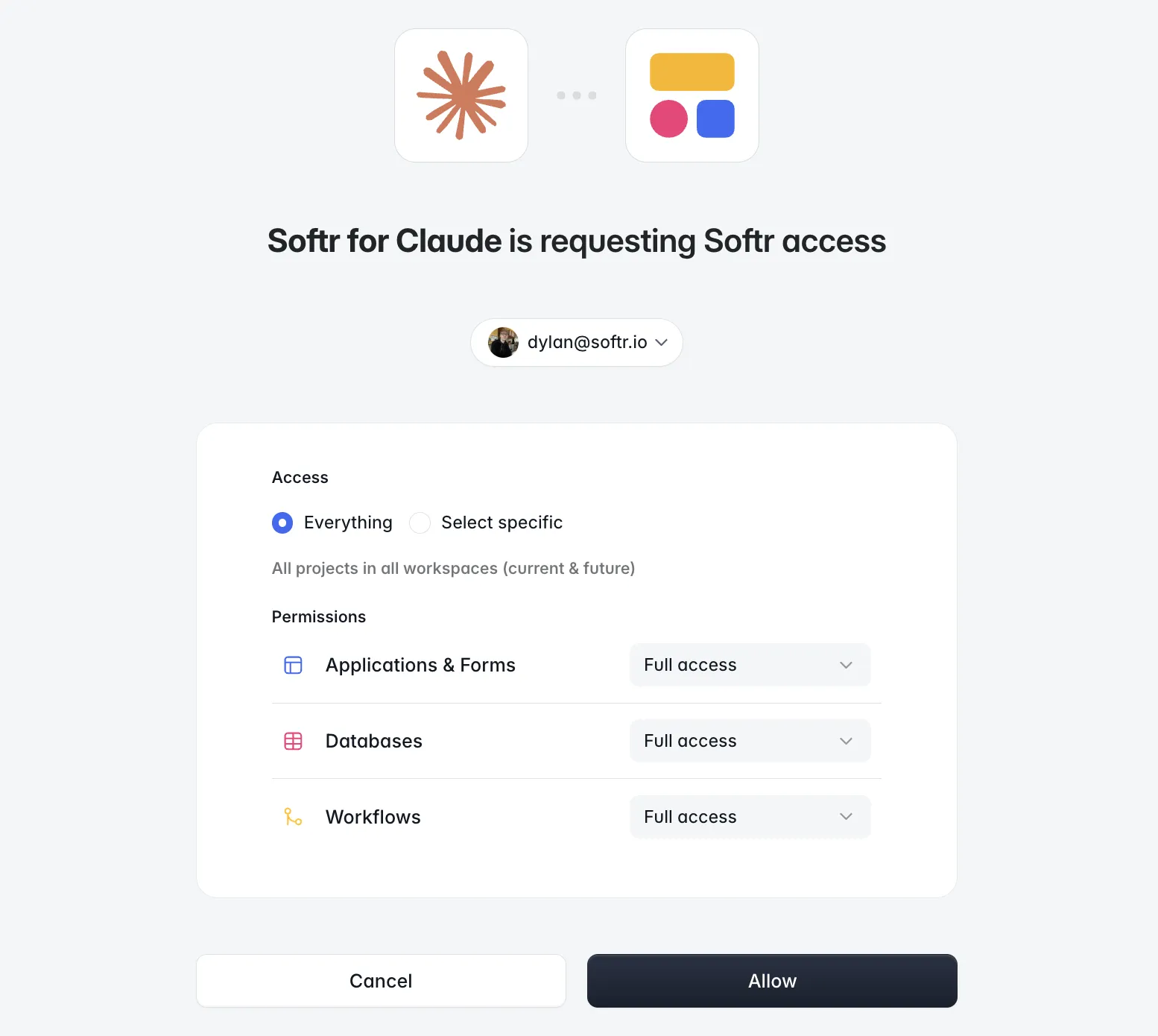
Softr's authorization screen is where you set the connection's scope. Select which workspaces the AI can reach, then set access levels for each area: Applications and Forms, Databases, and Workflows. Permissions range from no access to full edit access, with view-only options in between.
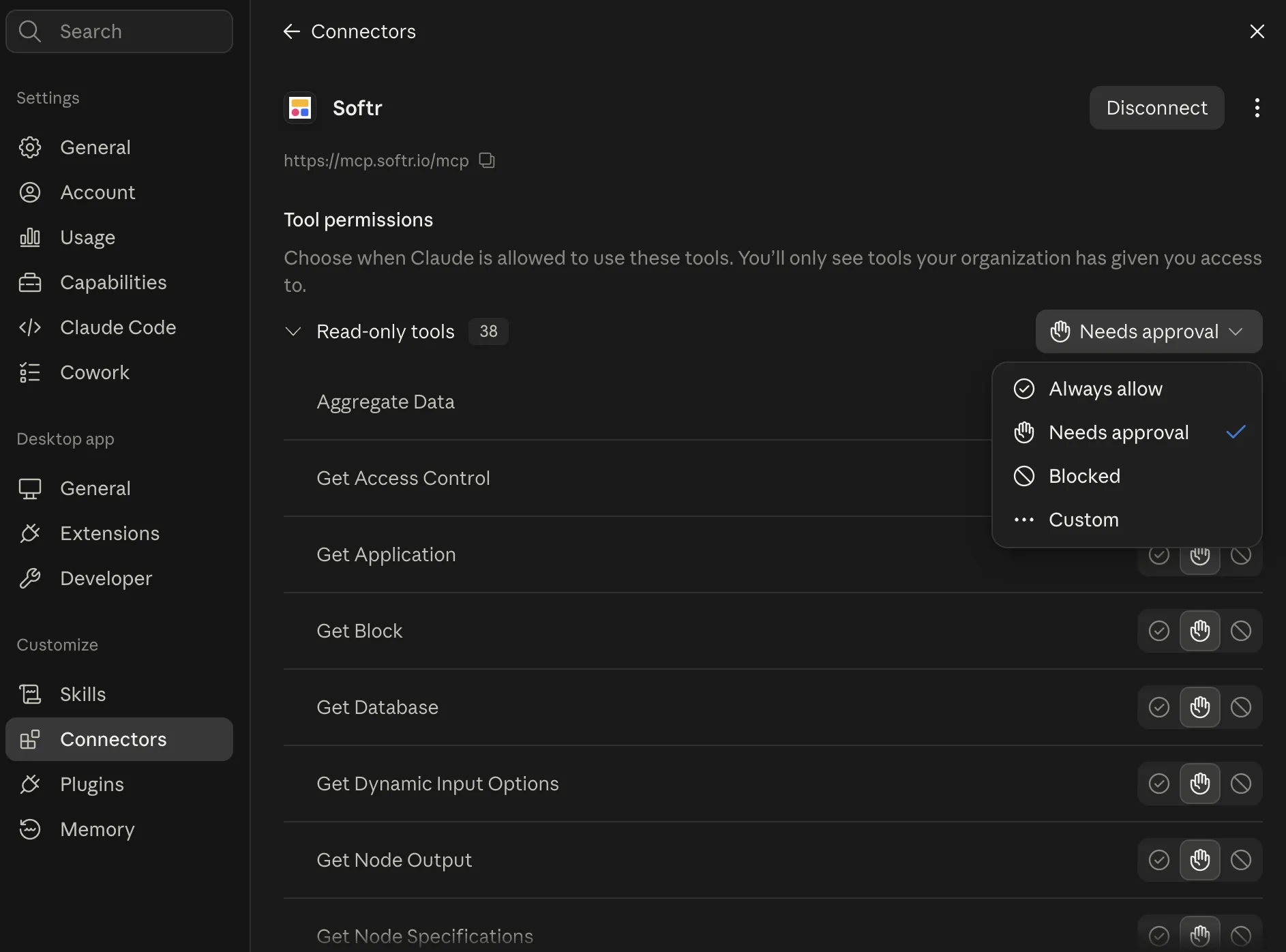
Most AI tools add a second approval layer, letting you block or allow access to specific MCP tools. In Claude, for example, each tool can be set to always allow, needs approval, or blocked (or you can go custom for more granularity).
Why use Softr MCP?
Plenty of tools let an AI build apps, but Softr MCP gets you apps that are permissioned, manageable, and accessible by default. Your build lands in a secure system with a database behind it and a login in front of it, so your team and clients can actually use it. And the benefits don't stop there:
- Build in the AI tool of your choice: Use Claude, ChatGPT, Codex, or Cursor to manage your data, build apps, and create workflows inside Softr, without switching tabs or opening the editor.
- Start with AI, keep control in Softr: Your agent configures the app; Softr keeps the data, permissions, workflows, and app structure in systems you can inspect and refine by hand. A teammate who's never touched Claude can pick up the app in Studio.
- Use the AI you already pay for: The Softr MCP server works on every plan, including Free, and it doesn't use Softr AI credits. The thinking happens in your own assistant, on your existing subscription, so you'll never pay twice for the same work.
- Turn a build into something your team can log into: Connect it to real data, add the automations, set the user groups, and give teammates or clients a secure sign-in. Softr Databases can hold that data, or point the app at 21+ external data sources.
- Get the speed of AI without relying on generated code: Your app runs on Softr's secure infrastructure rather than code written from scratch.
Build in AI, run on Softr
Softr MCP doesn't replace the builder or ask you to trust a black box. But it's a powerful new way to create and edit databases, permissions, apps, and workflows with the AI tools you're already using. And when you'd rather click than prompt, open Softr and you can edit any of it by hand. Your builds stay in Softr even if you switch AI tools.
👉 Try Softr free and connect your MCP server to Claude, Codex, or another AI platform today.
Frequently asked questions
What is Model Context Protocol (MCP)?
Which AI tools can connect to the Softr MCP server?
Do I need Softr AI credits to use the MCP server with Claude or ChatGPT?
What's the difference between the Softr MCP server and the App MCP Server?
What happens to what an AI builds if I stop using MCP?