Microsoft Power Automate pricing in 2026: Plans, traps, and real costs


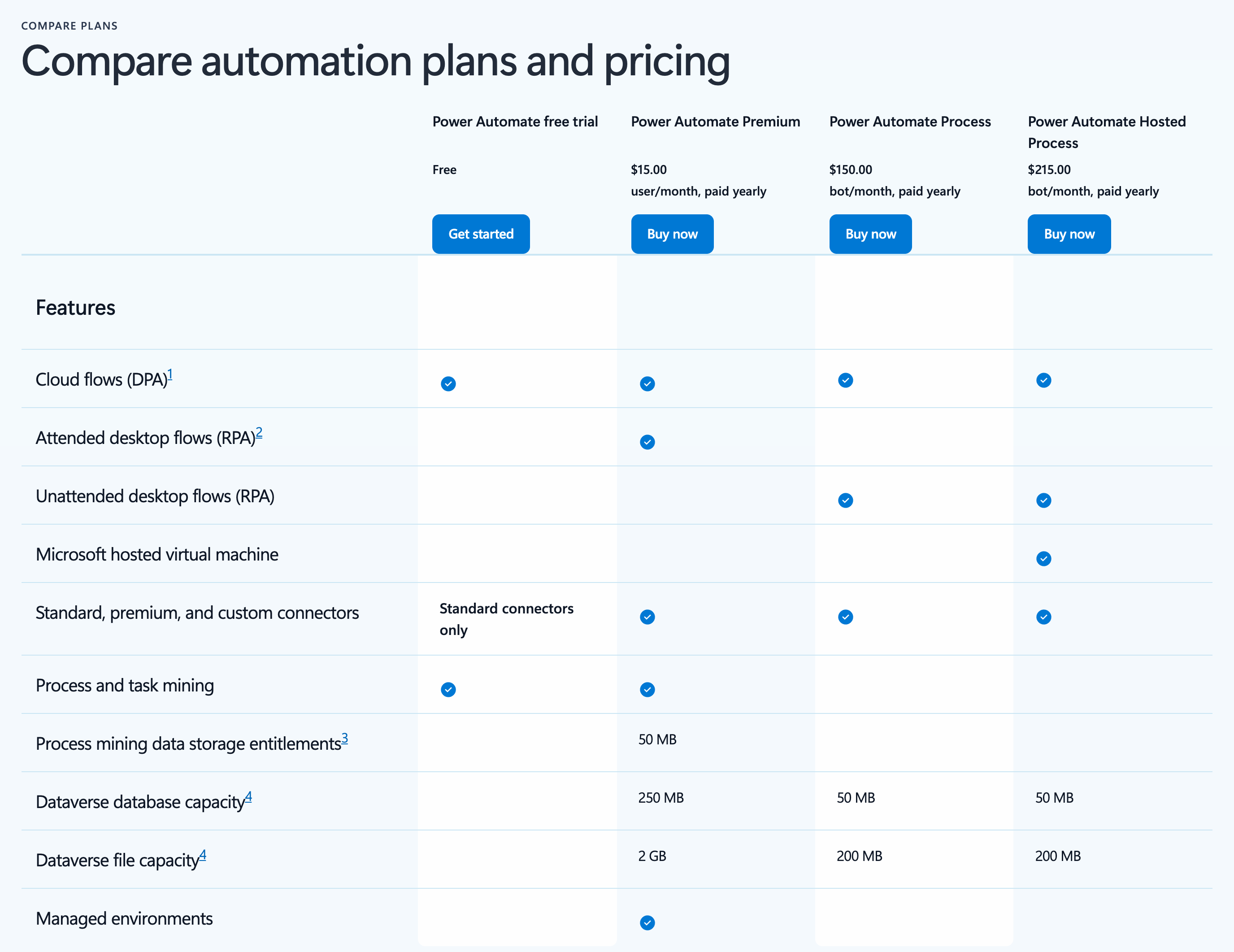
Microsoft Power Automate Premium costs $15 per user per month, and a Power Automate Process license costs $150 per bot per month (both billed annually). Microsoft 365 plans also include Power Automate, but only with standard connectors. Any flow that uses a premium connector requires a paid license.
This guide covers each license in detail and breaks down what Power Automate costs for a team of 50 or 500 people.
Power Automate pricing at a glance
All prices are US list prices with a yearly commitment, checked against Microsoft's pricing page on October 27, 2026. Microsoft also offers a 90-day self-service trial of Premium. Alternatively, admins can start 30-day trials of Premium, Process, or Hosted Process from the Microsoft 365 admin center.
Is Power Automate included in Microsoft 365?
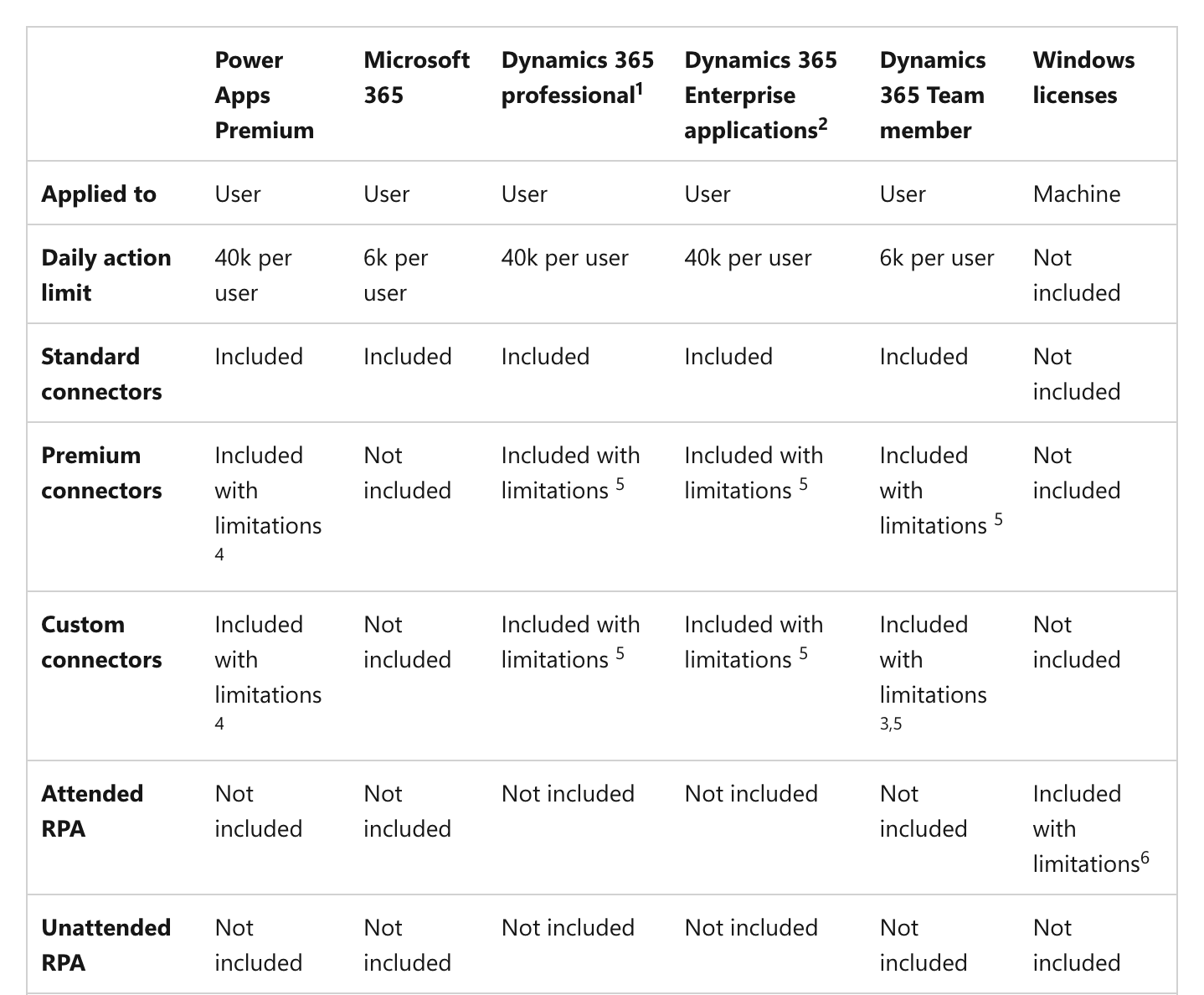
Yes, but only the standard version. Microsoft 365 and Office 365 plans let users build automated, scheduled, and button flows with standard connectors. That covers E1, E3, E5, F1, F3, and the Business plans. Standard connectors cover Microsoft apps like SharePoint, Outlook, Teams, and Excel, plus a host of other services.
No Microsoft 365 plan includes premium connectors, custom connectors, or desktop flow orchestration. That includes E5, Microsoft's top enterprise plan. A flow that calls SQL Server, Salesforce, or the HTTP action needs Power Automate Premium, a Process license, or pay-as-you-go.
Until November 15, 2026, Microsoft 365 users can use premium connectors inside Dataverse for Teams environments. However, Microsoft stops creating new Dataverse for Teams environments on that date, and existing ones will need full Power Automate licenses once they're upgraded.
Power Automate Premium vs Process vs Hosted Process
Power Automate has two kinds of paid license. Premium is a user license, so it's attached to a person. Process and Hosted Process are capacity licenses, so they attach to a flow or a machine regardless of who uses it.
Power Automate Premium ($15/user/month)
Premium is the license Microsoft recommends for users who build flows. It lets one person create and run unlimited cloud flows with standard, premium, and custom connectors (up to 40,000 actions a day).
Premium also includes one attended bot, which can run desktop flows on the user’s own computer while they’re signed in. Each license adds process mining, 250 MB of Dataverse database storage, and 2 GB of file storage to your tenant. Anyone who builds or manages desktop flows in the Power Automate portal needs Premium.
Note that Premium licenses bought from November 1, 2026 on no longer include AI Builder credits. AI Builder features now draw on Copilot Credits, which Microsoft sells separately. Credits on existing contracts last until the contract term ends.
Power Automate Process ($150/bot/month)
Process is a capacity license that you assign to one of two things:
- A cloud flow: The flow can use premium and custom connectors for everyone in your organization who runs it, whatever license they hold. It gets 250,000 actions a day, and you can stack up to 10 Process licenses on one flow.
- A machine: The license becomes an unattended bot. The bot signs in, runs one desktop flow at a time, then signs out.
A flow must sit inside a solution before you can assign a Process license to it. A Premium user also has to register the machine before an unattended bot can be assigned to it.
Power Automate Hosted Process ($215/bot/month)
Hosted Process works like a Process license on a machine, only in this case Microsoft itself supplies the machine. Each license runs one hosted bot on a Microsoft-managed Azure virtual machine, so there's no hardware to maintain. Hosted machine groups add and remove machines as the workload changes.
Microsoft says a Hosted Process license will also work as a standard Process license on cloud flows, but that option isn't available yet.
Old Power Automate plan names
If your contract still lists older plans, here's how they map to today's licenses:
- Per user plan and per user with attended RPA: Now Power Automate Premium. Premium includes everything the $40 per user with attended RPA plan did, for $15.
- Per flow plan: Now Power Automate Process.
- Unattended RPA add-on: Now Power Automate Process, at the same price.
- P1 and P2: Retired. Microsoft stopped selling and renewing these plans after December 31, 2020.
When do I need a paid Power Automate license?
You'll need a paid Power Automate license when a flow uses a premium or custom connector. How the flow starts determines who needs that license:
- Automated and scheduled flows: These run on the flow owner's license. If the flow uses a premium connector, only the owner needs Premium. Other people can still trigger it by doing something like adding an item to a SharePoint list.
- Instant flows: These run on the license of whoever starts them. If the flow contains even one premium connector, every person who runs it needs Premium (unless the flow has a Process license).
Common premium connectors include SQL Server, Salesforce, the HTTP action, and any custom connector. However, note that users who only respond to approval requests don't need Premium, even when that approval comes from a premium flow.
One Process license vs ten Premium seats
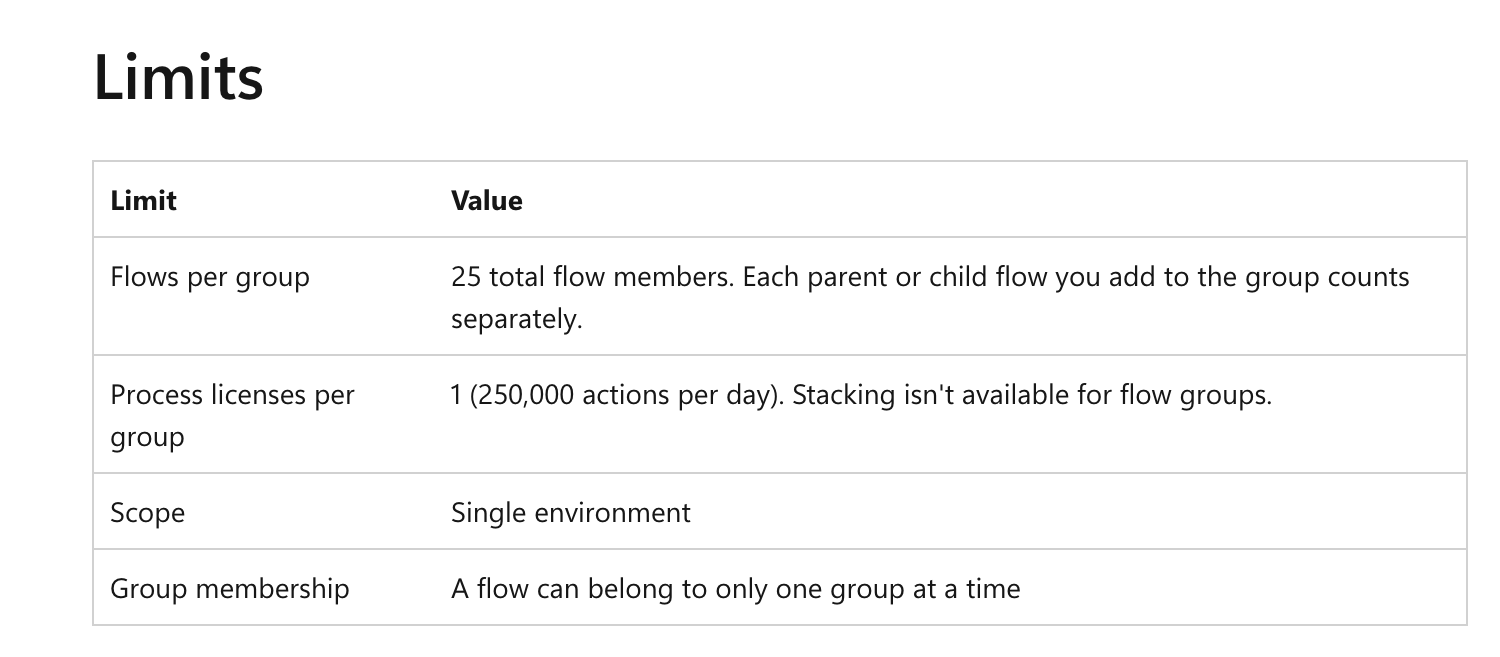
If you're weighing the choice between Process and Premium, here's the skinny: ten Premium seats cost $150 a month, which is equal to one Process license. From the 11th user on, Process is cheaper. Additionally, flow groups make Process even cheaper. One Process license can now cover a flow group of up to 25 cloud flows that share a pool of 250,000 actions a day.
So, when weighing your options, count users rather than flows. Add up the people who need Premium to run shared flows. If there are more than 10, a Process license on a flow group will generally cost you less.
Premium does still make sense for teams that build their own flows, run attended desktop flows, or use many unrelated premium flows. And a Process license covers flows, not users, so your builders still need Premium to create flows and run their own automations.
What Power Automate costs at 50 and 500 users
Microsoft recommends Premium for every user. The table below compares this "premium-for-all" approach with a mixed setup, where only builders get Premium and shared flows and bots run on Process licenses.
The mixed setup assumes that 10% of a small team builds flows, and 8% of a large one. Everyone else either runs shared flows or stays on standard connectors through Microsoft 365. Shared premium flows sit in flow groups of up to 25, and each unattended process gets its own bot.
At 50 users, opting for the mixed setup halves your bill, and at 500, it cuts it by about 70%. (These figures reflect annual billing excluding any Enterprise Agreement discounts, extra Dataverse storage, or Copilot Credits.)
Power Automate licensing traps IT should know
- Same flow, different license: Changing a flow's trigger from automated to a button moves the cost from the owner to every person who runs it.
- Owners who leave: If a premium flow's owner leaves or loses their Premium license, Microsoft downgrades the flow and notifies its owners. If no one acts, the flow turns off after 14 days. Add a co-owner with Premium, or move the flow to a Process license.
- Guest users: Guests need their own license, assigned in your tenant or in their home tenant. If you don't know what their home tenant provides, put a Process license on the flow.
- Flows inside Power Apps: A Power Apps license covers a flow only when the flow is associated with the app and uses the same data sources. A flow outside that context needs Power Automate licensing.
- Shared service accounts: One Premium license on an account that many people use counts as multiplexing, which breaks Microsoft's license terms. License each user, or put a Process license on the flow.
- Daily action limits: Each license has its own cap, from 6,000 actions a day on Microsoft 365 to 250,000 on Process. Limits aren't pooled across users.
- One bot, one run: Each unattended bot runs one desktop flow at a time. Two runs at the same time on one machine need two Process licenses.
- Self-service purchases: Users can buy Power Automate licenses with their own card. Admins can turn this off for each product with the MSCommerce PowerShell module.
- Dataverse for Teams: These Teams-only environments are the one place Microsoft 365 users get premium connectors. New ones stop on November 15, 2026, and upgraded ones need full licenses.
- AI Builder credits: New Premium licenses no longer include them. Flows that read documents or classify text now draw on Copilot Credits.
When to choose Power Automate pay-as-you-go
For pay-as-you-go pricing, you link a Power Platform environment to an Azure subscription, and Microsoft bills each premium run to it:
- Cloud flow runs and attended desktop runs are $0.60 each
- Unattended and hosted desktop runs are $3 each
Runs of standard-connector flows are free. Runs by users who already hold a Premium license are free too, so long as the run stays within that license's parameters. Testing a flow in the designer and resubmitting failed runs are also free.
A Premium seat costs the same as 25 runs a month at $0.60. A Process bot costs the same as 50 unattended runs a month at $3. So, pay-as-you-go fits seasonal flows and flows with many occasional users. Just be sure to verify these three things before you switch an environment:
- It's still in preview: Microsoft labels the flow-run meters as preview, so prices and limits can change.
- Process licenses stop working: An environment linked to Azure ignores its Process licenses. Keep flows that rely on Process in a separate environment.
- It doesn't buy more actions: The meter for action overages isn't live yet. Flows that hit their daily action limits need a Process license, not pay-as-you-go.
Is Power Automate being phased out?
No. Power Automate is Microsoft's current automation product, and Microsoft hasn't announced an end date for it. But some parts have retired: the Power Automate mobile app was deprecated on August 31, 2026, though cloud flows keep running and approvals still work in Teams. Personal Microsoft accounts lost access to cloud flows back in July 2025.
When to look at a Power Automate alternative
Power Automate is a solid, though somewhat complex, automation solution if your team lives in the Microsoft ecosystem. But the price you can expect to pay changes when flows need premium connectors or when a workflow needs an app built around it. Power Apps and Power Automate are licensed separately, so a request form with an approval flow can mean two bills.
With Softr, native Workflows run alongside your apps and data in a single workspace. Approvals start from a button or form inside an app, giving requesters access to live statuses on their own records.
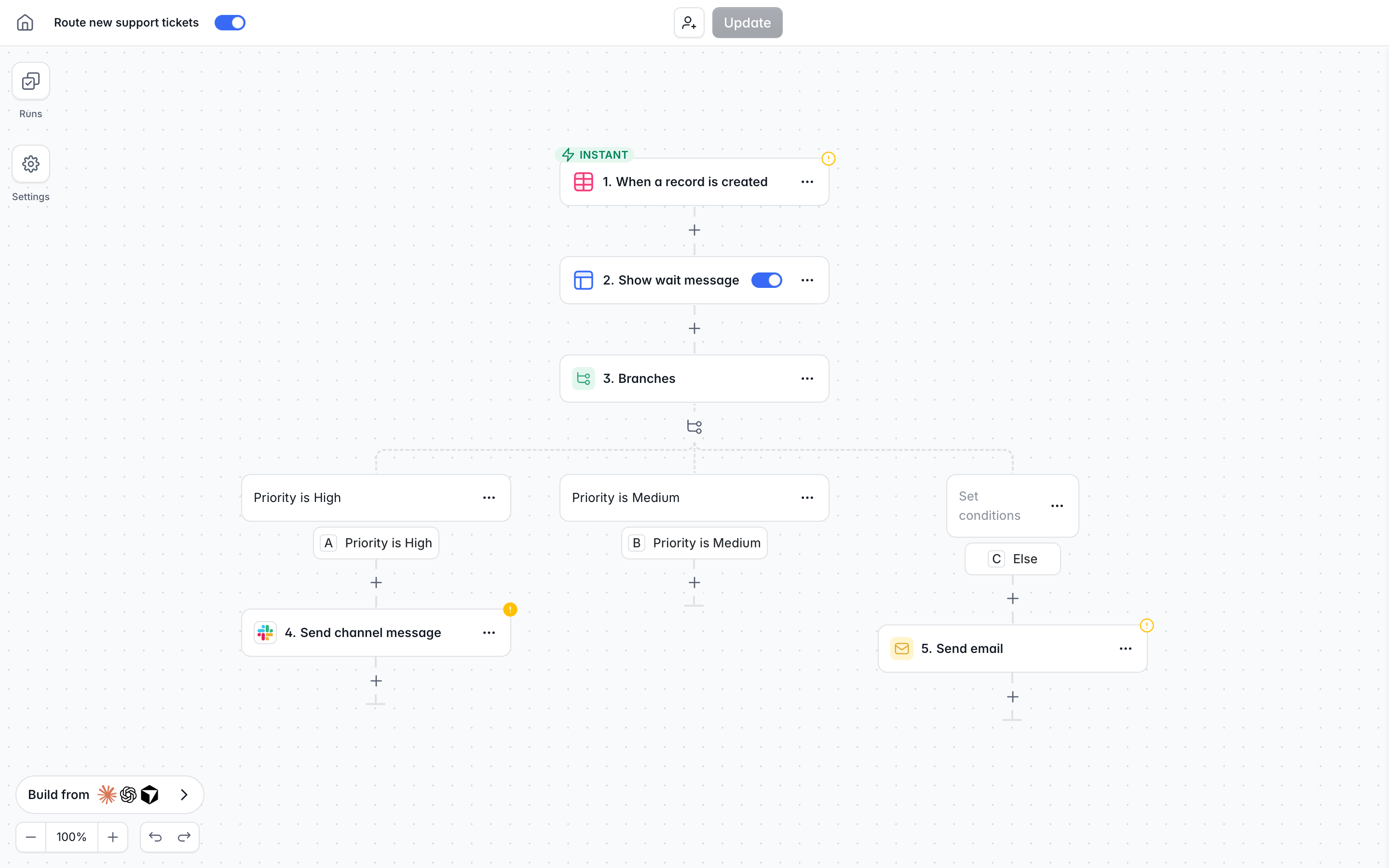
Softr bills workflows by plan, not per user involved in running them. The free plan includes 500 workflow actions a month, and Business includes 25,000. Triggers and flow controls don't count toward the limit. See Softr pricing for the full breakdown, or the Enterprise plan for info on SSO, SCIM, and audit logs.
If you only need to connect apps without building one, see our list of the best workflow automation tools.
Frequently asked questions
Is Power Automate being phased out?
Is Power Automate free with Office 365?
Is Power Automate Premium included in E5?
How much does Power Automate Premium cost?
What is the difference between Power Automate and Power Automate Desktop?