Cursor vs v0: Which AI coding tool is right for you? [2026]

[.blog-callout]
✨ TL;DR
- Cursor is built for developers: Tab autocomplete, parallel agents, and deep codebase indexing make it the best choice for ongoing development and production code, though the whole process stays developer-dependent. Non-technical teammates can’t build, launch, or adjust apps on their own.
- v0 is a faster path from idea to deployed app: Its prompt-based interface, Design Mode, and one-click Vercel deployment make it accessible to non-developers, but it struggles with complex projects and credit costs add up fast.
- Softr lets anyone create fully-realized business apps without code: Unlike Cursor and v0, you can use the AI Co-builder to generate a complete system with database, app, user management, permissions, and workflows already connected, with no developer required to launch or maintain it.
[.blog-callout]
A decade ago, if you wanted custom software, you hired a developer or learned to code yourself. Today you can build a basic app with a few prompts. With tools like Cursor and v0, developers spend far less time writing code and more time prototyping and supervising coding agents.
But that doesn’t mean both tools work for everyone. Cursor is built for developers who want to move faster inside a real codebase. v0 is built for people who want to go from idea to something live with as few steps as possible. Some teams use one, some use both, and for others neither makes sense.
We tested both—and compared them against Softr, a no-code alternative—so you can get a better sense of which tool fits your workflow.
Cursor vs v0 at a glance
| Cursor | v0 | Softr | |
|---|---|---|---|
| Best for | Developers who want AI to speed up their work inside a real codebase | Vibe coders and prototypers who want to go from prompt to deployed app fast | Teams that want complete no-code business apps with database, users, permissions, and workflows |
| Ease of use | Familiar to VS Code users; not approachable for non-developers | Anyone can vibe code an app; making the app secure and production-ready takes technical knowledge | Designed for non-technical operators; visual builder, AI Co-Builder, and intuitive options to manage security and permissions |
| Key strengths | Tab autocomplete, parallel agents, full codebase indexing, Composer model, model flexibility | Agentic full-stack generation, Design Mode, one-click Vercel deployment, screenshot and Figma to code | Complete end-to-end system with database, app, users, permissions, and workflows already connected |
| Output type | Code | Code (deployed to Vercel) | Running business app (hosted, secure, fully connected) |
| Tech stack | Any | React, Next.js, Tailwind, shadcn | No code required |
| Integrations | VS Code extensions, GitHub, GitLab, Slack, MCP | GitHub, Vercel ecosystem, databases, AI models via Vercel AI Gateway | 17+ native data sources including Airtable, Google Sheets, HubSpot; REST API connector |
| Pricing | Free (limited); Pro $20/month; Teams $40/user/month | Free ($5 credits/month); Premium $20/month; Team $30/user/month | Free plan available; paid plans from $19/month for Team: 5 + Client: 5 app users |
What is Cursor?

Cursor is an AI-powered code editor designed to make coding tasks faster. It has a full understanding of your codebase, which means it can offer context-aware suggestions that change code across multiple lines at once. Cursor includes tools covering the full agentic coding workflow: agents, implementation plans, code review, a proprietary coding model, and plugins that enable MCPs, skills, and subagents.
Developers using Cursor can jump between different coding workflows seamlessly. You can still write code manually, of course, but you can also use Tab autocomplete to accept Cursor’s suggestions, hand entire tasks over to Agent mode, or run multiple agents in parallel to tackle different sections of your project at once. With the release of Cursor 3, you can kick off agents from anywhere—mobile, web, desktop, Slack, GitHub, or Linear—and see all of them in a single sidebar on your desktop app. You can also move local agent sessions to the cloud and vice versa, making it easier to continue your work wherever you are.
Cursor offers its own in-house coding model, Composer, which tends to provide the best balance of cost and performance since it’s designed specifically for use with Cursor. You can also select models from OpenAI, Anthropic, Google, or xAI. And for code review, Cursor’s Bugbot product—billed separately—automatically identifies bugs and proposes fixes.
Cursor’s key features
- Tab autocomplete: With a full understanding of your codebase, Tab predicts what you’ll need next and gives multi-line suggestions that account for what you’ve already built.
- Agent mode: Describe what you need in plain English and Cursor implements it across multiple files simultaneously. You review every change before it ships.
- Parallel agents: Run multiple agents at the same time on different parts of your project. You can initiate agentic tasks from mobile, web, Slack, GitHub, or Linear, and manage all of them in one place. Coding sessions can move between local and cloud seamlessly.
- Full codebase indexing: Cursor reads every file locally, so suggestions account for existing logic, dependencies, and structure. It won’t recommend something that contradicts a function buried elsewhere in your codebase.
- Composer: Composer is Cursor’s coding model, which is fast, affordable, and performs competitively against other frontier models on coding tasks. You can also choose OpenAI, Anthropic, Google, or xAI models depending on the task.
- Bugbot: Automatically runs in the background to identify bugs and propose fixes. Cursor claims 70%+ of the bugs it identifies get fixed. You can improve performance over time by defining custom rules and best practices.
Cursor cons
- It generates code, not finished apps: Cursor produces a codebase, not user-ready software. Authentication, hosting, permissions, and data governance all take extra work. And when something needs to change after launch, everything needs to go through a developer; there’s no way for non-technical teammates to handle small app adjustments on their own.
- Credit-based billing is hard to predict: If you mainly use Tab autocomplete, you might be fine on the $20/month plan. But if you’re spinning up multiple agentic tasks in parallel, you can easily hit $200/month or more. For Team plan users, the billing experience is confusing since you get just $20 in usage credits despite paying $40/month per user (double the price of the Pro plan).
Cursor pricing
No credit card is required to get started with Cursor’s free plan. Annual billing saves 20% across all paid plans.
- Hobby (free): Limited Agent requests and limited Tab completions.
- Pro ($20/month): Extended Agent limits, cloud agents, frontier model access, MCP support.
- Pro+ ($60/month): 3x usage on all OpenAI, Claude, and Gemini models.
- Ultra ($200/month): 20x usage on all OpenAI, Claude, and Gemini models.
- Teams ($40/user/month): Shared rules and context, usage analytics, role-based access control, SAML/OIDC SSO.
- Bugbot ($40/user/month): AI code review add-on that catches bugs and proposes fixes.
When you exceed your plan’s included credits, you can keep working after that with “on-demand usage” which bills at normal API rates.
What is v0?
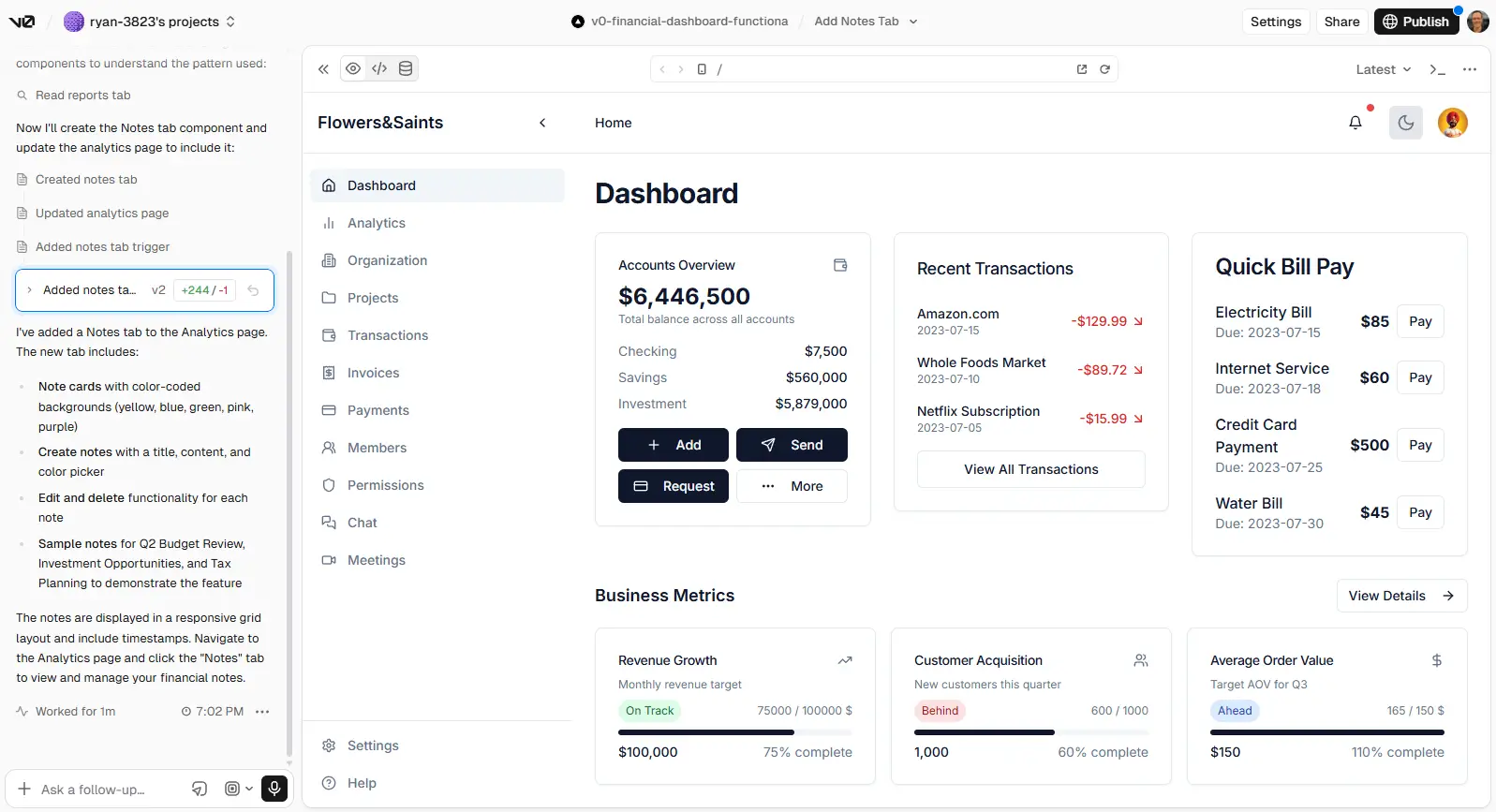
v0 is a full-stack agentic builder. It’s popular among vibe coders and for prototyping due to its prompt-based interface, its attractive templates, and its ability to quickly create React components and apps. Once v0 generates something, you can refine it with a built-in code editor or with Design Mode, which lets you select any element to tweak typography, colors, layout, and spacing.
In early 2026, v0 relaunched with an expanded scope: you can now import existing GitHub repositories and work on live codebases. Non-engineers are still a core part of v0’s audience, and it’s entirely possible for product managers, marketers, and founders to ship prototypes and landing pages without going through a developer.
v0 is built on Vercel, which handles deployment automatically. Hit Publish and your app is live on Vercel’s edge network within a minute, with SOC 2 infrastructure and a shareable URL. Environment variables like database connections and API keys sync both ways between v0 and your deployed app, so everything that works in your preview also works after you deploy.
v0’s key features
- Agentic full-stack generation: Describe what you want and v0 plans, builds, and deploys, creating a user interface, backend logic, database connections, and API integrations from a single prompt. It checks its own work and fixes errors without being asked.
- Design Mode: Select any element in the live preview and tweak typography, colors, layout, and spacing visually, or add a prompt for structural changes. It’s more accessible than the code editor for anyone who isn’t comfortable editing files directly.
- Turn screenshots and Figma designs into code: Upload a design, wireframe, or screenshot and v0 recreates it as working React code.
- One-click Vercel deployment: Hit Publish and your app is live within a minute. Environment variables sync both ways, so database connections and API keys that work in your preview work automatically after you deploy.
v0 cons
- v0 is locked into the React ecosystem: If your team works in Vue, Svelte, Angular, or other frameworks, v0 makes less sense because it doesn’t produce code for them natively. As one developer said, “I don’t use React / Next so v0 is very limited in use for me.
- Its credit-based system gets pricey fast: After v0 switched to credit-based pricing, one user said they “went from paying $20/month to $20 every day or two.” Another reported racking up $10 in charges in less than an hour.
- v0 can struggle with complex projects: One user reports, “the code I get from v0 is pure spaghetti”; another says, “It frequently fails at simple tweaks, refinement, long context windows, and bug-fixing.”
v0 pricing
v0 uses credit-based pricing, which naturally prompts the question, “What does a credit get me?” It depends on the complexity of your prompts and which model you’re using, but anecdotally, some users report getting around 40-60 messages per month on the Premium plan before hitting their limits.
- Free: 200 projects, $5/month in credits, 7 message/day limit; you can’t purchase extra credits.
- Premium ($20/month): Unlimited projects, $20 in credits, basic usage analytics.
- Team ($30/user/month): Unlimited projects, $30 in credits per user, shared credit pool, shared projects, team analytics.
- Business ($100/user/month): Unlimited projects, $30 in credits per user, shared credit pool, shared projects, team analytics, data opt-out.
- Enterprise (custom): SAML SSO, role-based access controls, advanced usage analytics, data opt-out, advanced team features.
Unused monthly credits roll over for one month. Paid plans also include an additional $2 of free daily credits for each day that you log in.
Cursor vs v0: pricing
Pricing isn’t a big differentiator for Cursor and v0, particularly now that both tools have switched to API-based pricing. You can get started for free with either platform; individual paid plans start at $20/month. v0’s Team plan starts at $30/user/month, while Cursor’s costs $40/user/month. And both platforms require you to do some math—and a bit of guesswork—to understand whether $20 of monthly API usage is enough to handle your tasks.
Key differences:
- v0 is more generous with credits: v0 offers $2 in extra credits for each day that you log in, which gives you another $60 in API usage over the course of the month (assuming you log in every day). v0’s $30/user/month Team plan includes $30 per user in credits, pools credits among users, and rolls over unused credits for one month. Cursor’s Team plan is more expensive, offers fewer credits, and doesn’t roll credits over.
- Cursor’s in-house AI model is cheaper than v0’s: Cursor’s in-house coding model, Composer 2, costs $.50 per million input tokens and $2.50 per million output tokens. v0’s cheapest model, v0 Mini, costs twice as much, which means even if you get more tokens with v0 you’ll probably burn through them faster.
- v0’s Business plan is expensive and only adds data opt-out: At $100/month per user, v0’s Business plan is more than 3x the cost of its Team plan, but it only adds the ability to opt out of data training. Cursor lets all users block their code from being used for training by toggling on “Privacy Mode.”
- Cursor includes unlimited autocomplete: For developers using Cursor, the Tab autocomplete feature can significantly boost output without consuming any credits at all. For teams that mainly use Cursor as a coding assistant, rather than as an agentic coding tool, it offers serious value.
The verdict: For light vibe-coding use and component design, v0 is cost-effective and more generous at the team level. Cursor makes more sense for developer workflows, especially if they include a mix of agentic tasks and coding autocomplete.
✨ Both Cursor and v0 charge per user. With Softr, your whole team can create business apps under a single subscription. Softr’s $19/month Basic plan includes Team: 5 + Client: 5 app users and its $99/month Pro plan supports Team: 10 + Client: 50 app users; even if you’re just using Softr’s free plan, you get 5 users total.
Cursor vs v0: on Reddit
There’s a general consensus across Reddit that v0 is useful for prototyping, while Cursor is a much stronger option for production code.
v0’s sweet spot is component designs and Next.js or React interactions. However, most devs include a disclaimer: v0 is great for quick user interface iterations, but they don’t use it for complex tasks or full projects.

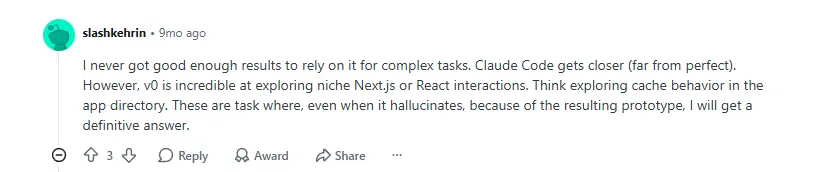
As the user below points out, v0’s usefulness for UI generation comes from its composite architecture, which pairs a state-of-the-art “base” model together with multiple specialized models. It can also generate multiple design variations from a single prompt.

Another difference is that v0 makes heavy use of templates. Your design might be more generic, but you also have a higher chance of getting a polished UI on the first try. Cursor, on the other hand, will “freestyle” its way to a design that may or may not be what you had in mind.

A recurring theme among developers on Reddit is that once you’re happy with your v0-produced design and components, it’s time to move over to a platform like Cursor or Claude Code to actually build your app.


Why? Because Cursor generates “much better code,” according to users, and also has a lower rate of failures than v0.

Cursor vs v0: a summary
v0 and Cursor do have some overlap, but they’re designed for different audiences and distinct moments in the building process.
- v0 takes you quickly from idea to working app. With beginner-friendly templates, Design Mode for visual adjustments, and one-click Vercel deployment, non-technical users can launch something that works without writing code. Developers use it too, mainly for generating attractive React components fast and getting a UI direction before committing engineering time. Still, while it’s great for prototyping and design, it’s not as reliable for complex projects.
- Cursor is better for developers writing production code. Tab autocomplete, parallel agents, and deep codebase understanding make it a stronger choice for ongoing development and anything that needs to hold up in production. Although you can now tell agents what to do using prompts, Cursor is decidedly for developers and requires technical understanding.
A common workflow combines both apps: use v0 to prototype and get the UI direction right, then move the project into Cursor to build the production version.
Softr — the best Cursor and v0 alternative for building real business apps without code

Cursor and v0 are built to generate code faster. But turning that code into something you can actually roll out to real users means dealing with authentication, permissions, and databases separately. It’s not something non-technical users can handle themselves, and even for skilled developers it’s an added engineering burden.
Softr takes a different approach. It’s an AI-native platform for building production-ready business software without code. Tell Softr’s AI Co-Builder what you need and it generates the database, interface, and business logic already wired together, with authentication, user management, permissions, and hosting included from the start. You can also use Softr’s built-in Vibe Coding block to create dynamic, custom UI components directly within your app and create powerful workflows to automate actions across your app and database.
Once your app is built, you can edit it visually at any time without touching a prompt or risking breaking what already works.
Best for: Operations teams, business owners, and department leads who need real software like client portals, internal tools, CRMs, and dashboards, and want to build and maintain it without a developer in the loop.
Why teams choose Softr

- A working app from day one: Authentication, user management, role-based permissions, and hosting come included. With Cursor and v0, that’s all additional overhead you have to deal with before rolling your app out.
- Your team can make changes without a developer: Non-technical users can build and edit anything using Softr’s AI Co-builder, visual editor, and Vibe Coding block. There’s no need to look through documentation or wait for engineering time.
- Built-in databases and native integrations: Store and manage data directly in Softr Databases, or connect in real time with Airtable, Google Sheets, HubSpot, Notion, SQL databases, and more.
- Workflow automation included: Trigger automated workflows that connect to other parts of your business when users submit forms, update records, or take action in your app.
- Free plan with real features: Softr’s free plan gives you 5 users total, 5,000 database records, unlimited apps, and up to 3 builders.
- One subscription covers your whole team: Softr’s $19/month Basic plan includes Team: 5 + Client: 5 app users and the $99/month Pro plan includes Team: 10 + Client: 50 app users. Cursor and v0 both charge per seat, so team costs add up fast on both platforms.
Cursor, v0, or Softr
Cursor and v0 have made it faster than ever to generate working code. But getting that code to a place where users can log in with the right permissions and access their data securely still takes developer support. Ongoing changes mean going back through a developer every time.
Softr lets anyone on your team handle the whole process. With Softr’s AI app builder, templates, and intuitive design tools, non-technical users can go from idea to working business app in a few prompts, with authentication, user permissions, databases, and workflow automation already included.
Try Softr for free and start building today.
Frequently asked questions
Is v0 or Cursor better for beginners?
Can you use v0 and Cursor together?
What’s the best alternative to Cursor and v0 for non-technical teams?