Trello is great for getting work out of people’s heads and into a shared visual space. But when projects involve more users, clients, approvals, timelines, or reporting, teams often need more than a flexible Kanban-style board. This guide breaks down the best Trello alternatives by use case.
Best Trello alternatives at a glance
| Tool | Best for | Standout Features | Pricing |
|---|---|---|---|
| Softr | Teams that need a custom, AI-powered project management system, not just a simple task board | • AI app building • AI-powered search and assistance • Granular permissions • Workflow automation • Multiple project views • Request forms | Free plan available Basic: $19/month Pro: $99/month |
| ClickUp | Teams that need more flexible project tracking | • Multiple project views • Custom fields and statuses • Dashboards and reporting | Free Forever plan available Unlimited: $7/user/month Business: $12/user/month |
| Wrike | Teams that need more structure than Trello can offer | • Custom workflows and fields • Dashboards and reporting • Request forms | Free plan available Team: $10/user/month Business: $25/user/month |
| Notion | Project tracking with docs, wikis, and team knowledge in one workspace | • Databases with multiple views • Projects and task management • Notion AI and Custom Agents | Free plan available Plus: $10/member/month Business: $20/member/month |
| Asana | Multi-team project planning and reporting | • Multiple project views • Dependencies and milestones • AI Studio and AI Teammates | Personal plan available Starter: $10.99/user/month Advanced: $24.99/user/month |
What to look for in a Trello alternative
- Ease of use: Trello is popular because people can pick it up quickly, so an alternative shouldn’t create unnecessary friction. Look for a tool your team can adopt without weeks of setup, training, or admin work.
- Reporting and dashboards: If Trello feels limiting, reporting is often the reason. Look for dashboards that show project status, blockers, deadlines, workload, and progress across multiple projects, not just activity inside one board.
- Timeline and dependency tracking: A good alternative should help teams see how work really connects. This matters when missed deadlines, blocked tasks, or shifting priorities affect the whole project plan.
- Multi-project visibility: Trello is board-first, which can make cross-project tracking harder as teams grow. Look for portfolio views, folders, workspaces, linked records, or dashboards that help managers see several projects at once.
- Workload and resource planning: If you need to understand who owns what, who’s overloaded, or where capacity is available, choose a tool with workload views or resource management.
- Workflow automation: Look for an alternative that gives you the level of workflow control you need — approvals, routing, notifications, recurring processes, and conditional logic.
- Integrations with your existing tools: Look for reliable integrations with tools like Slack, Google Drive, Microsoft 365, GitHub, HubSpot, Zapier, and external data sources.
- Pricing that fits how your team scales: Trello’s Premium plan is positioned for teams that need multiple project views and more advanced visualization, so alternatives should be judged by what they unlock at each tier, not just the entry price.
1. Softr — best for custom, AI-powered project management systems
.webp)
Any Trello alternative can show status updates, but most fall short when work requires approvals, handoffs, external visibility, and collaboration. When Trello reaches its limits, switching to another off-the-shelf tool may feel like the easiest option, especially when building a custom solution would usually take weeks or months.
To create a custom project management system (not just a task tracker), you don’t have to create a ticket for your engineering team or code it yourself. You can just ask Softr’s AI Co-Builder in plain English to build your project tracker in the way you want it — with your data and business logic connected, secure, and ready for real users from day one.
Once your app is generated, you can make changes using the visual editor or refine it with further prompts.
Softr combines a native relational database, apps, workflow automation, and granular permissions so you can easily link tasks to real data (like clients, assets, or requests). It also closes the gap between internal and external work. Build partner, vendor, or client portals with complete control over exactly what each user group can see, edit, create, or delete.
Pros and cons of using Softr
Pros:
- Fast to launch: Create your own Trello alternative quickly, without waiting on developers or stitching together tools.
- All-in-one app-building: Softr combines databases, interfaces, automations, infrastructure, and hosting in one secure platform. You can build project trackers, task management systems, client portals, and more tailored to your exact business logic without code.
- More scalable than basic boards: It supports teams that need multiple views, deeper task structure, dependencies, dashboards, and portfolio-level visibility.
- Built for operational & collaborative work: Softr’s an ideal fit for a wide range of operations—like project workflows, portals, CRMs, internal tools, and inventory systems—rather than just simple task tracking.
- Easy to share externally: Create multiple project views so different collaborators can view, approve, or edit their dependencies.
- Integrates seamlessly with other tools: Bring your stack together, including data from spreadsheets, CRMs, and external systems. Sync with 17+ native data sources or connect external tools through Rest API.
Cons:
- Not ideal for simple task tracking. If you only need a lightweight project to-do list without the need to scale, Softr might be more platform than you need.
Softr key features
- AI app building: Generate business apps and workflows fast, using plain-language prompts. No need to write code or hire a developer. Customize via prompting or visual blocks.
- Multi-project views: Choose how you want to view and manage projects, including Kanban boards, performance dashboards, interactive Gantt charts, lists, grids, and calendars.
- Request forms: Collect creative requests or campaign briefs through structured forms that automatically feed into your database and project workflows.
- Granular user permissions: Customize access for internal and external teams, clients, and vendors.
- Workflow automation: Trigger actions based on changes across apps, databases, and connected tools to save team members time and keep projects running smoothly. Run workflows directly within your app instead of relying on third-party tools.
- Enterprise-grade security: Keep project data protected with secure authentication, server-side permissions, and full SOC 2 and GDPR compliance.
- AI-powered search and assistance: You can use “Ask AI” features to quickly surface project information, summarize updates, and find relevant tasks, documents, or records without manually digging through dashboards and databases.
Softr pricing
Softr’s pricing is simple and predictable, with a generous free plan.
- Free: Unlimited apps for up to 3 builders, with access to Softr Workflows and Softr Databases, 5 app users, 5 AI credits, and 5,000 Softr Database records.
- Basic: $19/month for unlimited apps with 42+ integrations, Team: 5 + Client: 5 app users, 10 AI credits, and 50K records.
- Pro: $99/month for unlimited apps with 45+ integrations and custom code, Team: 10 + Client: 50 app users, 50 AI credits, 500K records, and up to 3 custom user groups.
- Business: $329/month for unlimited apps with 52+ integrations, Team: 30 + Client: 100 app users, 100 AI credits, 1M records, and up to 10 custom user groups.
- Enterprise: Custom pricing. Includes all Business plan features, plus priority support, a dedicated success manager, and advanced security features.
Why it’s better than Trello pricing
Softr’s pricing is better suited for teams that need more than a shared task board because it scales around users, apps, records, workflows, and permissions, not just access to boards. Trello looks cheaper at first, with Standard starting at $5/user/month annually and Premium at $10/user/month annually, but many important capabilities are locked in Premium: Timeline, Dashboard, Table, Map views, AI, unlimited automation runs, and stronger admin controls.
Softr’s plans include unlimited apps and a set number of builder seats, with clear user, database, and workflow limits, so teams can build project trackers, client portals, approval systems, dashboards, and task workflows in one place instead of paying for a board tool plus add-ons, Power-Ups, and separate workflow tools.
Verdict: Softr vs Trello
Softr is a better fit if you’re looking for a scalable project management system that you can easily set up yourself — with custom views, permissions, workflows, and external portals built in. Trello is still easier and cheaper for simple task tracking, but teams often outgrow it when they need structured reporting, multi-project visibility, approvals, or client-facing collaboration.
[.blog-callout]
✨ Real-world use case
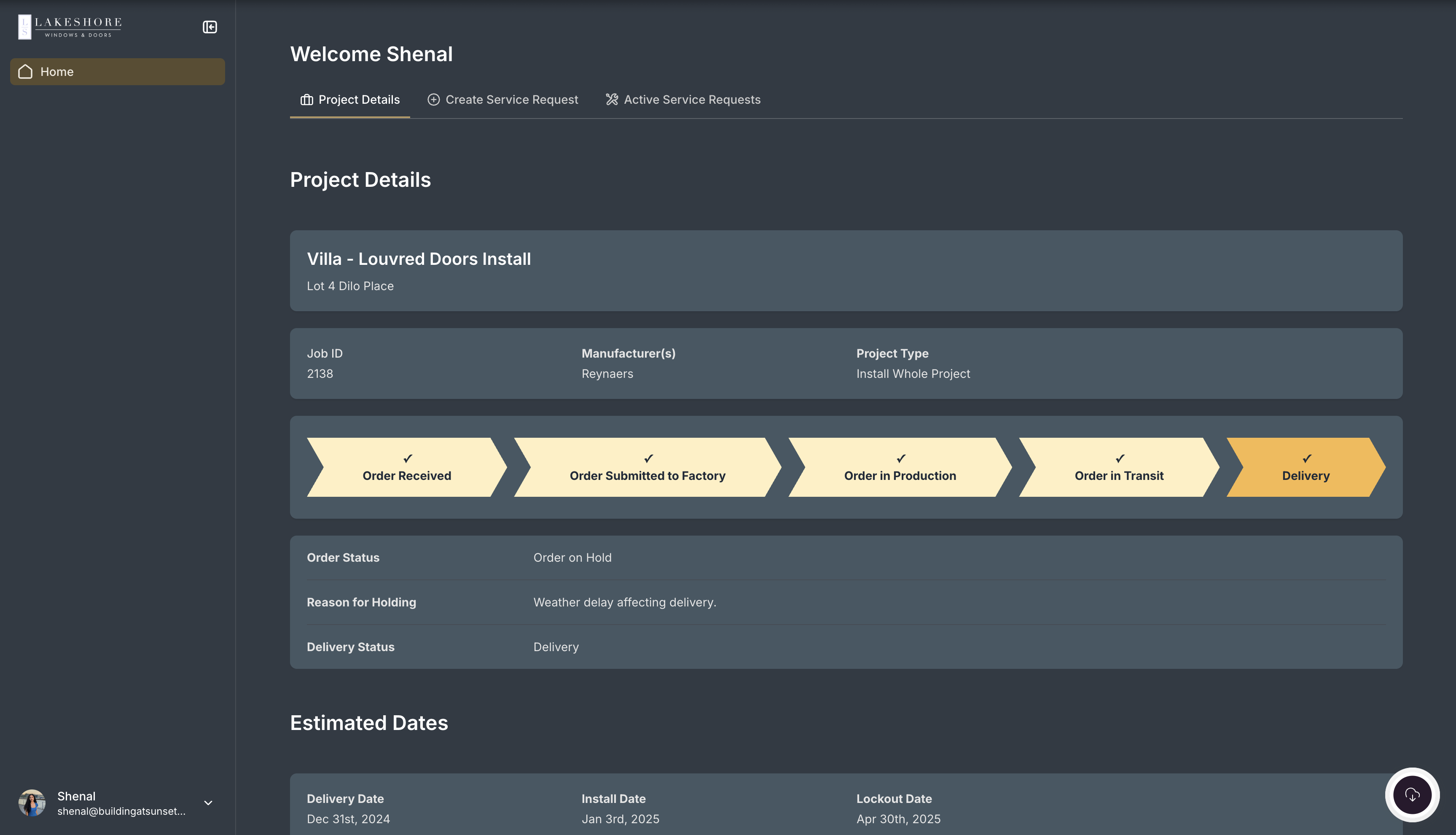
Lakeshore Windows replaced spreadsheets, email follow-ups, and manual contract handling with a custom Softr-powered project management system. Now, contracts are generated and signed automatically, clients get real-time project visibility, installers can access job details from the field, and staff work from one shared source of truth.
[.blog-callout]
2. ClickUp — best for teams that need more flexible project tracking
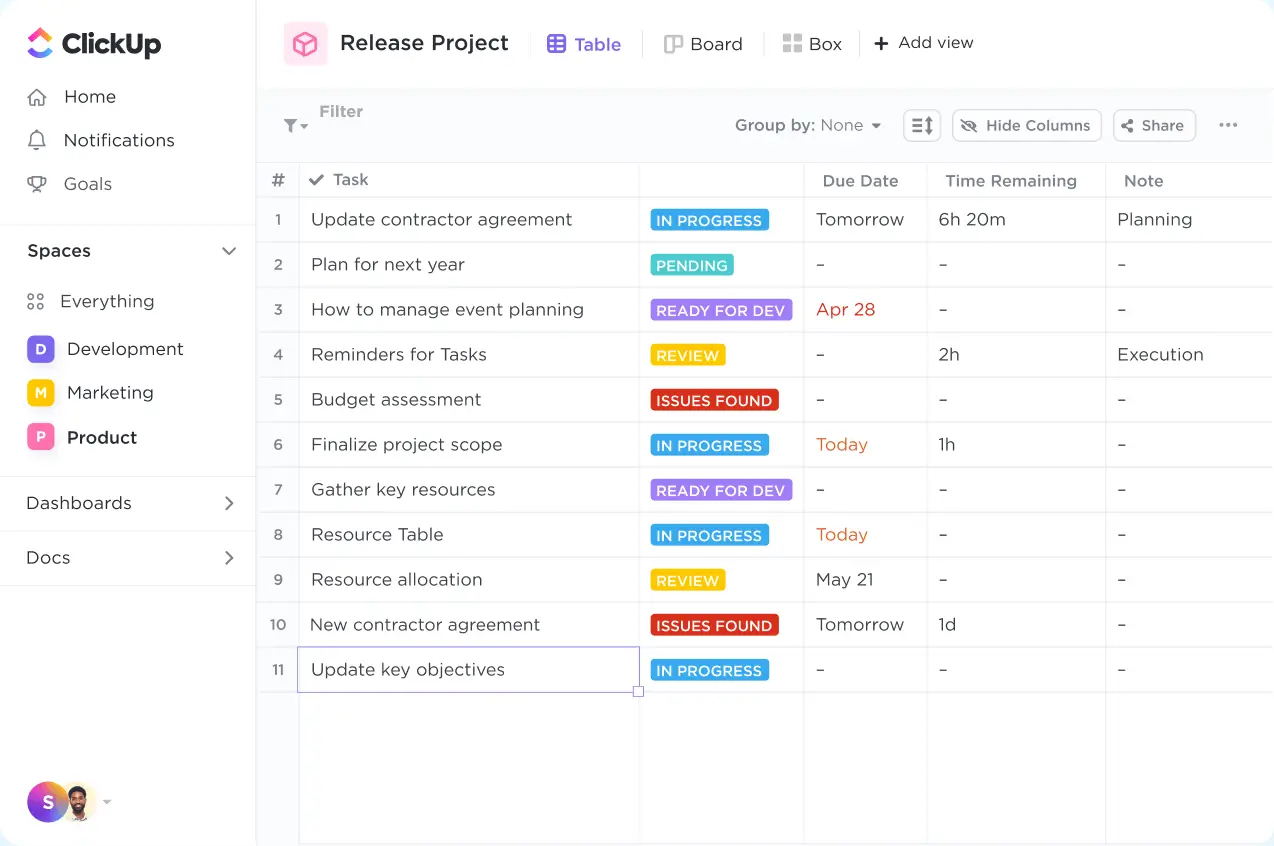
ClickUp is an AI work management platform for teams that need a more structured way to manage projects, tasks, docs, updates, and reporting in one place. Compared to Trello, it gives teams more ways to organize work beyond boards, with views, dashboards, automations, time tracking, and AI features to support complex workflows.
It’s a better fit for businesses that have started using Trello as a workaround for project management but now need clearer visibility, repeatable processes, and more control over how work moves across teams.
Pros and cons of using ClickUp
Pros:
- Flexible workspace: ClickUp lets teams structure work around different departments, projects, clients, workflows, and reporting needs.
- Strong for centralizing work: Teams can keep tasks, docs, conversations, goals, and updates in one place.
- Useful for process-heavy teams: ClickUp works well when teams need repeatable workflows, approvals, recurring tasks, sprint planning, or operational tracking.
- AI is built into the work context: ClickUp Brain connects to tasks, docs, chats, decisions, and connected apps, so AI can answer questions with more workspace context.
- Good value when teams use the full toolset: Its paid plans include many features that would often require separate tools, such as time tracking, dashboards, docs, chat, and automations.
Cons:
- Users often mention a learning curve, especially when setting up spaces, statuses, custom fields, views, and automations.
- Performance can be a pain point, with users reporting slow loading and lag during project navigation.
[.blog-callout]
✨ Teams that manage projects in ClickUp can use Softr to turn ClickUp tasks and lists into secure client portals, project trackers, dashboards, forms, or internal tools. The integration supports real-time, two-way sync, so teams can keep ClickUp as the source of truth while giving clients, partners, or internal users a cleaner, branded interface with role-based permissions. It’s especially useful when you want people to view or update relevant ClickUp data without giving them direct access to your ClickUp workspace.
[.blog-callout]
ClickUp key features
- Multiple project views: Teams can manage work in lists, boards, calendars, timelines, Gantt charts, dashboards, and other views depending on how they plan and track projects.
- Custom fields and statuses: Teams can adapt tasks to their own processes by adding fields, stages, priorities, owners, and workflow-specific details.
- Dashboards and reporting: ClickUp helps teams track project progress, workloads, goals, sprint activity, and performance across different projects.
- Docs and knowledge sharing: Teams can create docs inside ClickUp and connect them to tasks, projects, and team workflows.
- Native automations: Teams can automate repetitive actions like assigning tasks, changing statuses, sending updates, or moving work through a process.
- ClickUp Brain and AI agents: ClickUp’s AI layer can help summarize work, draft content, answer workspace questions, and support AI-powered workflows.
ClickUp pricing
Listed prices are based on annual billing.
- Free Forever plan available
- Unlimited: $7/user/month
- Business: $12/user/month
- Enterprise: Custom pricing
- Brain AI: $9/user/month
- Everything AI: $28/user/month
Verdict: ClickUp vs Trello
ClickUp is a better fit than Trello for teams looking for deeper project management, more workflow customization, advanced reporting, and AI-supported work management. The trade-off is that ClickUp takes more time to set up and can feel more cumbersome than Trello, especially for teams that just need a simple visual board.
3. Wrike — best for teams that need more structure than Trello can offer
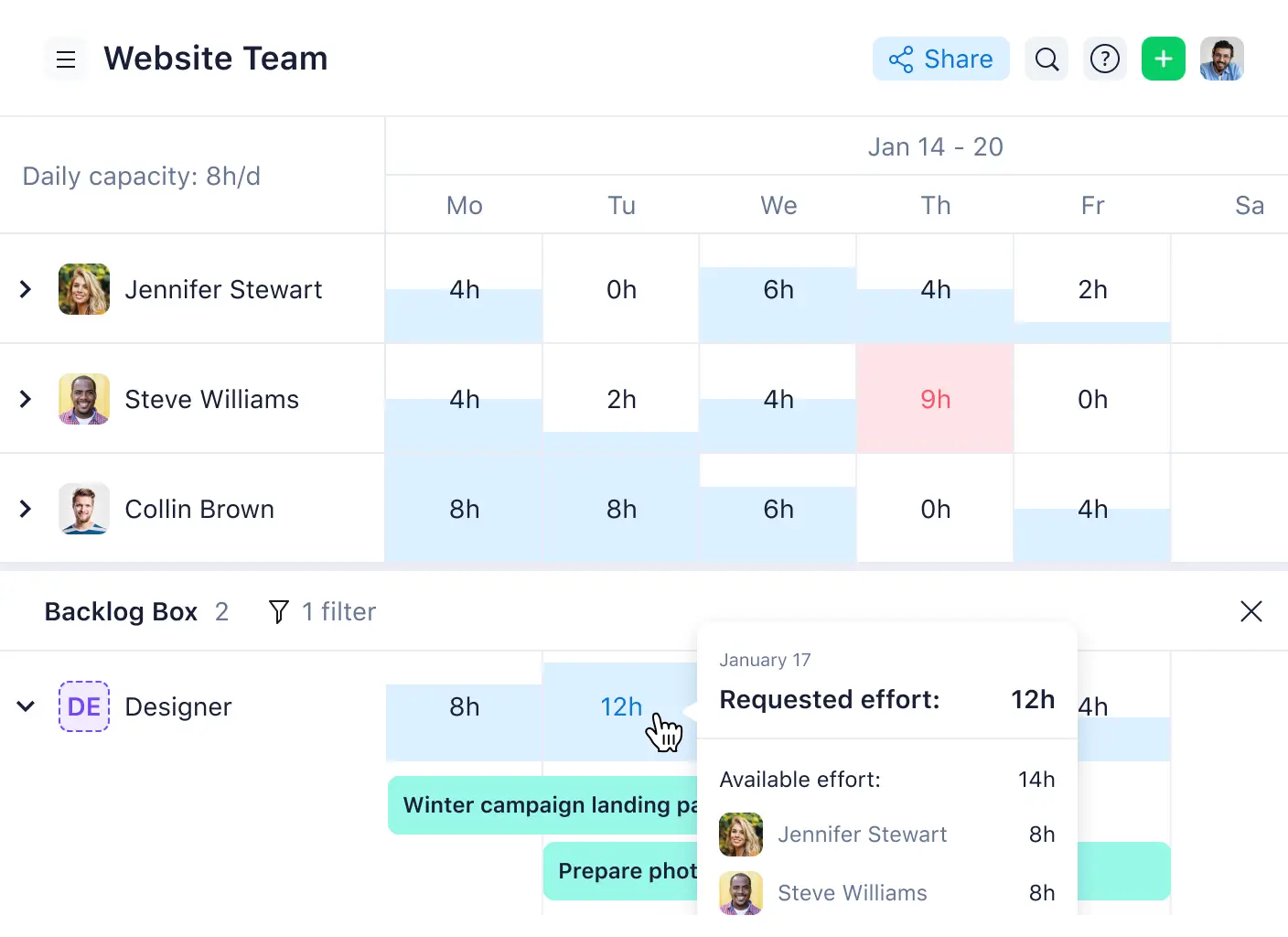
Wrike is a work management platform built for teams that need more control over complex projects. It comes with project planning features that allow you to visualize project timelines and dependencies and find bottlenecks before they become a problem. It’s way more structured than Trello.
That makes it a stronger fit for teams managing campaigns, client work, creative production, PMO workflows, or operational projects where boards alone start to feel limiting. However, Wrike takes a bit more setup and training than Trello, and users often point to its learning curve as one of the biggest drawbacks.
Pros and cons of using Wrike
Pros:
- Stronger project structure: Wrike supports more layered project planning than Trello, which helps teams manage tasks, folders, custom fields, timelines, and cross-functional workflows.
- Better reporting visibility: Wrike gives managers more ways to track project status, workload, and performance through dashboards, reports, and analytics.
- Useful for resource planning: Wrike is better suited for teams that need to understand capacity, workload, timelines, and ownership across multiple projects.
- Good fit for repeatable processes: Wrike works well for teams that need reusable workflows, project templates, request forms, and approval steps.
- Built for more governed teams: Wrike offers stronger admin, security, and workflow controls for teams that need more oversight than a simple task board can provide.
Cons:
- Wrike can feel heavy for teams coming from Trello or other lightweight task tools, especially when setting up custom workflows and reporting.
- The platform works best when someone owns the structure, permissions, dashboards, and process design.
- Teams that only need basic Kanban tracking may find Wrike more complex than necessary.
Wrike key features
- Custom workflows and fields: Wrike lets teams shape work around their own processes, statuses, and project data instead of relying on one fixed task format.
- Dashboards and reporting: Teams can create real-time views for project status, workload, progress, and performance across different workflows.
- Resource and capacity planning: Higher-tier plans support workload and capacity planning for teams that need to balance people and project demand.
- AI features: Wrike includes AI Essentials and AI Elite features across plans, with more advanced AI actions available in higher tiers.
Wrike pricing
Prices shown are billed annually.
- Free plan available
- Team: $10/user/month
- Business: $25/user/month
- Custom pricing for additional plans
Verdict: Wrike vs Trello
Wrike is a better fit than Trello if you need deeper project structure, reporting, resource planning, and workflow control. Trello is still easier and faster for simple task tracking, but Wrike makes more sense once boards become crowded and managers need clearer visibility across complex work.
4. Notion — best for project tracking with docs, wikis, and team knowledge in one workspace
.webp)
Notion is an AI workspace that brings together docs, wikis, databases, project tracking, meeting notes, calendars, mail, and search. Compared with Trello, it’s less of a simple Kanban board and more of a flexible workspace where teams can manage both their work and the context around it.
For teams outgrowing Trello’s board-first setup, Notion makes sense when tasks are tied to briefs, SOPs, research, campaign plans, meeting notes, or internal documentation. But there’s a trade-off here, since Notion takes more setup and workspace discipline. Without clear structure, it can become harder to navigate than a Trello board.
Pros and cons of using Notion
Pros:
- Flexible workspace: Notion lets teams shape pages, databases, and views around their own workflows instead of forcing everything into a fixed project management structure.
- Strong documentation layer: Teams can keep project context, meeting notes, SOPs, and internal knowledge close to the actual work.
- Better for connected planning: Notion works well when projects need linked databases, filtered views, templates, and shared team context.
- Useful AI direction: Notion’s AI features now support work like meeting notes, enterprise search, research, and custom agents for recurring tasks.
- Good for cross-functional teams: Marketing, product, ops, and leadership teams can use the same workspace without needing separate tools for docs and lightweight project tracking.
Cons:
- Notion gives teams a lot of freedom, so it takes more time to build and maintain a clean workspace than Trello.
- Pages, databases, templates, and permissions need clear ownership or the system can become hard to navigate.
- Teams that need deep dependencies, workload planning, advanced reporting, or strict operational controls may find it lighter than dedicated PM tools.
[.blog-callout]
✨ Turn your Notion workspace into a real operational app without rebuilding your data from scratch. With Softr’s Notion integration, you can turn Notion databases into client portals, internal tools, dashboards, and workflows with custom permissions, cleaner user experiences, and external access controls that go beyond Notion’s native workspace setup.
[.blog-callout]
Notion key features
- Databases with multiple views: Teams can track work in tables, boards, calendars, timelines, lists, and galleries depending on how they want to see the same information.
- Projects and task management: Notion supports project trackers, task databases, sprints, filtered views, and workflow automations for managing team work.
- Notion AI and Custom Agents: Teams can use AI for summaries, search, meeting notes, research, and recurring workflows that run on a schedule or trigger.
- Forms, publishing, and integrations: Notion supports forms, public pages, webhooks, API access, connected apps, and synced databases for tools like Jira, GitHub, Asana, and GitLab.
Notion pricing
Prices shown are billed annually.
- Free plan available
- Plus: $10/member/month
- Business: $20/member/month
- Enterprise: Custom pricing
- Custom Agents: $10 per 1,000 monthly Notion credits
Verdict: Notion vs Trello
Notion is a better Trello alternative for teams that need more than a visual task board, especially if project work depends on documentation and team knowledge. Trello is still the better fit for simple, fast Kanban-style task tracking where ease of setup matters more than flexibility.
5. Asana – best for multi-team project planning and reporting
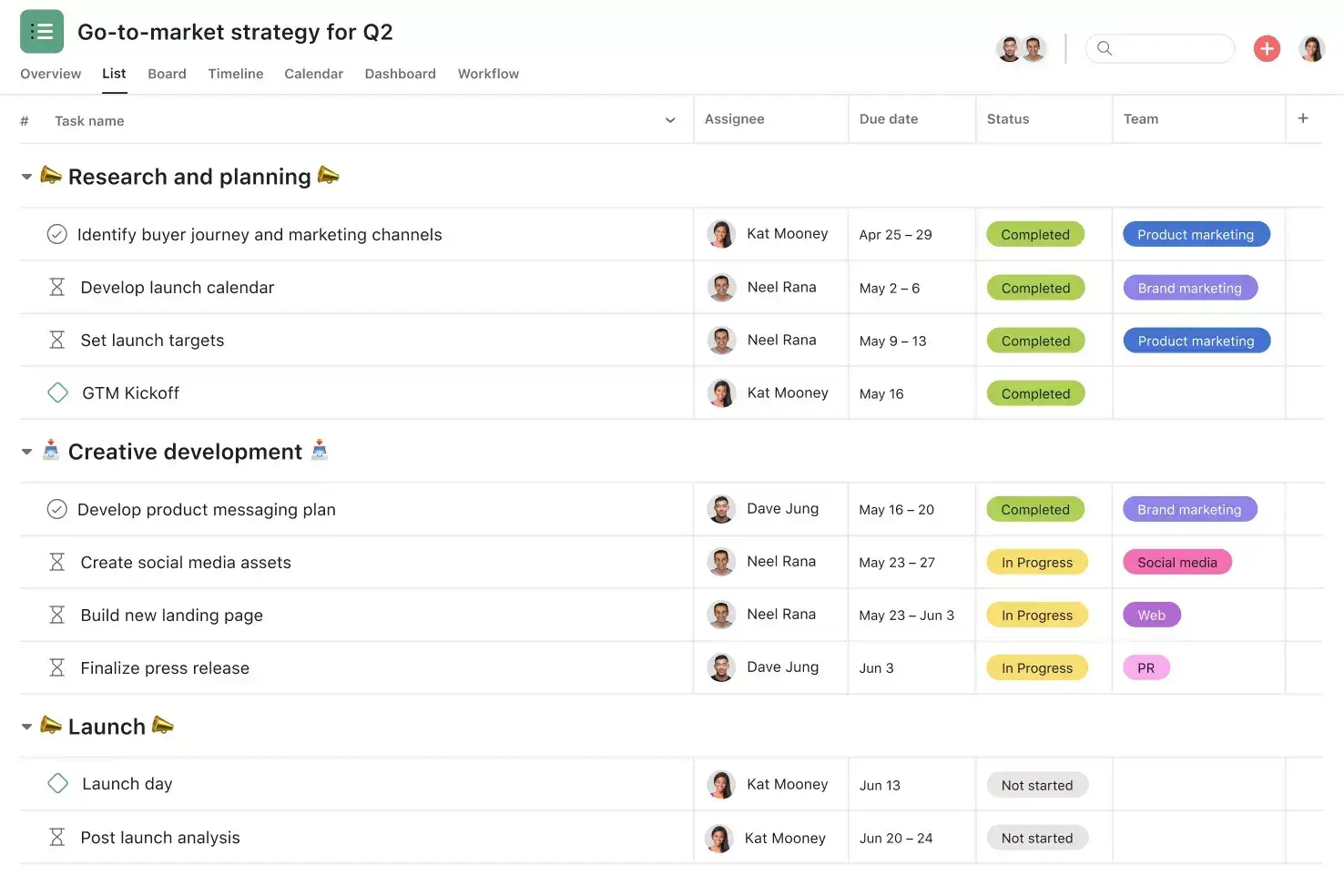
Asana is a work management platform. It’s built for tracking projects, tasks, owners, deadlines, dependencies, approvals, goals, and team workload across different views: lists, boards, calendars, timelines, and Gantt charts.
Asana is leaning heavily into AI-powered workflow management. AI Studio, AI Teammates, and smart workflow features are meant to help teams automate busywork, summarize progress, surface risks, and coordinate repetitive processes. That makes it a stronger fit than Trello for marketing, operations, product, and service teams managing ongoing work across multiple people or departments.
Pros and cons of using Asana
Pros:
- Strong project structure: Asana gives teams more control over deadlines, dependencies, approvals, portfolios, and workload than lightweight board tools.
- Clean team adoption: The interface is polished enough for non-technical teams, while still supporting more complex project workflows.
- Good cross-team visibility: Managers can track progress across projects, goals, and teams without relying only on individual task boards.
- Mature automation layer: Rules, templates, and AI workflows help reduce repetitive coordination work inside recurring processes.
- Useful AI direction: AI Studio and AI Teammates make Asana more relevant for teams that want AI to support workflow execution, not just task summaries.
Cons:
- Pricing can climb quickly as more users need access.
- Some of Asana’s strongest features, like portfolios, goals, workload, and advanced reporting, sit on higher plans.
- It’s still a project management tool, not a custom business app platform for portals, CRMs, inventory systems, or deeply tailored operational workflows.
Asana key features
- Multiple project views: Teams can manage the same work through list, board, calendar, timeline, and Gantt views.
- Dependencies and milestones: Asana helps teams map connected tasks and track important delivery points across a project.
- Portfolios: Managers can monitor multiple projects in one place and see status, ownership, and progress at a higher level.
- Goals: Teams can connect day-to-day work to broader company or department objectives.
- Workload view: Managers can see team capacity and rebalance work before projects stall.
- AI Studio and AI Teammates: Asana supports AI-powered workflows, summaries, task creation, and coordination inside team processes.
Asana pricing
Listed prices are billed annually.
- Personal: Free
- Starter: $10.99/user/month
- Advanced: $24.99/user/month
- Enterprise: Custom pricing
- Enterprise+: Custom pricing
Verdict: Asana vs Trello
Asana is a better fit than Trello for teams that need structured project management, reporting, dependencies, and cross-functional visibility. The trade-off is that it’s more expensive and heavier to manage, making Trello a stronger fit for simple visual task tracking.
Choose the right Trello alternative for your team
The best Trello alternative depends on what started breaking first in your project management flow. Some teams simply need better reporting and timelines. Others need deeper project structure, cross-team visibility, resource planning, or a way to collaborate externally without stitching together multiple tools and add-ons.
Tools like ClickUp, Wrike, Notion, and Asana can each solve a specific layer of that problem. But Softr stands out because it goes beyond project tracking itself. Instead of adapting your operations to a fixed workspace, you can build a project management system around the way your business already works. It includes a data structure, app logic, granular permissions, dashboards, authentication, hosting, and automations connected from day one.
If your team has outgrown Kanban boards and now needs a scalable operational system that supports both internal and external collaboration, Softr gives you the flexibility to build it without relying on developers or rebuilding everything from scratch.
Try the AI Co-Builder to build your custom project management system in minutes.
Frequently asked questions
What's the best Trello alternative for small teams?
Which Trello alternative is easiest to set up?
Do any of these tools support external client access?