


5 best spreadsheet alternatives to manage inventory in 2026
A spreadsheet tracks inventory until your catalog and team grow. These five spreadsheet alternatives add the structure inventory management actually needs.
Best spreadsheet alternatives to manage inventory at a glance
| Tool | Best for | Key features | Pricing | |
|---|---|---|---|---|
| Softr Databases | Building custom, no-code inventory systems with relational data, apps, and automation | Built-in relational database, no-code app builder, role-based permissions, AI agents, Ask AI, workflow automation, barcode scanning, 21+ data source integrations, PWA mobile app | Free plan available; paid plans start at $19/month | |
| Airtable | Flexible, no-code inventory databases you can customize to fit your workflow | Relational tables, multiple views, automations, AI Field Agents, revision history, portals for external collaborators | Free plan available; paid plans from $20/user/month | |
| monday.com | Visual, easy-to-use inventory tracking with flexible automations | Inventory template, multiple views, automations, dashboards, 200+ integrations, mobile app | Free for up to 2 seats; paid plans from $9/seat/month | |
| Zoho Tables | Flexible, no-code inventory tracking | Bidirectional relationships, multiple views, automations, forms, AI assistant, mobile app with OCR | Free plan available; paid plans from $4/user/month | |
| Baserow | Open-source, no-code database with self-hosting option | Relational tables, multiple views, automations, custom dashboards, self-hosting option, open API, AI assistant | Free plan available; paid plans from $10/user/month |
What to look for in a spreadsheet alternative for inventory
The right database for inventory depends on how complex your operations are, how many people need access to your data, and how much technical setup your team can handle. Here are some key features to prioritize:
- Intuitive interface: Your team should be able to use it from day one, whether it's a familiar rows-and-columns layout or a drag-and-drop builder.
- Real-time stock visibility: Stock counts should update instantly when items are received, sold, or moved, so everyone sees the same number.
- Relational data linking: When you update a supplier's price or a product's location, that change should automatically reflect in every connected order, report, and record.
- Multiple views: Grid, Kanban, calendar, and dashboard views let different teams see the same data in the format that works for them.
- Automations and alerts: You should be able to set up low-stock notifications, status updates, and reorder triggers without technical help.
- Access control and audit trails: Set roles and permissions for internal teams and external partners, with logs that show who changed what and when.
- Integrations and barcode scanning: Native connections to accounting and ecommerce tools, plus mobile barcode or QR scanning for receiving, picking, and transfers.
- Scalability: Check record, user, and location limits per pricing tier against where your business will be in a few months.
1. Softr Databases — best for building a custom, no-code inventory system with relational data and workflow automation
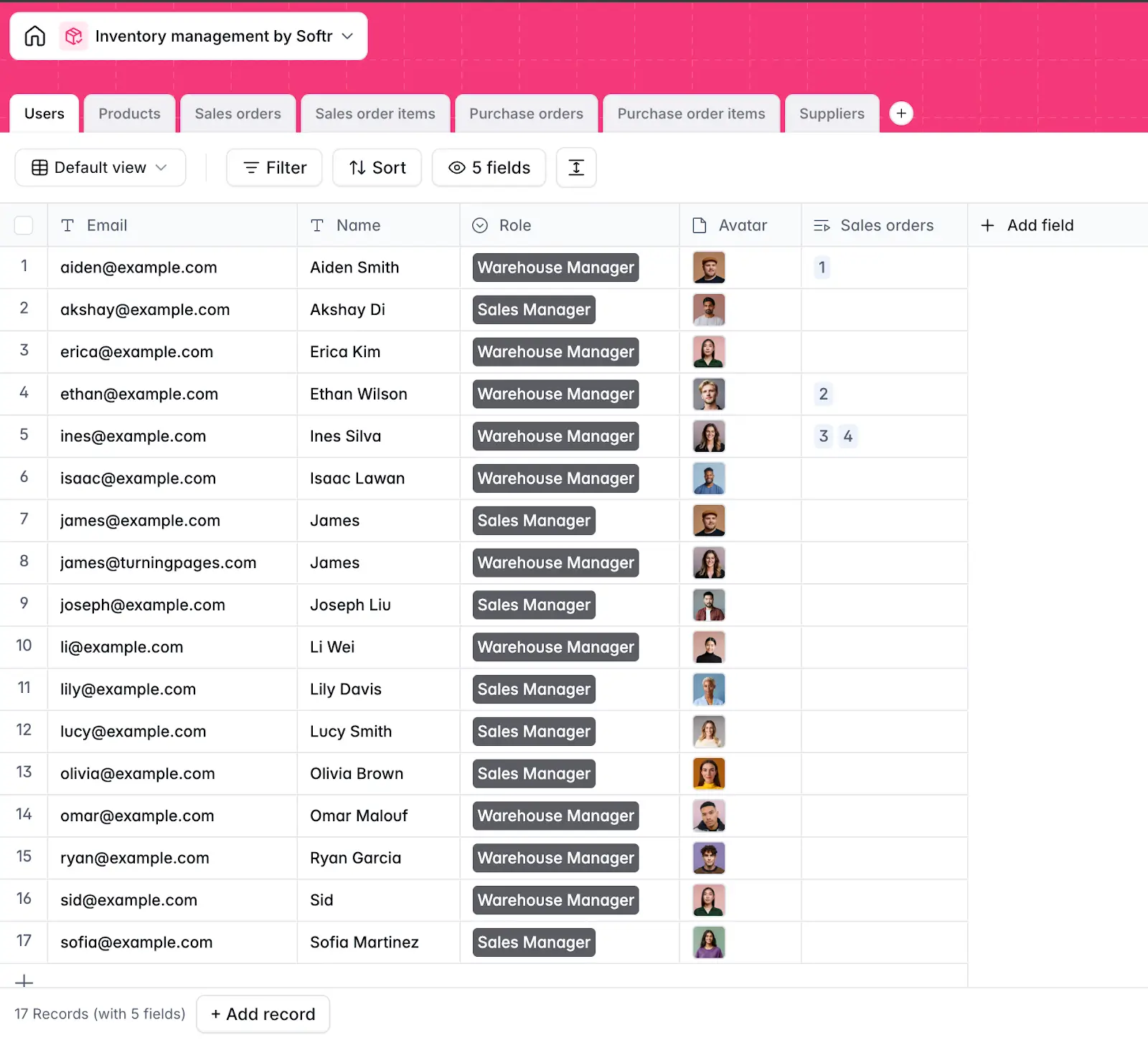
Softr Databases combines the familiarity of a spreadsheet with the power of a real relational database. You can structure and manage your inventory data using linked tables, custom views, formulas, and flexible field types without writing any code.
Start from scratch, generate a database with AI, or use the inventory management database template that comes pre-built with tables for products, suppliers, sales orders, purchase orders, and more. Then customize fields, adjust views, and add tables as your operations grow.
Use Softr's drag-and-drop builder to turn your data into a full-stack inventory app, order tracking pages, supplier directories, product catalogs, and portals for external vendors. Then set permissions to control what each user or team can see and do.
Database AI agents help you auto-fill fields, tag and classify products, clean up messy data, extract details from supplier invoices, and enrich records with web-sourced information. With Ask AI, your team can query live inventory data in natural language, like "What products are running low?" and get instant answers from the database.
Trigger actions using Softr Workflows when a record is created or updated, like alerts when stock drops below a threshold or automatic record updates when an order status changes. Build multi-step workflows with conditions, branches, and scheduling inside Softr, or extend them to tools like Slack and Airtable.
Softr Databases pros and cons
Pros
- Update a product, supplier, or order in one place and it reflects everywhere automatically.
- Your inventory data, app, workflows, and AI all live in one platform instead of separate tools stitched together.
- Native workflow automation eliminates the manual updates and repetitive data entry that slow teams down in spreadsheets.
- No per-seat pricing, which means warehouse staff, sales reps, suppliers, and partners can all access the system without costs scaling with every new user.
- Handles large datasets without the slowdowns that hit spreadsheets once you pass a few thousand rows.
- Lets you connect existing inventory data from Airtable, Google Sheets, or SQL databases without starting over.
Cons
- No native ecommerce marketplace integrations to platforms like Shopify, Amazon, or eBay, though you can connect via REST API, Zapier, or Make.
Softr Databases key features
- Relational database: Create linked tables for products, suppliers, orders, and locations with lookup fields, rollups, and formulas.
- No-code app builder: Build inventory dashboards, product catalogs, order management pages, and supplier portals using drag-and-drop blocks. Deploy on desktop and mobile.
- Role-based permissions: Set up user groups for warehouse managers, sales staff, admins, and external partners. Control who can view, edit, or manage specific records and pages.
- Native workflow automation: Automate stock alerts, order status updates, supplier notifications, and record syncing with multi-step workflows. Add conditions, branches, and scheduling for complex flows.
- Database AI Agents: Auto-fill, classify, and clean inventory data. Agents run automatically when records are created or updated, or manually on demand.
- Ask AI: Add an AI assistant to your inventory app that reads live data and answers questions about stock levels, orders, and performance.
- Barcode scanning: Scan item barcodes to log stock coming in and going out. Quantities update automatically in your database.
- Progressive Web App (PWA): Turn your inventory app into a downloadable mobile app in one click. Your team can access and update stock from any device.
- Enterprise-grade security: SOC 2 and GDPR compliant, with SSO, visibility rules, and access controls at every level.
- Integrations: Connect to 21+ sources including Airtable, Google Sheets, SQL databases, and Notion. Use the REST API for custom connections. Extend workflows to Slack and other tools via native integrations, Zapier, or Make.
Softr Databases pricing
Softr Databases are available on all plans with record limits that scale as you upgrade.
- Free: Unlimited apps, with access to Softr Workflows and Softr Databases, 5 app users, 5,000 database records, and 5 AI credits.
- Basic ($19/month): Unlimited apps with 42+ integrations, Team: 5 + Client: 5 app users, 50,000 database records, and 10 AI credits.
- Pro ($99/month): Unlimited apps with 45+ integrations and custom code, Team: 10 + Client: 50 app users, 500,000 database records, and 50 AI credits.
- Business ($329/month): Unlimited apps with 52+ integrations, Team: 30 + Client: 100 app users, 1M database records, and 100 AI credits.
- Enterprise: Custom pricing with SSO, dedicated success manager, and priority support.
Who Softr Databases is best for
Softr Databases is best for any size warehouse-based businesses looking for an enterprise-ready, no-code database and application platform to manage data and apps. This includes retailers, ecommerce businesses, wholesalers and distributors, light manufacturers, and field service teams that need to manage stock, orders, and suppliers in one place without coding, hiring developers, or paying per seat.
2. Airtable — best for flexible, no-code inventory databases you can customize to fit your workflow
.webp)
Airtable lets you build a custom inventory database with linked records, multiple views, and automations without writing code. Connect products to suppliers, locations, and orders across tables, so updates made once reflect everywhere automatically.
You can also build custom interfaces on top of your data with Interface Designer, so each team gets a view tailored to their role. AI-powered Field Agents run across thousands of records to classify products, research suppliers, or generate content. And Omni, Airtable's conversational AI builder, lets you create apps, automations, and interfaces by describing what you need.
Airtable pros and cons
Pros
- Lets you build a custom inventory tool on top of your existing data without code
- Flexible enough to start as a simple tracker and grow into a complete inventory system, with automations, integrations, and AI support for repetitive work.
- Connects directly with tools like Salesforce, Slack, Shopify, and Stripe, and extends to 1,000+ apps via third-party automation tools like Zapier and Make.
Cons
- Barcode scanning exists in the mobile app but it’s limited. Teams doing high-volume receiving, picking, or transfers have to use third-party extensions.
- Per-seat pricing scales with your team, record limits fill up fast as your catalog grows, and handling large datasets requires HyperDB (on the Enterprise plan).
- Granular permissions are complex to configure, and sharing data with external users like suppliers requires higher-tier plans and paid add-ons.
Airtable key features
- Relational tables: Link records across tables to avoid duplicate data—connect SKUs to suppliers, warehouses, and purchase orders in one system.
- Real-time sync: Any update made in one place automatically reflects across every table, view, and workflow tied to that record.
- Multiple views: Switch between grid, Kanban, calendar, gallery, Gantt, and timeline views so each team can work in the format that fits them.
- Airtable Automations: Set triggers and actions to update records, send notifications, or move data between tables automatically.
- Field Agents: AI agents that run across thousands of records to automatically retrieve and generate the data you need directly inside your app.
- Revision history and audit trail: See who changed what and when at the record level, so you can trace inventory discrepancies back to a specific edit.
- AI-powered demand forecasting: Anticipate what customers need next so you can plan stock levels and time launches more accurately.
Airtable pricing
- Free: 1,000 records per base, up to 5 editors, 100 automation runs per month.
- Team: $20/user/month (billed annually), 50,000 records per base, 25,000 automation runs, Gantt and timeline views.
- Business: $45/user/month (billed annually), 125,000 records per base, 100,000 automation runs, two-way sync, admin panel, SSO.
- Enterprise Scale: Custom pricing, 500,000 records per base, HyperDB (up to 100M records), advanced security and admin controls.
Who Airtable is best for
Airtable is a strong fit for operations, product, and retail teams that want to build custom workflows, link data across tables, and automate routine tasks.
3. monday.com — best for teams that want a visual, easy-to-use inventory tracker with flexible automations
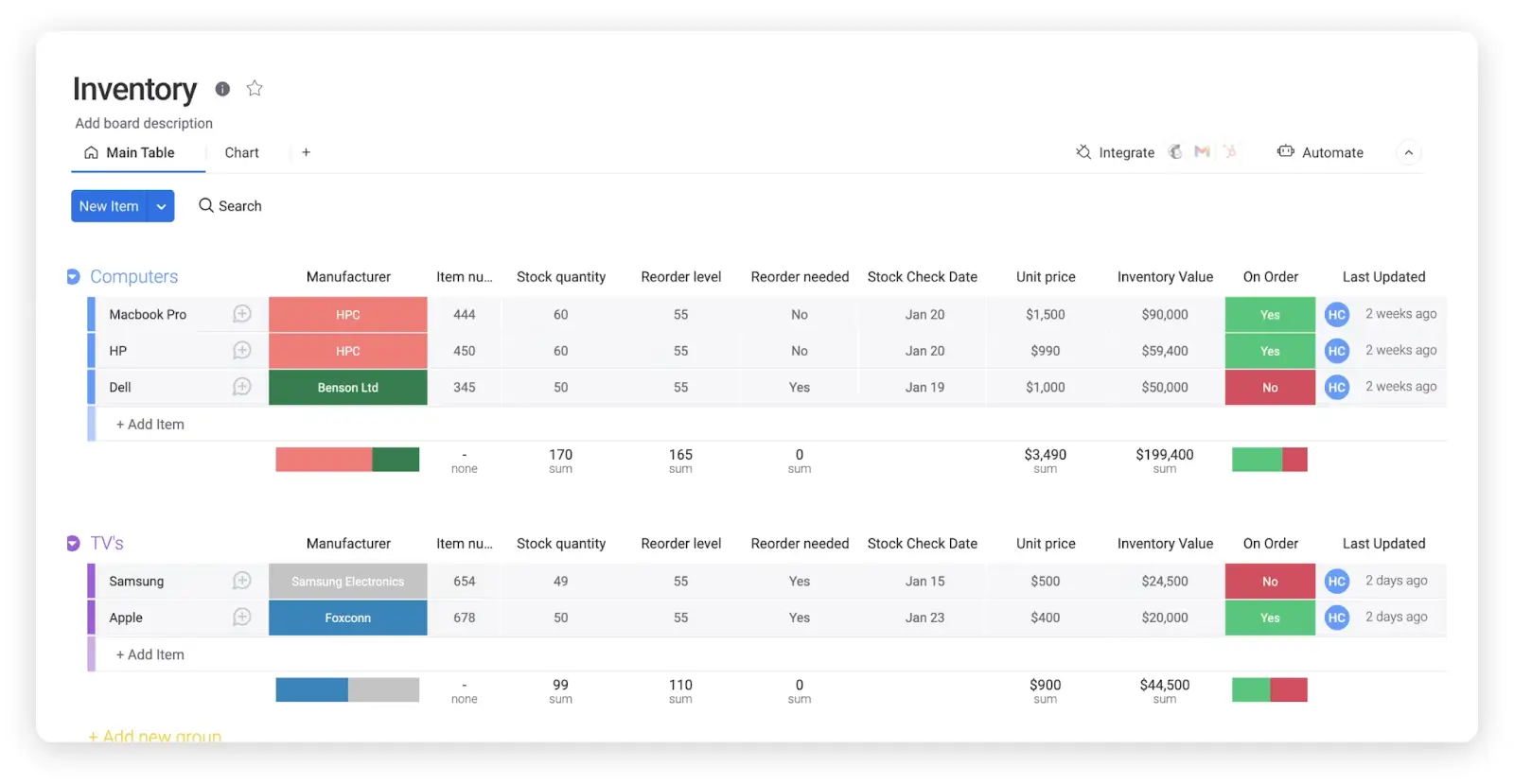
monday.com brings inventory tracking into a visual, color-coded workspace most teams can pick up without training. Track stock levels, orders, and supplier details across customizable boards, set up automations for alerts when inventory needs attention, and import your existing spreadsheet data in a pre-built inventory template. If you need more inventory-specific functions, add apps from the monday.com marketplace.
monday.com pros and cons
Pros
- Easy-to-read boards make it simple to see what’s in stock and what needs attention at a glance.
- Automations send low-stock alerts and status updates without technical help.
- Integrations that connect monday.com with other tools your team already uses.
Cons
- It’s a flexible work platform, not a full inventory system, so you may need extra setup to match how dedicated inventory tools work.
- Some inventory automations are harder to set up than they appear and require higher-paid tiers.
- Using monday.com as the main database for a website inventory can hit API rate limits. You may need a separate database behind the scenes.
monday.com key features
- Inventory template: Pre-built board for tracking products, stock quantities, reorder points, vendors, and order status—customizable to fit your workflow.
- Multiple views: Switch between table, Kanban, calendar, Gantt, and chart views so different teams can see inventory data in the format that works for them.
- Automations: Trigger-and-action workflows to send low-stock alerts, update statuses, notify team members, or move items between boards automatically.
- Dashboards: Pull live data from your boards into visual dashboards for a real-time overview of stock levels and orders.
- 200+ integrations: Connect with QuickBooks, Shopify, Salesforce, Slack, Google Workspace, and more. Extend further via Zapier and Make.
- Mobile app: iOS and Android apps for accessing and updating boards on the go.
monday.com pricing
- Free: Up to 2 seats, up to 3 boards, no automations or integrations.
- Basic: $9/seat/month (billed annually), unlimited items and viewers, 5GB storage, dashboards from 1 board.
- Standard: $12/seat/month (billed annually), 250 automation and integration actions, gantt and calendar views, guest access, dashboards from 5 boards.
- Pro: $19/seat/month (billed annually), 25,000 automation and integration actions per month, private boards, formula column, dashboards from 20 boards.
- Enterprise: Custom pricing, enterprise-scale automations and integrations, multi-level permissions, advanced security and governance.
Who monday.com is best for
monday.com is a strong fit for teams moving off spreadsheets who want a clear, shared inventory tracker with status updates, simple alerts, and dashboards.
4. Zoho Tables — best for small teams that want a flexible, inventory tracker
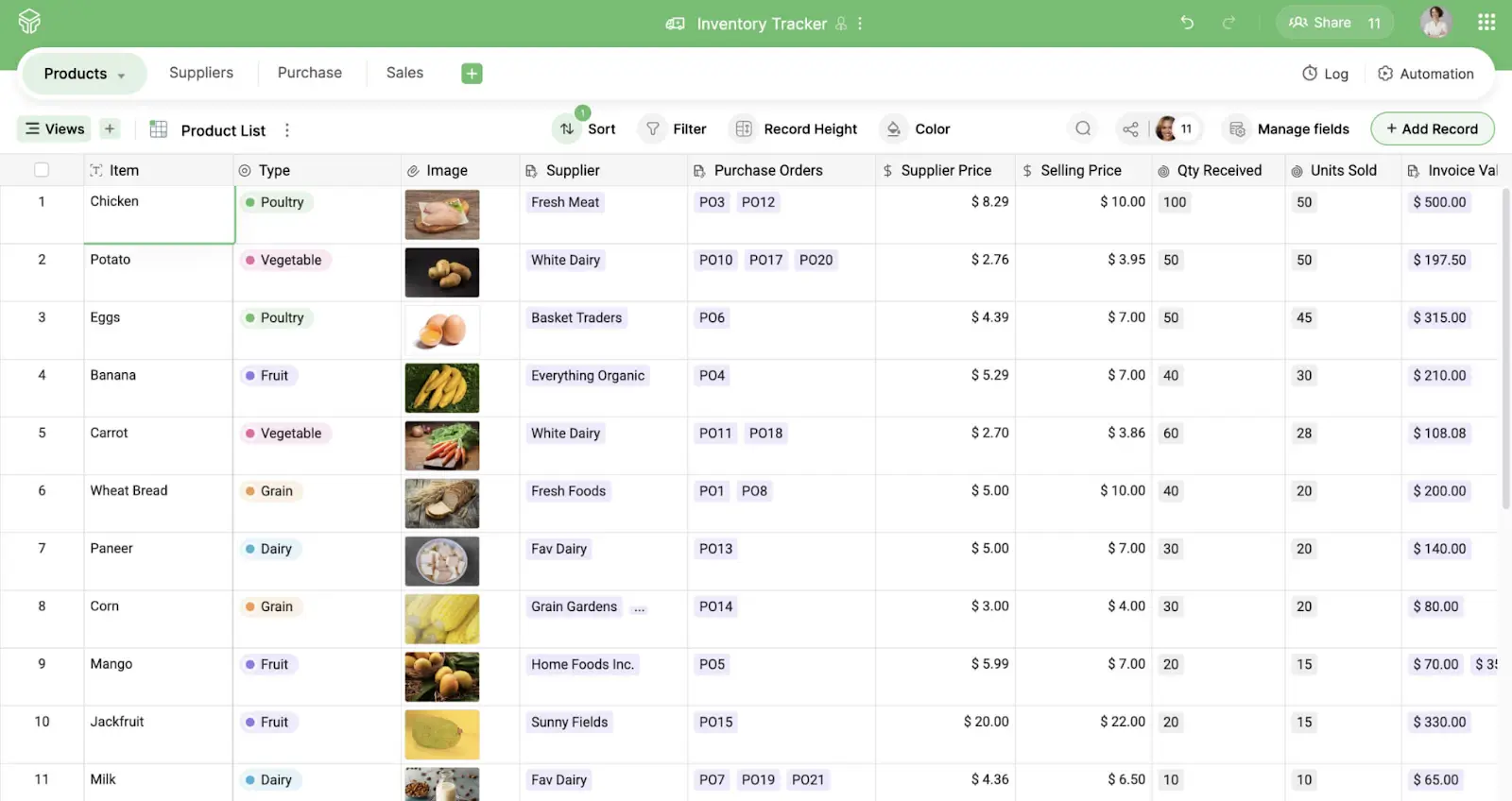
Zoho Tables is an inventory tracking database that lets you organize your inventory data, link related tables, set up automations, and collaborate with your team without writing a single line of code.
You can get started using the pre-built inventory tracker template, or build your own from scratch by describing what you need to Zia, Zoho's built-in AI assistant.
Zoho Tables pros and cons
Pros
- Data changes in one table automatically updates in any linked table, so your product, vendor, and order data always stay in sync.
- If your needs grow beyond what Zoho Tables can handle, you can connect to Zoho Inventory within the same Zoho ecosystem using Zoho Flow.
- Flexible access controls, so you share only what each person needs to see, whether that is the full workspace, a single table, or a specific view.
Cons
- It works well as a flexible tracker, but teams that need barcode scanning, serial number tracking, and advanced features will need to move to Zoho Inventory.
- Automation is limited to simple trigger-and-action logic.
- Zoho Tables works best within the Zoho ecosystem. If your business runs on tools outside of Zoho, connecting everything takes more effort.
Zoho Tables key features
- Inventory tracker template: Pre-built template for tracking products, stock levels, vendors, and orders. Customizable to fit your workflow.
- Bidirectional relationships: A change in one table, like a product update, automatically reflects in connected tables like vendors or purchase orders.
- Multiple views: Includes grid, Kanban, calendar, and gallery views.
- Automations: Trigger-and-action rules for low-stock alerts, record updates, or team notifications.
- Forms: Share a form link and responses go directly to your table. Useful for collecting data from suppliers or warehouse staff without giving them full access.
- Access controls: Set permission levels per collaborator to protect sensitive inventory data.
- Zia AI assistant: Describe your inventory setup in plain language and Zia creates the tables, sample data, and linked records for you.
- Mobile app: iOS and Android with OCR support for scanning physical documents and updating records on the go.
Zoho Tables pricing
- Free: Up to 2 users, 5,000 records per base, and 3 automations per base.
- Professional: $4 per user per month (billed annually) Starts from 3 licenses, 50,000 records per base, and 25 automations. 15-day free trial available.
Who Zoho Tables is best for
Zoho Tables works well for teams in the Zoho ecosystem who want a flexible, no-code inventory tracker. If you need barcode scanning, serial number tracking, or multi-location warehousing, connect Zoho Inventory and Zoho Tables via Zoho Flow.
5. Baserow — best for teams that want an open-source, no-code database they can self-host or use in the cloud
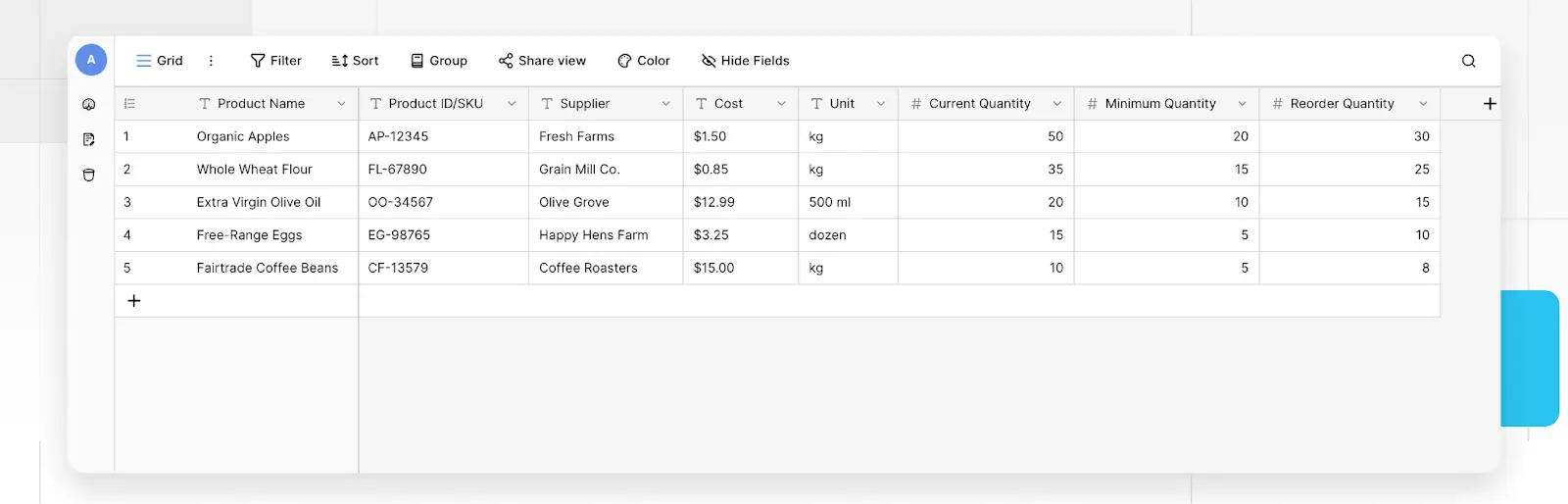
Baserow is an open-source no-code database that lets you build tables, link records, create views, and set up automations without writing any code. You can set up linked tables for products, purchase orders, and sales orders, then use views and automations to track stock levels, send low-stock alerts, and monitor delivery dates.
Baserow pros and cons
Pros
- Open-source and self-hostable with no row, storage, or API limits. Teams that need full control over their data can run Baserow on their own infrastructure.
- Relational database structure links inventory, purchase orders, sales orders, and vendor records across tables without duplicating data.
- Free plan includes unlimited databases and automations
Cons
- No inventory template. You build from scratch, which takes more setup time.
- Kanban, calendar, and survey views require higher-tier plans.
- Fewer native integrations.
Baserow key features
- Relational tables: Link products, purchase orders, sales orders, and vendor records across tables. Changes reflect automatically in connected tables.
- Multiple views: Grid, form, gallery, Kanban, calendar, survey, and timeline views for managing product data, tracking order status, and collecting data from suppliers.
- Automations: Unlimited runs per month while in beta. Set triggers for low-stock alerts, record updates, or team notifications.
- Custom dashboards: Pull data from multiple tables to track stock levels, orders, and key inventory metrics in real time.
- Self-hosting: Run Baserow on your own server with unlimited rows, storage, and API requests.
- Open API: Connect to external tools using the REST API and webhooks.
- AI assistant (Kuma): Describe what you need and Kuma builds your database structure.
- Data import/export: Import from CSV, XML, and JSON. Export to CSV, XML, JSON, Excel.
Baserow pricing
Cloud plans (billed yearly):
- Free: $0, unlimited databases, 3,000 rows per workspace, 2GB storage.
- Premium: $10 per user/month, 50,000 rows per workspace, 20GB storage.
- Advanced: $18 per user/month, 250,000 rows per workspace, 100GB storage, role-based permissions, audit logs.
Self-hosted plans:
- Open source: Always free, unlimited rows, storage, and databases.
- Premium (self-hosted): $10 per user/month, adds AI features.
- Advanced (self-hosted): $18 per user/month, adds role-based permissions, SSO, audit logs, and data sync.
Who Baserow is best for
Baserow works well for technical teams or data-conscious organizations that need a flexible, open-source database they can self-host and fully control.
Which spreadsheet alternative is best for managing inventory?
The right alternative depends on your inventory operations:
- For multiple view types and a large integration ecosystem, Airtable offers the most flexibility.
- For a visual tracker with status boards and alerts, monday.com gets teams moving quickly.
- For teams already in the Zoho ecosystem, Zoho Tables fits in without adding another vendor.
- For self-hosting and full control over your data, Baserow is the strongest option.
- For a relational database that keeps your inventory data structured, connected, and easy to manage without code, try Softr Databases.
With Softr, you can turn that database into a full inventory app with dashboards, supplier portals, workflow automation, AI agents, barcode scanning, and role-based permissions, all in one platform with no per-seat pricing.
Try Softr for free and start building your inventory system today.
Frequently asked questions
Which software is best for inventory management?
What can I use as a database for inventory instead of a spreadsheet?
Can I use Google Sheets for inventory management?


