The 6 best field service management software in 2026



[.blog-callout]
✨ TL;DR:
- The best field service management software gives businesses one place to manage scheduling, dispatching, work orders, invoicing, and customer communication. This way, your field team has the details they need on every job, and your office team always knows what’s happening on site.
- This guide compares six of the best field service management platforms—Softr, Jobber, Housecall Pro, SimplyDepo, Workiz, and Zoho FSM—based on pricing, key features, and the type of service business each fits best.
- Softr is the best overall pick for building a field service management app that fits your team’s workflows with AI.
[.blog-callout]
You know the pain of juggling multiple tools, and sometimes even paper forms, to manage work orders, customer messages, and payments.
Schedules get mixed up, jobs get delayed, and those delays can cost you business. Meanwhile, you and your team spend so much time on admin across different tools that you can’t take on new work and grow your revenue.
The right field service management software helps you fix that. It pulls job details and customer records into one place, so your team stays organized and keeps the business growing.
In this guide, we compare the best field service management software tools in 2026—covering features, pricing, and use cases—so you can pick the one that matches your team's goals and workflows.
Best field service management software at a glance
| Tool | Best for | Key features | Pricing |
|---|---|---|---|
| Softr | Teams of all sizes that need a customizable AI field service system | AI app builder, database, permissions, workflows, integrations, Ask AI | Free plan; paid plans start at $49/mo |
| Jobber | Small to mid-sized home service teams with simple, structured workflows | Scheduling, quotes, invoices, payments, Client Hub, reviews, campaigns | 14-day free trial; paid plans start at $49/mo |
| Housecall Pro | Solo operators and growing teams that want a tool with built-in workflows and AI support | Scheduling, estimates, payments, customer portal, reviews, AI tools | 14-day free trial; paid plans start at $59/mo |
| SimplyDepo | CPG field sales and retail execution teams | Mobile field sales, route planning, CRM, order management, retail execution, sales reporting | 30-day free trial; pricing by request |
| Workiz | Small to mid-sized teams that rely heavily on calls, lead tracking, and fast dispatching | Calls, texts, dispatching, lead tracking, AI answering, source tracking | Pricing varies; some plans require a quote |
| Zoho FSM | Small teams that want structured workflows in the Zoho ecosytem | Customer records, assets, work orders, scheduling, mobile app, invoices | Free plan; paid plans start around $25/mo |
What is field service management software?
Field service management (FSM) software helps you manage the full job lifecycle in one place, from online booking and estimates to scheduling, dispatching, customer communication, invoicing, payments, reviews, and follow-ups.
Instead of digging through paper folders, spreadsheets, group chats, and one person’s memory to confirm job details, your office and field teams can work from the same system. Dispatchers can see who’s assigned to each job, technicians can check the job address, customer notes, and work history before they arrive, and office staff can track updates without calling around for information.
Common industries that use FSM software include HVAC, plumbing, electrical, transportation and logistics, garage door, lawn care, pest control, locksmith, appliance repair, and junk removal.
What I look for in field service management software
The best field service management app depends on your team size, how your workflows are set up, and how complex your day-to-day operations are. Here are the key features to prioritize:
- Scheduling and dispatching: A drag-and-drop dispatch board with calendar views and the ability to filter technicians by location, skill, or job type.
- Mobile access: An app or mobile-friendly portal where technicians can view job details and share updates, with offline access for areas with poor signal.
- Work order management: A system to create, assign, and track work orders from request to completion.
- Customer communication: Features for sending automatic reminders and follow-ups, with two-way messaging so customers can reply directly.
- Quotes and estimates: Go for tools that let you create estimates, send them to customers, and turn approved quotes into jobs.
- Invoicing and payments: On-site invoicing, mobile payment collection through credit card or ACH, and direct sync with accounting tools you use.
- Customer database and job history: A single record for every customer that the whole team can easily access.
- Reporting and dashboards: Views that help you track job status, technician performance, revenue, missed appointments, and other key metrics.
- Workflow automation: Automations for reminders, status updates, approvals, follow-ups, and internal notifications.
- Integrations with the tools you already use: Native connections to payment, phone, and marketing tools, plus Zapier or REST API access.
- Role-based user permissions: Custom access levels for dispatchers, technicians, office staff, and managers.
1. Softr — best for teams that need a fully customizable AI field service system
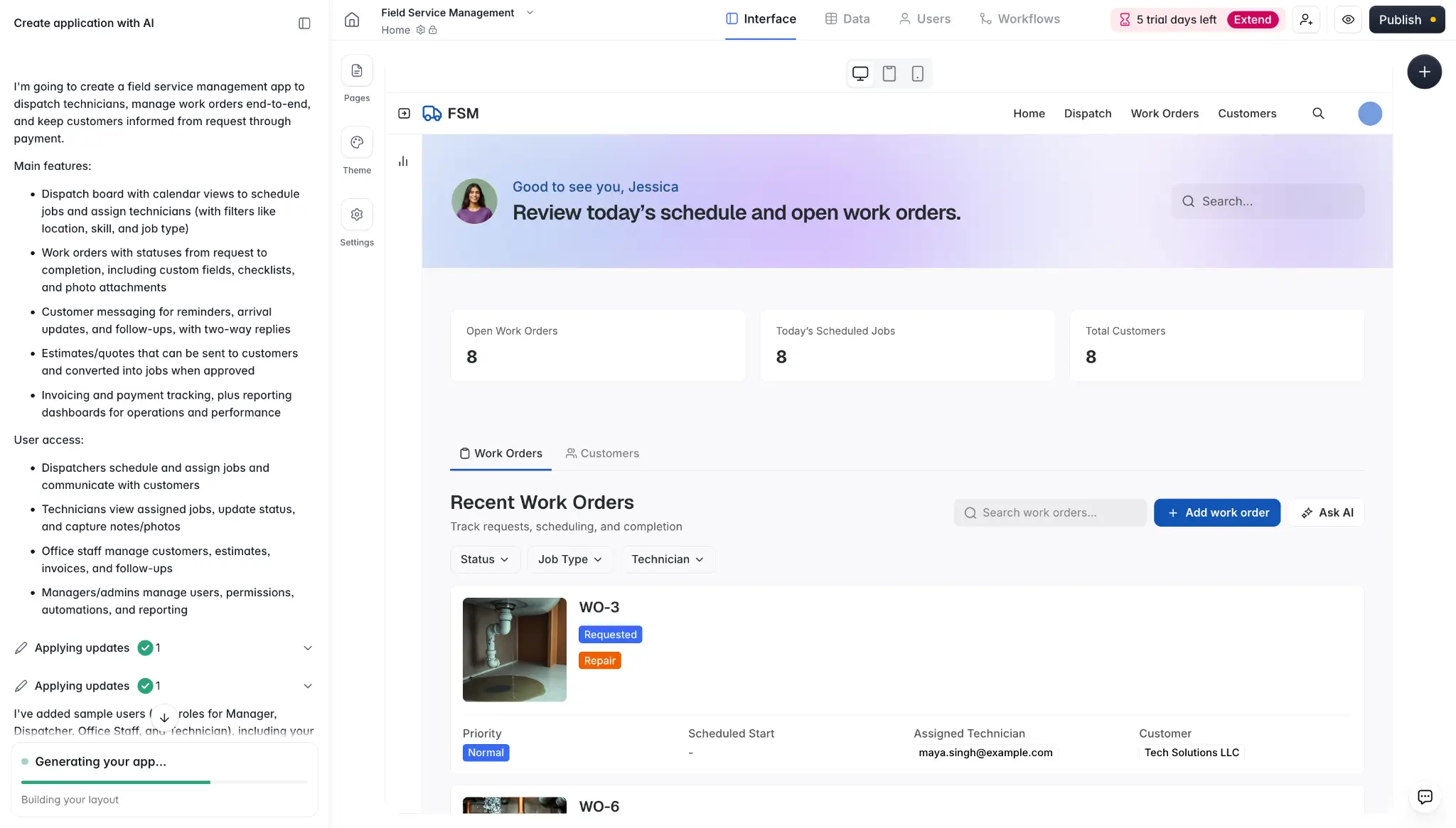
Softr is an AI-native no-code platform that lets you build a custom FSM tool around how your business actually runs, instead of adapting your process to a prebuilt tool. Rather than stitch together separate apps for scheduling, work orders, customer data, and automation, you can manage everything in one place.
Just describe how you want your field service system to work in plain English, and Softr's AI Co-Builder generates a fully functional app in minutes, with pages, a database, user permissions, and core logic already wired up.
Hosting, authentication, encryption, and security controls are also handled for you, so you don’t have to set up or manage the backend yourself.
Once the app is generated, you can the visual editor to make changes without spending AI credits: like adding a Kanban board for tracking job status, a calendar view for scheduling jobs, or charts for tracking technician performance, completed jobs, and revenue.
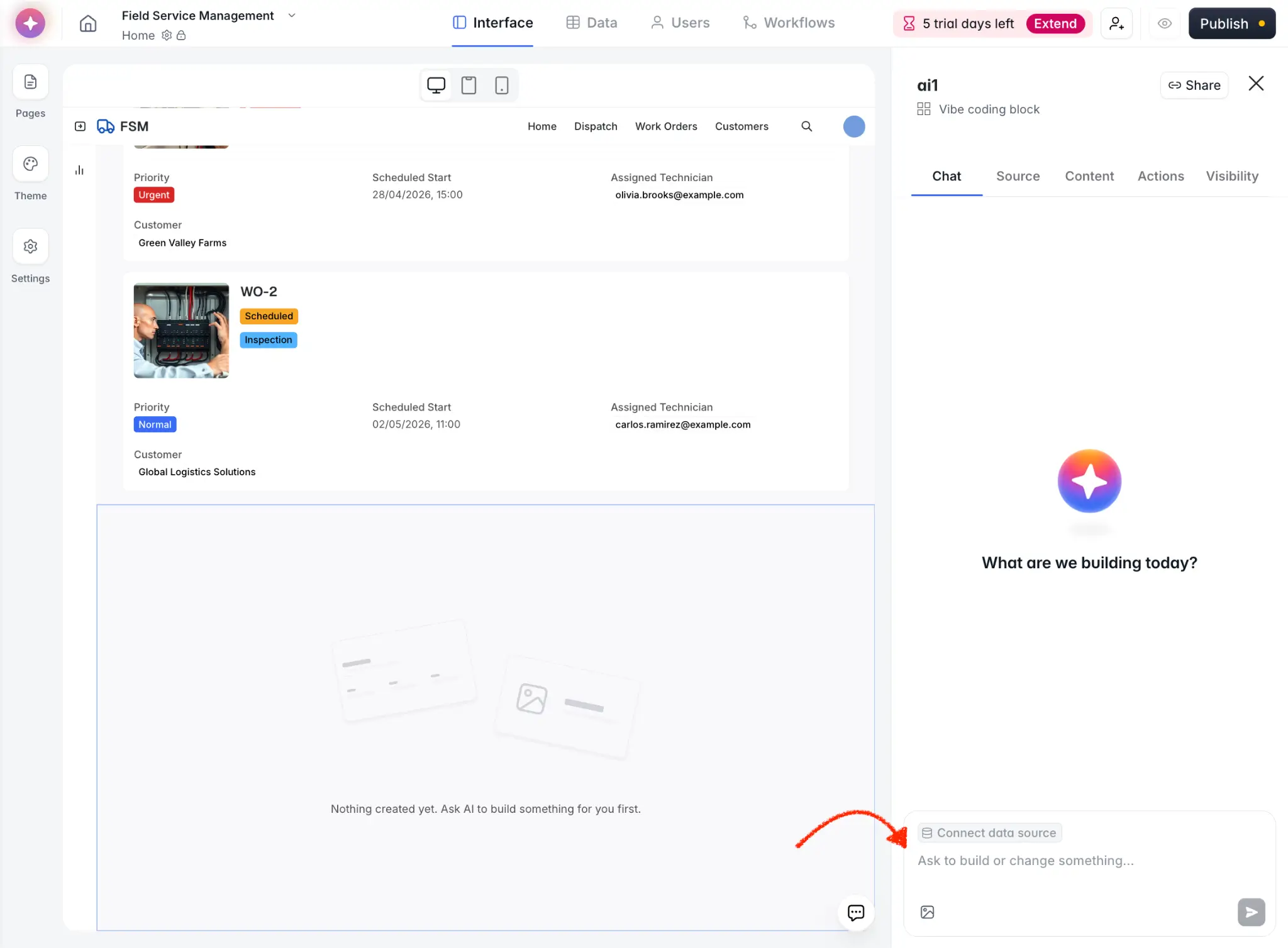
Or use the Vibe Coding block to add custom field service management features that Softr’s native blocks don’t support — for example, a drag-and-drop scheduling board, audio recording for status updates, or a bulk document uploader.
For your data, you can:
→ Store everything in Softr's built-in relational database.
→ Connect tools you already use, like Airtable for route schedules, Notion for job checklists, or SQL databases for fleet information.
→ Combine multiple sources in your app, so your team can work from one place. For example, pull customer records from HubSpot, store work orders and job photos in Softr Databases, and sync invoices to QuickBooks through Zapier.
You can also add AI agents in your database to automatically categorize jobs, summarize technician notes, or enrich records as new information is added.
Use Softr Workflows to automate repetitive tasks directly in your field service app. For example, a transportation company could set up triggers that send "on my way" texts when a driver starts a route or alert dispatchers when a delivery is marked complete.
Pros and cons of Softr
Pros
- Flexibility to build a platform around your own processes, job types, approval steps, and team roles that you can update as your process evolves.
- One platform for your core operations, so you don’t need separate tools to manage schedules, work orders, customer data, workflows, and team access.
- No traditional per-user pricing, so you can add more dispatchers, technicians, office staff, or clients without your cost increasing for every person you invite.
- Granular role-based permissions, so you can control what dispatchers, technicians, managers, office staff, or customers see and do inside the app.
- Customer portal built in, so you can give clients their own login to view jobs, approve quotes, pay invoices, and message your team.
Cons
- Requires extra setup for features like live GPS tracking, since these need to be connected through third-party integrations or REST API.
- Not ideal if you want a ready-made FSM tool with prebuilt industry workflows out of the box. However, it’s highly customizable.
Softr key features
- AI Co-Builder: Generate a working field service management app from a plain language prompt in minutes.
- Scheduling and dispatching: Build a job scheduling calendar or a custom dispatch board with technician filters and status updates.
- Work order management: Build forms to create, assign, and track work orders, with uploads and updates syncing to your database in real time.
- Quotes, invoices, and payments: Build quote and invoice workflows, accept online payments, and sync data to your accounting tools.
- Dashboards and reporting: Build dashboards that pull from your live data to track critical metrics like completed jobs and technician performance.
- Customer portals and two-way messaging: Give customers a self-service portal to view jobs, approve quotes, pay invoices, and contact your team.
- Data management: Store or connect customer records, work orders, invoices, and other job data in one place, with two-way data sync.
- Ask AI: Let your team ask questions in plain English and get answers from live job data.
- Role-based permissions: Control what each user can see and do at the page, block, or action level.
- Mobile access (PWA): Give technicians a mobile-friendly version of your app on their phones, no separate build needed.
Softr pricing
- Free: Unlimited apps, with access to Softr Workflows and Softr Databases, up to 5 app users, 5,000 database records, 5 AI credits
- Basic ($19/month): Unlimited apps with 42+ integrations, Team: 5 + Client: 5 app users, 50,000 database records, 10 AI credits
- Pro ($99/month): Unlimited apps with 45+ integrations and custom code, Team: 10 + Client: 50 app users, 500,000 database records, advanced permissions, calling external APIs, e-signature, 50 AI credits
- Business ($329/month): Unlimited apps with 52+ integrations, Team: 30 + Client: 100 app users, 1M records, two-factor authentication, 100 AI credits
- Enterprise: Custom pricing and onboarding, SSO, dedicated success manager
Who Softr is best for
Softr is best for teams with workflows that off-the-shelf FSM tools can’t handle. If you need to customize how jobs move across your team, build multi-step workflows to handle parts of your business operations, or add more team members or clients without traditional per-user pricing, Softr is the best overall choice.
2. Jobber — best for small to mid-sized home service teams that want quoting, invoicing, and growth tools
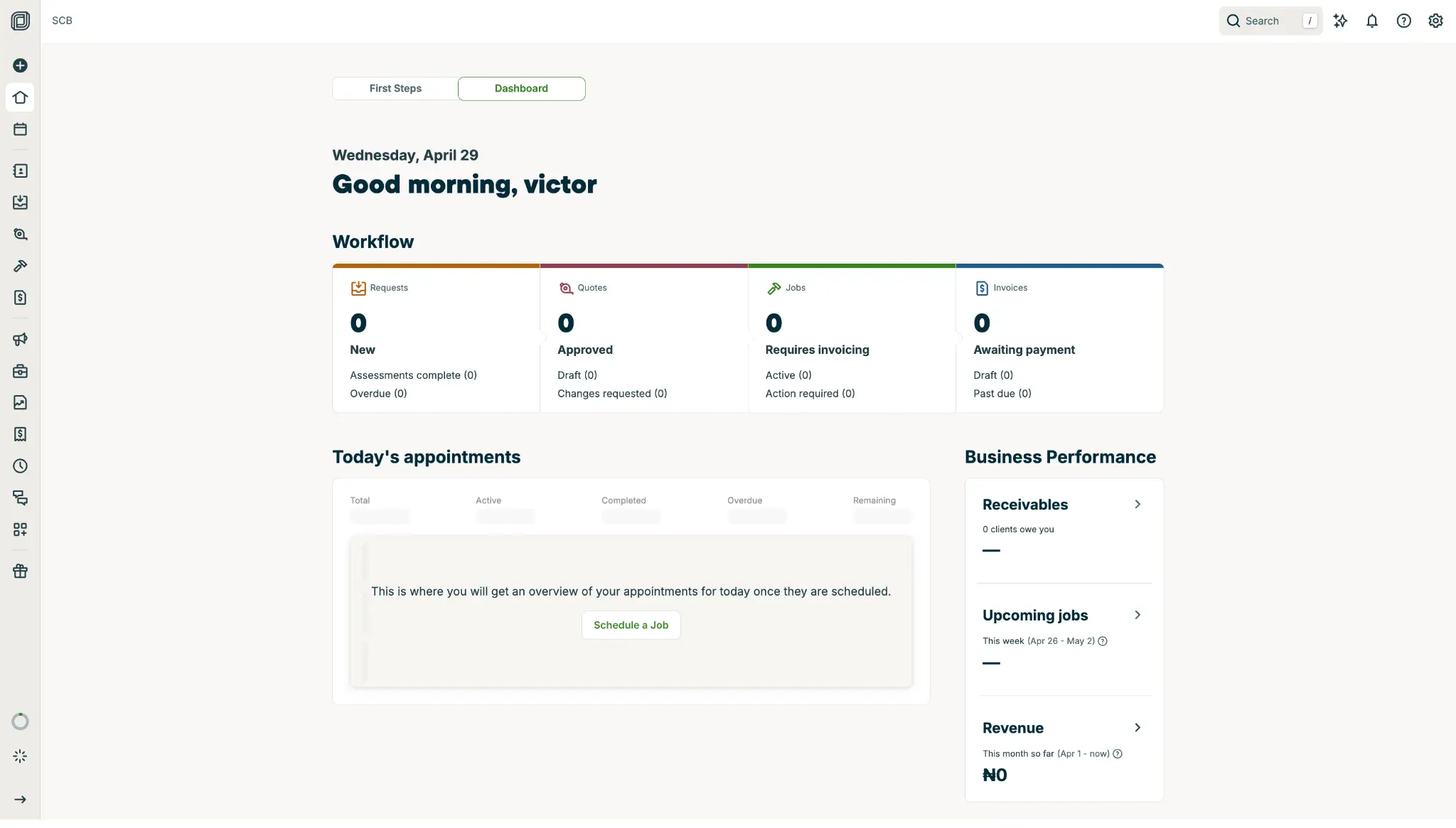
Jobber helps home service businesses—like HVAC, plumbing, electrical, landscaping, roofing, and pressure washing companies—manage the full customer and job workflow, from the initial request to the final payment after the job is done.
Jobber also gives you tools to help bring in more work, like reputation management, websites, online booking, and an AI Receptionist.
Pros and cons of Jobber
Pros
- Easy for the whole team to use; owners, office admins, and field teams will be able to manage jobs without much training.
- Customers can use Client Hub to check appointment details, request more work, and pay invoices without calling your team.
- Connects easily with your existing tools through an extensiveapp marketplace.
Cons
- Costs can rise as your needs grow. Tools like custom workflow automations are only available on higher plans or as paid add-ons.
- Adding more users can get expensive once you go beyond your plan's limit.
- Jobber’s structured process may feel limiting if you have complex routing needs or trade-specific processes.
Jobber key features
- Scheduling and dispatching: Schedule jobs, assign team members, update calendars, optimize routes, and suggest open time slots.
- Quoting: Create quotes with templates, deposits, financing, automated follow-ups, and supplier catalog integrations.
- Job management: Track job details, checklists, photos, field notes, customer updates, expenses, and job costs.
- Invoicing and payments: Send invoices, collect deposits and online payments, and track payment status.
- Client Hub: Let customers approve quotes, view appointments, request work, and pay invoices online.
- Customer management: Store client profiles, work history, notes, photos, and message history.
- Online booking and requests: Let customers request or book jobs from your website, social media, Google, or Client Hub.
Jobber pricing
Jobber offers a 14-day free trial, with prices scaling by team size and add-ons.
- Core: Starts at $49/month for 1 user. Includes basic quoting, scheduling, invoicing, payments, and app marketplace access.
- Connect: Starts at $139/month for 1 user, or $199/month for teams with up to 5 users. Adds automated reminders, automatic payments, checklists, quote and invoice follow-ups, time and expense tracking, routing, and GPS tracking.
- Grow: Starts at $199/month for 1 user, or $399/month for teams with up to 10 users. Adds advanced quote customization, optional line items, automatic time tracking, job costing, two-way SMS, and custom workflow automations.
- Plus: Starts at $699/month for teams with up to 15 users. Adds Marketing Suite, Receptionist, and a guided API walkthrough.
Who Jobber is best for
Jobber is best for solo operators and small to mid-sized home service teams with fairly standard workflows.
3. Housecall Pro — best for growing teams that want a mobile-first tool with built-in workflows and AI support
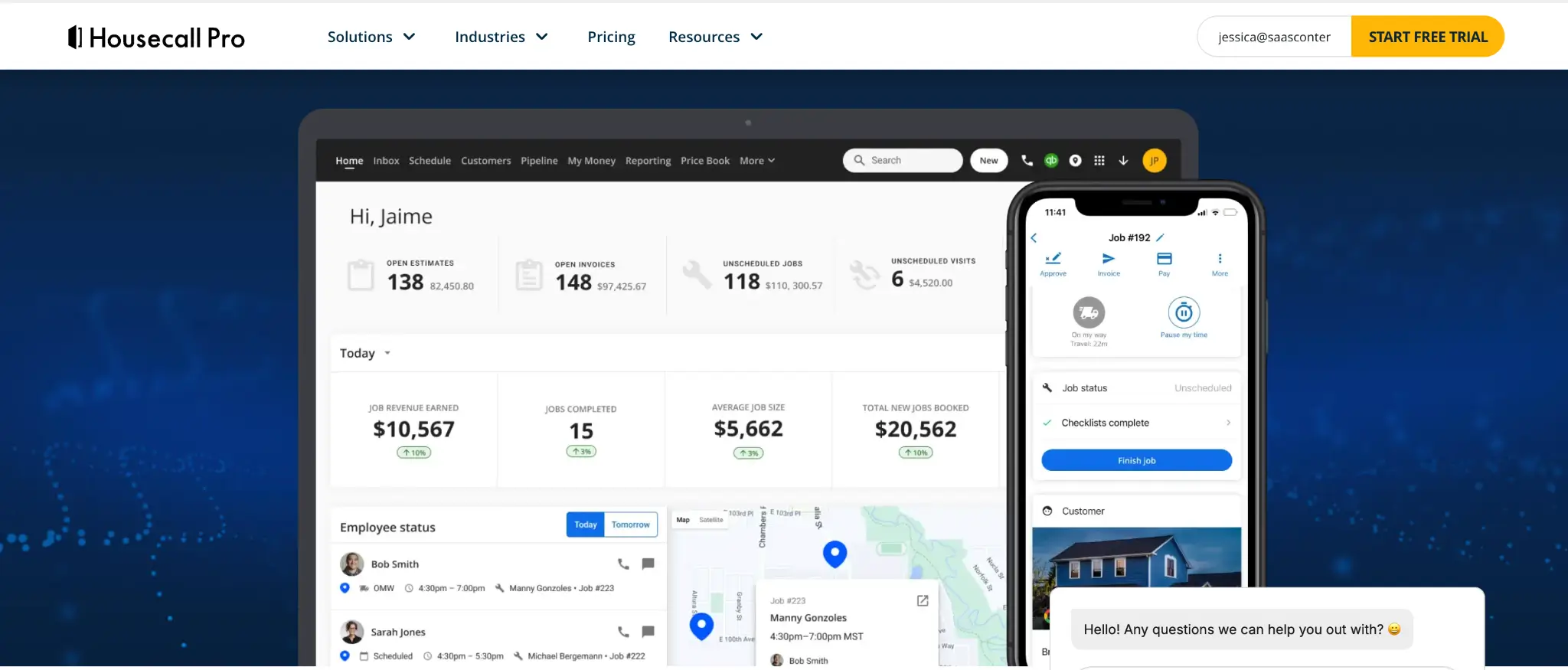
Housecall Pro helps home service teams manage everything from scheduling jobs and dispatching technicians to invoicing, payments, and customer follow-ups.
Its AI Team helps with admin tasks like answering customer calls, booking jobs, creating dashboards from job data, drafting marketing emails and review responses, and turning technician voice notes into invoices.
Pros and cons of Housecall Pro
Pros
- Makes scheduling and dispatching easier, with drag-and-drop scheduling, recurring jobs, route mapping, and “on my way” texts.
- Helps you turn estimates into paid jobs faster, with digital approvals, one-click invoices, automated reminders, and payment links.
- Gives customers more ways to pay, including digital wallets, Tap to Pay, card readers, mobile check deposit, customer financing, and Instapay.
Cons
- Many AI Team tools and growth features are sold as paid add-ons, so your real monthly cost can rise quickly past the base plan price.
- It may be too much for a solo operator who only needs simple scheduling, estimates, invoicing, and payments.
Housecall Pro key features
- Scheduling and dispatching: Schedule one-time and recurring jobs, assign technicians, map routes, and send “On my way” texts.
- Estimates and proposals: Create branded estimates, collect approvals, manage change orders, use price books, and offer proposals.
- Invoicing and payments: Send invoices, automate reminders, accept online payments, Tap to Pay and card readers, and offer financing.
- Customer communication: Use chat, automated reminders, follow-ups, customer history, and call/voice tools.
- AI team: CSR AI for call and chat answering, Coach AI for growth advice, Analyst AI for data insights, Marketing AI for content drafting, and Voice to Invoicing for hands-free invoice creation.
- Field team tools: Track employee time, use checklists, manage payroll, monitor vehicles with GPS/dashcams, and manage business expense cards.
Housecall Pro pricing
Housecall Pro offers a 14-day free trial.
- Basic: Starts at $59/month, 1 user. Core tools for scheduling, dispatching, estimates, invoices, payments, online booking, and customer communication.
- Essentials: Starts at $149/month, up to 5 users. Adds QuickBooks sync, customer equipment tracking, employee GPS tracking, and checklists.
- MAX: Starts at $299/month, up to 8 users. Adds advanced custom reporting.
Who Housecall Pro is best for
Housecall Pro is best for solo operators and mid-sized home service teams that want a mobile-friendly way to manage jobs, communicate with customers, take payments, track performance, and use light AI support tools.
4. SimplyDepo — best for CPG field sales and retail execution teams
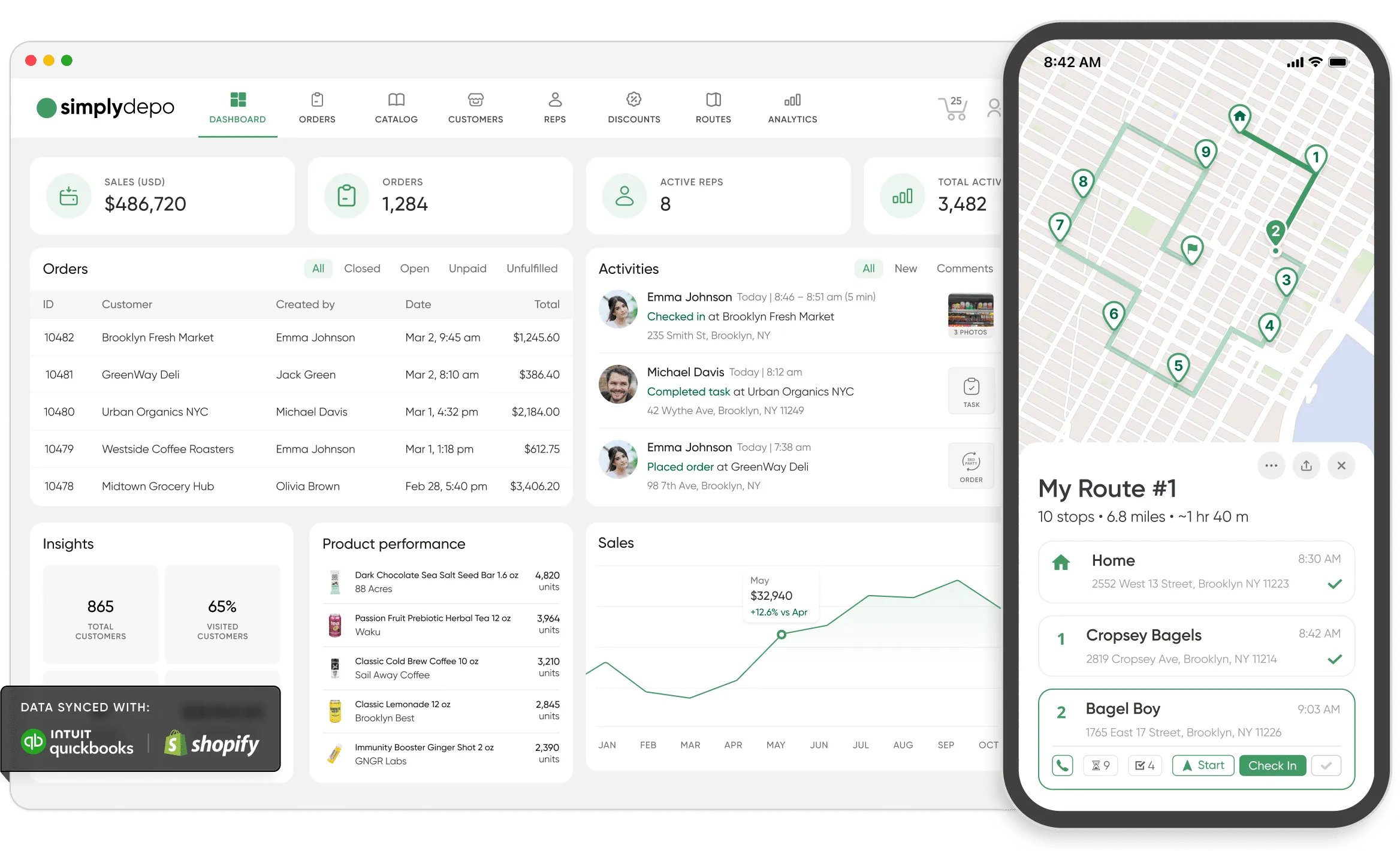
SimplyDepo is a field sales management platform built for CPG brands, distributors, wholesalers, and retail execution teams that manage employees working in the field. Unlike traditional field service management tools built around technician scheduling and work orders, SimplyDepo focuses on sales reps, store visits, retail execution, route management, and mobile ordering.
Field teams use SimplyDepo to manage customer accounts, take orders, optimize routes, complete store visits, track field activities, and give managers real-time visibility into sales performance.
SimplyDepo pros and cons
Pros
- Built specifically for CPG and distribution workflows
- Combines field activity, CRM, ordering, and route management
- Helps replace spreadsheets and disconnected sales tools
- Mobile-first experience for field representatives
Cons
- Not designed for traditional technician-based industries like HVAC or plumbing
SimplyDepo key features
- Mobile field sales: Give reps a mobile-first app to manage accounts, take orders, and complete store visits from the field, with offline order taking for low-signal areas.
- Route planning and visits: Plan routes, schedule account visits, and track field activities so reps cover territories efficiently.
- Customer CRM: Store customer accounts, contact details, and visit history in one place for the whole team to access.
- Order management: Take and manage orders against a full product catalog, with B2B customer ordering portal for self-service buying.
- Retail execution: Track in-store execution with tasks and forms, plus inventory visibility for what's on shelves and in stock.
- Sales reporting: Track sales performance and field activity, giving managers real-time visibility into the team.
SimplyDepo pricing
SimplyDepo offers a 30-day free trial with access to the full platform. CorePlan pricing by request.
5. Workiz — best for small to mid-sized teams that rely heavily on calls, lead tracking, and fast dispatching
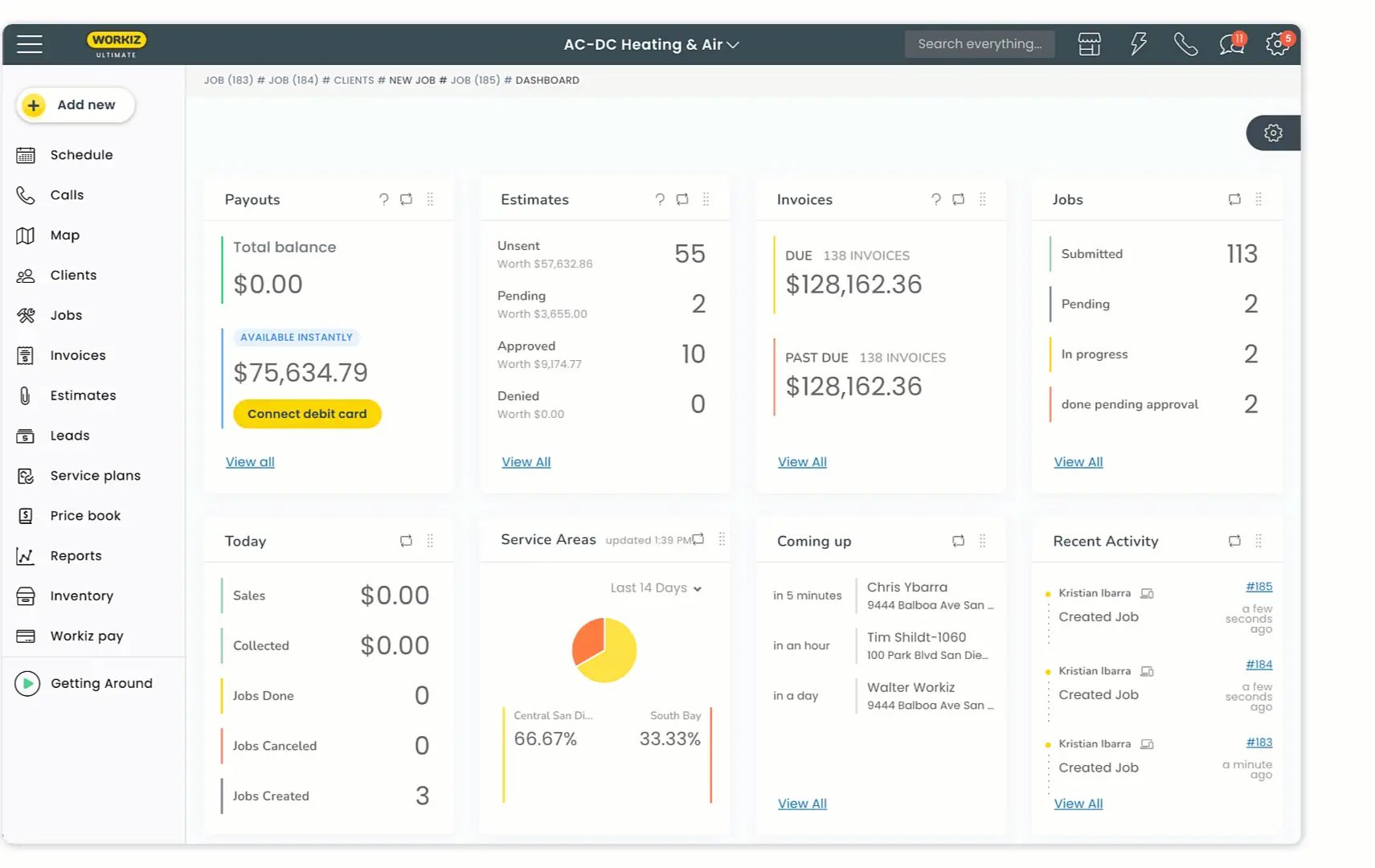
Workiz brings calls, texts, emails, job scheduling, and dispatching into one platform, so your team can respond to leads faster and easily track every customer conversation tied to the right job. It includes tools for call recording, call masking, source tracking, and AI automation, which is helpful for seeing which calls, ads, and lead sources are turning into booked jobs.
Pros and cons of Workiz
Pros
- Makes scheduling and dispatching easier, with drag-and-drop scheduling, location tracking, and AI-powered time slot suggestions.
- Helps multilingual teams respond to leads faster, with Workiz’s AI receptionist, which can answer calls, texts, and emails in English, Spanish, and French.
- Shows which lead sources drive revenue, so you can track calls, booked jobs, and payments back to channels like ads, Google, Angi, or Thumbtack.
Cons
- Workiz doesn’t publish monthly prices on its pricing page, so you have to request pricing or contact sales for each plan.
- Costs can go up with add-ons, especially if you need the phone system, Genius Answering, card readers, or more users.
- The mobile app gets mixed reviews, with users citing lag, crashes, and general usability issues.
Workiz key features
- Scheduling and dispatching: Schedule jobs, assign technicians, track locations, manage service areas, and suggest available time slots.
- Estimates and proposals: Create estimates, use price books, send sales proposals, and offer good/better/best options.
- Invoicing and payments: Send invoices, automate overdue reminders, collect online payments, request deposits, and offer financing.
- Client portal: Let customers view and approve estimates, sign proposals, pay invoices or deposits, review job history, and see upcoming appointments.
- Communication tools: Use built-in phone, text, and email tools with call recording, call tags, call flows, call masking, two-way texting, and source tracking.
- AI tools: Use Genius Answering, Genius Leads, Genius Scheduling, Smart Messaging, and Call Insights to reduce manual admin and respond faster.
Workiz pricing
Workiz’s pricing page doesn’t show fixed monthly costs, so you’ll have to request pricing based on your team size and needs. (You can also try its features with a 7-day free trial.)
- Kickstart: Includes scheduling, invoices, jobs, estimates, online payments, built-in reports, a local number, client management, and 2 automations.
- Standard: Adds QuickBooks Online, 5 automations, custom fields, location tracking, service areas, subcontractor management, and lead tracking.
- Pro: Adds performance pay, 10 automations, Genius Leads, Genius Scheduling, and custom reports.
- Ultimate: Adds service plans, 30 automations, inventory management, multi-day jobs, equipment tracking, purchase orders, and Zapier integration.
Who Workiz is best for
Workiz works best for teams where speed matters, especially when most jobs come through phone calls, ads, or booking platforms.
6. Zoho FSM — best for small teams that want structured workflows within the Zoho ecosystem
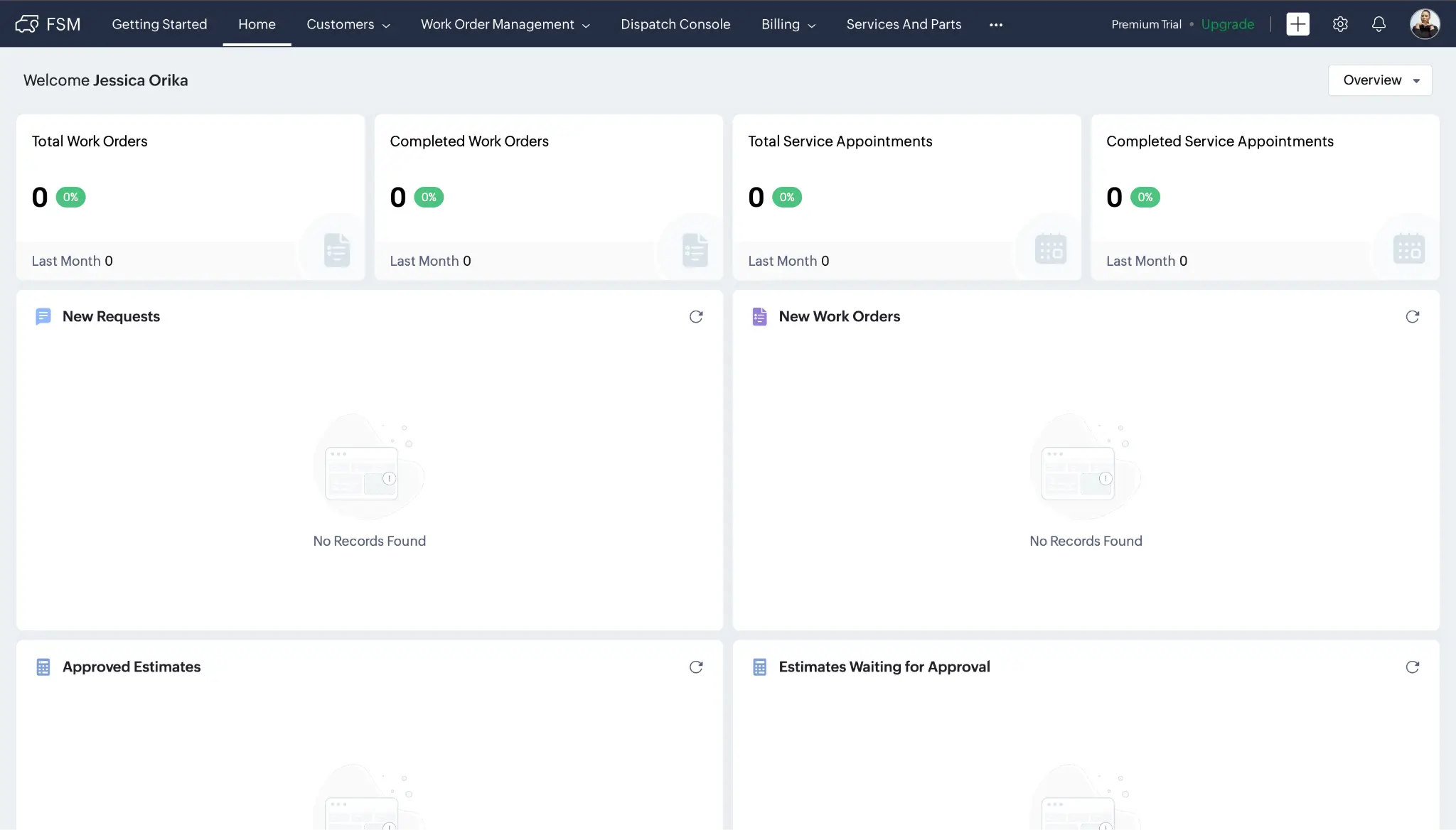
Zoho FSM is a field service management platform you can use in your browser, with a mobile app for field agents on iOS and Android. You can use it to manage customer records, track service history, assign technicians, document work done on-site, handle recurring maintenance, and keep invoices and payments connected.
Pros and cons of Zoho FSM
Pros
- Makes asset and maintenance tracking easier, with customer-owned equipment, warranty details, as well as installation and service history.
- Connects seamlessly with the Zoho ecosystem, so teams using Zoho CRM or other Zoho tools can keep field service, sales, finance, and support data connected.
- Gives you control over setup, with custom fields, workflow rules, webhooks, functions, APIs, role-based permissions, audit logs, and data encryption.
- Volume-based pricing instead of per-user fees, which works well for seasonal businesses and lower-volume teams.
Cons
- Setup can take longer if you need to configure workflows, templates, automations, data imports, or custom reports.
- You may need extra Zoho setup to get the full value, especially if your workflows depend on other apps in the ecosystem.
Zoho FSM key features
- Customer management: Keep contacts, companies, addresses, service history, invoices, appointments, and notes in one place.
- Asset tracking: Track customer-owned equipment, warranties, service history, and recurring maintenance.
- Requests and estimates: Collect service requests, create estimates, add parts and services, and send estimates for approval.
- Work orders and appointments: Turn approved estimates into work orders, schedule visits, assign field agents, and manage recurring service.
- Scheduling and dispatching: Use calendar, map, grid, and Gantt views to schedule jobs, assign agents, and track locations.
- Mobile app: Let field agents view jobs, customer details, assets, job sheets, notes, and schedules from the field.
- Invoicing and payments: Turn work orders into invoices, track payment status, and connect with Zoho Invoice or Zoho Books.
Zoho FSM pricing
- Free: $0/month for up to 20 users and 30 appointments.
- Standard: Starts around $25/month for up to 60 appointments.
- Professional: Starts around $35/month for up to 60 appointments.
Who Zoho FSM is best for
Zoho FSM is a good option for small teams that prefer structured systems and are comfortable configuring workflows, especially if they’re already using other Zoho apps.
What's the best field service management software for your team?
Ultimately, the best FSM platform for your business depends on your team size, your industry, and how your work runs today.
- If you need one place to manage jobs and grow your business without advanced routing or complex automation, Jobber can be a solid choice.
- If you’re a solo operator or growing team that wants a mobile-friendly tool with AI support for things like call answering, consider Housecall Pro.
- If you run a CPG, distribution, or retail execution team that manages sales reps and store visits rather than technicians, SimplyDepo is built for that workflow.
- If your team gets a lot of calls and needs to respond fast, especially in trades like locksmithing, garage door repair, or appliance repair, Workiz can be a good fit.
- If you already use Zoho tools, or your business has seasonal job volume and per-user pricing feels expensive, Zoho FSM is a natural choice.
- If you want to use AI to build a field service tool around how your team actually works—with the views, permissions, workflows, and data structure you need—Softr is the best, most flexible option on this list.
👉 Try Softr for free and start building your field service management app today.
Frequently asked questions
What is the best free field service management software?
Do I need a separate phone system for field service software?
What is the best field service software for small businesses?