Adalo pricing: A complete guide to plans in 2026


I wouldn’t judge Adalo pricing by the monthly number alone. The plans look simple at first, with no per-user billing, app-action overages, or AI token meter. That’s useful when you’re trying to get a mobile app into users’ hands without turning every test or edit into a cost calculation.
The harder question comes after the first working version. Does the plan still fit when the app needs app-store publishing, push notifications, custom actions, more editors, an external backend, or better performance under real usage?
In this guide, I dived into Adalo’s pricing and shared what you’re really paying for, where costs can climb, and when the platform still makes sense compared to an AI app builder like Softr.
Adalo pricing at a glance
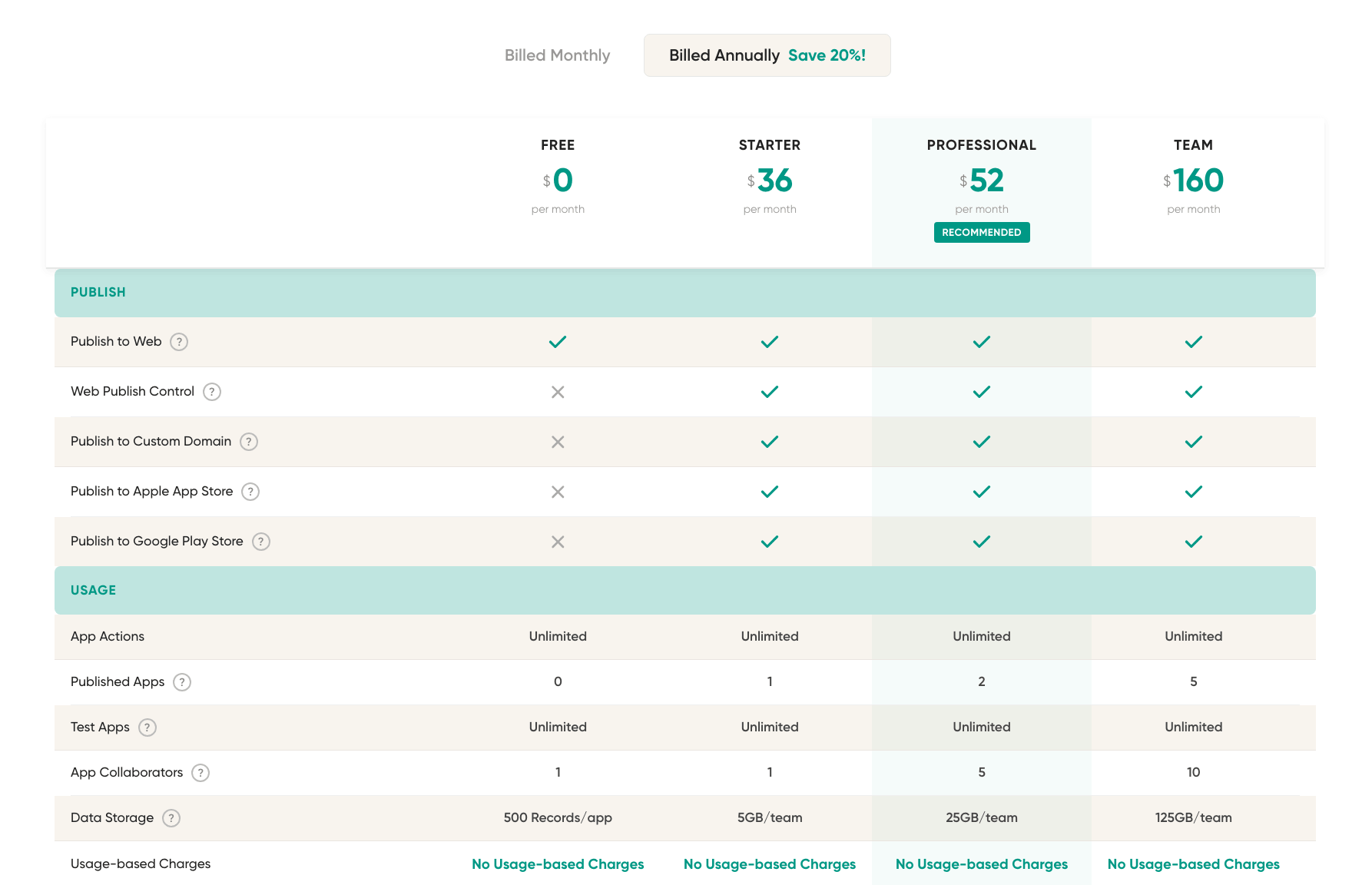
| Plan | Price (annual billing) | Best for | Key features | Limitations |
|---|---|---|---|---|
| Free | $0/month | Testing an app idea before publishing | Gives you enough to build and preview an app, test the editor, structure screens, and work with a small internal database. | No published app; capped at 500 records per app; only 1 editor; best for prototyping |
| Starter | $36/month | Founders or entrepreneurs launching one simple app | Moves you from testing to launching. This is the first tier where you can publish a real app, connect a custom domain, publish to web and app stores, and remove Adalo branding. | Limited to 1 published app and 1 editor; no custom integrations, custom actions, analytics, formulas, geolocation, push notifications, and white labeling. |
| Professional | $52/month | Small and medium businesses running more serious apps | Adds more editors, a second published app, analytics, push notifications, custom actions, integrations, formulas, and geolocation. | Still limited to 2 published apps and 5 editors; no priority support, Xano integration, App & Collections API, or version history. |
| Team | $160/month | Freelancers, agencies, or teams managing multiple client/business apps | Adds more published apps, more editors, much higher storage, priority support, Xano integration, APIs, version history, and white labeling. | Highest public self-serve plan; still limited to 5 published apps and 10 editors; more advanced scale or infrastructure needs may push teams toward Adalo Blue or custom support. |
Note: Monthly billing costs 20% more.
How Adalo’s pricing works
Adalo uses flat-tier pricing, so you don’t pay based on end users, app actions, AI prompts, or workload units. Instead, each plan is based on what you can publish, how many people can edit the app, how much storage you get, and which production features are included.
I’d treat the free plan as a testing space. You can build and preview apps, but you can’t publish them. Starter is the first plan I’d consider for a real launch because it includes one published app, app-store publishing, and a custom domain (plus you can remove Adalo branding).
The Professional plan is where Adalo starts to work for serious apps. It adds more editors, a second published app, push notifications, analytics, custom actions, formulas, geolocation, and custom integrations. Team is the better fit for agencies or teams managing several apps since it adds more published apps, more storage, priority support, Xano integration, APIs, version history, and white labeling.
The caveat is that Adalo’s predictable pricing doesn’t cover every cost. App store accounts, payment processing, external tools, paid components, or a backend like Xano can still add to the total price.
So, I wouldn’t read Adalo pricing as usage-based pricing. I’d read it as app-readiness pricing: the cost depends on whether you’re testing, launching, or running an app that needs deep features and maintenance.
Adalo pricing breakdown
Free
- Works best as a build-and-test plan, not a launch plan.
- Lets you create unlimited test apps, so you can try different app ideas without paying before you know which one is worth taking further.
- Includes 500 records per app, which is enough for small test data but not enough for a serious database-backed app.
- Includes unlimited app actions, so you’re not charged for basic in-app actions while testing.
- Gives you one app editor, which fits solo building but not team collaboration.
- Includes Ada AI Assistant for prompt-building and prompt-editing, so you can use AI to help create or revise the app before publishing.
Pros
- Good for learning Adalo without a credit card.
- Useful for testing screens, flows, and app structure before committing to a paid plan.
- Ada AI is included, so AI-assisted building isn’t locked behind a paid tier.
- No usage-based or token-based charges.
Cons
- You can’t publish an app on this plan.
- The 500-record limit makes it too small for most live apps.
- Only one editor is included.
- It doesn’t include the launch features that make Adalo useful for a real mobile app, such as app-store publishing, custom domain, or branding removal.
Best for: Solo builders testing whether Adalo fits their app idea before paying.
My verdict: I see the Free plan as a sandbox. It’s useful for checking out how Adalo’s UI feels, building an early protoype, and seeing whether the app logic makes sense. But it’s not a realistic launch plan. The moment you want users outside of a test environment, Free stops being enough.
Starter: $36/month, billed annually
- Includes 1 published app and 1 app editor, so it’s built around one person launching a single app.
- Lets you publish to web and app stores, connect a custom domain, and remove Adalo branding.
- Includes unlimited app actions, so you’re not paying based on in-app activity.
- Includes Ada AI Assistant for promt-building and prompt-editing, with no token-based charges.
- Comes with Adalo’s standard hosted database and core app-building features, but not the more advanced workflow and integration tools.
Pros
- This is the first plan that makes Adalo useful beyond testing.
- Good fit if you want to launch one simple mobile-first app without hiring developers.
- App-store publishing is included.
- Custom domain and branding removal make it usable for a public-facing app.
Cons
- Limited to 1 published app and 1 editor.
- Doesn’t include push notifications, app analytics, custom actions, formulas, geolocation, or custom integrations.
- Doesn’t include Xano integration, API access, version history, priority support, or white labeling.
- Not ideal if the app needs deep custom logic, real-time business workflows, or more than one builder.
- Users’ broader concerns around performance and support still matter once the app is live.
Best for: Solo builders launching one simple mobile-first app.
My verdict: Starter is Adalo’s real entry point because it gets your app published. I’d use it for a focused app with simple data, simple flows, and one person managing the build; but I wouldn’t treat it as a serious production plan. Once the app needs notifications, analytics, integrations, or stronger backend logic, Starter will feel too narrow.
Professional: $52/month, billed annually
- Includes 2 published apps and 5 app editors, which makes it more practical for small teams.
- Adds 25GB of team data storage, compared with 5GB on Starter.
- Adds production features missing from Starter, including push notifications, app analytics, custom actions, custom integrations, formulas, geolocation, and design versions.
- Includes unlimited app actions, so costs don’t increase based on in-app activity.
- Includes Ada AI Assistant for prompt-building and prompt-editing, with no token-based charges.
Pros
- A better fit for live apps than Starter because it adds the features many apps need after launch.
- Push notifications, analytics, formulas, and custom actions make the app more useful in real use.
- Supports small-team collaboration with 5 editors.
- Gives you room for a second published app.
- Keeps pricing predictable because Adalo doesn’t charge by users, actions, or AI usage.
Cons
- Still limited to 2 published apps.
- Doesn’t include Xano integration, App & Collections API, version history, white labeling, or priority support when needed.
- May still feel limited for apps that need a more secure backend or deeper API access.
- User reviews suggest performance, scalability, and support can become value concerns over time.
- No code export remains a long-term caveat if the app outgrows Adalo.
Best for: Small teams running one or two live apps that need notifications, analytics, integrations, and more app logic.
My verdict: Professional is the first plan I’d seriously consider for an app that needs to keep working after launch. It adds the features that make Adalo useful beyond a basic published app. But it doesn’t remove the main risks users report: performance limits, support frustration, backend constraints, and lock-in. I’d choose it for a focused app, not for something complex or data-heavy.
Team: $160/month, billed annually
- Includes 5 published apps and 10 app editors, so it’s designed for teams, freelancers, or agencies managing multiple apps.
- Adds 125GB of team data storage, compared with 25GB on Professional.
- Adds priority support, Xano integration, App & Collections API, version history, and white labeling.
- Includes unlimited app actions, so app activity itself doesn’t increase the bill.
- Includes Ada AI Assistant for prompt-building and prompt-editing, with no token-based charges.
Pros
- Better suited for agency, freelancer, or multi-app work than the lower tiers.
- Xano integration gives you options when Adalo’s built-in backend isn’t enough.
- App & Collections API adds more flexibility for connecting Adalo with other tools.
- Version history is useful when multiple users are making changes to an app.
- White labeling helps when the app is client-facing or agency-managed.
Cons
- It’s a large jump in cost from Professional.
- Still limited to 5 published apps and 10 editors.
- Xano may add a separate subscription cost.
- Priority support is included, but user reviews still show that support quality can be a concern.
- It doesn’t solve Adalo’s broader limits around performance, complex logic, or scalability.
Best for: Agencies, freelancers, or teams managing several Adalo apps that need Xano, API access, version history, and white labeling.
My verdict: The Team plan makes sense when Adalo is part of an ongoing app-building workflow, not just one project. It unlocks the features that matter for client work and more advanced setups. But this is also where the value question gets sharper. If you’re paying $160/month, performance, support, backend flexibility, and platform lock-in matter more. I’d choose Team only if the app mix or client work justifies those higher-tier features.
Adalo pricing: What users are saying on Reddit
Since Adalo removed App Actions billing in 2025, most users don’t frame Adalo’s pricing as confusing or usage-trappy anymore.
Across recent Reddit discussions, Adalo is described as being easy to start with for mobile apps, but caveats appear around value over time: price increases, production limits, offline needs, backend complexity, and the possible cost of rebuilding later.

In a Reddit thread from two weeks ago, users said Adalo had become harder to recommend because of pricing increases, even though they still praised its overall ease of use. If the price rises before the app is earning revenue or proving traction, that ease starts to feel less valuable.
Hidden costs to watch out for with Adalo
Adalo’s paid plans are flat, so the hidden cost won’t be surprise usage fees. Instead, costs show up around the app. If you want to publish a native app, you’ll still need an Apple Developer account and a Google Play developer account. If your app accepts payments, Stripe or another payment processor will take transaction fees. And if the app needs features beyond Adalo’s built-in setup, you’ll end up paying for third-party tools, paid components, automation tools, or an external backend like Xano.
This is why I’d treat Adalo as predictable, but not fully contained. The plan may be easy to budget for, but the total cost depends on how much support, backend flexibility, and long-term reliability your app needs after launch.
One other concern is the 5 published app limit. If you want to build more apps wth Adalo, you’ll need to pay for an entirely new subscription to the platform.
Which Adalo plan should you choose?
Choose Free if you’re still testing whether Adalo can support your idea. It’s useful for shaping an app’s V1, trying the editor, and figuring out app structure before you pay. I wouldn’t use it for anything beyond validation because you can’t publish the app.
Choose Starter if you’re launching one simple app and you don’t need a team inside the builder. This is the first plan that makes sense for a real public app because it includes publishing, app-store access, a custom domain, and no Adalo branding. You can use it for a focused mobile app with simple data and simple flows.
Choose Professional if the app needs to do more after launch. This is the better fit when you need push notifications, analytics, custom actions, formulas, integrations, and a few people working on the app. I’d choose it for one or two live apps that need more than basic screens and records, but I’d still be careful with data-heavy or complex workflows.
Choose Team if Adalo is part of client work or an ongoing app-building process. It makes the most sense when you need three to five published apps, more editors, Xano integration, API access, version history, and white labeling. I’d only pay for Team if those higher-tier features clearly matter, as the price jump also makes Adalo’s long-term caveats more important: performance, backend flexibility, support quality, and lock-in.
For most builders, I’d start with Free to test and move to Starter only when ready to publish. I’d choose Professional if the app needs to run reliably with notifications, analytics, and integrations. Team is not the natural upgrade for everyone. It’s for teams or agencies that need the extra infrastructure around multiple apps.
Is Adalo worth it?
Adalo is worth it if your main goal is to launch a mobile-first app without building from scratch. Its pricing is predictable, and the plans are easier to understand than usage-based app builders. The tradeoff is that the value depends heavily on how complex the app becomes after launch.
Consider Adalo if you:
- Want to build and publish a native mobile app without hiring developers.
- Need a simple customer-facing app, booking app, directory, event app, or lightweight tool.
- Prefer flat pricing over usage-based billing tied to users, actions, or AI prompts.
- Need app-store publishing, custom domains, and branding removal without managing a separate development process.
- Are validating an app idea and want to avoid a full custom build before the concept is proven.
Pass on Adalo if you:
- Need a complex, data-heavy app with advanced backend logic from the start.
- Expect offline support, deep API flexibility, or full control over the app’s infrastructure.
- Want to own or export the underlying code.
- Are building a product that must scale beyond a simple MVP without a likely rebuild.
- Need strong performance, support reliability, and backend flexibility as non-negotiables.
- Don’t specifically need mobile app publishing and would be better served by a web app, portal, or internal tool builder.
Adalo vs Softr pricing: Which is better?
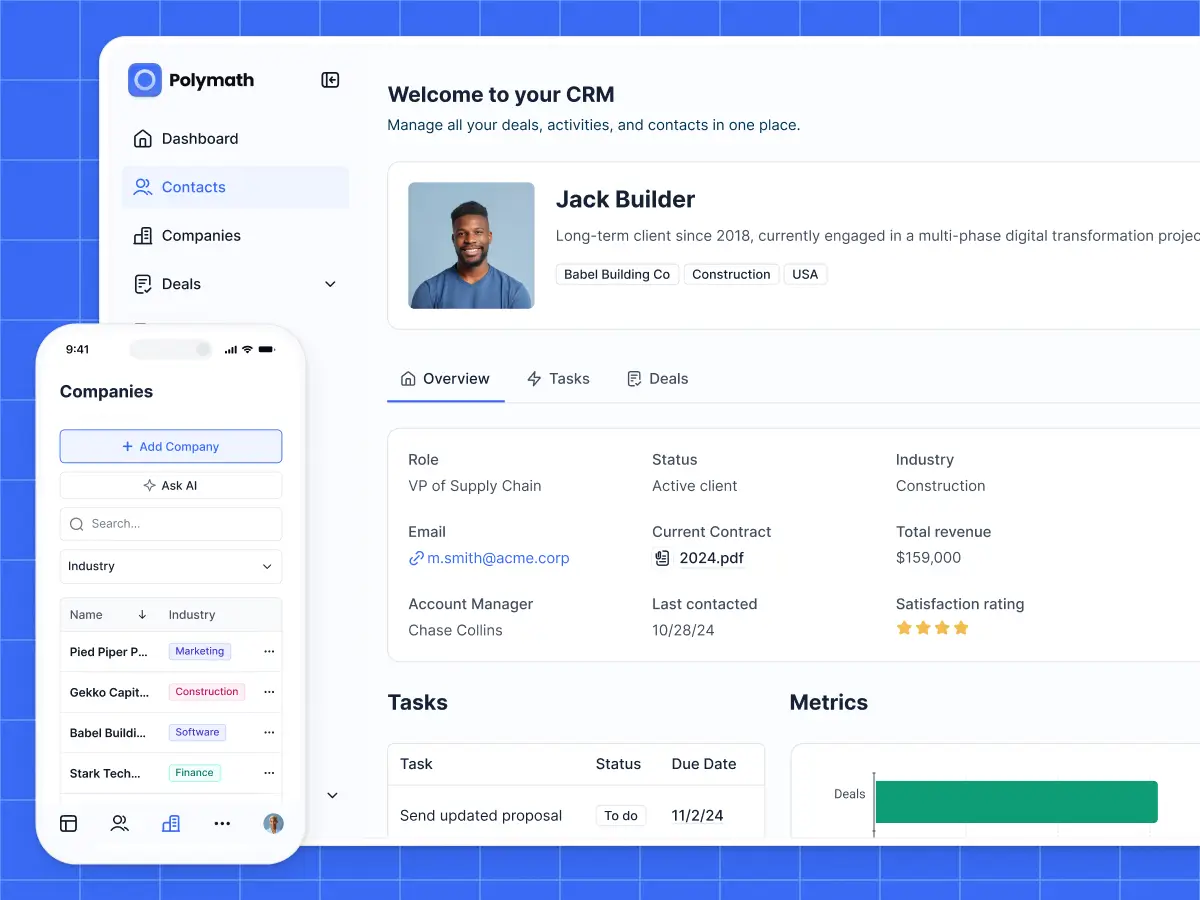
Adalo can be a good choice when you’re trying to build and publish mobile apps without writing code. Compared to Adalo, Softr is packed with more collaborative features and value. It’s built for business apps like client portals, CRMs, intranets, dashboards, vendor portals, project trackers, and internal tools.
You’re not paying based on how many apps you publish or how many builders work on them. Every Softr plan includes unlimited apps, and the free plan includes up to 3 builders. Pricing scales with the size of the business system instead: external users, records, workflows, AI credits, permissions, data sources, and security needs.
That difference matters if your team needs more than one app. With Adalo, the plan limit is tied directly to published apps. With Softr, you can build several tools in the same workspace and manage cost around actual operational scale: how many people need access, how much data you’re managing, and how many workflow actions your apps run.
Softr pricing overview
| Softr plan | Price | What you get |
|---|---|---|
| Free | $0 | 5 users total, unlimited apps, up to 3 builders, 5 AI credits, 5,000 database records, 500 workflow actions |
| Basic | $19/month | Team: 5 + Client: 5 app users, 10 AI credits, 50K records, 2.5K workflow actions |
| Pro | $99/month | Team: 10 + Client: 50 app users, 50 AI credits, 500K records, 10K workflow actions |
| Business | $329/month | Team: 30 + Client: 100 app users, 100 AI credits, 1M records, 25K workflow actions |
| Enterprise | Custom | SSO, audit logs, SOC2 reporting, IP blocking, SLAs, dedicated success manager, priority support |
What you get with Softr
- Highly predictable, flat pricing: You pay a flat monthly rate that scales with how many records and users you have, so you know your cost upfront.
- Unlimited apps and builders: Softr doesn’t price around the number of apps you publish or the number of people building them, making it a better fit when one team needs several apps.
- Pricing aligned to operational scale: Softr’s limits are tied to app users, records, workflows, AI credits, user groups, and security. This matches how business apps usually grow: more people, more data, more permissions, and more automated work.
- Built-in database, workflows, and permissions: Softr isn’t just a front-end builder. Softr’s AI Co-Builder generates the app, database, permissions, and business logic together in a single system.
- AI and visual editing: After generating an app with AI, your team can keep editing visually instead of relying on prompts every time something needs to change.
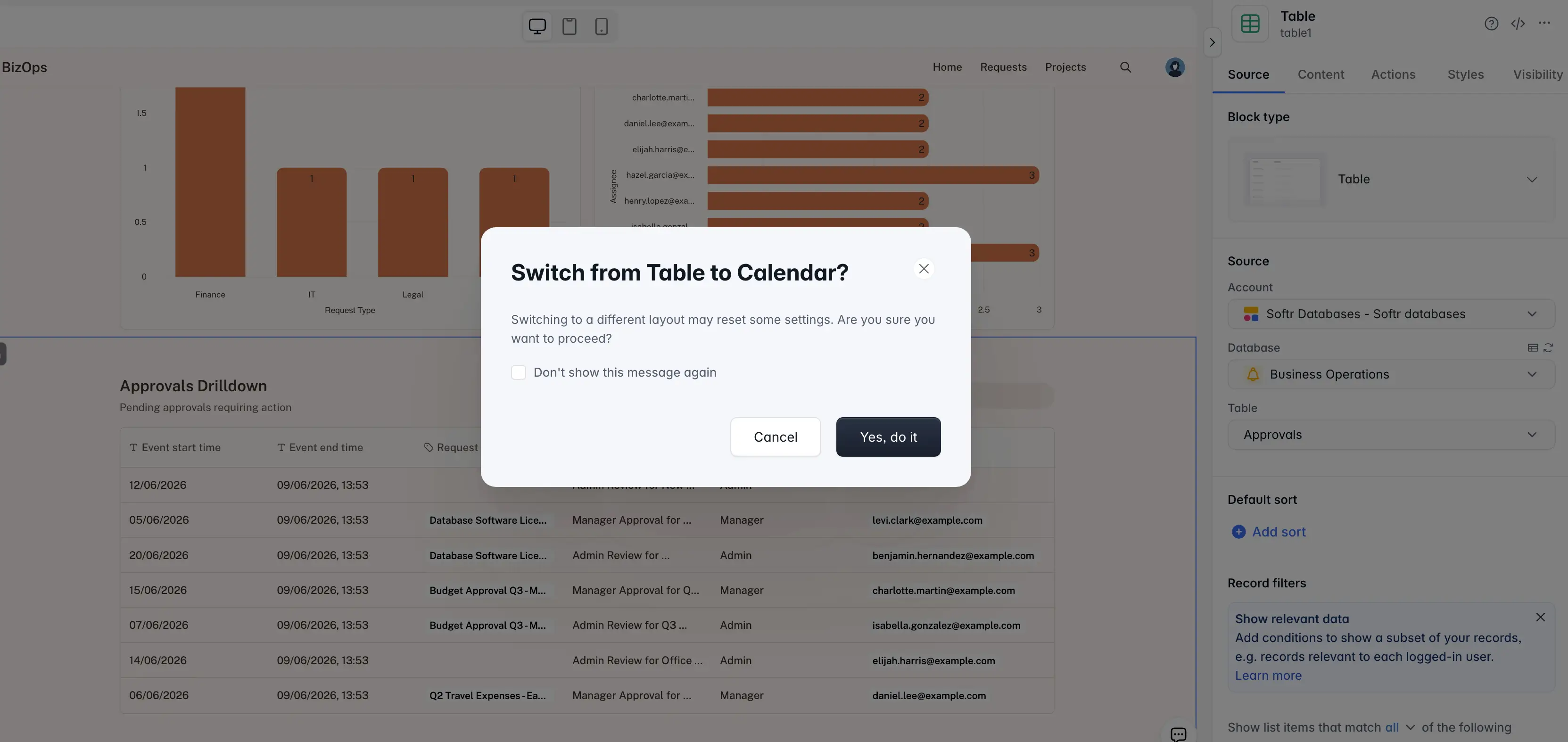
- A better fit for portals and internal tools: Softr works well when different users need different views of the same data, like clients, vendors, partners, managers, or field teams.
- Integration with your existing business data: Softr has its own relational database, and it connects to 21+ data sources, including Airtable, Google Sheets, HubSpot, Notion, SQL databases, and Supabase. And with Softr MCP, teams can connect Softr’s built-in database to tools like Claude, ChatGPT, Cursor, or any MCP client.
- Enterprise-grade security from the get-go: SOC2 and GDPR compliance, SSO on Enterprise, and strong infrastructure make Softr one of the most secure AI app builders.
Why teams choose Softr over Adalo
- Softr lets teams build unlimited apps, while Adalo limits published apps by plan. This matters if you need a client portal, internal dashboard, CRM, and project tracker instead of one standalone app.
- Softr includes unlimited app builders, while Adalo limits app editors by tier. This makes Softr easier to manage when operations, marketing, customer success, and leadership all need to help maintain internal or external business tools.
- Softr is stronger for permissioned business apps. Teams can create user groups, control what different users see, and build portals where clients, partners, vendors, or employees access only the data meant for them.
- Softr is the better fit when the app is not built exclusively for mobile. If you need a native iOS or Android app, Adalo is the more direct fit. But if you need a secure web-based portal, CRM, dashboard, tracker, or internal tool, Softr’s pricing and product structure fit these business tools better.
👉 With Softr, you still get a mobile view. Your Softr apps can be turned into progressive web apps, so users can add them to their device home screen and open them like an app. You can also customize the app name, icon, splash-screen background, and install prompt. Read more about Softr for mobile use cases here →
Adalo vs Softr: Which should you choose?
This choice comes down to what you’re really trying to build. Adalo is easier to understand when the goal is a mobile app: something people can download, open, and use on their phone. Softr makes a lot more sense when the app is part of how a business runs day to day.
To sum up, I wouldn’t choose based on price alone (although Softr can be cheaper for many use cases). I’d look at the job the app needs to do after launch. If you want a simple mobile product, Adalo is the closer fit. If you need to organize business data, give different people controlled access, and support several internal or customer-facing workflows, Softr is the stronger choice.
Try Softr for free and build your first production-ready business app with AI.