Transcript
Let me show you how to set up the interface actions in Softr and how the process works. First, we go into the interface where I have a button called Open.
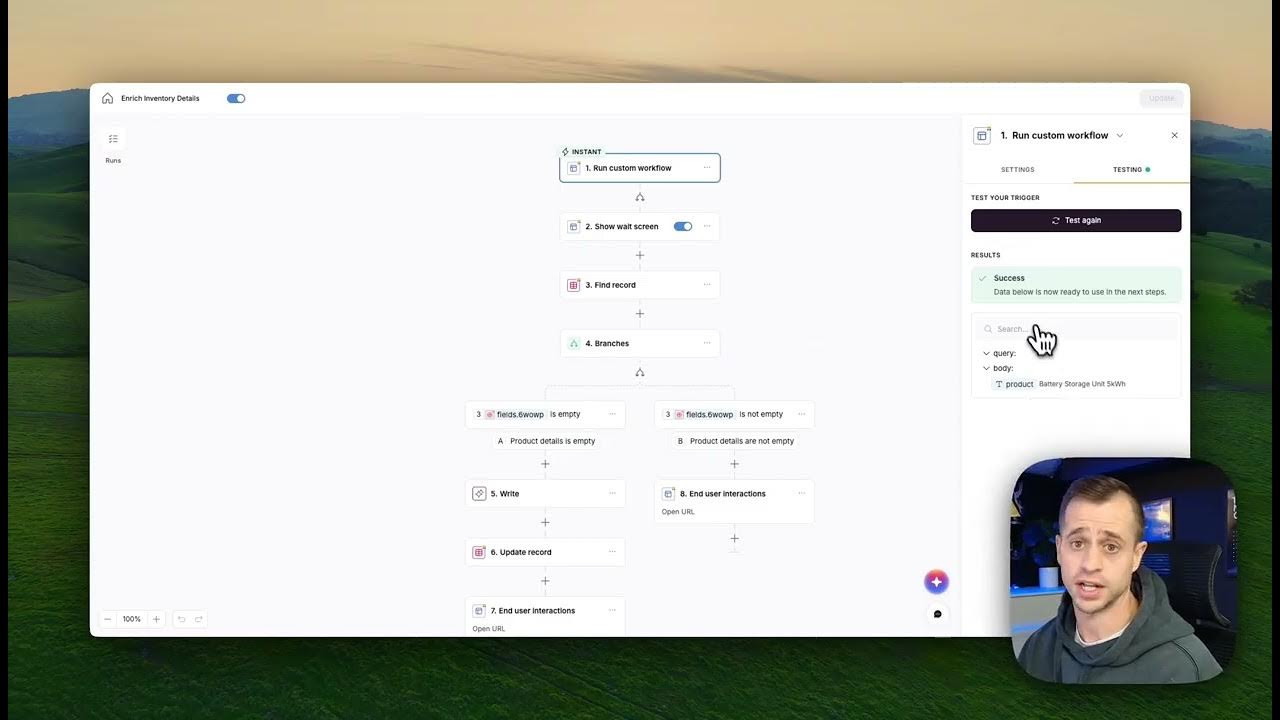
Under Actions, you will see the trigger set to run a custom workflow. Before you can use this, you need to go and create that workflow within the editor.
Once you create the workflow, you come back to the button and add it there. Within the workflow, you can send data, such as a specific product, so the system knows which item was clicked.
[.blog-callout]
Note from Softr: While you can manually set up these triggers, the AI co-builder can help you instantly generate the core structure of your app and its Softr Databases schema.
[.blog-callout]
You can send additional values as well, such as selected records or parameters. This is the payload data that you are sending directly to the workflow.
For now, you need to go into preview mode and press that button to send a test payload. This allows the first step of the workflow to receive the information and see the data coming through.
Once the workflow receives that test information, it initializes it so you can begin building out your logic. You can then add steps like showing a wait screen or defining specific conditions.
Depending on your logic, you can send the user to specific destinations. For example, you could show a toast message indicating a successful update and then refresh the page.
If you want to bring them to a details page, you need to open a new URL. You can craft that URL using the record ID found in the first step of your workflow.
When a user clicks the button, the workflow runs through these steps, follows the branches you created, and ensures everything is updated for the user.
[.blog-callout]
Note from Softr: Softr Workflows allow you to keep your business logic right where your design is, reducing the need for external tools when building a client portal or internal tool.
[.blog-callout]
Currently, the run custom workflow event from a button is the primary trigger. In the future, we will expand this to include form submissions and conditional updates.
If you need a workaround right now, you can use a different trigger like when a condition is matched in Softr Databases. This allows a workflow to run as soon as a record meets specific criteria.
This is a great alternative for triggering logic after a form submission. You can simply pass a field that lets the database know the record is ready for the workflow to run.
I hope this quick explanation helps you understand how to use interface interactions. Enjoy building with Softr Workflows.