Transcript
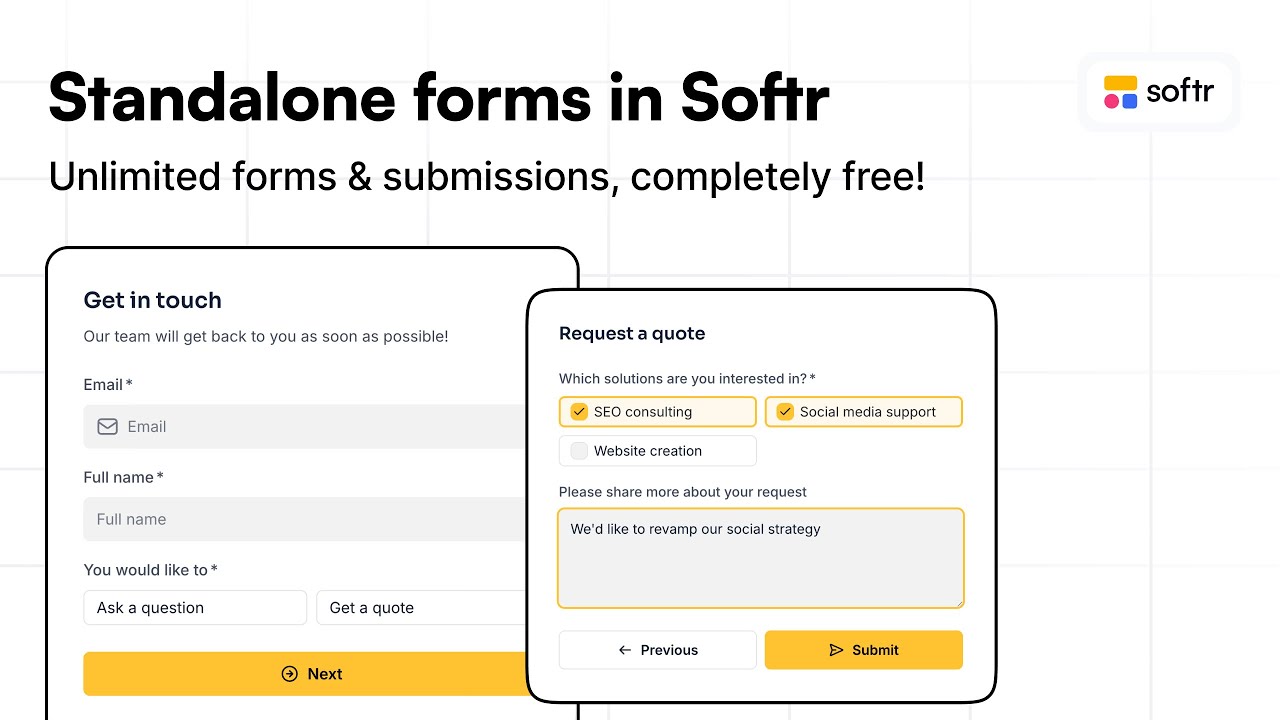
Softr is launching standalone forms. This is the easiest way to publish a form without building a full app.
And the good news is that they are completely free. You get unlimited forms and unlimited submissions.
You can store the data in a native Softr Databases or in one of the external sources that we support.
[.blog-callout]
While Softr integrates with 17+ external data sources, Softr Databases is the powerful, native way to manage data directly within Softr for maximum performance.
[.blog-callout]
You can also send data to any webhook or directly to your email. You can even connect your own domain and publish it with a link.
Alternatively, you can get a code snippet to add to any website to integrate the form within the page. Let's look at a quick overview in the Softr Studio.
I am in the new Forms tab where I have already created one, but you could simply start from scratch. This is the place to set the destination of the data.
[.blog-callout]
If you want to move even faster, you can use the AI co-builder to generate your application structure and Forms automatically based on your specific needs.
[.blog-callout]
In my case, I am storing the submissions in a Softr Databases. You have many options to customize your form, such as domain restrictions to limit submissions to your company.
You can customize the design with a site section or directly through the theme. This is where you set the fonts, colors, and different styling for the form.
To build the core of your form, you go into the steps and decide which fields to use. For example, you can add email, full name, or a select value.
You can also set conditional logic. For this contact form, if you select ask a question or get a quote, it changes the next step based on that selection.
[.blog-callout]
For those building business tools, Softr offers an AI CRM template and an ERP template that come with pre-built forms and logic already configured.
[.blog-callout]
When it comes to the form ending, you can show a success message or a thank you screen that includes a button. Once finished, you can edit the settings.
Settings allow you to change the Softr-hosted subdomain, upload a browser icon, or set up your own custom domain. Then you are ready to publish.
Once published, the form is accessible via the link. We can send a test submission to reach the next page about requesting a quote and selecting services.
Back in the studio, the data tab shows all submissions for your form. The publish section also provides the code to embed the form directly into your website.