Unlock your team’s potential in 2026: top collaboration tools for small businesses
Collaboration becomes a real challenge when teams have to juggle multiple platforms to work together. Important details often get lost in the shuffle, leading to confusion and hold-ups that can throw projects off track. This scattered approach makes it tough for small businesses to keep everyone on the same page and move forward efficiently.
Real-time collaboration hurdles present another roadblock. Without effective tools for immediate interaction, remote and hybrid teams find themselves out of sync, unable to capitalize on spontaneous idea-sharing.
Perhaps most concerning is the financial burden of complex collaboration software. Small businesses operating on tight budgets are often trapped between inadequate free tools and enterprise-level solutions that are both expensive and overly complicated. This forces many to use multiple unconnected apps to fill their collaboration needs which creates problems with data integration.
But there's hope. We'll look at 7 collaboration tools (starting with our own solution, Softr) and discuss their key features, pros, cons, and pricing. We'll also highlight ideal use cases for each tool. By the end, you'll have enough insights to decide which solution best fits your small business needs.
7 best collaboration tools for small businesses at a glance
| Tool | Best for | Key features | Pricing |
|---|---|---|---|
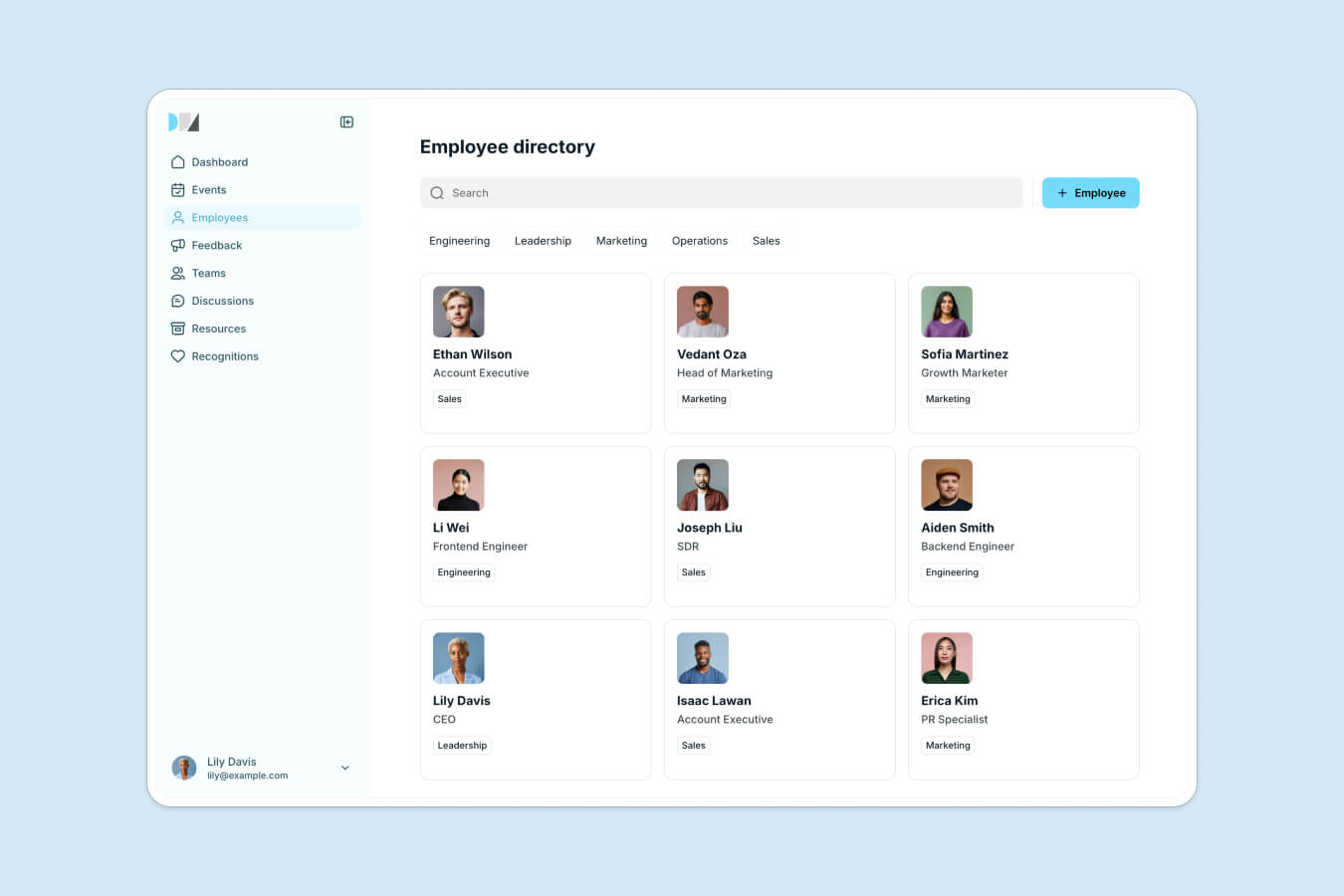
| Softr | Small teams wanting a custom intranet instead of a generic collaboration tool | • Team directory with search, filters and profile cards • Build without code • Role-based access | Free plan; paid from $19/month |
| Planview | Enterprise-grade project management and collaboration | • Streamlines processes across teams • Team communication • Workflow efficiency tracking | N/A |
| Slack | Teams whose collaboration runs on conversation | • Channels per project, team or topic • Direct messaging • App integrations | Free plan; paid from $8.75/user/month |
| ClickUp | Small businesses wanting tasks, projects and automation in one place | • Task management • Project collaboration • Workflow automation | Free plan; paid from $7/user/month, billed annually |
| monday.com | Teams that want visual project tracking in a single interface | • Visual work management boards • Workflow automation • Progress monitoring | Free plan; paid from $9/user/month |
| Hive | Combining task management and automation in one interface | • Task management • Automation • Team collaboration features | Free plan; paid from $5/user/month, billed annually |
| Podio | Organizing operations around custom workspaces | • Task and project management • Custom workspaces • Work management platform | Custom pricing |
What is collaboration software for small businesses?
Collaboration software is a digital platform designed to improve team workflows and enhance productivity. These tools enable teams to work together efficiently, regardless of their physical location.
Collaboration software typically includes features like file sharing, which allows team members to access and edit documents in real-time. Project management capabilities help track progress and deadlines, while team communication features facilitate quick discussions and updates. So, by combining these features (and more), collaboration software creates a central hub for all team activities and reduces the need for endless email chains.
Why do small businesses need collaboration tools?
Here’s why your small business can’t do without team collaboration apps:
- Communication silos: Team members often work in isolation and this often leads to misunderstandings or even duplicated efforts. Important information gets lost in email threads or private chats which causes delays. Collaboration tools tackle this by providing centralized communication platforms where all team interactions are easily accessible to everyone.
- Project delays: Without a central system to track progress and deadlines, projects often fall behind schedule. Team members struggle to prioritize tasks and managers lack visibility into bottlenecks. Collaboration software offers project management features that allow teams to set clear timelines, track progress in real-time, and quickly identify roadblocks.
- Unorganized tasks: Task lists often become fragmented across multiple platforms or physical notes. This fragmentation leads to critical tasks being overlooked or forgotten. Collaboration platforms address this issue by offering centralized task management systems which come with benefits like centralized task visibility, efficient task prioritization, and streamlined progress tracking.
What should you look for in collaboration tools for small businesses?
Here’s what to focus on when choosing the best collaboration tools for small businesses:
- Ease of use: Small business owners often lack time and resources for extensive training, so clean interfaces and simple navigation are important. The best collaboration platforms allow users to jump in and start working productively almost immediately, without feeling overwhelmed by complex features.
- Affordability: Given that many small businesses operate on tight budgets, pricing plans offering flexibility and value are essential. Some platforms provide free-forever plans, which can be an excellent starting point for small teams or businesses testing the waters of digital collaboration.
- Integration capabilities: Small businesses often use diverse software for different purposes, such as CRMs for customer management, accounting software for finances, and project management tools for task tracking. Collaboration tools that can integrate with these existing systems create a more unified workflow. So, look for collaboration tools that offer a wide range of native integrations or support for popular third-party apps.
- Real-time collaboration features: Tools should offer capabilities for document sharing, simultaneous editing, and instant team communication. So, look for platforms that allow multiple users to work on the same document simultaneously, with changes reflected in real-time. Features like in-document commenting, version history, and the ability to revert changes can further enhance the collaborative experience.
- Security: This one is equally important. You need your platform to be at least SOC 1 and SOC 2 certified, as these certifications indicate strong data protection practices. We recommend that you also check where the company servers reside and if the country has a good reputation on that matter. For instance, countries like Switzerland, Germany, and Iceland are known for strong data protection laws, while some may have concerns about data stored in countries with less stringent privacy regulations.
7 Best collaboration tools for small businesses to use in 2026
Below we discuss the best collaboration software for small businesses.
Tool 1: Softr
Softr is the first AI-native platform for building business software without code. Instead of forcing your team into a generic collaboration tool, it lets you build the exact internal hub your business needs: a company intranet, a project tracker, a knowledge base, a client portal, or a custom CRM, all without writing a single line of code. Over 1 million builders and 7,000+ organizations now use Softr, including teams at Netflix, Google, and Stripe.
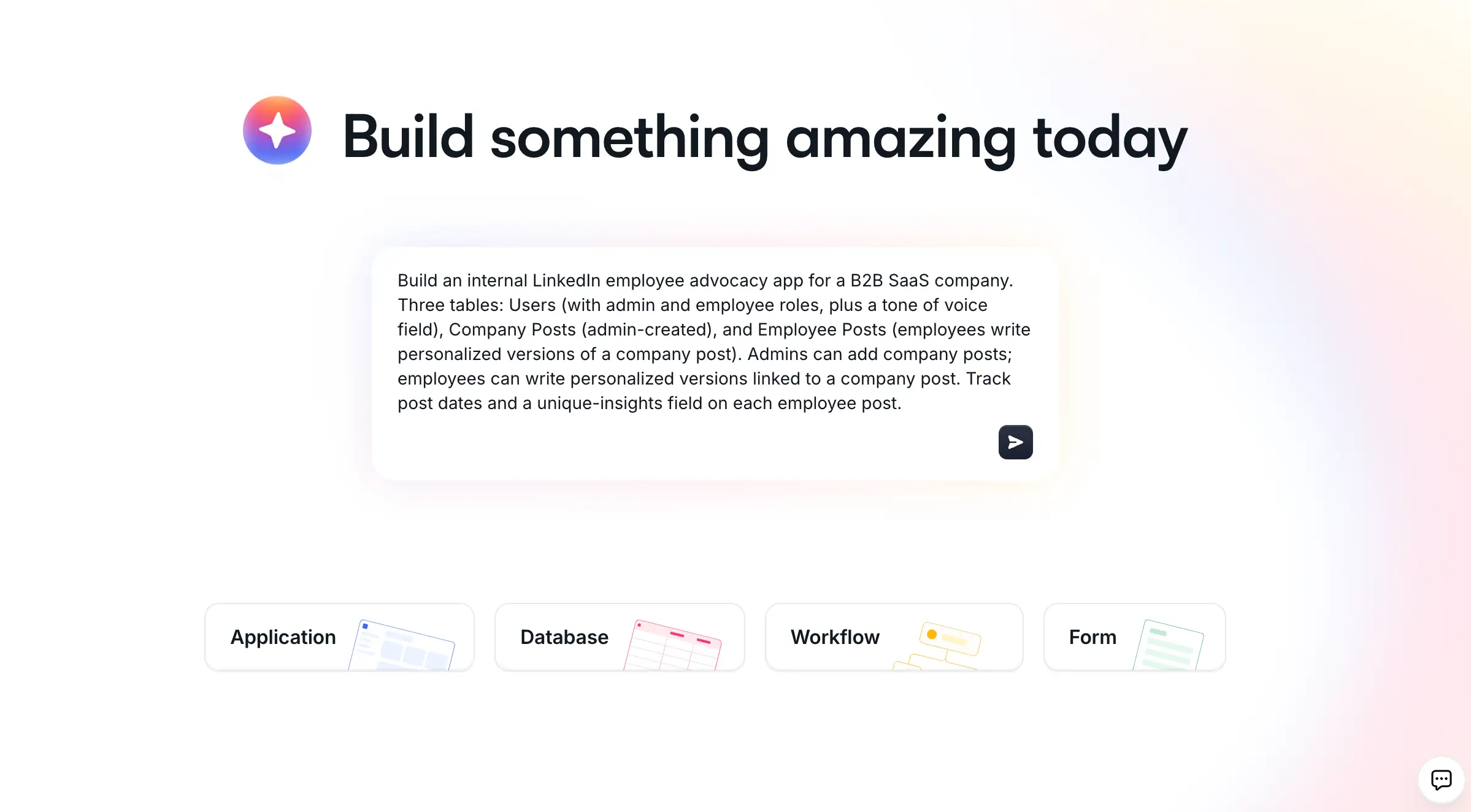
Where most tools on this list hand you a fixed product and ask you to adapt your workflow to it, Softr adapts to you. You describe what you need, and the AI Co-Builder builds a complete, working app for you: the database, the pages, the blocks, and the user permissions, already connected and ready for real users. You get three ways to build, so AI is the fastest path but never the only one: generate with AI, start from a pre-built template, or build from scratch. Once inside the editor, you can switch fluidly between asking the AI and configuring things visually yourself.
That hybrid approach matters for a small business that depends on the tool every day. Pure "vibe coding" platforms generate an impressive demo, then leave you with fragile code that breaks the moment a real user logs in. Softr apps are production-ready and secure from day one, because authentication, user roles and permissions, hosting, and security are built in (Softr is SOC 2 Type II compliant, with all data hosted in Germany).
For data, you can use Softr Databases, a native relational database built for business apps, as your primary source. If your data already lives elsewhere, Softr also connects to 21+ external sources like Airtable, Google Sheets, and HubSpot. To automate the work, Softr Workflows run automations triggered directly from your app's interface (like an action button or a form submission), and you can still connect to Zapier, Make, and n8n through native integrations when you need them.
A few customers describe the shift well:
"It's fantastic to be able to create portals without writing a line of code quickly but with great results. I was able to replace a WordPress site and a management system made in Excel."
Marco D., .NET Analyst Developer (Small-Business), G2 review
"I use Softr for building a combined tool that manages internal and external workflows. It solves the problem of sharing data with user restrictions and structuring partner communication."
Michael W. B., Director of Sales and Operations (Small-Business), G2 review
Larger teams see the same payoff. Celonis had thousands of customer implementations' worth of go-to-market knowledge trapped in a sprawling Google Slides deck that was painful to navigate. They rebuilt it as a searchable knowledge base on Softr, shipping a first version in under five days. It reached full adoption within two to three months and became one of the top three core tools used by 1,500+ go-to-market team members.
"Our users love it. They think it's the perfect way to connect knowledge we are building up across our customer interactions, structure it, and make it easily accessible."
Celonis go-to-market team, Softr customer story
Key features
- AI Co-Builder that builds a full app from a prompt
- Drag-and-drop visual editor
- Native Softr Databases plus 21+ external data sources
- Softr Workflows triggered from the app interface
- Collaborative user portals
- Custom forms generation
- Project tracking tools
- Task management integration
- Dynamic search with filters and sorting
- Client-facing portals
- Pre-built app templates
- Record commenting and in-app collaboration
- Vibe Coding block for limitless custom UI
- User roles and permissions
- Integration with Airtable, Google Drive, and Slack
Pros
- Easy to use
- Active community
- Highly scalable
- Certification portal
- Responsive customer support
Cons
- Lacks built-in real-time chat (best paired with a messaging tool like Slack)
Best suited for
- Company intranets and team hubs
- Internal knowledge bases and team wikis
- Custom CRM system creation
- Client and vendor portals
- Employee directories and portals
- Project and task tracking
- Internal workflow automation
- Inventory and order management
How to build your internal hub with Softr
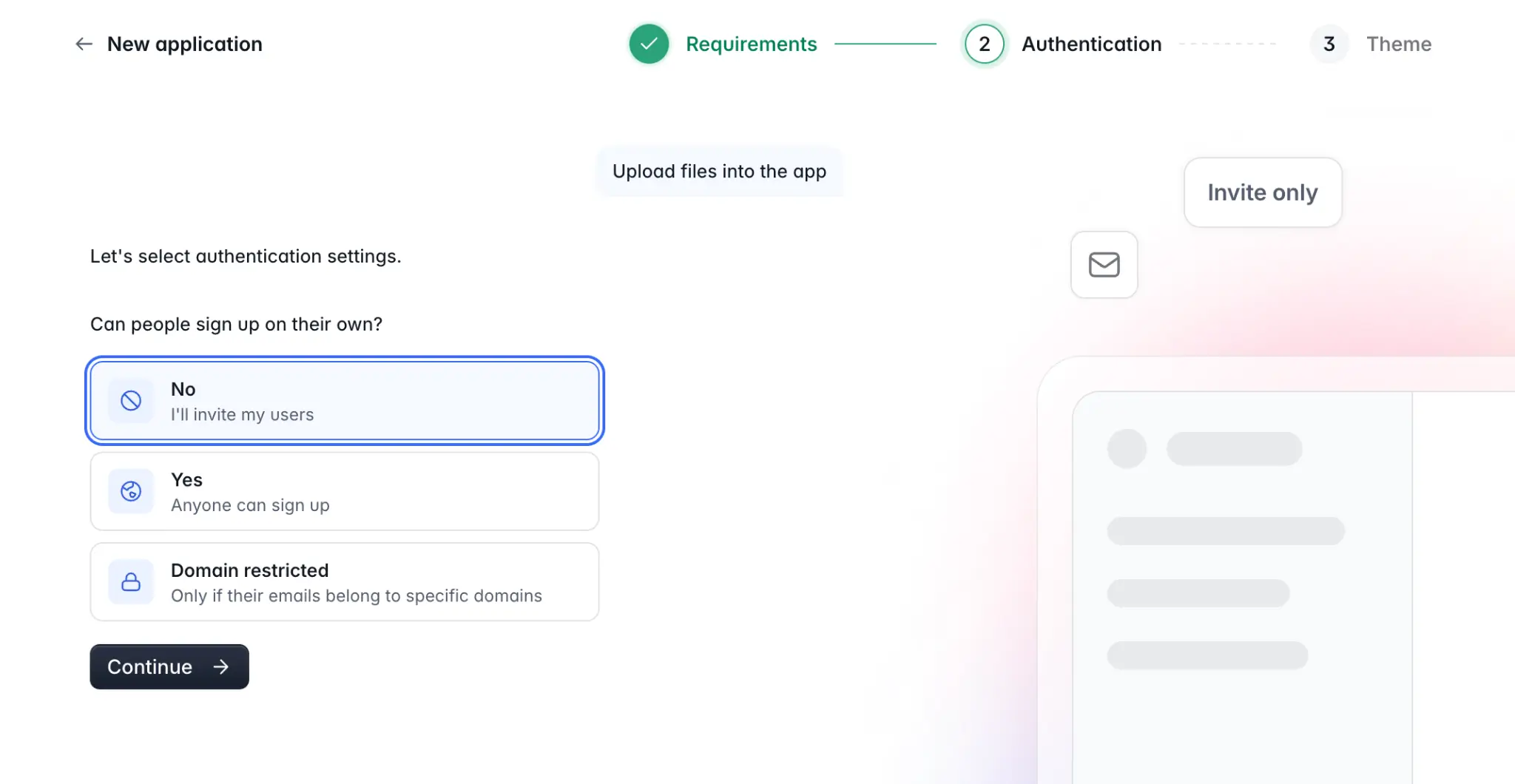
- Open the Softr dashboard, click "Generate with AI," and describe the hub you need (for example, "a company intranet with announcements, an events calendar, and an employee directory").
- Answer the AI Co-Builder's 2-3 clarifying questions about sign-up, navigation, and theme.
- Review the generated app: the AI sets up your Softr Database tables, pages, blocks, and user groups automatically.
- Refine anything by hand in the visual editor, or ask the Co-Builder to adjust it (add a page, change a permission, add a chart).
- Set up automations with Softr Workflows, then invite your team and go live.
Pricing
Softr's plans run from Free to Enterprise (custom pricing, contact sales), and every plan (including Free) includes unlimited published apps and unlimited forms, and the free plan includes up to 3 builders. The Free plan ($0/month) is notably generous compared to other platforms here, with 5 app users total, 5,000 database records, 500 workflow actions, and AI credits to test the Co-Builder.
For more features and capacity, Softr's paid plans begin with the Basic tier at $19/month, which expands to Team: 5 + Client: 5 app users, 50,000 database records, and 2,500 workflow actions. The Pro tier ($99/month) supports Team: 10 + Client: 50 app users, custom user groups, and additional integrations, making it the sweet spot for production internal tools and client portals.
Tool 2: Planview

Planview is an enterprise-grade project management and collaboration software designed to streamline processes, foster team communication, and improve workflow efficiencies. What’s unique about Planview is that it covers every aspect of project and portfolio management. It provides advanced features for strategic planning, resource management, and detailed analytics, so it’s a robust choice for businesses with complex and large-scale projects.
Key features
- Task management
- Portfolio management
- Resource capacity planning
- Demand management tools
- Workflow automation engine
- Task dependencies setup
- Strategic roadmap planning
- Risk management features
- Timesheet tracking system
- Objectives and Key Results (OKRs)
- Agile and waterfall support
- What-If scenario planning tools
- Integrated financial planning
- Real-time analytics dashboards
- Sentiment analysis
- Advanced integrations (e.g., Salesforce, Oracle ERP, SAP)
Pros
- Extensive feature set
- Customizable features for diverse team needs.
Cons
- Higher pricing tiers
- Steeper learning curve
Best suited for
- Enterprise-wide portfolio oversight
- Collaboration across dispersed teams
- Digital transformation management
- Scaled agile framework adoption
- Product development lifecycle management
Pricing
Planview offers a custom quote based on your specific needs. So, to get an accurate pricing, you'll need to contact their sales team.
Tool 3: Slack

Slack is a communication-focused collaboration platform designed to streamline team conversations. Slack organizes conversations into channels, which can be created for specific projects, teams, or topics. Channels can be public (open to all team members) or private (restricted to select participants).
Using Slack, users can engage in private, one-on-one, or small group conversations through direct messages. This feature facilitates quick communication without cluttering shared channels.
Slack supports file sharing that allows users to upload and share documents, images, and other files directly within conversations. It integrates with many third-party applications so teams can centralize their workflows and access external tools without leaving the Slack interface.
Key features
- Channels for organized communication
- Direct messaging for private conversations
- Lists for task management
- Group conversations
- Pinning messages
- Voice and video calls
- Emoji reactions
- Polls and surveys
- File sharing and storage
- Search functionality
- Granular roles
- Mentions and notifications
- Do Not Disturb mode
- Message activity analytics
- 2600+ integrations
Pros
- Free plan available
- Easy to navigate
- Great for real-time communication
Cons
- Limited project management features
Best suited for
- Remote or distributed team collaboration
- Real-time project discussions
- Sharing updates and announcements
- Centralizing communication across different departments
Pricing
Slack's paid plans start at $8.75/user/month with the Pro plan. This plan includes unlimited message history, group audio and video meetings, and 24/7 support. Slack also offers a free plan, but it is limited to 90 days of message history.
Tool 4: ClickUp

ClickUp is a versatile project management and collaboration platform that helps small businesses streamline their workflows. It offers a comprehensive suite of tools to manage tasks, collaborate on projects, and automate various business processes.
Key features
- Task management system
- 1000+ templates
- Prioritization of tasks
- Recurring task automation
- Time tracking
- Task dependencies setup
- Customizable task statuses
- Project timelines
- Gantt charts and Kanban boards
- Custom field options
- Collaborative editing
- Mind map integration
- Comprehensive permissions
Pros
- Free plan available
- Mobile app
- Robust project management capabilities
Cons
- Steep learning curve
Best suited for
- Managing complex projects and tasks
- Coordinating cross-functional team efforts
- Streamlining business processes and workflows
- Centralizing project data and documents
Pricing
ClickUp offers affordable paid plans starting at $7/user/month billed annually, which include cool features like built-in time tracking, Gantt charts, and unlimited file storage. For small teams just getting started, ClickUp's free plan provides features tools like Kanban boards, sprint management, and calendar view.
Tool 5: monday.com

Monday.com is a versatile work management platform that empowers small business teams to collaborate efficiently on projects, streamline workflows, and monitor progress all within a single interface.
What sets Monday.com apart from ClickUp is its more user-friendly interface and gentler learning curve, making it easier for teams to adopt quickly, unlike ClickUp's steeper learning curve and more complex feature set.
Key features
- Visual task tracking boards
- Time tracking feature
- Project timeline view
- Gantt chart integration
- Project intake and approvals
- File sharing support
- No-code automations
- Team collaboration tools
- Kanban board view
- 200+ templates
- Customizable task statuses
- Task dependencies setup
- Subtasks and checklists
- Notifications and reminders
- Workload management tools
- Data export options
- 70+ integrations
Pros
- Free plan available
- User-friendly interface
- iOS and Android apps
Cons
- Can be pricey for larger teams
- Reporting features could be better
Best suited for
- Campaign progress tracking for marketing
- Strategic planning for small teams
- Content calendar for social media
- Workload balancing across teams
Pricing
Monday.com offers a paid plan starting at $9/user/month. This basic plan includes 5GB of file storage, the ability to customize notifications, and 24/7 customer support. For those just starting, there's a free plan that supports up to 2 team members and provides 500 MB of file storage.
Tool 6: Hive

Hive is a comprehensive project management and collaboration tool designed to help small businesses streamline their workflows. It combines task management, automation, and team collaboration features in a user-friendly interface, making it easier for teams to stay organized.
Key features
- Task management boards
- Team messaging chat
- Project templates library
- Gantt chart view
- Time tracking
- File sharing
- Custom workflows setup
- Action cards assignments
- Calendar view integration
- Automations for tasks
- Approval workflow feature
- Subtasks and dependencies
- Forms for data collection
- Goal tracking system
- AI-powered analytics
Pros
- Free plan available
- Intuitive interface
- Built-in time tracking
Cons
- Higher price point compared to some alternatives
- Management of permissions and project hierarchy is cumbersome
Best suited for
- Marketing campaign planning
- Cross-team project coordination
- Product development tracking
- Client project management
- Remote team collaboration
- Event planning and execution
- Creative content production
- Resource and capacity planning
Pricing
Hive offers paid plans starting at $5/user/month billed annually, which allow up to 10 team members to access features like an AI Assistant, an in-app calendar, and up to 10 projects. They also have a free plan for teams of up to 10 people, but it doesn't include custom project fields or task labels.
Tool 7: Podio

Podio is the last small business collaboration software on our list. It’s a versatile collaboration and work management platform that helps small businesses organize their operations. Designed to manage tasks, projects, and workflows, Podio offers the flexibility to adapt to different business processes, so it’s suitable for different team structures and industries.
Key features
- Task management
- Customizable workspaces
- Automated workflows builder
- Team collaboration chat
- File sharing
- Meeting scheduling
- Calendar integration option
- Meeting scheduling tool
- Integrated CRM functionality
- Time tracking support
- Document management system
- Project template customization
- Role-based permissions control
Pros
- Free plan available
- Highly customizable
Cons
- Can be complex to set up initially
- Limited built-in templates
Best suited for
- Project and task tracking
- Sales pipeline management
- Product planning and development
- Business process management
- Team communication and collaboration
- Teams needing integrated CRM for client management
Pricing
Podio, now Progress Podio, no longer publishes its prices. Its paid plans include features like unlimited client users, automated workflows, and read-only access. While Podio has a free plan, it's mostly limited to basic task management features. Compared to other platforms, we find Podio's free plan less generous in terms of capabilities.
Now you're ready to optimize your collaboration efforts
Choosing the right collaboration tool can make a big difference for small businesses. While all the options we discussed have their merits, Softr offers something special. It's a no-code platform, which means anyone on your team can create custom tools without needing to know how to program.
Want real-time chat? Time tracking? Project boards? With Softr, you can build it all. This flexibility lets you tailor your workspace to fit your exact needs, and adjust as your business grows. The other tools we covered are good too, but Softr adapts to you, not the other way around.