Clinked sits in the dedicated client portal category, and it does that job well, especially if you need white-labeling, enterprise-grade compliance, and collaboration features that don’t require much setup. The sticking point for most teams is the cost. This guide covers eight Clinked alternatives, each with its own strengths, so you can find the right one for your team.
Best alternatives to Clinked at a glance
The prices listed here (and throughout this article) apply to monthly billing cycles. Most of these tools offer discounts if you go with an annual plan, so be sure to check their pricing pages for the latest information.
| Tool | Best for | Key features | Pricing |
|---|---|---|---|
| Softr | Teams building fully custom, production-ready client portals with AI | No-code visual editor, AI Co-Builder, relational databases, granular permissions, workflow automation, enterprise-grade security | Free plan available; paid plans start at $19/month |
| Assembly | Service firms who want a polished, all-in-one branded portal with billing and contracts | Branded client portal, messaging, billing, e-signatures, AI assistant, app marketplace | Starts at $59/month |
| SuiteDash | Agencies and SMBs who want an all-in-one client portal with CRM, billing, and deep white-labeling at a flat rate | White-label portal, CRM, project management, invoicing, workflow automation, unlimited users on all plans | Starts at $19/month |
| Moxo | Enterprises managing complex, compliance-heavy client workflows with automation | Secure workspaces, workflow automation, document requests, e-signatures, private cloud option | Starts at $200/month |
| Agency Handy | Digital agencies that need a fully branded ops platform with service catalogs, task management, and billing | White-label portal, Kanban boards, service catalog, file feedback, invoicing, subscription management | Starts at $19/month |
| FuseBase | Teams that want a knowledge-base-style client portal with AI-powered workspace tools | White-label portals, AI agents, document builder, 2,000+ integrations, deal rooms, browser extensions | Starts at $39/month |
| Foyer | Service teams that want a simple, secure client portal with data residency on all plans at a transparent per-user price | White-label portal, secure file sharing, messaging, e-signatures, forms, HIPAA compliance, Power BI embed | Starts at $19/internal user/month |
What to look for in a Clinked alternative
You want a branded, secure client experience that doesn’t force you to move up pricing tiers just to unlock basic features.
With that in mind, keep an eye out for these key features:
- Accessible pricing: The entry-level plan for Clinked starts at $239/month. All tools on this list are less expensive at their lowest tiers.
- Security: Portals can store sensitive data. Protect it through encryption, multi-factor authentication (MFA), and compliance with relevant data protection standards.
- White-labeling from day one: Presentation matters. Make sure rebranding features are available on a tier you can afford.
- Built-in billing and contracts: If you're using a client portal for service delivery, invoicing and eSignatures shouldn’t require a separate tool.
- AI features: Although most of the popular tools come with AI features, find ones that are useful to you. For example, you might want to be able to query your data, generate summaries, surface answers, or even build full portals with AI.
- Flexible data and workflow management: Look for platforms that let you connect to various data sources and automate routine tasks like sending notifications, triggering follow-ups, or updating records when client activity happens.
- Ease of setup: The more complex the portal platform, the longer it takes to get clients using it. Prioritize tools with intuitive onboarding and clean client-facing interfaces.
1. Softr — best for teams building production-ready client portals with AI
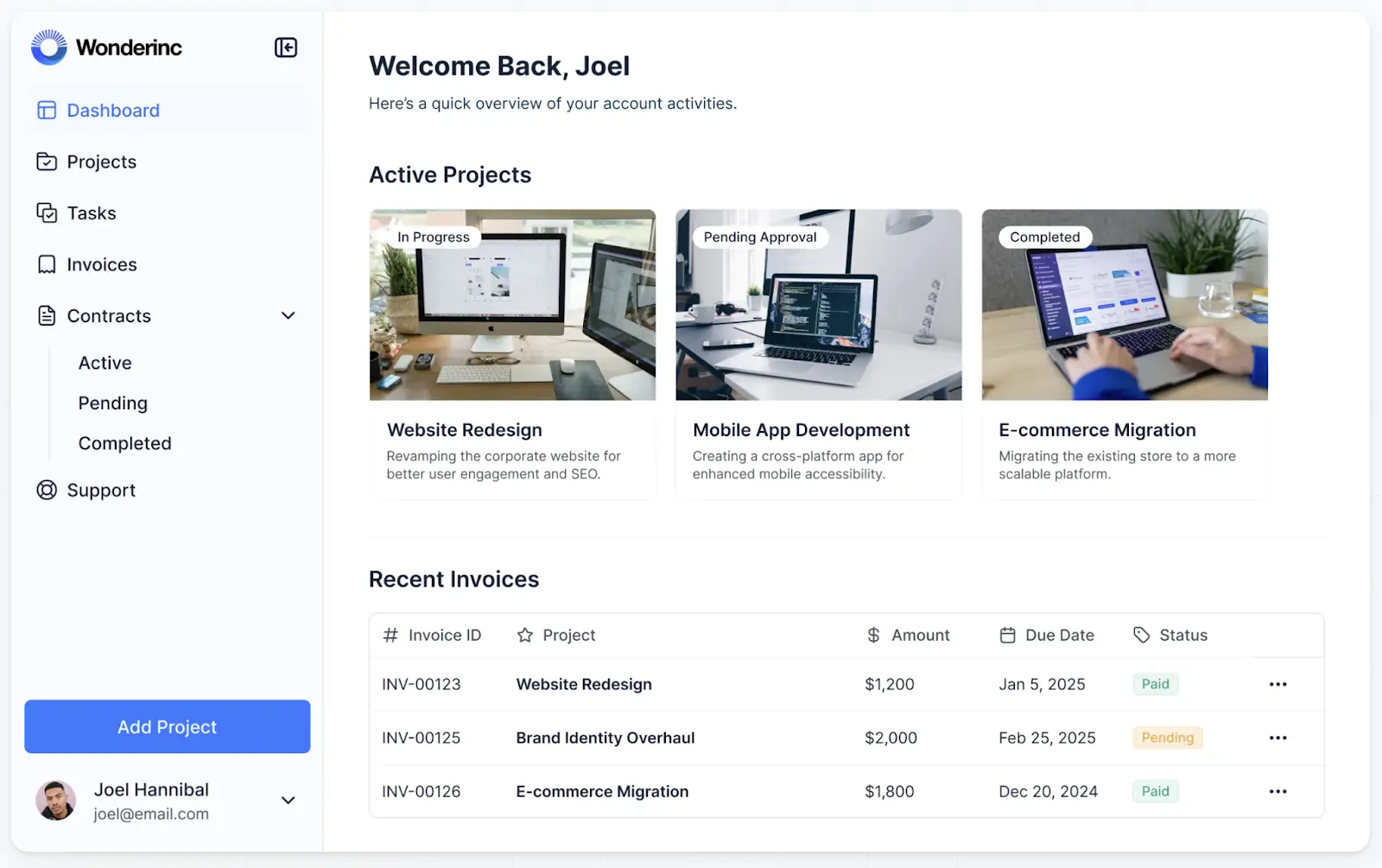
It's a drag when your client portal comes with a hefty price tag and a long list of features, only half of which you use. Building with Softr eliminates that problem. You just describe the portal you want, and Softr's AI Co-Builder creates it with the features you actually need, tailored to your business process. It can connect to a native Softr Database without API rate limits, or an external database you’re already using, like Airtable or Google Sheets.
Everything you’d need in a production-ready portal is included from day one. Custom branding. Granular permissions. Workflow automation. Enterprise-grade security. Plus, you can embed an AI assistant right in your portal, so your clients can punch in questions and get back answers based on your live company data. That means your customer service team isn’t stuck fielding the same basic inquiries over and over when they could be focused on more strategic work.
Pros
- AI and no-code building: With the Co-Builder, generating your portal is as simple as typing in a prompt. To refine it, you can jump in and out of a drag-and-drop visual editor, so you’re not spending AI credits just to adjust text, change colors, or add blocks. For teams that live in an AI assistant, the Softr MCP lets you build and update apps, databases, and workflows directly from tools like Claude or ChatGPT.
- All-in-one platform for client-facing and internal work: Along with portals, you can also build CRMs, dashboards, forms, and other internal tools, so all your ops live in the same place.
- Production-ready from day one: Hosting, security, and user management are all included and working the moment your portal goes live.
- Works with your existing data: Softr integrates with multiple data sources. You have the flexibility to use your existing Airtable, Notion, SQL, or Google Sheets data (or a dozen other options).
- Granular permissions: Control who sees what at the app, page, block, and record level. Clients only see their own projects and files, and your team sees everything they need to manage them.
- Built-in workflow automation: Trigger emails, Slack notifications, or data updates based on client activity without needing a separate automation tool.
- Live chat support and an active community: Access live chat support and a thriving community of builders.
Cons
- Softr doesn't generate exportable code. If you eventually want to access the code or want a highly customized engineering setup, you’re better off with another tool.
Key features
- AI Co-Builder: Describe the portal you want in plain language, and Softr's AI generates it instantly — complete with pages, layouts, and a clear data structure.
- Ready-made portal templates: There’s a simple client portal template if you just want a clean slate to build from, or more specialized options, like a SaaS customer portal template or even a freelancer management template. Start from something closely aligned with your workflow to minimize setup time.
- Softr Databases: Build and manage relational data natively, with linked records, lookup fields, and formula fields that power your app directly.
- Progressive web app (PWA) support: You don’t need a developer to turn your portal into a downloadable mobile app for your clients to install. Just click, and bam, it exists.
- Enterprise-grade security: Your client data stays protected with SOC 1, SOC 2, and GDPR compliance, plus SSO and built-in encryption.
- Built-in AI assistant: Embed AI right in your portal, so clients can get the answers they need by submitting questions in plain English.
- Vibe coding blocks: Build custom app components with AI that connect to your data and match your portal's theme, useful for when you need to insert some unique design or logic.
Pricing
Softr offers flexible pricing and a generous free plan:
- Free: Unlimited apps, with access to Softr Workflows and Softr Databases, 5 app users, 5,000 records, 5 AI credits
- Basic: $19/month, unlimited apps with 42+ integrations, Team: 5 + Client: 5 app users, 50,000 records, 10 AI credits
- Pro: $99/month, unlimited apps with 45+ integrations and custom code, Team: 10 + Client: 50 app users, 500,000 records, 50 AI credits
- Business: $329/month, unlimited apps with 52+ integrations, Team: 30 + Client: 100 app users, 1M records, 100 AI credits
- Enterprise: Enterprise (custom pricing, contact sales)
Why it's better than Clinked pricing
Standard, the lowest plan you can get on Clinked, starts at $239/month for 100 members. And features like Kanban boards and white-label email notifications are locked behind the $479/month Premium tier.
Softr's first paid plan comes in at $19/month and gives you a fully customizable, AI-powered portal from the get-go, with automation, databases, permissions, and more. You can build exactly what you need at a price that scales with your team.
2. Assembly (formerly Copilot) — best for service firms that want an all-in-one branded portal
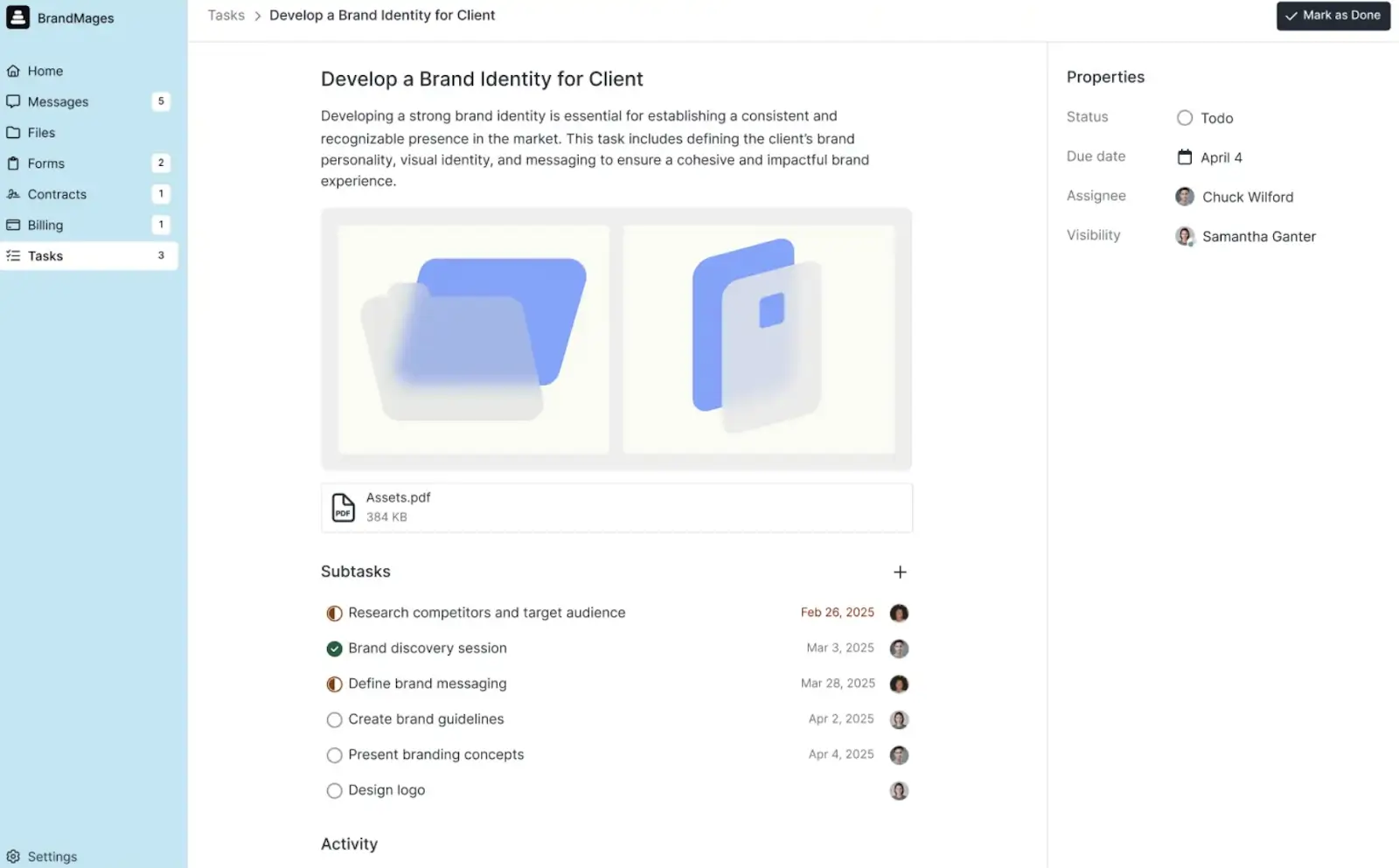
Assembly is built for service businesses that want a polished, branded client experience. Messaging, files, tasks, contracts, and billing fall under one login. And the UI has a calm, organized feel to it that users love. It also comes with a full API and developer documentation, so you can add on custom features should your needs ever evolve.
Pros
- Clients get a clean, polished portal experience. They won’t have to hunt to find files, messages, tasks, and invoices.
- Billing, eSignatures, and invoicing are all built in, so you're not paying for separate tools or spending time connecting them.
- You get SOC 2 and HIPAA compliance on the Advanced plan.
- To extend your portal’s functionality, you can add or embed apps, link to external websites, or build a custom app for your workspace. And you can easily enable or disable apps or adjust their visibility, depending on what you need them for.
Cons
- Some users have said the portal UI can be rigid, citing limited control over layout options.
- Assembly doesn't offer AI-assisted building. There's no way to describe what you want and have the tool instantly generate it. If speed of setup matters to you, that's worth knowing upfront.
- The Starter plan caps you at three internal users and charges you $39 per each additional user. The Advanced plan raises the baseline to five, but the pricing jumps to $399/month with additional users coming in at $59 for each additional user.
- The "Powered by Assembly" badge appears on your portal and client-facing emails. Removing it requires upgrading to the Advanced plan.
Key features
- Role-based access: Internal users can have full system access or scoped permissions. On Advanced plans, you can also control which internal users see which clients and notifications they receive.
- Easy import: Add or update clients and companies in bulk via CSV, or use tools like Zapier and Make to automate the process on an ongoing basis.
- Assembly Assistant: This built-in AI tool lets you draft and send client messages, create internal notes, generate invoices, manage tasks, and chat with your team more easily.
- Platform and API: Assembly's REST API covers most core resources, with webhooks for real-time event triggers.
- Security and compliance: SOC 2 Type II certified. HIPAA compliance, including a Business Associate Agreement (BAA), is available on the Advanced plan. MFA enforcement for all internal users and clients is also an Advanced-only feature, along with granular session controls, like custom magic-link expiry and configurable session timeouts.
Pricing
- Starter: Starts at $59/month. Comes with the basics—a CRM, client portal, messaging, billing, contracts, tasks, files, and forms for just one internal user and up to 50 clients.
- Professional: Starts at $189/month. Everything in Starter, plus domain customization, automation integrations, and more automation tasks for three internal users (or $39 for each additional user) and up to 500 clients.
- Advanced: Starts at $499/month. Everything in Professional, plus HIPAA compliance, SSO, and unlimited automation tasks for five internal users (or $79 for each additional user) and unlimited clients.
- Enterprise: Starts at $2,400/month. Everything in Advanced, plus custom SSO and a sandbox workspace for a customized number of internal seats based on your needs and unlimited clients.
3. SuiteDash — best for agencies who want deep white-labeling and unlimited users at a flat rate
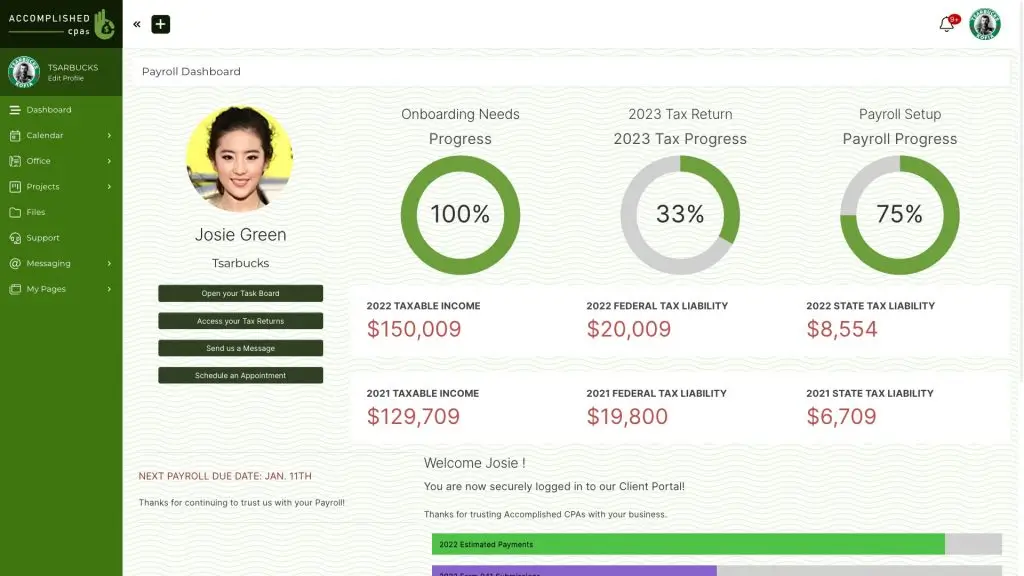
On SuiteDash, you can start with a blank portal or a template (stock or community-built). Once you're in, the customization and white-labeling options are about as extensive as it gets. Unlike most tools on this list, your headcount doesn't affect your bill, either: unlimited clients and staff are included with every plan.
Pros
- SuiteDash bundles CRM, client portals, invoicing, project management, scheduling, eSignatures, file exchange, email marketing, support tickets, and community features under one roof.
- It’s highly customizable. You can build out portal pages, landing pages, custom fields, and even set up the platform in multiple languages using built-in translations.
- Every plan comes with unlimited clients and staff. You don’t have to worry about per-user fees as your team or client base grows.
- Full white-labeling starts on the entry-level plan. You get your own login URL, platform branding, and a mobile app that clients can install directly on their devices through PWA technology.
- It’s GDPR compliant. A BAA is available for teams processing protected health information. It’s also PCI/DSS certified for payment security.
Cons
- SuiteDash is feature-dense. It can take a few weeks to learn where everything lives and how it all connects before you're actually productive in it.
- Over the years, reviewers have flagged slow performance and page load speeds. The issue has reportedly improved, but remains inconsistent.
- AI features are available but limited, and pricing is unclear from the site. SuiteAi is a paid add-on with tiered pricing and based on credits. So when credits run out, they need to be purchased separately. It's also scoped to generating or polishing text and creating images from prompts, not building or structuring the portal itself.
- No SOC 2 certification is mentioned anywhere on its site. 2FA is available, but enforcement is a paid add-on.
Key features
- FLOWs automation: Their trigger-based workflow builder lets you automate actions across the platform, like sending messages, assigning tasks, updating records, and more, without writing any code.
- Built-in LMS: Available on the Pinnacle plan, the LMS lets you create and sell digital courses, track participant progress, and deliver a fully branded learning experience to your clients.
- Internal roles: There’s a detailed permission structure for staff users. Roles include Super Admin, Admin Manager, Admin, Project Manager, Office Manager, Teammate, Salesperson, and Freelancer, each with different levels of access across CRM, projects, and platform settings.
Pricing
Their pricing remains the same whether you’re on a monthly or yearly plan.
- Start: $19/month. White labeling and email marketing campaigns for unlimited users, clients, and portals with 100GB of file storage.
- Thrive: $49/month. Everything in Start, plus autoresponder drip marketing, proposals (with the option to build and save your own templates), and deal stage pipelines with 500GB of file storage.
- Pinnacle: $99/month. Everything in Thrive, plus advanced automation, onboarding workflows, learning management software, and task dependencies with 2TB of file storage.
4. Moxo — best for enterprises managing complex, compliance-heavy client workflows
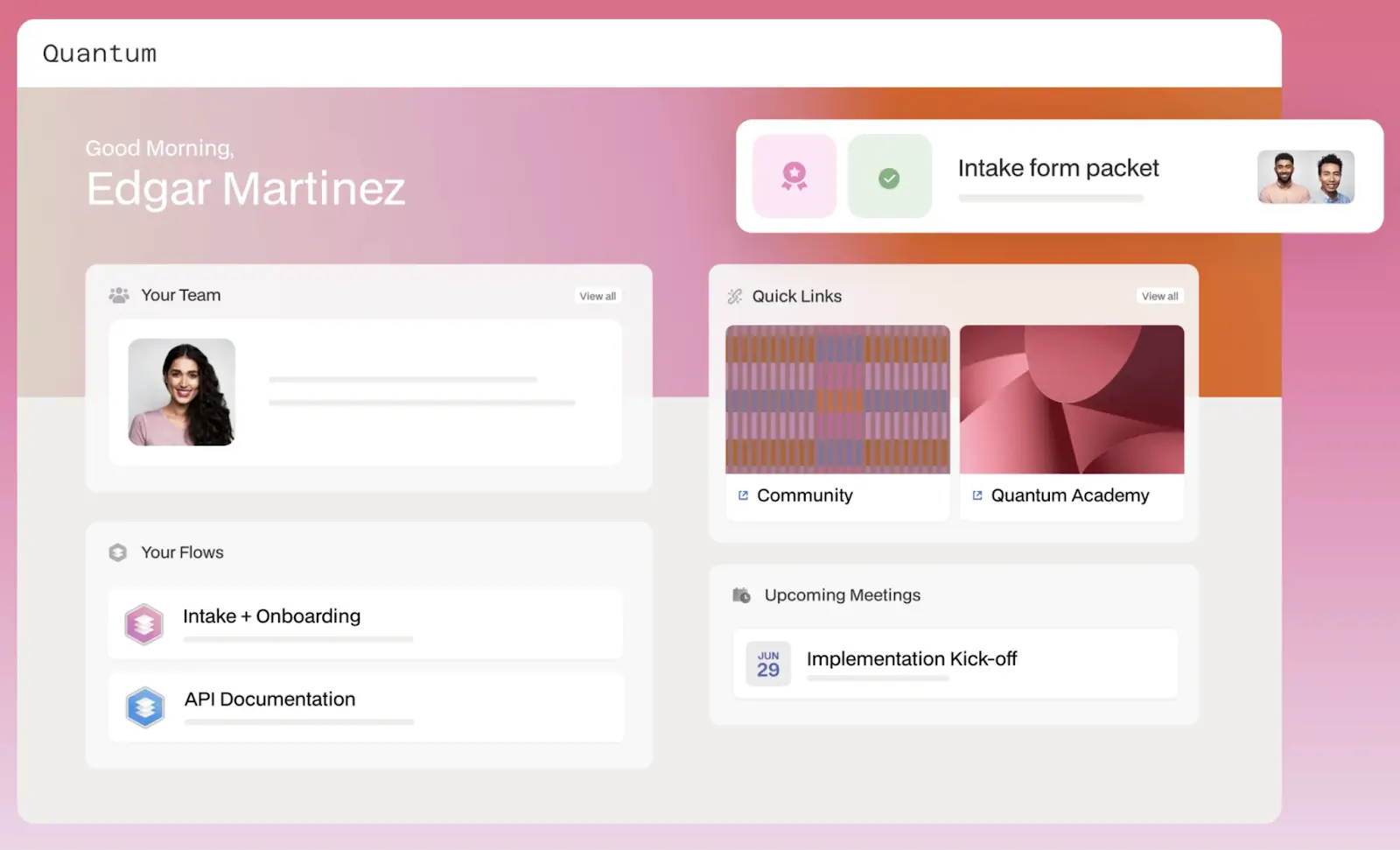
Moxo’s first paid tier starts at $200/month, admittedly not that much less than Clinked's $239. And it can take some time to learn how to set it up. But if you need enterprise-grade features that Clinked is missing, Moxo is worth your attention. The standout feature is its workflow and AI automation: AI agents can handle preparation, validation, routing, and follow-up, so your team stays focused on the decisions only they can make.
Pros
- You get advanced workflow automation for document requests, approvals, and multi-party sign-offs without manual follow-up.
- It’s SOC 2 Type II and SOC 3 certified, GDPR compliant, and aligned with Cloud Security Alliance standards. The platform maintains a seven-year audit trail, which is meaningful if you’re in a regulated industry.
- Moxo scales well for large teams managing high volumes of complex client interactions.
Cons
- The enterprise-level pricing, obviously. That’s hard to justify for small or mid-sized teams.
- Setup and configuration can be complex, requiring significant time before the platform is production-ready.
- Pricing isn't straightforward. The current pricing page lists two tiers (Business and Enterprise) but other documentation references a "Business Pro" tier and optional add-ons. Expect to talk to the sales team before you lock in a clear figure.
Key features
- Logic engine: Business processes are rarely linear, and Moxo’s workflow builder accounts for that. You can route work based on form inputs or outcomes, run parallel workstreams, send documents back to clients for revisions without losing context, and automatically escalate to the right person when deadlines are missed.
- Visibility: Every action taken inside a workspace is logged. Audit trails and activity records give you a clear, timestamped view of what happened, who did it, and when, useful for compliance documentation and internal accountability.
- Data residency: There’s private cloud deployment with configurable data center locations, for teams that need control over where their data lives.
Pricing
- Business: Starts at $200/month. Comes with 10 client workspaces per year, workflow automation and controls, and management.
- Enterprise: Custom pricing. Everything in Business, plus more advanced features across workflow automation, management, and support.
5. Agency Handy — best for digital agencies that need a fully branded ops platform
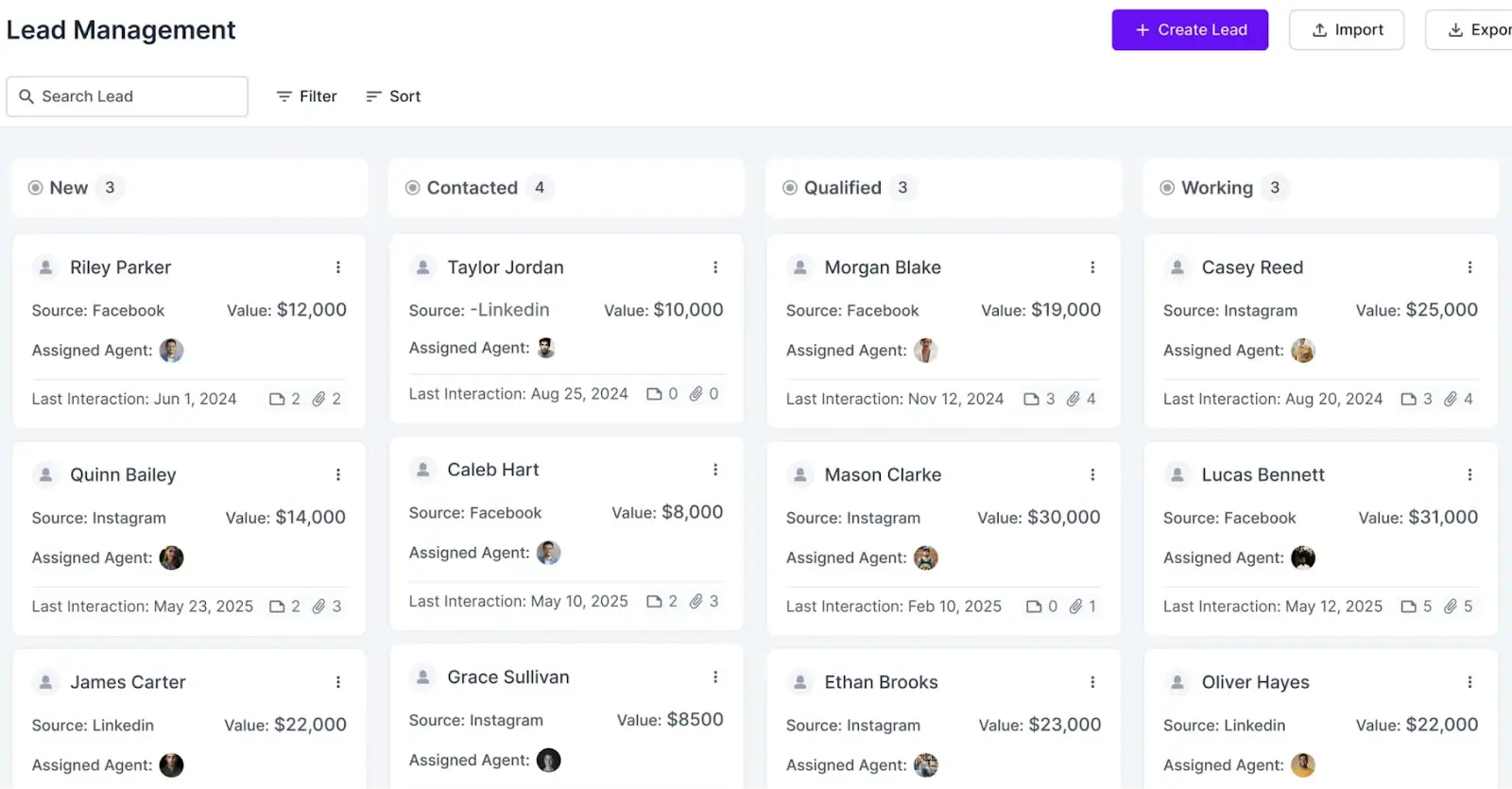
Agency Handy has everything you need to see clients through the full customer journey. You land a customer, sell them a service, get them onboarded, and the work begins, all in one place. But compared to SuiteDash, which offers a similar feature set and price tag, Agency Handy is narrower by design. There’s less to configure, it’s faster to get running, and easier for clients to navigate from day one.
Pros
- All plans come with full white-labeling. You can select a custom domain, logo, colors, and branded emails starting at the entry tier.
- A service catalog with embeddable checkout lets clients purchase and onboard themselves directly from your website.
- File feedback with annotations keeps design and content review cycles clean and centralized.
- Handle client support tickets with Agency Handy’s built-in ticketing system.
Cons
- The Freelancer tier has pretty low client and user limits. Teams expecting volume should consider Team Starter or Business Pro instead.
- Third-party integrations are limited compared to more established platforms. Most connectivity runs through Stripe, PayPal, and webhooks.
- They have no published security certifications. There's no evidence of SOC 2, HIPAA, or formal compliance standards. SSO and 2FA are on the roadmap—a good sign, but something to keep in mind if security is a priority now.
Key features
- Service catalog: List your services with deliverables, pricing, and portfolio work, then embed the whole thing on your website, so clients can purchase and onboard without you lifting a finger.
- Project and task management: Kanban boards with deadlines, assignments, and file sharing are built in.
- File feedback: Scattered notes have delayed many a project. On Agency Handy, clients and team members can annotate files directly, keeping design and content reviews all in one thread.
Pricing
On all plans, Agency Handy offers more users, workspaces, or other desired features at custom pricing.
- Freelancer: $19/month. Project and task management, invoicing and subscriptions, proposals, tickets, and white labeling for one user and one workspace and up to 100 leads.
- Team Starter: $99/month. Everything in Freelancer, plus a custom domain and email, Slack integration, app embeds, and an API key for 10 users, one workspace, and up to 3,000 leads.
- Business Pro: $199/month. Everything in Team Starter, plus a dedicated account manager for 30 users, up to five workspaces, and up to 10,000 leads.
6. FuseBase — best for teams that want a knowledge-base-style client portal
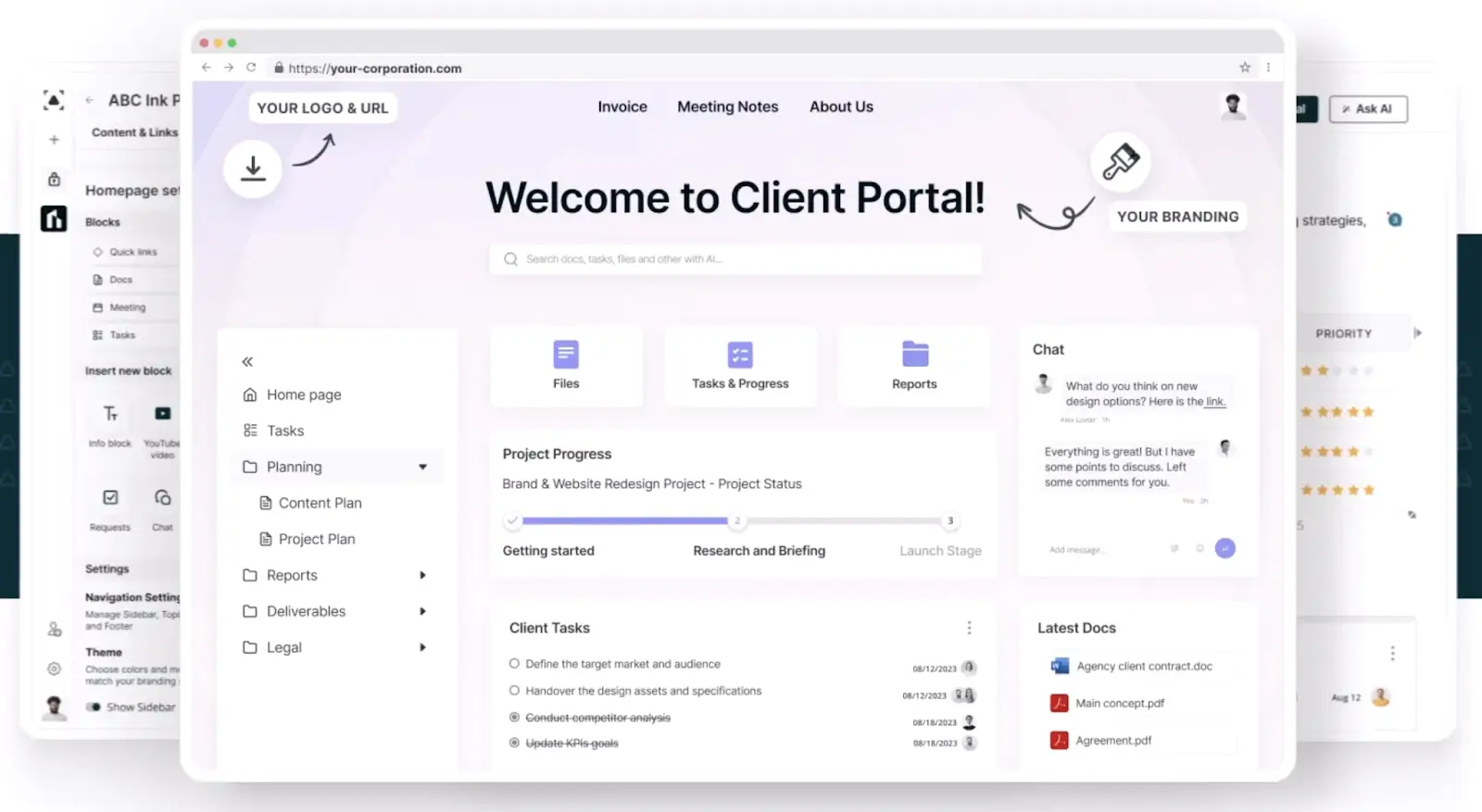
FuseBase started as Nimbus, a knowledge management tool, and that history shows. It helps you keep your clients informed and aligned with features like document sharing, real-time updates, task visibility, and file access all in one place. It's a better fit for teams that intend to use their portal as a project collaboration hub, rather than teams that expect deep billing and contracts capabilities.
Pros
- Your team workspace and client portals run on the same platform. Everyone’s working from the same docs, tasks, and files, with access controlled by who's allowed to see what.
- Pages support embeds from more than 2,000 external sources. You can pull in live data, tools, and content from across your stack without building anything custom.
- Deal rooms give you a dedicated space to organize sales materials and contracts for prospects before a project starts. And you can see how they're engaging with the content.
Cons
- White-labeling and custom HTML/CSS are only available on the Advanced plan ($399/month). If brand control is a priority, the lower tiers won't get you there.
- AI request limits scale by plan: 1,000 requests/month on Solo, 10,000 on Essentials. Teams using AI heavily will hit those ceilings fast.
- FuseBase has vibe coding capabilities for building custom apps, but getting set up requires installing a CLI and working inside an IDE like VS Code or Cursor. Once you're in, it's manageable, but that initial setup might feel unfamiliar to non-technical users.
Key features
- Security: FuseBase is the most security-credentialed tool on this list. It’s SOC 2 Type II compliant and HIPAA certified, with 93 documented controls across encryption, access management, incident response, and more.
- AI integration: AI is well integrated throughout the product. All plans come with agents and MCP support. And at an additional $10 per month per user, you get an interactive assistant to query your workspace content, generate summaries, and automate routine tasks using natural language.
- Deal rooms: In these pre-sale collaboration spaces, you can consolidate materials, contracts, and client conversations in one place.
- Browser extensions: Four companion tools extend FuseBase into your browser: an AI assistant, a voice typing tool, a screen capture and SOP builder, and a note-taking and file-sharing tool.
Pricing
- Solo: $39/month. One client account and client portal with 1,000 AI requests and 1,000 automation runs for one member.
- Essentials: $99/month. Everything in Solo, plus 100 client accounts and 10 client portals with 10,000 AI requests and automation runs for five members.
- Advanced: $399/month (annual billing only). Everything in Essentials, plus a customizable number of client accounts and client portals with 50,000 AI requests and 50,000 automation runs for 50 members, along with granular permissions and white labeling.
- Unlimited: Custom pricing. Unlimited features—client accounts, client portals, AI requests, automation runs, and members.
7. Foyer — best for teams that want a straightforward, HIPAA-ready client portal at a transparent price
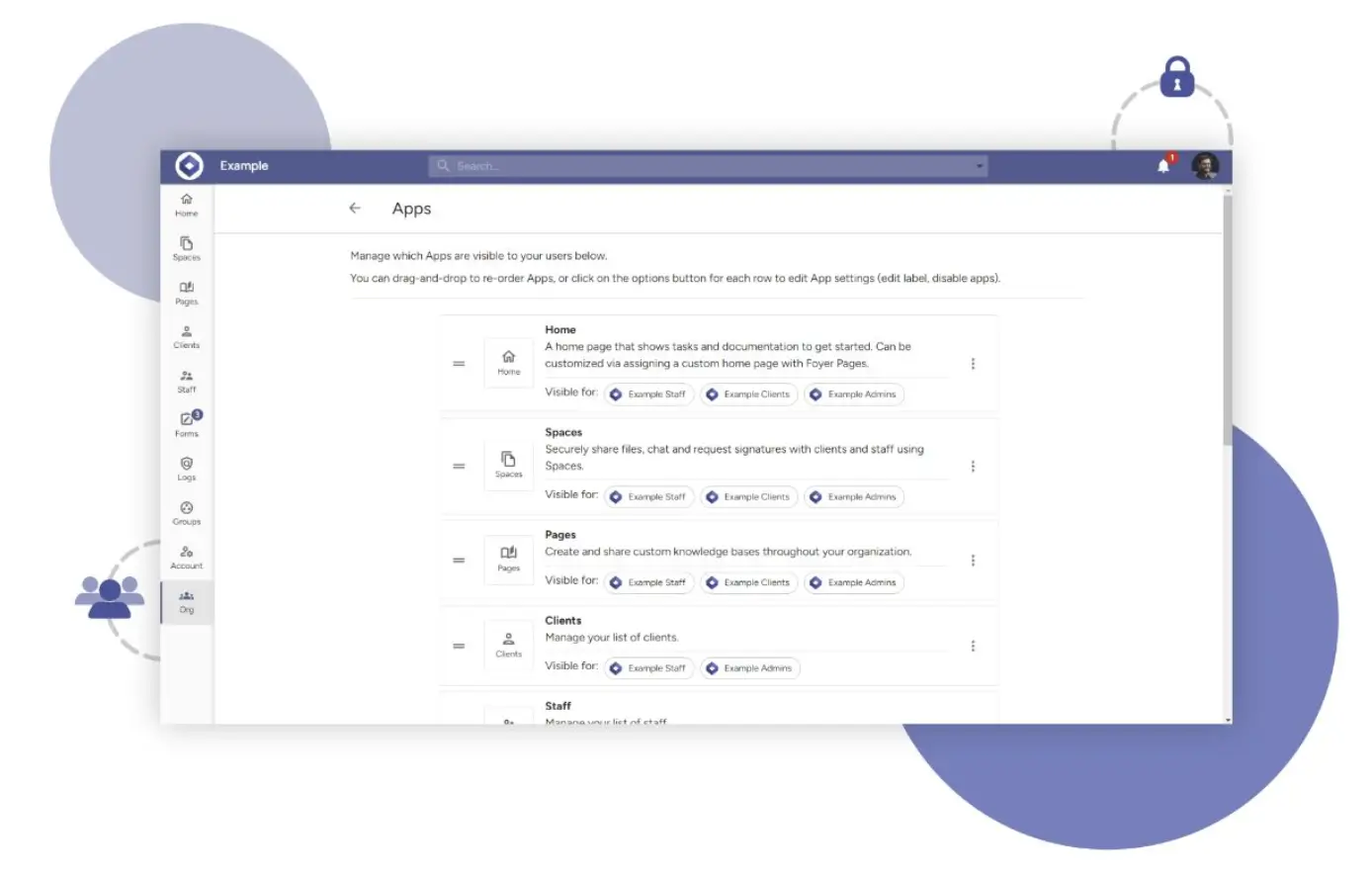
Foyer keeps it simple: one flat rate per internal user, unlimited clients, and no feature gating by tier. That pricing transparency, combined with data residency across the US, EU, and Australia on all plans, along with HIPAA compliance available on a higher tier, makes it a strong fit if you’re in a regulated industry.
Pros
- Pricing is simple and transparent pricing. One flat rate per internal user, unlimited clients, no hidden tiers.
- HIPAA compliance and data residency options across the US, EU, and Australia on the Ultimate plan, not as an enterprise add-on.
- You’re not restricted by file types or sizes, and 100GB of storage per internal user is pooled across your team.
- It integrates with Power BI, so data-heavy teams can surface analytics and reports directly inside the client portal.
Cons
- Foyer isn’t an all-in-one platform. It doesn’t offer native billing, invoicing, or project management. You’ll have to connect separate tools if you need those.
- It’s a smaller ecosystem than more established platforms. Most connectivity is handled through the API and webhooks rather than with native integrations.
Key features
- White-label portal: Custom branding, domain, and login page across all plans.
- File sharing: No restrictions on file type or size, with 100GB of storage per internal user.
- Real-time messaging: Group chat and organization-wide channels are built directly into the portal.
- eSignatures and file requests: Collect signatures and request documents from clients without needing a separate tool.
- HIPAA compliance: Built into the Ultimate plan, with data residency options in the US, EU, and Australia.
Pricing
All plans have a two-user minimum.
- Standard: $19/internal user/month. Comes with 1,000 GB of storage per user, 50 client accounts, and technical support.
- Premium: $39/internal user/month. Everything in Standard, plus 200 GB of storage per user, 500 client accounts, and a custom domain and email.
- Ultimate: $59/internal user/month. Everything in Premium, plus 500 GB of storage per user, 5,000 client accounts, and HIPAA compliance.
- Enterprise: Custom pricing. Everything in Ultimate, plus custom integrations and options for unlimited storage, client accounts, and staff accounts.
Which Clinked alternative is right for your team?
If you've been looking to step away from Clinked—whether the cost isn't justified, the feature set isn't the right fit, or you just need something more flexible—the alternatives above each offer a compelling path.
The right fit depends on what you're building and how you work:
- If you want a polished, all-in-one portal with billing, contracts, and HIPAA compliance, go with Assembly.
- If you want unlimited users and white-labeling at a flat monthly rate, SuiteDash is hard to beat.
- If you need enterprise-grade workflow automation and compliance, Moxo is the most capable option.
- If you run a digital agency and need a platform built around how agencies actually work, try Agency Handy.
- If your portal is primarily a collaboration and knowledge hub, FuseBase offers the most security credentials and a deep AI toolset.
- If you want simple, transparent per-user pricing with data residency built in, Foyer keeps it clean.
- And if you want to use AI to build a custom, fully-featured client portal that connects to your existing tools and scales without a developer, Softr is the strongest option on this list.
Ready to build a client portal that actually works for your business? Try Softr for free today.
Frequently asked questions
What are the best Clinked alternatives?
Which Clinked alternatives include a free plan or trial?
Does Clinked have a free plan?