[.blog-callout]
✨TL;DR
- The best inventory trackers offer barcode scanning, workflow automation, integrations with your existing sales and accounting systems, and mobile access for teams working offsite.
- This guide covers five inventory tracking tools—Softr, Zoho Inventory, Katana, Sortly, and inFlow Inventory—based on pricing, key features, multi-location tracking, and suitability for different business types.
- Build a custom inventory tracker that matches the way your team actually works using Softr. You get a native relational database, barcode scanning, workflow automation, role-based access controls, and AI capabilities in one platform, without per-user pricing or stitching together external tools.
[.blog-callout]
At its core, an inventory tracker shows how much stock you have; records when products are added, sold, or moved; and alerts you when it comes time to reorder — with live updates across different locations, warehouses, and sales channels.
Unlike spreadsheets, your team can always see what’s in stock, what’s running low, and where each item is stored. It gives you a single source of truth to manage total inventory, so you can make better decisions and avoid running out of stock or ordering too much.
But with so many inventory trackers available in 2026, choosing one can feel both arbitrary and overwhelming. To make it easier, we compared five tools and broke them down based on use cases, top features, and costs.
What to look for in an inventory tracker
The right software depends on your order volume, number of locations, sales channels, and how much your workflow differs from what most tools provide out of the box. Here’s what to prioritize in your search:
- Real-time stock visibility: Stock levels should update as soon as an item is received, sold, moved, or removed, so your team can make laser-accurate decisions about reordering and fulfillment.
- A central product database: Look for a tool that stores all your product information in one place that includes SKUs, descriptions, costs, and variants. This lets every team work from the same records.
- Ease of use: Prioritize software your warehouse staff, field teams, and external partners can pick up quickly — not just your admin or the person who set it up.
- Barcode and QR code scanning: Look for a tool that lets your team scan items using a mobile device to check stock in and out (in a warehouse or in the field).
- Multi-location tracking: If your inventory is spread across different warehouses, stores, or locations, you need to see exactly where each item is at any time.
- Automated reorder alerts: The tool should notify you when stock drops below a preset level, so you’re not manually checking counts to decide when to reorder.
- Integrations with your existing tools: Your inventory tracker should connect to the accounting, eCommerce, and sales tools you already use.
- Stock movement history: You should be able to see a full record of what changed, when it changed, and who made the change. This helps with audits and shows which products move fastest.
- Mobile access: Your team should be able to check and update inventory on the go. Offline access is also helpful if field teams work in places with unreliable internet.
Best inventory tracker software at a glance
| Tool | Best for | Key features | Pricing |
|---|---|---|---|
| Softr | Building a custom inventory tracker with AI and no-code | No-code app builder, native relational database, barcode scanning, role-based permissions, native workflow automation, AI agents and Ask AI, PWA mobile app | Free plan available; paid plans start at $19/month |
| Sortly | Small teams that need simple, visual inventory tracking | Folder-based organization, barcode and QR code scanning, item photos and custom fields, low-stock and date-based alerts, activity and movement reports, offline mobile access | Free plan available; paid plans start at $24/month |
| Katana | Small and mid-sized manufacturers that need inventory and production in one system | eCommerce integrations and order sync, batch and serial number tracking, barcode-enabled workflows, multi-location management, open API | Free plan available; core plan starts at $299/month |
| Zoho Inventory | Small businesses managing orders across multiple sales channels | Multichannel selling, barcode generation and scanning, serial and batch tracking, multi-warehouse management, workflow automation, customer and vendor portals, built-in reporting and analytics | Free plan available; paid plans start at $29/month |
| inFlow Inventory | Businesses needing end-to-end inventory and order management | Purchase-to-sale workflow, B2B Showroom, barcode scanning and label designer, multi-location tracking, order fulfillment and shipping, reorder automation | Starts at $129/month |
1. Softr — best for building a custom inventory tracker with AI and no-code
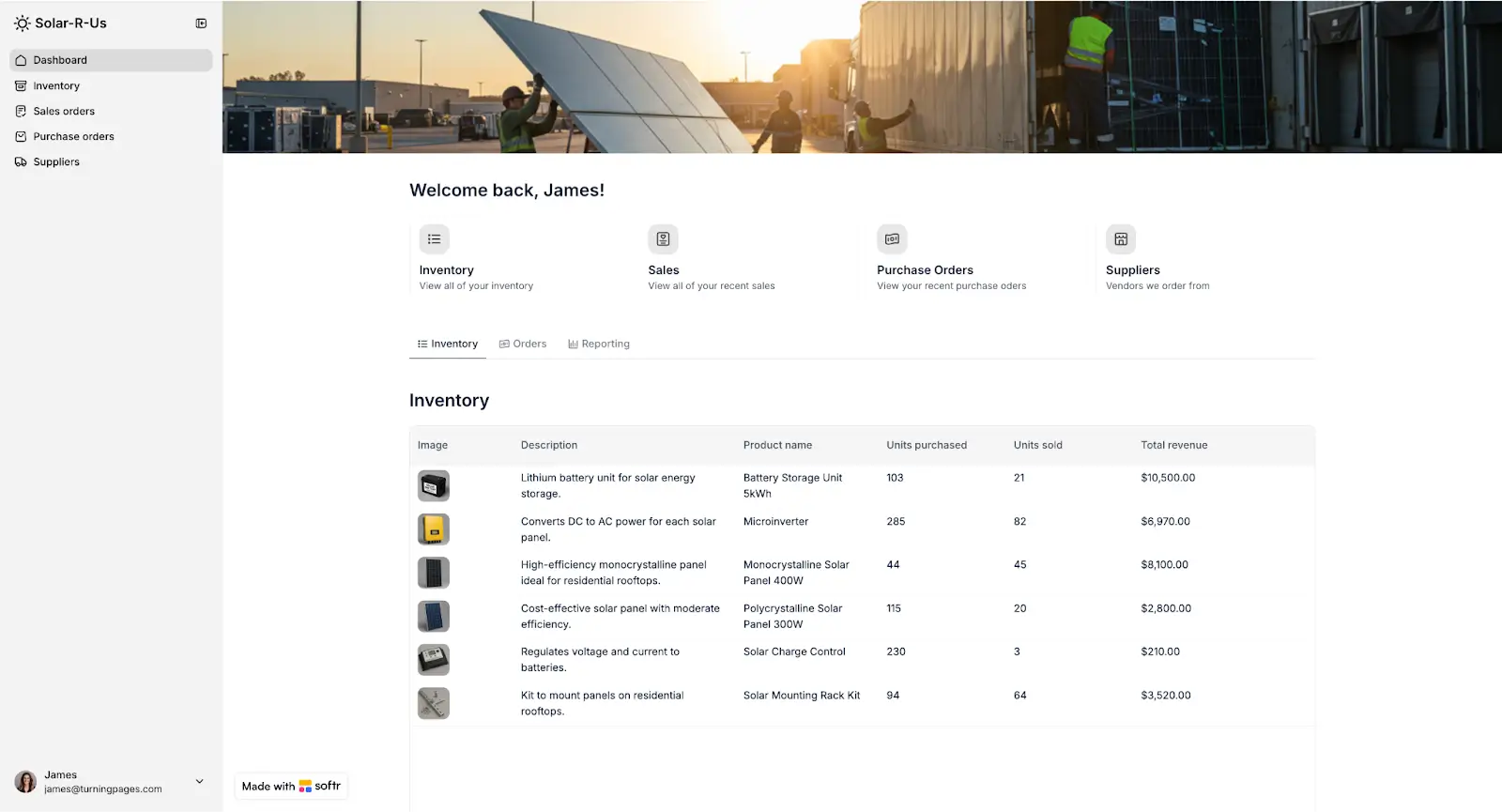
Softr is a no-code platform that lets you build a custom inventory tracking app aligned with the way your business actually runs.
You can store and organize your stock data in a built-in relational database, automate repetitive tasks like reorder triggers and record updates, and create custom portals for suppliers, vendors, or other external users who need secure access.
Start from an inventory management template or describe what you need and let AI generate the structure and interface for you. Then use the drag-and-drop editor to build out pages for stock tracking, order management, product catalogs, and supplier directories. Set role-based permissions so warehouse staff, sales reps, and external partners each see only what is relevant to them, then publish and share the URL with your team.
Once your app is live, use Softr’s native workflow automation to keep things running with limited manual intervention. Set up triggers and conditions to automate tasks like sending notifications when a new order is created, updating order status when a shipment is confirmed, or alerting your team when a product drops below a certain stock level.
You can also add an AI assistant that reads your live data and answers operational queries like "Which suppliers have open orders?" or "What items haven't moved in 30 days?"
Softr pros and cons
Pros
- Build the tracker you need without paying for features you won’t use. Start with the basics, then add supplier portals, automated workflows, and more as your needs grow.
- One platform instead of four. The relational database, app builder, automations, and AI are all native to Softr, so you don’t have to pay for or manage separate tools just to get a working inventory tracker.
- No per-seat fees or hidden charges. Adding a warehouse manager, a supplier, or a new sales rep won’t impact your monthly bill.
- Accessible from anywhere. Your Softr inventory tracker can be a desktop and mobile web app or a downloadable app with one-click PWA.
- Automate more than basic alerts. Create multi-step workflows with conditions and triggers to move stock, update records, and notify the right people at each stage of the process.
Cons
- No built-in connections to eCommerce marketplaces like Shopify, Amazon, or eBay — but you can still connect them via REST API
Softr key features
- Visual app builder: Create inventory dashboards, product catalogs, supplier portals, and order tracking pages using drag-and-drop blocks. You can customize layouts, filters, and views for different teams without writing any code.
- Native relational database: Store products, suppliers, orders, stock levels, and locations in linked tables. When you update a record in one place, those changes show up everywhere they should.
- Barcode scanning: Scan item barcodes to record stock coming in and going out — quantities update automatically in your database.
- Built-in automation: Build workflows inside Softr to automate tasks like reorder alerts, status updates, notifications, and record changes without leaving the platform. Add conditions, timing, and multiple steps to match your process.
- AI capabilities: Use AI agents to clean up records, fill in missing fields, tag data, or summarize info in your database. Add an AI assistant to your app so users can ask questions about live inventory data and get answers in plain language.
- Integrations and data connections: Bring in data from tools you already use, including Airtable, Google Sheets, Notion, SQL databases, and more. Connect to any other systems through the REST API.
- Role-based permissions: Create user groups and control what each user—warehouse staff, managers, suppliers, and external partners—can see or do based on their role.
- Progressive Web App (PWA): Publish your inventory app as a downloadable mobile app in one click. Your team can access and update stock from any iOS or Androird device.
- Enterprise-grade security: Protect your inventory data with secure sign-in options, SOC 2 and GDPR compliance standards, and built-in utility pages for sign-up and email verification.
Softr pricing
Softr offers flexible pricing with a robust free plan.
- Free: Unlimited apps, with access to Softr Workflows and Softr Databases, 5 app users, 5,000 records, 5 AI credits
- Basic ($19/month): Unlimited apps with 42+ integrations, Team: 5 + Client: 5 app users, 10 AI credits
- Pro ($99/month): Unlimited apps with 45+ integrations and custom code, Team: 10 + Client: 50 app users, advanced permissions, calling external APIs, e-signature, 50 AI credits
- Business ($329/month): Unlimited apps with 52+ integrations, Team: 30 + Client: 100 app users, 1M records, two-factor authentication, 100 AI credits
- Enterprise: Custom pricing, SSO, dedicated success manager, tailored onboarding
Who Softr is best for
Softr is a good fit for retailers, eCommerce businesses, wholesalers, distributors, field service teams, and manufacturers that need a flexible inventory system but lack in-house developers. If rigid inventory tools don’t match the way your business works, Softr lets you build a system that does.
2. Sortly — best for small teams that need simple, visual inventory tracking
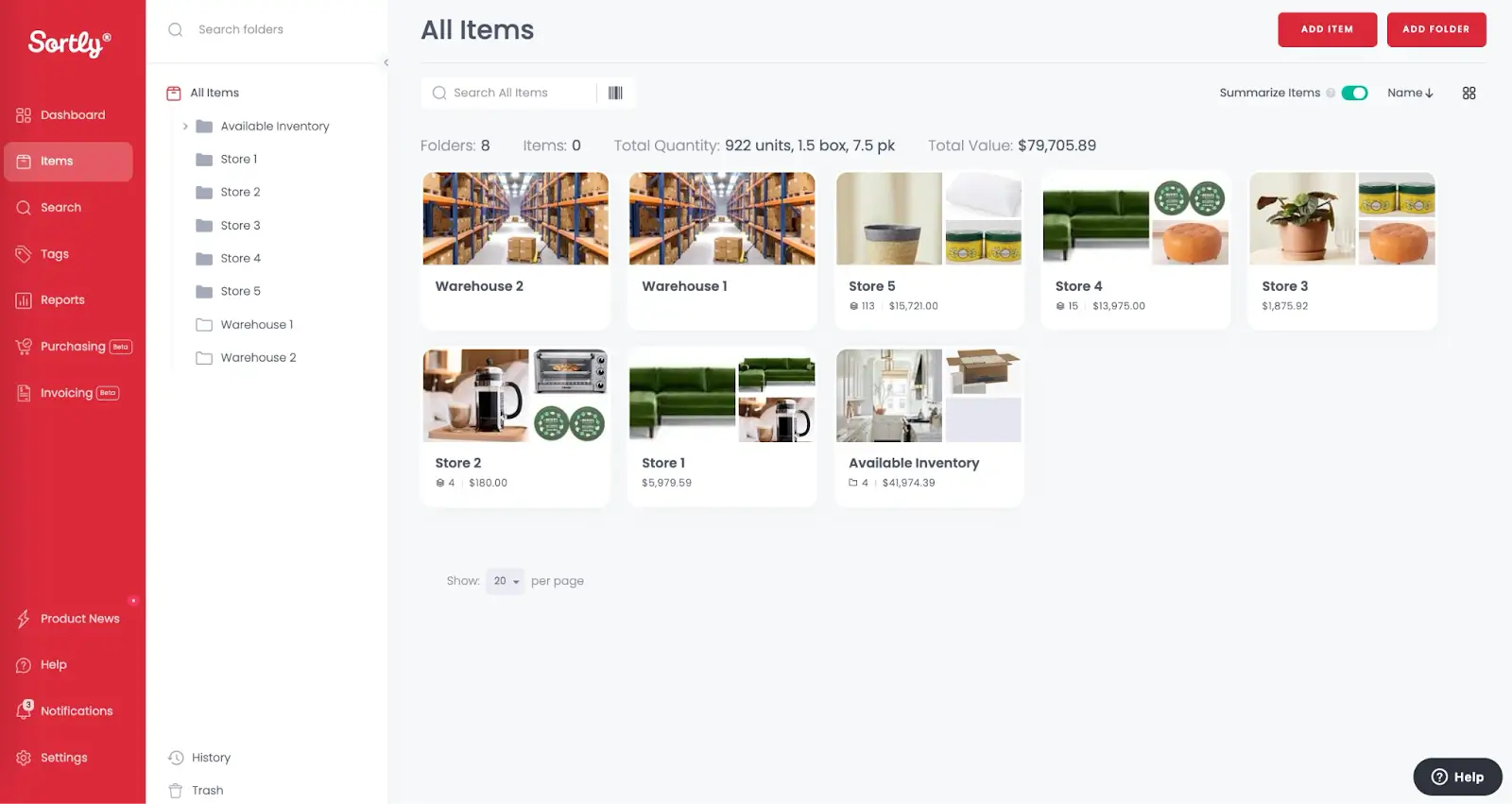
Sortly is a visual inventory tracking app that lets you organize stock using folders, photos, and custom fields, so your team always knows what you have, where it is, and who has it. Create item entries with photos, custom tags, and details like price and cost, then organize everything into folders and subfolders by location, category, or team.
Sortly pros and cons
Pros
- Visual, folder-based organization makes it easy to find and manage items across multiple locations
- Full activity log tracks every change, who made it, and when, so you always have a clear audit trail
- Offline mobile access lets your team update inventory even without an internet connection
- Date-based alerts help teams track maintenance schedules and expiration dates, not just stock levels
Cons
- Pricing has increased in recent years, and some users on Reddit report being caught off guard by the changes
- Item limits per plan mean businesses with large catalogs may need to upgrade or delete records to stay within their tier
- Doesn’t natively integrate with eCommerce platforms like Shopify or WooCommerce, except through Sortly API, which requires technical setup
Sortly key features
- Barcode and QR code scanning: Scan existing barcodes or generate and print custom labels using your phone.
- Folder-based organization: Create folders and subfolders to mirror your locations, teams, or categories.
- Item photos and custom fields: Add photos to item entries and create custom fields to track any detail your business needs.
- Low-stock and date-based alerts: Set quantity thresholds to trigger reorder reminders, or use date-based alerts to track maintenance schedules and expiration dates.
- Activity and movement reports: See a full log of who changed what and when, with reports on item flow, stock levels, user activity, and location movements.
- Offline mobile access: Track and update inventory from your phone even when you are out of range, with automatic sync when you reconnect.
- Integrations: Connects natively to QuickBooks Online, Slack, Microsoft Teams, and Amazon Business for purchasing. Webhooks and an API are available for connecting other tools.
Sortly pricing
- Free: 100 unique items, 1 user
- Advanced ($24/month): 500 unique items, 2 users
- Ultra ($74/month): 2,000 unique items, 5 users, purchase orders
- Premium ($149/month): 5,000 unique items, 8 users
- Enterprise: Custom pricing
Who Sortly is best for
Sortly works best for small businesses and field teams that need a straightforward way to track physical inventory, tools, equipment, or supplies across multiple locations.
3. Katana — best for manufacturers that need inventory and production management in one system
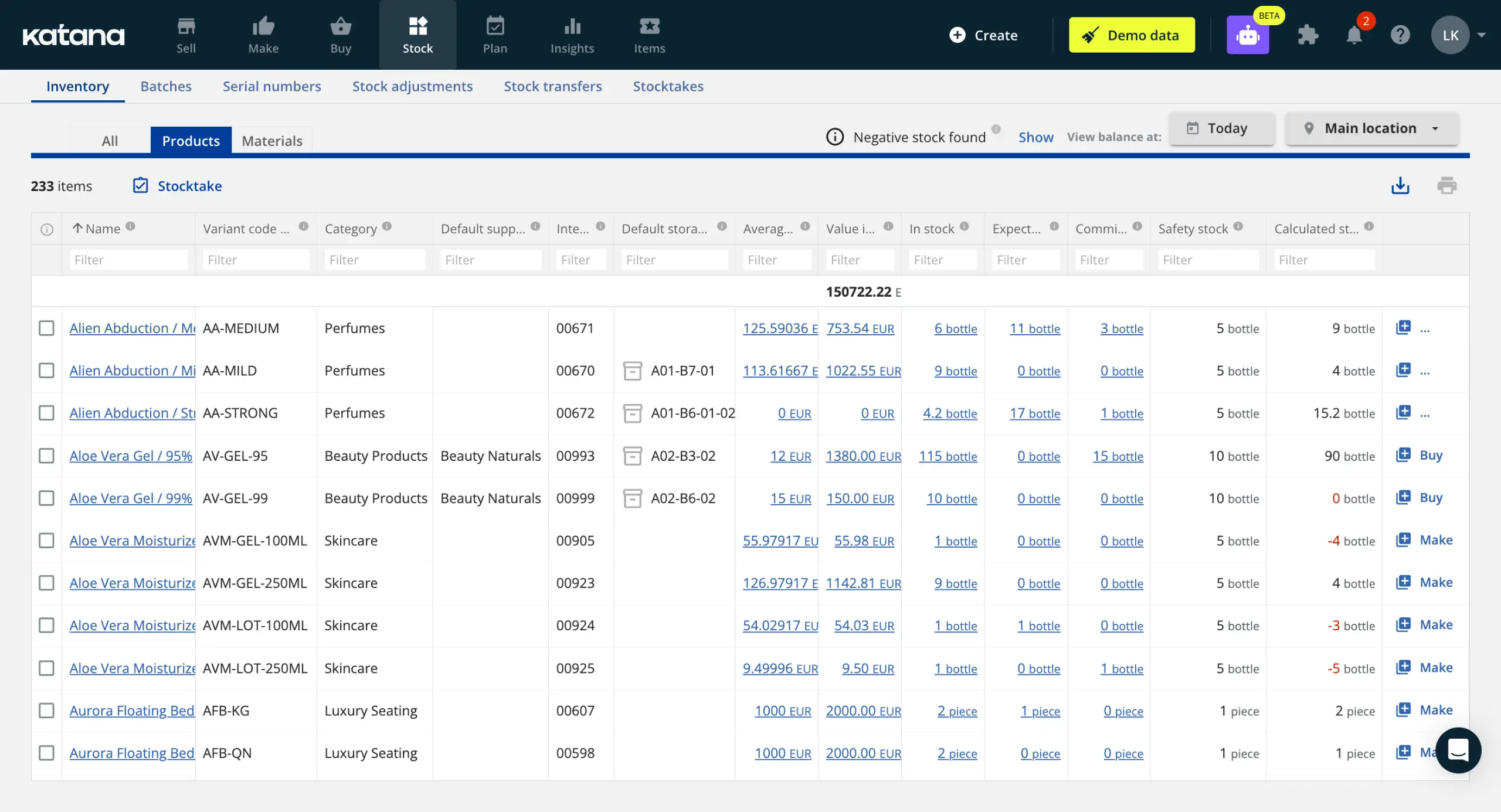
Katana is a cloud-based inventory tracker for businesses that both make and sell products. Where most inventory tools focus on tracking finished goods, Katana connects raw materials, production, and sales orders in one system so you know what you have, what is being made, and what is ready to ship.
Katana pros and cons
Pros
- Connects inventory and production in one system
- No per-seat fees and no SKU limits on paid plans, so your costs do not scale with team size or catalog size
- Implementation takes around six weeks compared to six to twelve months for most ERP systems, according to Katana
- Native integrations with Shopify, WooCommerce, BigCommerce, QuickBooks Online, Xero, HubSpot, and Salesforce, plus an open API for custom workflows
- Batch, lot, and serial number tracking with expiry date management built in for compliance-sensitive industries
Cons
- One of the more expensive options on this list
- Key features like traceability, warehouse management, and manufacturing management are paid add-ons
- An onboarding fee that starts at $2,000 for higher-tier plans
- Not suited for pure retailers or resellers with no manufacturing component, as the platform is built around production workflows
Katana key features
- Real-time inventory visibility: See stock levels across all locations, channels, and production stages in one dashboard.
- eCommerce integrations and order sync: Connect Shopify, WooCommerce, BigCommerce, Amazon, and eBay so sales orders flow directly into Katana.
- Planning and forecasting: Katana calculates recommended order quantities based on live stock levels, forecasted demand, safety stock, and minimum order quantities, so you reorder at the right time.
- Batch, lot, and serial number tracking: Track every item from supplier to customer. Manage expiration dates and respond quickly to audits or recalls.
- Barcode-enabled workflows: Use barcode scanning for receiving, picking, packing, and stocktaking. Updates reflect instantly across your inventory.
- Multi-location management: Manage stock across warehouses, stores, and partner locations and transfer stock between sites.
- Open API: Build custom workflows and connect tools not covered by native integrations.
Katana pricing
- Free: Up to 30 SKUs, 3 locations, unlimited users, with a 15-day full feature trial.
- Core Plan (from $299/month): Unlimited SKUs, users, and integrations.
Who Katana is best for
Katana is best for businesses that manufacture their own products and need a single system to manage raw materials, production, and finished goods inventory.
4. Zoho Inventory — best for affordable, multi-channel inventory management
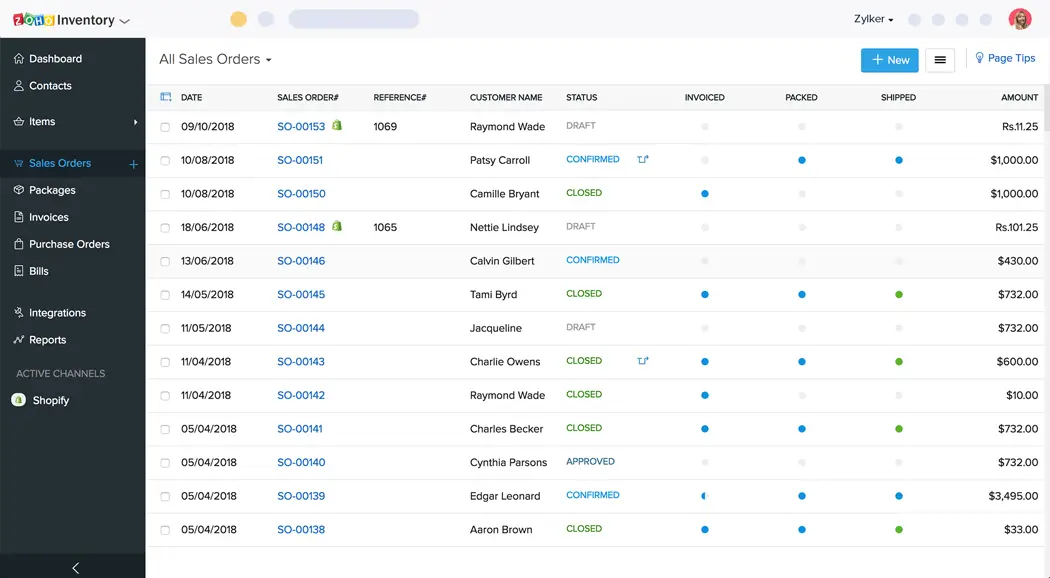
Zoho Inventory is a cloud-based inventory and order management tool built for small to mid-sized businesses that sell across multiple channels. If your business already uses Zoho Books for accounting or Zoho CRM for sales, inventory data flows between them automatically. It still works well as a standalone tool even if you don’t use Zoho tools.
Zoho Inventory pros and cons
Pros
- Deep integration with the Zoho ecosystem means inventory, accounting, and CRM data stay in sync without manual work
- Supports multi-channel selling across Shopify, Amazon, eBay, Etsy, and more, with automatic stock updates across all channels when a sale is made
- Batch and serial number tracking help businesses in food, healthcare, and electronics manage traceability and expiration dates
Cons
- Monthly limits on invoices, purchase orders, and bills on lower plans can restrict fast-growing businesses
- Customization and automation features are locked behind higher-tier plans
- Teams not already in the Zoho ecosystem may find the integration setup with third-party tools less straightforward than expected
- Adding users, locations, or order volume beyond plan limits comes at an additional cost per add-on
Zoho Inventory key features
- Multi-channel order management: Sync and fulfill orders from Shopify, Amazon, eBay, Etsy, and other platforms in one place.
- Barcode generation and scanning: Generate barcodes for your items and scan them to populate line items on invoices and bills automatically.
- Serial and batch tracking: Track individual units by serial number or group items by batch to manage expiration dates, recalls, and traceability.
- Multi-warehouse management: Add multiple warehouse locations, create transfer orders between them, and restrict staff access based on their role.
- Purchase and sales order management: Create, send, and track purchase orders and sales orders with status updates, approval workflows, and automatic conversion to invoices or bills.
- Customer and vendor portals: Give customers a self-service portal to track orders and pay invoices, and give vendors a portal to manage purchase orders and upload bills.
- Workflow automation (Professional plan and above): Set up rules that trigger actions automatically, such as updating an order status when a shipment is confirmed or sending a notification when stock drops below a reorder point.
- Reporting and analytics: Access built-in reports on inventory, sales, purchases, and payments.
Zoho Inventory pricing
- Free: 50 invoices per month, 1 user, 2 locations
- Standard ($29/month): 500 invoices per month, 2 users, 2 locations
- Professional ($79/month): 3,000 invoices per month, 2 users, 4 locations
- Premium ($129/month): 7,500 invoices per month, 2 users, 6 locations
- Enterprise ($249/month): 15,000 invoices per month, 7 users, 10 locations
Who Zoho Inventory is best for
Zoho Inventory is best for businesses that sell across multiple online channels and want an affordable, structured system for managing orders, stock, and fulfillment.
5. inFlow Inventory — best for end-to-end inventory and order management
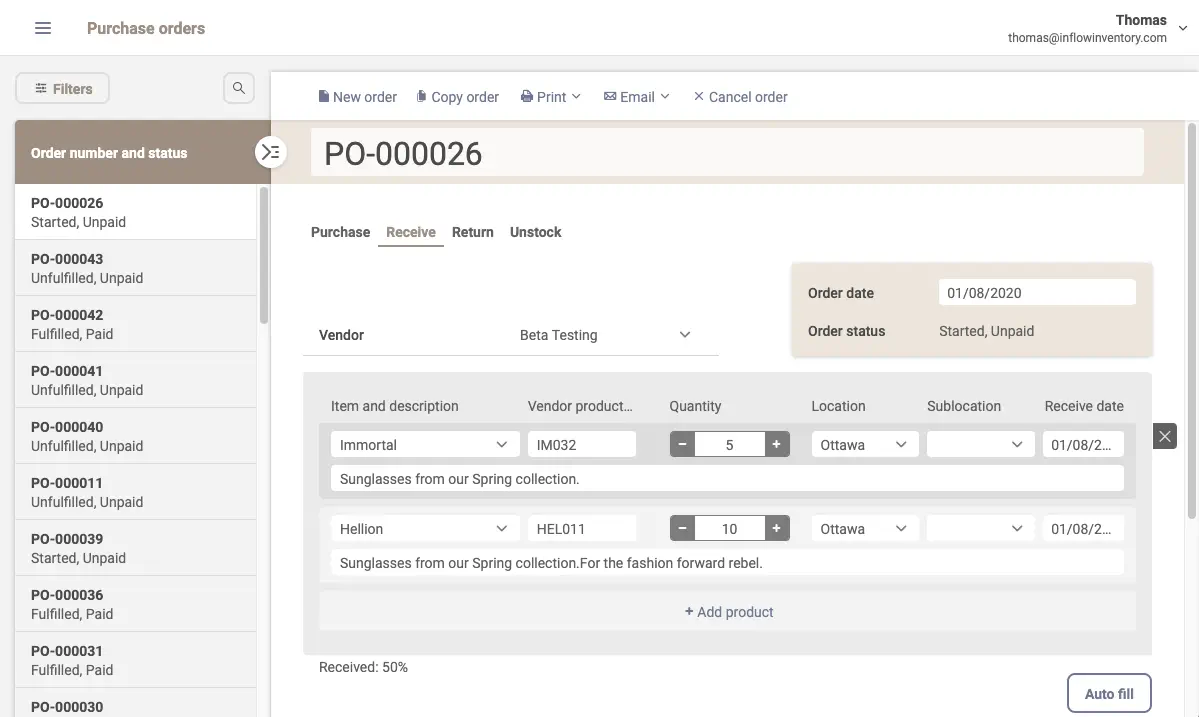
inFlow Inventory is an inventory management software for businesses that need to manage the full cycle from purchasing stock to fulfilling orders in one place. For teams managing stock across multiple locations, it lets you set reorder points by product and by location, transfer stock between sites, and control access to locations.
inFlow Inventory pros and cons
Pros
- Covers the full purchase-to-fulfillment workflow in one system
- Custom showroom lets wholesale customers view your product catalog, see the prices set for their account, and place orders anytime
- Bulk pricing tools let you update costs across your entire catalog at once, useful when vendor costs change frequently
Cons
- Sales order limits on lower plans can become costly if your order volume grows
- A mandatory one-time onboarding fee applies on higher-tier plans
- Serial number tracking is an add-on cost on all plans, not included by default
inFlow Inventory key features
- Complete purchase-to-sale workflow: Create purchase orders, receive stock, process sales orders, generate invoices, manage returns, and handle back orders in one platform.
- Barcode scanning and label designer: Generate barcodes and scan them using your phone camera or inFlow's dedicated Smart Scanner. Design custom labels using built-in templates or build your own from scratch.
- B2B Showroom: A built-in wholesale portal with real-time inventory sync, customer-specific pricing, and abandoned cart reminders on select plans.
- Multi-location stock management: Track inventory across unlimited locations with sublocations, stock transfers, reorder points per location, and user-level access controls.
- Order fulfillment and shipping: Compare shipping rates across 50+ carriers, print labels, manage partial shipments, and track order and payment status.
- Reorder automation: Set reorder points per product and per location. inFlow sends reminders or generates purchase orders automatically when stock runs low.
- Asset and serial number tracking: Track individual assets by serial number across locations and team members, with a full movement history for each item.
- Integrations: Connects to 100+ eCommerce, shipping, and accounting tools including Shopify, Amazon, WooCommerce, QuickBooks Online, and Xero, with many connections available through Extensiv Integration Manager and EasyPost
inFlow Inventory pricing
- Entrepreneur ($129/month): 2 team members, 1,200 sales orders per year
- Small Business ($349/month): 5 team members, 12,000 orders per year
- Mid-Size ($699/month): 20 team members, unlimited orders
- Enterprise: Custom pricing
Who inFlow Inventory is best for
inFlow works best for businesses in wholesale, distribution, manufacturing, or eCommerce that process orders across multiple sales channels, manage shipments, or run a wholesale operation that needs a dedicated ordering portal.
Which inventory tracker is best for your team?
Choose Sortly if you want a simple, visual way to track physical inventory, tools, or equipment across different locations. Zoho Inventory is best if you already use Zoho Books or Zoho CRM and need your stock, orders, and shipping activity to stay synced.
Go for inFlow if your business needs to closely manage its inventory process, from purchasing to order fulfillment and wholesale. Katana can be a good fit if you make your own products and need inventory and production to work together in one system.
But if standard inventory tools don’t match the way your team works, Softr lets you build your own tracker using AI, a pre-built template, or from scratch — all without writing a line of code. You can use Softr’s native relational database, set up inventory automations, enable barcode scanning, add AI capabilities, and control who sees what.
All these features live in one platform, and you don’t have to deal with per-seat pricing to give your team access. Plus, users can access Softr apps from any device to manage inventory no matter where they work.
Try Softr for free and start building your inventory tracker today.
Frequently asked questions
Can I use Excel to track inventory?
What is the best software to track inventory?
Which software is commonly used for inventory management?