
.webp)
Real estate moves so fast that having the right tool is the difference between a closed deal and a missed one. Between juggling leads, arranging showings, and finalizing deals, you default to solving what’s urgent—and when you’re in that mode, it’s easy to miss a follow-up or let a lead go cold. A small oversight that may cost you a commission.
With so many real estate CRMs on the market and each targeting a different segment, it’s hard to pick the best one for you. I put together this breakdown of the top tools to help any professional in the industry find the right fit, from solo agents to investors.
Best real estate CRMs at a glance
| Tool | Best for | Key features | Pricing |
|---|---|---|---|
| Softr | Building a fully functional real estate CRM with AI | AI Co-Builder, customizable lead capture forms, native workflow automations, AI querying of live CRM data, and Kanban, pipeline, and calendar views | Free plan available. From $19/mo (Basic) |
| Follow Up Boss | Relationship management | 200+ lead source integrations with auto-routing, conditional automations across email and SMS, Smart Lists as a daily call queue, team reporting with call recording | No free plan. 14-day trial. From $58/user/mo (Grow) |
| REsimpli | Real estate investors | Skip tracing included from Basic (10k credits/mo), list stacking for motivated seller targeting, 9 AI agents for calls, voicemails, and SMS, and real-time KPI dashboard | No free plan. 30-day trial. From $149/mo (Basic, 1 user) |
| Lofty | Agents and brokerages | IDX website with MLS listings updated every 15 min, Smart Plans for automated lead nurturing, AI Sales Assistant for 24/7 qualification, behavioural lead scoring | No free plan. From ~$499/mo; real cost often $700–$1,000+ with add-ons |
| Showdigs | Leasing management | On-demand licensed agent network in 20+ cities, AI leasing bot for qualification and scheduling, self-guided smart lock tours, ILS syndication to 30+ listing sites | No free plan or trial. From $50/mo + $20/listing beyond first 2 |
| HubSpot CRM | General-use free option | Unlimited contacts and email logging on free tier, multi-source lead capture, timed email sequences, 500+ integrations including MLS and DocuSign | Free plan available. From $15/user/mo (Starter); $90/user/mo (Professional) |
What are real estate CRMs?
Real estate CRMs are specialized software platforms that help agents, investors, brokers, and teams to track leads, manage client relationships, and streamline the entire sales process from first contact to closing. These platforms are strong in industry-specific integrations with MLS databases, have robust communication tools for quick follow-ups, and include automation capabilities to nurture relationships without extra admin.
What to look out for in real estate CRMs
- Contact and lead management. Your CRM should capture leads from multiple sources, whether that’s Zillow or your website, and let you segment them so you can prioritize and take action.
- Pipeline and deal tracking. A visual pipeline helps you see each deal’s status, so you can quickly jump into any of them to add notes, get more information, or move it forward.
- Automation and follow-up sequences. Once set up, you can focus on the urgent work while your CRM takes care of nudging and nurturing your clients.
- Integrations (MLS, email, dialers). Bringing all your tools together into a single platform saves time and effort, especially since CRMs are usually the source of truth in a business.
- Reporting and analytics. These help you evaluate your team’s performance, so you can understand where and why deals are being won or lost.
- Mobile experience. Agents spend most of their time going from property to property, so a mobile app acts as a useful bridge to log calls, update deals, or message leads on the go.
- Ease of use. Your CRM shouldn’t add friction to the way you work. It must have a clean interface, a predictable user experience, and a friendly setup procedure.
- Pricing and scalability. You should balance keeping the most from every commission with having powerful tools to close more deals. Look for tools that have a pricing structure that matches your current level and don’t get extremely expensive without delivering useful features.
Out of the 78 apps considered, I chose the strongest option for each use case, instead of listing all the real estate CRMs on the market that share similar features. There’s at least one option for every professional: agents, teams, brokerages, investors, and leasing managers.
1. Softr — best for building a fully functional real estate CRM with AI
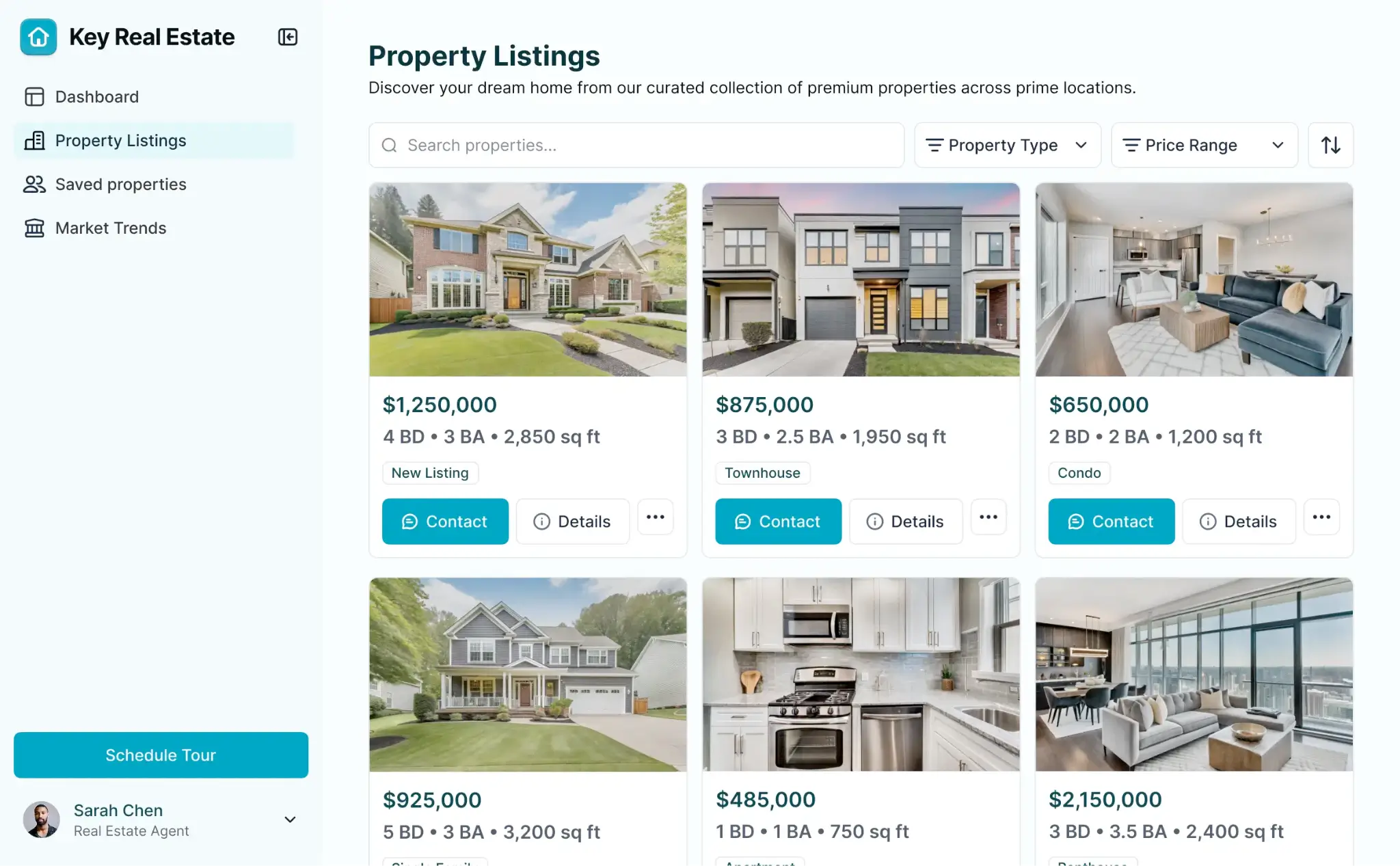
Softr is an AI app builder that lets you whip up real estate management tools tailored to the way you work. You can build your CRM, public listings pages, and property management portals from a prompt with the AI Co-Builder or yourself using the no-code visual editor.
Softr offers the core building blocks for everything that a strong real estate CRM needs: forms let you capture leads directly into your database, and you can segment and display them in any way you like. Workflows let you set rules based on lead information, so you can automatically prioritize and assign them as they reach out.
AI is built directly into all your apps: with Ask AI, you can ask questions about your data, surface stalled deals, or pull insights from your pipeline. If you’re looking to improve your listings pages, you can generate new visual elements with AI, useful to make interactive photo galleries or mortgage calculators, without having to actually code them.
Softr pros
- Fully customisable to real estate workflows. Softr lets you model the data types that matter to you, such as property listings, tenancy stages, investor deal flow, or vendor contacts. You can then build your own views, forms, and dashboards around them.
- Build every tool you need. You can build any software tool to run your real estate business on Softr. Start with your real estate CRM, follow that with a custom listings website, or a client portal where buyers can log in to submit their documentation.
- Granular role-based permissions. Set up which members of your team can see each record, so everyone has the information needed to complete their tasks while protecting more sensitive data.
- AI querying of live CRM. Agents can ask natural-language questions directly inside the app and get answers pulled from live data. This reduces time spent building filters and reports.
Softr cons
- Not a CRM out of the box. You can start from the real estate CRM template which speeds up configuration time, but it really depends on whether you prefer the flexibility of building your own app versus having a rigid structure already set up.
Softr key features
- Customizable lead capture forms: add forms to your pages to collect new leads, automatically adding them to your contact database with source tracking and custom fields.
- Segmented contact database: build a relational database with custom fields, filters, and views so agents can segment contacts by lead status, property interest, or any other signal.
- Softr Workflows (native automations): trigger automated follow-up emails, record updates, or task assignments based on form submissions or status changes without using third-party software.
- Pipeline and calendar views: display deal stages, deadlines, and follow-up tasks using built-in Table, Kanban, and Calendar blocks.
- Mobile-ready PWA interface: access from any device without a native app install, allowing agents to update lead records, check pipeline status, and submit forms from the field.
Softr pricing
- Free: Unlimited apps, with access to Softr Workflows and Softr Databases, 5 app users, 5,000 Softr Database records, 500 workflow actions.
- Basic ($19/month): Unlimited apps with 42+ integrations, Team: 5 + Client: 5 app users, 50,000 Softr Database records, 2,500 workflow actions, custom domain.
- Pro ($99/month): Unlimited apps with 45+ integrations and custom code, Team: 10 + Client: 50 app users, 500,000 Softr Database records, 10,000 workflow actions, 3 custom user groups.
- Business ($329/month): Unlimited apps with 52+ integrations, Team: 30 + Client: 100 app users, 1M Softr Database records, 25,000 workflow actions, custom user groups (up to 10).
- Enterprise (custom pricing, contact sales):, custom usage limits, SSO, SLAs, dedicated success manager.
2. Follow Up Boss — best for relationship management
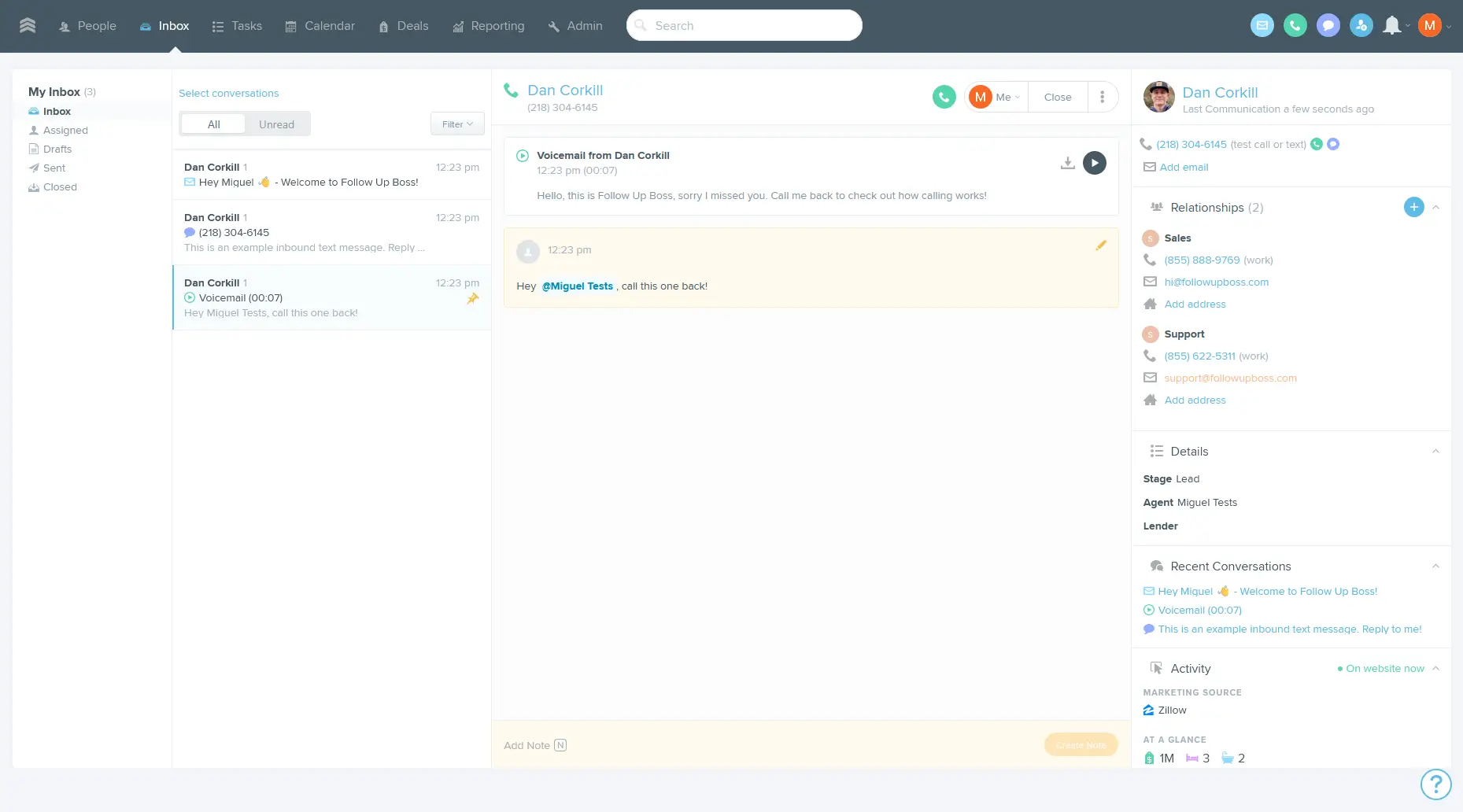
Follow Up Boss, FUB for short, works like a real estate operating system. It combines lead routing, fast follow-ups, and coordination features so your team can react quickly and service more clients. It’s a great match if you’re struggling with missed leads or failing to follow up on time.
All your leads land in a single inbox, no matter whether they came from a portal, a referral, or any other channel. You can route and assign them quickly from here before they go cold, and set up email/SMS automation to keep the relationship warm as they consider their options. In the longer term, these tools extend to check in with older leads, email them on anniversaries, or identify referral opportunities so you can have a shot at repeat business.
The relationship management features are some of the strongest in the category, but this focus is also FUB’s weakness. It’s not an all-in-one platform, lacking strong built-in marketing features or native transaction management: you’ll have to shop for additional software to support your entire workflow.
Follow Up Boss pros
- 200+ lead source integrations: Follow Up Boss connects natively with over 200 lead sources and IDX website platforms, automatically routing and tagging incoming leads.
- Automations 2.0 with conditional triggers: set up automations that fire up when a deal stage changes, a tag is added, a new inquiry comes in, a property is saved/viewed by a lead, or date-based. Actions include sending notifications, nurturing emails, or assigning leads to agents.
- Built-in group and two-way texting: FUB offers these two texting modes available directly on the platform, useful in contexts where you want to update the buyers, an agent, and a lender without sending multiple texts.
- Team reporting and agent accountability: The Pro and Platform plans include call recording, advanced reporting, and team leaderboards that surface each agent's contact rate, response time, and lead conversion by source.
Follow Up Boss cons
- Zillow data ownership risk: Zillow owns FUB and, as of November 2025, can process saved data from your customers who are also Zillow customers. This means that any saved notes or communications between you and customers that also have a Zillow account can be used by the company, including for AI training and advertising.
- No native transaction management: Follow Up Boss is a lead-to-contract CRM. It doesn’t include dedicated transaction management functionality.
- Steep initial setup and learning curve: Follow Up Boss requires approximately 3–4 hours of initial configuration before it’s ready to use. More than that, it’s not an opinionated platform: while this is good in terms of flexibility, it may leave inexperienced agents feeling a tad lost.
Key features
- Lead Flow: automatically imports leads from 250+ sources and routes them to agents based on rules like zip code, price point, or round robin.
- Action Plans: pre-scheduled sequences of emails, texts, and tasks that run automatically or on demand to maintain consistent multi-touch follow-up across lead types.
- Smart Lists: auto-updating saved filters that surface contacts by stage, last communication date, website activity, tags, or source. This works as a daily "who to call" queue.
- Tags and Segmentation: contacts can carry multiple tags (e.g., Buyer, Seller, VIP, specific ZIP code) alongside a single pipeline Stage, so you can improve your targeting.
- Deals (Pipeline View): separate buyers and sellers pipelines with customizable stages (e.g., Consultation Scheduled, Under Contract, Closed) and custom fields to track transaction-specific deadlines and details.
- Mobile App (iOS & Android): full CRM access from mobile, with Caller ID, texting, inbox management, and deal updates so agents on the go can stay responsive.
Pricing
- No free plan; 14-day free trial available
- Grow ($58/month per user): Lead management, Smart Lists, Action Plans, 2-way email and calendar sync, reporting, mobile app, AI features
- Pro ($416/month, includes 10 users): Everything in Grow, plus unlimited calling and texting, team inboxes, call reporting, and personalized onboarding
- Platform ($833/month, includes 30 users): Everything in Pro, plus team subgroups, enhanced integrations, dedicated success manager
3. REsimpli — best all-in-one for real estate investors
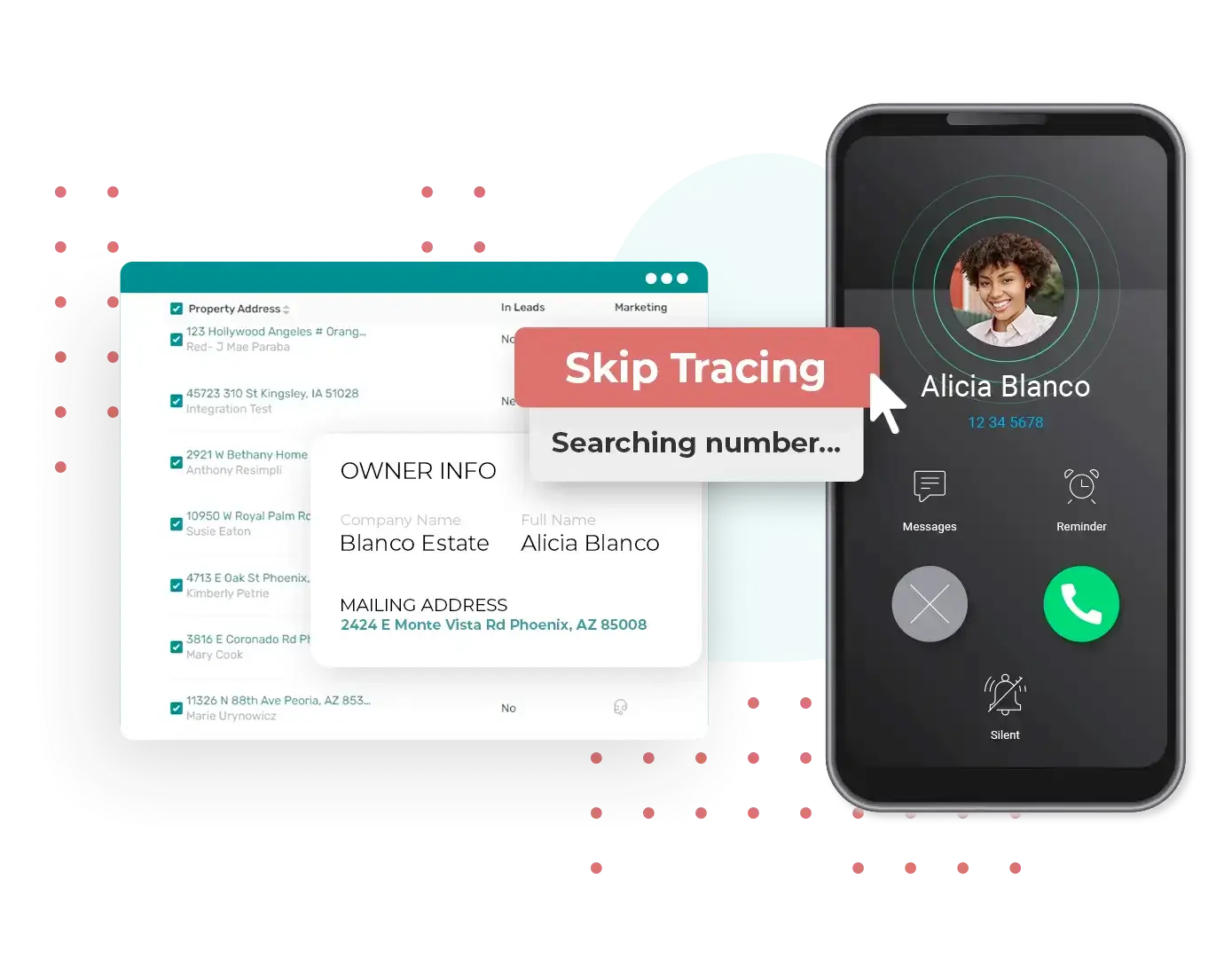
There’s a lot of software for selling properties, but not as much for real estate investors. REsimpli fills that gap, with excellent features for wholesalers and flippers, helping you identify opportunities, build deals, and buy properties from motivated sellers.
As an all-in-one for investors, it offers CRM pipelines for deal tracking; communication features spanning SMS, email, or ringless voicemail; skip tracing to find owner information; and KPI tracking to make sure you stay on target. On top of this, it supports driving for dollars workflows, where you can log your routes into the app and flag promising properties, placing them into lists you can work through later.
Due to REsimpli’s specialization, agents, brokerages, or lettings managers won’t find a lot of value here. Its strong feature set is opinionated, meaning it doesn’t give you a lot of flexibility if you have unique workflows, forcing you to adapt to the tools rather than the other way around.
REsimpli pros
- Skip tracing included in every plan: starting at 10,000 credits/month on Basic, you can enrich seller lists with other contact data without having to upgrade right away.
- List stacking for motivated seller targeting: overlay multiple marketing lists to surface properties to find property owners that are motivated to sell, so you can prioritize and close more deals.
- 9 AI agents for automated follow-up: AI agents cover inbound call handling, voicemail drops, setting appointments, and SMS follow-ups. This ensures motivated seller leads receive consistent responses even outside business hours.
- Real-Time KPI Dashboard: The built-in dashboard tracks leads contacted, appointments set, offers made, and deals closed in real time, giving team leads and solo operators a live view of acquisition performance without exporting data to a spreadsheet.
REsimpli cons
- Add-on costs can stack up: while the headline plans offer a decent amount of credits for metered features, tools like AI agents come at $99/agent ($399 for all 9), additional users at $99/month per seat, and unlimited list stacking at $199/mo. This can change the total cost sharply: click the compare features button on the pricing page and evaluate what you need before committing.
- No automated buyer identification for disposition: for wholesalers that act as a bridge between motivated sellers and prospective buyers, REsimpli provides only a buyer list that you manage manually. There is no buyer scoring, no investor ranking algorithm, and no data-driven buyer matching. You must still source, qualify, and add your own buyers through networking and manual research.
- Steep setup curve and rigid pipeline structure: new users consistently report a multi-week setup period before the platform operates as intended. The pipeline structure is described as rigid, with limited ability to customise stages or automate non-standard workflows without hitting the boundaries of what the system allows.
Key features
- Speed-to-Lead AI: Automatically calls new leads within 15 seconds of form submission to qualify, schedule, or transfer them live, eliminating manual response lag.
- Drip campaigns: Builds automated multi-step follow-up sequences across SMS, email, ringless voicemail, and direct mail, triggered by lead status or inactivity.
- List stacking and tagging: Identifies leads appearing across multiple marketing lists, applies customizable tags, and filters by motivation criteria to prioritize outreach without a separate tool.
- Lead Score AI: Scores and ranks leads using 150+ data points — including engagement, property data, and past deal history — so acquisitions teams focus on the highest-priority contacts.
- Offer management and e-signatures: Generates contracts from templates, sends for e-signature, and auto-advances the lead stage to "Under Contract" once signed.
- Built-in dialer and texting: Calls and texts are made directly from the browser or mobile app, with automatic call logging, recording, and outcome notes attached to each lead profile.
- Mobile app with real-time sync: The iOS/Android app supports in-app calling, SMS, task management, push notifications for new leads, and Driving for Dollars. Everything gets synced instantly with the desktop CRM.
Pricing
- No free plan; 30-day free trial available
- Basic ($149/month): 1 user, lead and contact management, skip tracing credits (10,000/month), calling and SMS, SEO-optimised seller and buyer websites, e-signatures
- Pro ($299/month): 5 users, everything in Basic, plus increased calling minutes and SMS, cash buyer searches, list stacking
- Enterprise ($599/month): 15 users, everything in Pro, plus unlimited list stacking, higher skip tracing credits (50,000/month), priority support
4. Lofty — best all-in-one for agents and brokerages
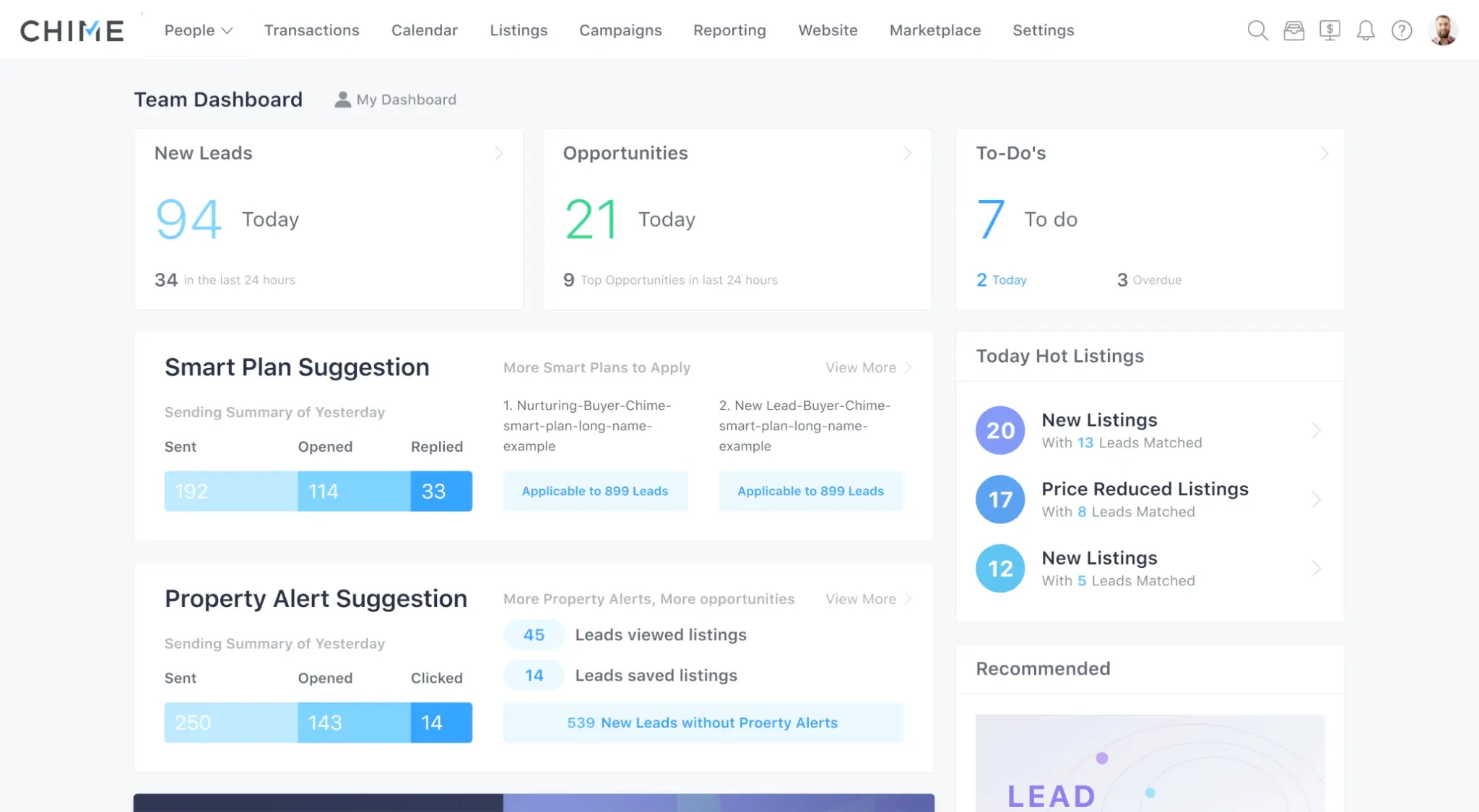
Lofty combines all the features you need as an agent or brokerage, saving you time and money compared to stitching together all the software to handle your workflow end-to-end.
It packs an IDX website for curating your listings, lead capture tools that directly funnel visitors to your CRM, and tools to reach them immediately and nurture them over time. The AI Sales Assistant can take care of qualification and scheduling visits before any human agent gets involved, lowering the admin impact when handling new leads.
The all-in-one nature reflects on the platform’s pricing, so make sure you actually need all the features on offer before committing. The breadth also means that setup time can be longer than in other tools, both as you configure the platform and map your work to it.
Lofty pros
- IDX website with direct CRM feed: Every Lofty plan includes a fully customisable IDX website with MLS listings updated every 15 minutes, A/B testing for landing pages, forced registration flows, and behaviour tracking that pushes property view data and saved searches directly into the CRM.
- Smart Plans for automated lead nurturing: Lofty's Smart Plans trigger multi-step follow-up sequences across email, SMS, and task reminders based on lead behaviour and pipeline stage, running in the background without manual intervention.
- AI Sales Assistant for 24/7 lead qualification: Lofty's AI assistant engages website visitors via chat and text, pre-qualifies leads with qualifying questions, and can schedule showings automatically before a human agent is ever involved.
- Seller lead capture via home valuation: the built-in property valuation landing page exchanges a home value estimate for a seller's contact information, feeding that data straight into the CRM with automated follow-up.
Lofty cons
- High base price with a layered add-on model: online sources report that Lofty's Core Plan starts at $449/month, but the advertised price does not reflect what most serious users will actually pay. Features such as the AI Assistant, voice, and power dialer, among many others, are billed separately.
- Structural limitation: a contact cannot simultaneously be both a buyer and a seller. For agents working with active investors who are simultaneously acquiring and listing, or with homeowner clients who are selling one property while searching for another, this is a real workflow gap.
Key features
- Smart Plans: Automated multi-step sequences combining email, SMS, and task reminders that trigger on events like lead creation or pipeline stage changes, with an Auto-Apply option that enrolls matching leads without manual intervention.
- Behavioural lead scoring: Lofty's lead scoring engine analyses property views, search activity, and engagement patterns to surface high-intent contacts at the top of the pipeline.
- Segments: Contacts can be assigned to multiple overlapping segments simultaneously, each with configurable reminder periods that flag leads as "expired" if not contacted within the set window.
- AI Assistant: A built-in AI chatbot screens inbound leads by collecting timeline, budget, and property criteria in real time, then routes qualified leads to agents with a call task.
- Transaction Management Checklists: When a transaction advances to a new pipeline stage, a pre-built checklist automatically generates the relevant tasks and deadline reminders for that stage.
- IDX Lead Capture: Forced IDX registration, property valuation landing pages, and custom property alert subscriptions feed contacts directly into the CRM with source tags applied at capture.
- Lead Source Integrations: Native connectors for Zillow, Realtor.com, and Facebook route portal leads into Lofty with source and tag data intact; Zapier extends this to additional tools and can trigger Smart Plans as a workflow step.
- Closely Mobile App: A branded client-facing app (Closely) syncs MLS searches, saved favorites, and in-app messages back to the agent's Lofty dashboard, maintaining CRM visibility without switching to a browser.
Pricing
Custom pricing on request based on your needs. Online sources report pricing starts at $499 for core features.
5. Showdigs — best for leasing management
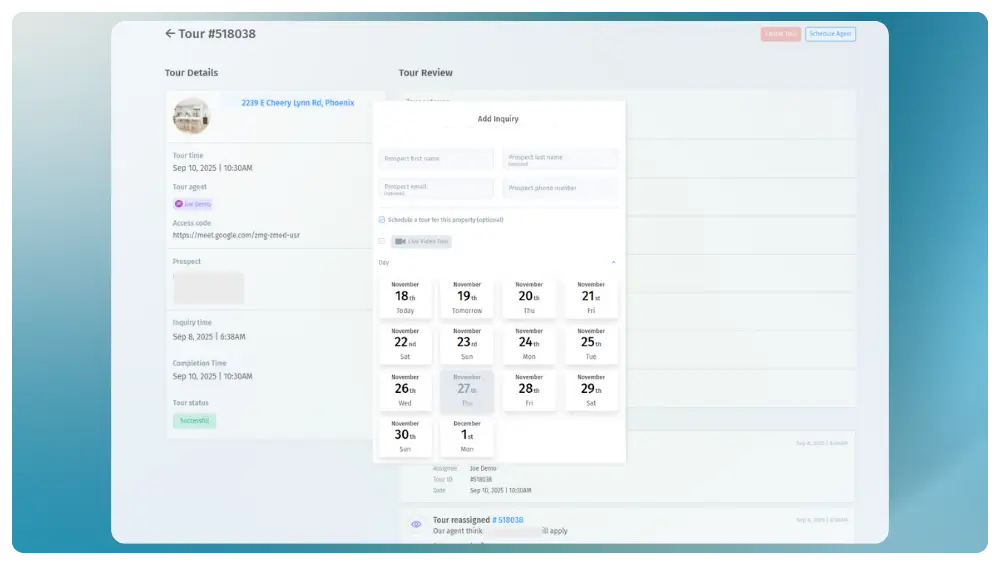
Showdigs aims to fill vacancies faster without burning out your leasing team. It’s designed around the leasing workflow, taking care of listing management, handling showings, scheduling, communication, and fieldwork. This makes it a better fit when compared with trying to adapt a selling solution into this use case.
If you’re struggling to be at all the scheduled showings, Showdigs can arrange safe self-tours to save time. After uploading their government ID and completing identity checks, prospective renters get a smart lock code to enter the property. Access logs record the entire process for safety purposes—so you can offer a seamless (and practically futuristic) experience while balancing convenience and security.
While economical for a small number of listings, Showdigs can get pricey with its $20/listing beyond the first two. Some reviewers also report issues with inconsistent execution when using the platform’s showing agent network, as they sometimes give thin feedback or fail to encourage applications.
Showdigs pros
- On-demand licensed agent network: Showdigs gives property managers access to 3,500+ licensed real estate agents across 20+ cities who can conduct in-person showings seven days a week, including same-day and evening slots.
- End-to-end leasing automation: The platform's AI leasing bot handles 24/7 prospect auto-responses, pre-qualification, showing scheduling, and automated follow-up sequences.
- AppFolio, Yardi, and Rentvine integration: Two-way sync with the most widely used property management platforms means leasing activity flows directly into existing systems, eliminating redundant data entry for teams already operating inside these tools.
- Real-time leasing funnel reporting: Tour reports, conversion rate reports, property performance dashboards, and team performance metrics give managers granular pipeline visibility — a critical lever for brokerages managing large or distributed portfolios who need data to optimise occupancy.
- ILS syndication to 30+ listing sites: Showdigs pushes vacancies to over 30 internet listing services from a single upload, reducing the manual work of cross-posting and compressing time-to-first-inquiry for newly listed units.
Showdigs cons
- Narrow geographic coverage: Showdigs' on-demand agent network operates in approximately 15–20 US cities. Property managers with portfolios outside those markets cannot access agent-conducted showings.
- Per-showing fees compound rapidly for high-cancellation portfolios: Showdigs charges on a per-service basis for agent showings (reported at $40–$45 per showing), and that fee applies regardless of whether the prospect follows through on an application.
- Built narrowly for single-family residential: Showdigs doesn’t accommodate mixed-use, multifamily, or commercial leasing workflows.
Key features
- Unified lead capture dashboard: Pulls inquiries from Zillow, Apartments.com, Zumper, and other listing sites into a single dashboard, triggering an instant automated SMS and email response to each prospect.
- Automated lead qualification: Upon capture, Showdigs sends AI-driven pre-screening questions (move-in date, income, pets) to filter out unqualified leads before a leasing agent is involved.
- Intelligent tour scheduling: Syncs with leasing agent calendars and unit availability to let qualified leads self-book same-day or on-demand showings without back-and-forth communication.
- AI-powered lead scoring: Assigns priority scores to leads based on move-in urgency, budget fit, and engagement, helping leasing teams focus on prospects most likely to sign immediately.
- Centralized communication timeline: Logs every email, text, and call against a single prospect record, giving any team member instant visibility into the full interaction history.
- Performance analytics dashboard: Tracks Days on Market (DOM), lead-to-tour conversion rates, cost-per-lease, and agent response times in real time across the full portfolio.
- PMS and stack integrations: Offers native two-way integrations with AppFolio and Rentvine, plus a Zapier integration for connecting leasing events to tools like LeadSimple, Slack, and Google Sheets.
- Self-showings and on-demand agent dispatch: Supports secure unaccompanied tours via AI-powered identity verification and smart lock integration, or dispatches vetted licensed agents based on location and availability.
Pricing
- No free plan; no free trial.
- Flat Rate ($50/month): 2 active listings per month ($20 for each additional listing) for unlimited users, leasing automation, scheduling, ILS syndication, self-showings, AI prospect responses, 2-way SMS, on-demand agent network access.
6. HubSpot CRM — best general-use free CRM
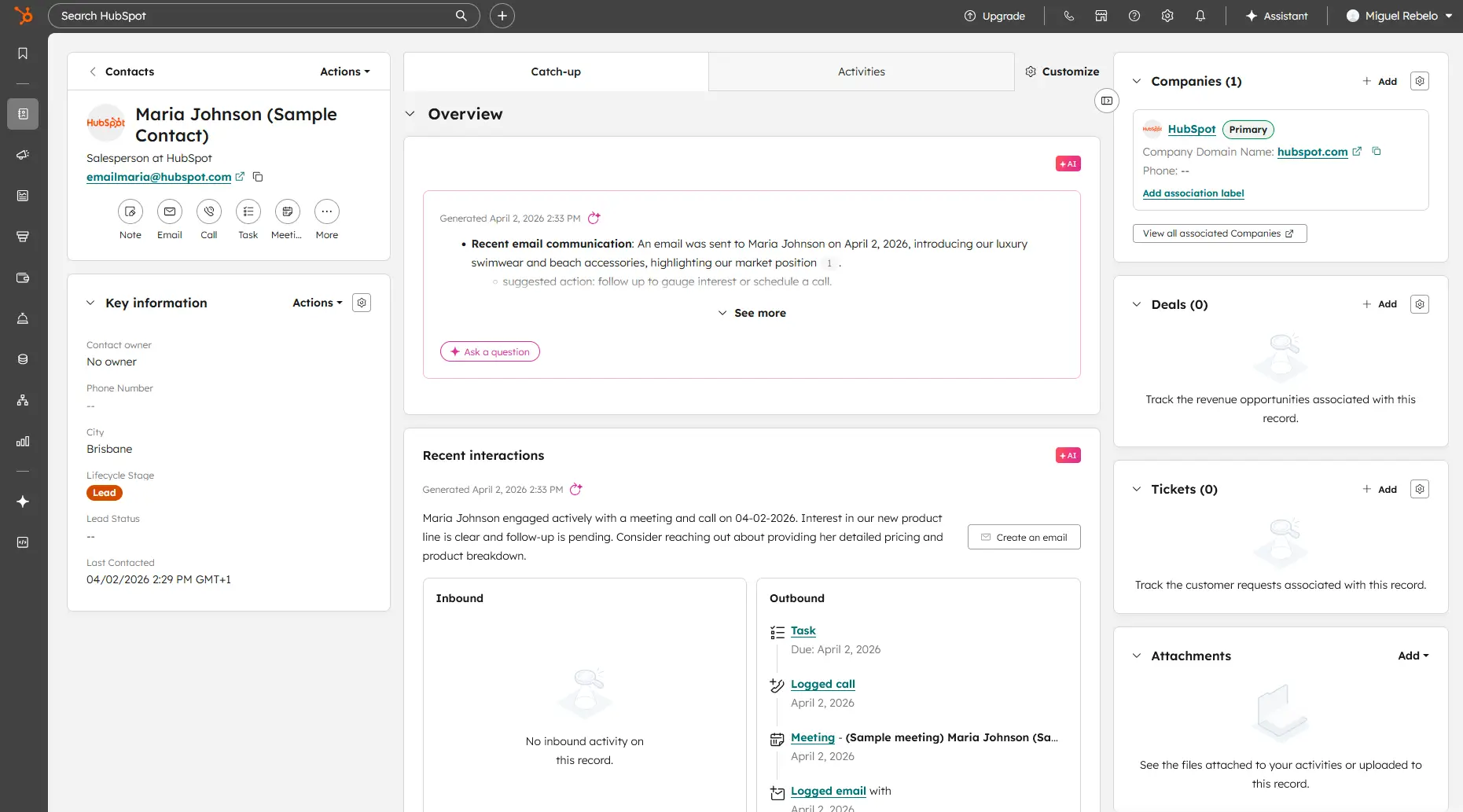
For solo agents or teams just starting out, HubSpot’s generous free plan covers all the basics you need across the core real estate workflows, helping you get started faster and without spending a dime. Because the CRM isn’t limited to one industry, you can use it to expand into other types of businesses or markets.
During onboarding, the platform’s Breeze AI engine uses your website information and asks questions to customize the CRM for you. It configures general settings such as the sales pipeline to match your needs, so you spend less time during setup. The platform’s deep feature set will take time to learn, but the excellent help content and intuitive interfaces will get you there faster than the alternatives.
Despite the early generosity, HubSpot gets expensive as you need more features, with Enterprise plans commanding one-time installation fees on top of the higher subscription price.
HubSpot CRM pros
- Multi-source lead capture: HubSpot automatically pulls in and centralises leads from Zillow, Realtor.com, your website, social media, and open house QR codes into a single contact record.
- Long-lead nurturing for investors and landlords: HubSpot's Marketing Hub is purpose-built for drip campaigns targeting buyers or investors who aren't ready to transact immediately.
- Dynamic list segmentation: Agents can create behaviour-triggered segments like "Viewed 5+ properties in the last week" or "Downloaded mortgage calculator" and fire targeted campaigns automatically, helping prioritise high-intent buyers without manual triage.
- Performance reporting for teams and brokerages: Brokerage managers get automated dashboards tracking lead-to-showing conversion rates, agent activity, pipeline value by rep, and source ROI — all without manually pulling data from disparate systems.
HubSpot CRM cons
- Pricing escalates fast for teams: the full CRM Suite Professional (which most real estate teams actually need for combined marketing, sales, and service automation) costs $1,781/month. A five-person agency with standard automation needs will routinely hit four figures a year before factoring in add-ons.
- No native property management or lettings functionality: HubSpot has no built-in tools for tenancy tracking, maintenance request management, rent roll visibility, or landlord-tenant communication workflows. Letting managers and landlords who need to handle ongoing property management will have to look for extra software and connect it to HubSpot.
Key features
- Sequences: The Sequences tool sends a timed series of personalized emails and task reminders to prospects; a reply automatically unenrolls the contact, preventing over-contact.
- Deal Pipelines: Fully customizable pipelines with named stages (e.g., "Offer Submitted," "Under Contract") display deals on a Kanban board with probability-to-close weighting per stage.
- Tasks & Reminders: Tasks attach to contact, company, or deal records with a due date and configurable email reminders (at due time, 30 min, 1 hour, or 1 day before), surfacing inspection periods and closing deadlines inline.
- Workflows (Automation): Contact-based Workflows fire automated actions triggered by form fills, property changes, or list membership.
- App Marketplace Integrations: HubSpot's App Marketplace includes connections to Zillow, DocuSign, Google Calendar, and MLS/IDX providers via native apps and Zapier, keeping the real estate tech stack synced.
- Mobile App (iOS & Android): The mobile app surfaces full contact records, deals, tasks, and a caller ID feature that displays CRM data on incoming calls, enabling follow-up directly from a property showing.
Pricing
- Generous free plan available for 2 users with basic contact management, email tracking, deal pipeline. Also includes core features of marketing, service, content, and data hubs for free.
- Starter ($15/month per user, billed annually): Contact management, email and calling tools, basic deal pipelines, meeting scheduling, live chat
- Professional ($90/month per user, billed annually): Everything in Starter, plus sequences, forecasting, sales analytics, playbooks, e-signatures, automation workflows
- Enterprise ($150/month per user, billed annually): Everything in Professional, plus advanced permissions, custom objects, predictive lead scoring, conversation intelligence
Find the right fit for your real estate CRM
This guide may shorten the time needed to choose a CRM, but it doesn’t replace testing to find which one matches your workflow. Make some time to sign up for one or two platforms on this list and try them with the tasks you do daily. Doing so also saves you the hassle of buying a new app and finding limitations after you finish configuring it. And if you want full freedom to build a suite of real estate tools, try Softr for free.
Frequently asked questions
Can Softr be used as a real estate CRM?
Do I need technical skills to build a CRM with Softr?
What’s the best real estate CRM for my business?