


8 best CRM software for small businesses in 2026


As a small business, the pressure is on to close deals and grow your customer base, even when you’re struggling with limited tools and a strapped budget.
Without a proper CRM (customer relationship management) in place, every missed follow-up or forgotten task can keep your early-stage prospects from signing the dotted line on the very deals you’re depending on.
But if you shop around enough, you’ll probably notice a pattern: Most CRMs are built for enterprise businesses and come packed with features (plus the price tags) that don’t make sense for small businesses.
You still need a CRM that can keep up with your pace: just without the heavy costs, bloated feature sets, or long onboarding cycles. If you need a few tips on finding out which is the best crm software for small business (and which features to pick), keep reading for detailed CRM comparisons.
Best CRM software for small businesses at a glance
| Tool | Best for | Top features | Pricing |
|---|---|---|---|
| Softr | Small businesses that want a fully customizable CRM on top of existing data (no code needed) | • Drag-and-drop CRM builder with templates • Works with 21+ data sources (Airtable, Sheets, Notion, SQL, etc.) or Softr's native database • Granular permissions and role-based access • Easy to add a client portal, forms, automations, or an AI chat assistant | Free: Up to 5 seats Paid from: $19/mo (Team: 5 + Client: 5 app users, annual) |
| monday.com | Teams that want a project management platform that can also function as a CRM | • Visual boards for tasks, projects, and pipelines • Automation builder for repetitive tasks • Large template library across projects + CRM | Free: (14 day trial) Paid from $15/user (3 user minimum) |
| folk | Startups that want a flexible CRM built around relationships | • Contact enrichment and data automation • Email sequences and outreach campaigns • folkX Chrome extension • Shared relationship timeline | Free: (14-day trial) Paid from: $24/user/mo (annual) |
| Nutshell | Small teams that want easy-to-use, AI-powered automation | • Powerful AI outcomes • Smart sales automation • Built-in marketing tools • Multiple pipeline views | Free: (14-day trial) Paid from: $13/user/mo (annual) |
| Pipedrive | Sales-led SMBs that want a simple, visual pipeline | • Visual sales pipeline with drag-and-drop interface • Email and call tracking • AI sales assistant | Free: (14-day trial) Paid from: $14/user/mo (annual) |
| Attio | GTM builders looking to automate complex sales workflows | • Data powered automations • Real time reporting • Call intelligence • Developer platform with API and SDK | Free: up to 3 seats Paid from: $29/user/mo (annual) |
| Zoho CRM | Businesses in the Zoho ecosystem wanting a feature-rich CRM | • Dedicated spaces for team collaboration • AI features across forecasting, agents, and more • Multi-channel support across email, phone, social, and live chat | Free: up to 3 seats Paid from: $14/user/mo (annual) |
| Salesflare | Small businesses selling B2B to enrich contact and company profiles | • Lead generation software with email finders and LinkedIn integrations • Drag and drop pipeline builder • Automated email sequencing | Free: (trial) Paid from: $29/user/mo (annual) |
What is a CRM for small businesses?
A CRM for small businesses is a tool that helps you track leads, customers, and sales conversations in one place. Instead of hunting through old email threads or trying to remember what happened on last week's call with a prospect, a CRM gives you a clear view of where each opportunity stands and what needs to happen next.
The right CRM should grow with you, starting at a price point that makes sense for your current team size, with plans that scale reasonably as you add seats and capabilities. You need something powerful enough to match your sales process and give your team visibility into what's happening, but lightweight enough to set up quickly without requiring a developer or months of training.
What makes the best CRM software for small business?
- Intuitive user experience and quick setup: Small teams don’t have time for complex software or lengthy onboarding. A great CRM should be easy to learn and simple to use so fast-moving teams can get up to speed quickly.
- Contact and sales management: At its core, your CRM needs to help you track every lead, conversation, and opportunity in one place. Look for a clear pipeline view, activity history, and the ability to see what your whole sales team is doing at a glance.
- Built-in task and project tracking: The best CRM software for small businesses gives you a complete view of every project related to leads and customers, with the ability to drill down individual tasks by team member, status, or priority.
- AI-powered capabilities: Modern CRMs use AI to handle busywork, like drafting follow-up emails or surfacing high-priority leads. For small teams, these features can feel like having another teammate take work off their plates.
- Reporting and analytics: Your CRM should make it easy to see what’s working and not overwhelm you with dashboards. Real-time, exportable reports on pipeline health and revenue forecasts help you make smarter decisions, faster.
- Smart automation features: Follow-up reminders, lead routing, stage changes, task creation: these small automations can make a lot of difference. Look for a CRM that saves time without requiring complex setup or third-party tools.
- Integrations: Your CRM shouldn’t create another data silo. The best systems connect to the tools you already rely on with native integrations or API support to keep your data in sync automatically.
- Value for money that scales as you grow: Budget matters. SMB-friendly CRMs offer reasonable entry-level pricing and avoid hidden add-ons or high per-seat costs, so you can avoid surprise jumps in cost.
- Team collaboration and permissions: Your CRM should give everyone the right level of visibility without overcomplicating team access. Flexible user groups and granular permissions let each person see only what’s relevant to their role.
1. Softr — best for creating a custom CRM on top of your business data

Unlike most of the other CRMs on this list, Softr isn’t a traditional CRM tool and that works in its favor. It's an AI app builder that lets you create a fully custom CRM on top of the data you already have, whether it lives in Softr's native database or an external source like Airtable, Google Sheets, HubSpot, and Notion.
Instead of being locked into predefined fields, rigid layouts, or per-seat pricing, you use drag-and-drop blocks (Lists, Forms, Kanban boards, Tables, Charts) to design an interface that actually matches your sales process. Your CRM can adapt to your workflows instead of forcing you to adapt to the tool.
And if your CRM needs to expand into a client portal, or you need to add advanced lead capture forms, a business quote generator, or a knowledge base, you can build it all in the same system without adding more software.
The AI features are a major advantage. Ask AI adds a built-in chat assistant your app users can interact with, and Database AI Agents can automatically enrich records, summarize notes, or pull insights from the web. Together, they help eliminate manual updates and the day-to-day busywork that slows teams down.
Who is Softr for? Small to mid-sized businesses that want a flexible, budget-friendly CRM tailored to their workflows — without paying for out-of-the-box CRM software or custom development.
Softr best features
- AI Co-Builder: Generate a fully-functional CRM in minutes with a plain-language prompt, complete with a database, utility pages, and app logic that's connected and ready for real users.
- Drag-and-drop builder: Use Lists, Tables, Forms, Kanbans, and Charts to create a CRM interface that fits your sales workflow.
- 21+ native data integrations: Connect to Airtable, Google Sheets, HubSpot, Notion, monday.com, Supabase, SQL databases, BigQuery, and more—or use Softr’s native database.
- Advanced lead capture: Build conditional lead forms, support forms, or intake flows and embed them on your site to capture prospects directly into your CRM.
- Reporting & dashboards: Create real-time dashboards with chart blocks to track leads, pipeline health, revenue, and team performance.
- Account & contact management: Track deal activity, notes, documents, and communication history, with visibility across companies and contacts.
- Task & project tracking: View tasks on a Kanban board and move them through stages as work progresses.
- Document & invoice handling: Upload contracts, attach files, manage documents, and collect payments using Stripe or PayPal.
- Ask AI: Add a built-in chat assistant that helps users search CRM data and get answers instantly.
Softr pros and cons
Pros:
- Fast to set up: Launch a CRM in minutes using templates and a drag-and-drop builder—no developers, onboarding calls, or complex setup required.
- Works with your existing data: Connect instantly to Airtable, Google Sheets, HubSpot, Notion, monday.com, Supabase, SQL databases, and more. No migrations or data cleanup needed to get started.
- Flexible permissions: Set granular, role-based access so team members, contractors, or clients only see what’s relevant to them.
- All-in-one platform: Add client portals, lead forms, quote generators, or knowledge bases without paying for additional tools. Everything lives in one place.
- Built-in AI: Use Ask AI to help users find information faster, and Database AI Agents to automate data enrichment, summaries, and updates.
- Affordable and predictable: Free plan for up to 5 users. Paid plans start at $19/month for Team: 5 + Client: 5 app users (annual) with no per-seat pricing as your team grows—ideal for small businesses on a budget.
Cons:
- No out-of-the-box marketing automation: Softr doesn’t come with email marketing or campaign management, though it can integrate with marketing tools that have these features (and much of this can be handled with Softr Workflows).
- Some setup required: Small businesses wanting a plug-and-play CRM may need more upfront configuration (often resolved by starting from a CRM template).
Softr pricing
Softr offers flat, predictable pricing plans so you always know what you’ll pay each month.
- Free ($0/month): Unlimited apps, with access to Softr Workflows and Softr Databases, 5 app users, 5,000 records.
- Basic ($19/month): Unlimited apps with 42+ integrations, Team: 5 + Client: 5 app users, 50,000 records.
- Pro ($99/month): Unlimited apps with 45+ integrations and custom code, Team: 10 + Client: 50 app users, 500,000 records.
- Business ($329/month): Unlimited apps with 52+ integrations, Team: 30 + Client: 100 app users, 1M records, custom user groups (up to 10), Webhook & API workflows.
- Enterprise (custom pricing): Everything in Business plus custom workflow execution limits & run history, unlimited workflows & steps, SSO (SAML/OpenID), custom billing, dedicated success manager, and team training.
Have a look at this tutorial on how you can build a CRM with Softr (+ a free AI CRM template from Softr).
2. monday CRM — best for a CRM that feels like a project management system
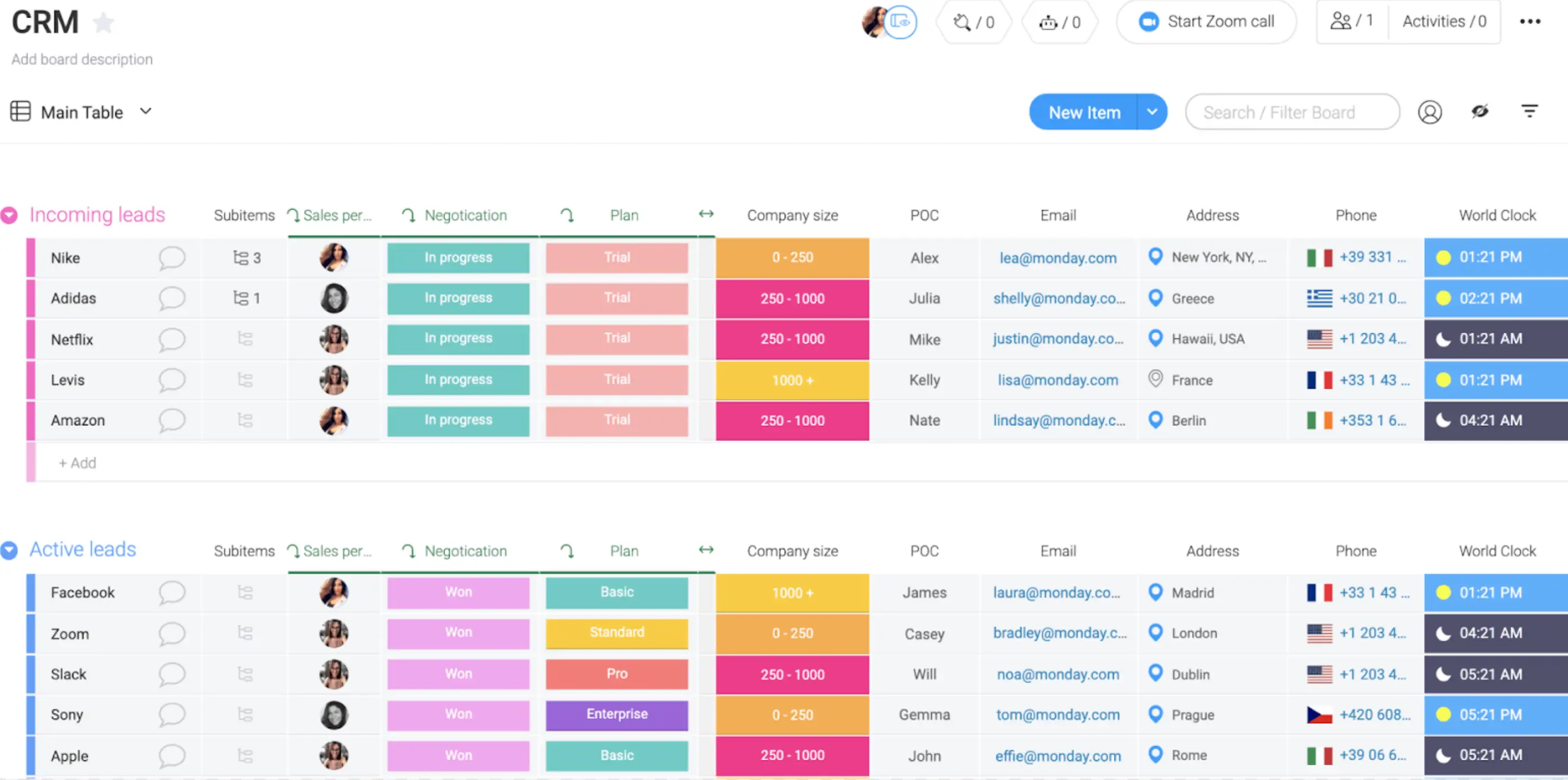
monday.com is first and foremost a work-management platform, which makes it a good fit for small businesses that want their CRM to feel more like a shared workspace.
Your pipeline is displayed as a visual board, deals move through stages with simple drag-and-drop, and each record includes a full activity timeline—emails, calls, notes, tasks, and reminders all in one place. AI features add helpful nudges, like identifying stalled deals or proposing follow-up messages.
Who is monday CRM for? Small sales teams already familiar with project management tools, who want automated workflows and color-coded pipelines.
monday CRM best features
- AI-powered features for formulas and actionable tasks: AI assists with creating formulas, generating task recommendations, and surfacing high-priority leads to keep your team focused on what matters.
- Automated deal management: Set up no-code automation rules to trigger follow-ups, change deal stages, route leads, and create tasks as opportunities progress through your pipeline.
- Templates for lead, contact, and deal management: Pre-built templates help you get started fast without building your CRM structure from scratch.
monday CRM pros and cons
Pros:
- Highly visual interface that's intuitive and easy for teams to adopt quickly
- Strong collaboration features with built-in commenting, tagging, and activity tracking
- Deep integrations with common tools (Gmail, Outlook, Slack, more)
Cons:
- Essential features like email integration and advanced automations are locked behind higher-tier plans
- Some users find the interface overwhelming for small teams
- Minimum three-user requirement means solo operators or two-person teams pay for seats they don't need; no native free plan for CRM
monday CRM pricing:
- Free: 14-day trial
- Paid from: $15/user/month (3-user minimum, billed annually)
[.blog-callout]
If monday.com is where your data lives, Softr helps you turn that data into secure client portals, dashboards, and internal tools without extra seats or workarounds. Try Softr today →
[.blog-callout]
3. folk CRM — best for startups that want a flexible CRM built around relationships

folk is a CRM for startups that need a simple way to manage relationships, track conversations, and grow revenue without the complexity of traditional enterprise software.
Rather than force teams into rigid workflows, folk gives startups a flexible workspace where contacts, companies, deals, and outreach campaigns live in one place. The platform combines CRM functionality with prospecting, enrichment, email sequences, and automation, allowing teams to spend less time updating records and more time building meaningful business relationships.
What makes folk different is its relationship-first approach. Instead of focusing only on deal stages, folk helps teams organize their entire network, from prospects and customers to investors, partners, candidates, and media contacts. Everything stays connected through a shared timeline that gives full visibility into every interaction.
Who is folk for? Startups, agencies, service businesses, and growing sales teams that want a lightweight CRM without the complexity of legacy platforms. It's particularly well suited for founder-led sales, outbound prospecting, partnerships, fundraising, and relationship-driven growth.
folk best features
- Contact enrichment and data automation: Enrich contacts with verified information in one click and keep records clean without manual research.
- Email sequences and outreach campaigns: Create personalized campaigns, automate follow-ups, and track engagement directly inside the CRM.
- folkX Chrome extension: Capture contacts from LinkedIn, Sales Navigator, Gmail, company websites, and other sources without manual data entry.
- Shared relationship intelligence: View emails, meetings, notes, LinkedIn activity, and team interactions in a unified timeline for complete context.
folk pros and cons
Pros:
- Highly intuitive interface with almost no learning curve
- Strong LinkedIn prospecting through folkX
- Built-in email sequences and outreach automation
- Flexible structure that adapts to sales, fundraising, partnerships, and recruiting
- AI-powered fields, enrichment, and workflow automation
Cons:
- No free plan available
- Advanced forecasting features are lighter than some enterprise CRMs
folk pricing
- Free: 14-day free trial
- Standard: $24/user/month
- Premium: $48/user/month
- Custom: $80/user/month
4. Nutshell — best for small teams wanting AI-powered automation that's still easy to use

Nutshell brings serious automation and AI capabilities to small teams without the complexity, specifically focusing on using AI and automation to cut out busywork.
With Nutshell, AI outcomes are built into every tier — from summarizing calls and emails automatically, to drafting personalized first-touch emails, to enriching contact records. The platform also includes powerful sales automation features like lead assignment rules, automated email sequences, and task workflows that advance deals automatically.
Nutshell wraps all these features in a user-friendly interface, which helps even non-technical sales teams get started quickly. With marketing and customer engagement tools as part of the platform, teams can also cut down the time they spend switching between tools.
Who is Nutshell for? Small businesses that want powerful automation and AI-driven workflows without months of setup or requiring technical expertise.
Nutshell best features
- AI outcomes included in every plan: Call summaries, email drafting, lead scoring, and contact enrichment are included without requiring a premium tier.
- Sales automation: Automated lead routing, email sequences, and task workflows advance deals without manual effort.
- Contact management: 360° contact timelines log every email, call, and note automatically.
- Email and calendar sync: Two-way sync with Gmail and Outlook keeps data current.
- Built-in marketing tools: The platform includes forms, landing pages, email campaigns, and a chatbot, all in one place.
- Multiple pipeline views: Teams can use Kanban, list, map, and chart views for flexibility.
Nutshell pros and cons
Pros:
- Native AI with summaries, email drafting, lead scoring, and enrichment included in all plans
- Simple automation for lead routing, email sequences, and task workflows without custom code
- Full-featured tools, including email and calendar sync, forms, landing pages, chatbots, and SMS
- Accessible support with free live chat for all customers and trial users
- Quick onboarding with setup taking days, not months
Cons:
- Reporting lacks complex forecasting or custom reporting found in enterprise CRMs
- Integration depth varies among the 5,000+ offerings
- Fixed layout with UI customization that is less flexible than other tools
Nutshell pricing
- Free: 14-day trial
- Paid plans from $13/user/month (billed annually)
5. Pipedrive — best for small sales teams who want a visual, deal-focused pipeline

Pipedrive is one of the best CRM software for small businesses built around one core idea: making it simple to see where every deal stands and what needs to happen next. The interface centers on a drag-and-drop visual pipeline where you can move deals between stages with a quick click.
For small sales teams that live and breathe deal flow, this focused approach means less time clicking through menus and more time actually closing.
What sets Pipedrive apart is how it strips away the noise. You're not drowning in features you'll never use. Instead, you get a clean, purpose-built sales tool that tracks emails, calls, and activities without turning into a project management system.
Who is Pipedrive for? Small sales teams that think in deals, not features. It's ideal for B2B sellers, account managers, and sales reps who want a clean, focused pipeline view.
Pipedrive best features
- Visual sales pipeline with drag-and-drop interface: See your entire deal flow at a glance and move opportunities between stages instantly.
- Email and call tracking: Automatically log conversations and sync with Gmail, Outlook, or your phone system so nothing falls through the cracks.
- Activity-based selling: Set tasks and reminders tied to specific deals, so your team always knows what needs to happen next.
- Mobile app with offline access: Update deals, log calls, and check your pipeline from anywhere, even without internet connection.
Pipedrive pros and cons
Pros:
- Clean, intuitive interface that sales teams can learn in minutes, not weeks
- Strong email integration with two-way sync and template support
- Flexible pipeline customization lets you match your actual sales process
- Solid mobile app keeps remote and field teams connected
Cons:
- Limited project management features: If you need to track post-sale work or complex customer projects, you'll likely need another tool
- Reporting capabilities are basic on lower-tier plans: Advanced analytics require upgrading
Pipedrive pricing
- Free: 14-day trial
- Paid from: $14/user/month (billed annually)
6. Attio — best for GTM teams building data-powered workflows

Attio takes a more data-centric approach to CRM. It’s built for go-to-market teams who need more than just a contact database. Instead of purely offering one-size-fits-all templates, Attio lets you model your data exactly how your business works, with custom objects and attributes that go far beyond standard contact and company fields.
For teams with technical chops or developer resources, Attio's API and SDK open up even more possibilities. You can build custom integrations, sync data bidirectionally with your stack, and create workflows that connect your CRM to the rest of your operations.
Who is Attio for? Fast-moving GTM teams that need flexible data modeling, powerful automations, and real-time reporting — especially if you have developer resources.
Attio best features
- Data-powered automations: Build sophisticated workflows that trigger on any data change. Automatically enrich leads, route opportunities, update deal stages, and notify team members based on pipeline activity.
- Real-time reporting: Get instant visibility into your sales metrics with live dashboards that update as data changes, no manual refreshes or waiting for reports to generate.
- Call intelligence: Record, transcribe, and analyze sales calls automatically to surface key insights, track objections, and coach your team on what's working.
- Developer platform with API and SDK: Connect Attio to your entire tech stack with robust API access and pre-built SDKs for custom integrations and workflows.
- Flexible data modeling: Create custom objects, fields, and relationships that match your actual business processes instead of adapting to a rigid CRM structure.
Attio pros and cons
Pros:
- Highly customizable data structure lets you track exactly what matters to your business
- Powerful automation engine handles complex workflows without requiring developer resources
- Modern, fast interface that feels more like a product tool than traditional CRM software
- Strong collaboration features with commenting, mentions, and shared views
Cons:
- If a steep learning curve gives you a real stress spike, be warned: teams expecting an out-of-the-box solution may need time to configure Attio to their needs
- Smaller ecosystem of pre-built integrations compared to established players like HubSpot or Salesforce
Attio pricing:
- Free: Up to 3 seats
- Paid from: $29/user/month (billed annually)
{{cta-1}}
7. Zoho CRM — best for small businesses looking to scale fast with feature-rich capabilities
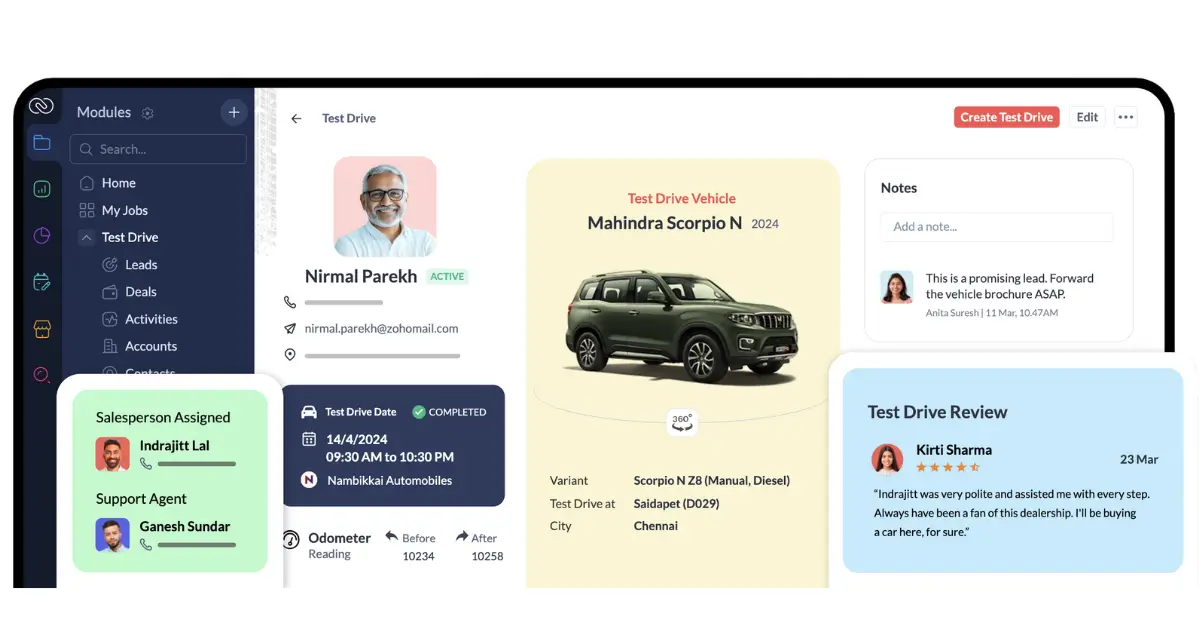
Zoho CRM packs enterprise-level features into a package that small businesses can actually afford. Unlike many CRMs that nickel-and-dime you for basic functionality, Zoho gives you multi-channel support, AI-powered insights, and team collaboration tools right out of the gate, even on lower-tier plans.
What makes Zoho appealing for growing teams is how it meets you wherever your customers are. You can manage conversations across email, phone, social media, and live chat from a single interface, so nothing gets lost in the shuffle. The AI features go beyond basic lead scoring. Zia, Zoho's AI assistant, helps with sales forecasting, suggests optimal contact times, and can even detect anomalies in your pipeline before they become problems.
For teams that need room to grow, Zoho's ecosystem is hard to beat. It integrates natively with Zoho's suite of business tools (accounting, helpdesk, marketing automation), but also connects to hundreds of third-party apps. This means you can start simple and add capabilities as your needs evolve without switching platforms.
Who is Zoho CRM for? Teams and small businesses managing customer relationships across multiple channels (email, phone, social, chat).
Zoho CRM best features
- Dedicated spaces for team collaboration: Create shared workspaces where sales teams can discuss deals, share updates, and coordinate on accounts without switching to Slack or email.
- AI features across forecasting, agents, and more: Zia AI assistant predicts sales trends, recommends next actions, automates data entry, and surfaces insights from your pipeline activity.
- Multi-channel support across email, phone, social, and live chat: Engage customers wherever they are and track all conversations in one unified timeline—no more jumping between tools to piece together interaction history.
- Advanced workflow automation: Build complex automations with conditional logic, time-based triggers, and custom functions to eliminate repetitive tasks.
- Canvas design studio: Customize your CRM interface with drag-and-drop components to match your team's workflow and surface the data that matters most.
Zoho pros and cons:
Pros:
- Generous feature set on entry-level plans. You get serious capabilities without paying enterprise prices
- Strong mobile app with offline mode keeps field teams productive anywhere
- Extensive customization options let you tailor the CRM to your exact processes
- Native integrations with Zoho's broader ecosystem (Books, Desk, Campaigns) create a unified business platform
Cons:
- The interface isn't going to win design awards. It’s functional rather than aesthetically pleasing and can definitely feel cluttered.
- Some advanced AI and automation features require higher-tier plans or additional purchase
Zoho pricing:
- Free: Up to 3 seats
- Paid from: $14/user/month (billed annually)
8. Salesflare — best for B2B teams who need automatic contact enrichment
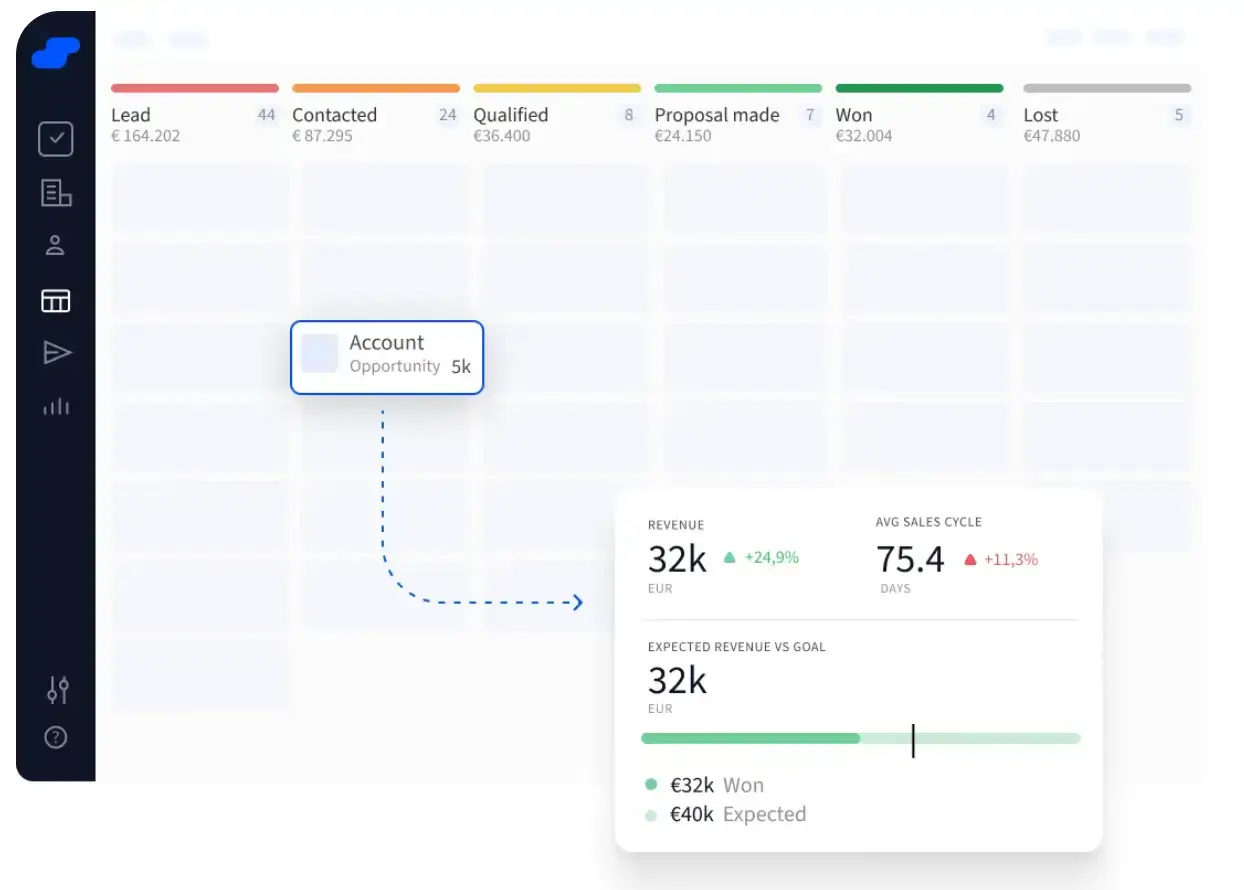
In B2B sales, showing up informed wins deals. But when you’re running on fumes or have limited resources, you might not have time to research prospects or deal with that data entry.
Fortunately, Salesflare can take a lot of that off your plate. Instead of making you manually enter contact details and company information, it does the heavy lifting for you. The platform automatically enriches leads by pulling data from email signatures, social profiles, and company databases. For small B2B teams juggling outreach and deal management, this means less data entry and more time actually selling.
Once contacts are in your pipeline, automated email sequencing keeps conversations moving forward without manual follow-ups.
Who is Salesflare for? Sales reps, consultants, and agencies that use Gmail or Outlook and need automatic data capture, smart reminders, and follow-up tracking without the complexity of enterprise tools.
Salesflare best features:
- Lead generation software with email finders and LinkedIn integrations: Discover new prospects and automatically enrich contact profiles with accurate email addresses, phone numbers, and company details pulled from LinkedIn and public databases.
- Drag-and-drop pipeline builder: Visualize your sales process with customizable stages and move deals forward with simple drag-and-drop actions.
- Automated email sequencing: Set up multi-step email campaigns that trigger based on prospect behavior, with personalization tokens and A/B testing to improve response rates.
- Automatic activity tracking: Salesflare logs emails, calendar events, and calls automatically, then organizes everything by contact and company so you always have context.
- Relationship intelligence: See which accounts have gone cold, who needs follow-up, and where opportunities are slipping through the cracks based on engagement patterns.
Salesflare pros and cons:
Pros:
- Automatic data enrichment drastically reduces manual data entry and keeps records up to date
- Built-in lead generation tools eliminate the need for separate prospecting software
- Clean, intuitive interface that's easy for small teams to adopt quickly
- Strong email integration with Gmail and Outlook, including sidebar extension for logging activity without leaving your inbox
Cons:
- Best suited for B2B sales. B2C teams or transactional sales models may not benefit as much from the relationship-tracking features
- Not built for complex multi-team workflows (limited project management)
- Limited customization compared to more flexible platforms like Attio or Softr: you're working within Salesflare's structure rather than building your own
Salesflare pricing:
- Free: Trial available
- Paid from: $29/user/month (billed annually)
Find the best CRM software for small businesses in 2026
The right CRM keeps your sales moving and your team on the same page without the complexity or cost of enterprise software. After analyzing CRM reviews and testing these platforms ourselves, we’ve got the gist: You need something powerful enough to organize your sales process, but not so bloated or expensive that it slows you down.
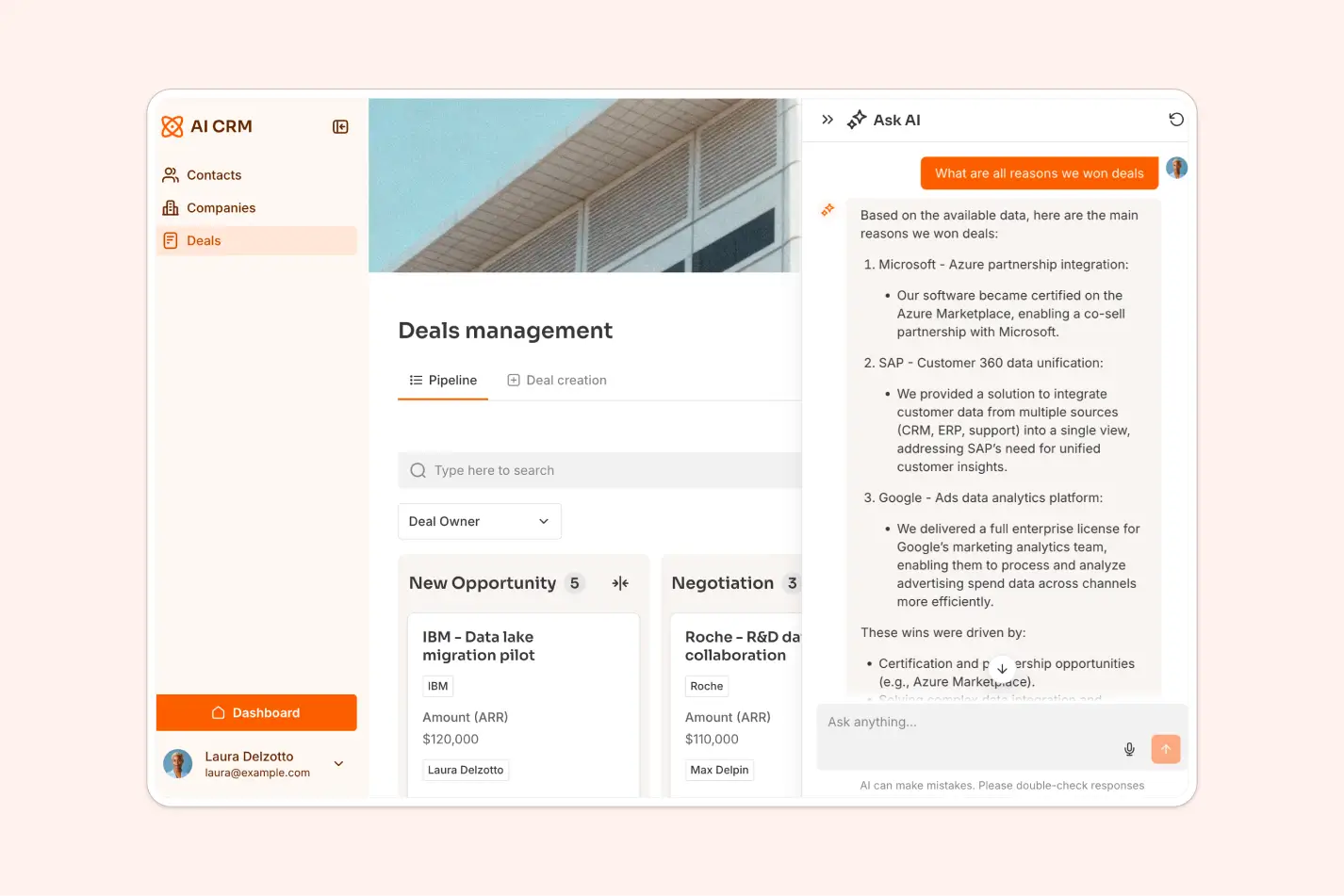
If your customer data already lives in Airtable, Google Sheets, HubSpot, or other tools, or if you want to build and manage everything in one place, Softr gives you huge flexibility. You can create a CRM that actually fits how you work. And you can add lead capture forms, client portals, or AI-powered features without paying for separate tools or hiring developers.
Start with a free AI CRM template and see how easy it is to build a customizable, small-business-friendly CRM.
This article was originally published in Nov 2025. The most recent update, with contributions from Dylan Reber, was in June 2026.
Frequently asked questions
What is the best free CRM for small businesses?
How much does CRM software cost for small businesses in 2026?
When should a small business start using a CRM?
Can I build a custom CRM without coding?
What's the difference between CRM software and a sales pipeline tool?


