


Attio is known for its flexibility for fast-growing teams: model your own data, build workflows, sync communications. But many teams discover the limits fast. Costs rise quickly once you add extra inboxes or automations, integrations are still limited, and reporting often takes more setup than you’d like. Even small things, like renaming system fields, can feel restrictive. Here are the most practical Attio alternatives.
Best alternatives to Attio at a glance
| Tool | Best for | Standout Features | Pricing |
|---|---|---|---|
| Softr | SMBs and internal teams needing a flexible no-code CRM connected to existing data | • Drag-and-drop builder • Role-based permissions (SOC-2 secure) • 150+ CRM & portal templates • Ask AI query assistant | Free plan (up to 5 users) Paid from $19/mo |
| HubSpot Sales Hub | Startups and scaling teams wanting a free CRM with sales automation | • Free CRM with contacts, deals, pipelines • Email tracking & scheduling • Easy upgrade path to Marketing/Service Hubs | Free plan Starter $20/user/mo |
| Zoho CRM | Cost-conscious teams seeking customization + automation | • Workflow automations & cadences • Multichannel communication (email, chat, social) • Reporting & forecasting | Free for 3 users Paid from $14/user/mo |
| Folk CRM | Small teams needing LinkedIn capture + outreach | • LinkedIn capture (folkX extension) • Email/WhatsApp sync • Sequences & dashboards | No free plan Paid from $20/user/mo |
| Pipedrive | Sales teams wanting a visual pipeline with automation add-ons | • Kanban-style sales pipeline • 500+ integrations & add-ons • Email sync & automation (higher tiers) | No free plan Paid from $14/user/mo |
| Capsule CRM | Small businesses needing simple contact management + pipelines | • Contact & task management • Visual sales pipeline • Project boards & tagging | Free (2 users) Paid from $18/user/mo |
| Salesflare | Outbound B2B teams prospecting on LinkedIn + Gmail/Outlook | • Automated data capture from email/calendar • LinkedIn Chrome extension • Simple pipelines & lead scoring | No free plan Paid from $29/user/mo |
| Apptivo | Service teams needing CRM + billing/invoicing in one platform | • Modular app suite (CRM, Quotes, Projects, Invoices) • Two-way Google/QuickBooks sync • Workflow automations | No free plan Paid from $10/user/mo |
| Keap | Small businesses wanting CRM + built-in marketing & payments | • CRM + email/SMS automation • Sales pipeline & appointments • Payments & checkout forms | No free plan Paid from $249/mo |
Limitations of Attio
Attio brings a modern, flexible take on CRM, but it’s not without its drawbacks. You might run into challenges like these:
| Limitation | Why it matters (with real-world context) |
|---|---|
| 1. High costs for core features | Many SMBs feel pushed into higher-priced tiers sooner than expected. Users note that costs rise quickly with more records or automation credits, with the Pro plan (~$69/user/month) often feeling overpriced compared to alternatives. |
| 2. Limited integrations | Missing native integrations (like LinkedIn inbox or advanced marketing tools) force reliance on Zapier or APIs, adding complexity and maintenance overhead. |
| 3. Weaker fit for outbound sales | Attio isn’t designed as an outbound-first CRM. Features like lead scoring, territory management, or native dialers are absent, and it also doesn’t support logging LinkedIn interactions with prospects. Outbound teams often need extra tools. |
| 4. Reporting gaps | Pre-built reports are limited, and building detailed analytics is time-consuming. Teams say it’s harder to get quick views of pipeline health compared to other CRMs. |
| 5. Mobile app & communication limitations | Email and calendar sync can feel clunky, and the mobile app lags behind desktop, making it less efficient for sales teams working on the go. |
| 6. Rigid system elements | Some objects and fields can’t be renamed or adjusted, making it harder to customize the CRM to reflect your specific workflows and terminology. |
| 7. Not ideal for very simple needs | If you only need basic contact and pipeline tracking, Attio may feel like overkill and not cost-effective compared to simpler CRMs. |
| 8. Performance at scale | Some users report slower performance with large datasets, which could affect reliability as your CRM grows. |
What to look for in an Attio alternative
Choosing a CRM is less about ticking feature boxes and more about making sure the system actually fits the way your team works. Here are the key factors to weigh before making a switch:
- Ease of setup and onboarding: You shouldn’t need weeks of tinkering (or engineer help) to get up and running. Look for tools with ready-to-use templates and simple imports so you can set up and move quickly.
- Integrations with your existing tools: Jumping between spreadsheets, email, and project trackers leads to inevitable manual errors. Choose a CRM that connects with what you already use, so you’re not duplicating data entry.
- Pricing transparency as you scale: Watch out for per-seat pricing that adds up quickly, or record limits that force you into costly plans. Make sure the costs stay predictable as your team and client list grow.
- Automation and workflows: Don’t waste hours on manual follow-ups or status updates. CRMs with built-in workflows help you cut repetitive tasks and reduce errors that many systems are prone to.
- Reporting and visibility: Pick an Attio alternative that gives you quick, accurate pipeline insights without needing a data analyst.
- Custom permissions and security: Inviting clients or contractors to your CRM can expose sensitive data. If you want client portal capabilities, go for a CRM with strong access controls, so you can share specific data confidently.
- Flexibility for your workflows: Some popular CRM platforms box you into their way of working. Look for one that lets you customize fields, layouts, and approvals around your sales process, and not the other way around.
- Performance and reliability: A CRM that slows down with more records or users is a liability. Look for options that can handle large datasets so you feel confident growing with it.
- Support and community: Check that your chosen Attio alternative offers responsive help, guides, and a community you can tap into.
1. Softr – best no-code Attio alternative that integrates with existing data and tools
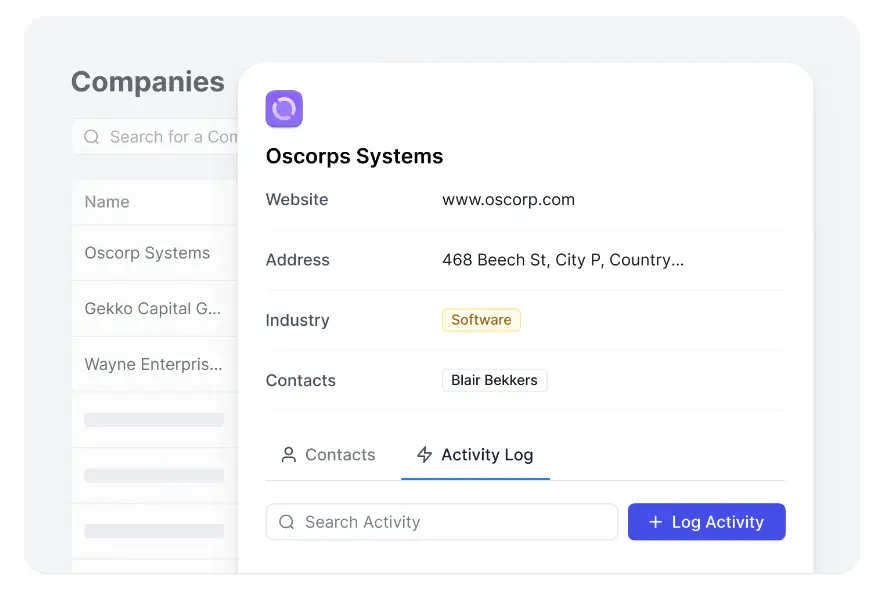
Softr is more than a CRM: it’s a no-code platform that lets you build a CRM around the way your team actually works. You can connect it directly to the tools you already use, like Airtable, Google Sheets, Notion, HubSpot, monday.com, ClickUp, Coda, and more, or manage everything in Softr’s own native relational database.
Unlike complex, out-of-the-box CRMs, you’re not locked into predefined structures or forced into per-seat pricing. Instead, Softr lets you build a secure, branded CRM that you can extend with a client portal, inventory tracker, or ticketing system—all without code.
And with its growing AI capabilities, Softr becomes even more flexible for customer relationship management: Ask AI is a built-in chat assistant that lets CRM users query data and get instant answers to questions like “Which deals from Q2 are still in negotiation?”
Pros and cons of using Softr
Pros:
- Modern drag-and-drop builder with 90+ app templates for CRMs, portals, and dashboards
- Build your CRM on top of data in Airtable, Google Sheets, Notion, monday.com, ClickUp, SQL, Coda, and more—or manage your CRM data directly in Softr Databases
- Secure, role-based access for internal and external end users, with SOC-2 and GDPR compliance built in
- Transparent, predictable pricing without per-seat costs
- Extend your CRM with a client portal, ticketing system, inventory tracker or other custom tool in the same platform to reduce tool sprawl and costs
Cons:
- Doesn’t include out-of-the-box marketing automation yet (requires integration with tools like Mailchimp, Zapier, or Make). Available with Softr Workflows.
- Unlike dedicated CRM tools, Softr requires you to build the CRM views and features you need. Templates speed this up, but it’s not out-of-the-box.
Softr key features
- Data flexibility: Connect to 21+ data sources (Airtable, Notion, monday.com, SQL, and more) or use Softr’s relational database with formulas, rollups, and linked records.
[.blog-callout]
Storing your customer and sales data in Airtable? You can import it to Softr Databases in one click.
[.blog-callout]
- Role-based permissions: Customize CRM access for admins, account managers, and more.
- Account & deal tracking: Manage contacts, interactions, and pipelines with modern drag-and-drop blocks to show your data.
- Dashboards & reporting: Create real-time dashboards to monitor sales and customer engagement.
- Built-in forms: Create advanced lead capture forms with conditional logic and embed them in your website.
- Ask AI: Use a built-in chat assistant to get instant answers from your CRM data.
- Custom branding: White-label your CRM to match your company’s look and feel.
- Mobile-ready: Access your CRM from any device or ship it as a downloadable PWA app.
{{cta-1}}
Softr Pricing
Softr offers flexible pricing plans, so you can build a customer relationship management platform at any tier:
- Free for up to 5 users per month
- Paid plans start at $19/month for Team: 5 + Client: 5 app users (when billed annually)
- Pro: Starts at $99/month for Team: 10 + Client: 50 app users (when billed annually)
- Business: Starting at $329/month for Team: 30 + Client: 100 app users (when billed annually)
- Enterprise (custom pricing, contact sales)
Why it’s better than Attio pricing
Attio’s per-seat pricing and usage-based limits can drive costs up quickly. Softr keeps pricing predictable: no seat licenses, no surprise spikes. That’s more cost-effective for SMBs that need to add teammates, clients, or partners without rethinking their budget.
Who Softr is best for
SMBs and internal teams that want a CRM they can launch quickly, customize to their own processes, and expand as their needs evolve. Perfect for agencies, professional services, HR/recruitment, and operations-heavy industries like construction or manufacturing that benefit from combining CRM, portals, and dashboards in one secure platform.
[.blog-callout]
💡 Scaling volunteer management with spreadsheets quickly hit a wall for Selfless Fiji. Managing 60+ daily emails for volunteer sign-ups made it impossible to track engagement or measure impact.
They built a CRM in Softr instead, which now supports over 2,400 volunteers and has boosted participation by 200%. Multi-step forms and project hubs save hours of admin work each day. See the full story →
[.blog-callout]
Learn more about how to build a custom CRM with Softr below 👇
2. HubSpot Sales Hub — best for teams seeking a free CRM with scalable sales tools

HubSpot Sales Hub starts with a free CRM that covers contact and deal management, email tracking, meeting scheduling, and pipelines. It’s easy to get started and provides enough core features for small teams to organize sales without upfront costs.
From there, you can expand into advanced automation, detailed reporting, and integrations with HubSpot’s broader suite, including Marketing, Service, Operations, CMS, and Commerce. This modular approach makes HubSpot a strong growth option, though costs can rise quickly as you unlock higher-tier features.
Pros and cons of using HubSpot
Pros:
- Generous free plan with essential CRM features
- Easy-to-use interface with fast setup
- Seamless upgrade path into Marketing, Service, and other Hubs
- Large ecosystem of integrations and partner apps
- Scales from startup-friendly to enterprise-level
Cons:
- Paid tiers and add-ons can become expensive as you scale
- Advanced features like revenue attribution, custom objects, or CPQ live on higher plans
- Free plan limits customization options
HubSpot key features
- Free CRM: contacts, deals, pipelines, tasks, meeting scheduling, email tracking
- Sales automation: sequences, lead scoring, forecasting, revenue attribution (higher tiers)
- Email & meeting tools: templates, scheduling links, Gmail/Outlook integration
- Pipelines & reporting: customizable deal pipelines, dashboards, and cross-Hub analytics
HubSpot pricing
- Free plan available (unlimited users, up to 1,000 non-marketing contacts)
- Starter plans from ~$20/user/month (annual billing)
- Sales Hub Professional: ~$90/user/month
- Sales Hub Enterprise: ~$150/user/month
- Commerce Hub Professional seat: ~$85/user/month; Enterprise ~$140/user/month
- Additional costs for extra marketing contacts, onboarding, and advanced add-ons
Who HubSpot is best for
Small to medium-sized businesses that want a free CRM to start with and a seamless path into sales automation, marketing campaigns, or customer service as they scale. Best if you prefer an all-in-one ecosystem instead of stitching separate tools together.
Verdict: HubSpot vs Attio
HubSpot delivers a broad platform that grows from free CRM into full marketing, sales, and service operations. For most SMBs comparing Attio alternatives, the Sales Hub Professional tier hits the balance of automation, reporting, and scalability. If you want everything in one ecosystem, HubSpot is stronger. Attio, on the other hand, remains leaner and more customizable for teams that only need a flexible CRM without committing to a full suite.
3. Zoho CRM — best for growing teams seeking customization at a low cost

Zoho CRM is a cloud-based platform that offers a broad suite of features for sales, marketing, and support. It gives you modular options so you can scale up as you grow, while still keeping costs reasonable. If you want custom workflows, automation, and a large integration ecosystem without enterprise pricing, Zoho could be a strong choice.
What makes Zoho stand out is its flexibility: you can start small with a free plan for up to three users, then layer on advanced features like AI-driven sales forecasting, multichannel communication (email, chat, social media), and customizable dashboards as your team matures.
Pros and cons of using Zoho CRM
Pros:
- Offers a free plan for up to 3 users, useful for very small teams or testing
- Rich automation and workflow tools (cadences, macros, custom modules) to reduce manual tasks
- Strong customization: fields, layouts, dashboards, multiple pipelines
- Good integration ecosystem with both Zoho apps and third-party tools
- Predictable, tiered pricing that scales with your needs
Cons:
- Many advanced features (AI assistant, advanced analytics, multiuser portals) are limited to higher-tier plans
- Steeper learning curve due to the platform’s breadth and customization depth
- The mobile app is functional but not as smooth or full-featured as the desktop version
Zoho CRM key features
- Sales automation & multichannel outreach: Cadences and activity tracking across email, chat, social, and phone to keep follow-ups on track.
- Customizable data model: Custom modules, fields, and multiple pipelines so the CRM mirrors your process.
- Reporting, dashboards & forecasting: Quota tracking and performance insights with advanced filters and analytics.
- Ecosystem, integrations & security: Integrations across Zoho and third-party apps, plus permission controls, encryption, and compliance support.
Zoho CRM pricing
Pricing:
- Free for up to 3 users
- Standard: ~$14/user/month (annual billing)
- Professional: ~$23/user/month (annual billing)
- Enterprise: ~$40/user/month (annual billing)
- Ultimate: ~$52/user/month (annual billing)
Who Zoho CRM is best for
Best for small to mid-sized businesses that want a highly customizable CRM at an affordable price. Great if you need strong automation and reporting without enterprise overhead, and you’re willing to invest some time in setup and configuration.
Verdict: Zoho vs Attio
Zoho CRM delivers broader automation, multichannel communication, and a free starter option, making it a cost-effective alternative to Attio. While Zoho requires more setup and can feel heavy for simple needs, it’s a stronger fit if you’re looking for scalability and deep customization at a lower cost.
4. Folk CRM – best for small teams that want lightweight outreach with LinkedIn capture
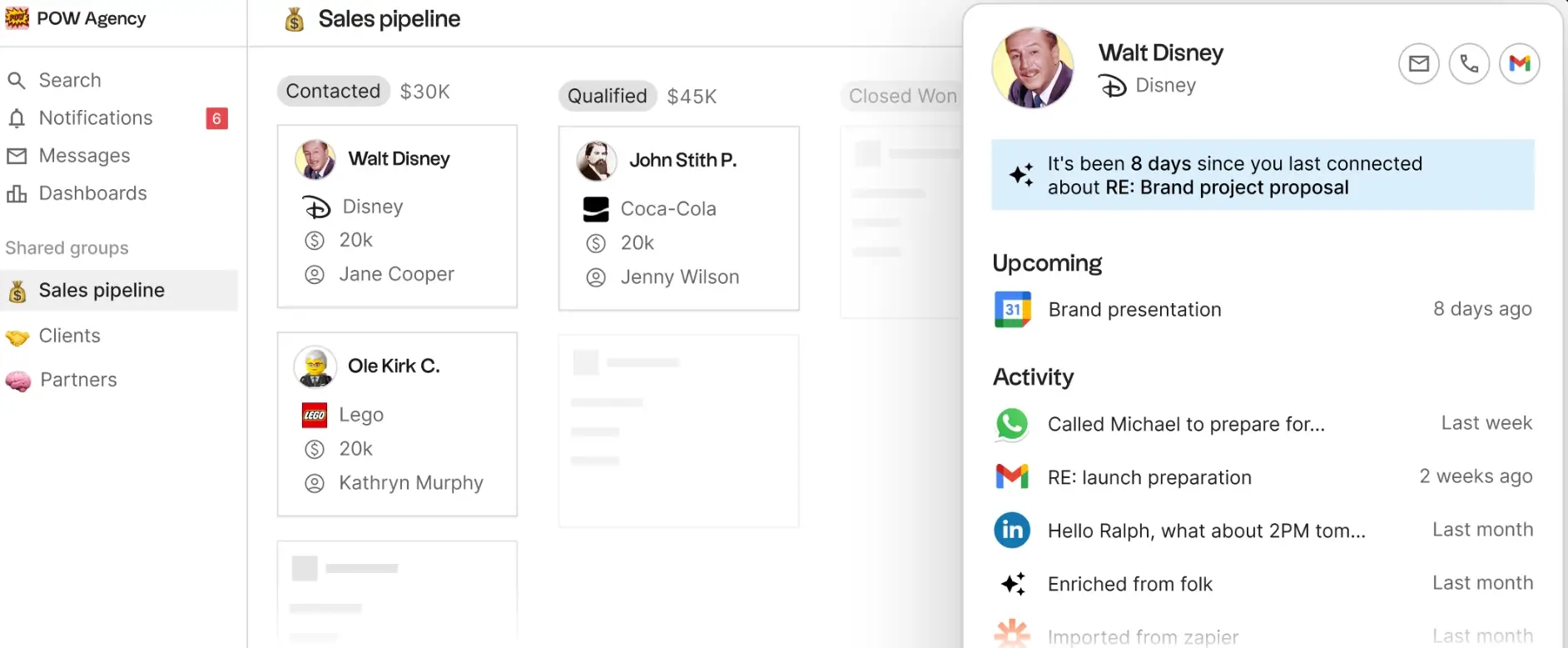
Folk is a modern, lightweight CRM that focuses on simple contact management and multi-channel outreach. You can pull prospects from LinkedIn using its folkX browser extension, sync Gmail or Outlook, message via WhatsApp, and connect thousands of other tools through Zapier/Make. It’s intentionally simpler than heavyweight CRMs, with straightforward pricing and fast setup: good when you don’t have ops engineers on hand.
Folk’s paid Premium tier adds sales-centric features—email sequences, custom objects & deals, dashboards, API access, and advanced roles/permissions—so small teams can graduate from spreadsheets without jumping straight to an enterprise platform.
Pros and cons of using Folk
Pros:
- Fast capture from LinkedIn: add prospects with the folkX extension (no CSV hassle).
- Multi-channel basics in one place: Gmail/Outlook, WhatsApp, plus automations via Zapier/Make.
- Straightforward pricing: Standard and Premium plans with clear monthly/annual options.
- Grows a step beyond “just a contact list”: sequences, dashboards, and roles when you need them.
Cons:
- LinkedIn isn’t a native two-way sync (capture is via the browser extension, not a direct LinkedIn API).
- Integrations lean on Zapier/Make for breadth; deep native coverage is narrower than larger CRMs.
- Lighter reporting/ops depth than enterprise CRMs; best for small teams, not complex sales orgs.
Folk CRM key features
- LinkedIn capture (folkX): add leads from LinkedIn straight into Folk.
- Multi-channel communication: Gmail/Outlook email, WhatsApp messages, plus Zapier/Make automations.
- Email sequences & custom objects (Premium): nurture leads and model simple pipelines without extra tools.
- Dashboards & roles (Premium): basic visibility and access control for small teams.
Folk CRM pricing
Pricing:
- Standard: $20/user/month (annual) or $25/user/month (monthly).
- Premium: $40/user/month (annual) or $50/user/month (monthly).
Who Folk CRM is best for
Founders, agencies, and small sales teams graduating from spreadsheets who want quick LinkedIn capture, simple outreach, and basic pipelines without the setup overhead of a full enterprise CRM.
Verdict: Folk vs Attio
Choose Folk if you want a lighter CRM with fast LinkedIn capture and simple sequences at a predictable price. Pick Attio if you need deeper data modeling, richer reporting, or a more customizable system (and you’re okay with higher costs and setup effort). Folk is the pragmatic, “start now” option; Attio is the flexible but heavier lift.
5. Pipedrive – best for sales teams that want a visual pipeline and simple CRM
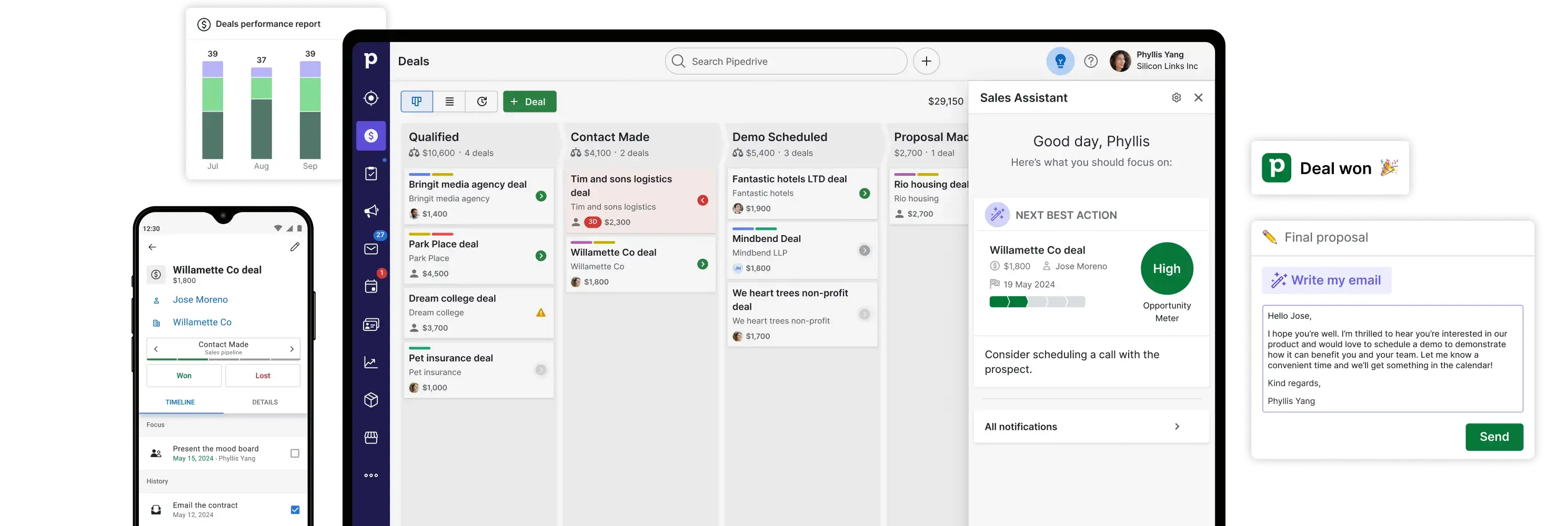
Pipedrive is a sales-first CRM built around a clear, Kanban-style pipeline with lightweight automation and email tools. It’s easy to set up, has a short learning curve, and now layers in AI helpers for reporting and email: useful when you want reps selling, not configuring software.
Unlike broader “all-in-one” platforms, Pipedrive keeps the core tight and lets you add marketing and lead-gen through optional add-ons (e.g., LeadBooster, Campaigns, Web Visitors) or upgrade tiers where some of these are included. That helps lean teams start small and expand only if needed.
Pros and cons of using Pipedrive
Pros
- Fast, intuitive UI for managing deals in a visual pipeline; consistently praised by users for ease of use.
- Built-in email + automation basics (sync, tracking, sequences on higher tiers) with AI-assisted reporting.
- 500+ integrations via the marketplace to connect phone, billing, and other tools.
- Clear plan structure with a 14-day free trial.
Cons
- Marketing features aren’t native by default; you’ll rely on add-ons like Campaigns or LeadBooster, or upgrade tiers.
- Lighter reporting/ops depth than enterprise CRMs; better for straightforward sales motions.
Pipedrive key features
- Visual pipelines & deal management with customizable stages and fields.
- Email sync & tracking with scheduling and sequences on higher plans.
- AI helpers (e.g., AI-powered report creation; AI email tools on higher tiers).
- Add-ons as needed: LeadBooster (chatbot, prospector, web forms), Campaigns (email marketing), Web Visitors; Projects/Smart Docs included on Premium+ or purchasable on lower tiers.
Pipedrive pricing
Plans (billed annually, per seat):
- Lite: $14/month
- Growth: $39/month
- Premium: $49/month (most popular)
- Ultimate: $79/month
All plans include a 14-day free trial. Pricing and add-ons vary by tier.
Who Pipedrive is best for
You can add marketing tools later, but note that full marketing automation, campaign workflows, and segmentation features typically live in paid add-ons like Campaigns or LeadBooster, which increase your total cost.
Verdict: Pipedrive vs Attio
Pick Pipedrive if you want a straightforward, visual sales CRM with quick setup and predictable pricing; layer on add-ons only when needed. Choose Attio if you prioritize deeper data modeling and more flexible objects, and you’re comfortable with more configuration and potentially higher costs.
6. Capsule CRM – best for businesses that want clean contact management and solid pipelines without complexity
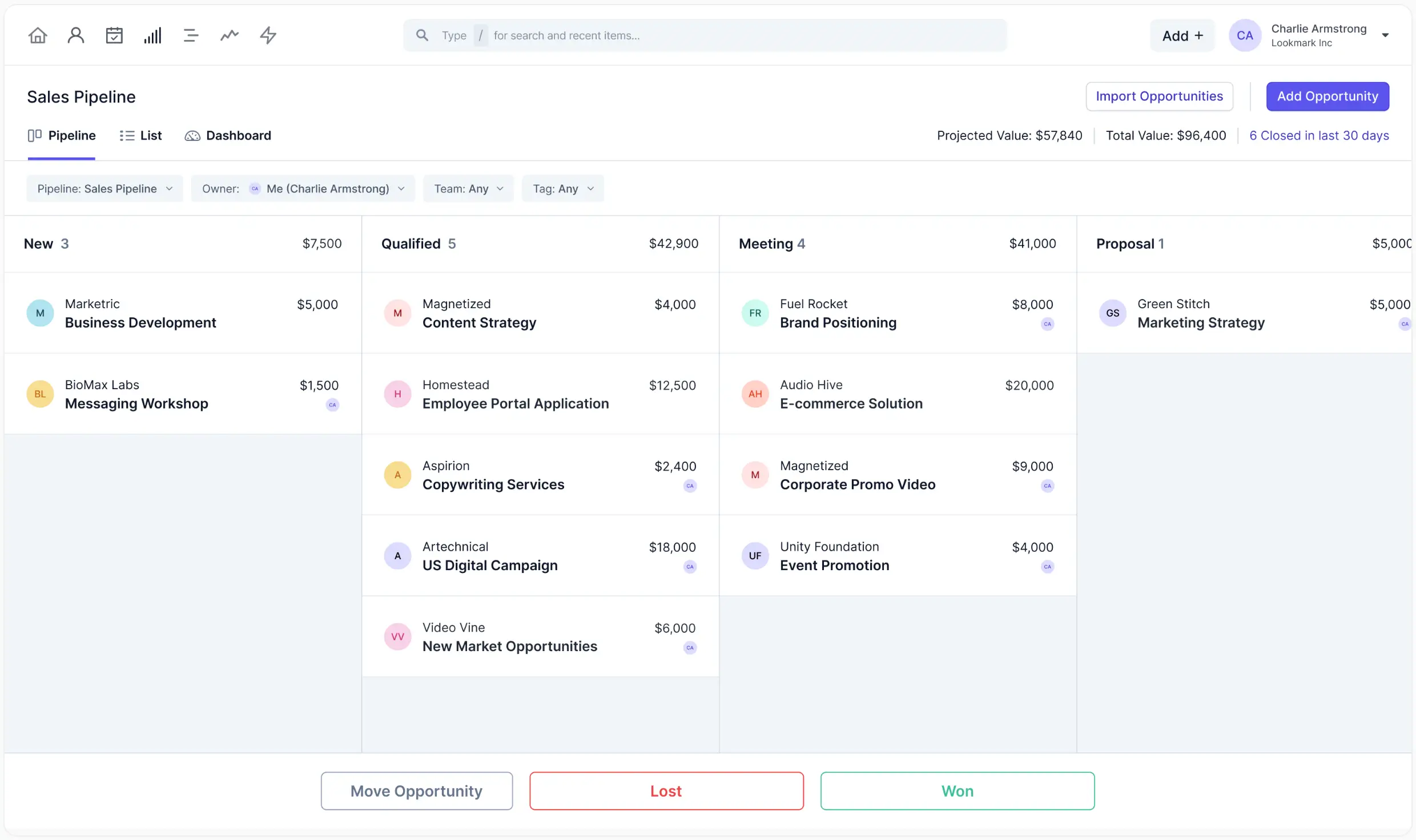
Capsule CRM is built to help small to mid-sized teams stay organized without overwhelming them. It centralizes contact info, tracks activity history, and visualizes sales pipelines with clean simplicity. If you dislike CRMs with too many unused features, Capsule gives you what you need: reliable core tools, easy onboarding, and focused workflows.
For teams scaling up, Capsule offers richer automation, contact enrichment, multiple pipelines, and project boards, so you can expand gradually, only adding complexity when you're ready.
Pros and cons of using Capsule
Pros
- Has a free plan (2 users) with basics: contact history, opportunity tracking, and core email/calendar sync; good for testing or solo work.
- Clean, intuitive interface; minimal setup time. You’ll spend less time learning the tool and more time doing.
- Multiple tiers give room to grow: add workflows, dashboards, project boards, contact enrichment, and more as needed.
- Strong integrations: Gmail/Outlook, email templates, Zapier, accounting tools, and more.
Cons
- Reporting/dashboard customization is more limited than in more enterprise-grade CRMs. If you need deeply configurable reports or highly tailored analytics, you may hit ceilings.
- Mobile app doesn’t always match all desktop functionality; some features are easier on a larger screen.
- Some advanced features (e.g., large contact limits, advanced enrichment) are only in higher tiers—costs go up as you add more users or contacts.
Capsule CRM key features
- Free plan: Supports up to 2 users with 250 contacts, basic sales pipeline, Gmail/Outlook addon, mobile access.
- Visual pipelines & opportunities: Drag-and-drop pipeline views, with steady reminders/notifications when things sit too long.
- Workflow automation (paid plans): Trigger emails, reminders, or stage updates based on changes in your pipeline.
- Multiple project boards & reporting dashboards: View pipelines + project progress + contact health in one place.
- Contact enrichment & tagging: Automatically pull in company metadata, tag contacts, group them by roles or priorities.
- Team & access controls: Define permissions so teammates see what they need—nothing more.
Capsule CRM pricing
Pricing (billed annually):
- Free: $0/user, up to 2 users with core features
- Starter (first paid tier): ~$18/user/month, basics plus email templates, shared mailbox, improved contact and goal features
- Growth: ~$36/user/month, adds workflow automations, deeper reporting, multiple pipelines & project boards
- Advanced: ~$54/user/month, more contacts, advanced enrichment, more boards & pipelines
- Ultimate: ~$72/user/month, priority support, large contact limits, more customization and onboarding help
Who Capsule CRM is best for
Capsule suits small-to-mid teams (founders, agencies, service businesses) who want reliable contact & pipeline management without overpaying for features they won’t use. If your priority is getting started quickly, minimizing admin, and scaling only as needed, Capsule gives you that sweet spot.
Verdict: Capsule vs Attio
Capsule offers a leaner, more approachable CRM than Attio for many SMBs. While Attio has strength in custom objects, deeper metadata modeling, and more flexibility, it comes at a higher setup cost. If what you need most is clean contact records, simple pipelines, dependable workflows, and a better cost-to-value ratio in early stages, Capsule is a very strong pick.
7. Salesflare — best for outbound B2B teams that prospect on LinkedIn and want a self-updating CRM

Salesflare is a lightweight CRM built to cut manual data entry. It pulls contacts and activity from your email and calendar into unified timelines, then layers on tracking, lead scoring, and simple pipeline management. If your team prospects on LinkedIn and follows up by email, Salesflare’s Chrome extension and email finder make it easy to add a contact and enroll them in a sequence without leaving the browser.
You can start on Growth and add sales-centric features, like email sequences, advanced permissions, and API access on the Pro tier. Teams that need onboarding help or data migration can opt for the Enterprise plan (min. 5 seats) with a dedicated account manager. There’s also a 30-day free trial.
Pros and cons of using Salesflare
Pros
- Automated data capture from email/calendar reduces admin and keeps timelines accurate.
- LinkedIn capture + email finder via Chrome extension; launch sequences from a profile.
- Simple, visual pipelines with tracking and lead scoring built in.
- Gmail/Outlook support and broad app coverage through Zapier/Make.
Cons
- Sequences and role permissions sit on the Pro tier (not in the entry plan).
- Integrations: many deeper connections route through Zapier/Make rather than a large native marketplace.
- Enterprise features require a 5-seat minimum.
Salesflare key features
- Automated timelines: pulls emails, meetings, and interactions into one view; includes tracking & lead scoring.
- LinkedIn email finder + Chrome extension: add prospects and start sequences from the browser.
- Email sequences (Pro): automate multi-step follow-ups with open/click tracking.
- Inbox & integrations: Gmail/Outlook support and connectors via Zapier/Make.
Salesflare pricing
Billed annually (per user):
- Growth: $29/mo (or $39/mo billed monthly)
- Pro: $49/mo annual (or $64/mo monthly)
- Enterprise: $99/mo annual (or $124/mo monthly), minimum 5 users; includes setup, data migration, and a dedicated manager
- Trial: 30-day free trial available
Who Salesflare is best for
Founders, agencies, and small B2B sales teams that live in Gmail/Outlook and prospect on LinkedIn. You’ll get fast capture, automated timelines, and simple sequences without the overhead of a complex CRM.
Verdict: Salesflare vs Attio
Choose Salesflare if you want a lean CRM that automates data entry and makes LinkedIn-to-email outreach seamless. Pick Attio if you need more flexible data modeling, custom objects, and deeper reporting, and you’re fine with more setup and higher-tier costs. Salesflare is the faster win for outbound-led SMB teams; Attio suits more complex, highly customized workflows.
8. Apptivo – best for service teams standardizing sales-to-billing workflows without custom builds
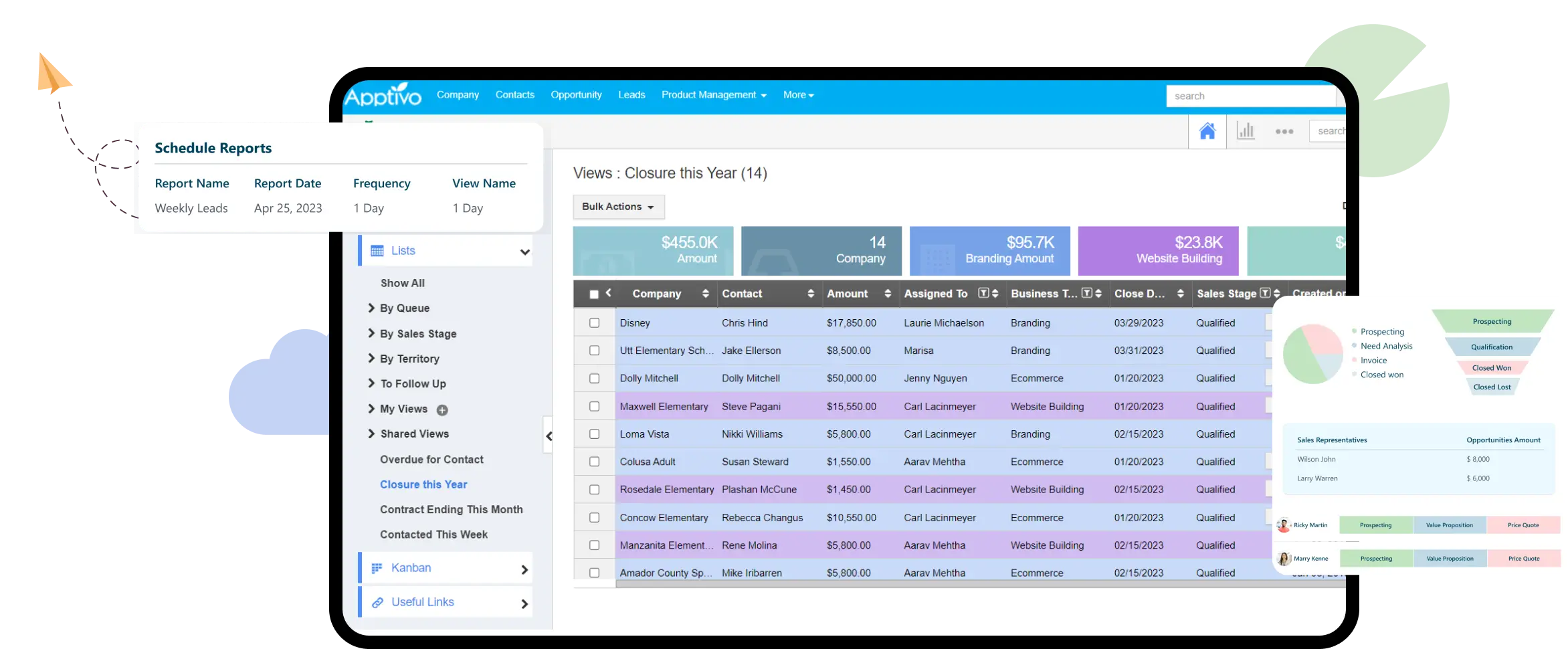
Apptivo is a modular business platform: start with CRM, then switch on apps for quotes, invoicing, projects, help desk, field service, and more, so you can manage customer work and back-office tasks without bouncing between tools. Plans are affordable and scale cleanly as you add apps, fields, and automations.
Where it shines is in consolidation. Instead of stitching together a CRM, billing tool, and project tracker, you can run the full client lifecycle in one place: convert an opportunity to a quote, send an invoice, track delivery, and keep the record linked end-to-end. You choose only the apps you need, customize layouts and workflows, and connect essentials like Google Workspace and QuickBooks as you grow.
Pros and cons of using Apptivo
Pros
- All-in-one toolkit: CRM + quotes/CPQ, invoicing, projects, help desk, and dozens of additional apps when you need them.
- Grows with you: higher tiers unlock more apps, custom fields, and workflow automations.
- Useful integrations: two-way Google email/calendar/contacts and accounting sync (e.g., QuickBooks).
- 24/7 support on paid plans.
Cons
- UI feels more utilitarian than newer CRMs; deeper customization can add setup time.
- Integration ecosystem is narrower than the biggest CRMs—you’ll lean on core connectors or API.
- Some automation/marketing features live on higher tiers, so costs rise as needs expand.
Apptivo key features
- Modular app suite: add CRM, Quotes/Orders/Invoices, Projects, Help Desk, Field Service—60+ apps available.
- Customization & workflows: generous custom fields and workflow rules to automate routine steps.
- Built-in quoting & invoicing: move from estimate to invoice without leaving the platform; accounting sync available.
- Google/Outlook two-way sync: keep email, calendar, and contacts in step across your stack.
Apptivo pricing
Annual (per user): Lite $15, Premium $25, Ultimate $40.
Monthly (per user): Lite $20, Premium $30, Ultimate $50.
Enterprise: custom. 14-day free trial available.
Who Apptivo is best for
Service businesses, agencies, and founders who want CRM + day-to-day operations (quotes, invoices, projects) in one platform, with room to add apps and automation as the team grows without enterprise pricing.
Verdict: Apptivo vs Attio
Choose Apptivo if you need an affordable, modular suite that combines CRM with invoicing and project delivery. Pick Attio if your priority is flexible data modeling and a more modern, customizable CRM layer, and you’re comfortable adding separate tools for finance or project work (and a potentially higher overall cost).
9. Keap – best for small businesses that want built-in marketing automation, email/SMS, and payments in one CRM

Keap (formerly Infusionsoft) bundles CRM, email marketing, text messaging, sales pipeline, scheduling, quotes/invoices, and payments into a single platform. You get a drag-and-drop automation builder, prebuilt “playbooks,” and a mobile app — useful if you want sales and marketing to live in one place rather than stitching tools together.
Keap now sells the full platform at a single starting price (no feature-gated tiers). Pricing scales by contact count and user seats, and many accounts pair the software with a one-time implementation package to get migrated and live quickly. SMS/voice are available as a built-in add-on (U.S. availability noted) with usage tiers.
Pros and cons of using Keap
Pros
- All-in-one toolkit: CRM, email marketing, automations, appointments, quotes/invoices, checkout forms, and payments.
- Powerful automation with templates and an AI assistant to draft campaigns quickly.
- Email + SMS in the same workflows; dedicated business number and U.S. messaging tiers available.
- Native Gmail/Outlook sync and Zapier for thousands of connections.
Cons
- Cost scales with contacts/users; entry price is higher than many SMB CRMs.
- The implementation package is positioned as part of getting started, adding a one-time cost.
- SMS availability and some phone features are U.S.-only.
Keap key features
- Automation builder & playbooks for marketing, sales, and service workflows.
- Email/SMS marketing with broadcasts, sequences, and tracking (SMS tiers, U.S.).
- Quotes, invoices & subscriptions with checkout forms and payment integrations.
- Sales pipeline & appointments with Gmail/Outlook sync and mobile app.
Keap pricing
- Starts at $249/month for the full platform (pricing scales by contacts; annual billing typically discounts). Free trial available.
- Implementation services are offered as a one-time package (commonly around $500–$1,500).
- Text marketing tiers include an initial bundle (e.g., 500 texts/100 mins) with optional higher tiers; U.S. only.
Who Keap is best for
Owner-led or small marketing/sales teams that want one system for lead capture → automated nurture → booking → invoice/payment, plus email/SMS—instead of juggling separate tools.
Verdict: Keap vs Attio
Pick Keap if your priority is built-in marketing automation and payments with email/SMS under one roof. Choose Attio if you need flexible data modeling and a modern, customizable CRM layer, and you’re comfortable connecting separate tools for marketing and billing. Keap reduces tool sprawl; Attio offers more CRM schema flexibility and often lower entry costs for teams that don’t need advanced automation.
10. Lightfield — best for visual collaboration and creative asset organization
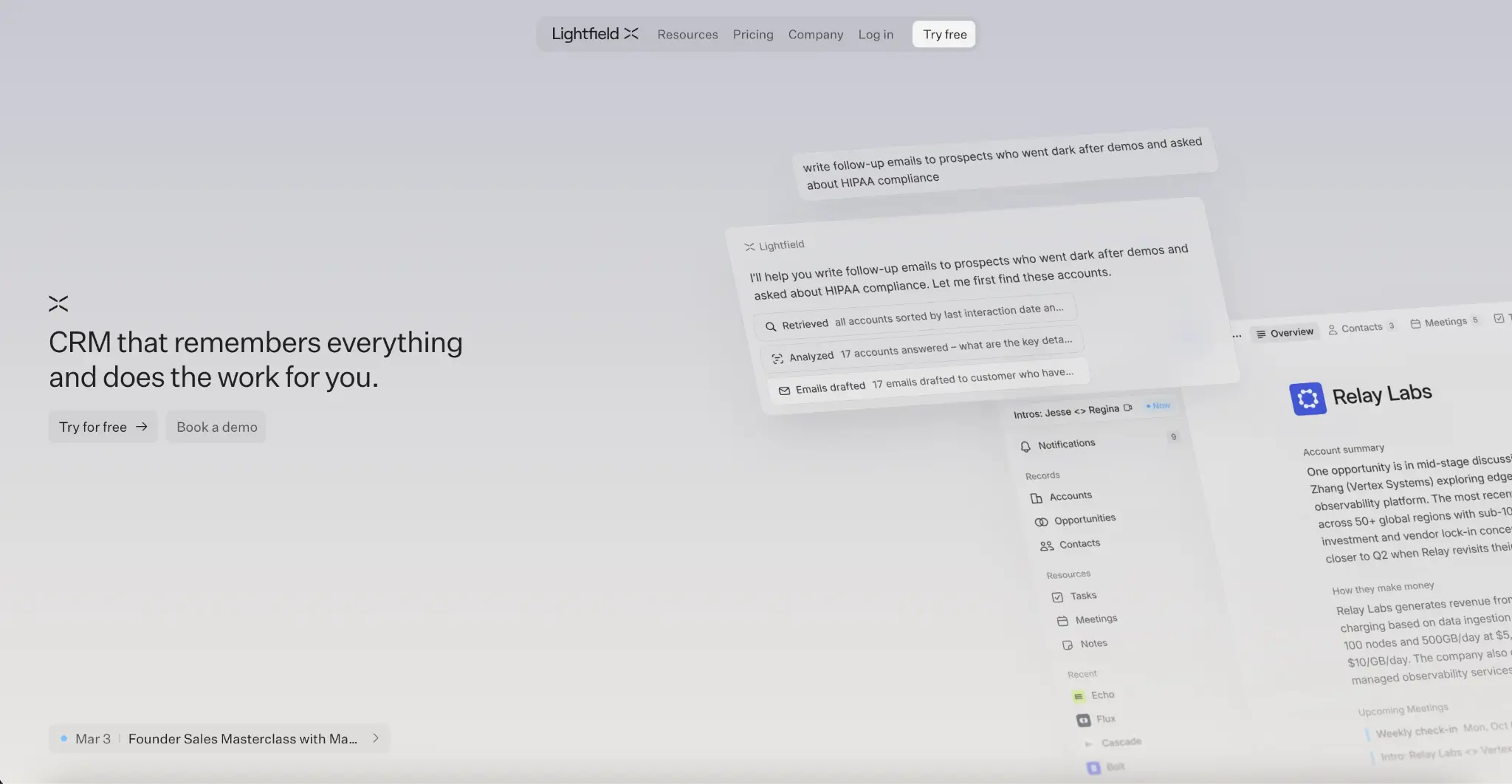
Lightfield is a visual workspace designed to help teams collect, organize, and collaborate on images, videos, links, and creative inspiration in one place. Instead of juggling multiple tools or messy folders, Lightfield gives you a clean, canvas-style environment where everything lives visually—making it especially useful for designers, marketers, and creative teams.
What makes Lightfield stand out is its focus on visual-first collaboration. You can drag and drop assets, arrange them spatially, and build collections that feel more like mood boards than rigid databases. It’s built for brainstorming, ideation, and creative workflows where context and visual relationships matter just as much as the assets themselves.
Pros and cons of using Lightfield
Pros:
- Intuitive, visual-first interface that’s easy to use and quick to adopt
- Great for organizing inspiration, references, and creative assets in one place
- Real-time collaboration makes it easy to work with teams or clients
- Flexible canvas-style layout supports brainstorming and ideation workflows
- Supports multiple content types (images, videos, links, and more)
Cons:
- Less structured than traditional project management or DAM tools
- May not suit teams that need rigid workflows or detailed task tracking
- Limited advanced analytics or reporting compared to enterprise tools
- Still evolving, so some features may be less mature than larger platforms
Lightfield key features
- Visual canvas workspace: Drag-and-drop interface that lets you organize assets spatially, like a digital mood board.
- Collaborative collections: Share boards with team members or clients and work together in real time.
- Multi-format support: Add images, videos, links, and other creative assets into one unified space.
- Inspiration and ideation tools: Build collections for campaigns, brand direction, or creative exploration.
- Simple organization & navigation: Keep projects clean and accessible without complex folder structures.
Lightfield pricing
Pricing:
- Free plan available (with core features)
- Paid plans may vary based on team size and feature access (check website for latest details)
Who Lightfield is best for
Best for creative teams, designers, marketers, and agencies that need a flexible, visual way to organize ideas and collaborate on assets. It’s particularly useful for early-stage project planning, mood boarding, and creative direction.
Verdict: Lightfield vs Attio
Lightfield offers a more intuitive and visually engaging alternative to traditional asset management or collaboration tools. While it may not replace structured systems for task management or analytics, it excels in creative workflows where inspiration, collaboration, and visual context are key.
Choose the right Attio alternative for your team

When weighing Attio alternatives, focus on what matters most to your team: fast setup, predictable costs (especially around email sync and seats), reporting you can trust, and permission settings that match how your team shares data.
If you’re looking for something more flexible than a traditional CRM, a tool you can shape without developers and expand into portals, ticketing systems, or other business apps, Softr is worth considering. You can connect your existing data in Airtable, Google Sheets, Notion, or other sources, then use Softr’s modern building blocks (Lists, Tables, Charts, Kanbans) to design a CRM that truly fits your business.
Try Softr for free and see how easy it is to build a customizable, branded CRM.


.webp)