Most inventory platforms now have AI built in, but what they mean by that ranges from sophisticated demand forecasting to basic data queries to building an entire custom inventory system from a prompt. Here are eight of the best AI inventory platforms, what each one does well, and who it’s actually built for.
Best AI inventory management software at a glance
| Tool | Best for | Key features | Pricing |
|---|---|---|---|
| Softr | Building custom AI inventory systems with AI and no code | • AI Co-Builder builds your full system from a description • Database AI Agents enrich and clean records automatically • Ask AI assistant answers inventory and stock questions instantly • Vibe coding blocks make it easy to generate custom dashboards and other features | Free plan available; paid plans start at $19/month for Team: 5 + Client: 5 app users |
| Cin7 | High-volume retailers and wholesalers selling across multiple channels | • Real-time sync across Shopify, Amazon, EDI, and more • ForesightAI demand forecasting • Built-in EDI • B2B self-serve portal for wholesale customers | Starts at $349/month for 5 users and up to 6,000 orders per year; 14-day free trial available |
| Katana | Small to mid-sized manufacturers and D2C brands | • Live visibility across raw materials, WIP, and finished goods • BOM management with auto shortage alerts • Visual production scheduling and Shop Floor App | Free plan includes 30 SKUs and 3 locations; paid plans start at $299/month, and pricing scales with order volume; unlimited users |
| Zoho Inventory | Budget-conscious teams that need solid order and inventory management | • Full order lifecycle management (sales orders, POs, backorders) • Multi-channel selling across Amazon, Shopify, eBay, and Etsy • Zia AI assistant for demand forecasting | Free plan covers 50 orders/month; paid plans start at $29/month for 2 users, 2 locations, and 500 orders/month |
| Netstock | Enterprises adding demand forecasting on top of their existing ERP | • AI-powered demand forecasting • Automatically flag which SKUs deserve the most attention • "What-if" scenario planning • 60+ pre-built ERP integrations | Custom quote starting at $900/month; requires an existing ERP |
| Fishbowl | QuickBooks-centric manufacturers and distributors | • Best-in-class QuickBooks and Xero integration • Multi-level BOM and work order management • Multi-location barcode and serial tracking • Fishbowl AI Insights for purchasing analytics | Starts at $229/month for two users, inventory tracking, and SKU management |
| Sortly | Teams tracking tools, supplies, and physical assets | • Mobile-first with offline mode for field teams • Photo and QR/barcode scanning via phone camera • Low-stock alerts and automated reporting | Free plan includes 100 items and 1 user; paid plans start at $24/month for 500 items and 2 users |
| Inventory Planner by Sage | Ecommerce brands looking for SKU-level demand forecasting | • SKU-level AI demand forecasting • Multi-channel sync (Shopify, Amazon, WooCommerce) • SKU-level profitability and cash flow tracking | Custom quote starting at ~$250/month |
What is AI inventory management software?
AI inventory management software helps businesses track stock, uncover insights faster, and make smarter buying decisions without relying on spreadsheets or manual processes. It replaces the guesswork and reactive firefighting of traditional inventory management with systems that flag problems early and take action on your behalf.
But "AI inventory management" means different things depending on the platform. Some tools use AI to help you build and configure your inventory system from scratch. Others specialize in demand forecasting or supply planning on top of an existing ERP.
What to look for in AI inventory management tools
While most AI inventory management tools offer a meaningful advantage over spreadsheets, picking the right one matters. Not every business needs the same thing: a field team tracking supplies has far different needs than a distributor managing thousands of SKUs across multiple warehouses. Still, many businesses can benefit from some combination of the following capabilities.
- AI that builds your inventory system. Platforms like Softr use AI app generators to create a complete inventory system from a prompt, including tables, views, permissions, and anything else you need.
- AI that works on your data. Once your inventory system is built, AI agents can reduce ongoing work by automatically cleaning, enriching, and categorizing records. For example, instead of manually tagging product categories or looking up supplier details, AI handles it as records are added.
- AI that forecasts demand. Platforms like Cin7, Netstock, and Inventory Planner use machine learning to analyze historical sales, seasonality, and lead times to predict what to order and when, and can trigger purchase orders automatically.
- AI that answers questions about your stock. You can interact with your inventory data by asking questions of an AI assistant rather than pulling reports.
You'll also need to make sure your inventory management system covers other essentials like workflow automation, real-time syncing, centralized inventory data, granular user permissions, and integrations with your existing tools. In the tool-by-tool breakdown below, we’ll explore the AI and non-AI features that each inventory management tool offers.
1. Softr — best for building custom AI inventory management systems
.webp)
Softr is a visual full-stack platform that lets you build real business software with AI that actually works. Softr comes with an AI app builder, native relational database, and workflow automation, each powerful on its own, built to work together from day one.
Describe the inventory system you need and the AI Co-Builder generates your app and native database (or you can connect to 21+ data sources like Airtable, HubSpot, or Google Sheets). From there, you can automate workflows and connect your existing tools without leaving the platform.
If you need to further refine your inventory management system without reprompting the AI, just use the visual co-builder to tweak the layout or use Softr's vibe coding blocks to generate any extra interface-level elements your operation needs, like stock level dashboards, SKU lookup tools, or reorder trackers.
Softr's prebuilt inventory management template is another way to get started quickly:
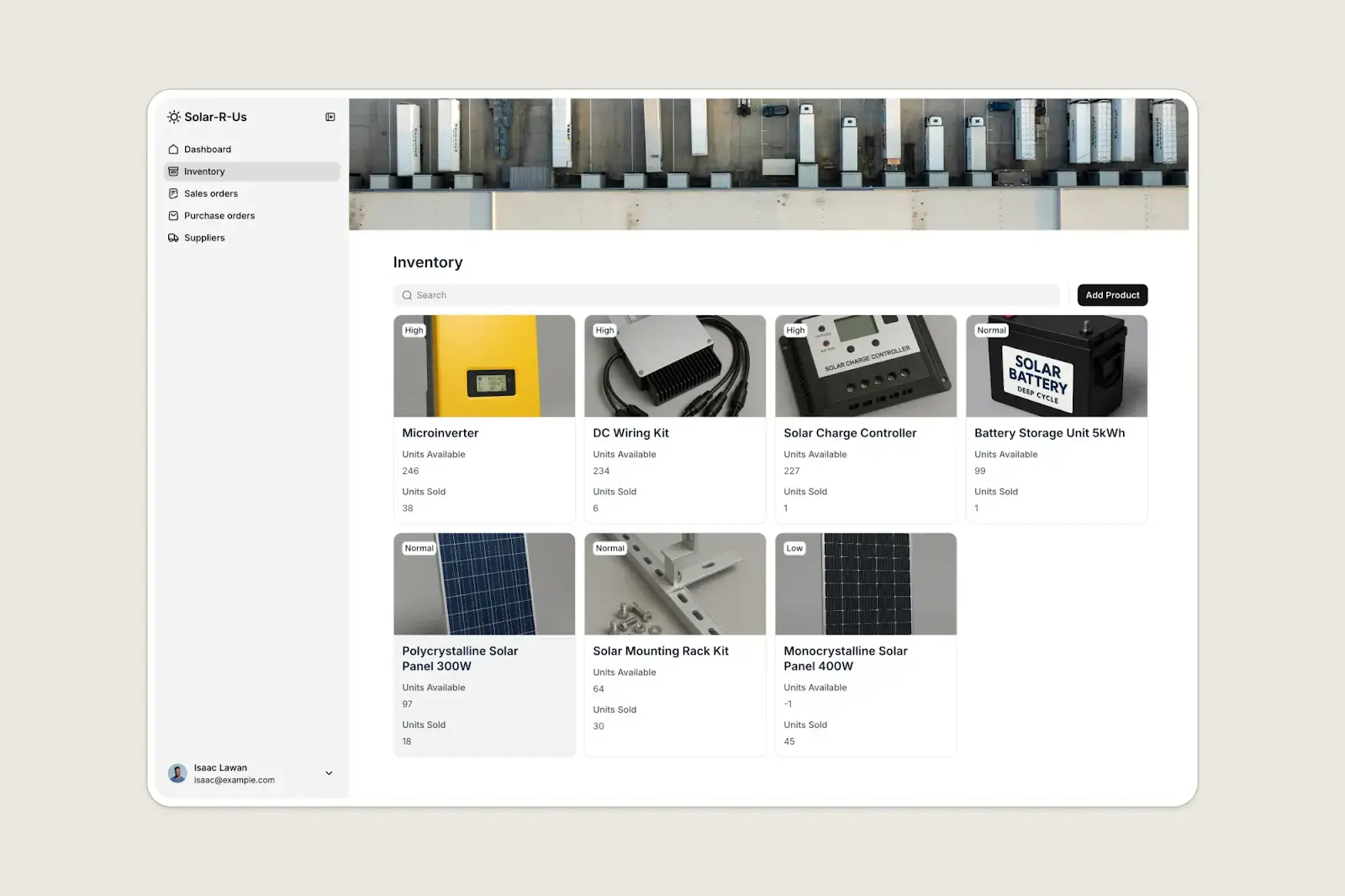
Once your system is live, AI keeps working in the background. Database AI Agents can enrich supplier profiles, categorize new products, and clean duplicates as data flows in. Anyone on your team can query Softr’s Ask AI assistant about inventory questions without building a report (like "What’s our total stock value by supplier?"). And with Softr Workflows (including AI steps), it’s easy to set up custom automations for low-stock alerts, reorder notifications, and supplier follow-ups.
Pros:
- Build exactly the inventory system you need with custom fields, views, and workflows that match how your business operates
- Native, relational Softr database or connect to 21+ external data sources so your inventory system lives on top of data you already own rather than requiring you to migrate to a new platform
- AI Agents enrich supplier records, categorize products, and keep data clean as records are added or updated
- Easily create portals for suppliers and custom views for different users
- Accessible pricing starting at $19/month for Team: 5 + Client: 5 app users
Cons:
- Requires more upfront design work than plug-and-play tools, though Softr’s AI App Generator and inventory management template cut setup time significantly
- Doesn't include a built-in forecasting engine
Softr best features
- AI Co-Builder: Describe your inventory system and AI creates it in minutes, including database structure, interface, and user permissions.
- Database AI Agents: When a new product is added, AI can generate descriptions, tag categories, pull supplier details from the web, or summarize spec sheets automatically.
- Ask AI: Any team member can query inventory data ("Which SKUs are below reorder point?") and get instant answers without building reports.
- Supplier and vendor portals: Give suppliers a secure login to view open POs, submit delivery updates, or upload documents without any access to the rest of your system.
- Granular permissions: Create entirely different experiences for each user role rather than just adjusting access levels. Warehouse workers might only need a simple mobile view, for example, while managers get full dashboards.
- Workflow automations: Trigger reorder requests when stock drops below a threshold, route POs to a manager for approval, or update a supplier record when a delivery is marked received.
- 21+ data source integrations: Connect Airtable, Google Sheets, HubSpot, Xero, or any REST API, or manage everything natively in Softr Databases.
Softr pricing
With Softr’s predictable pricing tiers, it’s easy to start small and scale as you grow. There’s also a generous free plan.
- Free: Unlimited apps, with access to Softr Workflows and Softr Databases, 5 app users, up to 5,000 records per workspace; includes AI features and 5 AI credits
- Basic: $19/month for unlimited apps with 42+ integrations, Team: 5 + Client: 5 app users, 50,000 records per workspace, and 10 AI credits (more available for purchase)
- Pro: $99/month for unlimited apps with 45+ integrations and custom code, Team: 10 + Client: 50 app users, 500,000 records per workspace, and 50 AI credits (more available for purchase)
- Business: $329/month for unlimited apps with 52+ integrations, Team: 30 + Client: 100 app users, 1M records per workspace, and 100 AI credits (more available for purchase)
- Enterprise: Custom pricing available
[.blog-callout]
👉 Start with Softr’s free plan to build your first inventory app, or browse inventory management templates to launch in minutes.
[.blog-callout]
2. Cin7 — best for high-volume retailers and wholesalers selling across multiple channels
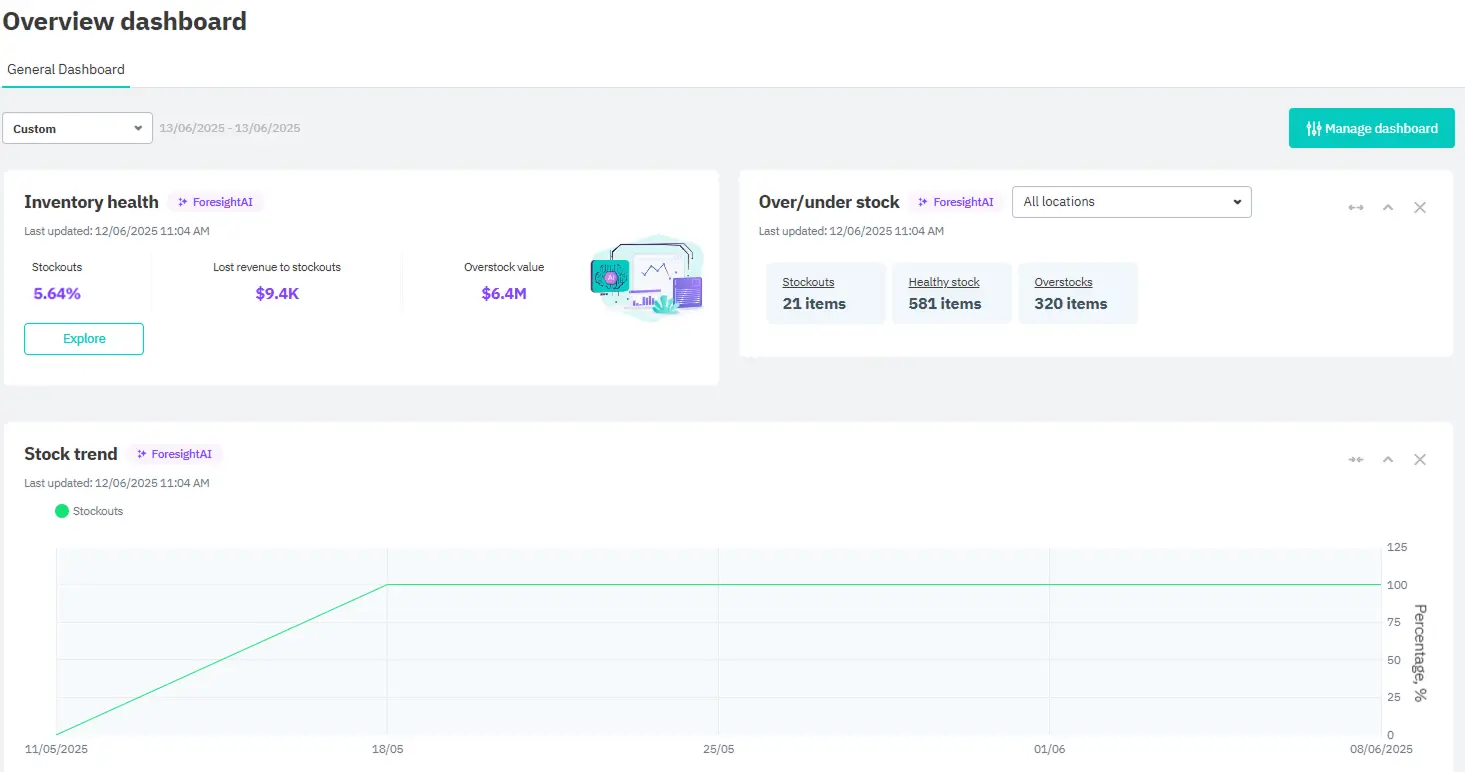
Cin7 is a multi-channel inventory and order management platform. If you're managing stock across multiple sales channels, warehouses, and fulfillment methods, that’s exactly what Cin7 is built for. For brands selling through big retailers, a major differentiator is Cin7’s built-in EDI, which is included at no extra cost. (Most competitors charge separately for EDI or don't offer it at all.)
ForesightAI generates purchasing recommendations based on historical sales and lead times, though it's a paid add-on rather than included in base plans. And with 700+ integrations, Cin7 connects to most tools already in your stack.
Cin7 pros and cons
Pros:
- Unified inventory across Shopify, Amazon, eBay, WooCommerce, POS, and wholesale in real time
- Built-in EDI at no extra cost, a meaningful advantage for wholesale and big-box retail brands
- ForesightAI demand forecasting reduces overstock and stockout cycles
- 700+ integrations cover most tools already in your stack
Cons:
- Post-onboarding support can have long response times
- Shopify sync occasionally generates errors, particularly around order routing and variant management
- Implementation fees are mandatory, which adds to the upfront cost
Cin7 best features
- Multi-channel inventory sync: Real-time stock accuracy across all channels, warehouses, and fulfillment locations.
- Built-in EDI: Connect with large retailers at no additional cost.
- ForesightAI demand forecasting: AI-powered purchasing recommendations to avoid stockouts and excess inventory.
- B2B portal: Wholesale customers self-serve orders, browse your catalog, and view invoices without manual quoting.
- Light manufacturing features: Basic BOM management and assembly features for simple production workflows.
Cin7 pricing
Cin7 offers a 14-day free trial, and even the entry-level Standard plan has a rich set of features. Just keep in mind that some features, like ForesightAI forecasting, are paid add-ons.
- Standard: $349/month for 5 users, up to 6,000 orders per year, and 2 ecommerce and app integrations
- Pro: $599/month for 10 users, up to 24,000 orders per year, and 4 ecommerce and app integrations
- Advanced: $999/month for 15 users, up to 120,000 orders per year, and 6 ecommerce and app integrations
- Omni: Custom pricing for bespoke enterprise implementations
3. Katana — best for small to mid-size manufacturers and D2C brands
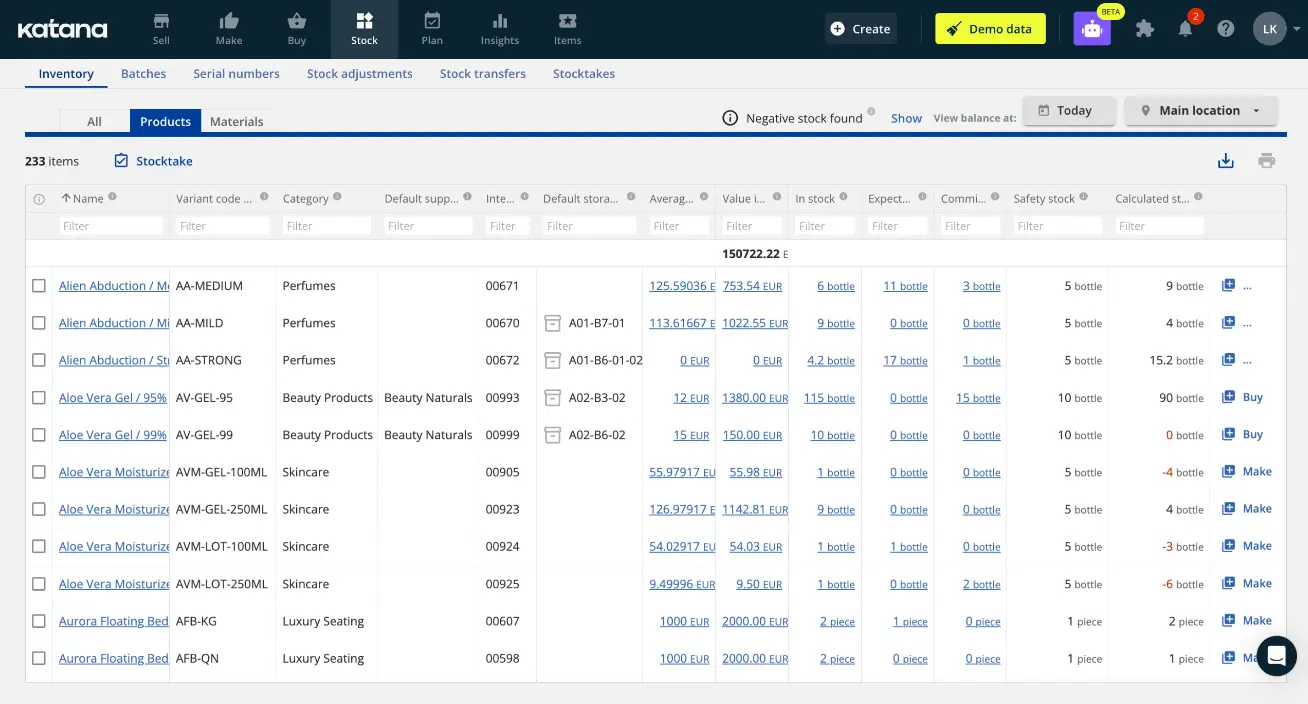
Katana is a cloud inventory platform for small to mid-size manufacturers, particularly direct-to-consumer and Shopify brands. It offers real-time visibility into raw materials, work-in-progress, and finished goods, so you always know what's available to sell and what's tied up in production. Katana's AI-powered demand forecasting, available as an add-on, generates replenishment recommendations based on sales trends and lead times. Users moving away from spreadsheets or legacy ERPs consistently praise Katana as intuitive and easy to use.
Katana pros and cons
Pros:
- Visual interface is easier to learn than most inventory management systems
- Real-time visibility across raw materials, WIP, and finished goods in one dashboard
- Shopify and QuickBooks integrations are reliable and frequently praised in reviews
- Unlimited users on all paid plans
Cons:
- Pricing has increased dramatically over time; Katana’s order-based pricing can be challenging for high-volume, low-ticket businesses
- Users report occasional performance lags and sync delays
- Limited customization on reporting and document templates
Katana best features
- Live inventory tracking: Simultaneous view of raw materials, WIP, and finished goods availability.
- BOM management: Multi-level BOMs that auto-calculate material requirements and flag shortages before production delays.
- Visual production scheduling: Drag-and-drop manufacturing orders across a timeline with Shop Floor App for production staff task lists.
- MRP engine: Auto-alerts when to reorder based on actual demand from sales orders.
Katana pricing
Katana gives you full platform access—including unlimited users—for free for 15 days. After that, you can continue to use the free plan, but you’re subject to a 30 SKU limit. Paid plans vary greatly depending on how many monthly orders you process and how many inventory locations you have.
- Free: 30 SKUs, 3 locations
- Core: From ~$299/month (pricing scales with order volume)
- Implementation packages start at $2,000
There are also a number of add-on modules, including warehouse management at $149/month, traceability at $249/month, and manufacturing management at $199/month.
4. Zoho Inventory — best for budget-conscious teams that need solid order and inventory management
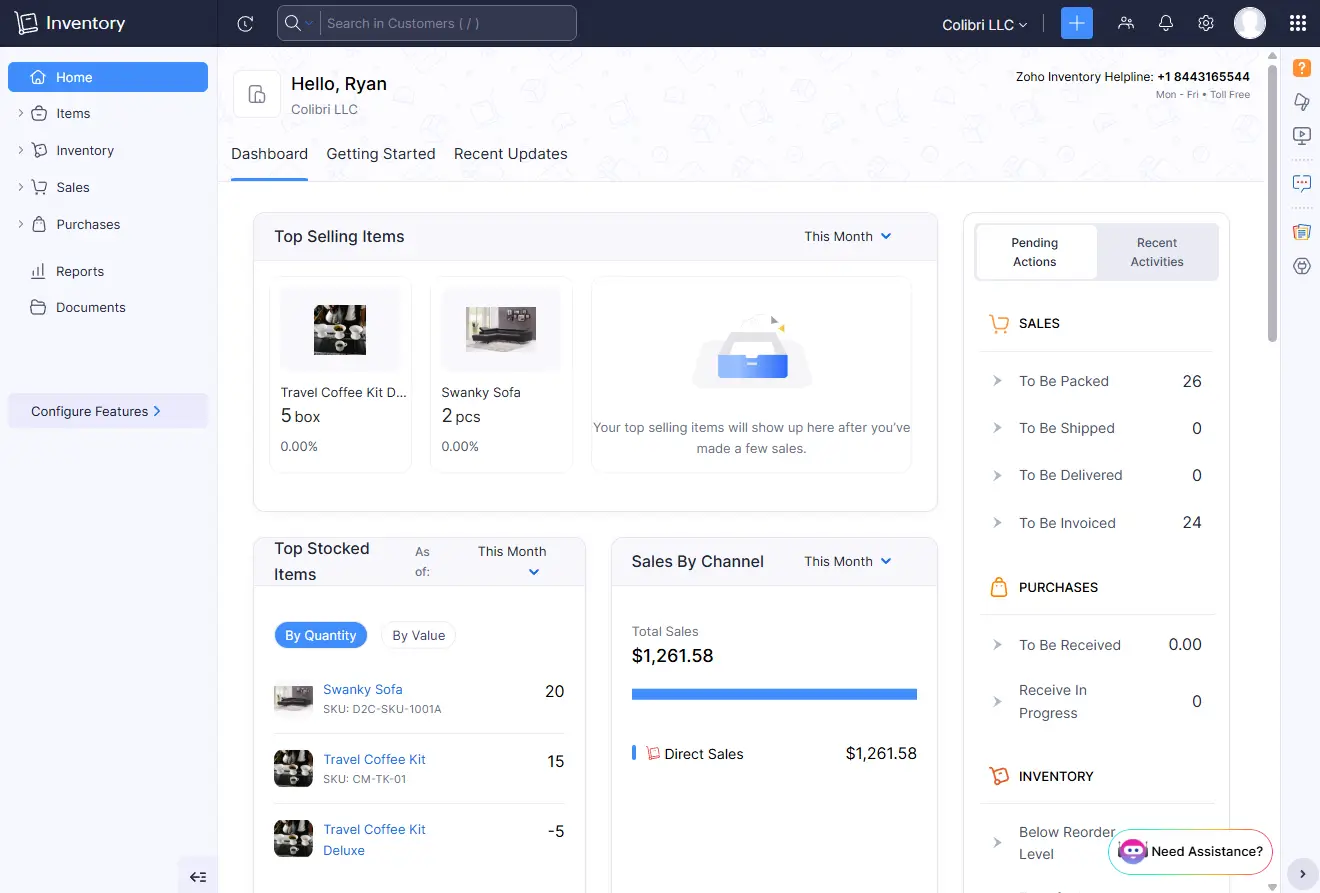
Zoho Inventory is an inventory and order management platform built for SMBs selling across multiple channels. It handles the full order lifecycle—multi-channel selling, warehouse management, shipping, serial/batch tracking, and PO management—at prices well below most competitors. Zia, Zoho Inventory's built-in AI assistant, adds seasonal demand forecasting and workflow automation across the platform. Zoho Inventory is especially valuable for teams already using Zoho CRM or Zoho Books, since inventory data flows automatically across the ecosystem without extra setup.
Zoho Inventory pros and cons
Pros:
- Handles the full order lifecycle (sales orders, POs, backorders, dropshipping, and multi-warehouse management)
- Inventory data flows automatically between Zoho Inventory, Zoho CRM, Zoho Books, and Zoho Analytics
- Free plan supports 50 orders/month across two locations
Cons:
- Monthly order caps force plan upgrades as transaction volume grows
- Third-party integrations outside the Zoho ecosystem can be inconsistent
Zoho Inventory best features
- Multi-channel inventory sync: Stock updates automatically across all connected channels when any order is placed.
- Order lifecycle management: Sales orders, POs, backorders, and dropshipping from one dashboard.
- Multi-warehouse management: Track and move stock across locations with auto-generated picklists.
- Serial and batch tracking: Assign serial numbers to individual units or group expiry-sensitive inventory into batches.
- Zoho ecosystem integration: Automatic data flow between Zoho CRM, Books, and Analytics — no reconciliation needed.
Zoho Inventory pricing
Zoho Inventory's pricing is among the most accessible on this list, with a genuine free tier and paid plans that scale gradually.
- Free: 50 orders/month, 1 user, 2 locations
- Standard: $29/month (billed annually) for 500 orders, two users, and two locations
- Professional: $79/month (billed annually) for 3,000 orders, two users, and four locations
- Premium: $129/month (billed annually) for 7,500 orders, two users, six locations, and 2,000 bins per location
- Enterprise: $249/month (billed annually) for 15,000 orders, seven users, 10 locations, and 5,000 bins per location
If you're already in the Zoho ecosystem—or open to it —Zoho One is worth a look: it bundles Zoho Inventory with 50+ apps including CRM, Books, and Analytics for $37/user/month.
5. Netstock — best for demand forecasting on top of your existing ERP
.webp)
Netstock is an AI-powered demand forecasting and supply planning layer that connects to an existing ERP. If you don't already have SAP, NetSuite, Microsoft Dynamics, Sage, or a similar ERP in place, Netstock isn't the right starting point. For teams that do, the reviews are unusually positive for a supply chain tool; 97% of G2 reviewers rate it 4 or 5 stars, and users consistently highlight how quickly the ROI becomes visible.
Netstock pros and cons
Pros:
- Forecasting is highly accurate; users say it has a significant impact on how quickly they make reorder decisions
- Automatic SKU prioritization to understand which SKUs deserve attention and which don’t
- Onboarding is smooth and, by ERP integration standards, relatively fast
Cons:
- Requires an existing ERP; doesn’t work as a standalone system
- Starts at ~$900/month, which is above most small business budgets
- Mastering advanced forecasting and scenario planning tools takes time
Netstock best features
- Demand forecasting: Machine learning engine analyzes historical sales, seasonality, and lead times for precise purchase recommendations.
- AI Pack: Dashboard Analyzer, Item Analyzer, and Item Troubleshooter uncover inventory issues before they affect operations.
- ABC classification: Auto-categorizes SKUs by value and variability so businesses can concentrate their focus where it matters most.
- "What-if" scenario planning: Model how lead-time changes or demand shifts affect inventory before they happen.
- 60+ ERP integrations: Pre-built connectors for SAP, NetSuite, Microsoft Dynamics, Sage, and others, with no custom development required.
Netstock pricing
Netstock starts at $900/month and only offers annual subscriptions. Pricing is based on custom quotes and varies based on ERP, number of SKUs, and the size of your business.
6. Fishbowl — best for QuickBooks-centric manufacturers and distributors
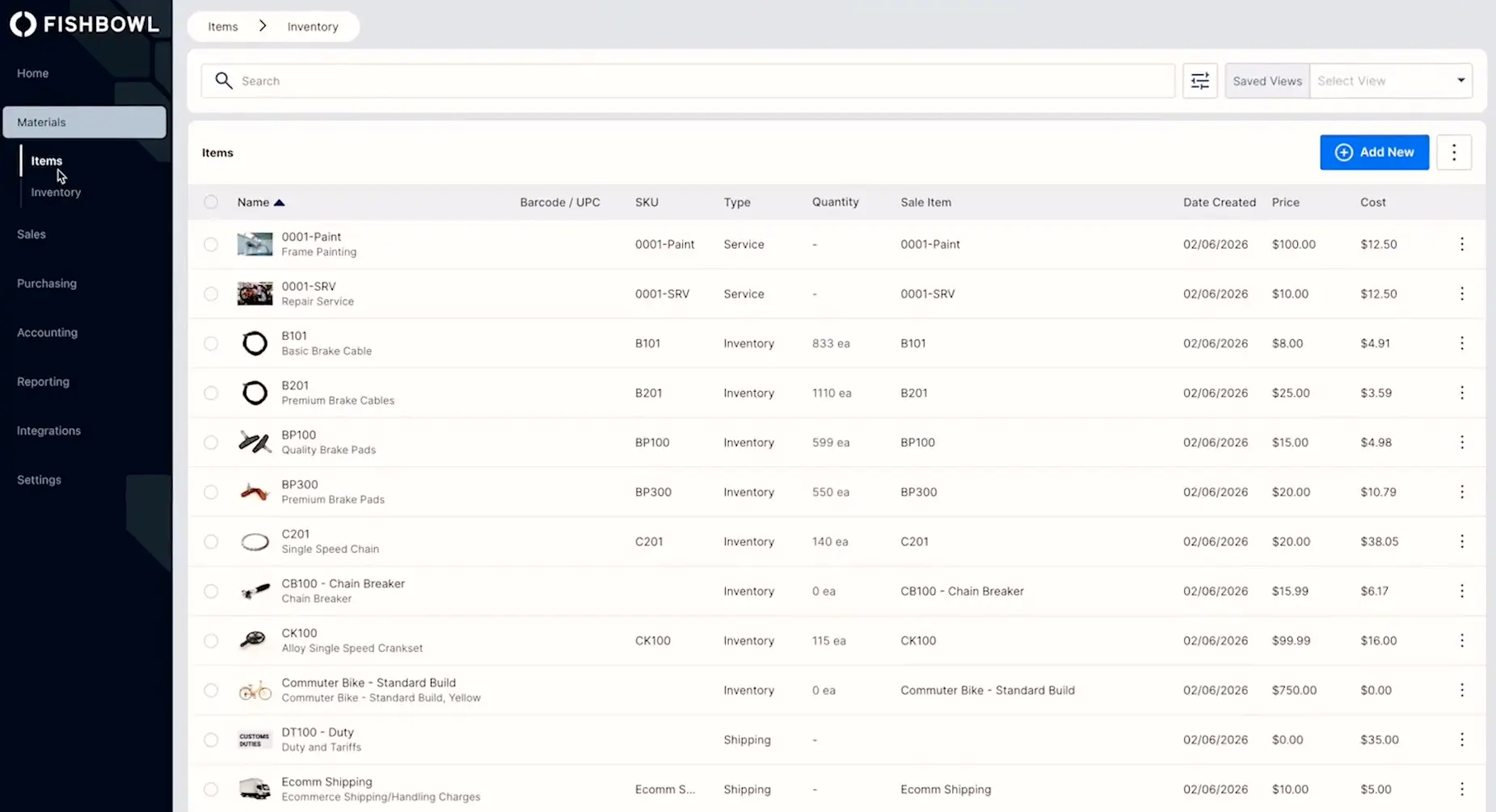
Fishbowl is a manufacturing and inventory platform built around its QuickBooks integration. Fishbowl's homepage calls it "the #1 inventory management software for QuickBooks users," and that positioning is backed up by real benefits: BOM management, multi-level work orders, serial and lot tracking, multi-location warehousing, and barcode scanning all stay aligned with QuickBooks in real time. The Fishbowl AI Insights module adds purchasing analytics and inventory optimization recommendations on top of that foundation.
For small manufacturers and distributors already running their finances in QuickBooks, Fishbowl covers the inventory and manufacturing layer without requiring a full ERP switch.
Fishbowl pros and cons
Pros:
- Best-in-class QuickBooks integration with bidirectional real-time sync
- Handles complex manufacturing including multi-level BOMs, work orders, and serial and lot tracking
- Adapts well to a wide range of industries including food production, manufacturing, medical devices, and consumer goods
Cons:
- Onboarding takes significant time, and most plans include a mandatory implementation package
- Custom reports beyond basic templates can cost hundreds or thousands of dollars
- Two-way QuickBooks sync can be inconsistent; data pushes from Fishbowl to Quickbooks cleanly but some users report that pulling data back is less reliable
Fishbowl best features
- QuickBooks and Xero integration: Every inventory movement reflected in accounting in real time.
- BOM management: Multi-level BOMs that auto-calculate material requirements and costs.
- Multi-location warehouse management: Barcode scanning, serial tracking, and audit trails across locations.
- Fishbowl AI Insights: Analytics that uncover purchasing trends and inventory optimization recommendations.
Fishbowl pricing
Fishbowl doesn’t include much on its Essentials plan—no picking and receiving workflows, bundles, or order fulfillment—so unless your needs are limited, expect to start with Growth.
- Essentials: $229/month (billed annually) for two users, inventory tracking, and item and SKU management
- Growth: $429/month (billed annually) for five users, core fulfillment support, and AI reporting
- Scale: $729/month (billed annually) for 10 users, advanced permission control, forecasting, and demand planning
- Advanced: Custom pricing if you need payment processing, audit trail reporting, or complex fulfillment
7. Sortly — best for tracking tools, supplies, and physical assets
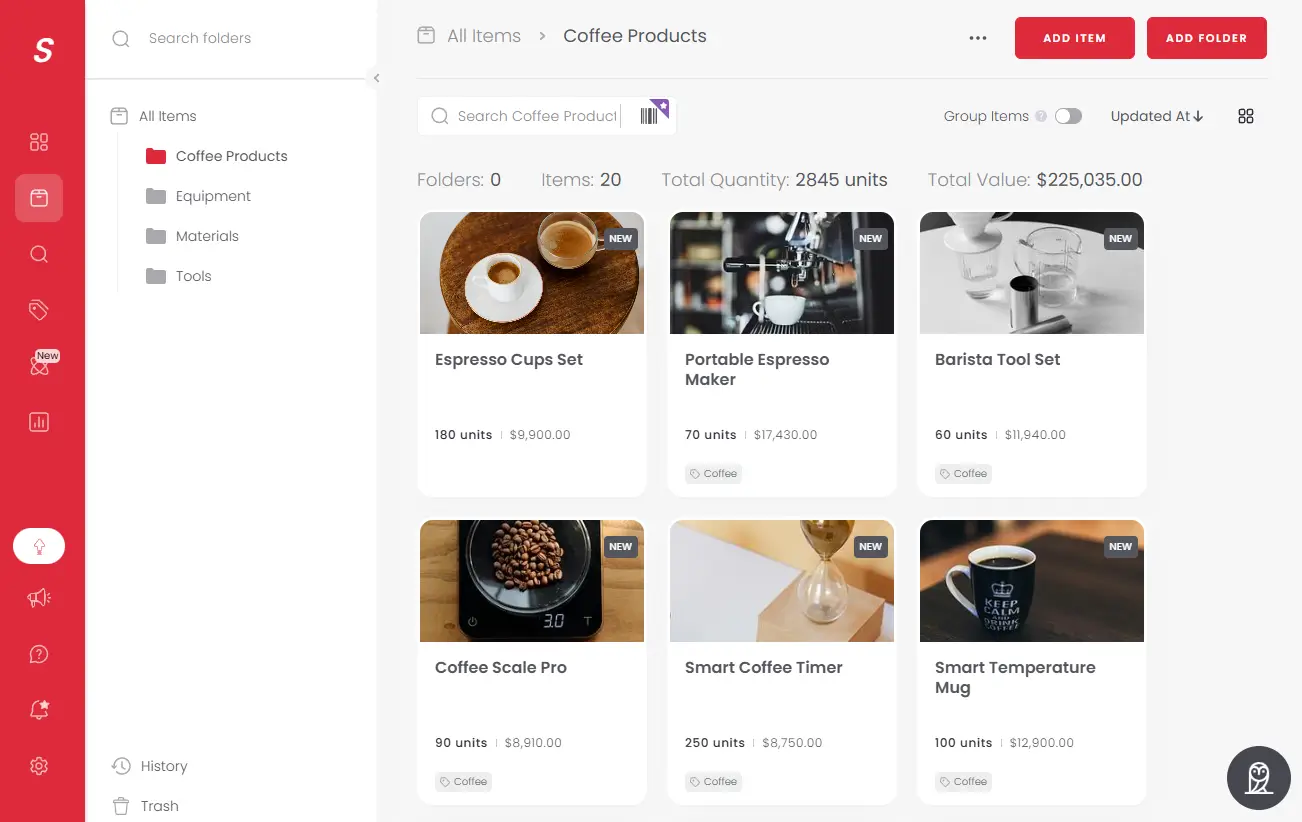
Sortly is a mobile-first app for teams that need to track physical items like tools, supplies, and materials. It's incredibly easy to use: on Reddit, users recommend it for everything from warehouse inventory to keeping track of boxes during a house move, which tells you something about its approachability. In a business context, it’s popular with construction firms, medical clinics, warehouses; and since the mobile app works offline, it’s especially practical for field teams without reliable internet access. Just keep in mind that Sortly is purely an item tracker, and it doesn't offer order fulfillment, demand forecasting, or ecommerce integrations.
Sortly pros and cons
Pros:
- Fastest setup on this list; teams can go from sign-up to tracking inventory in hours
- Mobile app works offline and offers photo-based tracking, barcode scanning, and folder organization
- Free plan available for up to 100 items
Cons:
- No ecommerce integrations, order fulfillment, or AI features
- Plans are tiered based on how many items you track, making them less economical for bigger operations
- Recent pricing changes more than doubled costs for some long-term users
Sortly best features
- Mobile-first with offline mode: Update from any device without internet; changes sync when connectivity returns.
- QR code and barcode scanning: Generate or scan barcodes via phone camera to instantly update quantities.
- Photo-based inventory: Attach photos to every item for instant visual identification in the field or warehouse.
- Folder-based organization: Custom folders by location, category, or project to help you track items as they move between sites.
Sortly pricing
Sortly overhauled their pricing in 2024, and long-time users weren’t exempt: many of them saw their costs double or triple. Still, compared to the more full-featured platforms on this list, Sortly remains one of the more affordable options
- Free: 100 items, one user
- Advanced: $24/month (billed annually) for 500 items, two users, and QR code label creation
- Ultra: $74/month (billed annually) for 2,000 items, five users, and purchase orders
- Premium: $149/month (billed annually) for 5,000 items, eight users, and Quickbooks integration
- Enterprise: Custom pricing
Note: The pricing above reflects a 50% discount that Sortly offers on the first year of any new annual plan. However, the discount drops to 20% upon renewal, so keep that in mind when comparing pricing.
8. Inventory Planner by Sage — best for ecommerce brands that need SKU-level demand forecasting
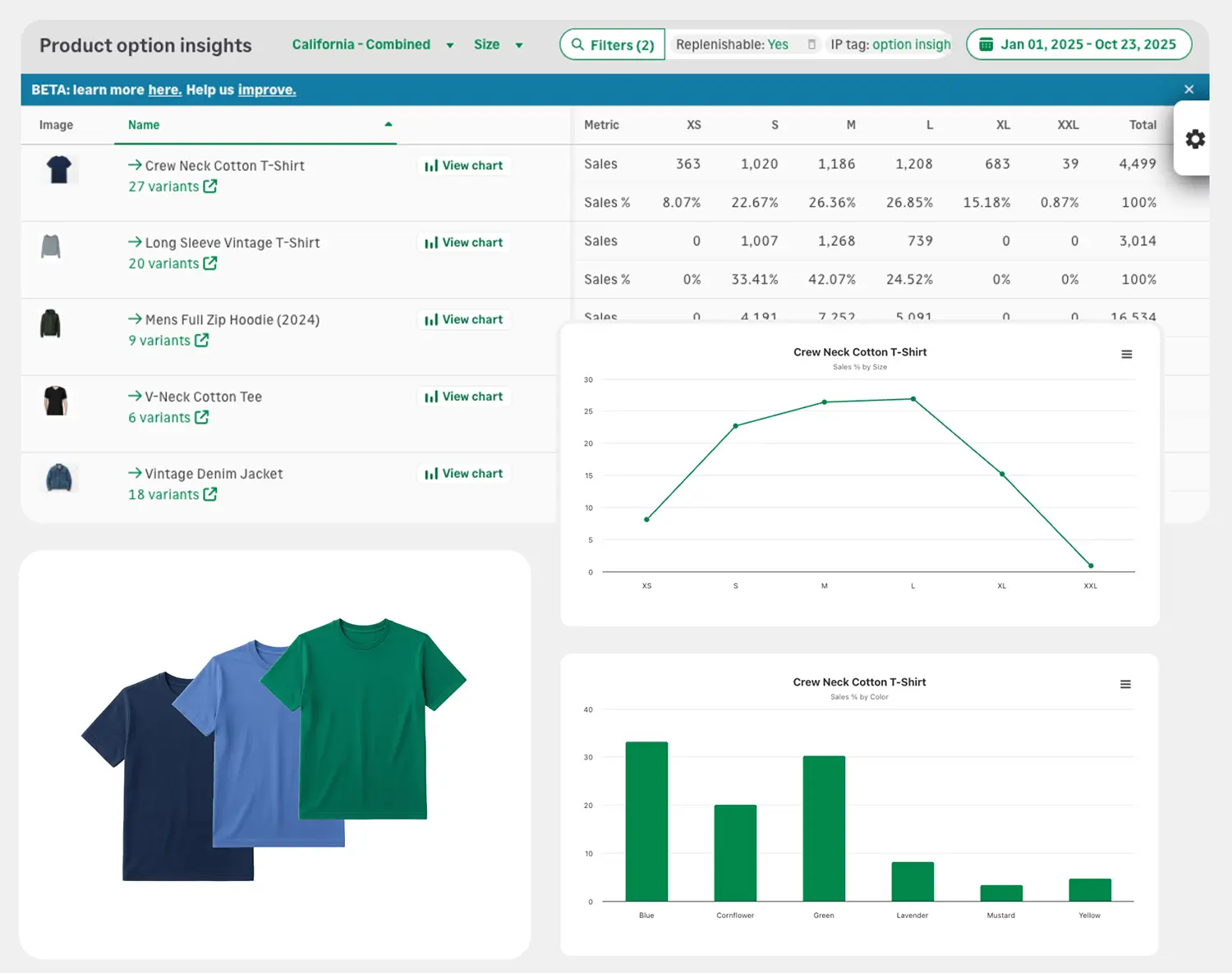
Inventory Planner is a dedicated AI demand forecasting and replenishment platform for multi-channel ecommerce retailers. While tools like Cin7 and Zoho include forecasting as one feature among many, Inventory Planner does one thing deeply: its AI engine analyzes demand at the SKU level and tells you exactly what to order, how much, and when. Demand planning with this level of granularity can save serious time for users managing hundreds or thousands of SKUs across multiple suppliers.
Inventory Planner pros and cons
Pros:
- Dedicated AI forecasting engine built specifically for ecommerce
- Automated PO generation turns hours of manual buying into minutes (users frequently cite this as the biggest time savings)
- Handles high-SKU operations across hundreds of suppliers with multi-channel sync
Cons:
- Some users have encountered Shopify API sync issues
- Pricing can be steep for early-stage brands
- Forecasting isn’t fully accurate right away; it takes time to calibrate
Inventory Planner best features
- AI demand forecasting: SKU-level analysis of historical sales, seasonal trends, and demand variability for precise replenishment recommendations.
- Automated PO generation: Turn forecasted demand into purchase orders by vendor in minutes, with no manual calculation.
- Multi-channel inventory sync: Connect Shopify, WooCommerce, Amazon, eBay, Linnworks, Cin7, NetSuite, and more into one forecasting view.
- SKU-level profitability analysis: Track inventory value, cash flow impact, and sell-through rates to identify which products tie up capital.
Inventory Planner pricing
Inventory Planner’s pricing is based on how much inventory you manage, so it scales as your store grows. You also get unlimited users. Pricing isn’t listed publicly, so you’ll need to reach out for an official quote, but current users report plans starting in the range of ~$250/month.
Find the best AI inventory management software for your team
Most platforms on this list have a pretty specific buyer in mind. Katana is aimed squarely at small manufacturers. Netstock is a forecasting layer that sits on top of an existing ERP, so for teams already running SAP or NetSuite it’s an obvious starting point. And for field teams and small operations that just need to know where their stuff is, Sortly does that job well. If your business fits one of those profiles cleanly, your decision might be pretty straightforward.
The harder decision is for businesses that don't fit neatly into any of those categories. Softr is worth considering if you've tried a dedicated inventory platform and found it too rigid, or if your operation has enough moving parts that a template-based approach was never going to work. With Softr, you can build exactly the system you need with AI, connect it to the tools you already use, and give different users different views of the same data without involving a developer.
Try Softr for free to build a custom inventory management system or explore the inventory management template to see what’s possible.
Frequently asked questions
What's the best free AI inventory management software?
Which AI inventory tool works best without an ERP?
How much does AI inventory management software cost?