CRMs used to be digital filing cabinets. Now they don’t just track activity, they interpret it: follow-ups get drafted, risks get flagged before a deal stalls, and forecasts are predictive rather than historical. Here’s our shortlist of the platforms that are genuinely predictive, and the ones that are hype and dashboards.
Best AI CRM tools at a glance
| Tool | Best for | Top features | Pricing |
|---|---|---|---|
| Softr | Small businesses that want an AI-powered CRM on top of existing data (no code needed) | - Custom apps & dashboards - AI agents for enrichment & predictive insights - “Ask AI” queries - Workflow automation - Visual builder | Free plan available; paid plans from $19/month |
| HubSpot (Breeze) | Teams looking for an all-in-one CRM platform with agentic workflows | - AI companions - Breeze agents for lead enrichment & predictive scoring - AI writers for outreach - Workflow automation | Free plan available; paid plans from $9/user/month |
| Salesforce Sales Cloud (Einstein AI) | Enterprise teams needing predictive sales insights | - Predictive lead scoring - Opportunity prioritization - Generative email & follow-up suggestions - Pipeline analytics - Automated activity capture | Free plan available; paid plans from $25/user/month |
| Zoho CRM (Zia) | Businesses in the Zoho ecosystem wanting AI-driven insights | - Predictive lead/deal scoring, revenue forecasting, anomaly detection - Next-best-action recommendations - Automated workflows | Free plan available; paid plans from $14/user/month |
| Freshsales (Freddy AI) | SMBs and mid-market teams seeking intelligent lead prioritization | - Lead scoring, deal prioritization, and forecasting - Workflow automation - Ticket & support handling | Free plan available; paid plans from $9/user/month |
What should you look for in AI CRM software?
- Predictive analytics and lead scoring: The best AI CRMs store data, yes—but nowadays they should also analyze it. Look for platforms that can predict which leads are most likely to convert, which deals may stall, and which accounts are at risk of churn, so you can act proactively.
- Automated activity capture: Your CRM should log summaries of calls, emails, and meetings automatically, reducing manual data entry while ensuring your AI has rich data to generate insights.
- AI-assisted communication: Features like follow-up suggestions, email drafting, or conversational guidance help sales reps engage leads more effectively without losing the personal touch.
- Smart forecasting: Predictive forecasts based on historical and real-time data give you a realistic view of revenue and pipeline health, instead of relying on gut instincts or past averages.
- Workflow automation with AI triggers: Look for automation that reacts intelligently, not just on static rules. For example, alerts when a high-value deal slows down or when a lead shows unusual engagement patterns.
- Actionable insights, not just dashboards: AI is only useful if it gives you clear, prioritized recommendations, like which accounts to focus on today or which campaigns are actually driving conversions.
- Integration with your existing stack: A strong AI CRM should connect seamlessly to your email, marketing tools, chat systems, and other business apps, so your predictive insights are based on complete, up-to-date data.
- Ease of use and team adoption: Advanced AI is only effective if your team actually uses it. Choose a CRM with an intuitive interface, easy onboarding, and clear explanations of AI suggestions.
- Scalable pricing and value: AI-powered CRMs can be expensive. Look for platforms that scale reasonably with your team size and offer transparent pricing for AI features.
- Privacy and data security: AI thrives on data, but your customers’ info must remain secure. Ensure the CRM offers strong privacy controls and complies with relevant regulations.
Best AI CRM software for sales teams in 2026
Softr — best for building a smart, scalable CRM with AI
.webp)
Most AI CRMs layer surface-level intelligence on top of a ready-fixed system and label it AI, but not Softr.
Softr is an AI-powered platform that lets anyone (with or without technical chops) build production-ready software. That includes custom apps, connected databases, automated workflows, and dynamic forms that can all work together as a fully functional CRM.
You start by describing the system you need, like a sales CRM for leads or a deal pipeline for a real estate team. Softr’s AI Co-Builder builds a complete database and app for your customer data, featuring tables with linked records, flexible field types, custom views, and all other relevant pages. Build CRM interfaces like dashboards or pipeline views on top of that data so your sales team can interact with and act on it.
Once it’s running, database agents can enrich records automatically, fill in missing details, summarize interactions, and provide predictive insights, showing which leads are most likely to convert or which deals need attention. You can also use workflow automation to trigger actions, assign tasks, and move deals automatically. Plus, CRM users can query data with the “Ask AI” functionality to get instant answers about deals without digging through tables.
Softr pros and cons
Pros
- Tailored to your business: Build CRM systems designed around your specific sales processes, team structure, and data requirements instead of forcing your operations into static off-the-shelf solutions.
- Full AI enablement: Use AI to describe what you need and get production-ready software with apps, forms, dashboards, and workflows in minutes, then add features as you grow with Softr’s visual drag-and-drop builder.
- Built-in AI: Database AI Agents and Ask AI are integrated directly into Softr, so you can get answers about data, while agents handle enrichment, updates, and predictive analysis.
- Flexible data integrations: Store your customer data on Softr’s native database, or sync with other spreadsheet or external tools (Airtable, Google Sheets, HubSpot), wherever your data lives.
- Role-based permissions and access: Set granular, role-based permissions so each customer or team member can only see or take action on their own deals.
Cons
- Lacks full control over back-end code
- Supports fewer integrations than some traditional CRMs, though Softr can also connect to Zapier and Make for more extensive automation.
Softr best features
- Full-stack CRM functionality: Expand your sales database into a production-ready CRM in minutes, with a front-end interface, dashboards, pipelines, task management, and reporting.
- Drag-and-drop builder: Add features to your CRM as you grow with lists, tables, forms, Kanbans, and charts to create workflows that fit your sales teams.
- AI agents and workflow automation: Use database agents to enrich records, predict customer behavior, search the web, and trigger actions when data is added or gets updated.
- Vibe Coding Block: Generate data visualizations and analytical widgets with AI to break down sales numbers, track KPIs, and surface actionable insights for your team.
- Ask AI: You can ask Softr AI questions about your live customer and pipeline or let it build entire databases for you based on natural language prompts.
- Predictable pricing: Flat-rate subscription tiers offer cost certainty and avoid the surprise charges that come with infrastructure overages and API calls.
- Security-compliant: Protect customer information from security threats. Softr is fully compliant with SOC2 and GDPR regulation
Pricing
- Free: Unlimited apps, with access to Softr Workflows and Softr Databases, 5 app users, 5 AI credits, and 5,000 database records
- Basic: $19/month for unlimited apps with 42+ integrations, Team: 5 + Client: 5 app users, 10 AI credits, and 50K records
- Pro: $99/month for unlimited apps with 45+ integrations and custom code, Team: 10 + Client: 50 app users, 50 AI credits, and 500K records
- Business: $329/month for unlimited apps with 52+ integrations, Team: 30 + Client: 100 app users, 100 AI credits, and 1M records
- Enterprise: Custom pricing
HubSpot (Breeze)
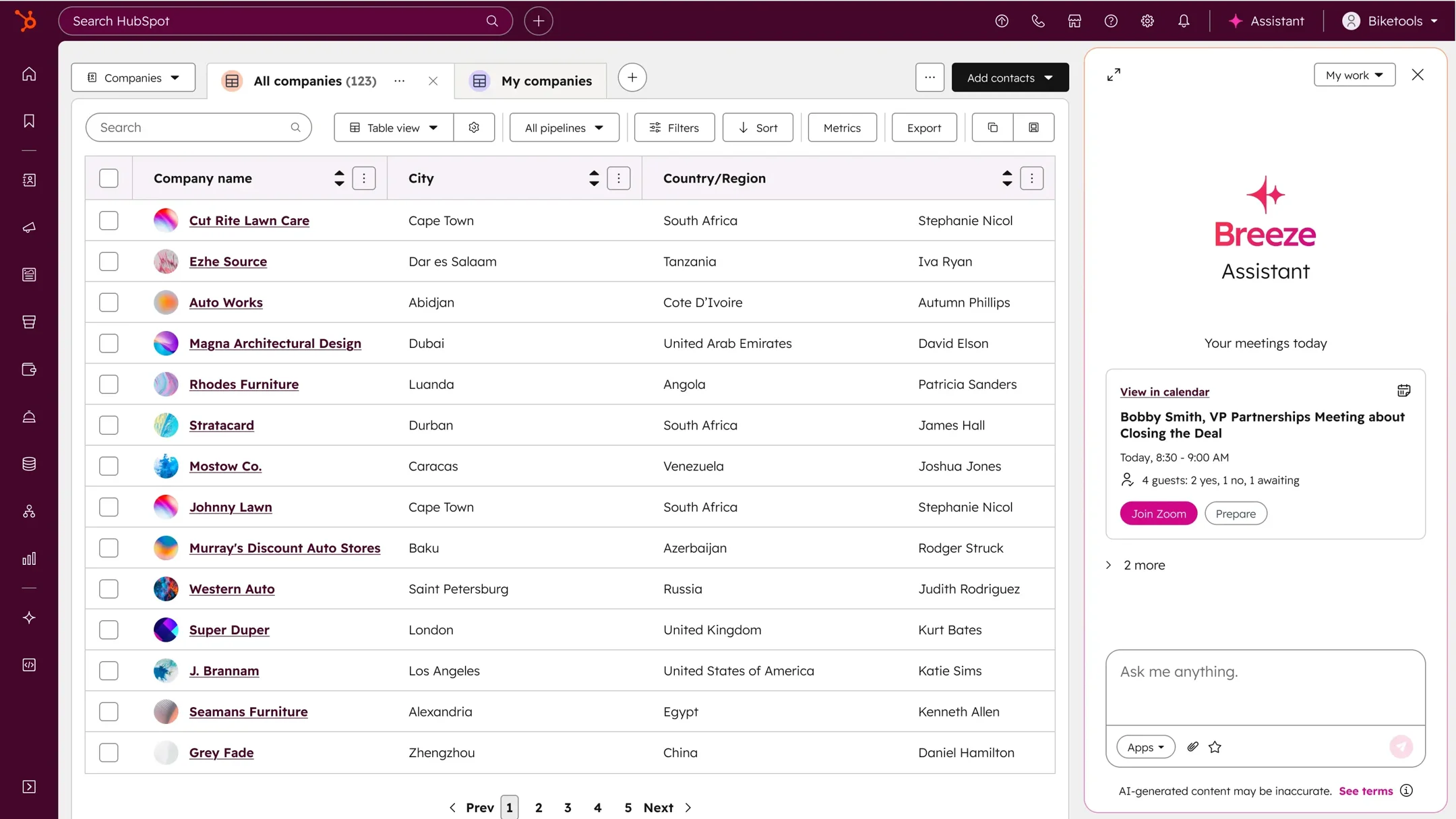
One of the most well-known CRMs out there, HubSpot is a solid albeit expensive off-the-shelf solution. It combines traditional CRM functionality (like contact and pipeline management) with a full suite of marketing features (social media and content management) to guide customers through every stage of the customer lifecycle.
HubSpot’s AI tools, dubbed “Breeze,” are its latest foray into empowering both sales and marketing teams alike. Breeze connects to your CRM data and allows you to enlist AI companions, agents, and “creative” content generators. Together, they help you automate work like lead enrichment, predictive analysis, and email outreach.
While that may solve a lot of issues for overstretched sales teams, the more advanced (and therefore more effective) agents require professional and enterprise plans, and additional usage often requires credit bundles.
HubSpot pros and cons
Pros
- All-in-one CRM and marketing platform: Combines sales, marketing, and service tools in one interface.
- AI-powered assistants: Breeze AI companions, agents, and writers automate lead enrichment, predictive insights, and outreach.
- Predictive lead scoring: Helps sales teams prioritize the most promising opportunities.
- Native integrations: HubSpot hosts a healthy collection of 76+ integrations
- Strong analytics and reporting: Track KPIs, campaign performance, and pipeline health across teams.
- Scalable for larger teams: Designed to handle enterprise-level workflows and multi-team collaboration.
Cons
- Expensive: Professional and enterprise plans are required to access the most powerful AI features.
- Steep learning curve: The breadth of features can be overwhelming for new users.
- Usage limits / credits: Advanced AI actions often require additional credit bundles, which can add up.
- Less flexible for customization: Unlike no-code platforms, you’re constrained to HubSpot’s structure and templates.
HubSpot best features
- Breeze companions: Provide meeting prep, summarize interactions, and suggest next steps in dashboards.
- Breeze agents: Automate lead scoring, data enrichment, logging calls, and task recommendations across sales, marketing, and service pipelines.
- Breeze content creators: Generate personalized emails, LinkedIn messages, content snippets, and outreach templates directly in the CRM.
- Predictive analytics: Surface insights about leads and deals, helping teams act proactively.
- Integrated workflows: Automate follow-ups, task creation, and cross-channel marketing campaigns.
HubSpot pricing
- Free ($0/month): Access for up to 2 users, free marketing and sales tools, and AI content generation.
- Starter (~$9/user/month, billed annually): Includes 500 HubSpot credits, Breeze Assistant, calling features with HubSpot‑provided phone numbers, repeating tasks and task queues.
- Professional (~$90/user/month, billed annually): Includes 3,000 HubSpot credits, AI Meeting Assistant, Breeze Prospecting Agent, call transcription and coaching, sales analytics, and more.
- Enterprise (~$150/user/month, billed annually): Includes 5,000 HubSpot credits, AI call transcript enrichment (beta), conversation intelligence, deal splits, deal journey analytics, lead form routing, pipeline approvals, and interactive voice response.
Salesforce Sales Cloud (Einstein AI)
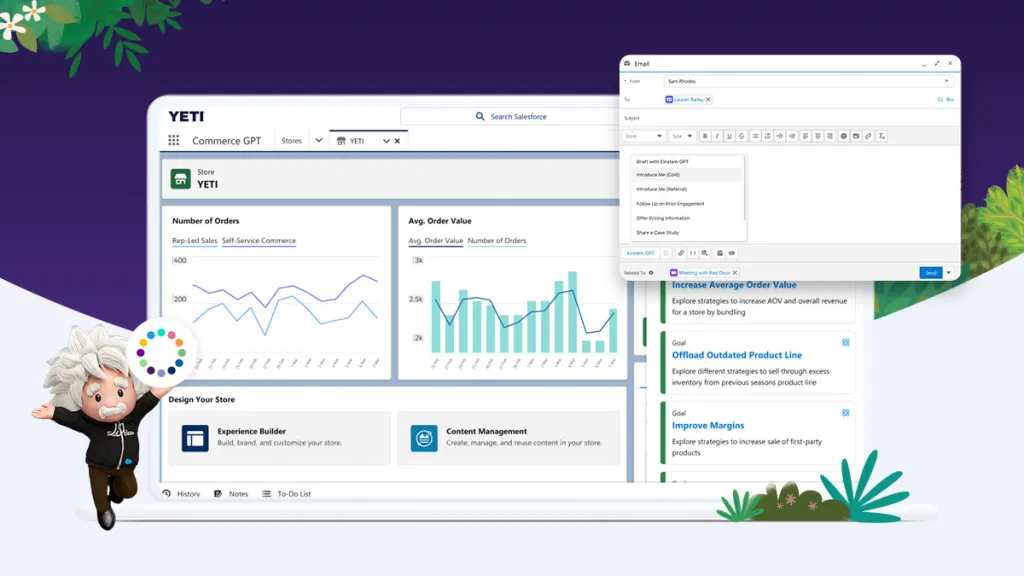
Salesforce Sales Cloud is another widely used enterprise CRM, known for its robust customization and powerful analytics.
The only problem? There are almost too many products to explore. Between enterprise-grade reporting, cross-channel campaign orchestration, and highly customizable automation tools, figuring out what you actually need (and how much to spend) can be overwhelming.
That probably even extends to its AI ecosystem, nicknamed Einstein AI. They incorporate predictive intelligence directly into the whole Salesforce platform, helping teams forecast revenue, prioritize leads, and uncover opportunities before they slip through the cracks.
Salesforce pros and cons
Pros
- Deep customization: Configure objects, fields, workflows, dashboards, and approval processes to match complex enterprise needs.
- Predictive AI insights: Einstein automatically scores leads, prioritizes opportunities, flags at-risk deals, and forecasts revenue using historical CRM data.
- Embedded AI recommendations: AI insights appear directly in dashboards, pipeline views, and record pages, providing actionable next steps without leaving the workflow.
- Generative sales support: Draft emails, summarize calls, and get suggested close plans or follow-ups using AI trained on your CRM context.
- Automated activity capture: Emails, calls, and calendar events are automatically logged to CRM records, reducing manual data entry.
- Platform-wide AI integration: Einstein extends beyond sales to service, marketing, and commerce, providing consistent predictive and generative intelligence across teams.
- Scalable for enterprise: Handles global teams, multi-layered approvals, and complex automation
Cons
- High cost: Advanced AI features, automation, and enterprise-level tools require professional or enterprise plans, which can be expensive.
- Complex setup: Implementation often demands dedicated admins, consultants, or internal ops teams to configure workflows, dashboards, and AI properly.
- Steep learning curve: The breadth of features and customization options can be overwhelming for new users or smaller teams.
- Product sprawl: With so many modules and add-ons, it can be hard to determine which tools you actually need.
Salesforce best features
- Predictive lead scoring: Automatically ranks leads based on likelihood to convert, helping sales reps focus on the highest-value opportunities.
- Opportunity insights: Flags deals at risk, highlights next-best actions, and recommends strategies for closing.
- Revenue forecasting: Generates AI-driven projections based on historical performance, pipeline health, and trend analysis.
- Automated activity capture: Logs emails, calls, and calendar events to contact and opportunity records, reducing manual data entry.
- Generative AI for sales: Drafts emails, follow-ups, and suggested close plans using context from CRM data.
- Einstein analytics dashboards: Visualizes KPIs, trends, and pipeline metrics with actionable AI-driven insights.
- Cross-platform AI integration: Extends predictive and generative intelligence to service, marketing, and commerce teams, providing a unified AI layer across Salesforce workflows.
Pricing
- Free Suite ($0/month): 2 users, basic lead, account, contact, and opportunity management, connected Slack conversations, simple email marketing. No AI included.
- Starter Suite ($25/user/month): Unlimited users, built-in sales flows, lead routing, AI automatically syncs emails, events, and contacts, dynamic email marketing and analytics.
- Pro Suite ($100/user/month): Everything in Starter plus greater customization and automation, sales quoting, forecasting, access to AppExchange, optional premier support, upgradeable to include Agentforce.
- Enterprise ($175/user/month): Everything in Pro plus advanced pipeline management, deal insights, conversation intelligence, optional Agentforce AI add-on.
- Unlimited ($350/user/month): Everything in Enterprise plus predictive AI, conversation intelligence, sales engagement, premier success plan, full sandbox, optional Agentforce.
- Agentforce 1 Sales ($550/user/month): Everything in Unlimited plus full AI suite, unmetered Agentforce usage, Salesforce Spiff, sales planning and programs, Salesforce Maps, Tableau Next, Slack Enterprise+, 1M Flex Credits and 2.5M Data Cloud Credits per org per year.
Zoho CRM (Zia)
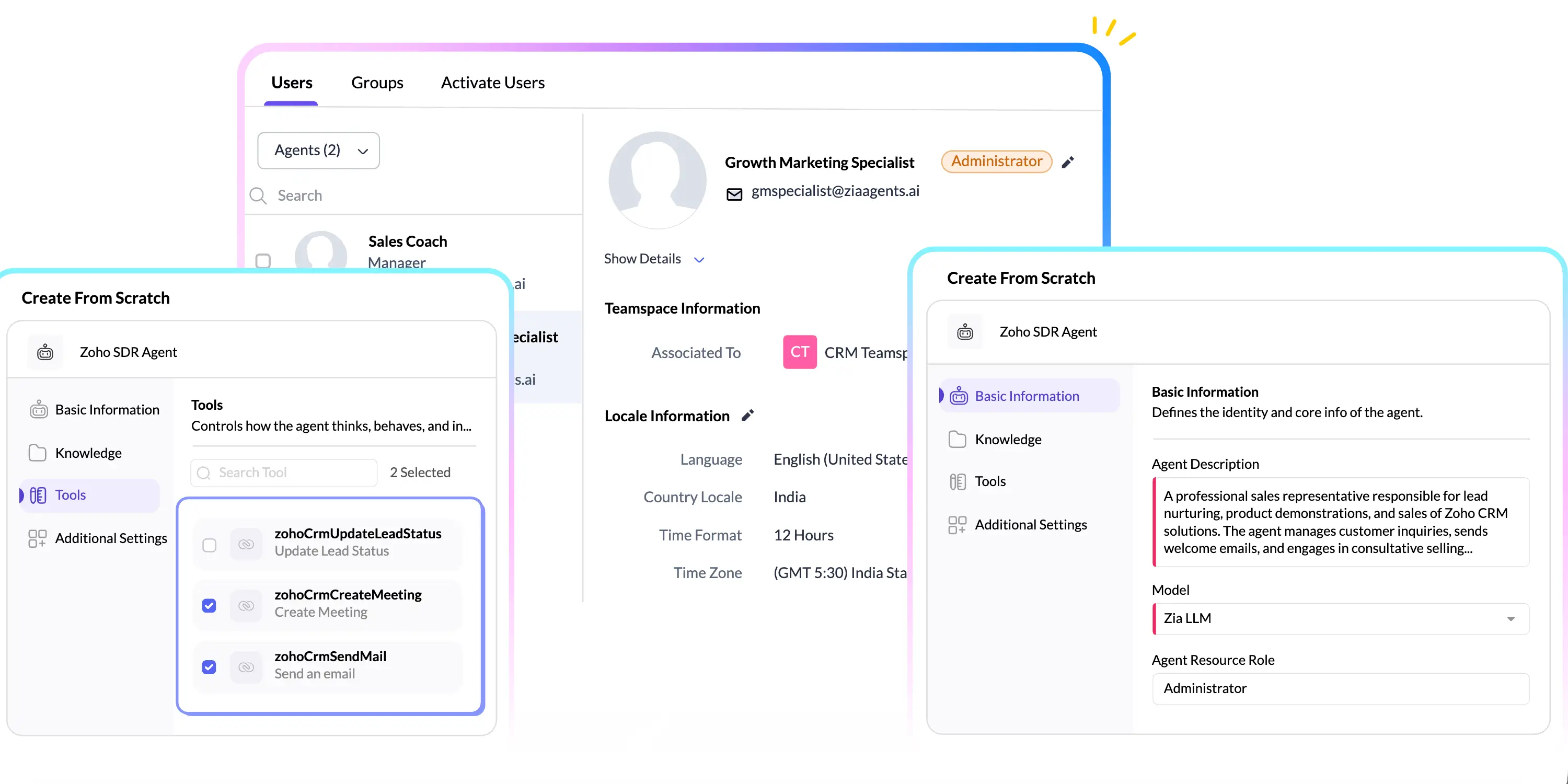
Zoho CRM is a versatile, feature‑rich CRM that appeals to businesses looking for strong automation and customization without the price tag of some enterprise platforms. It provides contact and pipeline management alongside multi‑channel engagement tools (email, phone, social, chat), making it useful for teams that support customers across different touchpoints.
Its much-improved AI assistant Zia helps teams work smarter by analyzing patterns in your CRM data. It can score leads and deals, forecast revenue, detect anomalies in your sales pipeline (like deals stalling longer than usual), and even suggest the best times for reps to call prospects. Zia also surfaces actionable recommendations for follow-ups and next-best actions.
Zoho CRM pros and cons
Pros
- Affordable pricing: Competitive plans with AI features included, accessible for small to mid-sized teams.
- Zia AI insights: Predictive lead/deal scoring, sales forecasts, anomaly detection, and call timing suggestions.
- Robust workflow automation: Automate tasks triggered by record actions, date-based events, score changes, or note updates.
- Guided processes with Blueprint: Create structured workflows that ensure your team follows sales processes consistently.
- Multi-channel CRM: Native support for email, phone, social, and live chat keeps customer engagement unified.
- Customizable modules: Flexible fields, layouts, and processes adapt to different business needs.
- Built-in reporting: Analytics dashboards and real-time reports help teams track performance and trends.
Cons
- UI complexity: The interface can feel less intuitive compared to simpler CRMs.
- Learning curve for advanced features: Maximizing Zia insights and automation may take time and training.
- AI accuracy depends on data quality: Predictions and recommendations are only as good as the underlying data.
Zoho best features
- Predictive Lead & Deal Scoring: Focus on the opportunities most likely to convert.
- Revenue Forecasting: AI-driven projections based on pipeline dynamics.
- Anomaly Detection: Alerts teams to stalled deals or unusual activity.
- Next-Best-Action Suggestions: Recommends follow-ups and pipeline moves.
- Call Timing Insights: Suggests optimal times for contacting prospects.
- Blueprint Workflows: AI-supported structured workflows guide teams through processes.
- Zia Voice Assistant: Ask questions or update records using natural language.
Pricing
- Free ($0/month): Free for up to 3 users with basic lead, contact, and deal management — a solid starting point for small teams.
- Standard ($14/user/month): Includes sales pipeline tools, mass email, workflows, forecasting, and core automation — great for teams centralizing basic CRM tasks.
- Professional ($23/user/month): Builds on Standard with advanced automation, Blueprint process management, inventory support, and enhanced customizations.
- Enterprise ($40/user/month): Adds Zoho’s AI assistant Zia (predictive insights, anomaly detection, best‑time suggestions), multi‑user portals, custom functions, and journey orchestration.
- Ultimate ($52/user/month): Maximum tier with extended AI capabilities, advanced customization, augmented analytics, priority support, and broader feature limits.
Freshsales (Freddy AI)
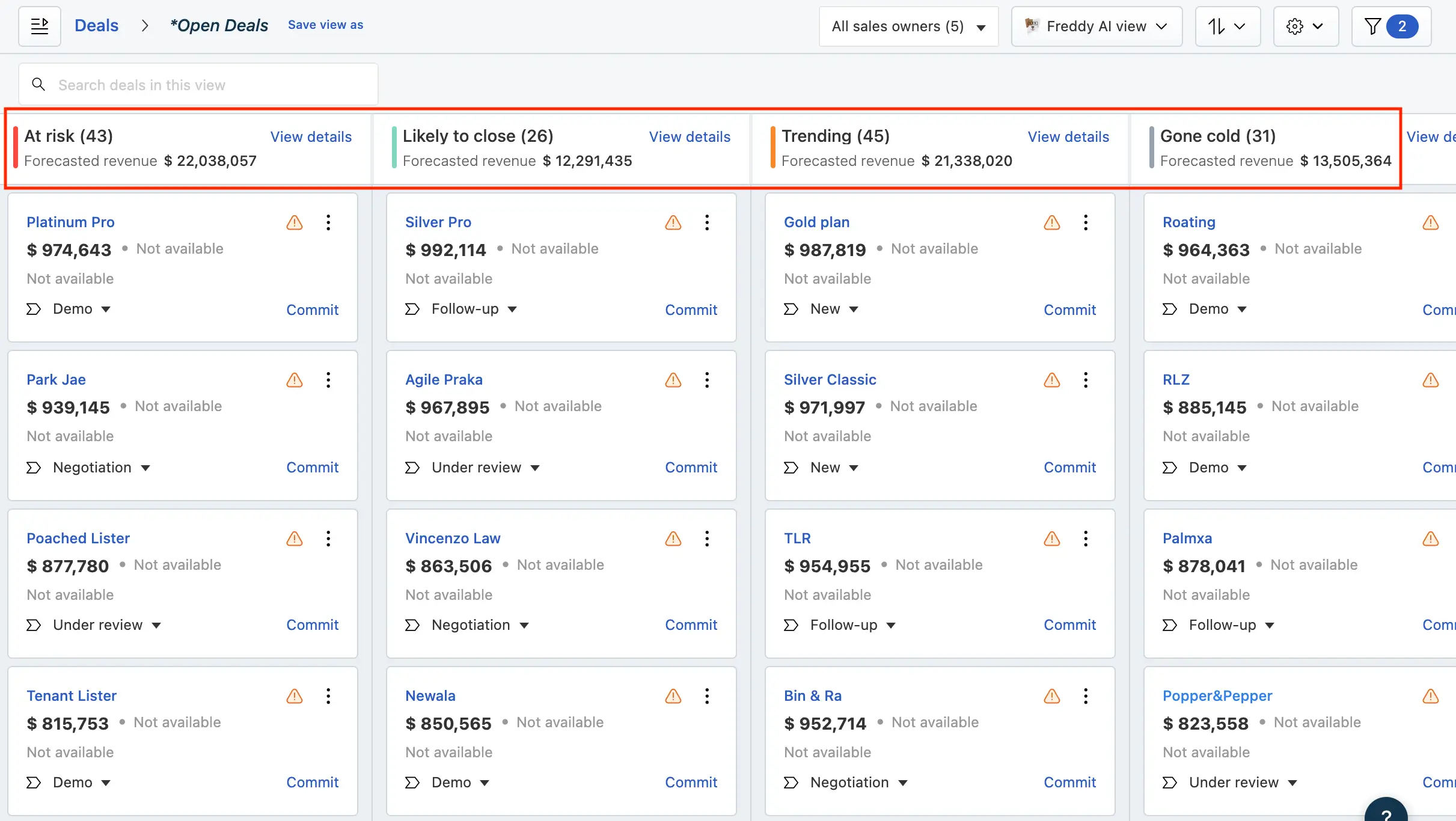
Freshsales, part of the Freshworks suite, is a sales-focused CRM that combines visual pipeline management with email, phone, and AI tools in one platform.
Freddy, Freshdesk’s AI assistant, provides predictive lead scoring, opportunity prioritization, and workflow automation, helping teams focus on the deals most likely to convert. It’s easy to adopt, affordable, and delivers strong core pipeline management without the complexity of enterprise CRMs. Freddy AI is particularly powerful for ticketing and support workflows, extending its AI assistance beyond sales to handle customer requests automatically.
Freshsales pros and cons
Pros
- Intuitive and user-friendly: Quick onboarding for small and mid-sized teams.
- Freddy AI insights: Predictive lead scoring, deal prioritization, and next-best-action suggestions.
- Multichannel automation: Automates emails, calls, tasks, and ticket handling, including refunds, orders, and customer profile updates.
- Pipeline visibility: Drag-and-drop Kanban boards and charts update in real time.
- Robust workflow automation: Triggers based on record actions, dates, score changes, or note updates; supports guided workflows with Blueprint.
- Affordable for SMBs: Competitive pricing with AI features included at entry and mid-level plans.
- Support and ticket AI: Freddy AI can resolve repetitive but complex queries across channels while escalating complex issues with full context.
Cons
- Less enterprise-ready: Fewer customization options than Salesforce or HubSpot.
- AI dependent on data quality: Predictions are only as good as the underlying data.
- Smaller third-party ecosystem: Fewer deep integrations than HubSpot or Salesforce.
- Limited marketing automation: Focused on sales; advanced marketing workflows may require add-ons.
- Smaller support community: Fewer forums and online resources than larger CRMs.
Freshsales best features
- CRM features: Centralizes email, phone, social media, and chat interactions for a 360-degree customer view.
- Workflow automation: Automates repetitive tasks like follow-up emails, lead assignments, and field updates.
- Zia AI Assistant: Predicts sales trends, analyzes email sentiment, detects anomalies, and offers voice-based AI assistant capabilities.
- Ticket and support handling: Resolves common customer requests across channels, from order tracking to profile updates.
- Pipeline Forecasting: AI-driven revenue projections based on historical data.
- Blueprint: A process management tool that guides sales teams through established workflows to ensure compliance.
Pricing
- Free ($0/month): Free for up to 3 users — basic contact, account, opportunity management, Kanban views, built‑in chat, email & phone, email templates, and activity timeline.
- Growth ($9/user/month): Unlimited users — includes everything in Free plus pipeline views, contact lifecycle stages, basic workflows, Slack collaboration, and core sales tools.
- Pro ($39/user/month): Unlimited users — adds Freddy AI contact scoring, sales emails, deal insights, custom sales activities, advanced custom fields, auto‑assignment rules, sequences, multiple pipelines, and advanced workflows.
- Enterprise ($59/user/month): Unlimited users — includes everything in Pro plus field‑level permissions, custom modules, Freddy AI forecasting insights, workflows for custom modules, sandbox, and audit logs.
Which CRM should you choose?
Ultimately, the best AI CRM is one that fits seamlessly into your existing processes, empowers your team to act on insights, and scales as your business grows. But you’ll want predictive analytics, workflow automation, and AI-assisted communication to give your sales team the edge to close more deals.
And with Softr, you get a fully customizable, AI-enabled CRM built around your own data—so your workflows, dashboards, and automations work exactly the way your team needs, giving you actionable insights without compromise.
Frequently asked questions
How does AI improve CRM functionality?
Why use a no-code platform like Softr to. build your CRM?
Can I customize the sales pipeline and deal stages?