.jpeg)
Order management software gives teams a shared view of orders, inventory, and fulfillment. You can route orders based on real availability, coordinate across locations, and handle changes without relying on memory or manual checks. Here's what it actually does, how to evaluate your options, and which tools make sense for growing operations.
Best order management software at a glance
| Tool | Best for | Standout features | Pricing |
|---|---|---|---|
| Softr | Building a custom order management system with an AI Co-Builder | • Custom order tracking system on top of existing business data • Role-based portals for teams, vendors, and clients • Configurable order routing and workflows • Real-time dashboards and automation • No per-seat pricing • AI assistants | Free plan available; paid plans from $19/month |
| Salesforce Order Management | Enterprise teams already using Salesforce | • End-to-end order lifecycle management• Multi-channel order capture • Inventory allocation and routing • Automated fulfillment workflows | Custom pricing |
| Zoho Inventory | SMBs managing inventory-driven order workflows | • Multi-channel order sync • Integrated shipping and packaging tools • Warehouse coordination | Free plan available; paid plans from $29/month |
| Fishbowl | Inventory-heavy and manufacturing-driven workflows | • Inventory-led order coordination • Warehouse picking, packing, shipping • Manufacturing work orders (BOM) | Plans from $229/month; custom pricing available |
| Kibo | Complex multi-location fulfillment operations | • Network-wide inventory visibility • Rules-based order routing • Multi-location fulfillment coordination | Custom pricing |
| Cin7 | Multi-channel product businesses | • Multi-channel order capture • Real-time stock synchronization • Warehouse management tools | Plans from $349/month |
| Deposco | Fast-growing operations needing unified fulfillment execution | • Combined OMS + WMS capabilities • Automated fulfillment routing • Real-time inventory visibility | Custom pricing |
What is order management software?
Order management software (OMS) helps businesses manage the full journey of an order from placement to fulfillment and post-delivery handling. Ideally, this process happens inside one connected system. It’s built for teams handling growing order volume across multiple channels, locations, or workflows who need clarity on what can be fulfilled, from where, and when.
In practice, it works by connecting orders with real-time inventory and fulfillment logic. Instead of tracking fulfillment manually across tools, teams can coordinate inventory, route orders based on availability, and manage delivery decisions as operations evolve.
What to look for in order management software
Here are the order management system evaluation criteria that matter most in practice:
- Unifies orders, inventory, and fulfillment in one system: The right OMS should connect order intake, stock availability, and fulfillment workflows so teams don’t rely on spreadsheets or manual updates to understand what’s happening.
- Eliminates coordination gaps across teams: Sales, warehouse, and operations should work from the same order data instead of passing updates through email or chat.
- Keeps inventory aligned with real activity: Orders, returns, and shipments should update stock levels automatically to prevent overselling or fulfillment delays.
- Brings orders from different channels into one place: Orders from email, the website, sales reps, or partners should appear in the same system automatically. This way, teams don’t have to collect and combine them manually.
- Provides real-time order visibility: Teams should be able to see fulfillment progress without chasing updates or checking multiple systems.
- Supports role-based access: Different teams should be able to act on orders based on their responsibilities without exposing unnecessary data.
- Integrates with existing tools: It should connect with your ERP, CRM, or inventory systems so data stays in sync without forced migrations.
- Handles exceptions without disruption: Changes, delays, or returns should be manageable without breaking fulfillment processes.
- Scales with growing order volume: As complexity increases, the system should support coordination without adding manual overhead.
1. Softr — best for building custom order management system with internal & external access

Most order management systems track orders—but orders don’t exist in a vacuum. Every order affects inventory, fulfillment, vendors, accounting, and customer updates. If your system can’t connect those moving parts, you end up stitching together extra tools just to keep everything aligned.
At its core, a solid order management system needs three things:
- A centralized place to store order data.
- An application (interfaces) for internal teams and external partners to interact with that data securely.
- Automated workflows that keep fulfillment moving and updates synced without manual coordination.
Softr is an AI no-code builder that takes a full-stack approach by letting you build everything in a single, unified system.
With it, you can turn your orders and business data into a flexible, secure order management system—no coding needed. Just describe the system you need, and the AI Co-Builder generates a fully-functional app—with the database and business logic already connected, secure, and ready for real users. Build interfaces your team actually needs: order dashboards, inventory views, and partner portals with role-based access and SSO.
Then layer in workflow automation to move orders, inventory, vendors, and fulfillment records through every stage of your process.
Softr pros and cons
Pros
- Unified operational hub: Manage orders, inventory, approvals, and fulfillment workflows inside one connected system that stores your data, apps, and automations.
- Data flexibility: Build your data in Softr Databases, or sync data in real time from databases and tools your team already uses without migrating everything manually (data from Airtable, SQL databases, Notion, HubSpot, or anything else with Rest API).
- Role-based collaboration: Provide separate access for sales teams, warehouse staff, vendors, or clients.
- External portals for stakeholders: Share order status or fulfillment updates securely with vendors or customers through dedicated portals, reducing email-based coordination.
- AI Co-Builder: Describe the database and app you need in plain language and generate working software that you can then customize.
- Production-ready from day one: Hosting, permissions, and infrastructure are built in for real-world usage.
Cons
- Not an out of the box OMS: Requires configuring your order structure rather than using a predefined system though there are 90+ pre-built templates you can use to start with.
- Advanced planning needed: Complex forecasting or manufacturing logic, like order routing may require custom workflows.
Softr best features
- Structured order intake: Create standardized forms for sales teams, field staff, or partners to submit orders in a consistent format. This reduces clarification back-and-forth and ensures every order includes the data required for fulfillment.
- Real-time inventory visibility: Track stock levels across locations using dashboards connected to your live data. When inventory changes, your system reflects it immediately, helping teams avoid overselling or fulfillment delays.
- Configurable order routing logic: Define how orders are assigned based on your own operational rules — such as location, inventory availability, order type, or responsible team. Routing updates records automatically so teams don’t manually reassign work.
- Centralized status and delivery tracking: Monitor each order from submission to completion with clearly defined stages. Also, view order volume, workload distribution, inventory status, or delays in one place. Managers don’t need separate reports to understand what’s happening across teams.
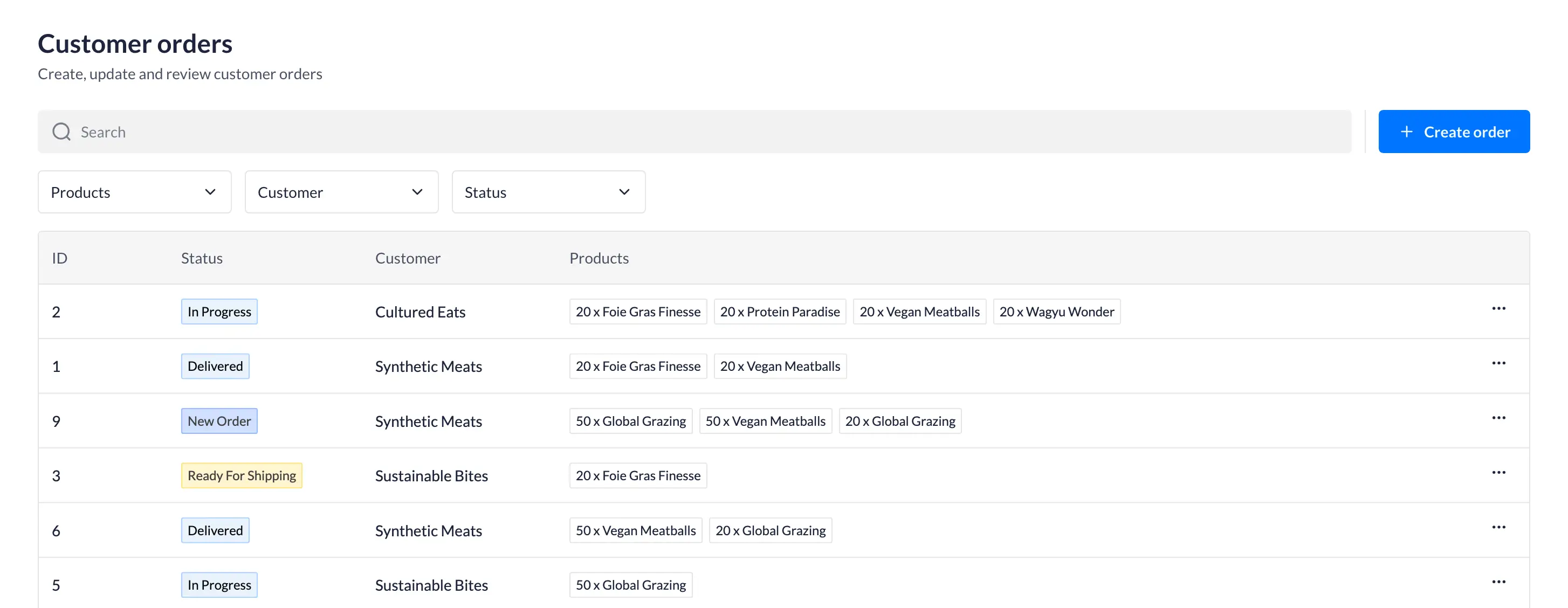
- Role-based access control: Control who can submit, edit, approve, or view orders through setting up user roles. Sales teams, warehouse staff, vendors, and clients can each access only what’s relevant to them.
- Built-in workflow automation: Trigger actions automatically when order status changes—such as sending notifications, assigning approvals, or updating related inventory records. You don’t need to plug in n8n, Make, or Zapier when you need any automation.
- Ask AI: Use natural language to query your app data to quickly find order details. For example, you can ask questions like “Which orders are delayed?” and get info without digging through filters.
- Payment processing integrations: Enable secure payments through integrated options such as Stripe or PayPal.
Softr pricing
Pricing is flat by plan, not per seat, making Softr predictable and cost-effective for growing teams.
- Free plan: Unlimited apps, with access to Softr Workflows and Softr Databases, 5 app users, 5,000 database records, 5 AI credits.
- Basic: $19/month (billed annually), unlimited apps with 42+ integrations, Team: 5 + Client: 5 app users, 50,000 records, 10 AI credits.
- Pro: $99/month (billed annually), unlimited apps with 45+ integrations and custom code, Team: 10 + Client: 50 app users, 500,000 records, 50 AI credits.
- Business: $329/month (billed annually), unlimited apps with 52+ integrations, Team: 30 + Client: 100 app users, 1M records, custom user groups (up to 10), Webhook & API workflows.
- Enterprise: Custom pricing including everything in Business plus custom workflow execution limits & run history, unlimited workflows & steps, SSO (SAML/OpenID), custom billing, dedicated success manager, and team training.
[.blog-callout]
Below is a closer look into how you can start building a custom order management database + an app — all inside Softr:
[.blog-callout]
2. Salesforce Order Management — best for enterprise teams already using Salesforce
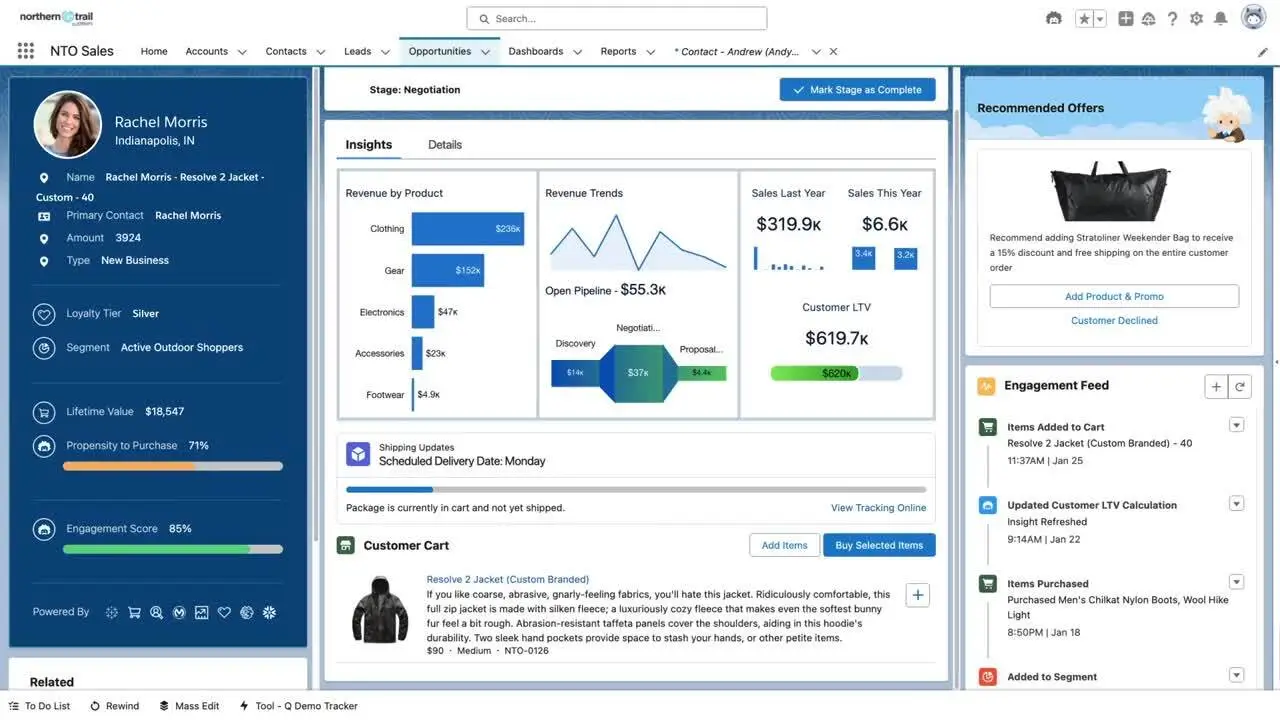
Salesforce Order Management helps businesses manage what happens after a customer places an order—from fulfillment to delivery and post-purchase service. Because it’s built into the Salesforce platform, it connects order data with customer records, inventory availability, and service workflows in one system.
This makes it especially useful for companies already running customer operations inside Salesforce and looking to coordinate fulfillment decisions alongside customer relationships.
Salesforce pros and cons
Pros
- Unified order data: The OMS brings customer details, order information, and fulfillment activity into the same system.
- Real-time visibility: Teams can see order status and fulfillment progress as updates happen, instead of waiting for manual updates from warehouses or service teams.
- Multi-channel coordination: Orders from different sources, such as online storefronts or sales teams, can be managed inside one workflow rather than tracked separately.
- Automated fulfillment workflows: The system can trigger actions like order routing, shipping updates, or billing steps without requiring manual intervention.
Cons
- Ecosystem reliance: Salesforce OMS works best when used alongside other Salesforce products, which may limit flexibility for teams using other systems.
- Implementation effort: Setting it up typically requires configuration and planning to align with existing processes.
- Enterprise complexity: Smaller teams may find the platform heavier than needed for simpler order workflows.
Salesforce Order Management best features
- End-to-end lifecycle management: Salesforce OMS tracks orders from purchase through fulfillment, delivery, and post-purchase activities like returns or replacements.
- Cross-channel order capture: Orders from multiple sales channels can be managed in one place, reducing the need for manual consolidation.
- Inventory allocation: The system helps route orders to fulfillment locations based on availability and operational logic.
- Automated workflows: Repetitive steps such as fulfillment updates or billing actions can be handled automatically.
- Post-purchase support: Teams can manage exchanges, refunds, and service interactions without moving into separate systems.
- Customer service integration: Service teams can access order details directly when supporting customers.
Salesforce Order Management pricing
Salesforce Order Management pricing is typically customized based on your existing Salesforce setup and connected products such as Commerce Cloud or Service Cloud.
3. Zoho Inventory — best for SMBs managing inventory-driven order workflows
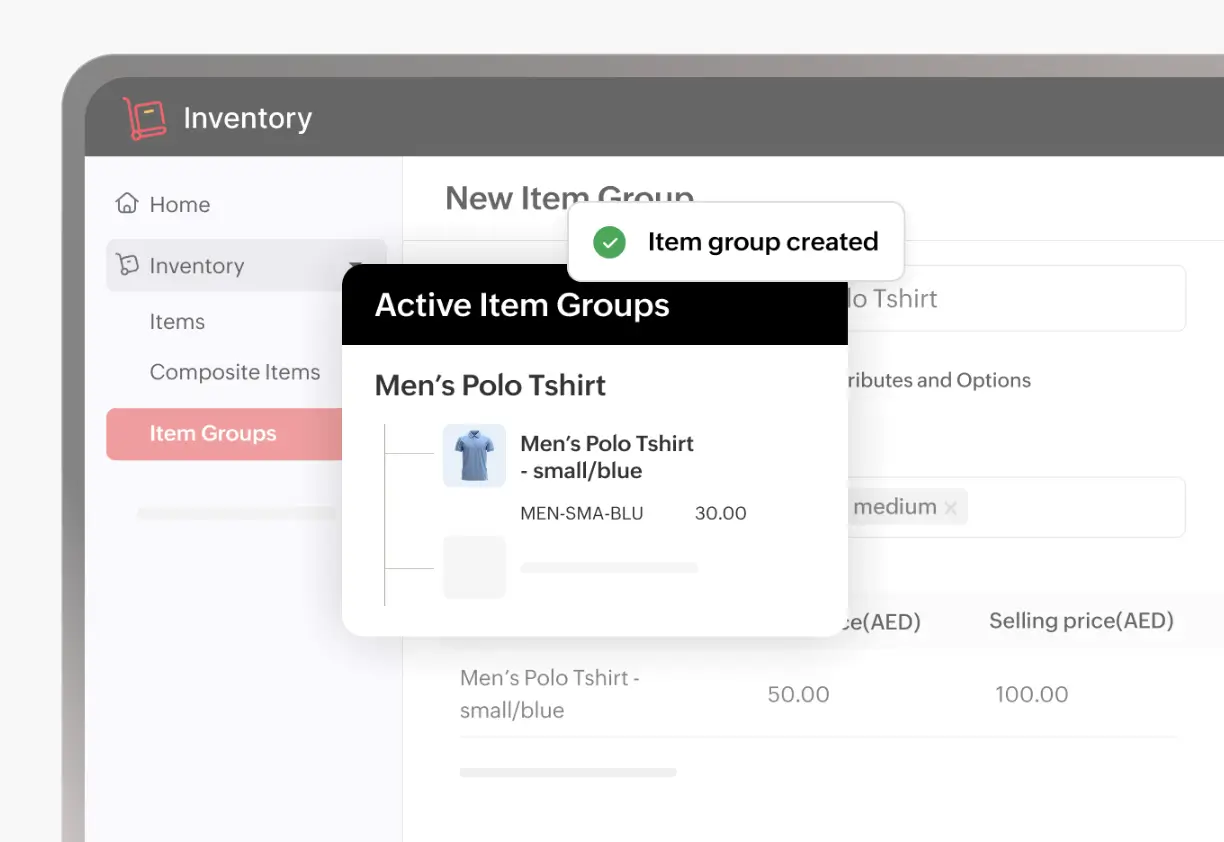
Zoho Inventory is a cloud-based inventory and order management system. It’s built for growing businesses that sell across multiple channels. It helps teams manage sales orders, stock levels, shipping, and fulfillment from one platform.
Rather than acting as a standalone OMS, Zoho Inventory supports order workflows by keeping inventory, purchasing, and fulfillment aligned. This way, teams always know what’s available and what can ship.
This makes it a common choice for businesses that need operational visibility without adopting a full ERP.
Zoho Inventory pros and cons
Pros
- Centralized order tracking: Sales and purchase orders can be managed in one place, reducing the need to move between systems when tracking fulfillment.
- Multi-channel selling support: Orders from platforms like Shopify, Amazon, or marketplaces can be brought into one system instead of tracked separately.
- Real-time stock visibility: Inventory levels update as activity happens, helping teams avoid overselling or fulfillment delays.
- Integrated shipping workflows: Teams can create packages, generate shipping labels, and track deliveries inside the platform.
- Warehouse coordination: Supports tracking and movement of stock across multiple locations.
Cons
- Inventory-led approach: Order orchestration depends heavily on inventory workflows rather than standalone routing logic.
- Advanced logic limitations: Complex fulfillment models may require integrations or additional configuration.
- Scaling complexity: Growing operational needs may push teams toward broader systems over time.
Zoho Inventory best features
- Sales and purchase order management: Handle both inbound and outbound orders in one system, with status updates tied to fulfillment progress.
- Real-time inventory tracking: Monitor stock levels across warehouses to support accurate fulfillment decisions.
- Multi-channel order sync: Sync sales from ecommerce platforms and marketplaces into one operational view.
- Packaging and shipping tools: Generate packing slips, shipping labels, and delivery updates without leaving the system.
- Automation support: Order statuses and fulfillment steps can update automatically based on activity.
Zoho Inventory pricing
Zoho Inventory offers tiered plans with a free forever plan and 14-day free trial for paid tiers.
- Standard — $29/month: core inventory features
- Professional — $79/month: adds batch & serial tracking, vendor portal
- Premium — $129/month: adds automation, barcodes, stock counting
- Enterprise — $249/month: adds Zoho Analytics and multi-currency support
4. Fishbowl — best for inventory-heavy and manufacturing-driven order workflows
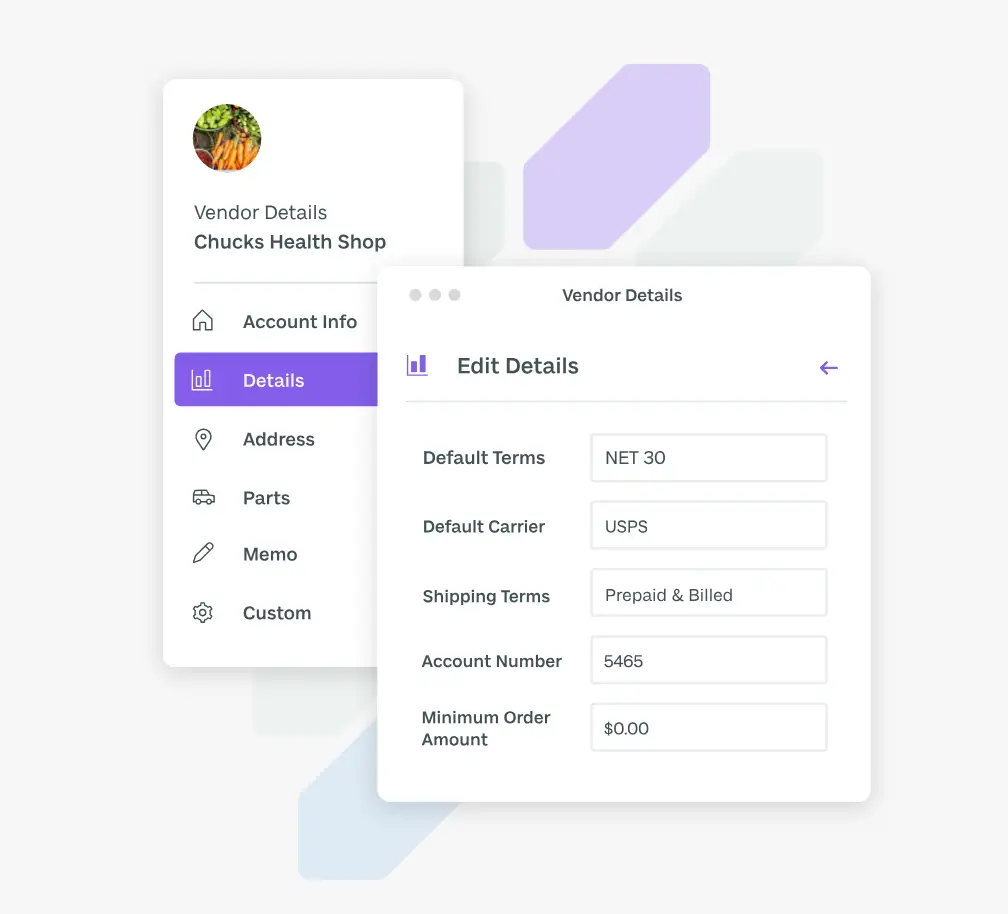
Fishbowl is an inventory-first system that supports order management by keeping stock, purchasing, and fulfillment aligned in one platform. It’s commonly used by manufacturers, distributors, and warehouse-driven teams that need more operational control than basic inventory tools provide.
Fishbowl helps manage orders through real-time inventory tracking, automated purchasing, and warehouse execution workflows like picking, packing, and shipping.
Fishbowl pros and cons
Pros
- Inventory-led coordination: Orders are tied directly to real-time stock levels, helping teams avoid shortages and fulfillment delays.
- Warehouse execution support: Built-in tools help teams manage picking, packing, and shipping from one system.
- Manufacturing alignment: Work orders and bill-of-materials (BOM) automation support production-driven fulfillment.
- Automated purchasing: Reorder points and demand signals can trigger purchase orders automatically.
- Accounting integrations: Connects with tools like QuickBooks or Xero for financial tracking.
Cons
- Inventory-centric model: Order orchestration is tied to stock workflows rather than flexible routing logic.
- Training required: Warehouse and manufacturing capabilities may introduce setup complexity.
- Less suited for enterprise scale: Advanced global fulfillment logic may require broader platforms.
Fishbowl best features
- Sales order management: Track order progress from quoting through shipping in one interface.
- Real-time inventory tracking: Monitor stock levels across locations to support fulfillment decisions.
- Warehouse picking workflows: Use barcode-enabled tools to batch-pick and pack orders.
- Automated reorder points: Generate purchase orders when stock falls below thresholds.
- Manufacturing work orders: Link production tasks directly to order demand.
- Shipping integrations: Connect with carriers to generate labels and fulfill orders faster.
Fishbowl pricing
Fishbowl pricing varies depending on deployment model and required modules, and is typically provided through custom quotes. All plans included here are billed annually.
- Essentials: $229/month
- Growth: $429/month
- Scale: $729/month
- Advanced: Custom pricing
[.blog-callout]
✨ If Fishbowl feels close but not quite right for your workflow, you can explore other options in our detailed review of Fishbowl alternatives →
[.blog-callout]
5. Kibo — best for complex, multi-location fulfillment operations
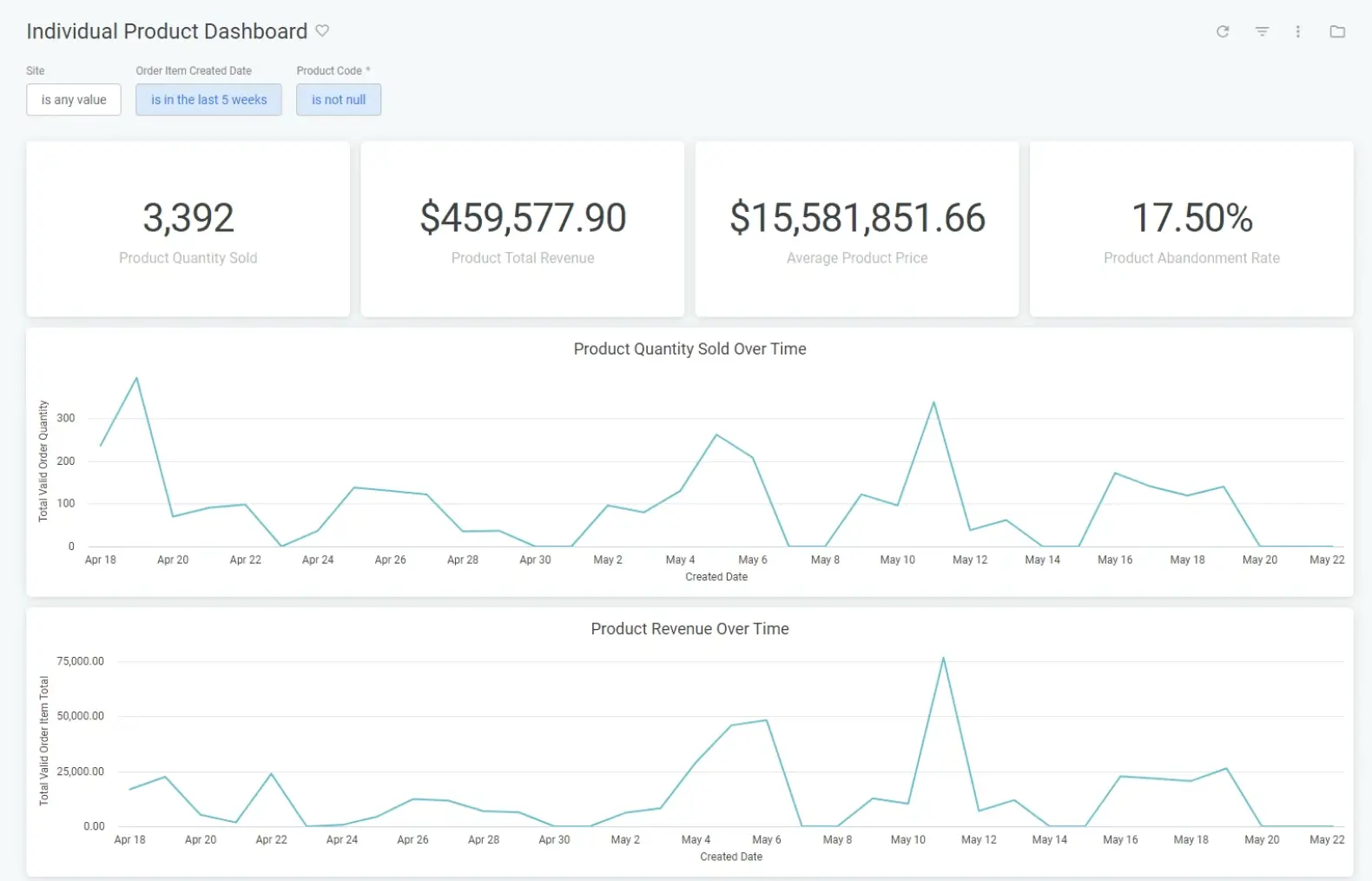
Kibo is a cloud-based order management system built for businesses managing fulfillment across multiple locations, channels, or partners. Instead of simply tracking orders, it focuses on coordinating how orders move through your network — from availability checks to routing and delivery.
It gives teams a centralized, real-time view of inventory across warehouses, stores, and vendor locations, helping them decide where and how to fulfill each order efficiently. This makes it relevant for companies running distributed operations where orders may be fulfilled from different nodes depending on stock levels, delivery timelines, or cost considerations.
Kibo pros and cons
Pros
- Real-time inventory visibility: Kibo provides a live view of stock across fulfillment locations, helping teams make accurate shipping decisions and avoid overselling.
- Intelligent order routing: Orders can be automatically directed to the best fulfillment location based on availability, speed, or cost.
- Multi-location coordination: The system supports fulfillment from stores, distribution centers, or suppliers within the same workflow.
- Lifecycle management: Teams can manage returns, replacements, and customer service actions without switching systems.
Cons
- Enterprise orientation: Kibo is designed for high-volume or distributed environments and may exceed the needs of simpler operations.
- Configuration effort: Routing logic and fulfillment rules typically require setup and planning.
- Process dependence: Outcomes rely on clearly defined fulfillment workflows across locations.
Kibo best features
- Network-wide inventory view: Aggregates stock availability across warehouses, stores, and vendor networks in real time.
- Rules-based order routing: Automatically assigns fulfillment locations using configurable decision logic.
- Estimated delivery commitments: Displays delivery timelines before purchase based on available inventory.
- Multi-channel order handling: Processes orders from multiple sales channels through one system.
- Returns and exception workflows: Enables customer service teams to handle adjustments or returns within the same interface.
- Performance analytics: Tracks fulfillment efficiency and operational metrics across the order lifecycle.
Kibo pricing
Kibo pricing is typically customized based on deployment scope and operational requirements.
6. Cin7 — best for multi-channel product businesses managing inventory and fulfillment
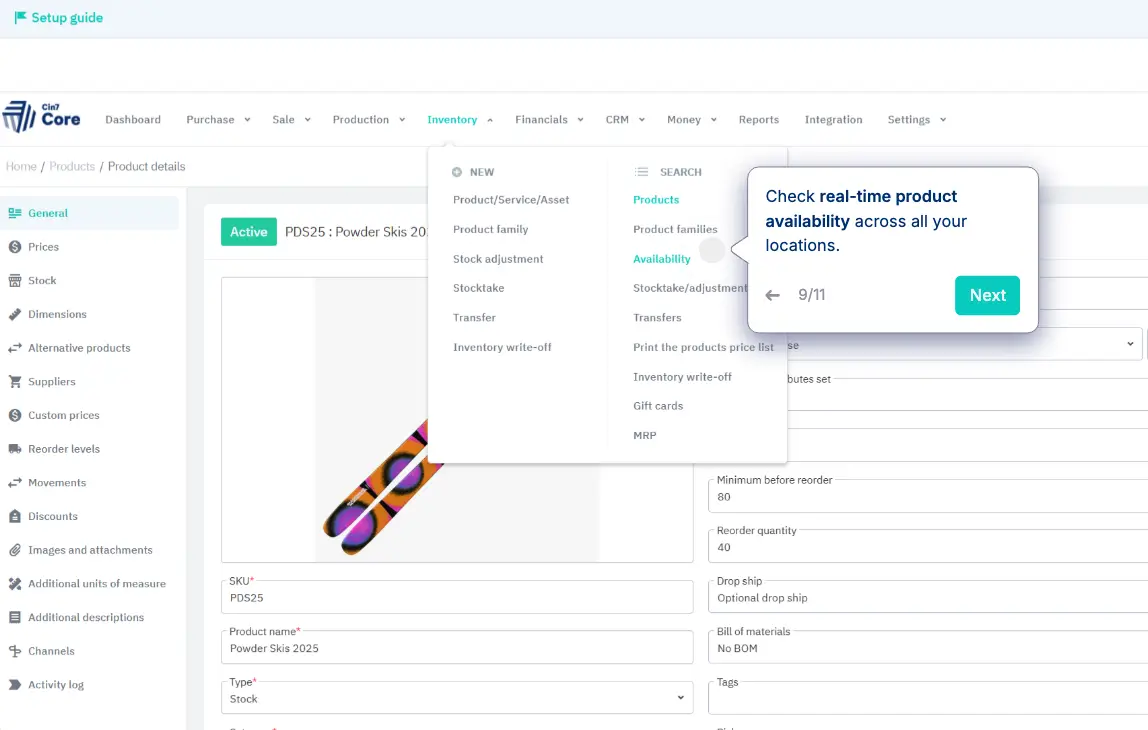
Cin7 is a cloud-based platform that combines inventory management and order workflows in one system. It’s designed for growing product-based businesses that sell across multiple channels and need to keep purchasing, stock, sales, and fulfillment aligned as operations scale.
Cin7 supports order operations by connecting inventory data with sales channels and warehouse activity. This gives teams a real-time view of what’s available and helps ensure orders can be fulfilled without delays or stock conflicts. This makes it relevant for retailers, wholesalers, and distributors managing both online and offline sales.
Cin7 pros and cons
Pros
- Multi-channel order capture: Cin7 integrates with ecommerce platforms and marketplaces so orders can be managed in one system instead of tracked separately.
- Real-time inventory updates: Inventory levels sync automatically across sales channels, reducing the risk of overselling or delays.
- Warehouse coordination: Built-in warehouse tools support picking, packing, and fulfillment workflows from within the same platform.
- Connected operations: Purchasing, sales, storage, and fulfillment are managed together, helping teams avoid manual reconciliation.
- Automation support: Replenishment and fulfillment processes can be automated to reduce manual work.
Cons
- Inventory-led structure: Order management depends on inventory workflows rather than flexible routing logic.
- Operational setup needed: Aligning purchasing, warehouse, and sales processes requires planning.
- Scaling complexity: As fulfillment logic becomes more distributed, additional tools may be needed.
Cin7 best features
- Multi-channel order management: Capture and manage orders from ecommerce platforms and marketplaces in one place.
- Real-time stock synchronization: Inventory updates instantly across channels as sales or returns occur.
- Warehouse management tools: Barcode scanning and automation support picking and packing workflows.
- Automated replenishment: The system can trigger purchase orders when stock falls below set levels.
- Reporting and analytics: Provides insights into inventory performance and fulfillment activity.
Cin7 pricing
Cin7 offers tiered pricing based on features and integrations, typically starting from a monthly subscription model.
- Standard: $349/month
- Pro: $599/month
- Advanced: $999/month
- Omni: Custom pricing
7. Deposco — best for fast-growing operations needing unified fulfillment execution
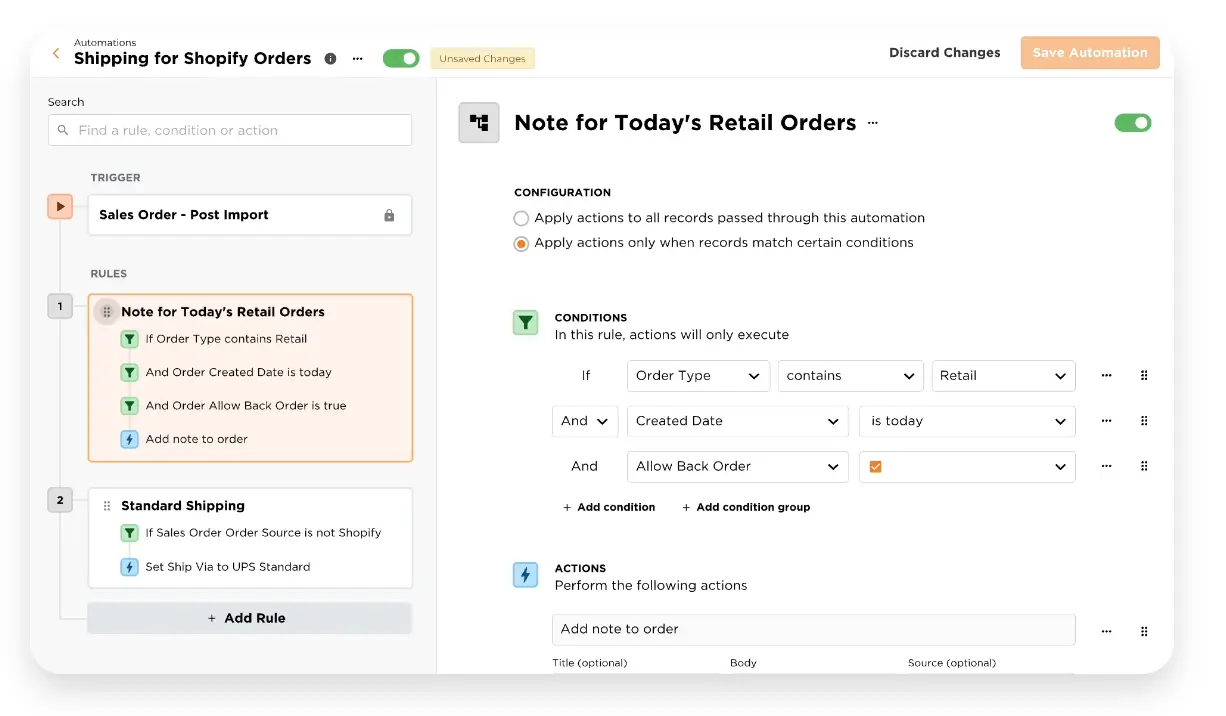
Deposco is a cloud-based platform that combines order management, warehouse management, and fulfillment execution into one system. It brings order coordination and warehouse activity together so teams can manage inventory, routing, and delivery decisions from a shared operational view. It also helps coordinate how orders are fulfilled, from allocating inventory to selecting shipping options, using automation and real-time visibility.
This makes it especially useful for retailers, ecommerce brands, and 3PL providers that need to fulfill orders across multiple channels and locations without relying on disconnected tools.
Deposco pros and cons
Pros
- Unified OMS + WMS: Deposco connects order processing with warehouse execution, helping teams avoid gaps between planning and fulfillment.
- Real-time inventory visibility: Teams can see what inventory is available across locations and channels as activity happens.
- Automated order routing: Orders can be assigned to the most efficient fulfillment location based on availability or delivery timelines.
- Multi-channel fulfillment: Supports order processing from ecommerce platforms and marketplaces within one workflow.
- Returns and exception handling: Built-in workflows help manage returns and adjustments without manual coordination.
Cons
- Operational scope: The platform is designed for supply chain execution, which may exceed the needs of simpler teams.
- Configuration required: Routing and automation logic typically require setup aligned with fulfillment processes.
- Cost considerations: Some users note pricing may be better suited to scaling operations.
Deposco best features
- Real-time inventory tracking: Monitor stock levels across multiple locations to support fulfillment decisions.
- Order lifecycle management: Track orders from intake through fulfillment and delivery.
- Automated fulfillment rules: Use configurable logic to assign orders to optimal fulfillment sources.
- Multi-channel order processing: Manage orders from different sales channels in one system.
- Advanced shipping support: Select carriers and delivery methods based on operational needs.
- Returns workflows: Handle returns and substitutions through automated processes.
Deposco pricing
Deposco pricing is typically customized based on deployment scope and fulfillment complexity.
Find the order management software that fits your needs
Growing order volume doesn’t just test your sales capacity. It also tests how well your operations stay coordinated under pressure. The right order management software gives teams a shared view of what can be fulfilled, from where, and when, so decisions don’t depend on memory, manual checks, or disconnected tools.
Each platform on this list approaches that challenge differently. Some focus on inventory accuracy. Others specialize in routing across multiple locations or channels. Enterprise tools emphasize orchestration at scale, while simpler systems prioritize ease of adoption.
If you want a system that adapts as your workflows evolve, and not one you have to rebuild every time operations change, then Softr offers a flexible starting point. You can centralize order data, create role-based interfaces and views for each team, automate handoffs, and extend the system into vendor or customer portals when coordination expands beyond internal teams.
Start with a free Order Management template to build a system around how your operations actually run today, and adjust it as complexity grows.