Transcript
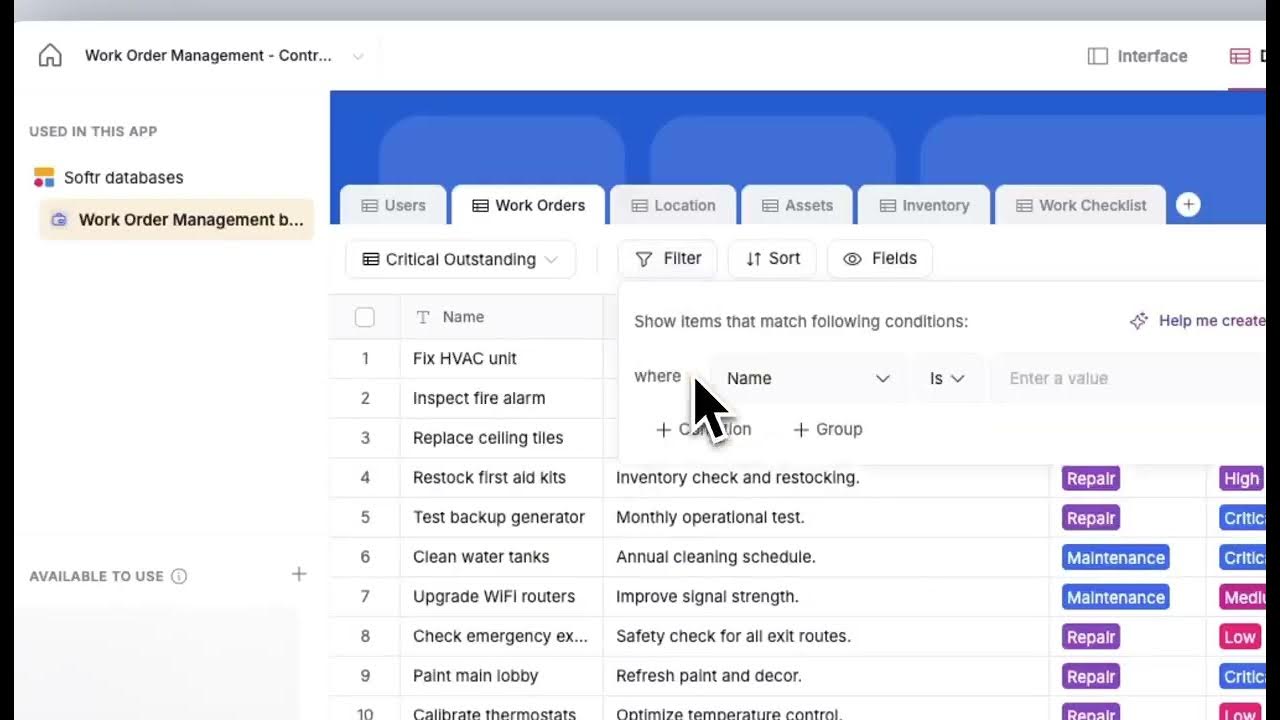
We have introduced a powerful feature set for Softr Databases that focuses on smart filters and custom views. This update is designed to help you organize and access your data more efficiently without leaving your workspace.
By using these tools, you can now create specific segments of your data based on various conditions. This makes it easier to manage large datasets while ensuring that you only see the information relevant to your current task.
[.blog-callout]
Note from Softr: While setting up these custom views manually is a great way to learn your data structure, you can also use the AI co-builder to automatically generate these views and database schemas just by describing what you need.
[.blog-callout]
Within Softr Databases, you can easily toggle between different views to change how your information is presented. This includes filtering by date, status, or any other primary field you have configured in your table.
Custom views also allow you to save your filtered perspectives so you do not have to recreate them every time you log in. This is especially useful for team collaboration where different members need to see different subsets of data.
[.blog-callout]
Note from Softr: If you find that the native filtering options don't meet a highly specific custom design requirement, you can use the Vibe-Coding block to prompt for a custom data visualization or custom filter interface that connects directly to your Softr Databases.
[.blog-callout]
These updates are a step forward in making Softr Databases a central hub for your business operations. It reduces the friction of moving between tabs and keeps your workflow streamlined and focused.
We are excited to see how you implement these smart filters in your own applications to improve data visibility for your users. Whether you are building an internal tool or a client portal, these features enhance the overall user experience.
![How to Build Custom Client Portals with Softr & Monday.com (No Code) [2026 Guide]](https://cdn.prod.website-files.com/67a3700c65457964cf349cd4/6a8f04a8cc901114e2c8e26b_efe0cb3b-44b7-47a6-9c1e-33bf66a8c762.jpeg)