



Vibe coding is changing how teams build software. Instead of typing code, you describe what you need, and AI turns it into working features or (with some extra legwork) full apps. It’s fast, flexible, and can help small and mid-sized businesses move projects forward without waiting on technical backlogs.
But building through AI alone comes with trade-offs, like unclear logic, hidden errors, or security gaps if there’s no structure behind it. That’s where vibe coding best practices make a big difference.
In this guide, you’ll learn 9 simple ways to make vibe coding actually work for your team. That includes how to write clearer prompts, test what the AI builds, and know when it’s better to use an AI no-code app builder like Softr instead.
3 ways teams use vibe coding today + pros and cons
Teams across industries vibe code to build prototypes, automate small tasks, or fill gaps in code when developer time is limited. It’s fast, but it’s also easy to overreach, especially when the AI’s code isn’t reviewed or documented properly.
| Use case | Scenario | Upside | Downside | Next step |
|---|---|---|---|---|
| 1. Agencies prototyping dashboards | Agencies use AI prompts to build client dashboards pulling from Google Sheets, Airtable, Supabase, etc. | Fast visual mockups; less developer dependency | Generated code often breaks when requirements change, due to unstable data models | Treat as first drafts; rebuild production versions in no-code tools |
| 2. Developers automating routine work | Small field-service/manufacturing teams generate CRUD scaffolds or unit tests via vibe coding | Cuts setup time by 50%+; great for repetitive code | Higher risk of security flaws and missing validation if reviews are skipped | Combine AI generation with human code reviews and automated testing |
| 3. Non-technical teams building internal tools | Ops/marketing managers create trackers, dashboards, or vendor tools when IT support is limited | Describe what you need; AI builds it in minutes | Tools break when workflows evolve without clear data structure or documentation | Use tools like Softr to convert AI ideas into stable, permission-based apps with real databases |
9 vibe coding best practices every modern builder should know
Vibe coding works best when you treat AI as a collaborator, not a magic box that outputs finished projects after one prompt. The best results come from structure, avoiding shortcuts, and understanding the limitations of pure vibe coding platforms. Here’s how to get the most out of it.
1. Define intent clearly with a PRD
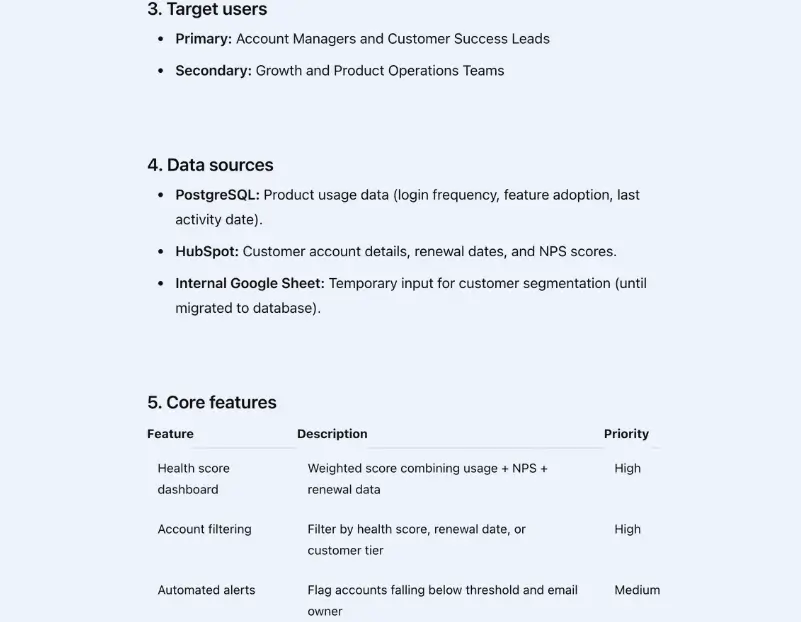
Before prompting, build a short Product Requirements Document (PRD), even if it’s just a one-page outline in Notion or Google Docs.
This is simply about clarity. You’re helping the AI (and your team) understand what you’re trying to build. A PRD should cover three basics:
- What you’re building: e.g., A client portal for property managers to track maintenance requests
- Who it’s for: e.g., Internal team leads and external vendors
- How it works: e.g., Data from Google Sheets or Airtable updates live in the portal, with role-based access
You can even create the first version inside an AI tool like ChatGPT; just ask it to “draft a simple PRD” for your use case, then edit for accuracy.
This small step will save time and credits later when you move into actual vibe coding. Once you know the what and why, the AI can handle the how far more effectively.
2. Wireframe or outline before you build
Before you start prompting, sketch what you want to see. A quick wireframe or workflow map helps you (and the AI) understand how everything connects (e.g., what interfaces exist, what each one does, and how users move between them).
You don’t need fancy design skills to do this. Use tools your team already knows, such as Figma, Whimsical, or Miro. Also, the best vibe-coding tools let you import screenshots or image mockups directly, so the AI can interpret layouts more accurately and generate code or UI logic that actually matches your intent. Here are some things you'll likely want to show:
- The key screens (dashboard, form, client list, reports)
- The main user actions (add, edit, view, approve)
- How data flows between them
That visual clarity prevents the AI from guessing layouts or missing user paths down the line. It’s also how experienced operators keep projects aligned with real business needs, especially when developers aren’t in the loop yet.
3. Define & structure your data and user roles before you build
Before you start generating code, set up the foundation that keeps everything organized. It’s tempting to jump straight into prompting, but without structure, your project will become messy fast, especially once multiple people start editing or testing AI outputs.
Start with three essentials:
- Version control: Many vibe coding tools (like GitHub, Replit, or Cursor) have built-in history to save checkpoints. Every major AI-generated change should be tracked. That way, if a new prompt breaks something, you can roll back instantly. Softr's Vibe Coding block also has this feature.
- Project rules: Define how files are named, organized, and reviewed. Even small teams benefit from lightweight conventions like feature branches or “commit after review.” For quick mockups or UI tests, you can skip heavy naming systems: just keep the app structure simple enough to share screenshots or a live preview URL with your team.
- Data setup: If your app connects to structured data (like Softr Databases, Airtable, or Supabase) establish that first. Tell the AI exactly how your data looks before it writes logic around it. If you don’t have real data yet, plan where it will live and how it’ll be stored later. If you forget to give clear instructions about the way you want the data to be managed, most vibe-coding tools will build a version of your app where the displayed data is actually hard-coded in the front-end, which gives the impression that the app is functional when it really isn't.

These small steps make vibe coding more predictable and decrease the risks of getting the “AI spaghetti” effect (lots of working parts, none connected cleanly). You can think of this stage as building the scaffolding before the walls. With the structure in place, the AI can work safely inside it, and your team won’t spend hours untangling dependencies later.
[.blog-callout]
💡 For teams that prefer to skip manual setup of the versions, rules, and database, Softr's AI Co-Builder can handle this structure automatically. It starts with native Softr Databases for full relational control, and also connects to 21+ external data sources (Airtable, Google Sheets, HubSpot, and more), manages permissions, and handles logic out of the box, so your team can focus on the app building itself, not the plumbing behind it.
[.blog-callout]
{{cta-1}}
4. Prompt with full context and break the build into steps
AI tools are only as good as the context you give them. Many errors in vibe coding come from trying to make the AI build too much, too soon, and with little direction.
Instead of one big prompt, like “Build a project management app,” break it down into smaller, goal-driven steps:
- “Set up the project database with fields for client, status, and deadline.”
- “Now create a dashboard view that filters by status.”
Each step helps the AI understand the structure before it moves on. By prompting step by step, you avoid tangled code and wasted AI credits.
[.blog-callout]
⚠️ Be careful when you start adding advanced features. AI tools don’t automatically rebuild the foundation: they stack new logic on top of what’s already there. That can lead to hidden issues if your app’s structure needs to evolve.
For example, you might ask the AI to build a simple CRM with tables for users, contacts, and deals. Later, you expand it into a SaaS-like setup where each customer has to configure their own CRM structure and permissions. Unless you revisit the data model first, the AI will try to rush new logic onto the old schema, creating inefficient or broken code.
[.blog-callout]
Before asking for bigger features, pause to check if your base still makes sense, especially your data relationships and user roles. Sometimes, starting a fresh generation from the updated structure saves hours of debugging later.
💡 Pro tip: Many teams use Notion or Google Docs to track their prompt history, treating it like living documentation. It’s simple, but it keeps everyone aligned as the build evolves.
5. Review and test before accepting changes
AI can generate code that looks flawless, but without review, hidden issues often slip through. Testing every change is what turns vibe coding from a quick experiment into a reliable workflow.
After each generation cycle, take a beat to validate what the AI produced:
- Run functional tests: Make sure every feature does what the prompt described.
- Check for structural issues: Review variable naming, data flow, and how functions depend on each other.
- Inspect for security gaps: Inspecting is always a great idea, especially with vibe coding.
[.blog-callout]
⚠️ Be aware of regression risk. In AI-generated workflows, adding new features or changing prompts can unintentionally break parts of your app that were working fine. Research shows that iterating on AI-generated code without a reset or re-check can increase security vulnerabilities and technical debt.
Before asking the AI to build advanced features, pause and ensure the foundation (data model, permissions, core logic) still fits your evolving scope.
[.blog-callout]
Even small automation scripts can introduce security risks if you deploy them blindly. Reviewing each output, ideally with another pair of eyes, keeps your system stable and your data safe.
For smaller teams, a simple review loop is usually enough:
- Generate and test locally.
- Review logic with a teammate.
- Deploy to a staging environment before rolling it out to users.
A few minutes of testing upfront can save you a major headache down the line, and it builds the confidence that every AI-generated piece of your workflow actually works as intended.
6. Document your prompts and decisions
When you use AI to build, every result depends on the prompt that came before it. Without vibe coding documentation best practices, you lose track of what worked, what changed, and why certain choices were made. (This becomes an issue if you want to pass the build off to another person or team down the line.)
You don’t need a complex system. Start with something simple:
- Keep a prompt log: a running record of what you asked and how the AI responded.
- Note key decisions: why you changed a data model, updated a flow, or rejected an output.
- Add context for the next person: if someone joins the project, they’ll understand the reasoning, not just the code.
Even a shared doc or spreadsheet can do the job. The point isn’t to create paperwork, but to keep continuity. When you revisit the build later, you’ll know which prompts produced reliable results and which ones to avoid repeating.
Teams that document as they go tend to move faster over time, since they don’t have to start from scratch or “reverse engineer” their own builds months later.
7. Build with security and secrets in mind
Even solid AI-generated code can hide subtle security risks. Before you trust what a model outputs, scan for these red flags:
| Sign or risk | Why it matters | How to fix it |
|---|---|---|
| Unverified or auto-imported packages | AI tools sometimes add libraries you didn’t request. These can contain outdated or vulnerable dependencies. | Review every import, pin versions, and run a quick vulnerability scan before deploying. |
| Inconsistent error handling | Generated code might expose stack traces or sensitive details to users. | Standardize errors and log securely instead of returning raw messages. |
| Unexpected API calls | Models may hallucinate endpoints or send data to unknown domains. | Check every external call and restrict unverified ones in testing. |
| Overly broad access scopes | AI can generate logic that grants admin-level permissions by default. | Narrow access scopes and audit tokens or roles in connected apps. |
| No audit or review trail | Without knowing who generated or approved the code, accountability drops. | Keep a simple record of AI-generated changes and peer reviews. |
I'm not saying that vibe coding is unsafe, however. This just means you need a few guardrails in place:
- Never share credentials or tokens in prompts. Treat AI tools like public channels. Anything you paste could be stored or logged.
- Use environment variables for sensitive data, not hard-coded keys.
- Ask for secure defaults. A simple “use parameterized queries and validate all inputs” goes a long way.
- Review generated authentication or role logic. AI may create user permissions that look right but don’t actually protect data.
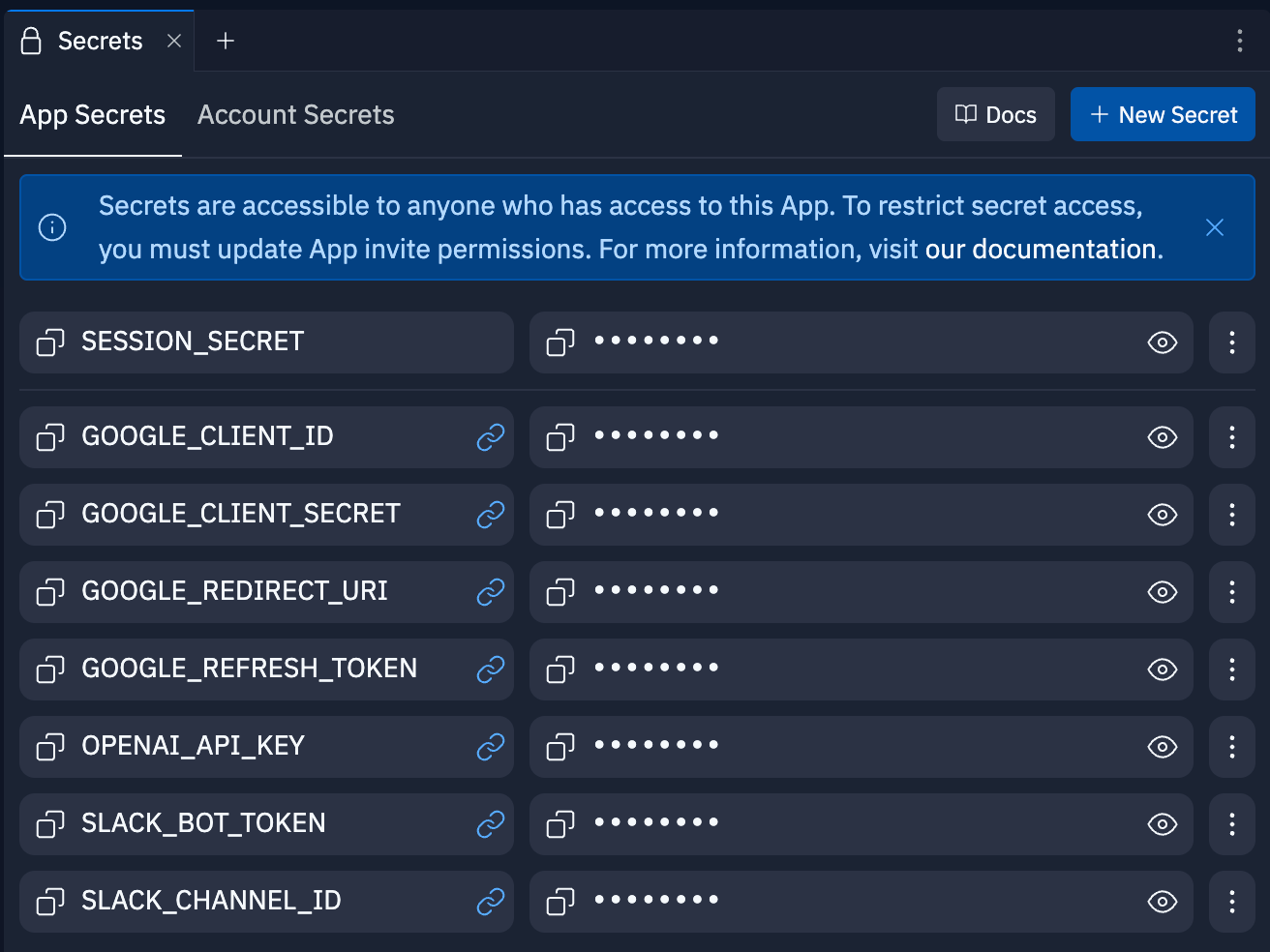
Security should be a consideration from the very beginning, rather than a final check before launch. If you're choosing tools for a whole team, our guide to enterprise vibe coding tools compares them on SSO, permissions, and audit logs.
8. Don't confuse a slick prototype for a production-ready app
While this is related to the last practice, it's worth emphasizing that just because a vibe-coded app looks pretty, that doesn't mean it's ready to share with real business users. At this point, every vibe coding tool can generate a convincing, sleek-looking prototype. But there's a world of difference between vibe coding a landing page or mini-app that doesn't store any data, and trying to vibe code something like a CRM or client portal.
Just last month, a permissions error in Lovable let any user access the source code and data of other users' projects. Although they did resolve the issue, that security risk was potentially exposing user data from February 3 to April 20.
Even the most professional looking vibe-coded tool can have security vulnerabilities in the underlying code. For non-developers using vibe coding platforms, the risk is even higher, since they might not have the know-how to spot issues or bugs in AI outputs.
All this is to say: don't trust something an AI generates just because it looks pretty.
9. Know when to scale into a structured platform
Vibe coding is great for speed, but not everything should stay inside an AI-generated codebase. Once your workflow starts growing (more users, more data, more moving parts), managing versioning, security, and updates becomes harder than expected.
That’s the point where teams usually shift from experimentation to stability. The AI helped you get a proof of concept fast; now you need something predictable enough to run day to day.
If your app or internal tool needs:
- Secure logins and role-based permissions
- Reliable data syncing between sources
- Built-in automation or approvals
- Controlled access for clients or partners
…then it’s time to move into a structured, no-code platform.
With Softr, you aren't forced to choose between moving fast and building something that actually works. What vibe coding tools promise—working software in minutes—Softr delivers without the fragility of pure vibe coding. You get the speed of AI generation with real logins, permissions, user management, and hosting built into your apps from day one.
Rather than abandon AI, Softr is all about giving your ideas a place to scale safely.
Building with Softr: From vibe coding to fully-functional, secure business apps
Vibe coding helps you move fast, until it doesn’t.
As soon as your AI-built prototype needs real users, approvals, or data connections, the quick wins start slowing you down. Fixing prompts turns into fixing code. Collaboration gets messy. That’s when teams realize they need a structure that still moves at their pace.
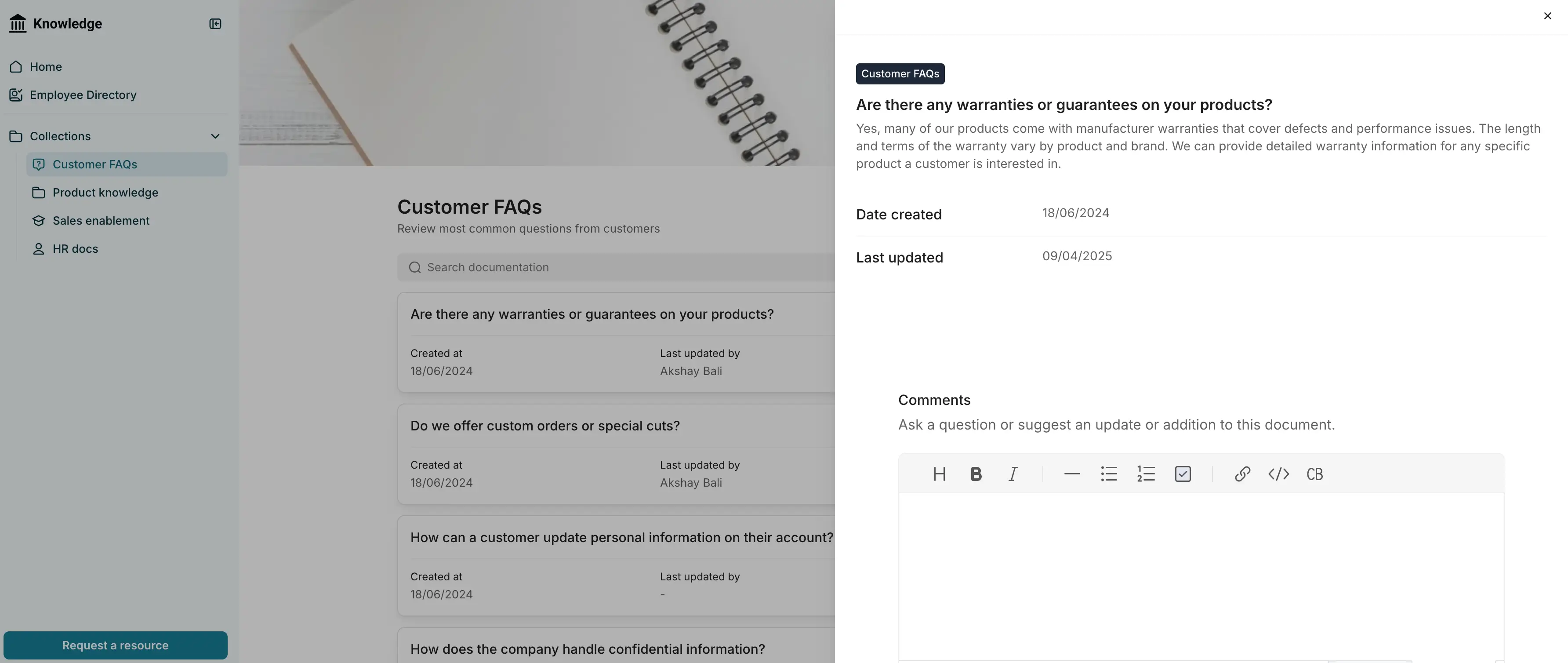
Softr gives you the freedom to build quickly without the fragility of a generated codebase. It’s an AI-native platform for turning concepts into production-ready business apps: no coding or infrastructure management required. Put simply, Softr provides structure without slowing you down.
1. Built-in databases and native integrations
Prototypes work until your data outgrows them. Softr Databases keep everything structured and synced: no lost records, no manual copy-paste.
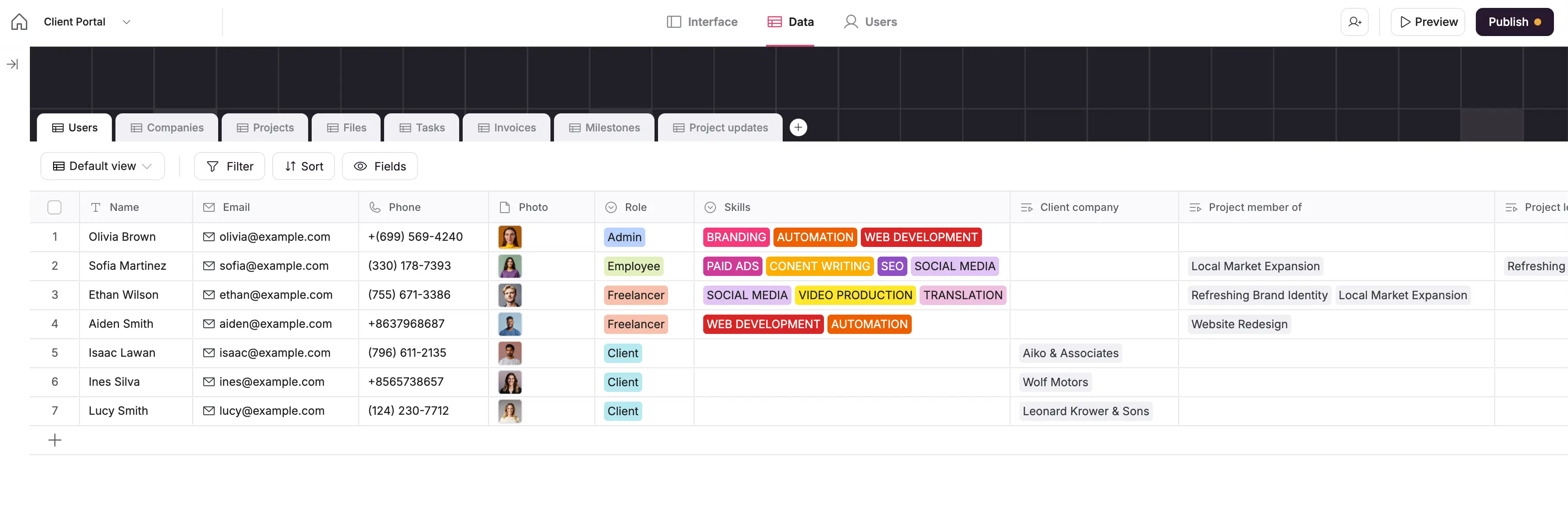
Softr Databases give you relational data control with formulas, filters, and linked records, so your workflows stay structured as they grow.
You can also connect to 21+ native data sources—from your existing data on Airtable to HubSpot and Notion—with two-way, real-time sync. That means your data stays connected, up-to-date, and ready to power your apps without manual upkeep.
2. Granular permissions and secure access
As your prototype turns into a live system, security becomes critical. After all, you don’t wanna expose sensitive client data to just anyone. Softr offers role-based access controls, global data restrictions, user authentication, and visibility settings for every block, page, or dataset.
That means you can easily build client-facing dashboards, partner portals, or internal tools that share data responsibly, making Softr ideal for businessess managing sensitive project, client, or vendor data.
3. Visual builder for structured app design
Ditch AI-generated UIs that break when you tweak a field. Softr’s drag-and-drop builder lets you design clean, modular interfaces, such as Lists, Grids, Forms, Charts, and Tables, linked directly to your data.
This gives non-technical teams full control over how apps look and behave, without touching code or design systems.
4. AI-powered app-building
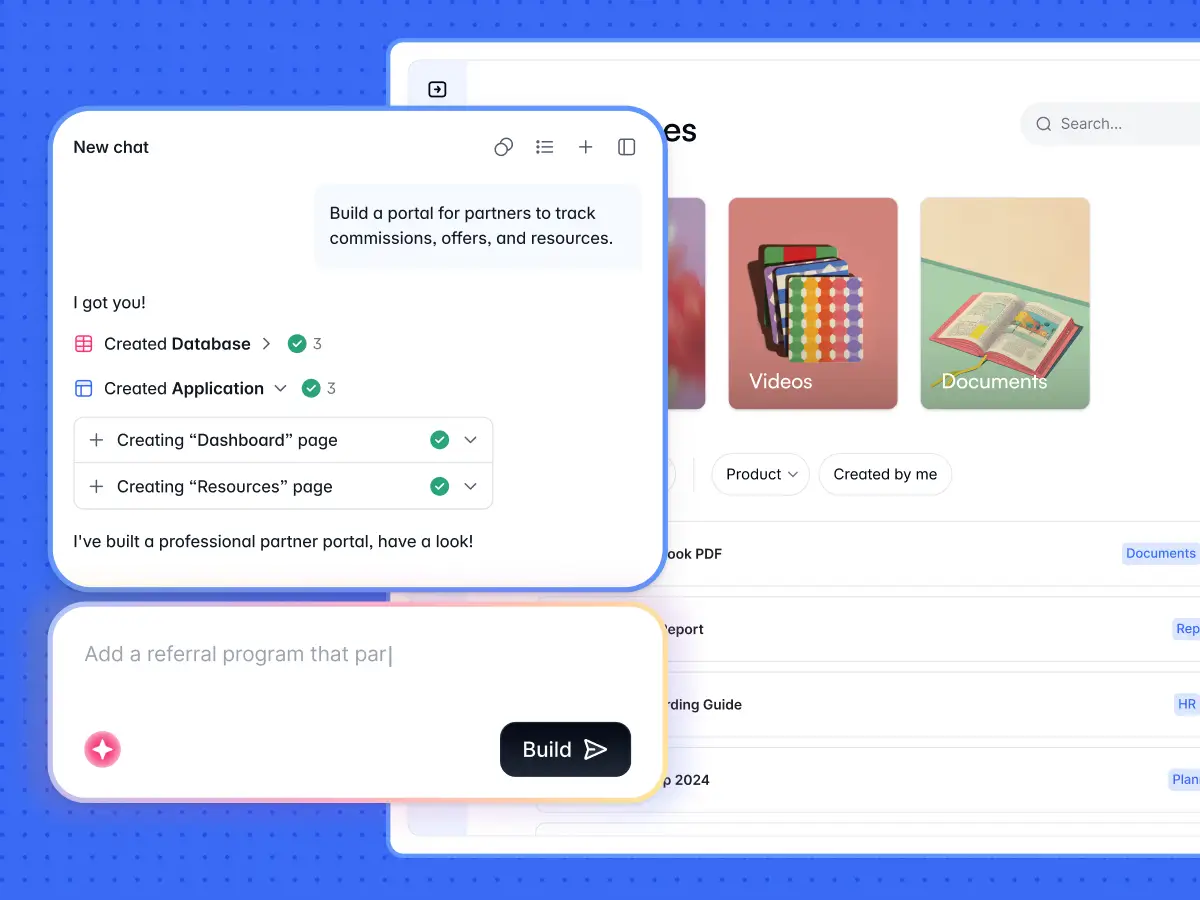
Softr helps builders move from “prompt-driven” to “AI-assisted” creation. It brings AI to every stage of building and using your app: from how data is managed to how end users interact with it.
AI for the app builders
- AI Co-Builder: Describe what you need, and Softr’s AI app builder instantly creates the database, app, and business logic — already connected, secure, and ready for real users.
- Vibe Coding block: The Vibe Coding block lets you describe what you want and drop in dynamic, AI-generated UI components—built from plain-language prompts using React, CSS, and JS—directly inside a structured, secure environment.
- Database AI Agents: Automate repetitive data entry, enrichment, and updates in real time. Agents can draft emails, tag records, or refresh product info, keeping your data clean without manual work. They help teams structure databases, define relationships, and write formulas faster, so you can focus on building workflows, not fixing data.
- AI Workflows: Add AI-powered steps inside your automation flows. Use it to generate summaries, write updates, or send reports: all inside Softr Workflows, with the same triggers, conditions, and permissions you already use.
- Softr MCP: Connect your favorite AI assistant (like Claude or Cursor) to build apps, edit databases, and configure workflows directly from your chat prompt.
AI for the end user
- Ask AI: Give teammates or clients instant, permission-based answers from your existing data. Users can type natural questions like “Which projects are overdue?” and get results directly from your Softr app.
5. Ready-made templates to speed up transition
When building with Softr, you don’t have to start from scratch. Softr offers over 100 customizable app templates: from CRMs and project trackers to vendor portals and dashboards.
Pick one, plug in your data, and start customizing immediately.
6. Predictable, transparent pricing
Unlike most AI vibe-coding tools, Softr’s flat-tier pricing scales linearly with your usage.
You’ll always know what you’re paying, no matter how many records, users, or automations you add. That’s ideal for growing teams that need reliability and cost transparency as they scale.
Here’s what Softr’s pricing looks like:
- Free ($0/month): Unlimited published apps, with access to Softr Workflows, Softr Databases, Softr MCP, 5 app users, and 5,000 Softr Database records. Good for testing or simple internal projects.
- Basic ($19/month): Unlimited apps with 42+ integrations, Team: 5 + Client: 5 app users, and 50,000 records. Adds a custom domain, conditional section visibility on forms, and 2 form-logic branches.
- Pro ($99/month): Unlimited apps with 45+ integrations and custom code, Team: 10 + Client: 50 app users, and 500,000 records. Includes removing Softr branding, calling external APIs, e-signature, onboarding flows, and custom user groups (up to 3).
- Business ($329/month): Unlimited apps with 52+ integrations, Team: 30 + Client: 100 app users, custom user groups (up to 10), and 1M records. Adds two-factor authentication, domain-restricted signup, an installable mobile app (PWA), and advanced security settings.
- Enterprise (custom pricing, contact sales): Everything in Business plus SSO (SAML/OpenID), custom invoicing, dedicated success manager, and team training.
Softr uses AI to help you build the apps that power your business: securely, at scale, and without extra tools.
Combine vibe coding and no-code with Softr
Vibe coding has made building faster and more creative than ever. But once the first version is live, speed alone isn’t what keeps things running — structure does. The teams that go further use AI to move faster and systems to stay in control.
That’s where Softr comes in. It helps you turn ideas into stable, scalable business apps: complete with real databases, secure permissions, and workflows that grow with your team.
If you’re looking to bring the latest AI progress into how you build and how your users interact with data, Softr gives you both: the reliability to scale and the flexibility to keep creating.
Try Softr for free and use AI and vibe coding to build client portals, dashboards, and knowledge hubs your business can rely on.
This article was originally published in November 2025. The most recent update, with contributions by Dylan Reber, was in May 2026.
Frequently asked questions
What is vibe coding, and what are its biggest risks?
How should I structure my prompts for vibe coding?
What are the most important vibe coding best practices for non-technical teams?


