


[.blog-callout]
✨ TL;DR:
- AI agents let small teams automate real work by taking inputs, reasoning on your data, and completing tasks end to end.
- This guide shows what AI agents are, how they differ from automations, and the core steps to build one safely: define the use case, choose a tool, connect clean data, design the workflow, and set permissions.
- You’ll learn the most useful agent types for SMBs and see practical examples you can replicate.
- With Softr, you can build and run these agents visually, connect your data sources, add guardrails, and automate routine work without code.
[.blog-callout]
Building AI agents once meant complex setups, code, and big budgets. Today, small and mid-sized teams are discovering how to make an AI agent that actually works (not just chats). The challenge? Knowing where to start, which tools to trust, and how to make sure your agent acts on the right data.
In this guide, you’ll learn what an AI agent is, why it matters for growing businesses, and how to create one without engineering help. We’ll walk through the tools, steps, and real-world examples that show how lean teams can use platforms like Softr to build smart, secure agents that fit into existing workflows without the usual technical overhead.
What is an AI agent?
Credits: 9x on X
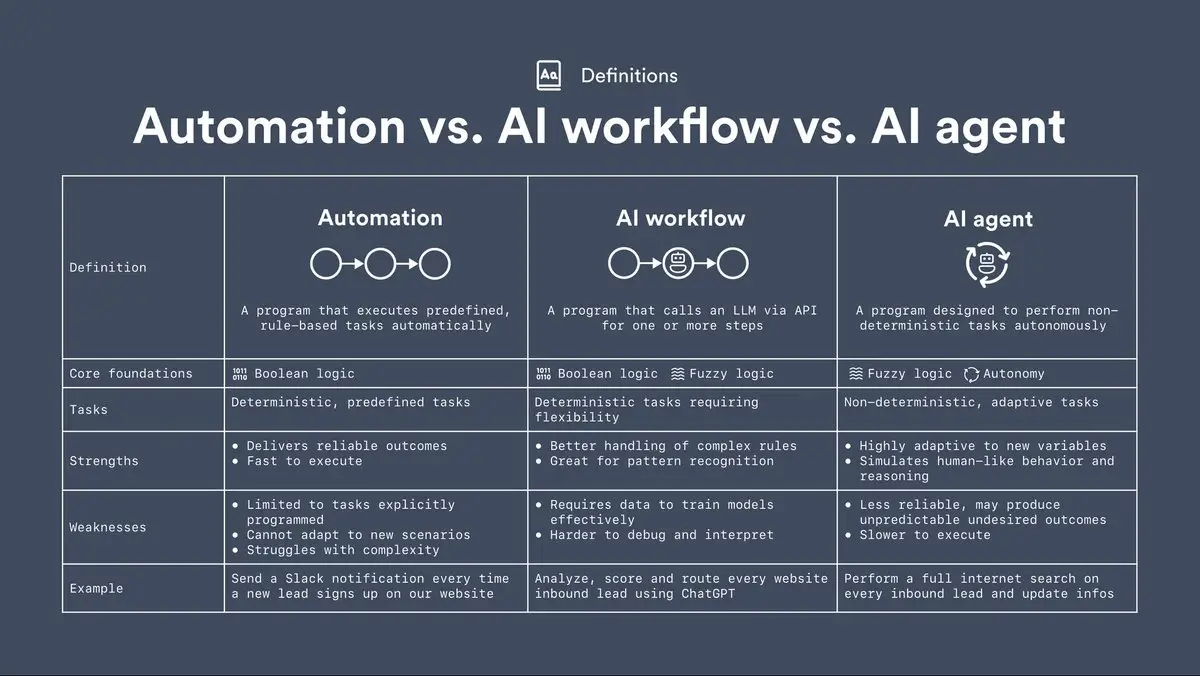
An AI agent is a system that doesn’t just respond: it acts. You give it a goal (“assign new leads,” “summarize tickets,” “update project data”), and it decides which tools to use, in what order, to complete the task. These tools can be anything: a database query, a workflow step, or an action in another app.
The difference between an AI chatbot and an AI agent is simple:
- A chatbot answers questions.
- An agent follows through on them.
Agents can read data, choose the right tools for the situation, trigger workflows, and ask for clarification when something’s unclear. For small teams, that means fewer manual tasks and smoother hand-offs without adding extra software or headcount.
The smartest ones combine three layers:
- Reasoning: understanding the task and context.
- Action: executing steps automatically.
- Learning: improving results over time, but this usually comes from better prompts, refined workflows, or stronger models, not from the agent “self-improving” on its own.
And while this used to require complex engineering setups, teams now build agents visually through modern AI app builders.
In short, an AI agent acts like an extra team member that never loses context and handles routine work reliably, as long as it’s built on a clear process and trusted data.
Why teams are building AI agents
AI agents are quickly becoming practical tools. For most small and mid-sized teams, they solve a simple problem: too much manual work, not enough time.
Instead of coding rules for every scenario, agents use reasoning to decide what to do next. That can be updating project data, summarizing client notes, or routing requests to the right person.
Three shifts made this possible:
- Better models: GPT-5 and Gemini 2.5 go beyond prediction. They can plan steps, reason through tasks, and follow through on actions.
- Simpler tools: No-code and vibe-coding platforms let teams build logic more easily.
- Faster operations: Teams want fewer tools to maintain and clearer control over data.
Step-by-step: how to make an AI agent
Building an AI agent is less about coding and more about clarity. You’re designing a system that can reason, act, and improve, so the process should feel structured, not experimental. Here’s how to do it right:
1. Define a focused use case
Start small. The best AI agents handle one clear workflow. Or, they can handle multiple, but you have to pause and ensure the foundation (data model, permissions, core logic) still fits your evolving scope to avoid regression risk.
Examples:
- Categorize incoming client requests and route them to the right folder.
- Summarize daily project updates and post them to Slack.
- Auto-create tasks when new data hits your CRM.
Give your agent a specific goal, clear input (where it gets data), and a measurable output (what success looks like).
[.blog-callout]
💡Tip: The narrower the scope, the faster you’ll see reliable results.
[.blog-callout]
{{cta-1}}
2. Choose your platform
There are now three main paths to building an AI agent, each with its own trade-offs.
1. Code-first frameworks
If you want full flexibility, frameworks like LangChain, LlamaIndex, or AgentKit let you define every logic step and connect APIs directly. They’re powerful but require engineering time and ongoing maintenance (not ideal for lean teams or quick pilots).
2. No-code or low-code builders
For most SMBs, visual tools like Softr are the easiest and safest way to start. They offer drag-and-drop workflows, native integrations, granular permissions for each user role, and AI actions you can test instantly. You can also plug agents directly into your apps, so your team can use smart assistants for tasks like research, data cleanup, or knowledge retrieval right where work happens.
[.blog-callout]
Takeaway: Choose the layer that fits your comfort and capacity. Vibe-coding tools are great for exploration; no-code tools are ideal for operational reliability.
[.blog-callout]
3. Pick your AI model and logic
Your AI agent’s “brain” determines how well it reasons, understands context, and performs real work.
If you’re building from code:
Frameworks like LangChain or AgentKit let you connect directly to advanced APIs such as GPT-5, Claude Sonnet 4.5, or Gemini 2.5 Pro. You’ll define the prompts, logic, and action triggers yourself. This is ideal for custom setups that need deep reasoning or multi-step planning.
If you’re using vibe-coding tools:
Vibe-coding tools layer these same models inside an interactive canvas. You describe what you need, the AI drafts the code, and you refine it. It’s fast and flexible, but still benefits from human review to catch logic or data-handling errors.
If you’re using no-code tools:
Most handle model integration behind the scenes. In Softr, for example, you can connect to 13+ models (e.g. o3, GPT-5, Claude Sonnet 4,5), depending on the task and the balance of speed, accuracy, and cost you need via Database AI Agents (or by bringing your own API key). That means you get GPT-5-level reasoning and Claude 4.5-level summarization without extra configuration: ready to automate actions, summarize data, or fine-tune logic inside your workflows.
[.blog-callout]
Takeaway: Start with a capable, well-maintained model, and keep it updated. The latest generations (GPT-5, Claude 4.5, Gemini 2.5 Pro, and Mistral 3.1) deliver faster reasoning, cleaner logic, and smoother integration.
[.blog-callout]
4. Connect your data
Every useful AI agent needs a source of truth. Without structured data, even the smartest model won’t know what’s accurate, up-to-date, or relevant.
[.blog-callout]
💡 If your goal is to automate client updates, manage inventory, or summarize team activity, your agent needs a clear, connected database to pull from. Databases like Airtable give agents context: they define what “a client,” “a task,” or “a product” actually means and how each relates to the next.
[.blog-callout]
Start by using Softr Databases as your primary source of truth, or link external sources like Airtable, Google Sheets, HubSpot, or SQL, so your agent can read, write, and update records in real time. The cleaner your structure, the fewer mistakes your agent will make when acting on that data.
If you’re building internal tools or client-facing apps, Softr Databases give you that structure from day one.
[.blog-callout]
Takeaway: Good agents depend on good data. Defining your structure clearly and connecting it is an essential practice.
[.blog-callout]
5. Design the workflow
Once your data is connected, your agent needs a clear path for what happens next.
A well-designed workflow defines when the agent acts, what it can change, and where humans stay in the loop.
Start with these:
- Trigger: What starts the process? (e.g., a new client request, a form submission, or a database update.)
- Reasoning step: How the AI interprets the event. Does it classify, summarize, or decide next actions?
- Action: The outcome—create a record, send an email, update a field, or trigger another workflow.
- Review or feedback loop: A checkpoint for validation before it continues or learns from results.
For many SMB workflows, like routing service tickets or updating project dashboards, this combination of automation + review ensures speed without losing control.
[.blog-callout]
If you’re building visually, Softr Workflows make this step easier. You can map triggers, add AI actions, and slot in manual approvals. All of this happens inside the same workspace that stores your data and permissions. That keeps the process transparent and auditable as it grows. Here’s an example of how you can set up a simple workflow inside your Softr app:
[.blog-callout]
[.blog-callout]
Takeaway: Treat your workflow as a blueprint, not a black box. Define where AI starts, where it stops, and how people stay involved: that’s how you build agents that teams actually trust.
[.blog-callout]
6. Set rules, roles, and permissions early
Before you let your agent run on live data, decide what it’s allowed to see and do. This is meant to protect your workflows from accidental changes or misfires.
The most common issues happen when agents have unrestricted access: a simple misunderstanding can overwrite client data or trigger the wrong workflow. Setting permissions early gives you visibility and control before things go wrong.
Here’s what to define from the start:
- Access scope: Which tables, pages, or tools can the agent use? Keep it narrow and explicit.
- Action limits: Can it edit, delete, or only suggest changes? Use approval steps for anything customer-facing.
- Role-based visibility: Make sure team members only see and trigger what’s relevant to their role.
- Auditability: Always keep a record of what the agent did, when, and by whom.
[.blog-callout]
Softr makes this easier to manage visually. You can create custom visibility rules using AND/OR conditions and reference any combination of database fields or user attributes. With Global Data Restrictions, you can also enforce app-level data protection, ensuring restricted records or fields can’t be viewed, updated, or deleted.
[.blog-callout]
7. Test and iterate
Even a well-designed agent won’t get everything right the first time. Testing ensures that what looks “intelligent” on paper actually works safely in your real workflows.
Start small. Run your agent on limited data or within a sandbox environment. Look for:
- Logic accuracy: Did it follow the right rules and sequence of actions?
- Data reliability: Did it use the correct sources and update only what it should?
- User transparency: Can your team see what the agent did and why?
Add checkpoints where a human can review outputs before full automation. For instance, if your agent drafts client updates or adjusts records, let it suggest changes first. Once you’re confident in accuracy and tone, move toward automatic approval.
8. Deploy and monitor
Once your agent works reliably in testing, it’s time to bring it into daily use. But deployment isn’t just turning it “on”. Deployment is more about setting up guardrails, visibility, and feedback loops so the agent keeps improving without surprises.
Start small: roll it out to one process, one team, or one client workflow. Give users a way to monitor what the agent is doing and flag anything unexpected. Even a simple audit trail showing the data touched or actions taken helps build trust.
[.blog-callout]
💡 For example, a support team makes an AI agent to categorize incoming tickets and assign them to the right agent.
At first, they deploy it in shadow mode: the AI suggests tags and priorities, but humans still confirm them. Over a week or two, the team compares its accuracy against real decisions, adjusts prompts, and fine-tunes rules.
Once the results are consistent, they switch to full automation for low-risk tickets while keeping manual review for edge cases.
[.blog-callout]
Keep these habits in place as your agent scales:
- Version control: Save prompt and workflow versions before every major change.
- Regular reviews: Check logs weekly to spot drift or new error patterns.
- Data freshness: Make sure your connected data sources stay synced; outdated data can lead to faulty actions.
Common pitfalls to making AI agents (and how to avoid them)
AI agents can save hours of manual work, but only if they’re built on clear logic and safe data access. Most early attempts fail for simple, preventable reasons.
- Over-automation: Teams let agents act too freely, skipping review steps.
Fix: Start with “suggest + approve” mode before giving full control. - Messy data: Unstructured or outdated sources cause wrong decisions.
Fix: Keep one clean database or connect structured data sources through your platform. - Undefined ownership: No one knows who updates, monitors, or audits the agent.
Fix: Assign one owner to review logs and adjust prompts regularly. - Security blind spots. Agents with unrestricted permissions can trigger unwanted actions.
- Fix: Limit data access by role and log every workflow run.
Summary: where AI agents deliver the most value
The most effective agents don’t try to automate everything. They focus on high-volume, repetitive workflows where decisions depend on structured data.
You’ll see the biggest returns when:
- Your team repeats the same steps daily (categorizing, updating, summarizing).
- The process depends on clear data, not creative judgment.
- Response time matters more than complexity.
- Human oversight can be added through approval or review steps.
Most teams start here: automating the predictable before tackling anything complex.
In Softr, these patterns are easy to implement because your workflows, data, and permissions live together. The agent doesn’t need custom code to understand what “a client,” “a ticket,” or “a project” means: your database structure defines it.
How to build your first AI agent with Softr
Softr is an AI-powered business app creation platform trusted by over 1 million builders worldwide. It gives business operators and ops teams a full-stack ecosystem—native Databases, a visual Interface Builder, and Workflows—to turn operations into reliable, AI-powered software without writing code or managing infrastructure.
You can design, test, and scale agents directly on top of your business data, with structure, permissions, and logic already built in.
1. Native data flexibility
Every smart agent needs reliable context. Use Softr Databases to manage your data and apps in one place—with relational tables, linked records, rollups, and formulas so your AI knows exactly how data connects and what it can safely change. Or, connect to external data sources like Airtable, Google Sheets, Notion, HubSpot, monday.com, ClickUp, SQL databases, Coda, and more with real-time, two-way sync.
All visibility rules in Softr are server-side, meaning hidden data is never sent to the browser and is highly protected. Softr is also SOC 2 and GDPR compliant, with role-based access, and optional SSO.
2. Database AI Agents
Softr’s Database AI Agents bring real automation directly into your data. They can fill missing fields, enrich records, extract details from files, or even pull real-time information from the web. And you don’t need any manual entry or copy-paste here.
Everything in Softr Database AI Agents runs inside your structured database; each agent has clear inputs, rules, and guardrails to follow. You decide when an agent should run, what it’s allowed to change(via conditions), and how it uses surrounding fields to reason about the task(via prompting).
And because these agents live inside your Softr apps, your team can use them directly in the tools they work in every day. It’s an easy way to give everyone access to smart assistants that help find answers, prepare information, and keep your data accurate without extra tools or workflows.
[.blog-callout]
See how Erin from Softr uses Softr Database AI Agents to set up an AI agent in her database to help her write social copy. 👇🏻
[.blog-callout]
- She picks the agent model,
- Sets up the prompt referencing other fields, the conditions under which the agent must act on,
- Previews and then tweaks the prompt to adjust the way she wants the agent to work.
Check the result in the video! ✨
3. Softr Workflows
Map what your agent should do: trigger AI reasoning, update records, notify teammates, or send reports, all from a visual workflow editor. You don’t need to tie third-party tools to make this happen. You can use Softr’s AI Co-builder to type what you want, and it will help you with creating the automation. Each step follows the same data and permission logic as the rest of your app. Here’s how it looks like:
4. Ask AI
Give your teammates or clients natural-language access to your data: “Which projects are overdue?” or “Show this month’s maintenance requests.” Ask AI works inside Softr apps, respecting permissions automatically.
Here’s how you can implement and use it in a CRM:
[.blog-callout]
Softr gives your AI agents a real foundation: structured data to act on, workflows to execute logic safely, and permissions to keep every action secure.
Start from scratch with your own data or use one of 90+ ready-made app templates to make your AI agent today!
Then add AI actions, approvals, and automations without writing a single line of code.
[.blog-callout]
Conclusion
Learning how to make an AI agent isn't just for engineers anymore. With the right tools and guardrails, business operators and department teams can build agents that support their daily work. When AI handles the routine tasks, people get more time back for what actually moves the business.
Softr makes that possible. Build your first AI-powered agent in minutes, connect your real data, and see how fast your team can move when your tools start thinking with you.
Try Softr for free and create your first AI agent!
Frequently asked questions
How much does it cost to make an AI agent?
Can I build an AI agent without coding?
Can you build an AI agent with ChatGPT?
Is it illegal to make an AI model?


