A client needs the latest deliverable, so they email you. You reply with a Drive link. Another member of their team can't find it two days later and emails again, asking about the invoice and who approved the new rate. This friction is doing two things: it's slowly altering your client's perception of you and drowning your team in repetitive requests that drive people away from their tasks.
This is where a client portal comes in: it centralizes all information about the relationships your clients have with you, so you can keep everything organized and always point back to the same hub. The white label element reinforces trust and increases perception of value, as you can hide the brand of the portal provider, placing yours front-and-center as the creator of the platform.
Compare white-label client portals at a glance
| Tool | Best for | Key features | Pricing |
|---|---|---|---|
| Softr | Building a customized portal | No-code portal builder with AI, 15+ data source integrations, role-based permissions, eSignature, PWA | Free plan available: paid from $19/mo |
| Clinked | Regulated industries | HIPAA, ISO 27001, FISMA, GDPR compliance, virtual data room, white-labeled mobile apps, full audit trail | 10-day free trial: paid from $299/mo |
| SuiteDash | All-in-one operations | Native CRM, billing, PM, LMS, and portal in one platform, HIPAA compliant, unlimited users, automation engine | 14-day free trial: paid from $19/mo |
| SuperOkay | Creative agencies | Embed hundreds of third-party apps, client approval workflow, packaged services, no login required for proposals | Free plan available: paid from $9/mo |
| Assembly | Polished client experience | AI assistant, Stripe invoicing and subscriptions, SOC 2 Type II + HIPAA BAA, passwordless client login | 14-day free trial: paid from $39/mo |
| Dock | Sales-led client workflows | Full customer lifecycle workspaces, order forms and price quotes, engagement analytics, synced content across portals | Free plan available: paid from $350/mo |
What is a white-label client portal?
A white-label client portal is a platform that agencies, freelancers, and service businesses can rebrand as their own with a custom domain, logo, and colors. It's used as the single place where clients log in to access files, track projects, sign documents, and communicate. Unlike generic project management tools, the client never sees the portal vendor's name: the experience looks and feels like a product the service provider built itself.
What to look out for in white-label client portals
- White-labeling depth. There are many elements of branding on a platform: the domain (both on the web and in emails), colors, typography, or login pages, among others. Client portal platforms sometimes segment the depth, placing full removal of their branding in the more expensive plans. Consider how much depth you need, check your budget, and review pricing information before committing.
- Set up complexity and time to value. Some platforms are ready in an afternoon; others require days of configuration before a client can log in. If you don't have time to customize a portal, choose a solution that's easier to use and faster to implement.
- Ease of use for clients. This is a make-or-break factor: a portal only delivers value if clients actually use it. Test the client-side experience to make sure it's intuitive, as difficulties here will drive your clients back to your inbox.
- Automation and workflow depth. Chasing approvals, sending follow-ups, or closing projects after delivery usually follow the same steps. If you're spending too much time in these routine tasks, look for automation features that turn triggers and events into action.
- File sharing and approvals. Secure uploads and organized folders help clients find what they need in a single place, without having to search through other tools. Some platforms even offer revision, approvals, or signing; check if they're useful for your specific workflows.
- Communication that replaces email. Built-in messaging and threaded comments need to be easy to use, and your team needs to actively monitor this channel. Look for features that make the portal the path of least resistance: email-based replies that land in the portal, proactive notifications, and public views for proposals.
- Security and compliance. Role-based permissions and data encryption are standard. If your clients are in healthcare, finance, or government, you'll also need to verify specific certifications (such as HIPAA, SOC 2, ISO 27001, or FISMA) since not every tool on this list qualifies.
- Mobile experience. Clients check in from phones. Some tools on this list have no mobile app and a desktop-only interface; others offer fully white-labeled iOS and Android apps or progressive web apps.
1. Softr — best for non-technical teams building a fully customized portal

Softr is an AI app builder that helps you put together a client-facing portal tailored to the exact way you work. It's a great match for agencies, consultants, or SMBs that need a branded platform to communicate with clients, without hiring developers, writing code, or paying for a custom build.
You can start from a prompt with the AI Co-Builder, which generates the interface, connected database, and underlying business logic from your instructions. If you want control as you go, you can build manually with the block-based visual editor. Your app can also connect to data sources you already use, such as Airtable, Notion, or HubSpot, so there's no migration process to worry about.
Clients use their own login to land on a private portal, so they can access their data and interact with your business in a secure environment. The same portal handles one client or a hundred: the data views adapt per user without additional reconfiguration.
Softr pros and cons
Pros
- Build and extend your portal without coding: pre-built portal templates, AI Co-Builder, and drag-and-drop editor lets non-devs launch and edit client portals, with a built-in database, pages, workflow automation, and user permissions.
- Manage your app data where you work: Manage your app data natively inside Softr Databases or connect your scheduling app to Airtable, Google Sheets, HubSpot, or any REST API.
- Built-in client workflows: forms, file uploads, comments, and conditional logic are all available, so clients can submit requests, upload documents, and review updates without extra tools and custom integration work.
- Robust user authentication: includes email/password, magic links, Google, SSO (SAML/OpenID), and advanced permissions rivaling dedicated tools.
- Strong security: Softr is SOC 1, SOC 2, and ISO 27001 certified; apps are hosted in Germany on AWS infrastructure, with encryption in transit and at rest.
- SEO and sharing control: page-level SEO and social settings, custom domains, and editable page metadata make public pages easily searchable and branded on link previews.
Cons
- Limited native integrations compared to some enterprise platforms: while Softr connects with many popular tools, some specialized workflows may require middleware like Zapier or n8n to bridge gaps between apps and automate processes.
Softr key features
- White-label branding: custom domain, favicon, brand colors, and full removal of Softr attribution, so clients see only the agency or business brand.
- 15+ data source integrations: native real-time sync to Airtable, Google Sheets, Notion, HubSpot, monday.com, ClickUp, Coda, Supabase, MySQL, PostgreSQL, and more, so the portal always reflects current data without manual exports.
- Role-based permissions & user groups: granular access controls with custom user groups to show each client only their own records, files, or dashboards.
- Document management with eSignature field: in-portal document upload, viewing, and eSignature fields, plus file-request and form-collection flows, enabling full document workflow without leaving the portal.
- Progressive web app (PWA): Softr portals can be published as a PWA for placing your portal on iOS and Android home screens, giving clients a near-native mobile experience without submitting to the app stores.
- Enterprise-grade security: Keep client data protected with secure authentication, server-side permissions, and full SOC 2 and GDPR compliance.
Softr pricing
- Free: Unlimited apps, with access to Softr Workflows and Softr Databases, 5 app users, custom domain, 5,000 DB records, 5 AI credits
- Basic ($19/month): Unlimited apps with 42+ integrations, Team: 5 + Client: 5 app users, 50,000 DB records, 10 AI credits
- Pro ($99/month): Unlimited apps with 45+ integrations and custom code, Team: 10 + Client: 50 app users, white-label branding, advanced data sources, 500,000 DB records, eSignature, PWA, custom CSS/JS
- Business ($329/month): Unlimited apps with 52+ integrations, Team: 30 + Client: 100 app users, custom user groups (up to 10), payment blocks, 1,000,000 DB records
- Enterprise (custom pricing, contact sales): SSO; IP blocking; audit logging; dedicated success manager; custom SLA
2. Clinked — best for regulated industries
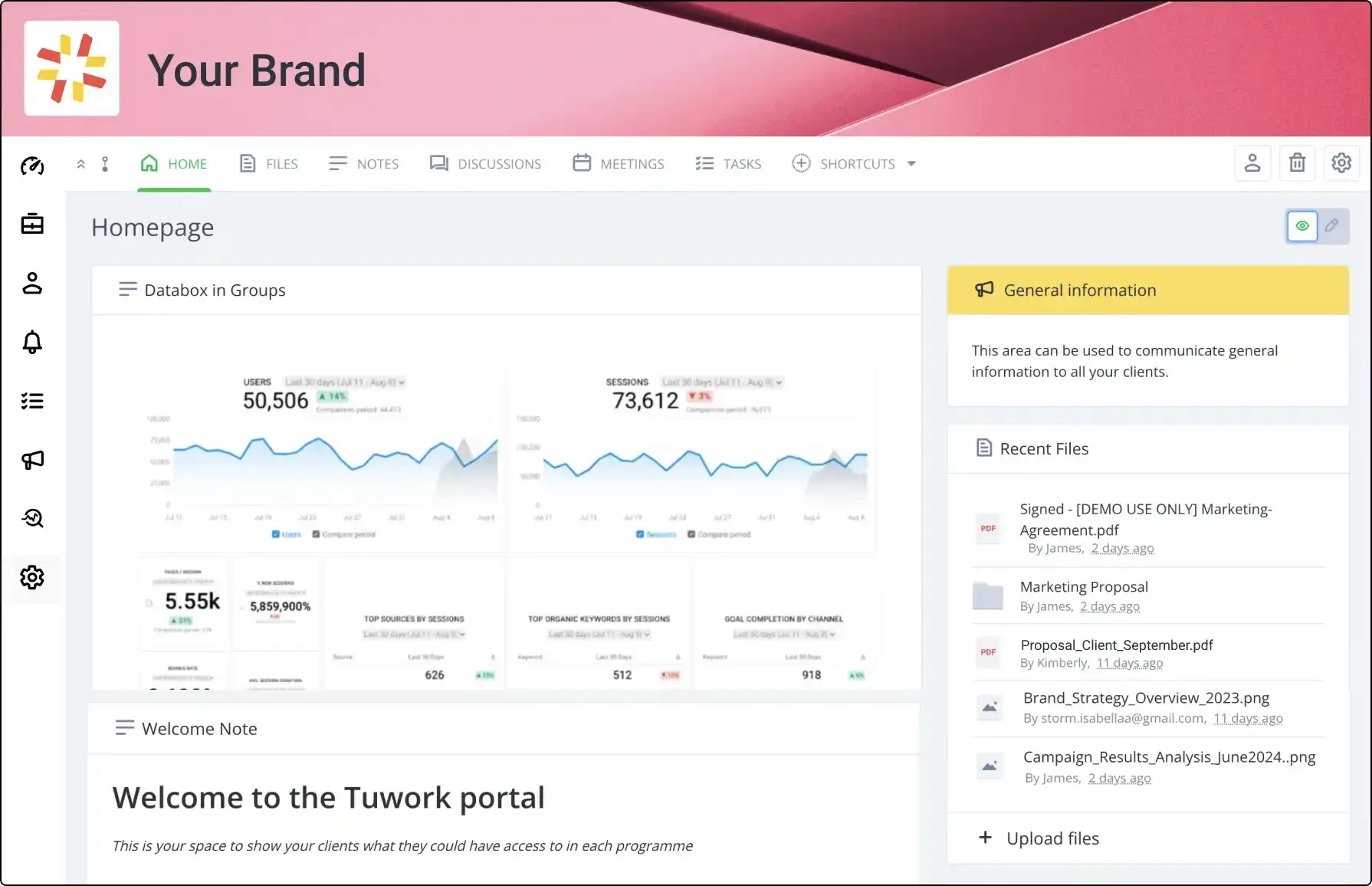
Regulated industries can't only judge client portal software by how good it looks: the underlying security and compliance architecture needs to be tight, as there's a high price for a leak or a breach. Clinked works well in this aspect, combining a wide range of certifications with a feature set that keeps data safe, so you can service your clients and trust your infrastructure.
Trusted by large companies and government agencies alike, Clinked offers detailed audit trails so regulators can see every access, upload, or permission update over time. The role-based access controls limit what clients and staff can see, and you don't need an IT team to set and edit these. You can enforce two-factor authentication for an additional layer of security to make sure compromised credentials don't lead to an immediate breach.
While these features are strong, they come with a high price tag, with functionality such as advanced project tools and more storage locked in expensive tiers. Clinked also lacks native invoicing, payment processing, and subscription management, so billing workflows will still need third-party tools.
Clinked pros and cons
Pros
- Designed for fast client adoption: no training needed to navigate files, messages, and tasks from day one.
- Trusted by recognizable enterprise and government organizations: listed as a supplier to the UK central government and used by companies like Canon and Desjardins.
- White-labeled mobile apps: offer your portal on iOS and Android, fully customized with your branding.
- Unlimited guest users on all paid plans: share files, notes, and collaborate with an unlimited number of clients.
Cons
- UI is dated: feels more like a corporate intranet than a modern web app.
- Limited feature set for mobile apps: some actions aren't available on mobile, such as adding projects or groups.
- Steep learning curve for admins: the high security profile adds friction, with complex permission hierarchies slowing down setup, and an enterprise-first architecture that exposes many controls requiring careful configuration.
Clinked key features
- Real-time collaboration & communication tools: group chat, 1-to-1 messaging, @mention notifications, discussions, annotations, commenting, and a Reach Out feature for client communication.
- Virtual data room (VDR): a dedicated VDR product with redaction, dynamic watermarking, NDAs, data room archiving, and Q&A starting from $599/month.
- Security & compliance stack: bank-grade encryption, ISO 27001, HIPAA, GDPR, FISMA, and FIPS.
- Role-based permissions & audit trail: granular custom access permissions, enforced two-factor authentication (Premium+), SSO/Active Directory (Enterprise), and a full audit trail.
- Project & task management: Kanban board (Premium+), group calendar, task assignments with deadlines, real-time progress monitoring, and Google/Outlook calendar integration.
- Document management with version control: file approval workflows, file locking, file requests, version control, instant file viewing, and integration with DocuSign and Acrobat Sign.
Clinked pricing
- No free plan; 10-day free trial
- Standard ($299/month, $239/month annual): 100 members; 1 TB storage; tasks, calendar, discussions, chat; custom domain; audit trail
- Premium ($599/month, $479/month annual): 250 members; 3 TB storage; white-label email notifications; Kanban; enforced 2FA; role-based permissions
- Enterprise (custom, annual): 1,000+ members; 5 TB+ storage; white-label mobile app; Active Directory/SSO; uptime SLA; custom data center location
- VDR (from $599/month): 250+ members; 3 TB+ storage; redaction; dynamic watermarking; NDAs; data room archiving; Q&A; unlimited data rooms
3. SuiteDash — best for an all-in-one portal builder
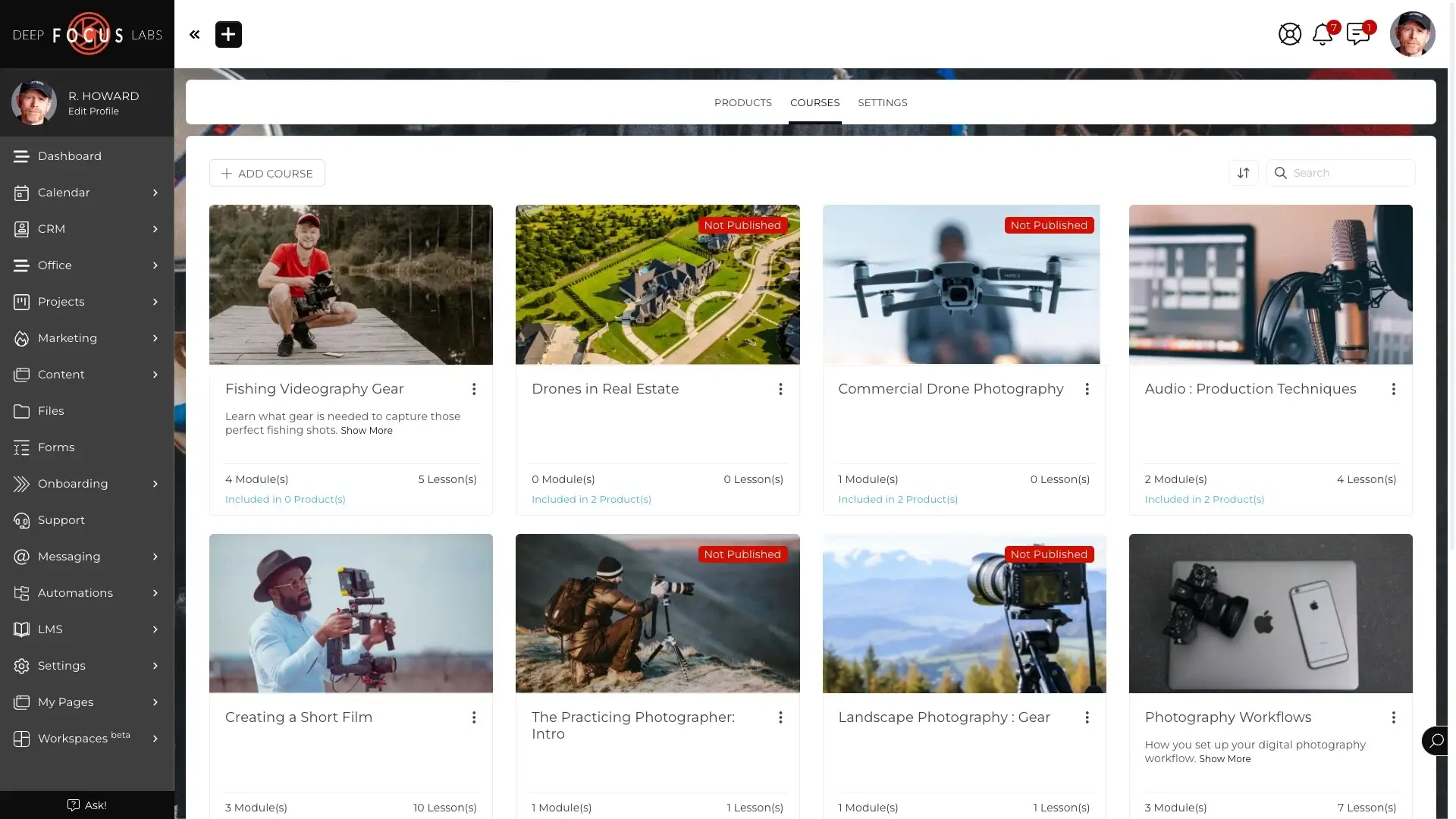
SuiteDash is an all-in-one business management platform with a white-label client portal lean, keeping everything you need in a single system rather than in a web of third-party tools. Every module runs on a shared database, covering the entire client relationship, from proposals through project delivery.
Since everything is connected to the same core, you can automate your portal based on client actions. A signed proposal can close a deal, automatically generate an invoice, create a project, and kick off an onboarding workflow. The onboarding toolkit guides new clients through intake forms, document signing, and setup tasks in a step-by-step workflow, with a ticketing system so your team can jump in and help if needed.
That breadth comes with a real onboarding cost: most users struggle with the learning curve, taking days of focused usage before the platform feels manageable. The interface's design hasn't kept up with the feature set, with dated templates and too many clicks required to complete key tasks.
SuiteDash pros and cons
Pros
- Automation engine handles onboarding, follow-up, and billing tasks: trigger- and event-based flows automatically handle repetitive tasks.
- Deep white-label customization: custom domains, branded email sender, zero vendor mentions, and full visual customization across every screen.
- No user limits: invite all your staff and onboard any number of clients without extra costs.
- LMS module enables upsell of digital products or training directly through the portal: host and monetize courses without relying on an external platform.
Cons
- Steep learning curve: initial setup can take up to 2 days, with users reporting a month of usage until they're fully comfortable.
- Dated UI: the dashboard feels overcrowded and navigation requires too many clicks to complete some key tasks.
- Slow performance when navigating between modules: page load times increase between module pages, with internal users waiting around 5 seconds for pages to become ready.
SuiteDash key features
- Native all-in-one architecture: every module (CRM, billing, PM, portal, LMS, messaging) shares a single database rather than connecting through third-party integrations.
- Interactive client onboarding toolkit: step-by-step, customizable onboarding workflows that guide clients through setup tasks, document signing, and intake.
- HIPAA compliance: viable for healthcare, therapy, legal, and financial services handling sensitive client data.
- Support ticket system: custom support inboxes with priority management baked into the client portal.
- Digital proposals + e-signing: native proposal builder with e-signature capability; signing a proposal can automatically trigger a new project, generate an invoice, and start onboarding.
SuiteDash pricing
- No free plan; 14-day free trial at full PINNACLE features; no credit card required
- START ($19/month, $15/month annual): extreme white labeling; unlimited users; 100 GB storage; CRM, client portal, branded mobile app, email campaigns
- THRIVE ($49/month, $40/month annual): 500 GB storage; adds drip marketing, dynamic proposals, live chat, deal pipelines
- PINNACLE ($99/month, $80/month annual): 2 TB storage; adds full automation (FLOWs), onboarding toolkit, LMS, support tickets, task dependencies
- Lifetime option: START $2,240 / THRIVE $3,940 / PINNACLE $6,840 one-time
4. SuperOkay — best for creative agencies
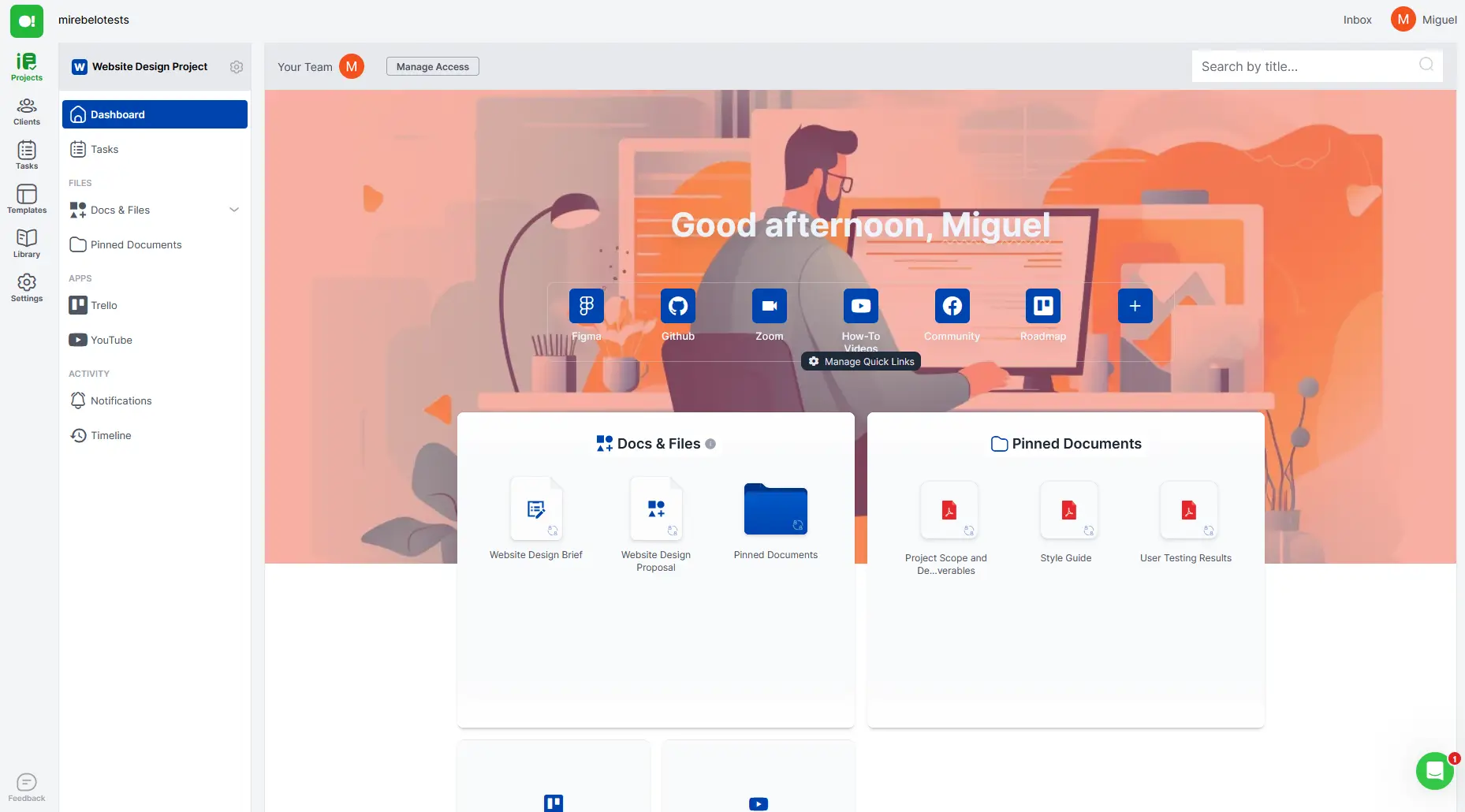
SuperOkay is a client portal for creatives and agencies who want clients to experience their work inside something that feels as intentional as the work itself. A dedicated layer between your internal stack and your client's inbox, it replaces improvised Notion docs and Basecamp guest logins, improving your professional image.
The document editor is where that premise pays off. Smart documents support rich media— video, charts, interactive graphs, and pricing tables— with formatting that looks like a designed deliverable. Each workspace carries the client's own logo, colors, and fonts, so you can make it feel like an extension of their brand rather than an external tool. To help drive repeat business and upsells, you can add retainer blocks and add-on services so clients can buy when they need to.
Appealing portals aside, SuperOkay is not a full operating system: there is no invoicing, no payment tracking, no lead management, and no way to email clients from within the portal. The platform is browser-only with a rough mobile experience, a friction point for clients on the go.
SuperOkay pros and cons
Pros
- Quick portal building and publishing: easy to build and customize, with multiple users reporting having everything ready in one or two hours.
- Easy for clients: consistently praised for a smooth and intuitive user experience that removes friction and increases adoption.
- No client login required to view proposals: send proposals that clients can review without logging in, removing obstacles from this important part of the relationship.
- Reusable block library saves time at scale: save individual blocks, multi-block sections, or full documents to a library and reuse them across any project, making it easier to build contracts and proposals without rewriting.
Cons
- No two-factor authentication (2FA): if a client's email inbox is compromised, an attacker will also have access to their portal.
- No native automation features: the portal acts as a document aggregator and information hub, not a platform that manages workflows or automatically triggers actions based on events.
- No invoicing, lead tracking, or analytics: lacks broader features that would simplify operations for agencies and freelancers.
SuperOkay key features
- Embed hundreds of apps in your portal: supports iframe-based embedding of any compatible third-party tool, such as Airtable, Figma, Miro, Google Data Studio, and Google Drive folders, directly inside the portal.
- Approval workflow: clients can sign off on deliverables via an approval button embedded inside documents, giving agencies a timestamped record of sign-off without requiring email or third-party e-signature tools.
- Quick links hub: a central launchpad inside each client portal rounding up the most important project resources, so clients find what they need instead of emailing you for help.
- Packaged services: pre-defined service bundles with fixed pricing presented in visual cards that clients can browse, turning the portal into a lightweight sales tool.
- Custom login page + favicon + open graph: the branded experience extends to the login screen, browser tab favicon, and link-preview images when the portal URL is shared in Slack or email.
SuperOkay pricing
- Free: 1 client; 1 project; 0.5 GB storage; no white label
- Solo ($9/month annual, $12/month monthly): 3 clients; 2 GB storage; unlimited projects, docs, tasks; no white label
- Solo+ ($29/month annual, $38/month monthly): 3 team members; 5 clients; 10 GB storage; white label + custom domain; 3 packaged services
- Business ($112/month annual, $146/month monthly): unlimited team members; unlimited clients; 1 TB storage; full white label; custom domain; dedicated support; onboarding call
5. Assembly (formerly Copilot) — best for building a polished client experience
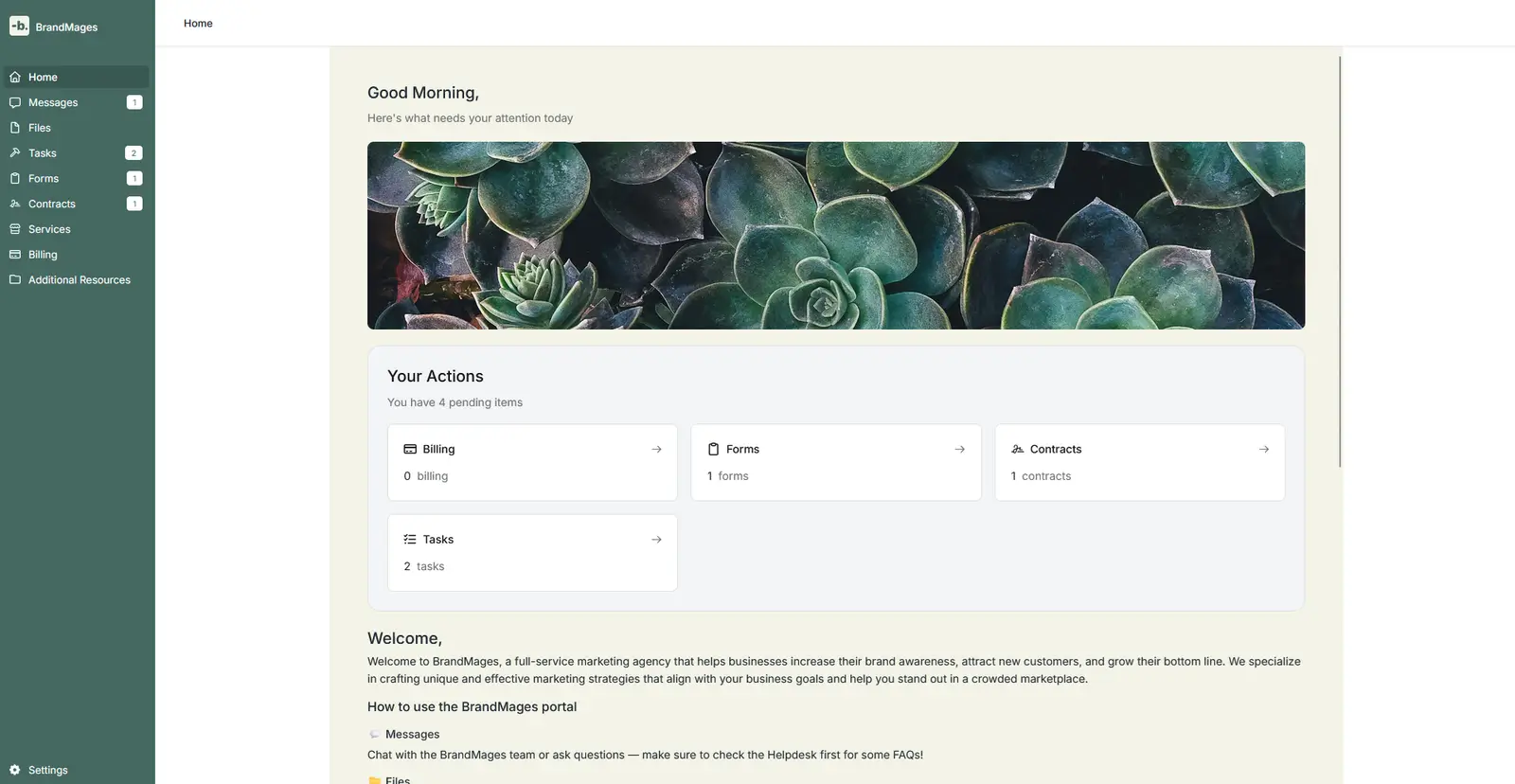
Assembly upgrades client experience by bringing together a wide range of features in the same platform—including everything from contracts to payments—with an AI-powered layer to save time and act on data. The streamlined design aesthetic is equally important, as it conveys efficiency and helps users interact with portal features without friction.
This matters because client portals are a trust signal as much as a delivery tool. A patchwork of emailed payment links, shared Dropbox folders, and loose calendar booking tools signals disorganization before the work even begins. Assembly has a proven track record of making businesses look good: in a Capital One case study, partner onboarding was cut from 50–60 days to nearly half the time, thanks to its centralized tools and automated flows.
These advantages come at a high cost, especially if you want to fully white-label the platform. Removing the "Powered by Assembly" badge costs $399 per month on the Advanced plan. The portal's design, while appealing, is inflexible for businesses that want to tinker with layouts and rearrange elements at will.
Assembly pros and cons
Pros
- Replaces multiple tools in one subscription: messaging, billing, file sharing, contracts, and onboarding in a single branded portal, slashing software spend and admin overhead.
- Polished design that earns trust: praised as sleek, intuitive, and professional, with customizable colors and branding.
- Modular and extensible via API and custom apps: embed external tools like Calendly, Google Docs, or Trello via iframes and custom apps that access client authentication data.
Cons
- Full white-labeling locked behind the $399/mo Advanced plan: removing the "Powered by Assembly" badge requires upgrading to Advanced; Professional ($149/mo) only offers a custom domain, not full brand removal.
- Complex initial setup: onboarding involves mapping workflows, toggling modules, and integrating apps, along with a complicated billing and services configuration step.
Assembly key features
- Client messaging and file sharing: threaded messaging with file attachments and granular permissions control built into the portal.
- Invoicing, payments, and subscriptions: integration with Stripe for one-time invoices, subscriptions, and recurring billing; ACH and credit card supported.
- AI Assistant: summarizes information in your workspace, drafts documents such as invoices or contracts, and suggests next steps.
- Passwordless client authentication: clients log in via Google SSO or magic link, no password required; clients can also reply directly by email without logging in.
- Compliance certifications: SOC 2 Type II certified; HIPAA BAA available on the Advanced plan and above; CCPA and GDPR compliant.
Assembly pricing
- No free plan; 14-day free trial, no credit card required
- Starter ($39/month annual, $59/month monthly): 1 internal user; 50 clients; 100 automation tasks/month
- Professional ($149/month annual, $189/month monthly): 3 internal users (+$39/user); 500 clients; 1,000 automation tasks/month; custom domain; custom email domain; API; Zapier/Make; Custom Apps
- Advanced ($399/month annual, $499/month monthly): 5 internal users (+$59/user); unlimited clients; unlimited automation; full white-label; HIPAA BAA; MFA enforcement
- Enterprise (from $2,000/month, custom): unlimited users and clients; custom SSO; sandbox workspace; dedicated success manager; personalized onboarding
6. Dock — best for boosting sales workflows with portal tools
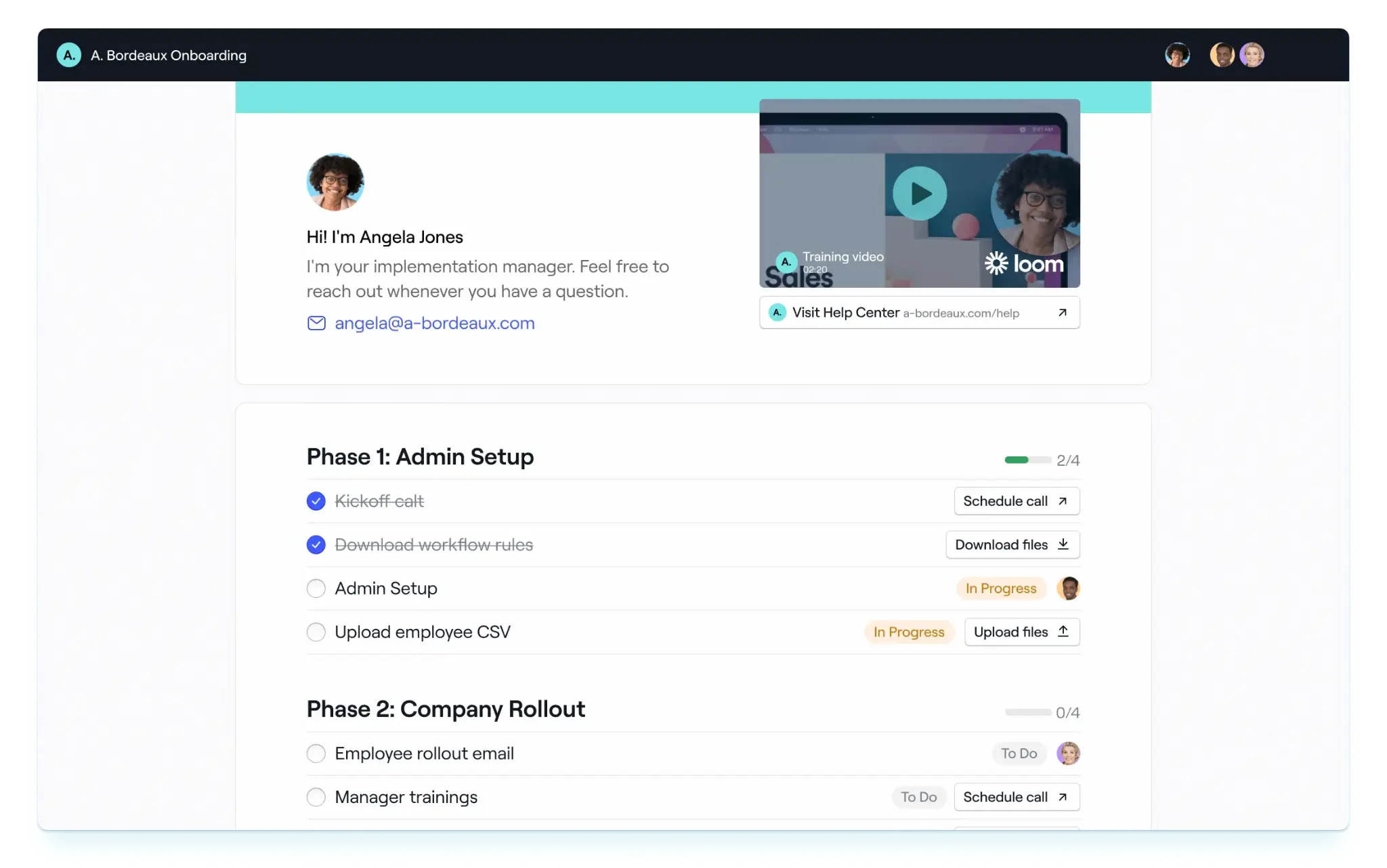
More than a client portal tool, Dock is an AI revenue enablement platform. The action revolves around the deal room: workspaces that host the first sales conversation and follow the entire relationship arc through onboarding and renewal. Every feature is focused on improving win rates, making your portal a tool to close more deals, not just hold documents.
This workspace includes order forms and pricing tables, so buyers can review and accept proposals without being sent to a separate tool: the deal closes where the conversation happens. From the client's perspective, the URL always remains the same, so it's easy to return and take action. For your team, you can push updated public information to all portals at once and use per-contact analytics to understand which clients are engaging—the signal a rep should reach out.
That sales-first foundation becomes a limitation outside of revenue workflows: Dock doesn't fit vendor management, HR onboarding, or internal documentation as cleanly as alternatives. Its sales features also need a third-party CRM in the background, such as Salesforce or HubSpot, to drive maximum value.
Dock pros and cons
Pros
- Everything the client needs lives in one URL: PDFs, pricing tables, forms, and deal-related information are all in the portal, so clients have everything to make a decision.
- Engagement analytics to reach out at the right moment: see workspace views, link clicks, downloads, and video watch time to gauge interest and target engaged leads.
- Clients love the experience: frequently praised for its clean UI and easy navigation, reducing friction during the sales process.
- Automation reduces admin burden: automated task reminders, onboarding sequences, and approval workflows nudge projects ahead without extra clicks.
Cons
- White-labeling and custom domain locked to the most expensive plans: removing Dock branding requires the Premium plan ($1,000/mo); using a custom portal and email domain is gated in the Enterprise plan (custom pricing).
- Limited design flexibility: formatting options are limited when configuring tables, layouts, and visual branding.
- Poor mobile experience: Dock has no mobile apps and the interface is not optimized for smaller screens, adding friction for clients browsing on smartphones.
Dock key features
- Full customer lifecycle workspaces: a single Dock workspace can transition from digital sales room to customer onboarding portal to ongoing client portal without migration, so the client relationship lives in one place from day one to renewal.
- Project plans with Kanban & timelines: multi-phase project plans with checklists, Kanban boards, timeline views, relative due dates, and task notifications sent to clients for upcoming deadlines.
- Synced content across portals: a single content update can be pushed to all active client workspaces simultaneously, so teams never manually update the same resource in dozens of portals.
- Embedded tools integration: Loom, Gong, Zoom, Typeform, Google Drive/Docs, Wistia, and PandaDoc can be embedded directly inside a workspace, so clients see a unified portal rather than a list of external links.
- Order forms & price quotes: native pricing tables, proposal blocks, and order forms inside workspaces that clients can review and accept without leaving the portal.
Dock pricing
- Free: 50 workspaces; basic integrations (Slack, Loom, PandaDoc); no white label
- Standard ($350/month): 5 internal users (+$50/user); unlimited workspaces; Salesforce/HubSpot CRM; advanced integrations (Gong, Chorus); no white label
- Premium ($1,000/month annual): 10 internal users (+$50/user); white-label branding (logo, colors, badge removal); order forms; learning playbooks; connected workspaces; advanced CRM; webhooks; priority support
- Enterprise (custom, annual): custom users; custom domain; API; automation; SSO; dedicated customer success manager; managed implementation
Which white-label client portal is right for you?
The right pick comes down to three questions:
- How much do you want to build versus buy?
- Does your industry require formal compliance certifications?
- And is your priority closing deals or delivering work?
A no-code builder like Softr fits agencies that want a portal shaped around their exact process; a structured workspace like Dock or Assembly fits teams that want something ready out of the box. Regulated industries (healthcare, finance, government) narrow the field quickly: only Clinked and SuiteDash carry the compliance stack those clients demand. And if your portal needs to do double duty as a sales tool, Dock is in a different category from the rest.
All six tools offer a free trial or free tier. The fastest way to find your fit is to pick the one that maps most closely to your current workflow, and run a fictional project to see how the experience feels on the other side.
Try Softr for free today and see how easy it is to turn a simple prompt into a powerful potral that your team will actually use.
Frequently asked questions
Is Softr good for building a white-label client portal?
Can I create a client portal with Softr without coding?
What makes Softr different from other white-label client portal software?