7 Fishbowl alternatives for centralized inventory in 2026

Fishbowl is a popular inventory management tool for small to mid-sized manufacturers, distributors, and warehouse-driven businesses. But it isn’t a fit for every team. As businesses grow and workflows evolve, common issues start to surface, like long setup times, fixed processes, dated UX, and limited flexibility beyond core inventory workflows. Here are the best Fishbowl alternatives in 2026, matched to team size and operational complexity.
Best alternatives to Fishbowl at a glance
| Tool | Best for | Standout features | Pricing |
|---|---|---|---|
| Softr | Teams needing a fully customizable inventory management system they can easily scale into a full ERP | • Build inventory + workflows on your existing data and tools • Role-based access control for teams & external users • Native workflow automation, visual dashboards, and AI on live data | Free plan available; paid plans from $19/month (billed annually) |
| Acctivate Inventory Software | Mid-market inventory with deep QuickBooks sync | • Advanced multi-warehouse & lot/serial tracking • Strong order, purchasing & fulfillment workflows • Tight QuickBooks Desktop & Online integration | Custom pricing (license + annual subscription) |
| inFlow Inventory | Simple, intuitive inventory for SMBs | • Fast onboarding & easy UI • Barcode scanning & multi-location tracking • eCommerce & accounting integrations | From $129/month (billed annually) |
| Zoho Inventory | Lean, cloud-based stock & order management | • Multichannel ecommerce syncing • Cloud-first order & warehouse management • Native Zoho ecosystem integrations | Free plan available; paid plans from $29/month |
| Odoo Inventory | Modular ERP + inventory in one platform | • Inventory tightly connected to sales, accounting & MRP • Automation rules & warehouse routing • Expand into full ERP as needed | Free Community edition; paid plans from ~$25/user/month |
| ERPAG | Cloud ERP for small manufacturers | • Built-in manufacturing, BOMs & work orders • Multi-warehouse inventory & production planning • QuickBooks & Xero integrations | From $49/month (5 users included) |
| Ply | Field service & trade inventory (trucks + job sites) | • Real-time truck, warehouse & job-site inventory • Automated purchasing & replenishment • Deep ServiceTitan & FSM integrations | Custom pricing (demo required) |
Why look for Fishbowl alternatives? 5 key reasons
Fishbowl is powerful, but many teams start exploring alternatives once it no longer matches how they work day to day.
| Pain point | What users experience |
|---|---|
| 1. Setup and onboarding friction | Fishbowl often requires significant configuration and training. Teams without dedicated IT support usually struggle to get value quickly. |
| 2. Inflexible workflows | Inventory, manufacturing, and order processes are structured around Fishbowl’s logic, not yours. Customizing beyond the defaults can be difficult. |
| 3. Limited reporting and visibility | Users frequently cite challenges with building flexible, real-time reports without exporting data or using external tools. |
| 4. Outdated user experience | The desktop-first interface feels clunky compared to modern, web-based platforms |
| 5. Scaling costs and complexity | As you add users, modules, or integrations, total cost and operational overhead can increase quickly. |
Fishbowl can still be a good fit for inventory-heavy operations with stable processes. But if your workflows are becoming complex, or your team wants more flexibility, it may be time to start weighing other options.
What to look for in Fishbowl alternatives
As you search for an alternative inventory management tool, pay attention to the following areas:
- Inventory structure & flexibility: You should be able to structure and connect products, SKUs, locations, and suppliers without heavy configuration or technical setup. Plus, these structures must match your workflows.
- Ease of use & onboarding: Look for tools your team can adopt quickly. A gentle learning curve means fewer errors and faster ROI.
- Reporting & operational visibility: The best Fishbowl alternatives make it easy to see stock levels, order status, and performance metrics in real time without exporting data.
- Integrations & data connectivity: Inventory rarely lives alone. Make sure the tool can sync with the accounting, e-commerce, data, and other internal systems you already use.
- Scalability without ERP overhead: Some teams outgrow Fishbowl but don’t want a full enterprise resource planning (ERP) platform. The right alternative should scale without adding unnecessary complexity or excessive costs.
- Front-end access & permissions: If external users, warehouse staff, or managers need different views, look for flexible role-based access control rather than one interface for everyone.
1. Softr — best Fishbowl alternative for teams needing a fully customizable ERP without code

Most out-of-the-box inventory systems come with dated interfaces and rigid features. Softr lets teams build a fully customizable inventory tracker that can expand into a full ERP system if needed. Add modules for procurement, sales, warehouse management, or financial tracking without switching platforms or disrupting operations.
Build your inventory management system on Softr’s native relational database, or sync with existing data sources like Google Sheets, Airtable, and BigQuery.
Softr provides role-based permission control and custom views for admins, managers, and employees. Views can even be set for different responsibilities, so your receiving team sees incoming shipments while your sales team monitors available stock. You can also track and update your data with dynamic dashboards that highlight important inventory trends, and that's really just scratching the surface.
Softr pros and cons
Pros:
- Self-serve portals for vendors, partners, and customers: Give external stakeholders controlled access to inventory, orders, or product data without back-and-forth emails or extra licenses.
- Fast to build and easy to maintain: Start quickly with the AI co-builder or from a pre-made template. Build ERP-style workflows across inventory, field service, franchises, HR, and operations without months of setup.
- Visual drag-and-drop builder: The visual builder and pre-built templates with sample data make app setup accessible for non-technical teams.
- Native workflow automation: Automate work orders, approvals, status changes, and cross-team handoffs without relying on third-party tools.
- Scales with your operations: Add new processes, locations, products, or teams without re-platforming or sudden per-seat pricing jumps.
- Built-in AI where work happens: AI agents and Ask AI run directly inside your databases, apps, and workflows, not in a separate system or interface.
Cons:
- Not a turnkey ERP: Softr isn’t an out-of-the-box inventory management software and doesn’t ship with fixed accounting or manufacturing modules.
- Advanced supply chain logic isn’t native: Use cases like demand forecasting or MRP require custom workflows or integrations rather than preset features.
Softr key features
- Granular, role-based access: Set up user groups for operators, managers, partners, or external users, and securely control who can view, edit, or manage data.
- Data integrations with real-time sync: Build apps on top of existing data sources (like Airtable, Notion, or HubSpot) or use Softr Databases to replace spreadsheets and manage data and apps in one platform.
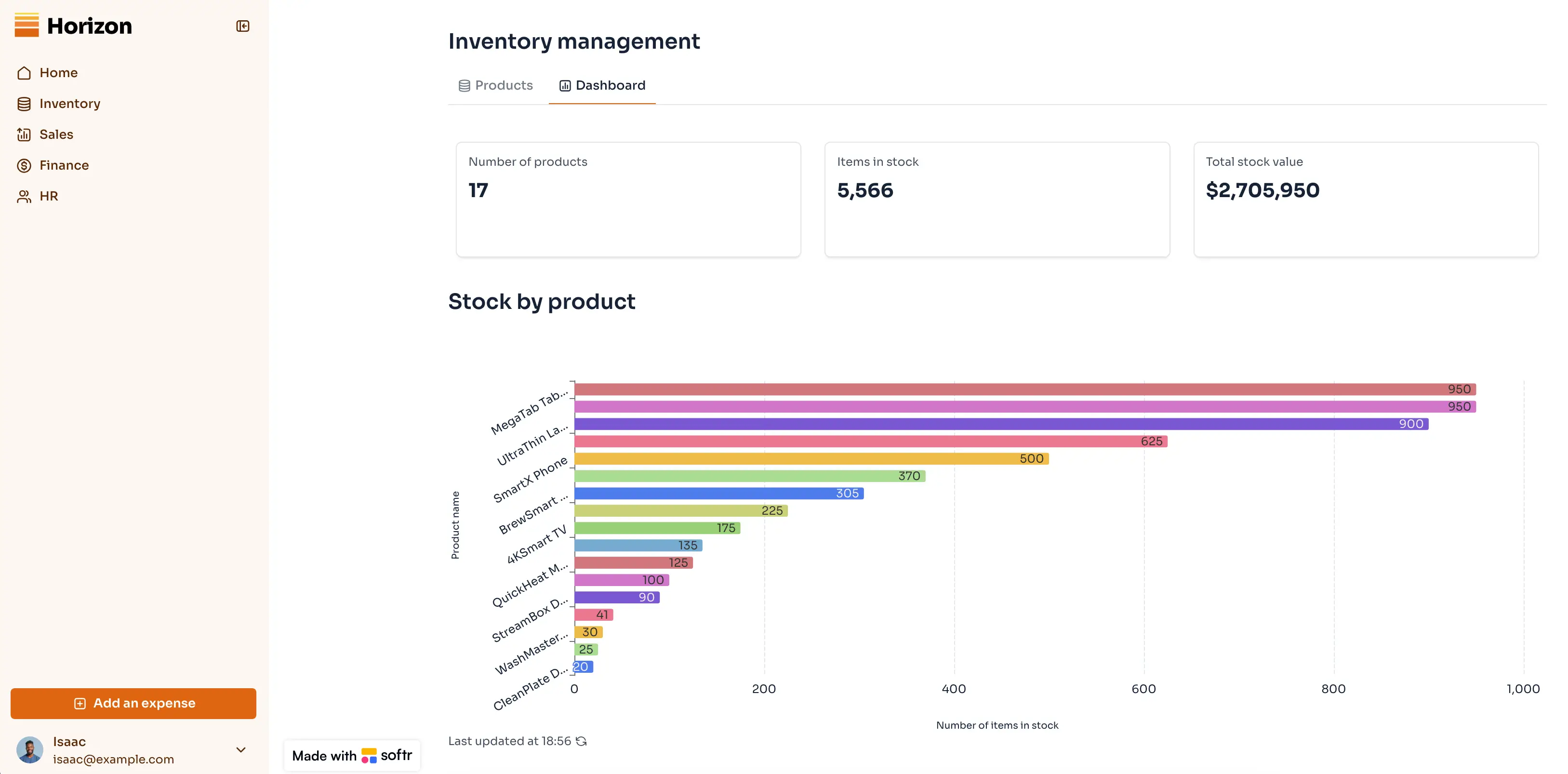
- Inventory management with dynamic dashboards: Store, track, and update product stock levels with a dashboard that highlights key inventory trends. Avoid manual upkeep for internal reporting with real-time views for stock levels, workflow status, and finances directly synced with your data.
- Document & invoice handling: Upload contracts, attach files, manage documents, and collect payments directly inside your Softr app by connecting to Stripe, PayPal, or QuickBooks.
- Vibe Coding Block: Generate app layouts, dashboards, pipelines, and custom tools using AI prompts.
- AI Co-builder: Describe the database or workflow you want in plain English, and Softr generates the structure for you. Use the co-builder to create systems quickly, then customize them with the visual editor to match your process.
- Search, filtering, and AI-powered insights: Quickly find parts, orders, suppliers, or production issues using advanced filters. Use Ask AI to query your system in plain English (like “Which work orders are delayed?”) and get instant, accurate answers.
- Access on any device: Allow users to access the platform responsively from any device. Also, turn your app into a downloadable mobile app with Softr's PWA feature.
- 24/7 support + active community: Access live chat support and an active builder community for help, best practices, and inspiration.
Softr pricing
Softr has predictable pricing tiers and a generous free plan so you can try before signing up.
- Free: unlimited apps, with access to Softr Workflows and Softr Databases, 5 app users, and 5,000 records
- Basic ($19/month): unlimited apps with 42+ integrations, Team: 5 + Client: 5 app users, custom domain, and Softr API & MCP
- Pro ($99/month): unlimited apps with 45+ integrations and custom code, Team: 10 + Client: 50 app users, removing Softr branding, advanced permissions, calling external APIs, and e-signature
- Business ($329/month): unlimited apps with 52+ integrations, Team: 30 + Client: 100 app users, 1M records, and two-factor authentication
- Enterprise (custom pricing, contact sales): SSO, dedicated success manager, and tailored onboarding
Why it’s better than Fishbowl pricing
Fishbowl pricing combines licenses, modules, and implementation effort. Softr has a flat-tiered pricing model: you start free, pay primarily for users, and avoid upfront implementation costs. This makes it easier to experiment, iterate, and scale your system without committing to expensive, rigid ERP contracts early.
Who Softr is best for
Softr is best for operations-led teams that:
- Have outgrown Fishbowl-style inventory tools
- Need inventory tightly connected to internal workflows, approvals, and reporting
- Want ERP-like structure without ERP-level rigidity or cost
- Expect processes to change and don’t want to rebuild their system every time
Typical scenarios include construction, field services, professional services, and growing SMBs managing inventory alongside broader operational workflows.
Verdict: Softr vs Fishbowl
Softr is a stronger choice than Fishbowl for teams that need control and adaptability over their inventory workflows. Fishbowl works best when your processes match its assumptions; Softr works best when they don’t. With Softr, you have to think upfront about how to run your system. As a result, you get one that evolves with your business instead of holding it back.
[.blog-callout]
✨ Urban’s Landscaping Group replaced a mix of spreadsheets, Trello boards, and legacy tools with a centralized ERP built on Softr. By consolidating project data, employee workflows, client access, and financial dashboards into one system, they cut admin time and improved cross-team visibility. It made inventory, scheduling, and reporting easier for operations and clients alike.
[.blog-callout]
2. Acctivate Inventory Software — best mid-market inventory alternative
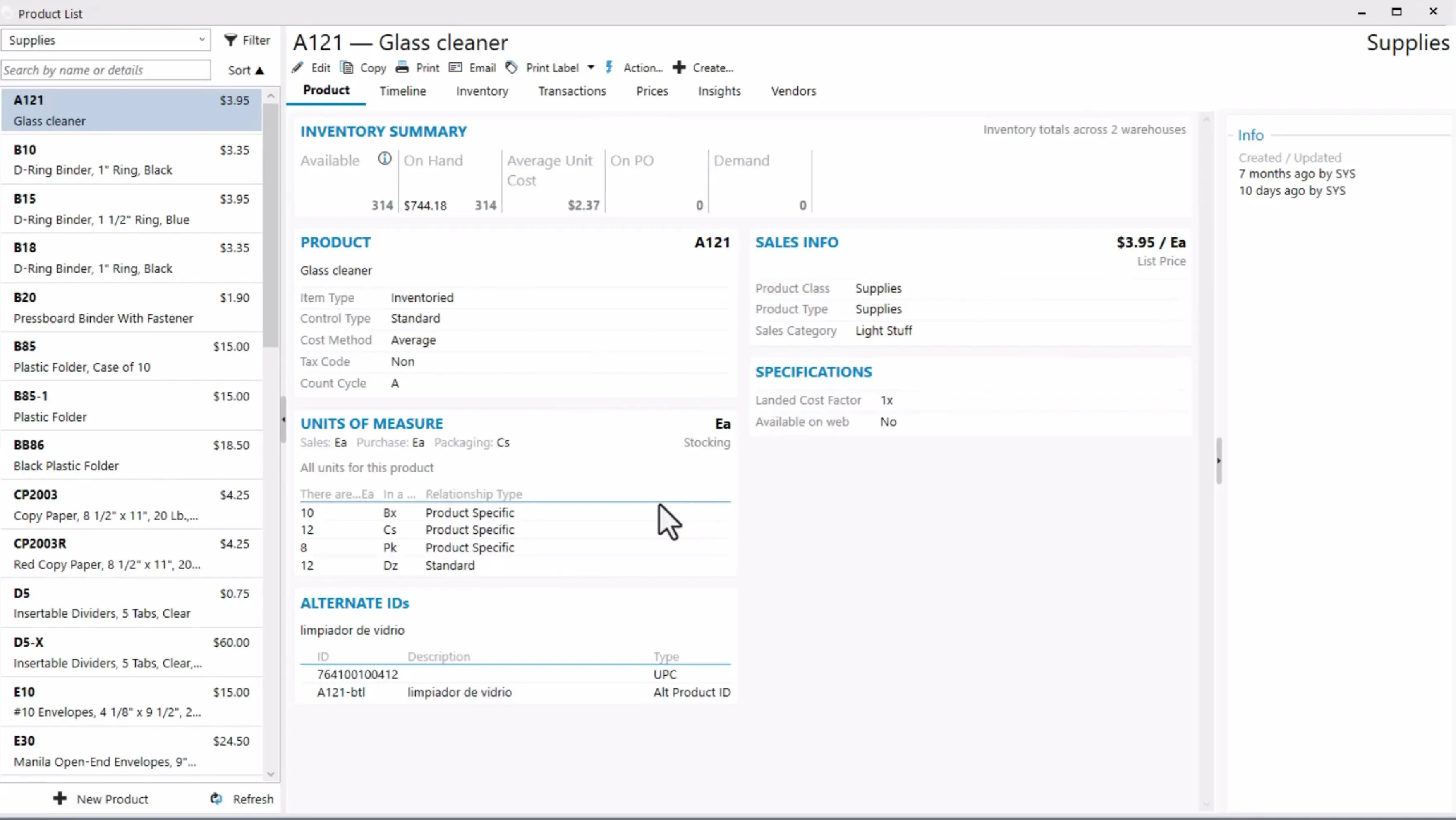
Acctivate is a great inventory and order management platform built to help growing product-centric businesses centralize stock, purchasing, warehouse workflows, and fulfillment — all while keeping financials in sync with QuickBooks. It’s designed for companies that have outgrown basic inventory tracking but aren’t ready for full enterprise ERP systems, offering multi-location control and real-time visibility across operations.
Acctivate pros and cons
Pros:
- Deep inventory and warehouse control: Manage real-time inventory, multi-location stock, lot/serial tracking, barcoding, and kitting across multiple warehouses.
- Seamless QuickBooks integration: Syncs inventory, orders, and financial data with QuickBooks (Desktop and Online), eliminating reconciliation headaches and reducing manual entries.
- Flexible configuration for diverse workflows: Users appreciate that Acctivate lets you tailor fields, workflows, and modules to fit different business processes and industry needs — not just one fixed setup.
- Broad order and fulfillment support: Acctivate manages sales order processing from quote through shipment, with tools for backorder control, shipping tracking, and customer history tied directly to inventory workflows.
Cons:
- Steeper learning curve: The depth of features and configuration options can require formal training and dedicated administrative time.
- Support and custom reporting needs: Some users report that reporting customization and advanced workflows may require additional effort or technical support.
Acctivate key features
- Multi-warehouse inventory tracking: Real-time control of stock across unlimited warehouse locations, with lot, serial, and barcoding support.
- Order and fulfillment management: Centralized processing of online, offline, and EDI orders with automation options.
- Purchasing and reorder automation: Purchase order creation and automated replenishment based on stock levels.
- Integration with QuickBooks: Two-way sync ensures inventory and financials stay accurate and aligned.
Acctivate pricing
Acctivate typically uses a perpetual license plus annual subscription model. Exact pricing is available on request. Packages vary based on modules and user count.
Who Acctivate Inventory Software is best for:
Acctivate is ideal for small to mid-sized distributors, manufacturers, and multi-channel sellers that:
- Rely on QuickBooks for accounting but need stronger inventory control
- Manage inventory across multiple warehouses and channels
- Want order, purchasing, and fulfillment workflows under one roof
Use cases include wholesale distribution, light manufacturing, and ecommerce brands scaling beyond spreadsheets and basic stock tools.
Verdict: Acctivate vs Fishbowl
Acctivate is a compelling mid-market inventory alternative to Fishbowl when you need centralized, real-time visibility into stock, order, and warehouse workflows with tight QuickBooks alignment. It delivers deep inventory functionality and multi-location support, but can require more upfront setup and training than cloud-native alternatives. For teams that rely on QuickBooks and need advanced fulfillment and tracking features without full ERP complexity, Acctivate is a strong fit.
3. inFlow Inventory — best for simple, intuitive inventory tracking for SMBs
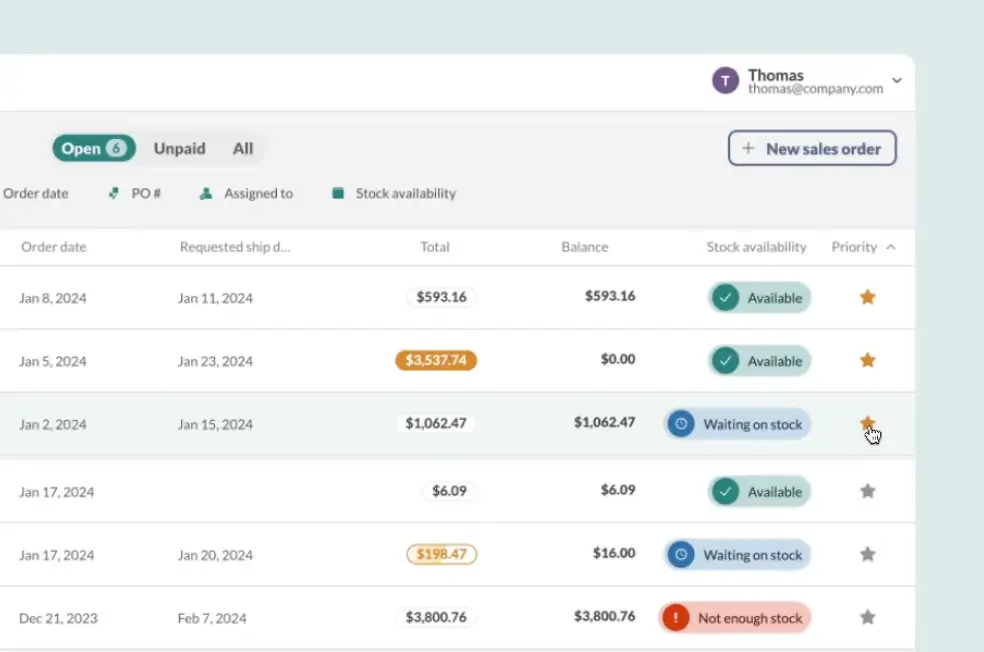
inFlow Inventory is a cloud-native, all-in-one inventory and order management platform designed for small to mid-sized businesses. It brings real-time stock visibility, purchasing, sales orders, barcode workflows, and multi-location control into one system that’s easy to learn and manage, making it a popular choice for teams moving off spreadsheets or basic solutions. inFlow also integrates with ecommerce, shipping, and accounting systems to centralize operations without overwhelming complexity.
inFlow Inventory pros and cons
Pros:
- Easy to adopt and use: Many users highlight inFlow’s intuitive interface and fast onboarding, allowing teams to get up and running with minimal training.
- Broad core inventory features: Real-time stock tracking, barcode scanning, reorder alerts, multi-location support, and order fulfillment tools simplify day-to-day operations.
- Strong integrations: Syncs with ecommerce platforms, accounting tools like QuickBooks Online or Xero, and more than 90 services to keep sales and inventory in harmony.
Cons:
- Advanced reporting and customization gaps: While reporting and dashboards are solid for many SMB workflows, deeper custom analytics may require workarounds or exports.
- Mobile experience limitations: Users note that the mobile app works but isn’t as full-featured or performant as the desktop/web experience.
inFlow Inventory key features
- Real-time inventory tracking: See stock levels, movements, and history across locations instantly.
- Order and fulfillment workflows: Manage sales, purchase orders, picking, packing, and shipping in one system.
- Barcode support: Generate, scan, and print barcode labels to streamline warehouse and stock workflows.
- Multi-channel integrations: Connect inventory with Shopify, WooCommerce, marketplaces, and accounting systems like QuickBooks or Xero.
inFlow Inventory pricing
inFlow uses tiered flat-rate plans based on team size, order volumes, and feature needs — plus a free 14-day trial.
- Entrepreneur — $129/month (billed annually): Basic technical support included.
- Small Business — $349/month (billed annually): Adds user access rights and Showroom access.
- Mid-Size — $699/month (billed annually): Ideal for growing operations.
- Enterprise — Custom pricing: For larger teams (25+ members)
Who inFlow Inventory is best for:
inFlow is ideal for small and mid-sized teams that:
- Need centralized inventory visibility and order workflows without complexity
- Want a solution that’s quick to adopt and easy to maintain
- Run inventory across multiple channels or locations
- Want integrations with ecommerce, shipping, or accounting for smoother operations
Typical users include wholesale distributors, boutique manufacturers, retail stores, and ecommerce brands that need real-time control without ERP-level overhead.
Verdict: inFlow Inventory vs Fishbowl
inFlow Inventory is a great choice compared to Fishbowl when your priority is simplicity paired with strong core tracking features. It delivers essential stock, order, and barcode management in an intuitive interface with modern integrations, ideal for SMBs. The trade-off is that it doesn’t offer the depth of advanced enterprise features found in bigger platforms, and some custom analytics may require workarounds. For teams leaving spreadsheets or legacy tools behind, inFlow hits the sweet spot of usability, capability, and predictable pricing.
4. Zoho Inventory — best for lean, cloud-based stock and order management
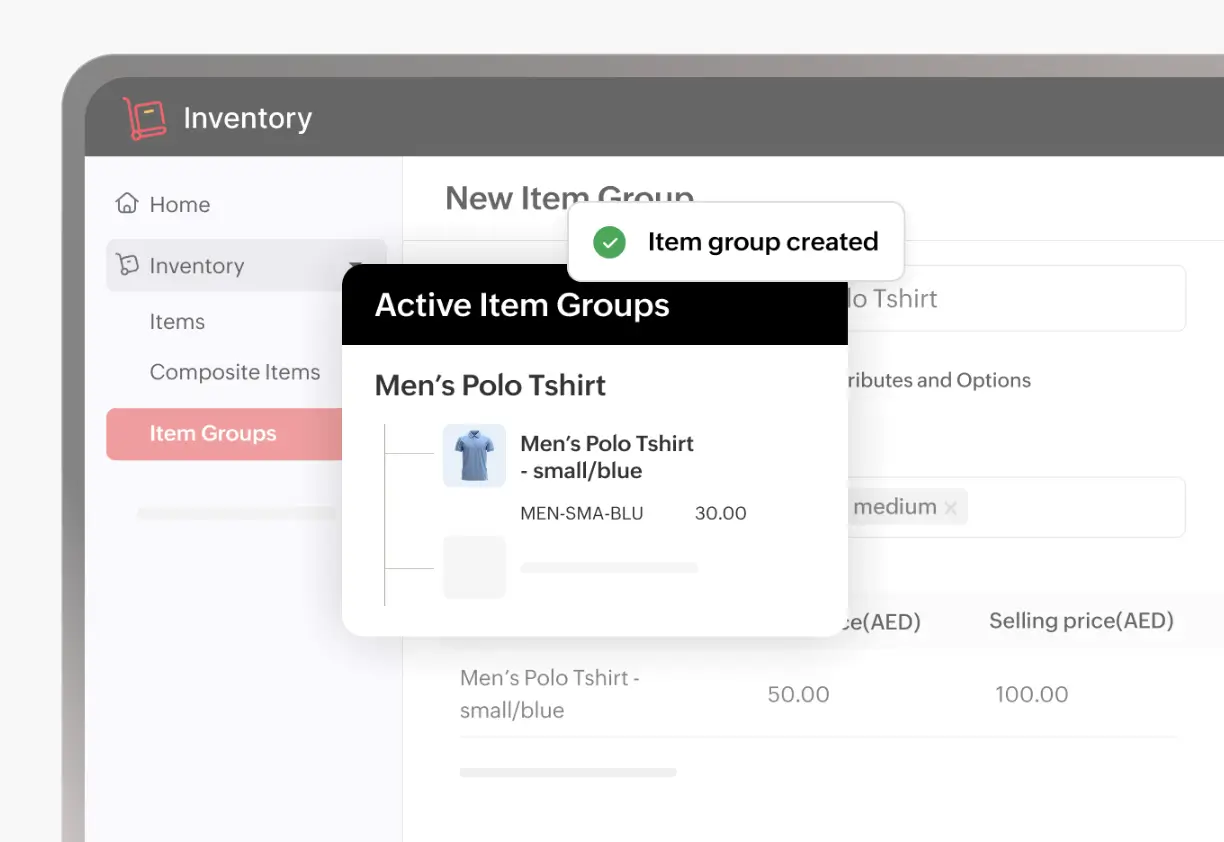
Zoho Inventory is a cloud-native inventory and order management solution that helps small to mid-sized businesses centralize stock levels, sales orders, and fulfillment across channels. It’s built to simplify real-time inventory tracking, multi-warehouse control, and e-commerce integrations. All of the above are due to a modern interface that’s accessible on any device and integrates smoothly with sales, shipping, and accounting tools.
Pros and cons of using Zoho Inventory
Pros:
- Cloud-first and easy to adopt: Designed for lean operations, Zoho Inventory provides a user-friendly, modern interface that’s simple to set up and manage without heavy IT overhead.
- Strong multichannel and sales integrations: Sync stock and orders across ecommerce platforms like Shopify, Amazon, and marketplaces while connecting to shipping carriers and accounting tools.
Cons:
- Not feature-rich for complex operations: Advanced reporting and deep automation may require add-ons or integrations outside the core product.
- Mobile functionality is limited: Some users report that mobile experiences are less robust compared to the desktop web app.
Zoho Inventory key features
- Real-time inventory tracking: Monitor stock levels, movements, and status across multiple warehouses.
- Order management & fulfillment: Manage sales and purchase orders, packing, shipping, and tracking in one system.
- Multichannel selling: Sync inventory and orders across ecommerce platforms and marketplaces.
- Barcode & warehouse tools: Use barcode scanning, batch tracking, and warehouse transfers to improve accuracy.
Zoho Inventory pricing
Zoho Inventory offers tiered plans with a free forever plan and 14-day free trial for paid tiers.
- Standard — $29/month: core inventory features
- Professional — $79/month: adds batch & serial tracking, vendor portal
- Premium — $129/month: adds automation, barcodes, stock counting
- Enterprise — $249/month: adds Zoho Analytics and multi-currency support
Who Zoho Inventory is best for:
Zoho Inventory is ideal for small and mid-sized teams that:
- Need centralized inventory, orders, and fulfillment in one cloud platform
- Sell across multiple channels (online stores, marketplaces) and want synchronized stock
- Want a lean, affordable system without ERP-level complexity
Typical users include ecommerce retailers, boutique distributors, and multichannel sellers who want real-time visibility and automation without heavy infrastructure.
Verdict: Zoho Inventory vs Fishbowl
Zoho Inventory excels as a Fishbowl alternative for teams prioritizing cloud-first simplicity and multichannel order workflows. It delivers real-time stock tracking and robust integrations at a lower price point and with easier onboarding than many traditional tools. The trade-off is that it doesn’t offer deep ERP or manufacturing planning capabilities, so it’s best for teams focused on core inventory and fulfillment rather than complex operational logic.
5. Odoo Inventory — best for flexible, modular ERP + inventory
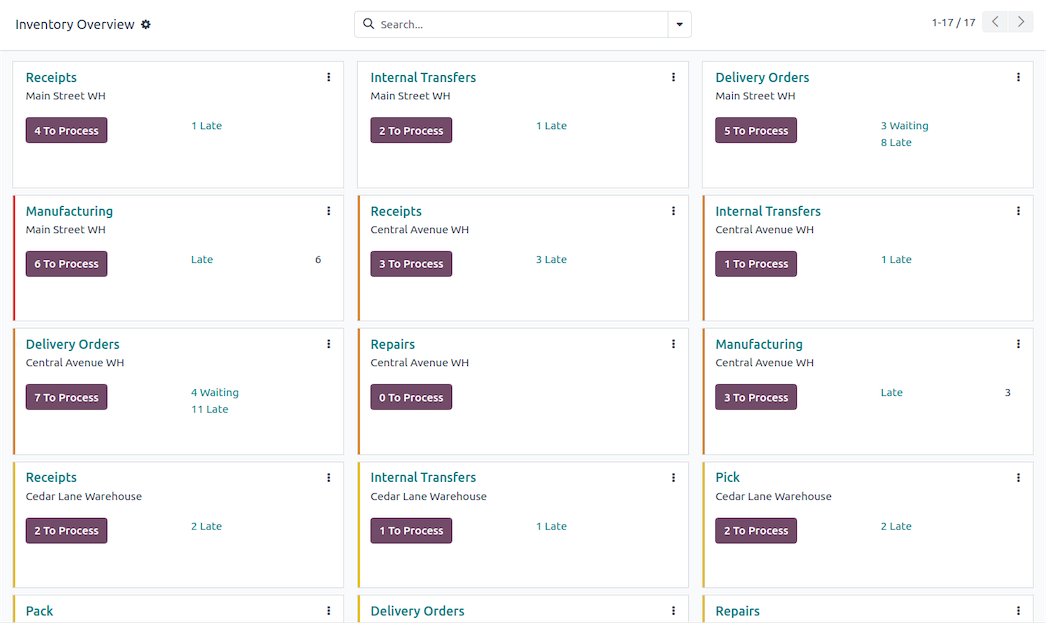
Odoo Inventory is part of the broader Odoo ERP ecosystem, offering a modular and extensible approach to inventory and warehouse management that sits within a unified business suite. Its inventory module provides real-time stock tracking, multi-warehouse support, automation, and advanced fulfillment workflows, while seamlessly connecting to sales, purchasing, accounting, CRM, and manufacturing when you need broader ERP functionality. This makes it a strong fit for teams that want one platform for inventory + operations without locking into a monolithic ERP.
Pros and cons of using Odoo Inventory
Pros:
- Real-time, modular inventory control: Track stock, manage transfers, and automate replenishment across multiple warehouses with flexible routes and rules.
- Part of an all-in-one ERP suite: Inventory integrates natively with Odoo’s sales, purchasing, accounting, manufacturing, and CRM modules for a centralized business system.
Cons:
- Requires configuration and planning: Because Odoo Inventory is part of a larger ERP suite, initial setup and module selection can take planning and implementation effort.
- Pricing can vary by module and users: Licensing and total costs depend on the number of apps and users, and optional implementation costs may add up.
Odoo Inventory key features
- Real-time inventory tracking: Monitor stock levels, movements, and availability across locations.
- Multi-warehouse management: Configure multiple warehouses, automate transfers, and manage warehouse routes.
- Automation and intelligent workflows: Automate replenishment, barcode scanning, and picking strategies like batch or wave picking.
- ERP-wide integration: Connect inventory with sales, purchasing, accounting, CRM, and manufacturing modules for unified operations.
Odoo Inventory pricing
Odoo Inventory uses a per-user, per-month pricing model that varies based on modules selected and deployment type (cloud/SaaS or on-premise). A free community edition is available, and paid cloud plans often start as low as ~$24.90/user/month for single apps, with tier increases as you add more apps or users.
Who Odoo Inventory is best for:
Odoo Inventory suits small to mid-sized businesses and growing enterprises that want to unify inventory with other core functions, such as sales, accounting, purchasing, manufacturing, and CRM. It’s especially useful when inventory workflows are tightly linked to broader business processes and you value a single system of record across teams.
Verdict: Odoo Inventory vs Fishbowl
Odoo Inventory is a strong alternative to Fishbowl when you want a modular, scalable inventory system embedded in a full business suite. It delivers deep control over stock and warehouse operations and lets you expand into ERP capabilities without switching platforms. The trade-off is that setup and pricing depend on how many modules and users you need, so it requires planning compared with standalone inventory tools.
6. ERPAG — best cloud ERP for small to mid-sized manufacturers
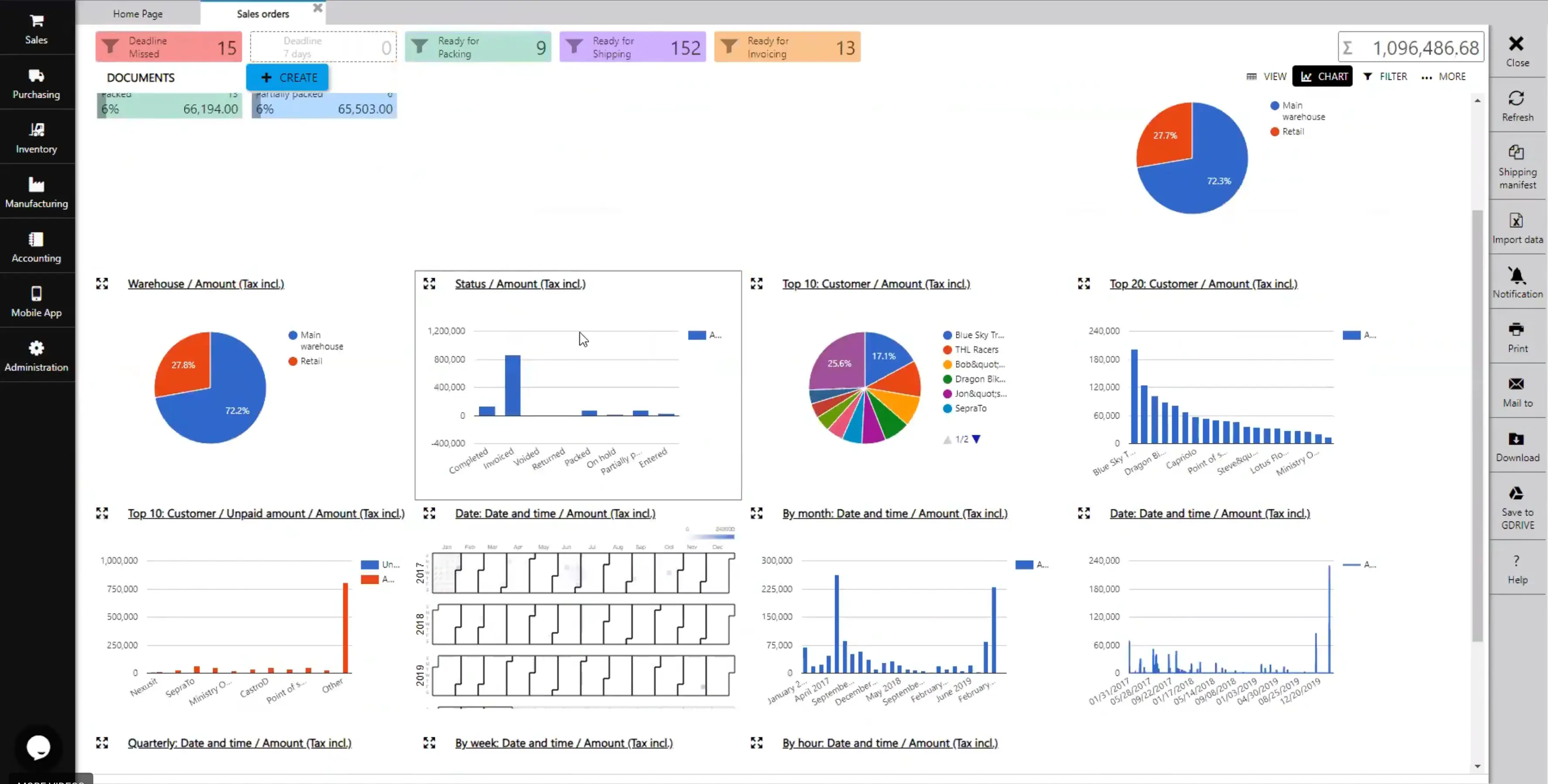
ERPAG is a cloud-native ERP/MRP platform designed to centralize inventory, manufacturing, sales, purchasing, and financials into a single system for small and mid-sized businesses. It combines real-time inventory and warehouse management with built-in production planning, multi-warehouse control, order fulfillment, and integrations with ecommerce and accounting platforms — making it a strong option for manufacturers and product-centric teams that want scalable ERP features without heavyweight enterprise pricing.
Pros and cons of using ERPAG
Pros:
- Comprehensive manufacturing and inventory control: Handles multi-warehouse stock, serial/lot tracking, barcoding, BOMs, kitting, and production work orders in one platform.
- Cloud-native, real-time operations: Stock, orders, and fulfillment update across systems instantly and can sync with ecommerce, POS, and accounting like QuickBooks or Xero.
Cons:
- Learning curve for deeper features: Because it covers ERP, MRP, inventory, POS, and more, new users may need time to explore all capabilities.
- Interface and integration gaps: Some reviewers note that shipping integrations and certain advanced workflows can feel less polished than larger ERP competitors.
ERPAG key features
- Inventory & warehouse management: Track multi-warehouse stock with serial/lot control, barcode support, and automated reordering.
- Manufacturing and BOM support: Manage work orders, bills of materials, and shop-floor operations.
- Sales & order fulfillment: Centralize customer orders, packing, shipping, and ecommerce sync.
- Accounting integrations: Sync data with tools like QuickBooks and Xero for unified financials.
ERPAG pricing
ERPAG offers subscription plans based on features and usage.
- Basic: ~$49/mo (5 users included; inventory, sales, purchasing, manufacturing)
- Professional: ~$99/mo (additional integrations, automation)
- Advanced: ~$199/mo (full ERP features, customizations, customer portal)
- All plans include 5 users; additional users ~$9/mo each.
Who ERPAG is best for:
ERPAG is ideal for small to mid-sized manufacturers and product-centric businesses that need:
- Centralized inventory, order, and manufacturing control
- Cloud-based ERP functionality without enterprise complexity
- Built-in production planning and multi-warehouse workflows
It’s especially strong for teams balancing inventory needs with shop-floor control and broader operational processes.
Verdict: ERPAG vs Fishbowl
ERPAG is a good alternative to Fishbowl when you want a cloud ERP with both inventory and manufacturing capabilities in one platform. It delivers deep stock control and production features with real-time visibility and integrations — often at a lower price point and with more built-in ERP logic than basic inventory tools. The trade-off is a bit more complexity and setup than simpler inventory systems, but for manufacturing teams or businesses growing beyond stock-only needs, ERPAG can replace multiple point solutions with one cohesive system.
7. Ply — best for field service and trade teams needing real-time truck & job-site inventory
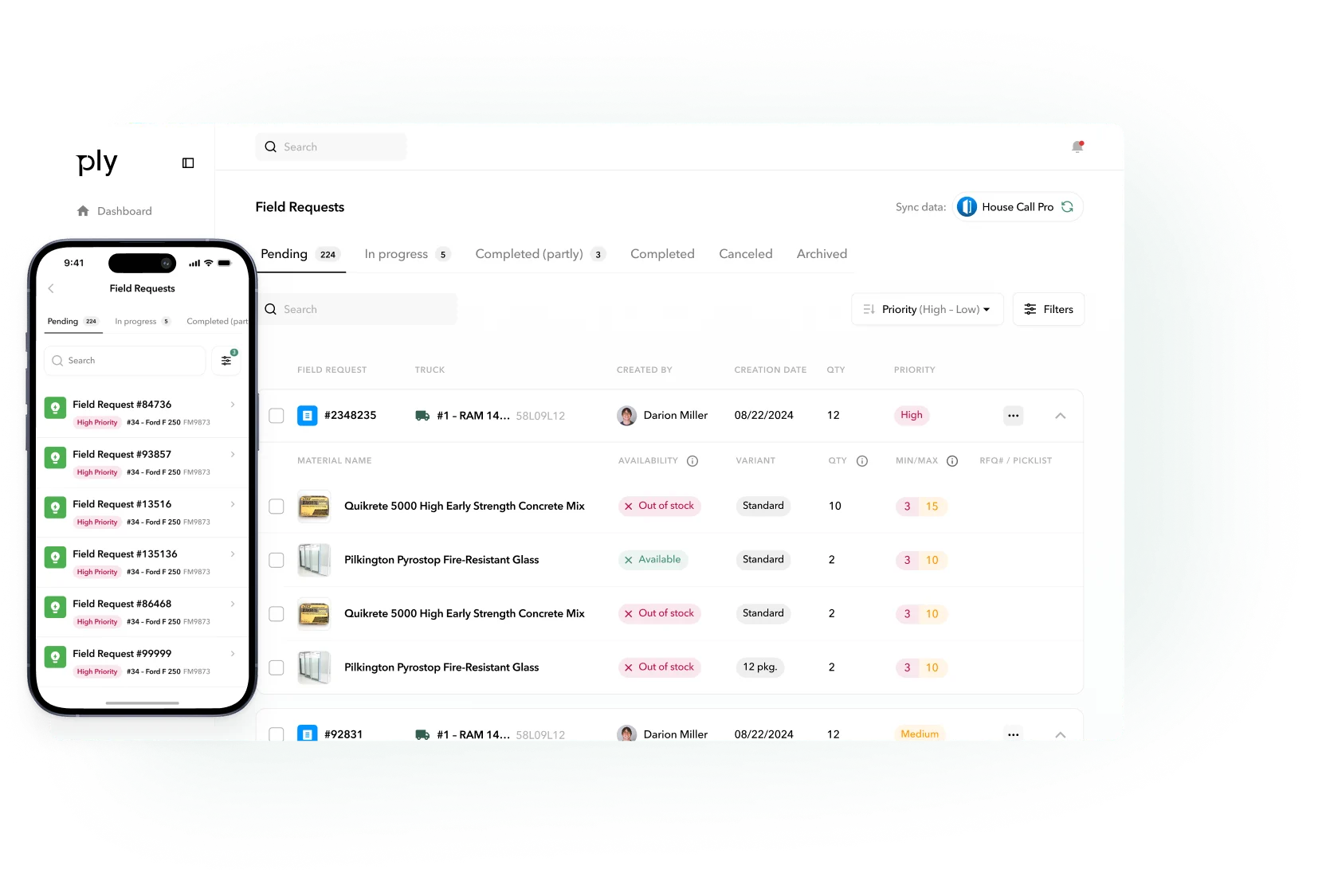
Ply is an AI-powered inventory and purchasing platform built specifically for trade and field service businesses, giving teams real-time visibility into stock across warehouses, service vehicles, and job sites. It simplifies purchasing, automated reordering, barcode scanning, and material tracking — all while integrating directly with common field service and accounting systems like ServiceTitan, Housecall Pro, Jobber, and QuickBooks.
Pros and cons of using Ply
Pros:
- Real-time visibility across trucks, warehouses, and jobs: Track exactly what parts and materials are available where your team needs them, reducing guesswork and last-minute supply runs.
- Smart replenishment and purchasing: Automated low-stock alerts, usage-based reorder points, and price comparisons save money, reduce waste, and free up administrative time.
Cons:
- Niche focus: Built specifically for the trades and field service — features may be less relevant for pure e-commerce or traditional warehouse-only operations.
- Specialized workflows: Powerful for contractor and service teams, but may lack advanced ERP modules like financials or production planning outside field use.
Ply key features
- Centralized real-time inventory tracking: See stock levels across service vehicles, warehouses, and job sites instantly.
- Mobile barcode scanning & kits: Scan parts on the go and manage kits or assemblies tied to jobs quickly.
- Automated replenishment: Usage-based min/max thresholds and automated purchase order creation streamline procurement.
- Field service integrations: Sync inventory and materials with tools like ServiceTitan, Housecall Pro, Jobber, QuickBooks, and Sage Intacct for unified workflows.
Ply pricing
Ply typically offers a cloud subscription model with a demo available on request. Pricing may vary by team size, integrations, and feature tiers.
Who Ply is best for:
Ply is ideal for field service and trade businesses that:
- Manage inventory across warehouses, job sites, and service vehicles
- Want real-time visibility into parts and materials in the field
- Need automated purchasing and replenishment tied to job schedules
- Rely on field service tools like ServiceTitan, Housecall Pro, Jobber, or QuickBooks
Common users include HVAC, plumbing, electrical, and general contractor teams juggling parts across multiple locations.
Verdict: Ply vs Fishbowl
Ply is a stronger fit than Fishbowl for teams that need real-time, mobile-centric inventory visibility and automated purchasing in the field. While Fishbowl excels at fixed warehouse and manufacturing workflows, Ply focuses on the unique challenges of service fleets and job sites — tying stock, purchasing, and materials to work orders and field service ecosystems. The trade-off is that Ply’s specialization makes it less broad than traditional ERP systems, but far more powerful for the trade and service use case.
Choose the right Fishbowl alternative for your team
Fishbowl still works for inventory-heavy teams with stable, defined processes. But for many growing businesses, its rigidity, setup overhead, and dated user experience can start to slow things down.
The best Fishbowl alternatives are easier to adopt, more flexible to customize, and cheaper to scale. Some tools are strong on core inventory tracking. Others connect stock with orders, workflows, and real-time reporting without weeks of setup or rigid structure.
If you’ve outgrown Fishbowl but don’t want to replace it with another inflexible system, Softr is the most logical next step. Centralize your existing inventory data, build tracking interfaces tailored to your warehouse operations and fulfillment workflows, and scale from basic stock management to a full inventory and order management solution
Try Softr for free to get started.