Peek behind the curtain of the average event and you might be surprised at how many are run with Google Sheets, email, and a calendar app. For small events, that’s often enough.
But many event planners jump between spreadsheets, ticketing and registration apps, vendor management tools, project management apps, and an attendee-facing events platform. That’s usually where the search for an all-in-one events management platform starts. (As one event planner put it, ”Juggling 10 platforms is driving me crazy.”)
In this guide, we’ve rounded up the best event management platforms so you can compare features, pricing, and flexibility to find the right one for your team.
Best event management software at a glance
| Tool | Best for | Features | Pricing |
|---|---|---|---|
| Softr | Building custom event management systems with an AI-Co Builder | - Custom branded apps for attendees, speakers, exhibitors, vendors, and staff with different levels of access - Native database to store events data and real-time sync with 21+ data sources - Automated workflows - AI-powered building - Granular permissions - White-labeled branding - Built-in AI chatbot | Free plan; paid plans start at $19/month (billed annually) with no per-registration or per-user fees |
| Eventbrite | Simple ticketing and registration with public marketplace exposure | - Easy setup - Marketplace with 90 million monthly users - Mobile scanning - Social integration | 3.7% + $1.79 fee per paid ticket (not including payment processing fees); No fees for free events |
| Cvent | High-volume enterprise events with venue sourcing needs | - Venue RFP tools - Vendor sourcing - Contract management - QR-based lead capture - Mobile event app - Compliance features | Custom annual contracts; pay-as-you-go option costs $3.95/registrant + 1.95% platform fee (not including payment processing fees) |
| Whova | Conferences and trade shows focused on mobile engagement | - Mobile event app with personalized agendas - Attendee networking, messaging, and gamification - Speaker and abstract management - QR code lead retrieval | Custom per-event pricing; per-registrant fees cost 3.0% + $0.99 (not including payment processing fees) |
| Bizzabo | B2B conferences focused on lead capture and attendee behavior tracking | - All-in-one event operating system - Unlimited events and unlimited registrations - SmartBadges for engagement and lead capture - Branded website and mobile app - Email marketing | Starts at $17,999 per year for three users ($499/month per user, only annual billing available) |
| Zoom Events | Virtual events and online summits | - Uses familiar Zoom video infrastructure - Multi-session events with agendas and breakout rooms - Q&A, polling, and recording are built in | Starts at $124.17/month for up to 100 attendees (billed annually); Also requires a Zoom Workplace Pro subscription ($13.33/month per user billed annually) |
What to look for in an event management platform
As you upgrade from a spreadsheet to a dedicated event management tool, you’ll encounter four broad categories: SMB-friendly apps, enterprise platforms, ticketing-focused tools, and custom platforms.
Picking the right platform depends on factors like:
- How many events you run per year
- Whether those events are virtual, hybrid, or in-person
- What event registration and check-in features you need
- How many attendees, speakers, and vendors you have
- Whether you need to manage venue resources like rooms and equipment
- Whether you want to integrate your existing tools (like CRM and project management apps)
- What reporting features you need
For big corporate conferences with thousands of registrants, large venues, attendee networking functions, and lots of speakers and vendors, it can sometimes make sense to invest in an off-the-shelf enterprise event management app.
But many businesses fall into an underserved middle: they’ve outgrown spreadsheets, but traditional event management apps are too rigid, complex, and expensive.
No-code tools are a good fit for businesses that need flexibility and customization. You can use AI and vibe coding to spin up event apps quickly, then rely on structured databases, automations, and granular access control to manage registrations, attendees, schedules, internal coordination, and reporting at scale. You can even sync data from existing tools, like project management apps and CRMs, to provide a unified events management interface without changing your entire process.
1. Softr — best for building secure event management systems with AI
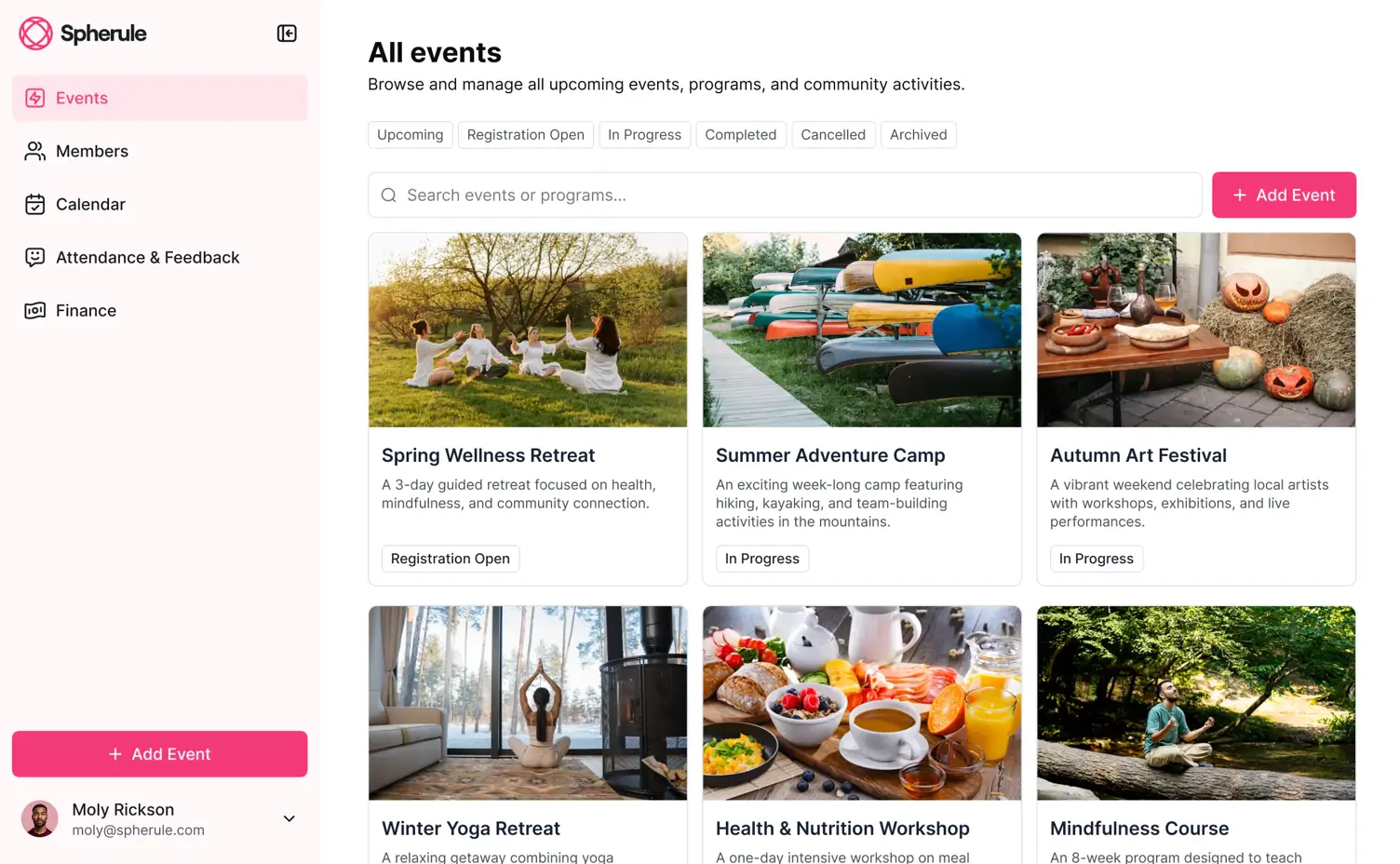
Softr is an AI-native platform for teams who've outgrown spreadsheets but don’t want the high costs or rigid layout of traditional event management platforms. Unlike platforms designed for one aspect of event management, Softr lets you create a custom event management system that handles registrations, attendee data, scheduling, internal coordination, and reporting all in one place.
Just describe what you need, and Softr’s AI Co-Builder creates the database for all your events data in minutes, along with the app and business logic all connected. Automate workflows across your stack and connect to your 3rd-party tools so registrations, attendee updates, team coordination, and post-event reporting all happen automatically.
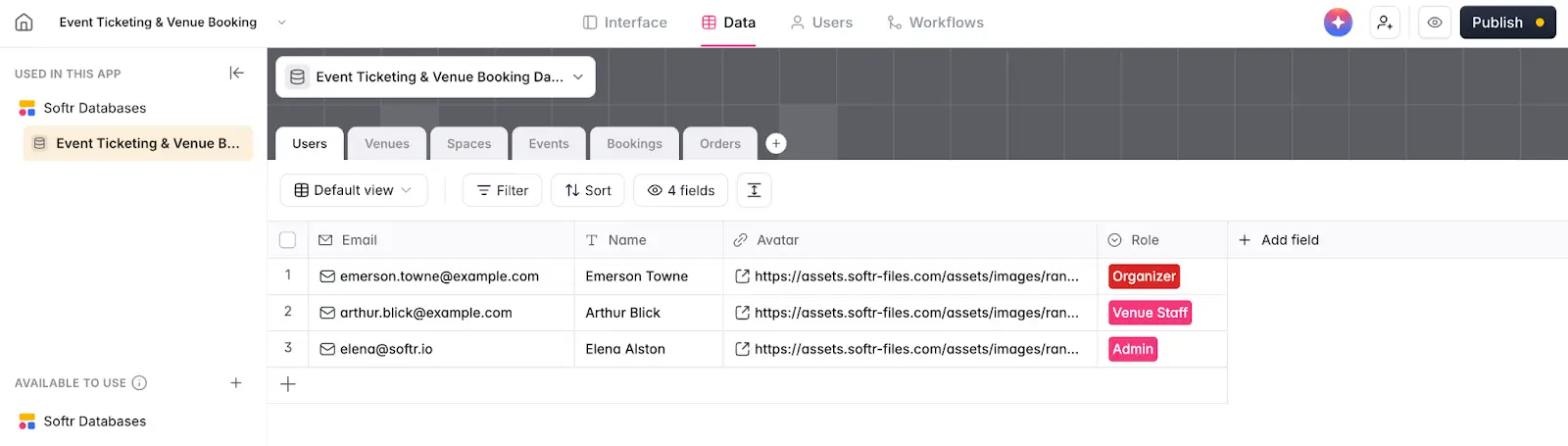
You still get full visual control over layout, branding, access, and permissions: everything you need for guests, organizers, and vendors to access event details or manage registrations. (You can also start with a template to get the ball rolling.)
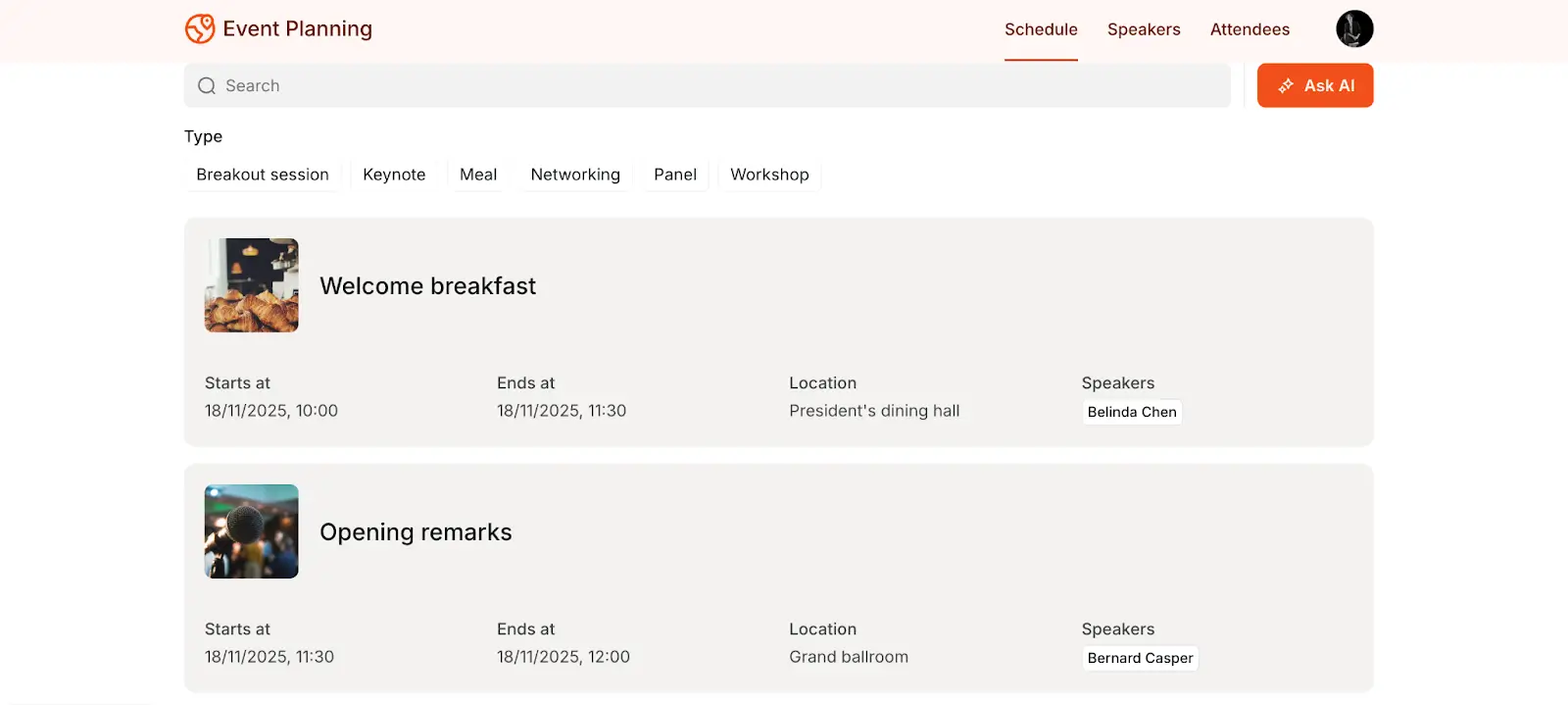
Unlike off-the-shelf events platforms, Softr is infinitely flexible. It adapts to how your events actually run, whether you're managing conferences, trade shows, or hybrid seminars. You can save time by automating event management activities like registrations, confirmations, reminders, follow-ups, data syncing, and reporting. As your needs change, you can modify your app without vendor lock-in or platform constraints.
Softr pros and cons
Pros:
- Build exactly what you need by creating interfaces, databases, and custom workflows that match how your events actually run
- One system for all event stakeholders with separate branded portals for attendees, speakers, exhibitors, vendors, and staff
- Transparent flat-rate pricing with unlimited events and no per-attendee or per-user charges
- Connects to your existing tools through real-time two-way sync with 21+ data sources so you don't have to rebuild everything
- Fast to launch with AI and easy to adapt without developers; you can generate complete event systems in minutes, then customize as your events evolve
- Fully white-labeled with your logo, colors, fonts, and custom domain
Cons:
- Requires more upfront design work than plug-and-play solutions, though you can spin up apps and iterate quickly with AI
- Not designed for large-scale attendee engagement features like networking or gamification for thousands of conference participants
Softr best features
- AI app builder: Describe your ideal event management app and the AI Co-Builder will generate the interface, database, and app logic in minutes.
- Centralized event data management: Keep all event information in one place, including registrations, attendees, speakers, schedules, vendors, and documents. Choose what data to track and control which users can view or edit it.
- Registration forms: Use conditional forms to register new members or event attendees and gather all the info you need.
- Payment processing integrations: Enable attendees or clients to securely pay for event fees or services through integrated payment options such as Stripe or PayPal.
- Roles and permissions: Provide planners, coordinators, attendees, and staff with dashboards tailored to their event roles, responsibilities, and event information.
- Built-in AI assistant: Add conversational AI so attendees can ask questions in natural language: "When is the keynote?", "Who's speaking about sustainability?", "Where's the networking lunch?" AI queries your live event data and provides instant answers without users navigating complex menus.
- Custom views and dashboards: include tables, lists, detail views, calendars, and charts to track schedules, tasks, vendors, timelines, and key event metrics in one place.
- Collaboration and file management: Includes built-in file sharing, comments, and status updates so teams can manage documents, communicate, and stay aligned without switching tools.
Pricing
- Free: Unlimited apps, with access to Softr Workflows and Softr Databases, 5 app users, 5 AI credits, and 5,000 database records
- Basic: $19/month for unlimited apps with 42+ integrations, Team: 5 + Client: 5 app users, 10 AI credits, 50K records
- Pro: $99/month for unlimited apps with 45+ integrations and custom code, Team: 10 + Client: 50 app users, 50 AI credits, and 500K records
- Business: $329/month for unlimited apps with 52+ integrations, Team: 30 + Client: 100 app users, 100 AI credits, and 1M records
- Enterprise (custom pricing, contact sales)
👉 Start with a free plan to build your first event system, or browse event management templates to launch in minutes.
2. Eventbrite — best for simple ticketing and registration

Eventbrite is a ticketing platform designed for fast setup and broad event discovery. If you're running community events, entertainment shows, or simple public gatherings where speed and event visibility matter more than anything else, Eventbrite gets you live quickly with minimal setup.
Eventbrite's main strength is its marketplace. When you publish an event, it appears on Eventbrite's discovery platform where 90 million monthly users browse events. You get simple registration forms, social media integration, and mobile ticket scanning. For free events, there are no fees at all.
Since Eventbrite doesn't offer tools for internal event operations, complex attendee management, or custom workflows, it’s best suited for straightforward ticketing needs. Businesses often outgrow it (or supplement it with another app) when they need more than basic registration, like managing speakers and vendors, coordinating staff, or building branded attendee-facing apps.
Eventbrite pros and cons
Pros:
- No platform fees for free events
- Fast setup; you can get events live in minutes
- Marketplace exposure to 90+ million monthly users for event discovery
- Mobile ticket scanning through iOS/Android apps for quick check-ins
- Reserved seating and timed entry ticketing
Cons:
- High service fees for paid events totalling 3.7% + $1.79 service fee (on top of standard 2.9% + $0.30 payment processing)
- Ticketing fees are non-refundable even if you refund a customer’s purchase
- Delayed payouts mean funds arrive 6-10 business days after the event ends
- Not designed for complex event operations like speaker portals, vendor management, staff coordination, or internal workflow tools
- Can't build branded experiences or control permissions for different user types
Eventbrite best features
- Eventbrite marketplace: Automatically list your event on the world’s largest event marketplace
- Multiple ticketing options: Create multiple ticket types with early bird pricing, group discounts, waitlist management, and promo codes
- User-friendly event page builder: Add branding, images, and descriptions to create professional-looking registration pages
- Eventbrite ads and social media: Promote events on Eventbrite’s ads platform or by sharing directly on Facebook, Instagram, and TikTok
- Real-time sales data: Track registrations and revenue as they happen with mobile-friendly dashboards
- Email marketing tools: Send campaigns to past attendees with segmentation (Pro plan only)
Pricing
- Free for free events (no fees, unlimited attendees)
- Paid events: 3.7% service fee + $1.79 per ticket + 2.9% payment processing
- Eventbrite Pro: $15/month (2,000 emails/day) to $100/month (10,000 emails/day)
3. Cvent — best for events with complex venue sourcing
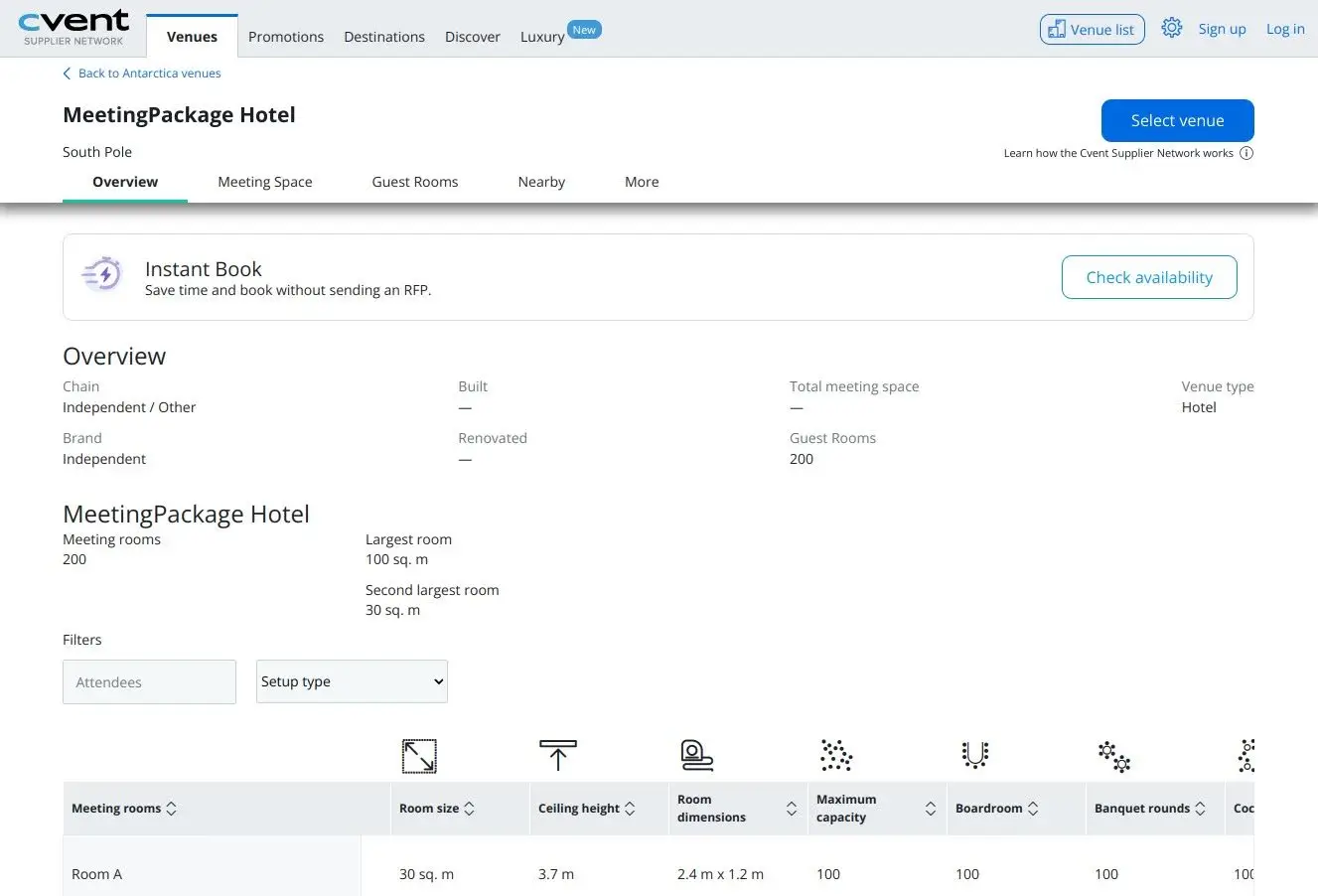
Cvent is an enterprise event management platform built for large organizations running frequent events. If you’re managing multi-day conferences with venue RFPs, vendor sourcing, and hotel room blocks, Cvent is designed to handle all of those enterprise needs in one platform.
Cvent has a supplier network with 340,000+ venues and a vendor marketplace with 40,000+ vendors. You can send RFPs, compare bids, and manage event contracts without leaving the platform. Cvent also meets other enterprise needs like SOC 2 Type II compliance, audit logs, and 90+ native integrations with enterprise apps and event management platforms.
Since Cvent requires a substantial annual budget and has a learning curve, it’s best for enterprises with dedicated corporate event teams rather than smaller teams or one-off events.
Cvent pros and cons
Pros:
- Comprehensive venue sourcing with 340,000+ venues, RFP tools, and contract management
- Enterprise governance features including audit logs, compliance controls, and advanced security
- 90+ enterprise-focused integrations including Salesforce, Marketo, Eloqua, and Concur
- In-depth reporting and analytics with custom reports and real-time dashboards
Cons:
- Large enterprise contracts can cost tens of thousands of dollars per year
- Registration fees are charged separately at $3.99-$12 per registration
- Contract lock-in through multi-year agreements
- Upcharges for features like mobile apps, badge printing, and gamification
- Steep learning curve to navigate Cvent’s interface
- Generally not cost-effective for small events
Cvent best features
- Venue sourcing and RFP management: Search venues by location, capacity, and amenities, then send RFPs and manage negotiations in one system
- Mobile event app: Branded app with agendas, speaker bios, networking, and live polling (separate cost)
- Check-in and badge printing: Professional check-in systems with QR code scanning and customizable badges (separate cost)
- Lead retrieval for exhibitors: QR-based lead capture that syncs directly to CRM systems
- Advanced registration logic: Build complex registration flows with conditional questions, session selection, and payment options
Pricing
- Custom Quote: Annual or multi-year contracts
- Pay-As-You-Go Pricing: Option to get started immediately without a contract by paying $3.95 per registrant + 1.95% of registration fee (on top of 2.95% payment processing fee)
4. Whova — best for conferences that prioritize mobile engagement
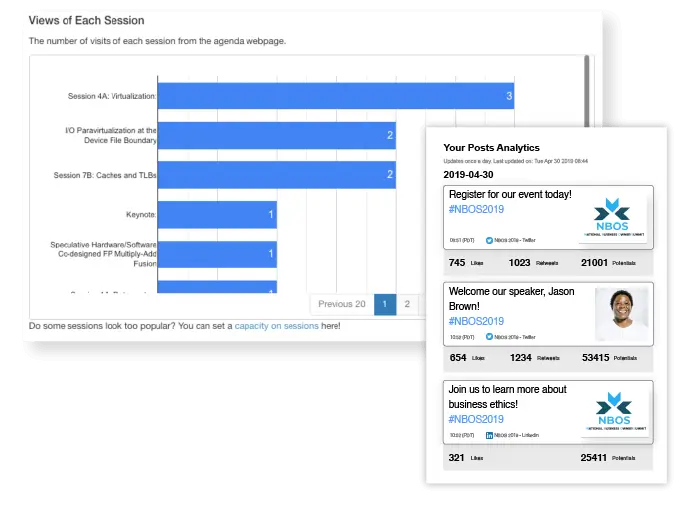
Whova is an all-in-one event management platform designed for professional conferences, trade shows, and academic events with 100+ attendees.
Whova’s main strength is its mobile app, which is designed to maximize event engagement. Attendees get personalized agendas, direct messaging, matchmaking, community boards for discussions, and gamification features like leaderboards and photo contests. Whova also offers abstract management for speaker submissions, event planning and event marketing tools, QR code lead retrieval for exhibitors, and per-event pricing that’s more affordable than enterprise-focused event software.
While it works well for traditional conference and trade show formats, Whova isn’t particularly customizable. There’s no option to white label your app, and it’s not built for flexible internal coordination or custom stakeholder portals.
Whova pros and cons
Pros:
- Event engagement app with direct messaging, attendee matchmaking, and gamification
- Lower ticket fees (3% + $0.99 + payment processing fee) than some competitors
- Built-in abandoned registration recovery tools
- Early payouts if you connect your account to Stripe
- Supports in-person, hybrid, and virtual events
Cons:
- A la carte pricing can increase total cost as you add features
- Built for standard conference formats; limited options for customization
- No white-label option; Whova branding isn’t removable
Whova best features
- Mobile event app: Attendees access personalized agendas, session details, speaker bios, and venue maps with real-time updates and notifications
- Networking and matchmaking: Attendee directory with profiles, direct messaging, and smart matchmaking based on interests and goals
- Gamification and engagement: Leaderboards, photo contests, and challenges that encourage participation throughout the event
- Speaker and abstract management: Collect session proposals, review submissions, and coordinate with speakers
- QR code lead retrieval: Exhibitors scan badges to capture leads that integrate with CRM systems for follow-up
- Event registration and ticketing: Custom forms with dynamic pricing, early bird discounts, and group packages
Pricing
- Per-event pricing (contact for quote)
- Ticket fees: 3% + $0.99 per ticket + plus payment processing fees
5. Bizzabo — best for B2B conferences focused on lead capture
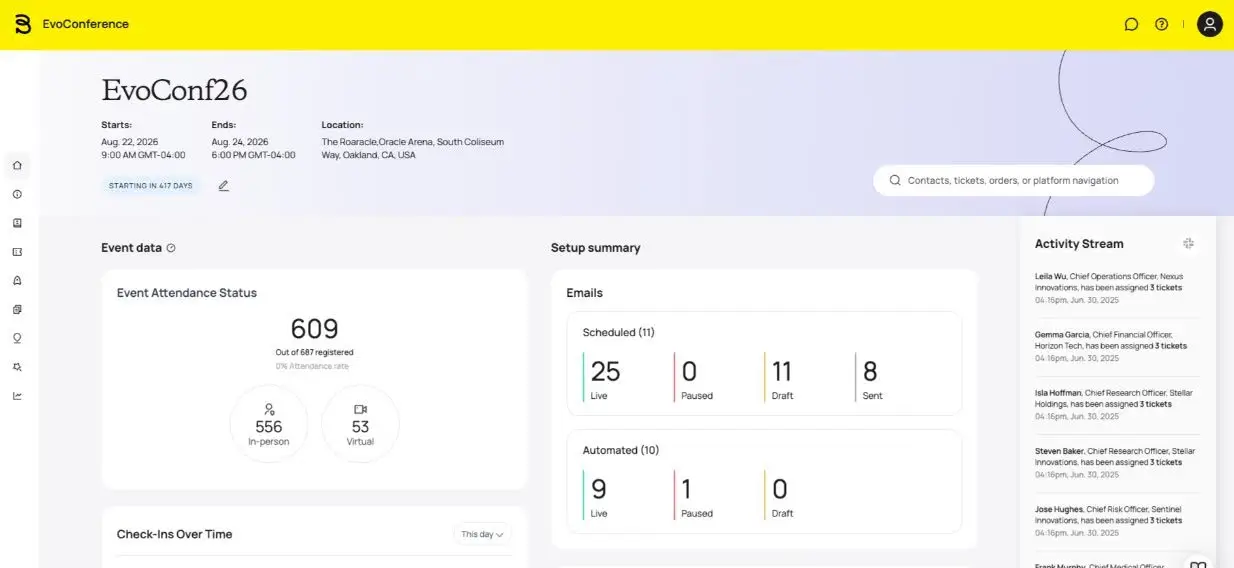
Bizzabo is an event management platform designed for B2B conferences and corporate events. The core of Bizzabo’s platform is Event Experience OS, a suite of event management tools that includes an event website builder, email campaign tools, ticketing and registration features, a mobile app, unlimited events, and unlimited registrations.
You can also purchase in-person add-ons including Klik SmartBadges, which encourage attendee networking and include gamification features to boost sponsor engagement and session attendance. SmartBadges can also capture real-time attendee behavior—like who attended which sessions and who engaged with sponsors—which is especially helpful when gauging your event’s ROI.
Pricing starts at $499/month per user. However, minimum contracts start at $17,999/year because only annual contracts are offered and there’s a three-user minimum. And Bizzabo’s add-ons can add up: sponsor portals, speaker portals, networking features, custom branding, and marketing integrations like HubSpot and Marketo all require additional investment.
Bizzabo pros and cons
Pros:
- Modern all-in-one events platform offering unlimited events and unlimited registrations
- Klik SmartBadges track attendee behavior and encourage networking
- SmartBadges also offer unique ROI-tracking and lead capture capabilities
- 2,500+ integrations including HubSpot, Marketo, Salesforce, and Pardot
Cons:
- Starts at $17,999 per year for three users
- No monthly payment option or pay-per-event option
- Extra fees for features that are core on other event platforms (like speaker portals)
Bizzabo best features
- All-in-one event operating system: Includes event planning, custom event websites and apps, registration, pre-event and post-event communications
- Klik SmartBadges: Event badge that’s also a sophisticated tracking device; captures session attendance, networking connections, and engagement, all of which syncs to your CRM
- Email marketing and automation: Build campaigns with segmentation, automated reminders, and abandoned cart retargeting
- Lead capture and scoring: Exhibitors and sponsors capture leads via mobile devices with automatic scoring and CRM integration
- Virtual production services: Studio-quality virtual and hybrid events
- Mobile event app: Personalized agendas, push notifications, live polls, and networking features
Pricing
- Event Experience OS: Starts at $17,999 per year for three users (only annual billing is available)
- Klik SmartBadge: Custom quote
- Premium add-ons: Virtual production suite, sponsor portal, speaker portal, networking, custom-branded event app, martech and CRM integrations
6. Zoom Events — best for virtual events
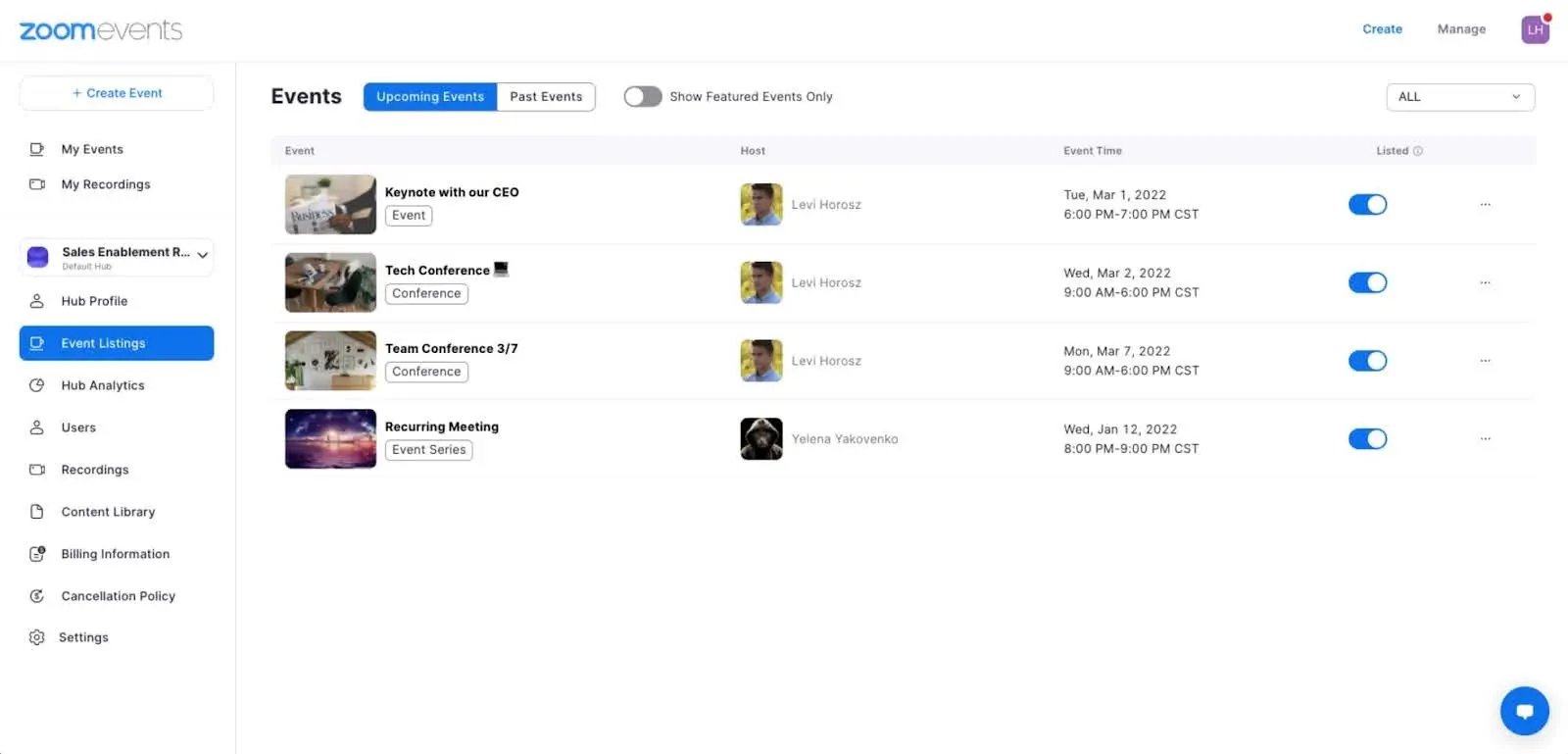
Zoom Events is a virtual event platform built on Zoom's familiar video infrastructure. If your organization already uses Zoom for meetings and wants to host larger events, Zoom Events seamlessly extends the app's capabilities to provide registration, event hubs, networking lobbies, and reporting. It works well for virtual conferences and online summits, and also supports hybrid events.
Attendees join events through the same Zoom interface they use daily, and you can create multi-session events with agendas and breakout rooms. Features like live Q&A, polling, and recording are built in, and post-event content stays available on-demand.
While Zoom Events supports hybrid events, it’s designed primarily for virtual experiences. In-person attendees at hybrid events can check in via QR code and get access to a Zoom companion app that lets them toggle between the in-person and virtual experience, but most other features are aimed at virtual attendees. And Zoom Events isn’t built for event operations tasks like vendor management, speaker management, or staff coordination.
Zoom Events pros and cons
Pros:
- Teams already using Zoom adapt quickly with minimal training
- Zoom's infrastructure handles large-scale events with reliable video quality
- Attendees don't need to download new apps or learn unfamiliar interfaces
- Post-event recordings stay available for on-demand viewing
Cons:
- Limited branding and customization
- No event operations tools or project management features
- Only basic features for in-person attendees at hybrid events
- Scaling to larger attendee counts increases costs quickly
Zoom Events best features
- Reliable video infrastructure: Built on Zoom's infrastructure (99.9% uptime) with breakout rooms, screen sharing, and recording
- Event hubs: Create multi-session events with centralized agendas, session listings, and lobby networking
- Post-event on-demand access: Recorded sessions stay available for attendees who couldn't attend live
- Zoom Live Streaming: Stream to Facebook, YouTube, and Twitch simultaneously
- Live engagement tools: Q&A, polls, reactions, and chat keep virtual attendees engaged during sessions
- Integrated registration and ticketing: Customizable registration pages with payment processing and attendee management
Pricing
- Zoom Events (annual): Starts at $124.17/month for up to 100 attendees or $415.83/month for up to 500 attendees (billed annually)
- Zoom Events (pay per attendee): Pricing for one-off events starting at $1,200 for 600 attendees and going up to $15,500 for 10,000 attendees
- Zoom Workplace Pro: All Zoom Events plans also require a Zoom Workplace Pro plan, starting at $13.33/user/month (billed annually)
Find the best event management software for your team
Most event platforms specialize in one thing. Eventbrite handles ticketing, Zoom Events does virtual conferences, and enterprise platforms like Cvent cover large-scale operations. These tools work well within their areas of specialty, but the moment you need something custom—like AI workflows, real-time data syncing, or stakeholder-specific portals—you’ll run into limitations. Instead of building precisely the event system you need, you’re stuck following a templated approach.
Softr works differently. Rather than forcing your events into predefined workflows, it gives you the flexibility to create exactly what you need. You can use Softr’s AI and no-code tools to quickly generate branded registration forms, internal coordination tools, speaker portals, exhibitor dashboards, and real-time check-in systems. Whether you’re running in-person conferences, virtual events, or hybrid experiences, everything adapts to your workflow.
Softr offers databases to structure all your event data, apps to create interfaces for each stakeholder, and workflows to automate operations. And with transparent flat-rate pricing, you’re never penalized for running more events, selling more tickets, or growing your team.
Try Softr for free to build your first event management system in minutes, or get started with our event planning template.
Frequently asked questions
What's the best free event management software?
Is there a better alternative to Eventbrite or spreadsheets for managing events?
What's the difference between ticketing apps and event platforms?
How much does event management software cost?
Which event management software is best for small businesses?