


Best CRM for agencies: 9 picks in 2026

[.blog-callout]
💡 TL;DR:
- Agency work moves fast: Leads, scopes, and updates get lost across emails, Slack, and spreadsheets.
- A CRM keeps it all in one place: Centralizes clients, pipelines, projects, and reporting, so teams stay aligned and follow-ups don’t slip.
- Four main CRM types in 2025: Operational, collaborative, analytical, and hybrid/project-enabled.
- Most CRMs are built for sales, not services: Agencies need tools that blend client tracking, delivery, and reporting.
- This guide compares the top options: You’ll find pros, cons, features, and pricing for tools like Softr, HubSpot, Zoho, Pipedrive, Attio, and more.
- Flexibility wins: No-code platforms like Softr let you build a custom CRM (or client portal) on top of Airtable, Google Sheets, or SQL: no dev time required.
[.blog-callout]
Agency work moves fast. Leads come in, scopes shift, and updates live across email, Slack, and spreadsheets. Without a central system, agencies lose visibility: client follow-ups slip, team handoffs aren’t smooth, and reporting takes longer than it should.
The best CRM for agencies fixes that. It brings your pipeline, client data, and day-to-day coordination into one place, with automations and AI that cut admin and surface what matters. Many modern tools also support adding self-serve client portals to your CRM, so projects, deliverables, and approvals stay clear without endless back-and-forth.
In this guide, we outline the core CRM types agencies rely on in 2025 and what to evaluate, so you can pick a system that supports your processes.
What is a CRM for agencies?
A CRM (customer relationship management) for agencies is software that centralizes leads, clients, and delivery workflows from first contact to ongoing work, so sales, accounts, and ops stay aligned.
Unlike sales-only CRMs, agency-ready tools go further. They track client relationships, show where projects stand, automate routine tasks, provide clear reports. And with AI features built in, some CRMs can also automatically prompt follow-ups, forecast workload and revenue, and keep your data clean and up to date.
Types of CRMs for agencies
Some of the traditional sales CRMs are straightforward, including just contacts and deal tracking. Others offer more advanced features like automation, reporting, or built-in project tools.
Most agencies use CRMs that fall into one (or more) of these types:
Some tools focus just on sales pipelines. Others go further and support content planning, creative delivery, or client reporting.
What to look for in CRM tools for agencies
- Ease of setup and time-to-value: Templates and drag-and-drop builders help lean teams launch quickly and avoid long onboarding.
- Custom pipelines and data fields: No two agencies manage client work the same way. Whether you organize by campaign, project type, or retainer stage, your CRM should let you tailor fields, stages, and views to match.
- Built-in task and project tracking: Once a client signs, the real work begins. CRMs that include or integrate with task tracking help teams manage deliverables, assign responsibilities, and avoid post-sale confusion.
- Reporting and dashboards: Account health, pipeline, and utilization in one view; exportable for client check-ins.
- Smart automation: From setting follow-up reminders to moving deals across stages, automation reduces manual work and keeps things from slipping through the cracks—especially in fast-moving teams.
- Shared visibility and team collaboration: Your sales, account, and creative teams need access to the same information. CRMs with team mentions, shared timelines, and activity tracking keep everyone aligned without switching tools.
- Granular permissions: Role- and group-based access so clients, sales, and ops see exactly what they should.
- Mobile/PWA access: On-the-go updates for client visits and field teams really help agencies move faster.
- Scalable pricing: Transparent plans that won’t spike with essential add-ons; predictable as you grow.
- SMB-fit UX and support: Friendly UI, fast support, and community resources, so adoption sticks.
{{cta-1}}
Best CRMs for agencies at a glance
Whether you're tracking leads, managing client deliverables, or keeping teams aligned, the right CRM can make all the difference. Below, we’ve rounded up top CRM options tailored to how agencies actually work.
1. Softr — best for fast and customizable setup that integrates with existing tools and data
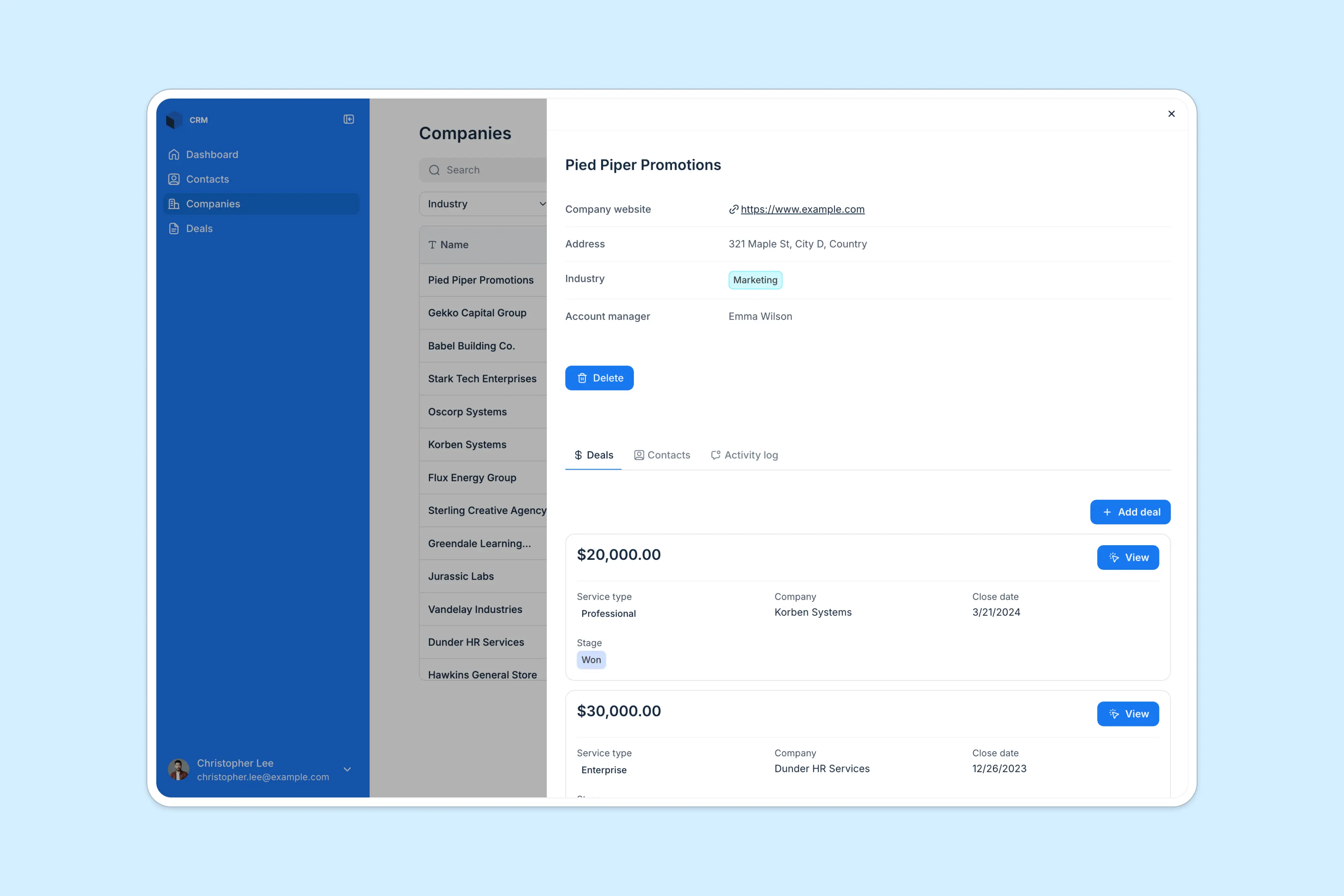
Softr isn’t a strictly CRM tool. It’s an easy yet powerful no-code platform that lets you build business apps on top of your existing data, including Airtable, Google Sheets, Notion, ClickUp, and more.
Unlike complex, out-of-the-box CRMs, you’re not locked into predefined structures or forced into per-seat pricing. Instead, use drag-and-drop blocks like Lists, Grids, Kanbans, and Forms to create a modern interface for your customer data, then customize logic and layout so it fits your workflows.
If you need to expand your CRM to include a client portal, business quote generator, or knowledge base, it’s easy to do this without having to pay for extra tools. And with AI features like Ask AI (a built-in chat assistant for app users) and Database AI Agents (which can automatically enrich records, update data, or pull live insights from the web), you can build a CRM that eliminates manual workflows.
Who it’s for
Small to mid-sized agencies that don't want to invest in expensive out-of-the-box software or custom development to get a CRM tailored to their business operations and industry.
Softr pros and cons
Pros:
- Fast to set up: Launch your CRM in minutes using a pre-built template and drag-and-drop builder, no dev work or complicated setup needed.
- Works with your existing data and tools: Connect Softr to Airtable, Google Sheets, Notion, HubSpot, and 14+ other native data sources in seconds. You can also automate key workflows with Zapier and Make integrations.
- Control who sees and edits what: Set granular, role-based permissions so sales or account managers can only see or update their own deals.
- All-in-one platform: Build CRMs, client portals, inventory trackers, and more in one place—so you can cut down on tool sprawl and costs.
Cons:
- No built-in marketing automation: Softr doesn’t come with email marketing or campaign management, though it can integrate with marketing tools that have these features (and much of this can be handled with Softr Workflows).
Softr best features
- Drag-and-drop builder: View and manage your pipeline with modern building blocks to show your data (tip: start with a free CRM template).
- Data flexibility: Connect to Airtable, Google Sheets, HubSpot, Notion, monday.com, BigQuery, SQL databases, and more. You can also connect to almost any external data source via REST API — or use Softr’s own native database.
- Conditional forms: Create advanced lead capture forms and embed them in your website. Or use forms to create a ticketing system for your CRM to ensure customer issues are logged, tracked, and managed quickly.
- Reporting & dashboards: Use chart blocks to create dashboards based on your real-time data, or embed data and reports from other tools to provide your team with key insights.
- Account & contact management: Maintain records of customer contact details, interaction details, transaction records, and deal status, and add comments to records to keep your team informed.
- Task and project tracking: Add and view project tasks on a Kanban board, and move them over as projects progress.
- Contract and invoice management: Securely upload and store important documents, with the ability to enable e-signatures and payments.
- Reporting & dashboards: Create dashboards based on real-time data to monitor account performance and customer feedback.
- Ask AI: Use a built-in chat assistant to get instant answers from your CRM data.
- Database AI Agents: Automatically enrich contacts, update data, or pull live insights from the web in Softr Databases.
Pricing:
Softr offers flexible pricing plans, so you can build a CRM that meets your needs:
- Free for up to 10 users per month
- Paid plans start at $49/month for 20 users (when billed annually)
- Professional: Starts at $139/month for 100 users (when billed annually)
- Business: Starting at $269/month for 500 users (when billed annually)
- Custom plans for enterprise customers
2. Zoho CRM – best for feature-rich CRM at a budget-friendly price

Zoho CRM is a comprehensive customer relationship management platform that offers a wide range of features, including sales automation, marketing tools, and analytics. It offers robust tools for sales automation, multichannel communication, marketing campaigns, and analytics, making it easy to manage leads, track performance, and nurture long-term client relationships from one centralized system.
Who it's best for
Agencies seeking a cost-effective CRM solution with robust features and customization options.
Zoho CRM pros and cons
Pros:
- Affordable pricing with a rich feature set.
- Highly customizable to suit different business models.
- Strong integration capabilities.
Cons:
- May have a steep learning curve for new users.
- Some advanced features are only available in higher-tier plans.
Zoho CRM best features:
- Sales Automation: Automate sales processes and workflows.
- Multichannel Communication: Engage with customers via email, phone, social media, and live chat.
- Analytics & Reporting: Gain insights into sales performance and customer behavior.
- Customization: Tailor modules, fields, and layouts to fit business needs.
- Integration: Connect with various third-party applications and Zoho's suite of products.
Pricing: Free plan available for up to 3 users. Paid plans start at $14/user/month, with additional features in higher tiers.
3. HubSpot CRM – best for full-funnel visibility and automation

HubSpot CRM is a cloud-based platform designed to manage customer relationships, marketing campaigns, and sales pipelines. It offers a suite of tools that integrate seamlessly to provide a comprehensive view of customer interactions.
Who it's best for
Mid-sized to large agencies seeking an all-in-one solution for managing client relationships, marketing efforts, and sales processes.
Hubspot CRM pros and cons
Pros:
- User-friendly interface.
- Comprehensive feature set.
- Strong integration capabilities.
Cons:
- Advanced features can be costly.
- May have a learning curve for new users.
HubSpot CRM best features:
- Contact Management: Centralized database to store and manage customer information.
- Email Marketing: Tools to create, send, and analyze email campaigns.
- Sales Pipeline Management: Visual dashboards to track deals and sales progress.
- Marketing Automation: Automate repetitive tasks and workflows.
- Reporting & Analytics: Generate reports to gain insights into performance metrics.
Pricing: Free plan available with basic features. Paid plans start at $20/month, with additional features unlocked in higher tiers.
[.blog-callout]
💡Storing your customer data in HubSpot? Softr lets you build client and customer portals, ticketing systems, internal tools, and more on top of your HubSpot data — no code required.
See an example →
[.blog-callout]
4. Copper CRM – best for Gmail-native client management

Copper CRM is a customer relationship management tool designed to integrate seamlessly with Google Workspace. It automates data entry and provides a streamlined experience within Gmail.
Copper runs natively inside Google Workspace, so you can add leads, track conversations, and manage tasks directly from Gmail, Calendar, and Drive: no tab-switching. There’s an official Chrome extension and Google Sheets add-on for capturing contacts, updating records, and email tracking from your inbox. Plans include a 14-day free trial, with Starter/Basics for smaller teams and Professional/Business unlocking advanced reporting and automations.
Who it's best for
For small-to-mid sized teams already built around Google Workspace (Gmail, Calendar, Drive) who want a CRM that lives in their inbox and minimizes context switching. Ideal for agencies, consultancies, project-based firms and field sales teams that need lightweight pipelines and email-centric tracking rather than heavyweight enterprise CRM infrastructure.
Copper CRM pros and cons
Pros:
- Seamless integration with Google tools: manage contacts, emails and calendar events without leaving Gmail.
- Intuitive user interface: teams familiar with Gmail pick it up fast.
- Built-in workflow automations and activity tracking to reduce manual data entry and let reps stay in context.
Cons:
- Limited customization options and marketing automation compared to full-scale CRMs: less ideal for complex sales or large enterprise workflows.
- Advanced features may require higher-tier plans.
Copper CRM best features:
- Google Workspace Integration: Native integration with Gmail and Google Calendar.
- Contact Management: Automatically captures and organizes contact information.
- Pipeline Management: Visual pipelines to track sales opportunities.
- Task Automation: Automate repetitive tasks and reminders.
- Reporting: Generate reports to analyze sales performance.
Pricing: Plans start at $25/user/month when billed annually. A 14-day free trial is available.
5. Insightly – best for combining CRM and post-sale delivery

Insightly is a CRM platform that integrates project management features, allowing agencies to manage customer relationships and project delivery within the same system. It brings sales, service, and delivery teams together, so you can track every client interaction from first contact to final handoff without juggling multiple tools.
Who it's best for
Agencies that need to track client interactions from initial contact through project completion.
Insightly pros and cons
Pros:
- Combined CRM and project management: Track leads, opportunities, and delivery tasks in one place.
- Wide range of integrations: Connects with Gmail, Outlook, QuickBooks, Slack, and other everyday tools.
- Easy to get started: Simple setup and intuitive design make it approachable for small and mid-sized teams.
Cons:
- Learning curve for advanced features: Workflow automation and project tools take time to master.
- Limited scalability: Larger teams may outgrow the system’s customization and reporting capabilities.
- Support can vary: Some users note slower responses or limited onboarding help.
Insightly best features:
- Contact & Lead Management: Store and manage customer information and sales leads.
- Project Management: Track project milestones, tasks, and deadlines.
- Workflow Automation: Automate business processes and task assignments.
- Email Integration: Sync emails with CRM records.
- Reporting & Dashboards: Visualize data and performance metrics.
Pricing: Plans start at $29/user/month. Higher-tier plans offer additional features and customization options.
6. Pipedrive – best for sales-led agencies that want a visual pipeline and simple CRM
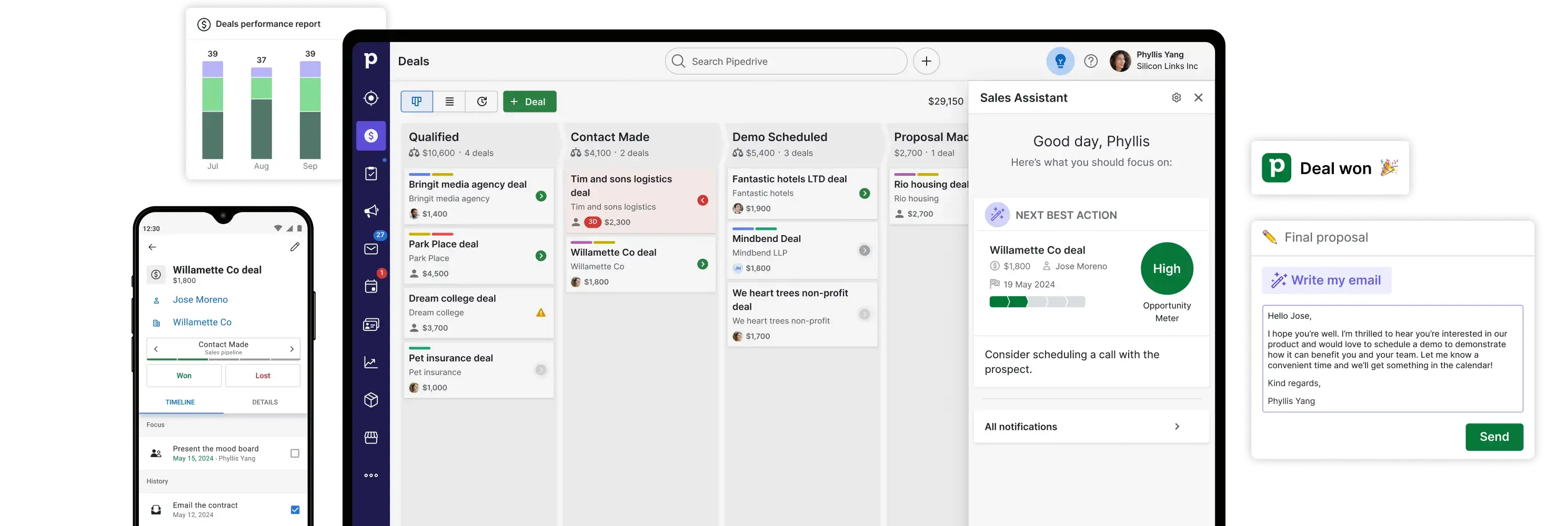
Pipedrive is a sales-first CRM built around a clean, Kanban-style pipeline with lightweight automation and email tools. It’s quick to set up, has a short learning curve, and now adds AI helpers for things like report creation and email drafting. You can keep the core simple and add marketing or lead-gen via optional add-ons (LeadBooster, Campaigns, Web Visitors) as you grow.
Who it’s for
Small to mid-sized agencies with straightforward sales motions that need an easy, visual pipeline and basic automations, without the complexity of an all-in-one suite. Start lean, then layer add-ons only if you need them.
Pipedrive pros and cons
Pros
- Fast, intuitive UI for managing deals in a visual pipeline; easy adoption for small teams.
- Built-in email + automation basics, with nurturing sequences and AI-assisted reporting on higher tiers.
- 500+ integrations via the marketplace to connect phones, billing, PM tools, and more.
- Clear plan structure with a 14-day free trial.
Cons
- Marketing isn’t native by default; email marketing and lead-gen come as add-ons (or higher tiers).
- Lighter reporting/ops depth than enterprise CRMs; best for simple sales processes.
Pipedrive best features
- Visual pipelines & deal management with customizable stages and fields.
- Email sync & tracking with scheduling and sequences on higher plans.
- AI helpers (e.g., AI-powered report creation; AI email tools on higher tiers).
- Add-ons as needed: LeadBooster (chatbot, prospector, web forms), Campaigns (email marketing), Web Visitors; Projects/Smart Docs included on Premium+ or purchasable on lower tiers.
Pipedrive pricing (billed annually, per seat)
- Lite: $14/month
- Growth: $39/month
- Premium: $59/month (most popular)
- Ultimate: $79/month
All plans include a 14-day free trial. Add-ons like LeadBooster, Campaigns, Web Visitors, Projects, and Smart Docs are available separately.
7. Attio — best for Google-centric agencies that want AI-assisted CRM without enterprise bloat

Attio is a clean, flexible CRM built around your inbox and calendar. It syncs Gmail or Outlook, enriches company and people records automatically, and adds AI to help with research, classification, and summarization inside your workflows.
Teams get sequences, reporting, and a growing app ecosystem (Slack, Segment, Mailchimp, Zapier, and more). It’s a solid fit for small to mid-sized agencies that live in Google Workspace or Microsoft 365 and want a fast, collaborative CRM that’s easy to shape around their pipeline.
Who it’s for
Agencies that want a modern, email-first CRM with strong Google/Microsoft sync, built-in enrichment, and AI helpers without a heavy marketing suite or long setup.
Attio pros and cons
Pros:
- Inbox-native experience: Fast adoption for Gmail/Outlook teams; sharing controls keep the right context in the CRM.
- Built-in enrichment and AI: Company/people enrichment plus AI attributes reduce manual updates.
- Scales with your org: Generous report limits, automation credits, and object flexibility on Pro.
Cons:
- Lower-tier limits: Fewer objects/reports and lower record caps on Free/Plus; bulk send capped at 50 per batch on all tiers.
- No built-in project or billing suite: You’ll pair Attio with PM/invoicing tools via integrations if you need end-to-end delivery.
{{cta-2}}
Attio best features
- Email & calendar sync: Connect Gmail or Outlook; control what’s shared, and send bulk emails (50 at a time). Pro and Enterprise include unlimited sends; Pro supports two email accounts per user.
- AI research: Use AI to research, summarize, classify records, and analyze calls directly in Attio.
- Flexible data model: Customize objects and relationships; Pro supports up to 12 objects and 1,000,000 records.
- Automation & sequences: Build automations with integration blocks and email sequences; Pro includes monthly automation credits with paid add-ons as you scale.
- Reporting: Insight and funnel reports with segmentation and targets; up to 100 reports on Pro.
- Ecosystem & integrations: Native apps for Slack, Segment, Mailchimp, Aircall/RingCentral, Zapier, and more.
Pricing (annual billing):
- Free: $0—up to 3 seats
- Plus: $29/user/month (or $36 billed monthly)
- Pro: $69/user/month (or $86 billed monthly)
- Enterprise: Custom pricing
8. Salesflare — best for agencies wanting CRM automation with minimal effort

Salesflare is a CRM that automatically captures contact info, messages, and activity from your inbox, calendar, and web interactions. It’s built to minimize data entry and help you focus on relationships, and not admin.
For agencies, this means cleaner contact records, more consistent follow-ups, and better visibility into what clients are doing, even when you don’t have time to manually update everything.
Who it’s for
Salesflare is built for small B2B teams that live in their inbox and want their CRM to handle the admin work for them. It’s ideal for sales reps, consultants, and agencies that use Gmail or Outlook and need automatic data capture, smart reminders, and follow-up tracking without the complexity of enterprise tools.
Salesflare pros and cons
Pros:
- Automated contact enrichment and activity logging (email, meetings, website visits)
- Built-in reminders, follow-up nudges, and AI-powered lead scoring
- Integrations with Gmail, Outlook, LinkedIn, and calendars
- User-friendly interface that’s quick to adopt
- Email tracking and sequences included in core plans
Cons:
- Not built for complex multi-team workflows (limited project management)
- Less modular/customizable than other CRMs
- Enterprise plans require higher minimum seat counts
Salesflare best features
- Automatic data capture & enrichment: Pulls in email signatures, logs calls and meetings without manual input.
- Email & web tracking: Alerts when emails are opened or links clicked, and shows what pages prospects visit.
- Sequence automation & reminders: Send multi-step email flows and get nudges for follow-up.
- Custom dashboards & reports: Visualize pipelines, forecasts, and activity metrics.
- Deep integrations: Works inside email clients and with productivity tools.
- Mobile app support: Access and update CRM on the go.
Pricing
- Growth: $29/user/month (billed annually) or $39 (monthly) — includes core features, automated input, 5 lead credits, email tracking
- Pro: $49/user/month (billed annually) or $64 (monthly) — adds workflows, permissions, custom dashboards, 100 lead credits
- Enterprise: $99/user/month (billed annually) or $124 (monthly) — adds onboarding, data migration, account manager, more lead credits
9. Odoo – best for agencies wanting an all-in-one, modular system
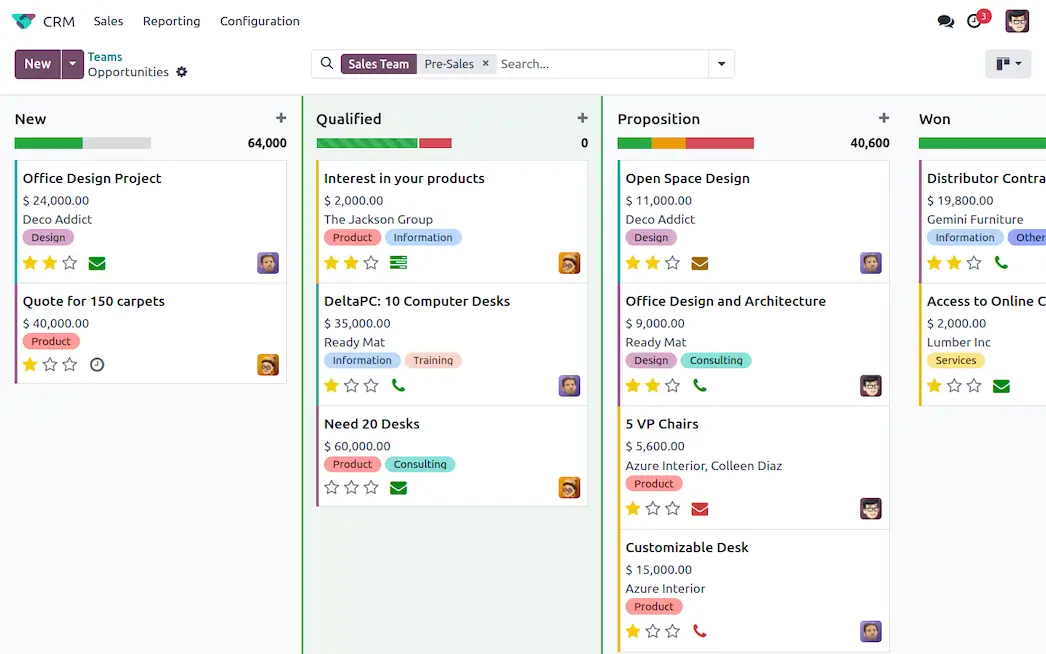
Odoo is a business suite with apps for sales, projects, accounting, invoicing, inventory, and more. Its CRM module covers leads, pipelines, activity tracking, and quoting. For service businesses, this means you can manage client relationships, project delivery, invoicing, and even timesheets in one system.
The platform comes in two editions: Community (open-source and free, but with fewer features and no official support) and Enterprise (paid, with mobile apps, advanced modules, and official support).
Who it’s for
Odoo is best for growing businesses that want their CRM connected to everything else they run — from invoicing and inventory to helpdesk and accounting. It’s a good fit for companies with technical teams or partners that can handle light setup and want the flexibility of open-source customization.
Odoo pros and cons
Pros:
- All-in-one business suite: Manage CRM, projects, invoicing, accounting, and inventory in one connected platform.
- Flexible and customizable: Open-source architecture and Odoo Studio let you tailor apps, fields, and workflows to your processes.
- Strong quoting and invoicing tools: Create proposals, capture e-signatures, and convert deals to invoices in one flow.
- Scales with your business: Start with one app and expand into 40+ integrated modules as your needs grow.
- Community and Enterprise options: Choose between a free, open-source edition or a paid plan with official support and mobile access.
Cons
- Steeper learning curve than plug-and-play CRMs
- Requires technical knowledge or partner support for customization
- Best features (mobile app, advanced modules, support) only available in paid plans
- Per-user pricing means costs increase if you add more team members
Odoo best features
- Pipeline management: Drag-and-drop boards to manage leads and opportunities
- Quoting & e-signatures: Send proposals, collect signatures, and convert to invoices in one flow
- Client portal: Share quotes, invoices, and project updates securely with clients
- Integration with Odoo apps: Expand into accounting, timesheets, HR, helpdesk, and more
- Reporting & forecasting: Advanced dashboards and analytics for pipeline health and sales forecasting
- Mobile access: Full-featured iOS and Android apps available in the Enterprise edition
Odoo pricing
- One App Free: $0 forever, unlimited users, but only for a single app (e.g. CRM, Invoicing, or any one Odoo app).
- Standard: $7.25/user/month billed annually (or $9.10 if billed monthly). Includes all apps on Odoo Online.
- Custom: $10.90/user/month billed annually (or $13.60 if billed monthly). Includes all apps plus Odoo Studio, Multi-Company, External API, on-premise deployment, and Odoo.sh hosting options.
Find the best CRM for how your agency works

The right CRM for agencies keeps your team aligned on every client, from project status and communication history to upcoming tasks and responsibilities. Some agencies need advanced automation and pipeline tracking, while others are looking for a simple, shared view of what’s happening and what’s next.
If your data already lives in tools like Airtable, Notion, SmartSuite, monday.com, or Google Sheets — or if you need a single place to manage your data and build a CRM — Softr is a great choice. It lets you create a custom CRM for your agency, complete with automations, AI-powered features, and even client-facing portals.
You don’t need to be a developer to make it happen: Start with a free template and tailor it to your agency’s workflow.


With over five years of experience in content marketing and SEO, Marie helps create and manage content that drives traffic and supports business growth.
Frequently asked questions
- What is the best CRM for agencies?
- Which CRM is best for small real estate agencies?
- What are the 4 types of CRM?

.webp)