


How to automate your CRM workflow: Benefits, use cases & best practices

Constantly juggling CRM tasks like data entry, follow-ups, and keeping the sales pipeline on track can bog your team down. Now imagine all those repetitive tasks running on their own, freeing your team to focus on what actually matters: building relationships and closing deals.
That's what CRM workflow automation does. It handles the everyday processes that keep your business running. But how do you make sure automation helps your team instead of creating new problems? In this guide, we'll cover everything you need to know about CRM workflow automation, from the basics to implementing it effectively in 2026.
What is a CRM workflow?
.webp)
A CRM workflow is a series of automated actions triggered by specific events or conditions, like a purchase or a form submission, within your customer relationship management system. Core CRM workflows include:
1. Customer onboarding
Many companies use CRM workflows to onboard their customers. With a well-crafted workflow, the entire process runs automatically from the moment a new customer signs up. Welcome emails? Sent automatically. Introductory calls? Scheduled without lifting a finger. Training materials? Dispatched at just the right moment. Every new customer gets off to a strong start. (For a deeper look at this stage, see our guide to mastering the client onboarding process.)
2. Lead nurturing
CRM workflows can segment your leads based on behavior or characteristics and send tailored content at the right times. As leads engage with your content, the workflow tracks their responses and adjusts its approach, guiding them through your sales funnel without manual effort.
3. Sales follow-ups
Follow-ups are critical but time-consuming. CRM workflows can schedule follow-up calls or emails, remind your sales team about pending tasks, and run entire follow-up sequences based on how prospects respond. It's like having a tireless sales assistant who never forgets a follow-up.
And that's just the start. CRM workflows can also handle:
- Tracking customer interactions so your company has full customer histories, making it easier to personalize each journey.
- Sending reminders for upcoming appointments, renewals, or payments, timed based on the customer's history or preferences.
- Segmenting customers by purchasing behavior or demographics for more targeted marketing.
What is CRM workflow automation?
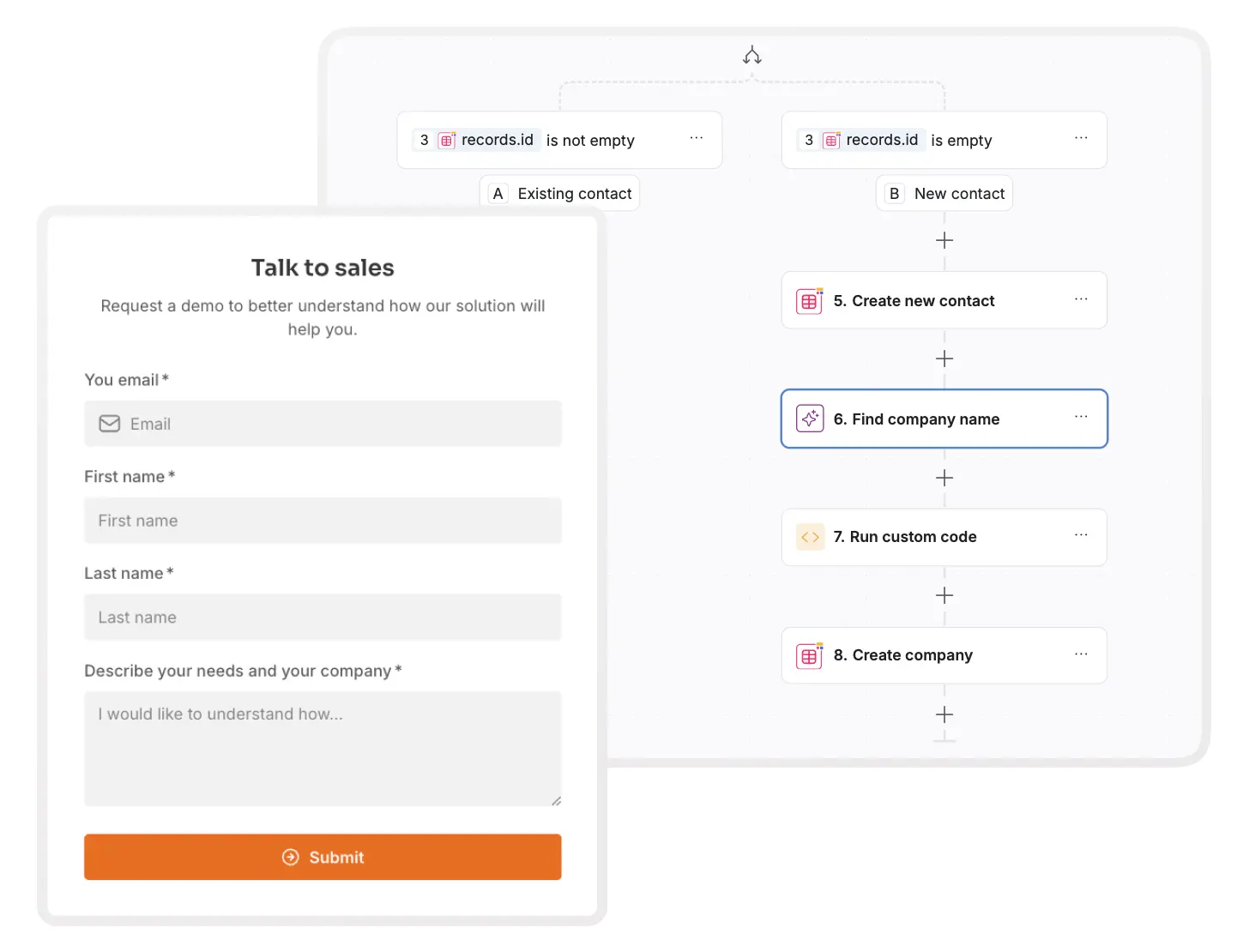
CRM workflow automation is the process of using technology to automate routine customer management processes like capturing leads, sending follow-ups, and analyzing feedback.
Each workflow is built from a few key elements:
- Triggers: Events that kick off a workflow. These can be customer actions, like submitting a form, or internal events, like a deal hitting a specific stage. The best modern tools fire workflows directly from UI interactions (a button click in your app) or database changes (a new lead record), so there's no polling delay.
- Actions: Tasks the workflow completes automatically once triggered, like sending an email, updating a record, or notifying team members.
- Conditions: The logic behind your workflow. Conditions decide whether an action should happen based on specific criteria. For example, only send an email if a lead's score is above a certain threshold. Branching logic lets workflows split into different paths based on the data they evaluate.
- Delays and wait steps: Sometimes you don't want an action to fire immediately. Wait steps add timing, like holding a follow-up email for three days so you don't overwhelm a lead.
- Integration points: Workflows rarely stay inside your CRM. Integration points connect your workflows to other tools, sending and receiving data so everything stays in sync.
- Reporting and analytics: Most CRM automation tools let you track and analyze workflow performance so you know what's working.
Think about typical CRM chores: data entry, follow-up emails, record updates. These usually eat at least an hour a day. Automation handles them by logging interactions automatically, refreshing contact info, and scoring leads based on behavior.
The advantages go beyond saved time. Automation makes your processes consistent. Every lead gets a timely follow-up, every inquiry routes to the right team, and no opportunity slips through the cracks.
How AI is changing CRM workflow automation in 2026
Until recently, automation meant building every workflow by hand: pick a trigger, add conditions, chain the actions. That still works, but AI now removes most of the setup effort. Instead of configuring logic step by step, you describe the outcome you want ("send a follow-up email three days after a demo if the lead hasn't replied") and the AI builds the workflow for you.
AI also improves what workflows can do once they're running. Lead scoring gets smarter because models learn from your actual conversion data instead of static point rules. Email timing and content adapt to each contact's behavior. And AI agents can handle judgment calls that used to require a human, like routing an unusual support request or drafting a personalized reply for a rep to approve.
In Softr, this shows up in two places. The AI Co-Builder generates your entire CRM app from a plain-text prompt, including the database, pages, user groups, and permissions. And the Workflow AI Co-Builder turns a description of your automation into working logic, which you can then edit visually. You get the speed of AI with full manual control, so automation stays something your team owns rather than a black box.
Benefits of CRM workflow automation
What happens when the boring tasks run themselves? You get:
- Time savings: With repetitive manual tasks out of the way, your team gets their time back. Instead of spending hours on data entry, follow-up emails, or record updates, they can focus on talking to customers, driving sales, and closing deals.
- Improved accuracy: Automated systems don't get tired or distracted. Customer information is captured accurately and messages go out without mistakes, which means better decision-making and more reliable data.
- Consistency: Consistency builds trust, and automation guarantees every lead and customer gets the same level of care. Whether it's follow-up emails, onboarding, or support responses, automated workflows make sure no steps are missed and every interaction follows your best practices.
- Scalability: As your business grows, automated workflows handle more clients without increasing the admin workload. You maintain quality service even during rapid growth, without adding headcount to manage it.
- Enhanced customer experience: Regular, timely communication creates a smooth customer journey. From welcome emails to support ticket confirmations, automated workflows make customers feel heard and valued.
How to define and set up CRM workflows in 4 simple steps
Step 1: Decide what to automate
Your CRM can manage a lot, but it can't manage everything. The key question is: what tasks can it take off your plate?
The answer depends on what your CRM can handle. An AI-native platform like Softr can manage a wide range of processes, from managing leads to analyzing reports, with Softr Workflows triggered directly from your app's interface or database.
Once you know what's feasible, identify which processes truly need automation. Look at the most time-consuming and repetitive tasks in your workflow. That's where automation makes the biggest impact, and it gives you a clear plan for the workflow you'll build next. If you need inspiration, browse these workflow automation ideas with free templates.
Step 2: Build and customize your workflow
Next, build a workflow customized for your business. Say you want to automate your sales pipeline. Take a close look at each stage, from lead generation to the final sale, and identify which areas benefit from automation and where a personal touch is essential.
You might find that automating lead generation works well, while the final sales stage needs hands-on interaction to close deals. Once you've mapped your pipeline, choose a CRM tool that makes building the workflow easy. Softr is AI-first, not AI-only: describe the CRM you need and the AI Co-Builder generates the database, pages, user groups, and permissions for you, or start from a template or blank canvas and keep full manual control. If you'd rather build the whole thing from the ground up, follow our step-by-step guide to building a CRM.
Step 3: Set up your workflow automation
Now it's time to configure the automation. Identify the tasks you want to automate, such as email sequences, reminders, and lead assignments, and set them up in your CRM. Documenting the process in a guide helps with future reference.

Softr makes this step simple. Workflows trigger directly from UI interactions (like a button click) or database changes (like a new lead being created), so they fire instantly. Configure email sequences, reminders, and lead assignments visually, or describe what you need and the Workflow AI Co-Builder sets up the logic. And if you're short on time, you can get a head start with Softr's Sales CRM template.
Automate where it makes sense, but leave room for personal interaction where it matters most. You streamline your processes while keeping the human touch.
Step 4: Test your workflows and optimize
Test your workflows before rolling them out. Run a few scenarios to confirm everything works as expected. This catches issues early, whether it's an email not sending, a task not being assigned, or customer data not updating.
After testing, monitor performance. Track metrics like lead conversions, response times, and task completions. If something isn't hitting the mark, tweak it.
Optimization is ongoing. Review your workflows regularly to find areas to improve. A task you automated might benefit from a personal touch, or new areas might emerge for automation as your business grows.
CRM workflow best practices to keep in mind
- Start small, then scale up: Begin with simple, high-impact tasks like follow-up emails or lead assignments. Once those run smoothly, add more complex workflows. Your team won't feel overwhelmed, and you can adjust as you go.
- Personalization is key: Automation doesn't have to feel robotic. Use customer behavior to personalize communication, like sending tailored emails after someone downloads a resource or attends a demo.
- Regularly audit and optimize workflows: Automation isn't set-it-and-forget-it. Periodically review your workflows for inefficiencies, tasks that can be streamlined further, or new processes worth automating.
- Involve your team in workflow planning: Work with sales, marketing, and support when setting up workflows. They know what should be automated and how it affects daily work.
- Ensure data privacy and compliance: Handle customer data responsibly. Set up privacy controls that comply with regulations like GDPR so customer information stays secure and your business stays compliant.
Build and automate a CRM with Softr
CRM workflow automation is no longer a nice-to-have for big corporations. It's an essential tool for businesses of all sizes competing in 2026.
By automating the repetitive tasks that consume your team's time, you free them to focus on building real connections with customers. It's not about working harder, it's about working smarter. The benefits are clear: improved efficiency, fewer mistakes, and the ability to grow without losing the personal touch.
And here's the best part: you don't need an IT department or a big budget to get started. With Softr, anyone can dive in. Describe the CRM workflow you need and the AI Co-Builder builds it, complete with permissions and a production-ready app around it. No tech skills required.
Sign up for Softr's free plan and start building stronger, lasting relationships with your customers.


