7 best AI-powered database software in 2026


AI-powered databases replace spreadsheets with structured, relational databases that let you use AI to organize data, connect related records across tables, and work from a single source of truth, all without writing a line of code.
In this guide, we’ll break down the AI features that genuinely save time, explain which tools work best for non-technical teams versus developers, and help you choose the database software that fits your team’s needs.
Best AI-powered database software at a glance
| Tool | Best for | Features | Pricing |
|---|---|---|---|
| Softr Databases | Flexible, AI-powered data management | • Database Co-Builder and Database AI Agents • AI-assisted formulas and filters • Full-stack apps with granular permissions • 21+ data sources, API, and MCP | Free plan (5 app users, 5,000 records); paid plans from $19/month billed annually |
| Airtable | Teams that want spreadsheet ease with database structure | • Omni conversational app builder • AI agents and PDF document extraction • 1,000+ integrations • Enterprise governance controls | Free plan; paid plans from $20/user/month; Portals cost $120/month for 15 seats on Team |
| Notion | Lightweight databases inside an all-in-one workspace | • AI writing assistant • Notion Agent (Business and up) • AI autofill for properties • Inline databases in documents | Free plan; paid plans from $10/user/month; AI and agents need the $20/user/month Business plan |
| Baserow | Open-source control and self-hosting | • Self-hosting and open-source code • Kuma AI assistant and AI agent node • AI field and formula generator • API-first with webhooks | Free plan (3,000 rows); paid plans from $10/user/month; AI needs the $18/user/month Advanced plan |
| Supabase | Developers building applications on PostgreSQL | • Full PostgreSQL database • AI assistant for SQL • Vector storage for embeddings • Real-time subscriptions and auth | Free plan; paid plans from $25/month per project |
| Retool Database | Technical teams building internal tools | • AI-assisted SQL and JavaScript queries • Zero-config Retool connection • 70+ built-in connectors • Dev, staging, and production environments | Free plan (5 users); paid plans from $10/user/month, plus per-end-user fees |
| Stackby | Marketing teams tracking campaigns | • Column-level API connectors • AI Field Agents (Business Plus) • 40+ native integrations • Grid, Kanban, calendar, gallery views | Free plan; paid plans from $9/user/month monthly, or much less billed annually; AI needs Business Plus |
What makes a database AI-powered?
AI-powered databases combine traditional data storage with AI features that help teams structure, analyze, and automate their data workflows, making it easier to manage complex data without heavy technical work. They typically include three or four fundamental layers:
- AI database building: Assistants that build a database from a plain-English description of what you want. AI generates tables, fields, and relationships so you don’t start from a blank canvas.
- AI agents inside the database: Database agents that work directly on your data, automatically enriching records by searching the web, cleaning messy fields, categorizing entries, and generating content without manual effort.
- Ask AI and natural-language querying: Built-in AI that lets users ask questions about their data on top of interfaces (like customer portals or dashboards), create filters or formulas, and surface insights instantly, without building reports or learning database syntax.
- Workflow automation that brings AI into your database: When a database record meets certain conditions, workflows should be able to pull in data from external sources (like Google Drive or email), use AI to process it (for example, summarize documents), and write the results back into the same database record, so everything stays connected in one system.
1. Softr Databases — best for flexible, AI-powered data management
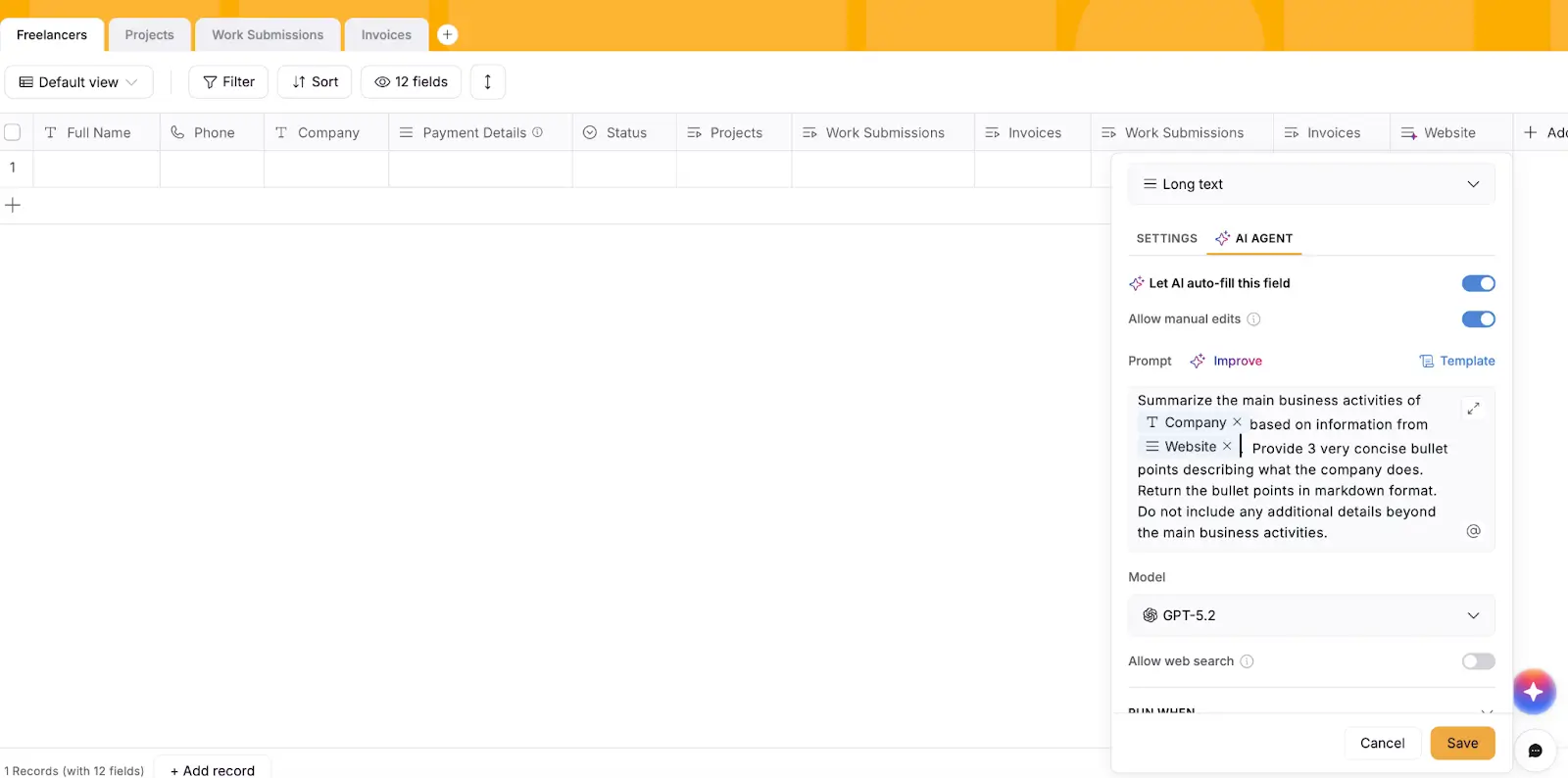
Softr Databases offers a spreadsheet-style interface with the structure and control ops teams need: link records across tables, create custom views for each workflow, and manage permissions for who can see or edit what. You can use it as a standalone data hub or as the backend to power full-stack business apps like CRMs, client portals, or internal tools.
To get started faster, Softr includes a Database Co-Builder. Describe your use case in plain English and AI instantly creates the database structure for you, including tables, fields, and relationships.
Once your database is set up, AI Agents work directly inside fields to automatically clean, enrich, categorize, and summarize data as it’s added or updated. Softr also uses AI to generate filters and formulas, so non-technical teams can build advanced database logic. You can connect 21+ data sources alongside Softr Databases, and every plan includes the Softr API and an MCP server for deep agent access.
Softr Databases pros and cons
Pros:
- AI Agents that work directly on your data, plus AI help for writing formulas and filters
- Use AI to create tables, fields, and relationships, then refine them by adding new tables, updating select options, and generating placeholder or real records directly into the database.
- Full-stack solution that includes databases, interfaces, and automation
- Built for both internal tools and external client portals
- Fast performance, even with large databases
Cons:
- Built for business users and teams rather than developers
Softr Databases best features
- Relational tables with linked records: Connect tables to model relationships between data (like customers, projects, and tasks) and keep everything in sync.
- AI-assisted database actions: Use natural language to write formulas and filters, edit database structure (like adding tables or fields), and update schema elements such as select-field values.
- AI database generator: Create complete database schemas from a prompt, including tables, fields, relationships, and optional placeholder or real records.
- Database AI Agents: Automatically write, clean, enrich, categorize, and summarize records directly inside database fields.
- Workflow automation with AI: Trigger workflows when records meet specific conditions, pull in data from emails, documents, or APIs, use AI to process it, and write results back into the same database record.
- Full-stack app building: Turn your database into client portals, CRMs, project trackers, or inventory systems. Connect existing data sources or use Softr Databases.
- Built for internal tools and external portals: Create secure internal apps or branded client-facing experiences with granular permissions and access controls.
Pricing
Prices below are for annual billing. Every plan includes a monthly allowance of AI credits, and you can add more from the pricing page.
- Free: Unlimited apps, Softr Databases, Softr Workflows, and the Softr API and MCP server. Up to 3 builders, 5 app users, 5,000 records, 500 workflow actions per month, and 5 AI credits per month
- Basic: $19/month. Adds a custom domain, conditional form logic, and automated database backups. 5 team users plus 5 client users, 50,000 records, 2,500 workflow actions per month, and 10 AI credits per month
- Pro: $99/month. Adds granular permissions, custom code, API connectors, and Softr branding removal. 10 team users plus 50 client users, 500,000 records, 10,000 workflow actions per month, and 50 AI credits per month
- Business: $329/month. Adds two-factor authentication, global data restrictions, an installable mobile app, and filtered user sync. 30 team users plus 100 client users, 1M records, 25,000 workflow actions per month, and 100 AI credits per month
- Enterprise: Custom pricing, with SSO, SCIM, audit logs, and custom limits
👉 Start with a free plan to test how Softr Databases transform your workflow, or browse templates to launch in minutes.
2. Airtable — for teams that want spreadsheet ease with database structure
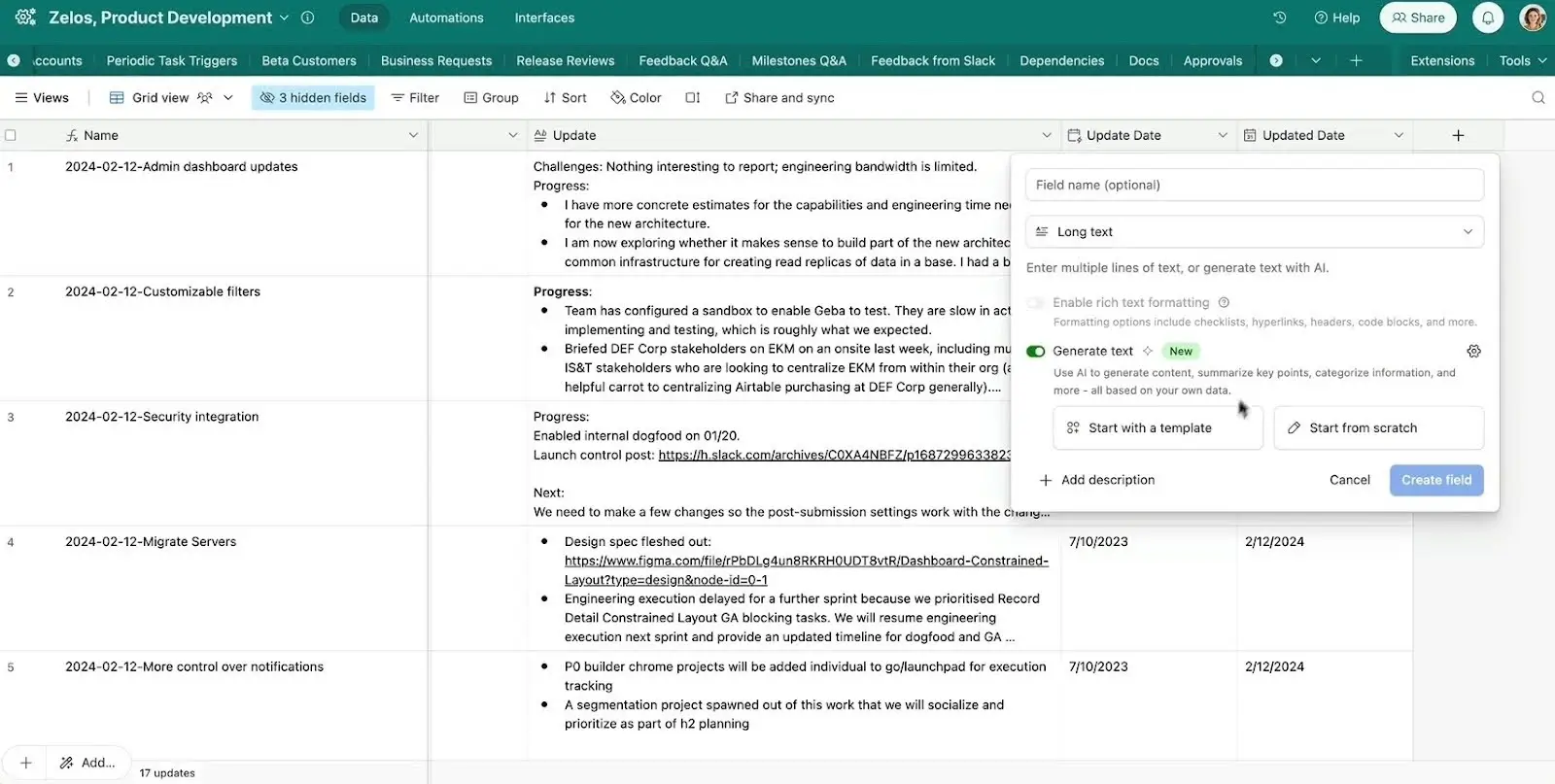
Airtable is a spreadsheet-database hybrid used by 500,000+ organizations. In recent years it's expanded beyond databases and now offers automations, interfaces, AI app building, and AI agents.
Anyone can easily spin up databases and interfaces using Airtable's Omni conversational AI assistant, which lets you describe what you need in natural language. You can also use agents to dynamically gather information, perform analysis, or generate data. For example, Airtable's document extraction agents turn PDFs into structured data at scale.
With its per-user pricing model, Airtable gets pricey fast if you need to allow lots of collaborators to modify records. It's best-suited for internal use: there's no white label option for interfaces and no native mobile app capabilities, and adding Portals (for external collaboration) costs $120/month for 15 seats on Team, or $150/month for 15 seats on Business.
👉 If you already manage your data in Airtable, Softr lets you build branded client portals and internal tools on top of your Airtable bases with granular permissions and mobile access (and no additional per-seat costs).
Airtable pros and cons
Pros:
- Audit logs, complex field types, and advanced schema management
- AI covers document extraction, content generation, and agents that run analysis for you
- More native connections than most database platforms (1,000+ integrations)
Cons:
- Per-seat pricing gets expensive quickly
- Performance can degrade with larger bases
- Portals are charged as an add-on starting at $120/month for 15 seats
- Interface builder doesn't offer much control over design, layout, or branding
Airtable features
- AI-powered document processing: Extract data from PDFs, generate summaries, and automate content tagging without manual data entry.
- Natural language database building: Use Airtable Omni to describe what you need and AI creates views and interfaces automatically.
- AI Agents for analysis: Get answers to questions across your data, automate categorization, and surface insights without building complex queries.
- Multi-step automation builder: Chain actions across tables and connected tools, triggered by record changes.
- Enterprise-grade database features: Audit logs, governance controls, and advanced schema management for teams that prioritize compliance.
- Extensive integration ecosystem: Connect with Slack, Gmail, Salesforce, Shopify, and 1,000+ other tools via native integrations or Zapier.
Pricing
- Free: 500 AI credits per editor monthly, 1,000 records per base
- Team: $20/user/month, 15,000 AI credits per user monthly, 50,000 records per base
- Business: $45/user/month, 20,000 AI credits per user monthly, 125,000 records per base, advanced admin controls
- Enterprise: Custom pricing, 25,000 AI credits per user monthly
👉 See Softr vs. Airtable for a detailed comparison.
{{cta-1}}
3. Notion — for lightweight databases inside an all-in-one workspace
Notion is an all-in-one workspace that creates a cohesive "operating system" for individuals and organizations. If your work includes lots of writing, notes, tasks, or an internal wiki, Notion lets you put all of those in one central place and collaborate with your team.
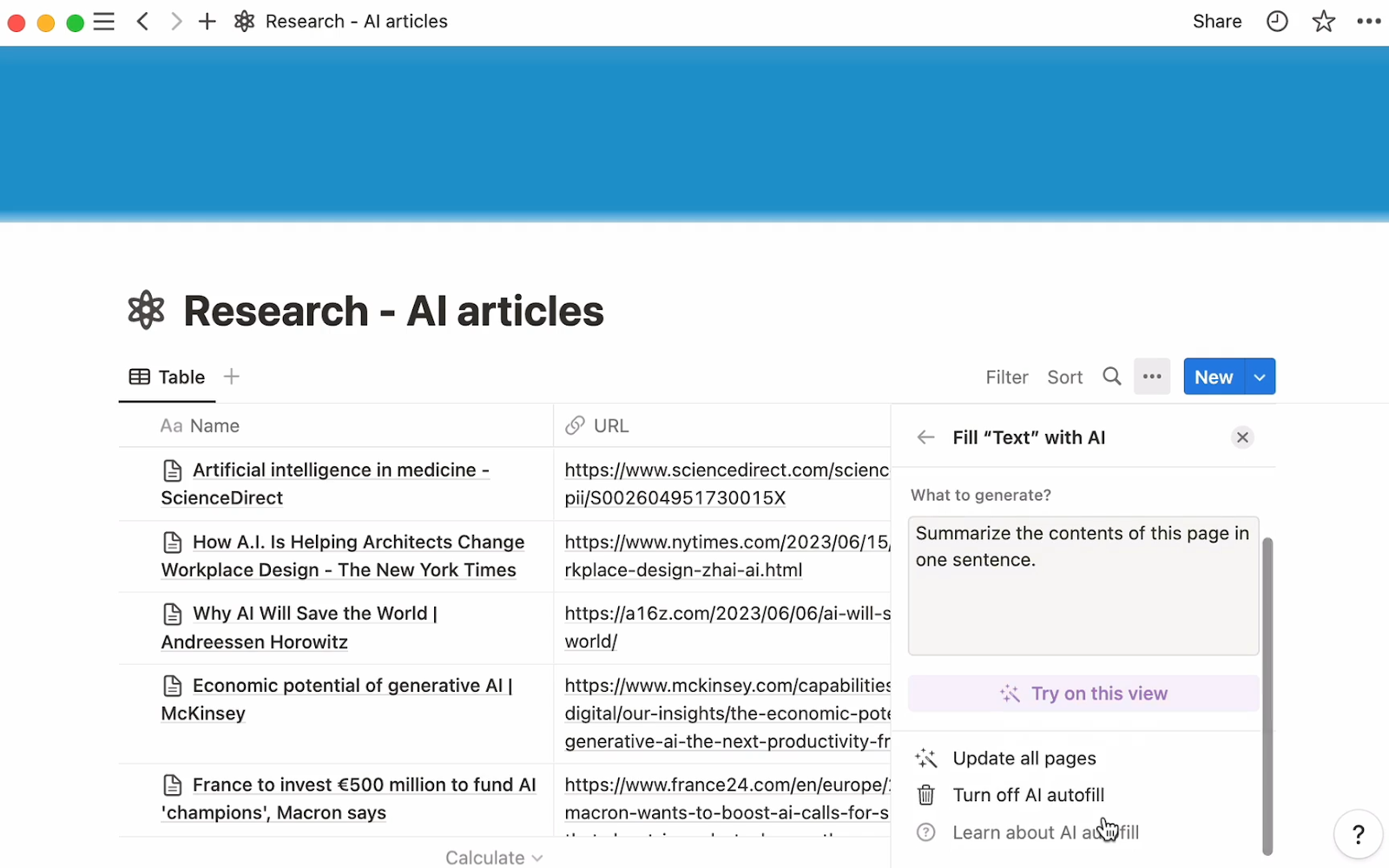
Notion AI can create dashboards from scratch, translate docs, generate long-form content, and search for information across your workspace. You can autofill your database with AI-generated summaries and insights. Notion Agent, which handles repetitive workspace tasks on its own, is available on the Business and Enterprise plans. Database editing is still the weak spot: Notion AI can create a new database, but it can't restructure an existing one or generate automations, forms, or charts.
If your team already uses Notion, or if you're looking for a lightweight, easy-to-use documentation or project management tool, it's a great option. If you're doing more data-heavy work, need lots of AI enrichment options, or rely on external portals, a dedicated database platform is a better bet.
Notion pros and cons
Pros:
- AI writing assistant can generate content from your database entries and documents
- Ask questions and Notion will look across your entire workspace to find answers
- Automatically populate database properties using AI autofill
- Notion Agent handles repetitive workspace tasks on Business and Enterprise plans
- Embed databases directly into documents
Cons:
- Agents can act on your workspace, but they can't restructure an existing database
- Lightweight database functionality compared to dedicated database platforms
- Performance can degrade with larger databases (over 10,000 records)
- Can't build external-facing portals or client-facing applications
Notion features
- AI writing assistant: Generate summaries, meeting notes, and content automatically from database entries and documents.
- Natural language data queries: Ask questions about your data in plain English and get instant answers.
- Inline databases: Embed databases directly in documents to keep related information together without tool switching.
- AI autofill for properties: Automatically populate database fields based on content and context.
- Relations and rollups: Connect databases and calculate aggregated values across linked records.
- Notion Agent: Hand off repetitive workspace tasks on the Business and Enterprise plans, or run custom agents on Notion credits.
- Template generation: Describe what you need and let AI create database and document templates.
Pricing
- Free: Individual workspace with basic databases and a trial of Notion AI
- Plus: $10/user/month for a collaborative team workspace, still only a trial of Notion AI
- Business: $20/user/month, the first plan with full Notion AI and Notion Agent
- Enterprise: Custom pricing, with full Notion AI and Notion Agent
Custom agents are billed separately at $10 per 1,000 Notion credits per month.
👉 You can turn your Notion databases into custom portals and apps using Softr's Notion integration.
4. Baserow — for open-source control and self-hosting
Baserow is an open-source no-code database platform with the option to self-host, which offers greater customization since developers can modify the codebase. Self-hosting also makes Baserow an attractive option for healthcare, financial services, and other organizations that manage sensitive data and want to host everything on-site. (You can use Baserow's cloud version if you don't want to deal with the hassles that come with self-hosting.)
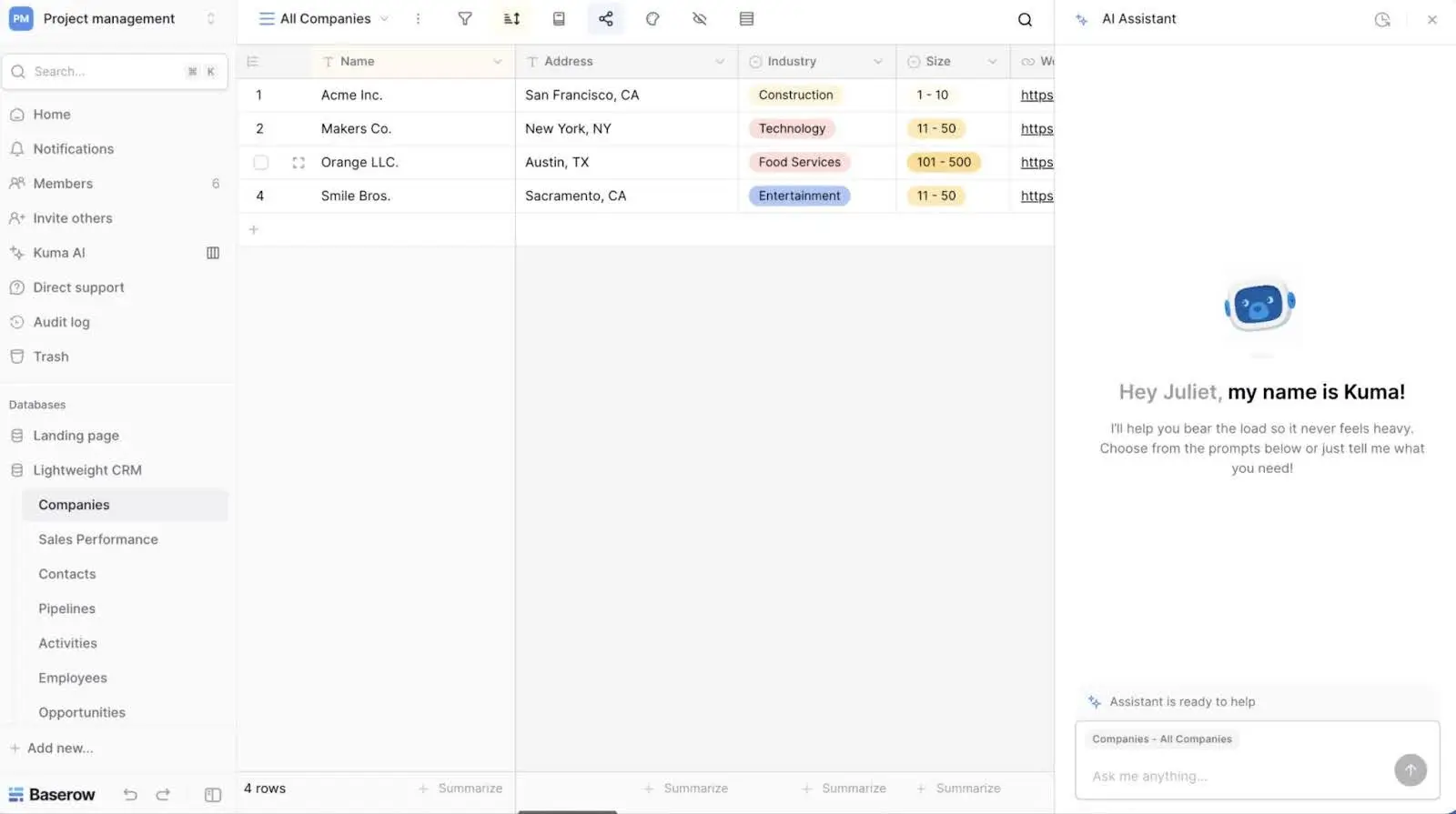
After starting as purely a database product, Baserow has evolved into a fuller no-code platform in recent years and now includes an app builder, automations, and dashboards. Baserow AI has caught up since its early days. The Advanced plan now includes the Kuma AI assistant, an AI field, an AI formula generator, an AI agent node for automations, and an MCP server. The catch is where those features sit: the free plan has none of them, and Premium doesn't unlock the assistant or the agent node either.
Baserow pros and cons
Pros:
- Option to self-host on your own infrastructure for data ownership and compliance
- Open-source codebase means no limits on customization
- AI field, AI formula generation, and an AI agent node for automations
- Enterprise plan supports 1 million rows per workspace
Cons:
- Self-hosting requires DevOps skills and ongoing maintenance
- AI features are locked to the $18/user/month Advanced plan and above
- App builder offers limited design freedom
Baserow features
- Self-hosting option: Deploy on your own infrastructure for complete data control and compliance with strict privacy regulations.
- Kuma AI assistant: Ask questions about your data and get help structuring tables, on Advanced and above.
- AI agent node: Add an AI step inside an automation to process records without writing code.
- AI formula builder: Build complex calculations with natural language descriptions instead of learning formula syntax.
- Beginner-friendly interface: Minimal learning curve with familiar spreadsheet-style UI and linked records.
- Smart filters and views: AI recognizes patterns in your data to suggest relevant filters and organizational structures.
- API-first design: RESTful API and webhooks make it easy to integrate with other tools and build custom solutions.
Pricing
Prices are per user per month, billed yearly. Self-hosted plans mirror the cloud tiers, including the row limits.
- Free: 3,000 rows per workspace, no AI features
- Premium: $10/user/month, 50,000 rows per workspace, limited AI features
- Advanced: $18/user/month, 250,000 rows per workspace, Kuma AI assistant, AI field, AI formula generator, AI agent node, and MCP server
- Enterprise: Custom pricing, 1 million rows per workspace, same AI features as Advanced
5. Supabase — for developers building applications on PostgreSQL
Supabase is a Postgres development platform that provides database, authentication, storage, and real-time features for building applications. It’s built for developers who want database, auth, and storage from one portable Postgres stack.
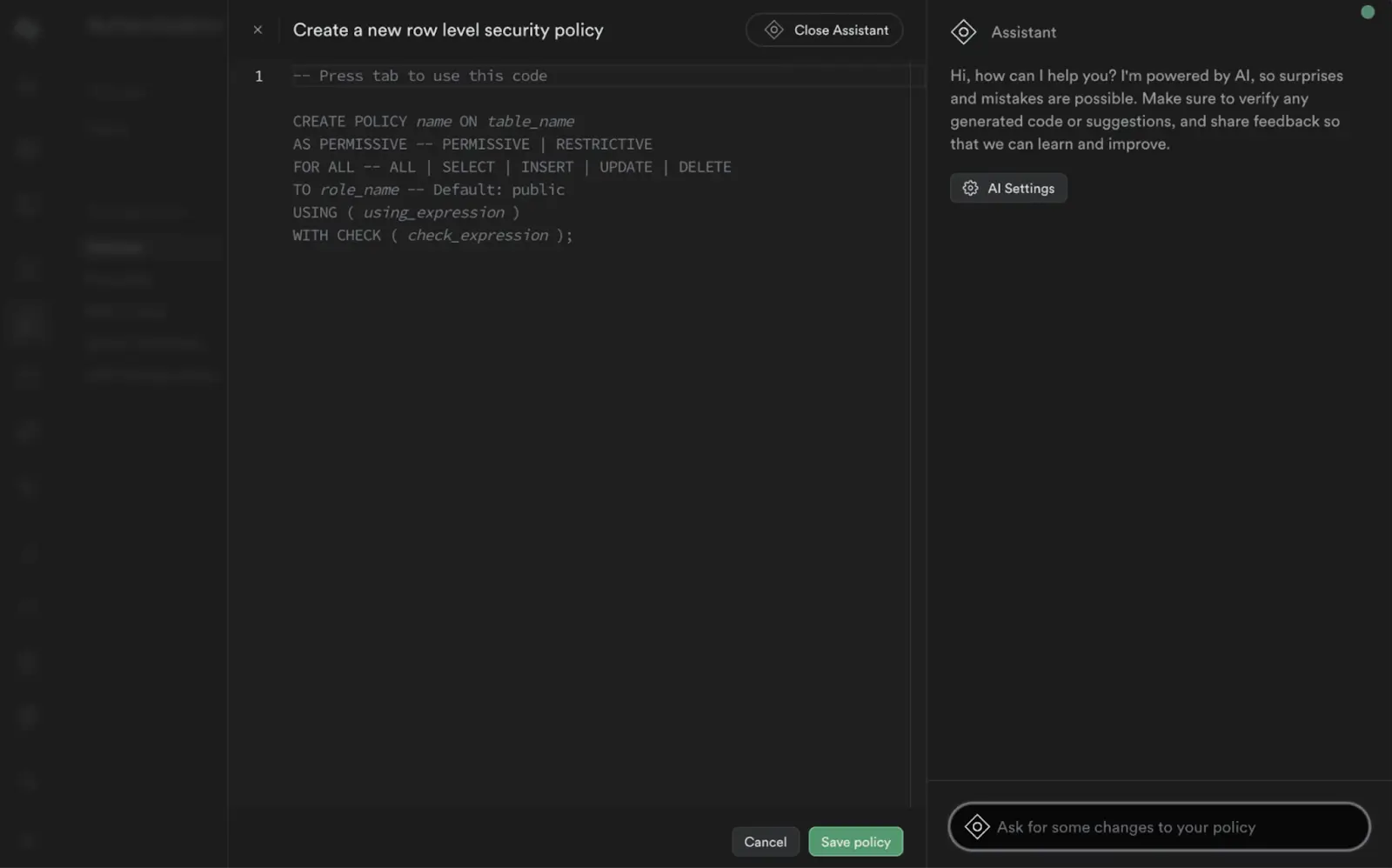
The Supabase Dashboard includes a built-in AI assistant that can automate tasks, generate SQL queries, analyze errors, and provide recommendations. Still, Supabase's AI features are intended to make life easier for developers and don't make databases and apps simple enough for non-technical users.
If you're a developer building custom applications, Supabase gives you all the tools and infrastructure you need and a free plan that supports up to 50,000 monthly users.
Supabase pros and cons
Pros:
- 100% portable Postgres database with authentication, storage, and real-time data synchronization
- AI assistant that generates SQL queries, debugs errors, and uncovers data insights
- Free tier supports a 500MB database and 50K monthly active users
Cons:
- Requires coding skills and database knowledge
- Built for developers creating applications, not business users
- Overkill for straightforward business needs like CRM or project tracking
Supabase features
- AI schema generation: You can generate full database structures using natural language.
- AI SQL editor: Type what you want and Supabase turns it into real database queries.
- Full PostgreSQL database: Advanced features including triggers, functions, custom types, and extensions that go beyond basic databases.
- Real-time data subscriptions: Your apps can instantly refresh for all users whenever data changes (important for apps like live dashboards, collaboration tools, and shared docs).
- Built-in authentication: Supabase comes with user login, sign-up, email verification, social logins, and permissions out of the box.
Pricing
- Free: 500MB database, 50K monthly active users
- Pro: $25/month per project, 8GB database, 100K monthly active users, daily backups
- Team: $599/month, adds SSO and SOC 2 compliance, extended API retention
- Enterprise: Custom pricing with SLAs, VPC support, audit logs
👉 Using Softr, you can turn your Supabase data into frontend apps for your clients or team.
6. Retool Database — for technical teams building internal tools
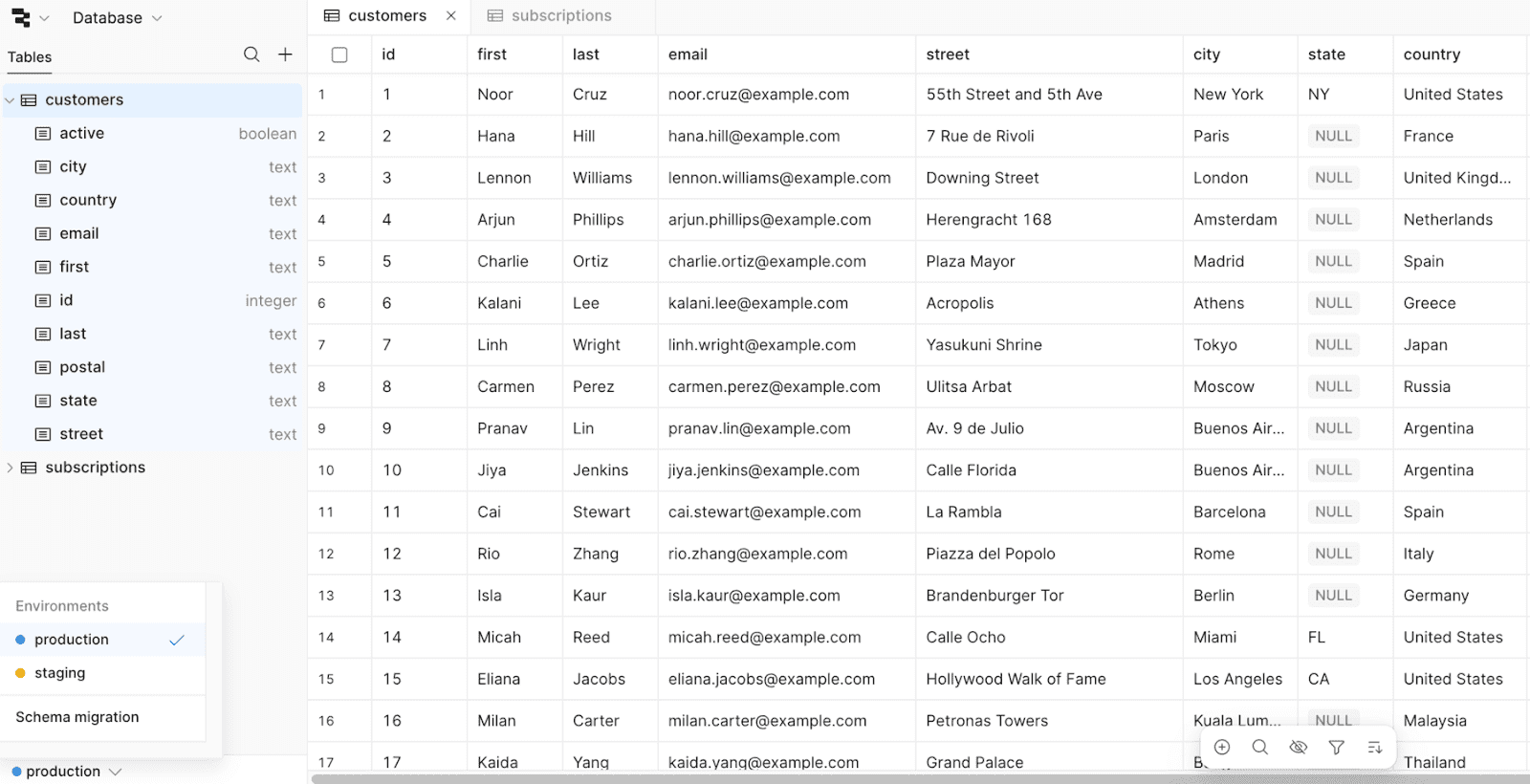
Retool Database is a managed PostgreSQL database built specifically for Retool's internal tool platform. It's designed for technical teams that already use Retool to build admin panels, dashboards, and operational tools, with a spreadsheet-style view that's more accessible than most products aimed at developers.
Retool's broader platform includes AI agents, smart workflows, intelligent routing, and internal search tools. However, the database is limited to AI-assisted query writing and doesn't offer field agents that can autonomously handle cell-level tasks like enrichment or tagging. Retool Database supports multiple environments (development, staging, production) with automatic query refresh when you switch between them.
If you have a team of developers and are building internal tools that need to connect multiple data sources simultaneously, Retool might make sense. However, it's limited to 1,000 queries per minute across your entire organization and requires technical expertise to use effectively. And you'll need to layer another platform on top of Retool to build polished external-facing apps.
Retool Database pros and cons
Pros:
- Deep customization with JavaScript and SQL for building complex internal dashboards
- Connects to 70+ databases and APIs for technical teams managing multiple data sources
- Advanced developer features like source control, audit logs, and version control
- Connects to the rest of Retool with no extra setup if you already use the platform
Cons:
- Not accessible for non-technical teams since it requires SQL and JavaScript knowledge
- Focused on internal-facing tools; not designed for external client portals
- No Field Agents for data enrichment (only Agents for the broader Retool ecosystem)
Retool Database features
- AI query writing: Use built-in AI tools to write JavaScript and SQL queries
- Built into Retool: Query the database from any Retool app with no separate connection to configure
- Spreadsheet-style interface: Manage data in a spreadsheet view while it stays a real PostgreSQL table
- GUI and SQL modes: Choose between writing raw SQL or using a graphical interface
- Environment switching: Move between development, staging, and production, with queries refreshed automatically
Pricing
- Free: Up to 5 users, 500 workflow runs per month, 5GB of database capacity, and 250 AI credits per month
- Team: $10/month per builder billed annually, 5,000 workflow runs and 1,000 AI credits per month; additional $5/month per internal user
- Business: $50/month per builder billed annually, 3,000 AI credits per month, advanced admin controls; additional $15/month per internal user and from $4/month per external user
- Enterprise: Custom pricing
👉 Check out our full Softr vs Retool comparison for a more detailed breakdown.
7. Stackby — for marketing teams tracking campaigns
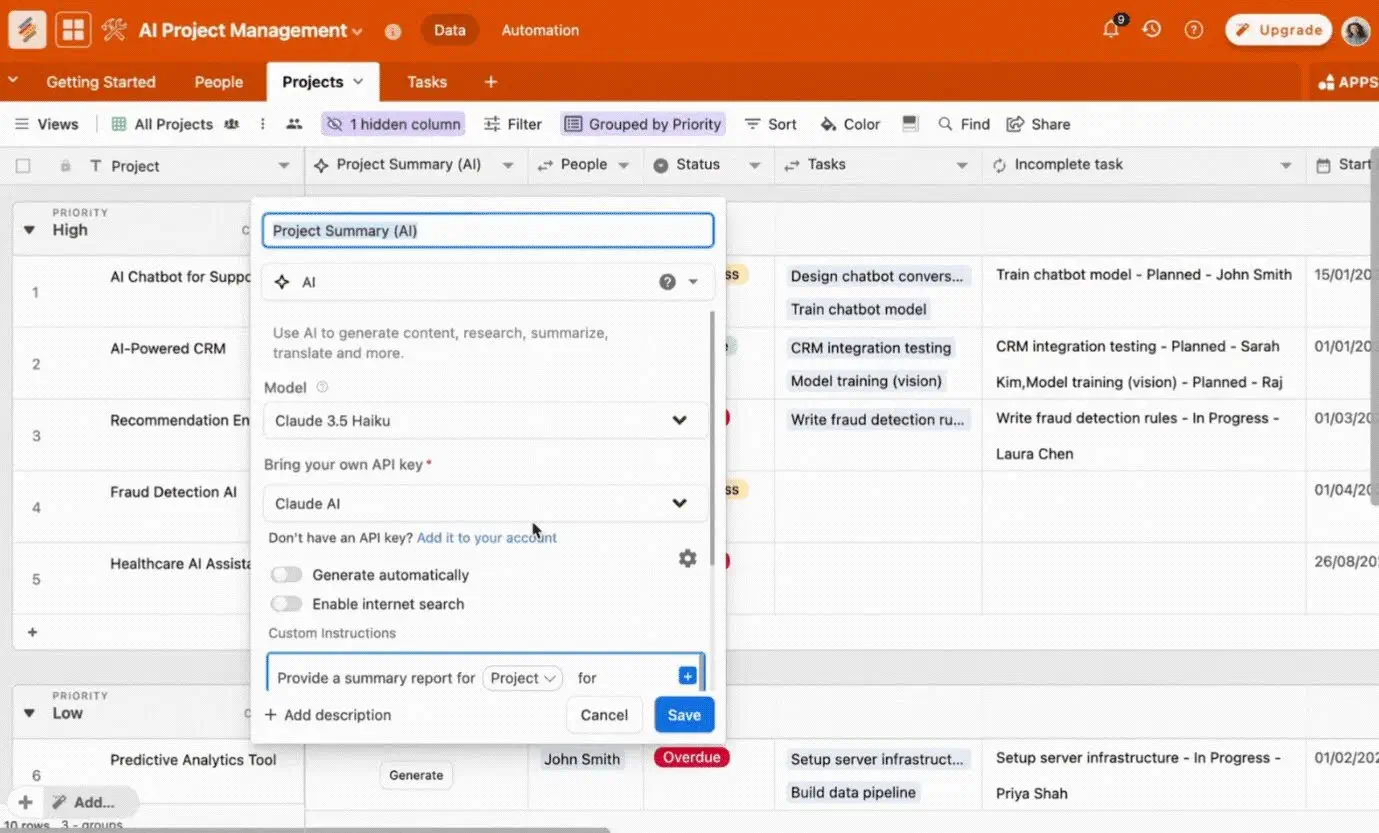
Stackby is a spreadsheet-style database built for marketers, agencies, and operations teams managing campaigns. With 40+ native integrations covering YouTube Analytics, Google PageSpeed, Facebook Ads, and Semrush, it suits marketers consolidating reporting data. Each plan caps how many of those API connectors you can use at once, from 2 on the free plan to 25 on Enterprise.
You can create AI-powered "stacks" (databases) with AI Field Agents that generate social captions and ad copy, categorize audience feedback, and analyze campaign documents. AI Field Agents run on your own API key from OpenAI, Gemini, or Anthropic. Stackby also offers multiple views (grid, Kanban, calendar, gallery) and pre-built templates for CRM, social media planning, and project tracking.
The AI features sit higher up the price list than they used to. Field Agents now need the Business Plus plan, which is $35/user/month billed monthly, though annual billing brings that down sharply. Stackby is also designed mainly for internal use rather than external apps like client portals.
Stackby pros and cons
Pros:
- Column-level API connectors provide live data updates
- AI Field Agents generate content, categorize data, and analyze documents, using your own model API key
- Accessible spreadsheet-style interface
- Annual billing is far cheaper than monthly, down to roughly $4 per user per month on Economy
Cons:
- Limited permissions and roles
- AI Field Agents need the Business Plus plan, and you bring your own model API key
- Designed primarily for internal workflows, not external-facing portals
Stackby features
- AI data enrichment: Automatically populate company information, social profiles, and contact details for leads and prospects.
- Smart linking between records: AI suggests logical connections between records.
- AI formula suggestions: Get intelligent recommendations for calculations without learning formula syntax.
- 40+ native integrations: Connect with Slack, Gmail, Trello, and other tools, within your plan's API connector limit.
- Automated categorization: AI tags and organizes records based on content and patterns.
- Multiple view types: Visualize data using grid, Kanban, calendar, and gallery views.
Pricing
Prices below are for monthly billing. Annual plans are sold as yearly bundles for three users and cost substantially less per seat.
- Free: 5 editors and 50 read-only guests, 2 API connectors, no AI features
- Economy: $9/user/month, 10 API connectors, no AI features
- Business: $18/user/month, 15 API connectors, still no AI Field Agents
- Business Plus: $35/user/month, 20 API connectors, the first plan with AI Field Agents
- Enterprise: Custom pricing, 25 API connectors
Five ways AI databases save you time
- Generate entire databases from a description. Instead of manually creating tables, fields, and relationships for a new client portal or project tracker, describe what you need (like "applicant tracking system for our recruiting team") and AI builds the complete structure.
- Extract data from documents at scale. Upload invoices and AI automatically pulls dates, amounts, vendor names, and line items into structured fields.
- Enrich records with web research. When a new contact fills out a form, you can design AI agents that automatically pull in company details like industry, employee count, and location.
- Write complex filters and formulas in plain language. Instead of learning database syntax, ask for "all overdue invoices over $5,000 from Q3 clients in California" or "calculate days until contract renewal with a 30-day warning flag."
- Categorize and route incoming requests automatically. AI reads support tickets, maintenance requests, or applicant inquiries and tags them by type, urgency, or department.
Choosing the right AI-powered database for your team
The biggest difference between AI databases is whether the database is only a place to store data, or whether it directly powers the apps your team actually uses.
Before choosing a platform, consider:
- Will your database live behind other tools, or will it be the foundation of your internal tools and client-facing portals?
- Do you need fine-grained control over layouts, permissions, and experiences for different users?
- Do you want to assemble multiple tools, or work in a single system where data and apps are tightly connected?
- How well does pricing scale as more users interact with your apps?
Developer-first platforms like Supabase or Retool treat the database as infrastructure. Airtable allows apps on top of data, but is often limited when teams need deeper personalization, granular user experiences, or predictable pricing at scale. Baserow focuses on hosting and compliance rather than app experience.
Softr is built around the idea that databases should directly power apps. Its databases are natively connected to the Softr app builder, so teams can create modern, highly personalized internal tools and external portals without connecting multiple products. Instead of managing an isolated database, teams work in apps tailored to each user, with granular permissions, flexible layouts, and pricing that scales as usage grows.
Try Softr for free to build an AI-powered database in minutes, or get started with one of our templates.
Frequently asked questions
What's the best free AI-powered database?
Can AI databases replace traditional databases?
What's the difference between an AI assistant and an AI-powered database?
What's the best AI database for small teams?
Can I migrate my existing data to an AI-powered database?