Transcript
My name is Kat and I work as a growth marketer here at Softr. Let me show you how I have been using AI agents for my work so far.
I work with creators and sponsors, and I have been dealing with quite a lot of manual tasks when it comes to invoice validation. So I decided to create this AI agent that checks this for me.
I actually prepared two invoices in order to showcase this. This one is correct and includes everything, full address, and the amount. This one is missing the address.
[.blog-callout]
While setting up manual data management is a great exercise, you can use the AI co-builder to generate your entire database schema and application structure just by describing your project goals.
[.blog-callout]
Let's put this to test. I will upload the first invoice, which is missing the address, and let's see if this returns what we need correctly.
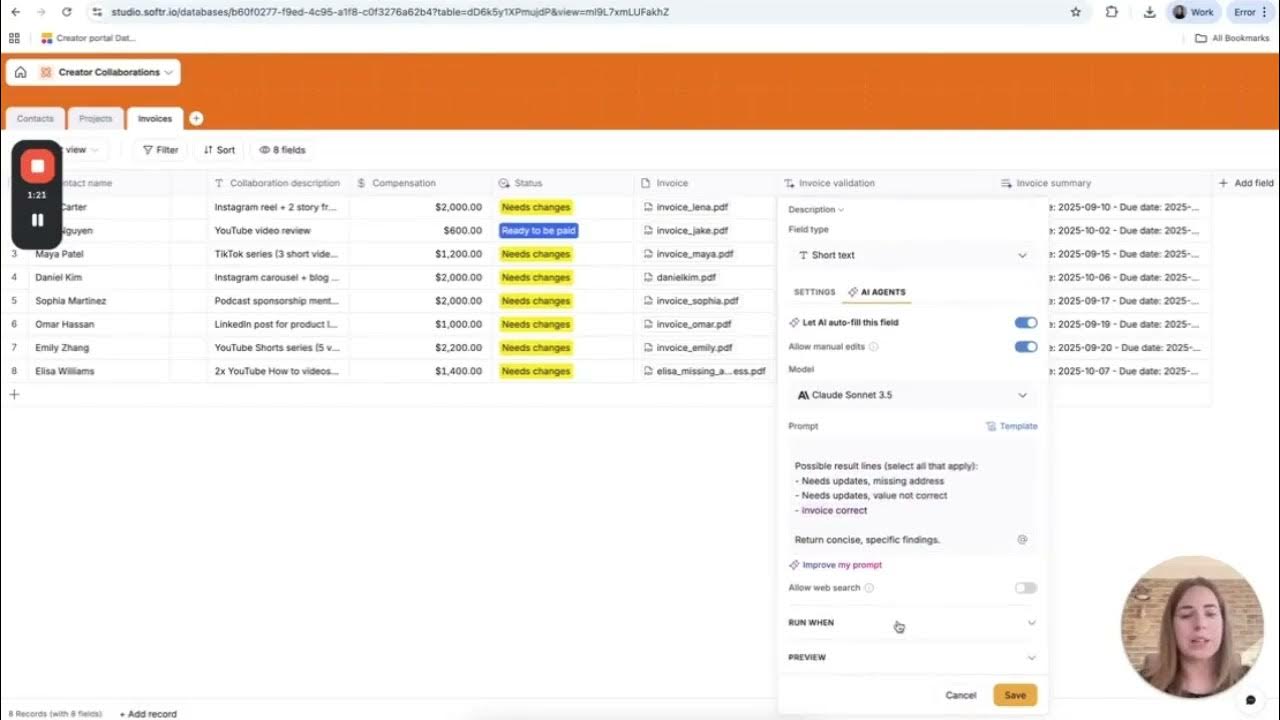
The invoice validation says: needs update, missing address. Let's check the AI agent. How I set it up is to check the invoice and return results as follows.
It selects all that apply, whether it needs updates because of the missing address, or because the value is not correct, or if it is correct completely, it says invoice correct. It runs whenever this record, the invoice, is updated.
[.blog-callout]
This logic is powered by Softr Databases, which allows you to store and manage your data natively within the platform for better performance and easier AI integration.
[.blog-callout]
I also have created another AI agent that is on the status level. I want the status to automatically change to ready to be paid if the invoice is correct.
If the invoice is not correct, I want it to change to needs changes. This was my prompt, and it runs whenever an existing record is updated, specifically the invoice and invoice validation.
[.blog-callout]
To keep your business logic and automation as close to your design as possible, you can also leverage Softr Workflows to handle complex, multi-step sequences natively.
[.blog-callout]
Now, let's try to upload the correct invoice. Let's see. Correct invoice, loading.
Now, the result should be invoice correct, and the status should change to ready to be paid. And here we go.
This is how I've been using AI agents so far, and I am very excited for all of you to try it. Thanks.