9 workflow automation ideas (+ free templates to build with)


[.blog-callout]
TL;DR (above the fold)
- Manual processes don’t scale. Emails, spreadsheets, and ad-hoc follow-ups slow teams down and create missed handoffs.
- Workflow automation fixes the gaps. Simple rules can assign work, send alerts, and keep records updated automatically.
- Strong foundations matter. Clean processes, structured data, and clear ownership are key before automating anything.
- Softr makes it practical. Build workflows with templates, built-in AI, and predictable pricing—without technical overhead.
[.blog-callout]
If you’re managing a service, field operations, or any other process-heavy business, you’re probably handling more tasks than you’d like at once.
There are client requests, vendor updates, approvals, follow-ups, and a steady stream of to-dos that pull your team away from actual work. Most of these steps happen manually in email threads, spreadsheets, or disconnected tools, which makes things slow and easy to miss.
Workflow automation helps you stay on top. Instead of manually assigning leads, chasing invoices, or reminding the team about onboarding tasks, you can set simple rules that handle the repetitive work for you.
In this guide, you’ll see practical workflow automation ideas and templates that help you build workflows that truly stick, so you never have to start from scratch.
What workflow automation actually means
Workflow automation is simply a way to take a routine task your team repeats every day and turn it into a rule the system can run for you. Instead of someone manually approving a purchase order, assigning a new lead, or reminding a technician about tomorrow’s job, you set a trigger (“when this happens”) and an action (“do that automatically”).
Most useful automations follow the same pattern:
| Component | What it means | Examples |
|---|---|---|
| Trigger | The event that starts the workflow | A form is submitted, a record changes status, a new client is added, an invoice becomes overdue |
| Condition | The rule that decides what should happen next | Type of client, job size, priority level |
| Action | The step the system completes automatically | Send a notification, create a task, assign an owner, update a record, and move the item to the next step. |
Why workflow automation is worth it
Most operational issues come from manual steps: approvals stuck in inboxes, follow-ups that someone forgets to send, or records that never get updated. When your day depends on remembering dozens of small tasks, things will slip.
Automation removes that pressure. A few targeted rules can:
- Cut errors by making every step follow the same logic.
- Speed up handoffs so new requests, jobs, or clients move instantly to the right person.
- Reduce repetitive work like routing documents, updating statuses, or sending reminders.
- Help you scale without adding more admin work as volume grows.
- Improve client and vendor communication because updates are timely and consistent.
For teams in service, field work, manufacturing, or construction, even small improvements make your work more reliable, especially when things get busy.
What you need in place before automating workflows
Before we get into the actual workflow-building examples, you have to have your prerequisites for building workflows in place:
1. Clean, well-defined processes
- Map your existing workflow from start to finish. Know who does what, when, and under which conditions (tasks, handoffs, decision points, exceptions).
- Fix inefficiencies before automating. Automating a broken process just magnifies the flaws. So clean up unnecessary steps, ambiguous handoffs, or redundant approvals first.
2. Consistent, structured data & clear inputs/outputs
- Make sure your data is well-organized and consistent, either in a database like Softr Databases and/or in other tools (Slack, email, Stripe, etc.). Automation tools rely on predictable data formats. Inconsistent or messy data creates fragile automations.
- Define input, output, and expected result for each step. Know what triggers each step (form submission? status change?) and what should result. This helps set up triggers, rules, and follow-up conditions correctly.
3. Clear goal and scope for automation
- Pick the right processes to automate. Define your objectives: why automate this process? Whether it’s saving time, reducing errors, improving throughout, or standardizing compliance, you should know what “success” looks like.
- Limit scope initially. Automating a complex process from day one increases risk. Begin with one manageable workflow to test the waters.
4. Defined ownership & stakeholder buy-in
- Assign a “workflow owner.” Someone should be in charge of the workflow design — able to clarify edge cases, make decisions, and approve changes.
- Involve everyone impacted. Get input from people who actually use or hand off tasks, to make sure automation matches real-world behavior and exceptions.
- Communicate intent and impact. People need to know why automation is happening, how it changes their work, and who handles exceptions or errors.
5. Tool fit & integration readiness
- Choose a workflow automation platform or tool that matches your needs.
- Ensure integrations (if needed) are supported if your workflow involves CRM, email, databases, spreadsheets, or other internal/external tools.
Workflow automation ideas + 9 free templates to build with
Below are nine real workflow automation ideas paired with templates that will help you build automations for your team using Softr Workflows.
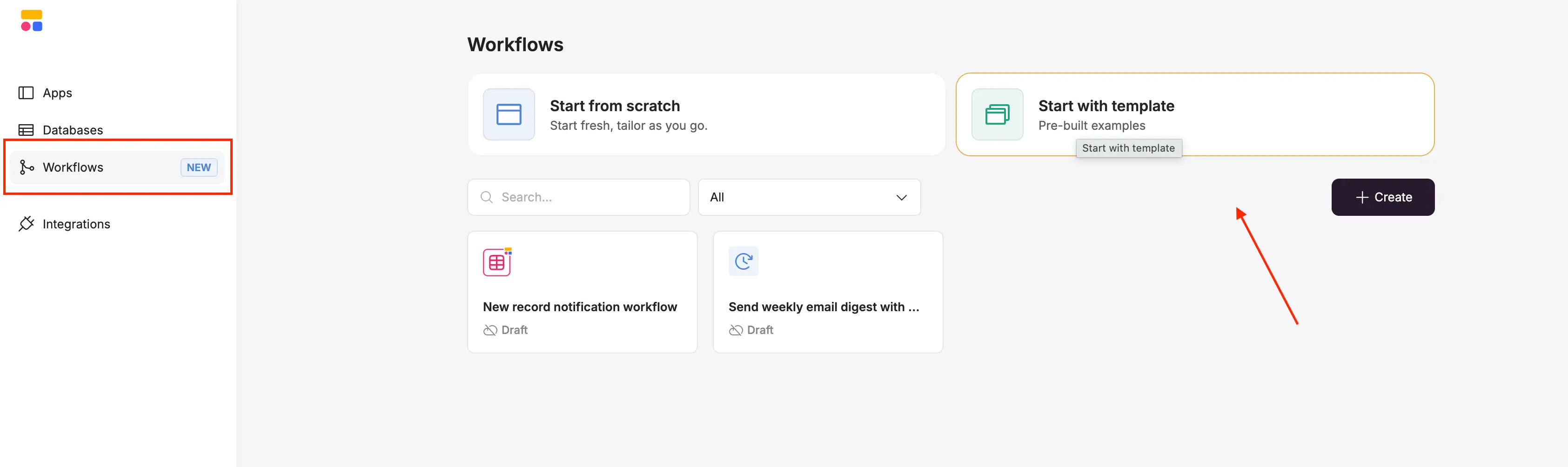
Find all these templates by logging into Softr (or signing up for free) and heading to the Workflows tab in the navigation menu.
1. Send a weekly email digest with AI summaries
Without automation, someone on your team has to open multiple spreadsheets or dashboards, filter for the right records, copy the data into notes, write a summary, and email it to the group. It’s time-consuming and easy to forget, especially on busy weeks.
How the workflow automation helps:
This workflow automatically compiles key information from your database(s) and sends a summary to your team on a recurring schedule. Softr finds the records you care about, uses AI to turn them into a clear summary, and emails it to the right people every week.
It’s ideal for staying on top of open jobs, overdue tasks, new clients, or any data you normally review manually.
The template is fully customizable, and here’s a clip on how you can set it up successfully:
2. Send a Slack alert for important records using AI
Teams typically scan new entries manually: reviewing tickets, leads, service requests, or incident reports to figure out what’s urgent. Someone then has to notify the team in Slack or email. This slow filtering often leads to delays or missed priorities.
How the workflow automation helps:
When a new record comes in, Softr uses AI to determine its urgency and only alerts your Slack channel if the record is truly important. Your team sees the highest-priority items instantly, without reviewing every entry or dealing with unnecessary notifications.
Here’s how you can customize the template:
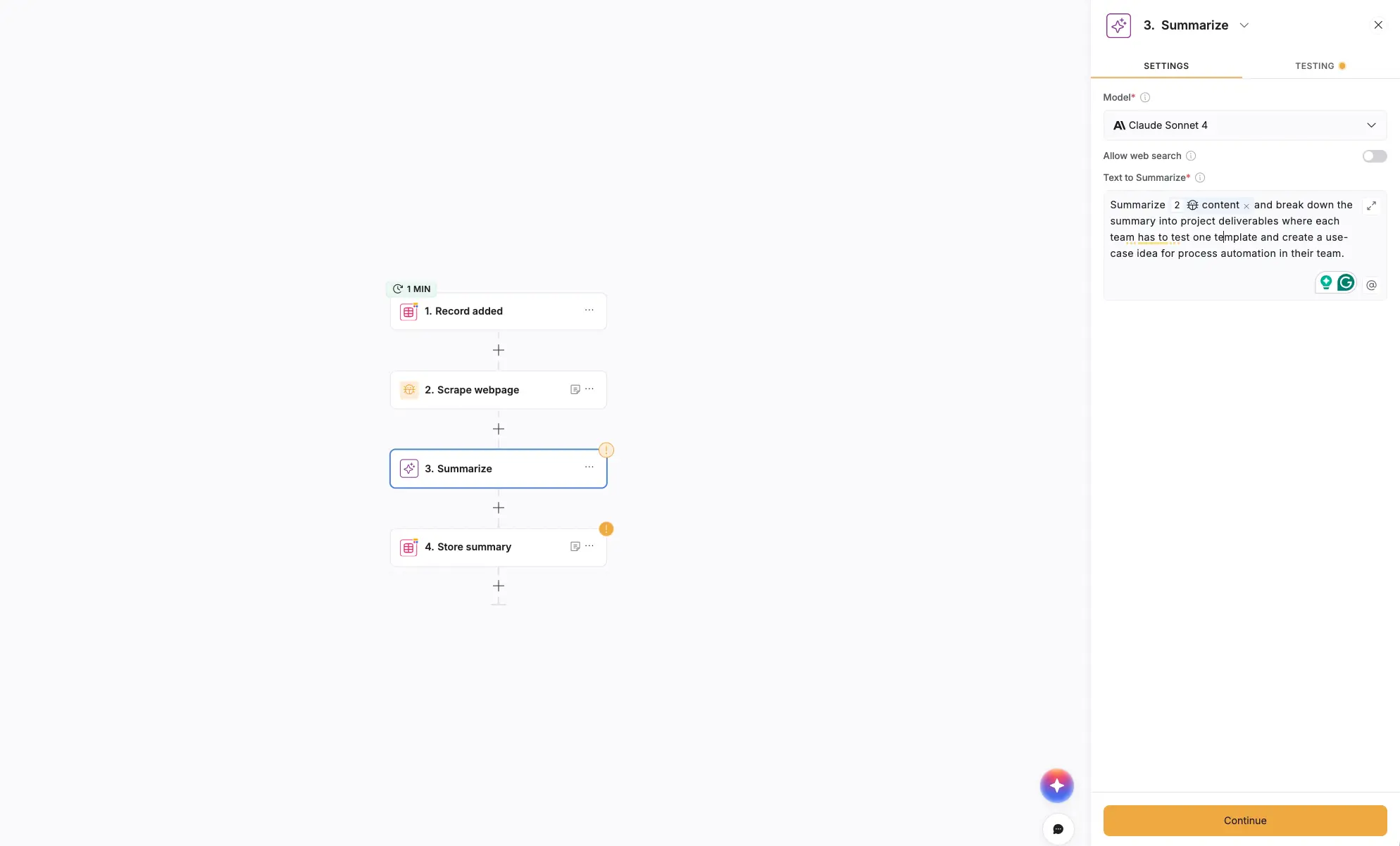
3. Scrape a URL, summarize with AI, and store the results
Normally, someone in the team has to open necessary links, skim the pages, pull out key points, write a summary, and paste it into your system. For teams tracking listings, suppliers, competitors, bids, or articles, this repetitive work can take hours every week.
How the workflow automation helps:
When someone adds a URL in Softr Databases, the workflow automatically extracts the content, summarizes it with AI, and stores the summary back in your database. You get clean, consistent insights without manual reading or copy/paste work, and your team can review information much faster.
{{cta-1}}
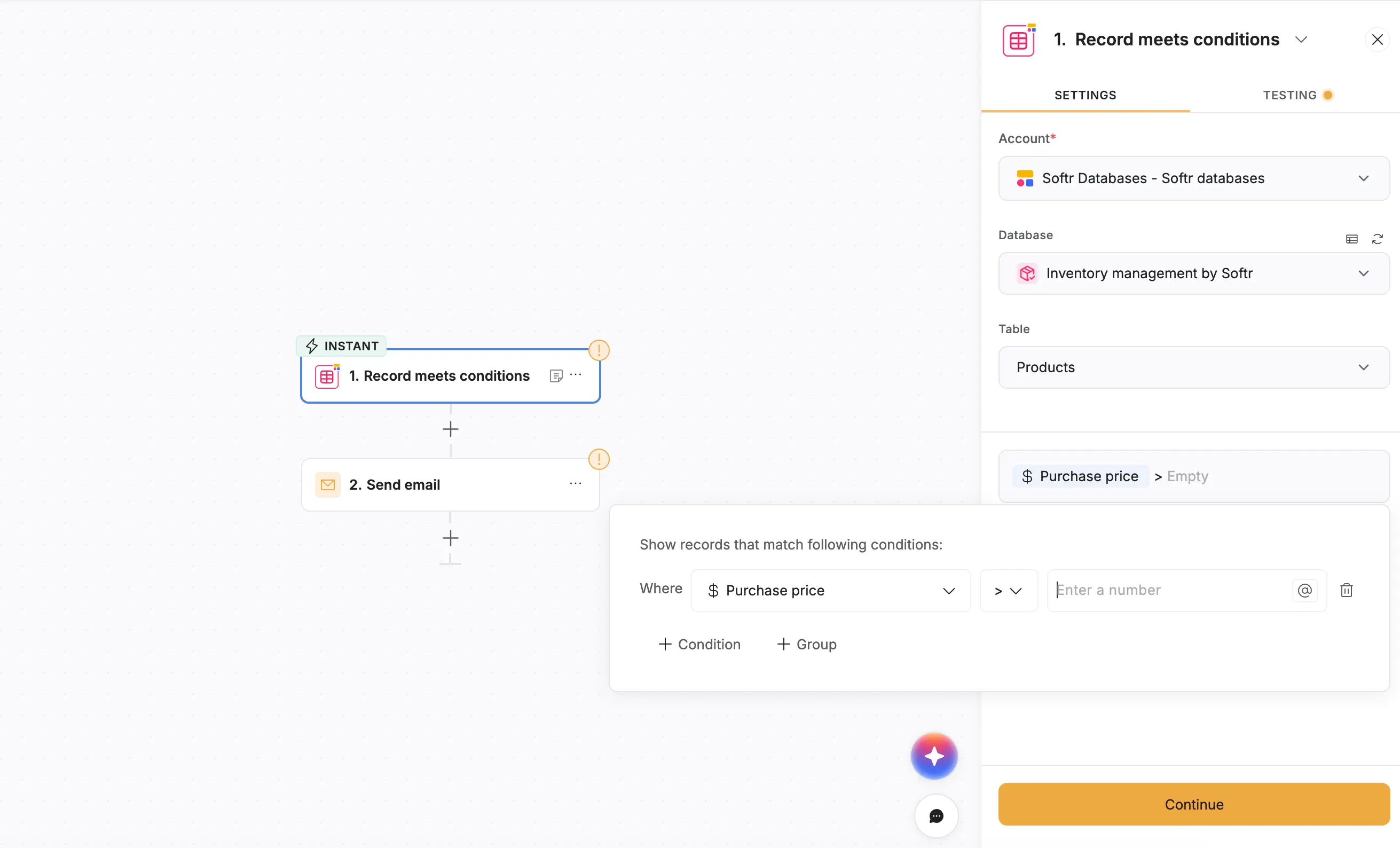
4. Send an email alert when a number hits a threshold
You often have to check dashboards or spreadsheets repeatedly to see many things: if inventory is low, if overdue invoices are piling up, if job load exceeds capacity, or if a metric has crossed a limit. It’s easy to miss changes unless you're monitoring constantly.
How the workflow automation helps:
This automation watches the data for you. The moment a value crosses your pre-defined threshold, it sends an email alert to the right person. You don’t need to monitor anything manually: your team can act as soon as something requires attention.
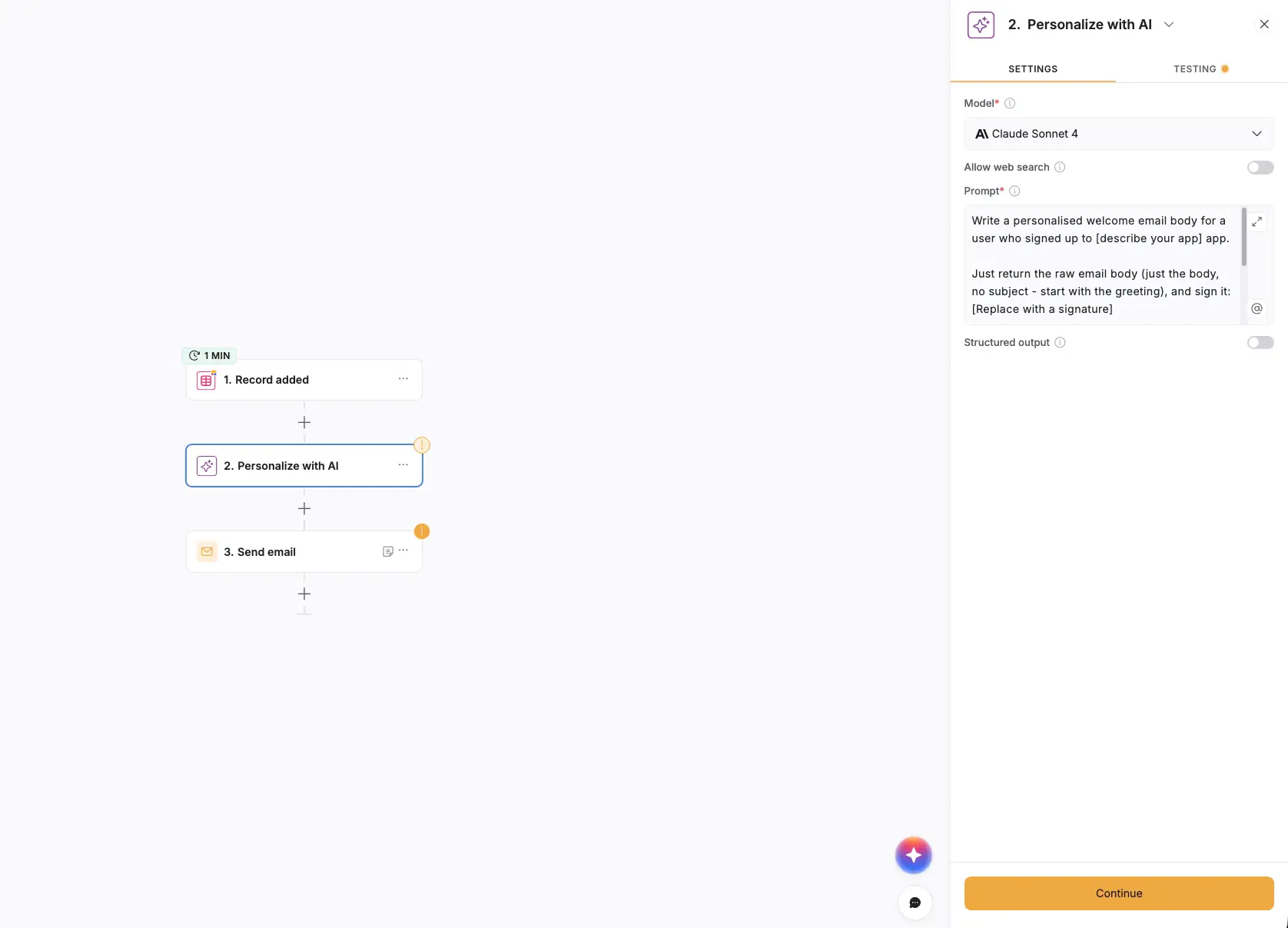
5. Send an AI-personalized email when a record is created
When a new lead or contact comes in, someone has to look at the details, decide what the right message should be, write a personalized email, and send it manually. For teams dealing with many inquiries a day, this becomes slow and inconsistent (and often leads to late or forgotten follow-ups).
How the workflow automation helps:
As soon as a new record (such as a newly signed-up lead) is added, the workflow analyzes the contact’s details with AI and generates a personalized email automatically. The message is sent right away, so every lead gets a warm, relevant touch without your team lifting a finger. It keeps response times tight and prevents early-stage drop-off.
6. Auto-assign owner with AI on record creation
Most teams manually decide who should handle each new lead, request, job, or ticket. Someone reads the entry, checks the criteria, and assigns an owner in the system. This creates delays, inconsistent routing, and gaps when the process depends on a single person being available.
How the workflow automation helps:
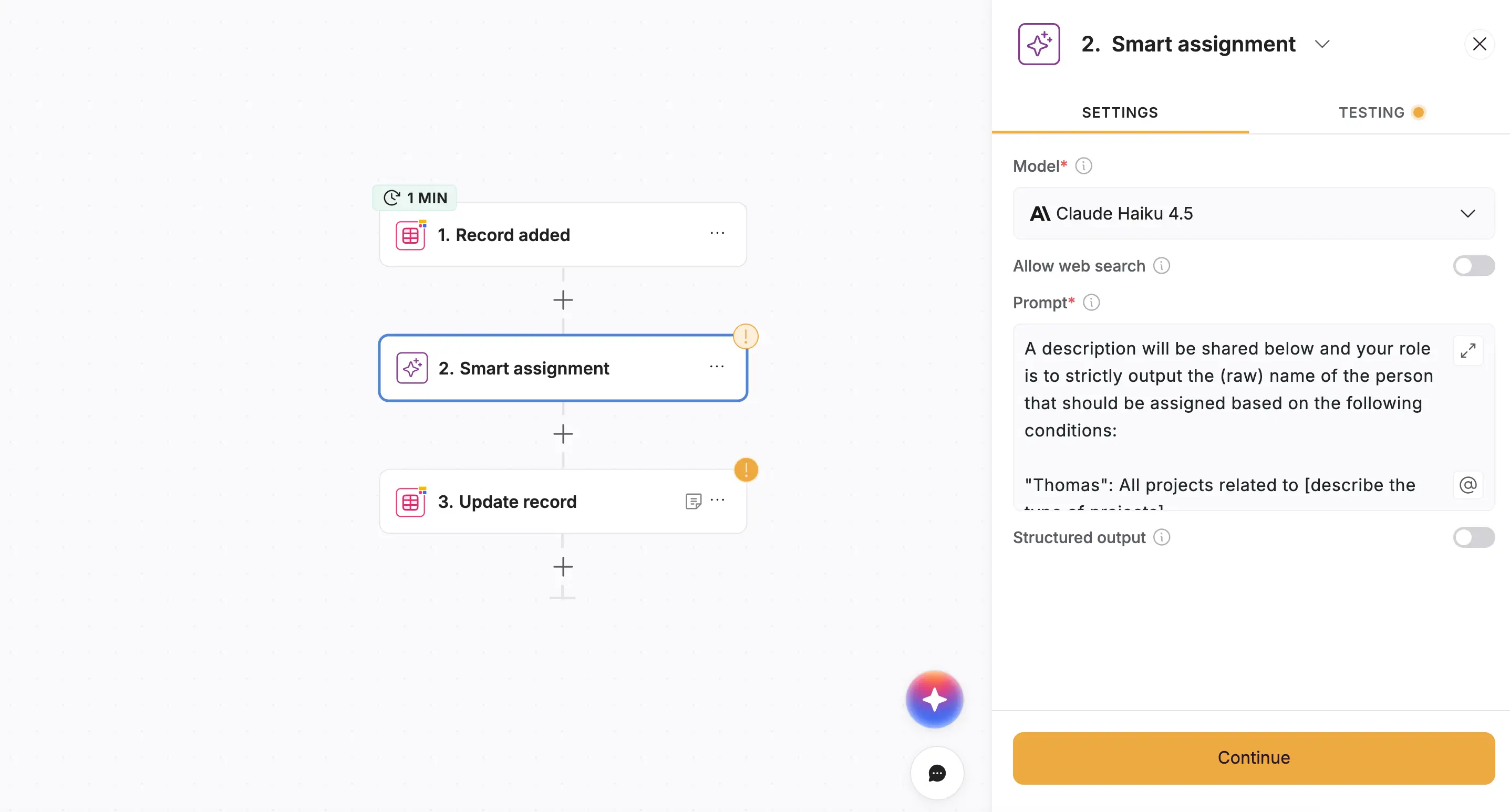
When a new record is created, the workflow uses AI to evaluate the data and match it to the right owner based on your rules. The record is updated instantly with the correct assignment. No waiting, no bottlenecks, and no missed handoffs: work moves to the right person immediately.
7. Send onboarding email sequence after sign-up
Without automation, onboarding emails have to be timed manually. Someone needs to send the first welcome message, wait a couple of days, remember to send the next one, and repeat for the final follow-up. It’s tedious, easy to forget, and creates inconsistent onboarding experiences.
How the workflow automation helps:
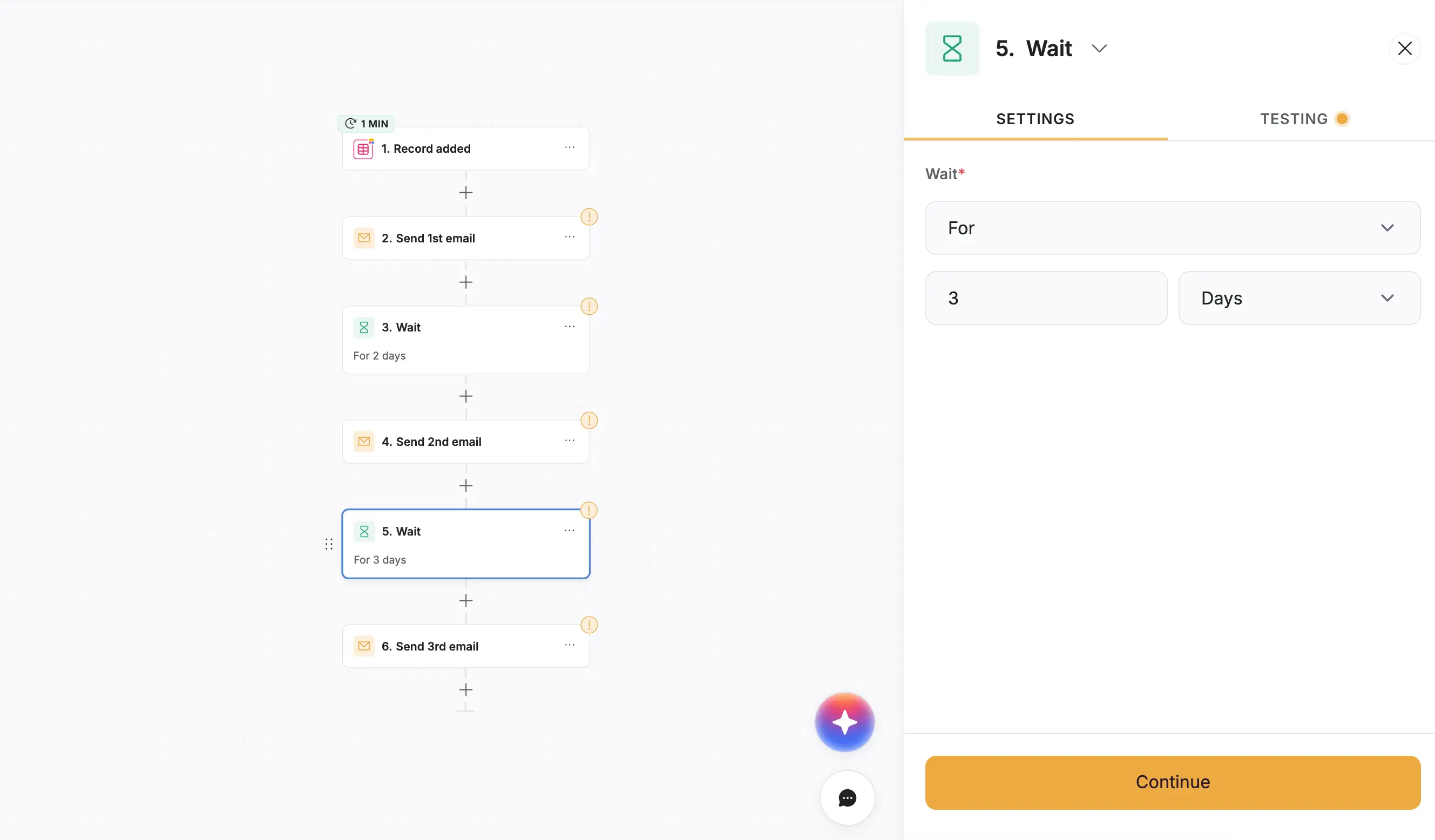
Once a new user is added, the workflow automatically sends a three-step email sequence on the exact schedule you define. Day 0, Day +2, Day +5 (you decide!): delivered with perfect timing every time. New clients or users get a smooth, consistent onboarding experience without your team doing any manual work.
8. Send Slack alert when a new record is added
Teams often refresh dashboards or check spreadsheets throughout the day to see if new requests, jobs, leads, or issues have come in. If they don’t catch a new entry quickly, response times slow down and tasks pile up.
How the workflow automation helps:
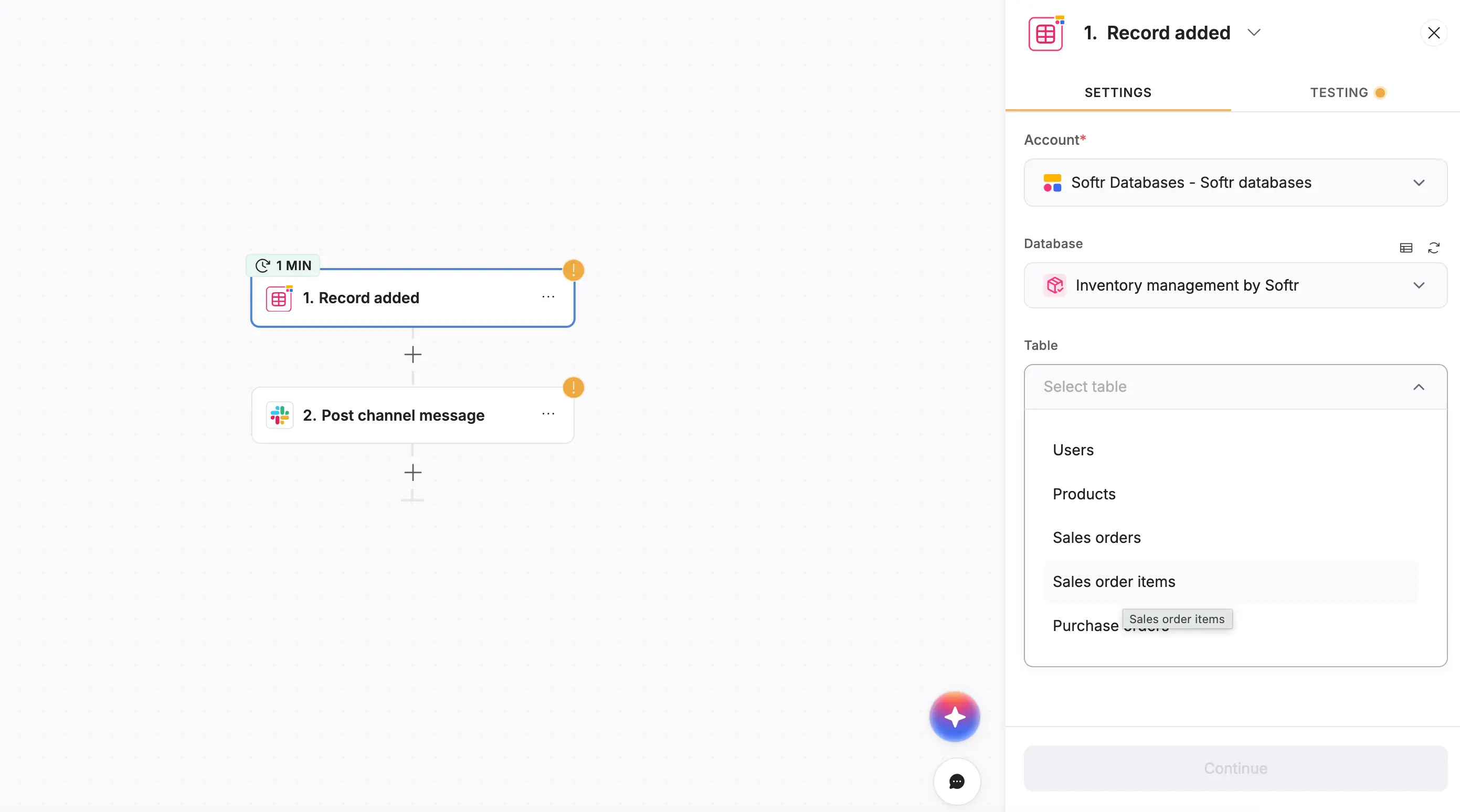
The moment a new record(such as a sales order item) is added, this simple workflow posts a notification to your Slack channel. Your team sees new activity instantly, and there’s no need for checking, refreshing, or delays. It’s an easy way to stay on top of fast-moving operational work.
9. Match the contact and enrich the company on the demo request
This one is crucial for avoiding duplicate work and error-prone data entries. When a new demo request comes in, someone must check whether the contact already exists, update or merge records, look up the company, add missing details, and notify the team. It’s a lot of steps, especially when multiple requests arrive daily.
How the workflow helps
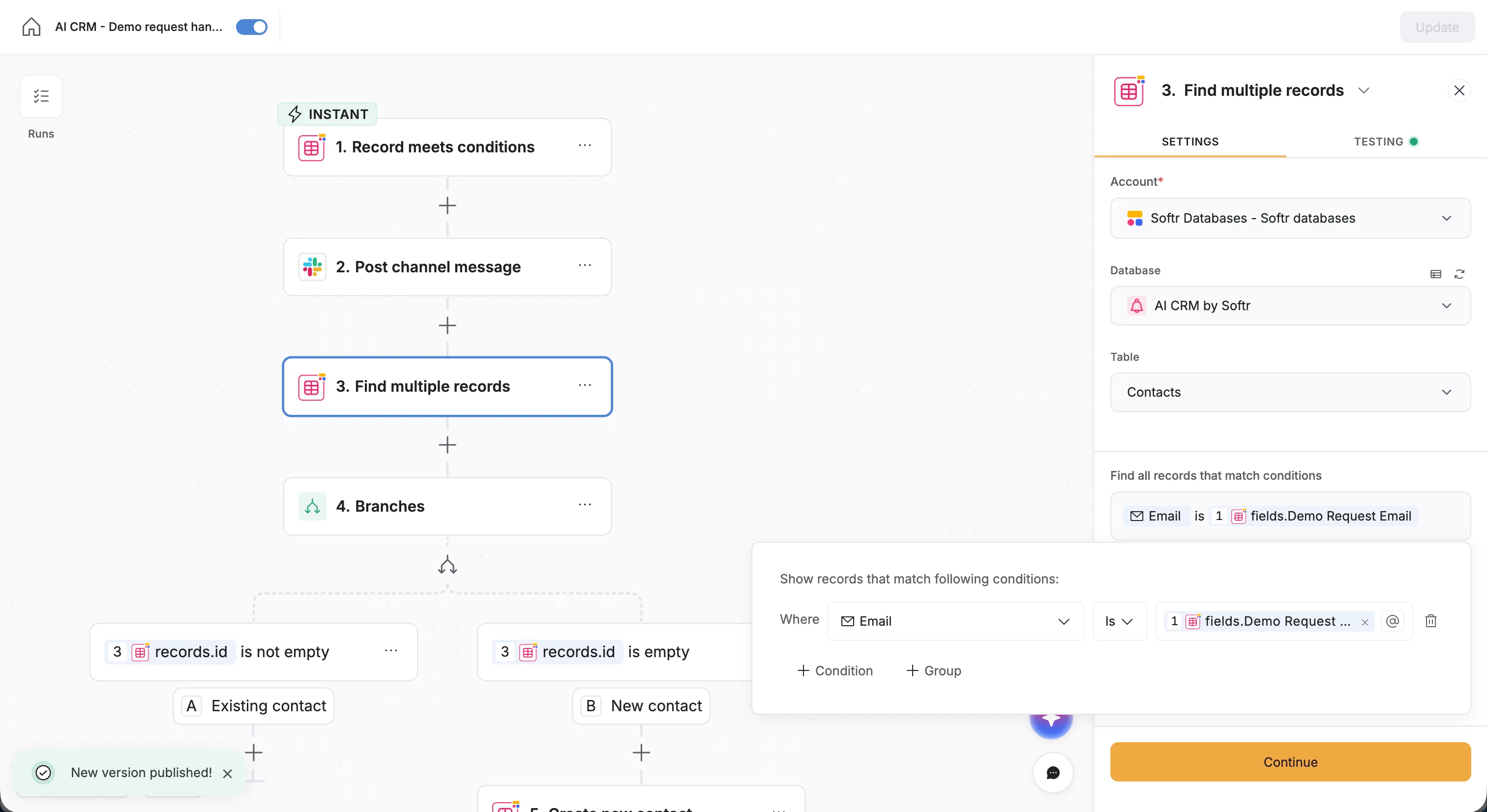
The moment a demo request is submitted, the workflow checks your database for an existing contact to prevent duplicates. If it’s a new lead, AI pulls company details from the email domain and creates a complete profile. The contact is linked to the right company, and your team is alerted so they can follow up quickly. No manual lookups or duplicate cleanup required.
Have a look at this simple tutorial on how to build this automation without a template, so you can get an idea of how you can customize your template when needed.
What to look for when choosing a workflow-automation platform
If your business relies on manual handoffs, spreadsheets, and repetitive admin work, the right automation platform should remove friction without adding complexity.
- Simple to use: Your team shouldn't need much technical help to build or update workflows. Look for a clear, visual builder that business operators and department heads can manage on their own.
- Connects to the tools you already use: Automations only work if your data moves smoothly. Make sure the platform integrates with your CRM, spreadsheets, email, and any systems your workflows depend on.
- Handles real operational logic: Many workflows need conditions, approvals, branching, or scheduled triggers. Choose a tool that can match how your actual processes run, not just the easy parts.
- Keeps your data reliable and controlled: If your work involves client records, vendor info, invoices, or job data, you need sensible permissions and a clear way to track changes.
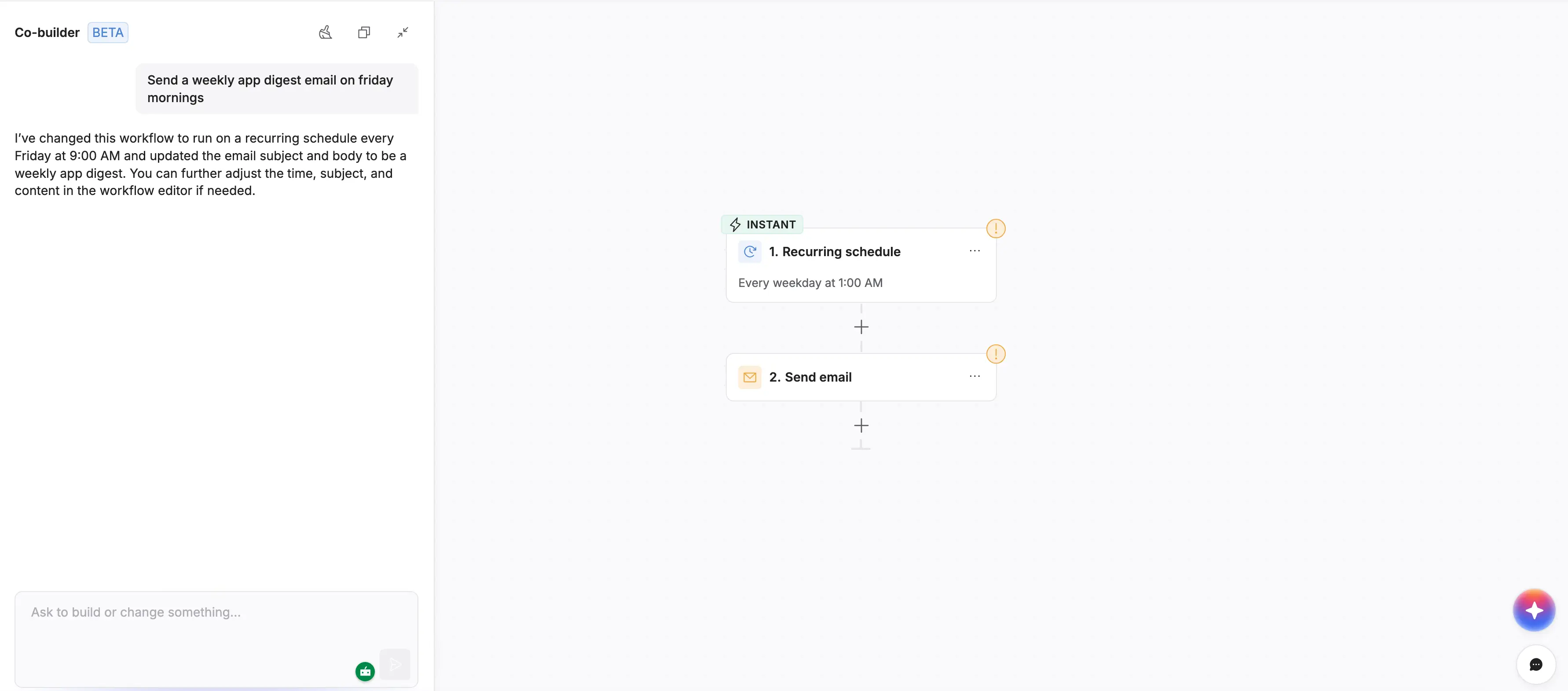
- Offers AI assistance (with predictable costs): AI can help teams move faster when setting up workflows, especially if you don't want to start from a blank canvas. Softr now has AI Co-builder that lets you describe what you want in plain language and generates a draft workflow you can review, adjust, and test before turning it on. Your AI assistant can also build, test, and publish workflows through the Softr MCP.
- Grows with your workload: As you automate more steps, the platform should support more workflows, more users, and more logic, without adding complexity or unpredictable costs.
- Offers templates so you don't start from scratch: Pre-built workflows help teams get started quickly, standardize processes, and build production-ready automations without reinventing everything manually.
Put your workflow automation ideas into action
If your team spends too much time chasing updates, checking spreadsheets, or moving work from one step to the next, automation can take real pressure off your day.
The workflow automation ideas in this guide show how small changes, such as clearer handoffs, timely alerts, and consistent follow-ups, make everyday operations easier to manage.
Start with one or two problem areas you deal with often, like routing new requests or keeping job statuses up to date. Once those are running automatically, it becomes clearer where to improve next.
And if you want a straightforward way to build these workflows yourself, Softr gives you templates and an AI Co-builder so you can describe what you need and get your workflow in action faster.