


How AI agent workflows work & how to build one in Softr

[.blog-callout]
✨ TL;DR:
- AI agent workflows help teams move beyond simple “if this, then that” rules by letting automations think before they act.
- They review context, make decisions, summarize or classify information, and complete steps you’d normally handle manually.
- You’ll learn the core patterns behind agentic workflows, what to get right before building them, and the common pitfalls to avoid.
- Softr lets you build these workflows visually: triggers, logic, AI steps, branching, and integrations—all in one place.
- Start with templates or build from scratch, connect your data, and let AI handle the work your team repeats every day.
[.blog-callout]
Teams spend hours every week moving information from one place to another: a new client comes in and needs to be onboarded, a request needs triage, an invoice needs checking, or someone needs to be notified about a key metric. Each hand-off costs time, attention, and context switching.
Now imagine a workflow that doesn’t just run automatically: it thinks first. It reviews context, makes decisions, and completes steps you’d normally handle manually.
That’s where workflows with AI agents step in. In this article, you’ll learn what these workflows are, how they differ from standard automation, and how your business (yes, even with a lean team) can build one using no-code tools like Softr.
What is an AI agent workflow?
Before defining the workflow, it helps to separate a few terms that often get mixed up:
- LLMs (Large Language Models): These are the "brain"—they can understand text, interpret instructions, and generate responses. But on their own, they don’t take action inside your tools.
- AI Agents: These are autonomous systems that use an LLM model to make decisions and execute a single task, like data enrichment and validation, or extracting insights. They take in information → interpret your instructions → perform work like enrichment, classification, validation, or summarization.
- AI Agent Workflows: This is where the AI agent becomes part of an end-to-end process *(aka an agentic workflow). A workflow starts with a trigger (a form submission, database update, or scheduled event), then uses AI in a subsequent action to decide what should happen and complete the next steps.
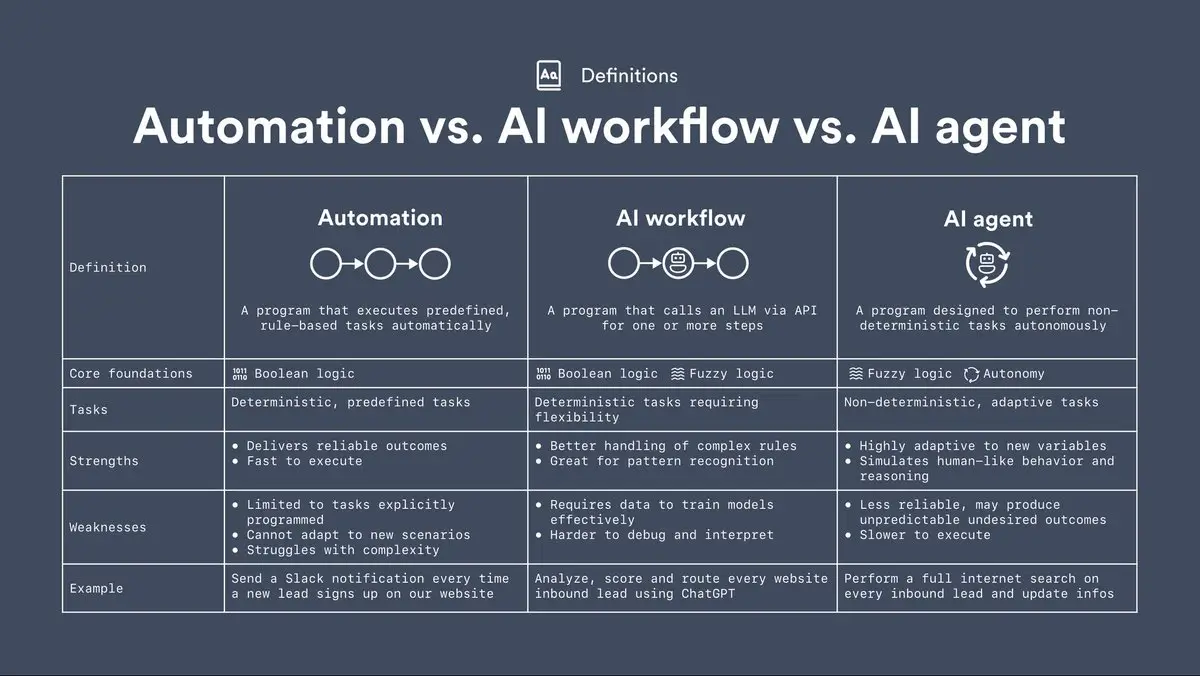
Credits: 9x on X
Unlike classic automation that executes fixed rules, this workflow gives the system “agency” and “autonomy.” Instead of only following rigid “if X then Y” rules, AI agent workflows can adapt to messy or incomplete data, summarize information, make decisions, and handle exceptions, without you micromanaging every step.
The term "AI agentic workflows" is becoming widely used in 2025 as businesses shift from rule-based automation to more flexible, decision-driven workflows.
What you need to get right before building AI agent workflows
Agent-driven workflows typically include four key phases:
- Planning: the agent evaluates goals, breaks them into subtasks, and sets logic paths.
- Tool access/execution: the agent calls integrations, APIs, external data, or knowledge sources, then acts.
- Reflection & feedback loop: the agent checks results and adapts or routes for human review when needed.
- Continuous improvement: learning from past workflows, refining decisions over time.
With the basics sorted, the next step is knowing the patterns that show up in most of the real implementations.
1. Key patterns to adopt
When you lift your processes into agentic workflows, here are three reliable patterns you can build on:
- Step-by-step chains (Prompt Chaining): Break a large task into smaller pieces: first extract key data → then make a decision → then act. In Softr, this could be “form submission → AI summarizes input → workflow updates record and sends email.”
- Smart routing (Routing): Not every request needs the same level of handling. Build a logic step: if client tier = “high” → route to senior agent logic; else → route to standard workflow path. This keeps things efficient and aligned with value.
- Looping & branching for complexity (Feedback / Parallelisation): When tasks require checks or ongoing updates, build branching logic and loops: for example, “if extra review needed → send to human for oversight → when approved → continue workflow.” Over time, this builds in the “reflection” and “learning” phases of your workflow.
2. When to know it’s ready
Before spinning up your first agentic workflow, run through these checks:
- Data quality: Are your data fields clean and up-to-date? Agentic workflows depend on good input.
- Defined decision points: Do you know where the agent must make a decision, what inputs it needs, and what outcomes you expect?
- Integration access: Can your workflow call the tools you need (APIs, Gmail, Notion, etc.)?
- Human-in-loop governance: Do you have oversight and escalation paths for when the agent doesn’t go as planned?
- Feedback loop defined: Have you defined how you will measure success and feed results back into improving the workflow?
3. Common pitfalls (and how to avoid them)
- Starting too broadly: Trying to automate an entire process at once often fails. Start small and narrow.
- Using poor data: If your records are incomplete, inconsistent, or outdated, the agent’s decisions may be flawed.
- Lack of audit trail or visibility: Even agentic workflows need logs, decision history, and human review points.
- Skipping change management: Your team must trust the workflow and understand what to do when it flags issues.
- No scaling plan: Once your pilot works, you need a clear roadmap for how to expand and manage repeats or variations.
How AI agent workflows work
AI-powered workflows all follow the same simple pattern. Once you understand this flow, everything else—including building your own—becomes much easier.
1. Inputs: every AI workflow starts with a non-AI trigger
In Softr, an AI agent never starts a workflow by itself. Your workflow always begins with a real event, and that event gives the workflow its context (the exact data the AI will use).
A workflow can start when:
- A Softr Database record is created or updated (e.g., new lead added, invoice edited, job request submitted)
- A user clicks an action button in your Softr app
- An external tool sends data (Airtable automation, Gmail email received, Google Sheets row updated via webhook)
- A schedule runs (daily recap, hourly checks, weekly follow-ups)
The key idea: the trigger happens first, and then the AI agent acts on the data from that trigger. This makes AI workflows predictable and controllable.
2. Reasoning: how the AI step interprets your instructions
Once the workflow has been triggered and the data is available, the AI action step “thinks” through the situation using two things:
- Your instructions: what you want the AI to do (e.g., summarize, classify, validate, extract, recommend, rewrite, etc.)
- The data from the trigger: the information it should base its work on (e.g., lead details, uploaded file, job notes, invoice amounts)
This is where AI becomes useful for tasks automations can’t easily do:
- summarizing long messages
- deciding if something is high-priority
- enriching data with missing details
- extracting structured fields from messy text
- writing or drafting responses
- categorizing ambiguous information
To set this up in Softr, you can choose the LLM model you want to use, provide the prompt, and test it.
3. Actions: what the workflow does with the AI’s output
After the AI step, the workflow continues with normal (non-AI) actions, just like any other automation.
For example:
- “Update the record with the AI-generated summary”
- “Send an email using the classification result”
- “Route the task to the right team”
- “Create a follow-up item if the AI flagged an issue”
- “Send the AI’s extracted data to another tool”
This is the biggest difference between an AI chat and an AI workflow: AI doesn’t just answer — it acts. It completes steps inside your business tools automatically.
As you use the workflow, you can also refine your instructions or adjust the model to improve accuracy. Small tweaks can quickly turn a good workflow into an indispensable one.
Now that we’ve covered the basics, it’s useful to see how this comes together inside Softr. The video below shows how agentic workflow logic, steps, and data actually play out.
How to build custom AI agent workflows with Softr: step-by-step overview
Softr lets you build workflows visually and add AI actions. You can also build them from Claude, ChatGPT, or Cursor through the Softr MCP. Each automation starts with a trigger, such as a new record, another record action (update, deletion, etc.), a button click, a webhook, or a one-time (or recurring) scheduled run, then moves through the steps you define.

What makes it “agentic” is the AI layer: you can add AI steps anywhere in the flow, map data from earlier steps, and let the model analyze text, summarize files, classify inputs, or run a web search when needed.
Because all of this runs inside your workflow, the AI works with your real business data, takes action instantly, and continues through the rest of the workflow without leaving your stack.
And when you need to connect tools, you can branch logic, call APIs, or push updates to services like Gmail, Notion, or Airtable, all in the same flow.
{{cta-1}}
Here’s what an AI agent workflow looks like in practice and how you can set it up in Softr: no third-party tools required.
Project management weekly email digest workflow
Every Monday morning, a project manager needs a quick overview of all tasks completed last week, what’s still in progress, and anything overdue. They don’t want to open the project tracker, filter through dozens of records, or ask the team for updates.
So they set up a weekly email digest workflow:
- It runs every Monday at 8:30 AM.
- It pulls all tasks from the project database that match their filter (e.g., completed last week, overdue, or assigned to their team).
- The AI step creates a handy summary they can scan.
- The final email step sends the digest straight to their inbox.
This way, they start the week with a clear picture of what’s done, what’s behind, and what needs attention. There’s no need to chase people or manually prepare a report.
So, as a project manager, here’s how you can set your workflow up:
- First, sign in to your Softr Studio or sign up for free, and you’ll see the dedicated Workflows tab in the left navigation.
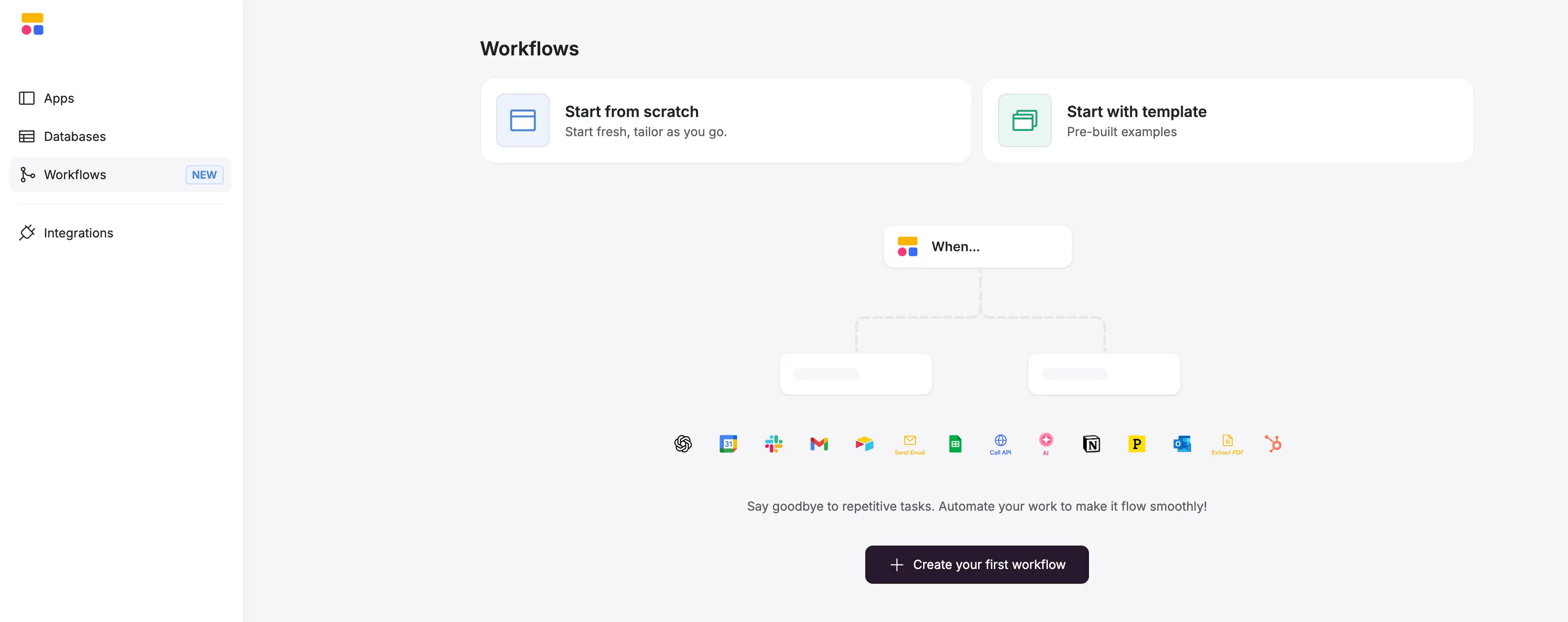
- You can either start from scratch,
…or you can use one of Softr’s pre-built workflow templates.
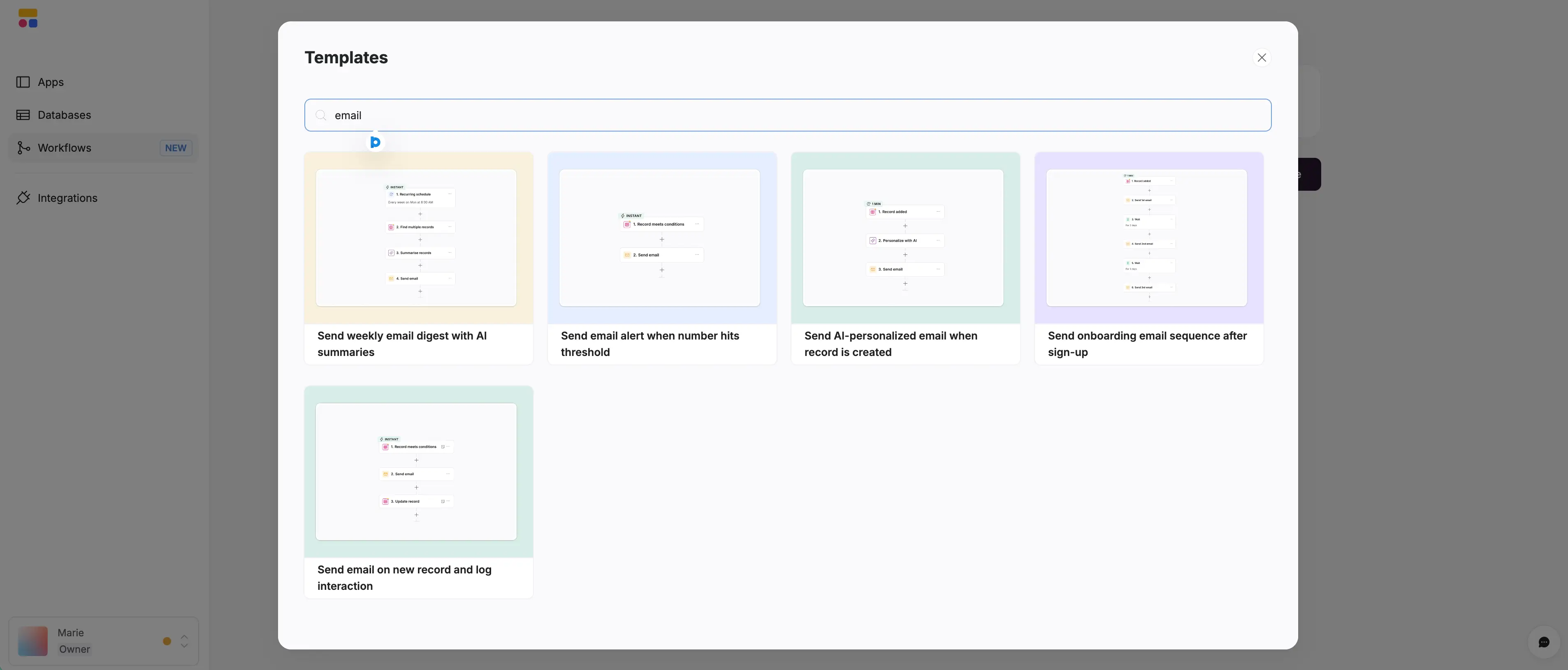
- For this example, let’s pick the “Send weekly email digest with AI summaries” template, where the workflow steps are set up but require your customization.
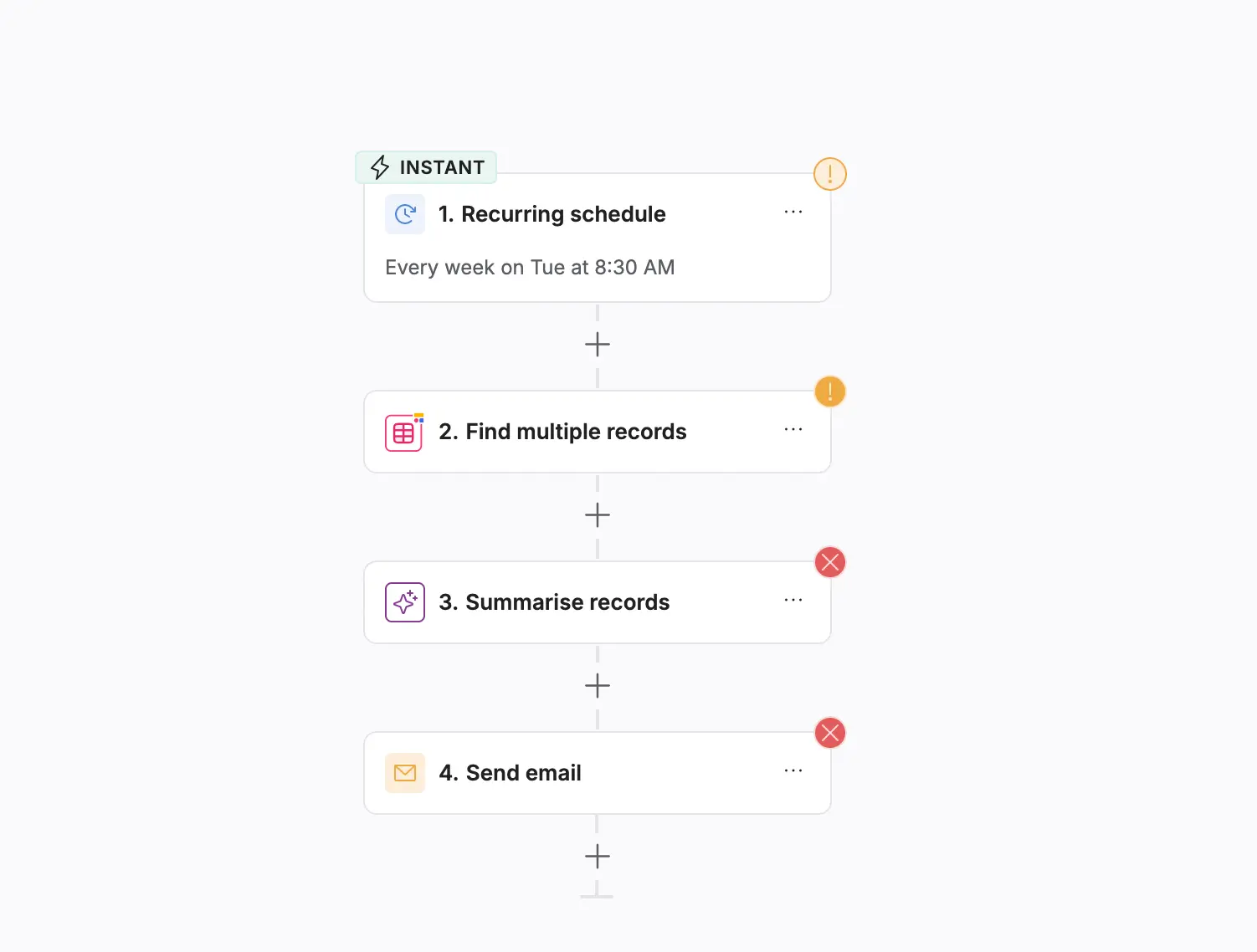
Here’s how you can customize them (see the quick demo below 👇🏻):
4. Pick the frequency of the trigger, since it’s a recurring one (Every Monday, 8:30)
5. Map the database and the necessary table (your project management database, tasks table).
Tip: You can create and have your database straight in your Softr Databases, and map that data, or, to test this workflow, you can use the sample database from our free Project Management app template.
6. Next, you pick the AI model for the summarization, and set up your prompt (in our case, it’s Claude Haiku 4,5)
7. And finally, in the last step, select the contact, the subject, the email body text, and start the testing of the workflow.
[.blog-callout]
Check out this live demo of Softr Workflows for a more detailed overview + Q&A with Softr Founders. →
[.blog-callout]
Start building smarter workflows with Softr
A new lead comes in, a record updates, or someone clicks a button, and your AI agent workflows pick up the rest.
You don’t need custom infrastructure or complex orchestration to build agentic workflows. Softr gives you the triggers, logic, AI steps, and integrations to automate the work your team repeats every day. Start with a simple flow, connect your data, and let Softr handle the decisions and actions behind the scenes.
When it works, add the next step, connect another tool, or bring in an agent to analyze or enrich data. Before long, your team’s “manual” work starts happening in the background.
You can start on the free plan with 500 monthly workflow actions — enough to build a few real workflows and see how they perform. Upgrading only becomes necessary when your automations start running at higher volume.



.webp)