


Free employee database software gives you one organized place for your team's information, so everyone works from the same source of truth instead of digging through spreadsheets, email threads, and someone's desktop folder. Here's how the leading free options compare on features, integrations, and where their limits kick in.
Best free employee database software at a glance
| Tool | Best for | Standout features | Pricing |
|---|---|---|---|
| Softr | Teams that want a flexible employee directory they can grow into internal HR tools | • Custom employee directories on existing data • Role-based access and user groups • Employee self-service forms and requests • Workflow automation with Softr Workflows • Mobile-friendly with optional PWA | • Free: $0/month (up to 5 users) • Basic: $19/month |
| Connecteam | Frontline and field teams that need mobile-first employee management | • Mobile-first employee app • Scheduling and time tracking • Employee documents and training • Built-in team communication | • Free: Up to 10 users • Basic: ~$29/month (30 users) |
| Zoho People | Small teams that want an all-in-one HR system | • Centralized employee records • Employee self-service portal • Attendance and leave tracking • HR workflows and approvals | • Free: Up to 5 users • Essential HR: ~$1.25/user/month |
| BambooHR | SMBs that want a full HRIS with reporting | • Centralized HR database • Custom fields and permissions • Reporting and dashboards • Employee self-service | • Free: Not available • Starter: Custom pricing (sales quote) |
| OrangeHRM | Teams that want a free, open-source HR system | • Free open-source Starter edition • Employee records and leave tracking • Attendance and basic reporting • Self-host or cloud deployment | • Free: Starter edition • Advanced: Free trial, custom pricing |
| Apptivo | Service teams that want employee data inside a CRM | • Employee management app • Connects HR data with CRM and projects • Custom workflows across apps • Mobile access | • Free trial available • Lite: ~$15/user/month |
What is employee database software?

Employee database software is a digital system that stores and organizes your team’s information in one place. It keeps details like roles, contact info, documents, and employment history easy to find and update, so you’re not relying on scattered spreadsheets or outdated files.
For small and mid-sized businesses, this kind of tool becomes a central hub for people data.
What to look for in a free employee database software
- Centralized employee records: You should be able to store roles, contacts, documents, and employment details without switching between tools.
- User permissions & roles: Your team needs simple ways to share information while keeping sensitive data protected.
- Ease of use: The tool should be straightforward for both admins and employees, especially if you don’t have dedicated IT support.
- Mobile access: specially for field service or remote teams, mobile support lets managers and employees update info on the go.
- Basic reporting & exports: Even basic reports and clean exports make payroll, compliance, and planning much easier.
- Integrations with other tools: Look for simple ways to connect to systems like scheduling, payroll, CRM, or communication tools. This reduces duplicate work.
- Self-service for employees: Let employees update their info, request time off, or access documents without relying on an HR admin each time.
- Security & compliance basics: Even free tools should use secure logins and reliable storage, especially when handling personal information.
- Scalability & upgrade path: You should be able to start free and move up as your team grows or needs more features without ripping out your data.
- Support & documentation: Good help guides, FAQs, or community support make it easier to get started and solve problems quickly.
1. Softr — best for building AI-powered employee directories and internal HR tools without code
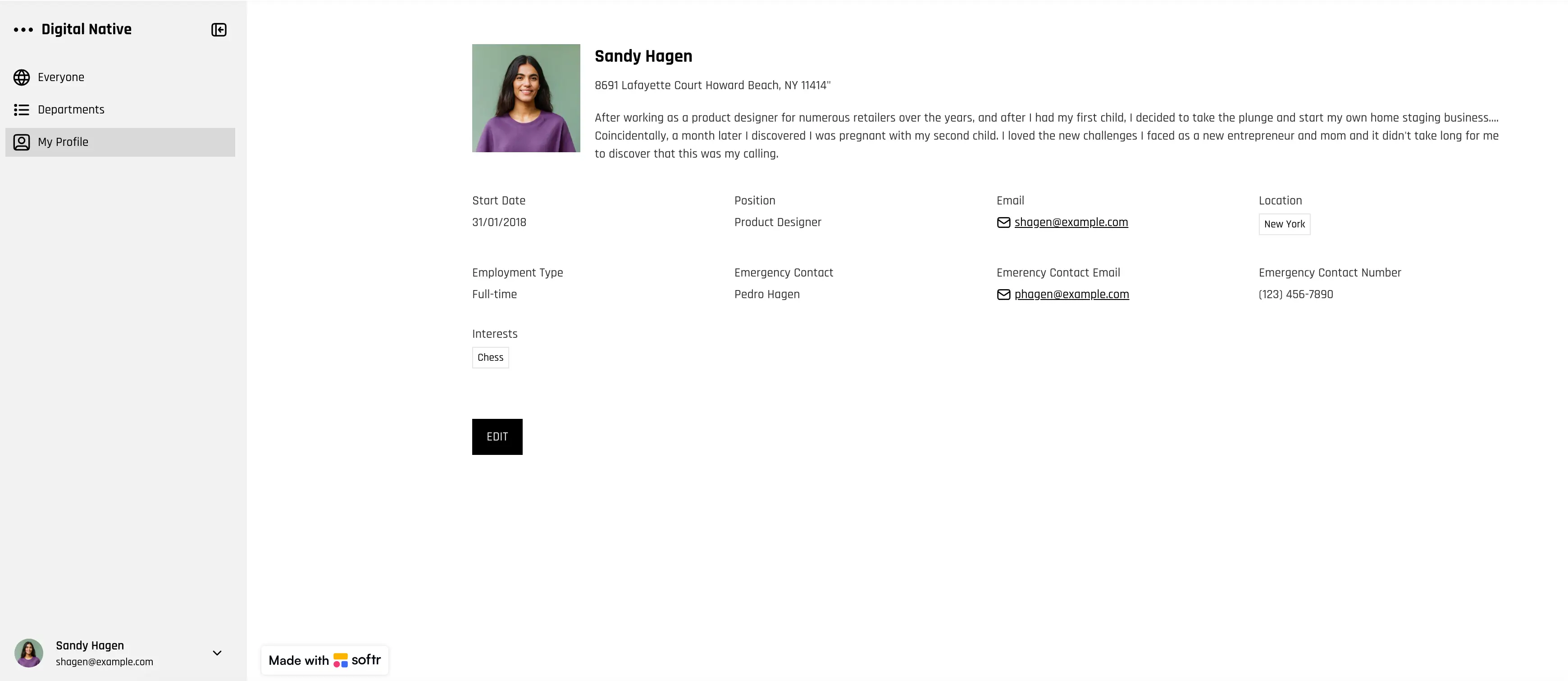
Softr lets you build a custom employee directory on top of your existing data, without engineering work. You can centralize employee profiles, documents, requests, and internal resources in one secure app. It’s a strong fit for small and mid-sized businesses that want more control than off-the-shelf HR tools, without taking on technical overhead.
Softr also includes built-in AI features to make your internal apps smarter and faster. You can use Ask AI, a real-time assistant that answers questions about your live app data without extra setup, and Database AI Agents to automate data enrichment and repetitive tasks
Softr pros and cons
Pros:
- Works with your existing data sources, including Google Sheets, Airtable, Notion, monday.com, HubSpot, or Softr’s native database
- Highly flexible layout and logic, so you can adapt the directory to your workflows
- Strong server-side permissions and user groups for controlling access to employee information
- Easy to extend beyond a directory into onboarding, time-off requests, knowledge hubs, or internal tools
- Mobile-friendly out of the box, with PWA support
Cons:
- Not a traditional all-in-one HRIS with built-in payroll or benefits
Softr best features
- Data flexibility: Connect your employee data from Airtable, Google Sheets, HubSpot, Notion, monday.com, SQL, BigQuery, or use Softr’s native relational database to store and manage your employee data.
- Role-based access: Create different user groups for managers and employees, so each person sees only the information and actions relevant to them. This is especially use ful when dealing with sensitive employee data that you don't want external freelancers to access, for example.
- Employee and contractor profiles: Build a searchable directory for employees and contractors, organized by departments, roles, or teams.
- New employee forms: Collect employee details through forms and automatically add new records to your directory without manual data entry.
- Works on any device: Access the directory from desktop or mobile, with a fully responsive design and optional PWA for a downloadable app experience.
- Customizable workflow automation & integrations: Automate staff onboarding tasks, profile updates, approval flows (like time-off or role changes), and data syncs using native Softr Workflows (no external automation tools like Make or Zapier required!)
- Scales with your team: Start with a simple directory and expand into onboarding, training, or internal portals as needs grow.
- Time-off and profile update requests: Let employees submit time-off requests or update their personal information through built-in forms, reducing admin back-and-forth.
- Search and filtering: Help users find people quickly using powerful search and filters, even as your team grows.
- Vibe-coding AI block: Use Softr’s vibe-coding capability to instantly generate or refine directory views, automate complex internal workflows (like onboarding sequences or approval flows), and build custom UI components powered by AI — all on top of your live employee data without writing code.
Softr pricing
Softr offers flat, predictable pricing plans so you always know what you’ll pay each month.
- Free ($0/month): Unlimited apps, with access to Softr Workflows and Softr Databases, 5 app users, 5,000 records, 5 AI credits.
- Basic ($19/month): Unlimited apps with 42+ integrations, Team: 5 + Client: 5 app users, 50,000 records, 10 AI credits.
- Pro ($99/month): Unlimited apps with 45+ integrations and custom code, Team: 10 + Client: 50 app users, 500,000 records, 50 AI credits.
- Business ($329/month): Unlimited apps with 52+ integrations, Team: 30 + Client: 100 app users, 1M records, custom user groups (up to 10), 100 AI credits, Webhook & API workflows.
- Enterprise (custom pricing): Everything in Business plus custom workflow execution limits & run history, unlimited workflows & steps, SSO (SAML/OpenID), custom billing, dedicated success manager, and team training.
Softr is a great choice if you want a free starting point for an employee directory today, with the flexibility to grow into a full internal(or external) system as your team and processes evolve.
[.blog-callout]
⭐ Real example: EvenUp used Softr to build an internal employee performance tracker on top of their existing data, with role-based access and self-service dashboards. The result: clearer visibility for employees, less admin work for managers, and over $6,000 saved per month by replacing manual tools and extra software seats. Check it out here →
[.blog-callout]
2. Connecteam — best for small teams and frontline staff who need a mobile-first HR and operations app

Connecteam is an all-in-one team management platform that helps small and mid-sized businesses manage employee schedules, time tracking, communication, training, documents, and basic HR workflows from one mobile-friendly app. It’s especially useful for teams in field services, operations, and frontline roles that need core HR and operations tools in one place.
Connecteam pros and cons
Pros:
- Connecteam offers a free Small Business Plan for up to 10 users with full access to features your team needs without time limits.
- The mobile-first design makes it easy for employees and managers to access schedules, documents, and communication on the go.
- Built-in tools like chat, updates, and knowledge base help keep everyone connected and informed in real time.
Cons:
- Some advanced reporting and automation features are only available on higher paid tiers.
- Pricing for larger teams can grow depending on how many users you add beyond the free plan.
Connecteam best features
- Employee scheduling and time tracking: You can create, share, and manage schedules, track time clock in/out, and see job statuses from any device.
- Centralized communication: Chat, company updates, and surveys keep teams aligned and informed.
- HR documentation and employee records: Store and manage employee documents, certificates, and files in a searchable hub.
- Training and onboarding tools: Deliver mobile courses, quizzes, and knowledge resources to help onboard and upskill staff.
Connecteam pricing
- The Small Business Plan is entirely free for companies with up to 10 users and includes core features across scheduling, communication, HR, and operations.
- Basic plan starts around $29 per month for up to 30 users when billed annually.
- Advanced plan starts around $49 per month for up to 30 users when billed annually.
- Expert plan starts around $99 per month for up to 30 users when billed annually.
- Enterprise pricing is available on request for larger teams and specialized needs.
3. Zoho People — best for teams that want an all-in-one HR management system
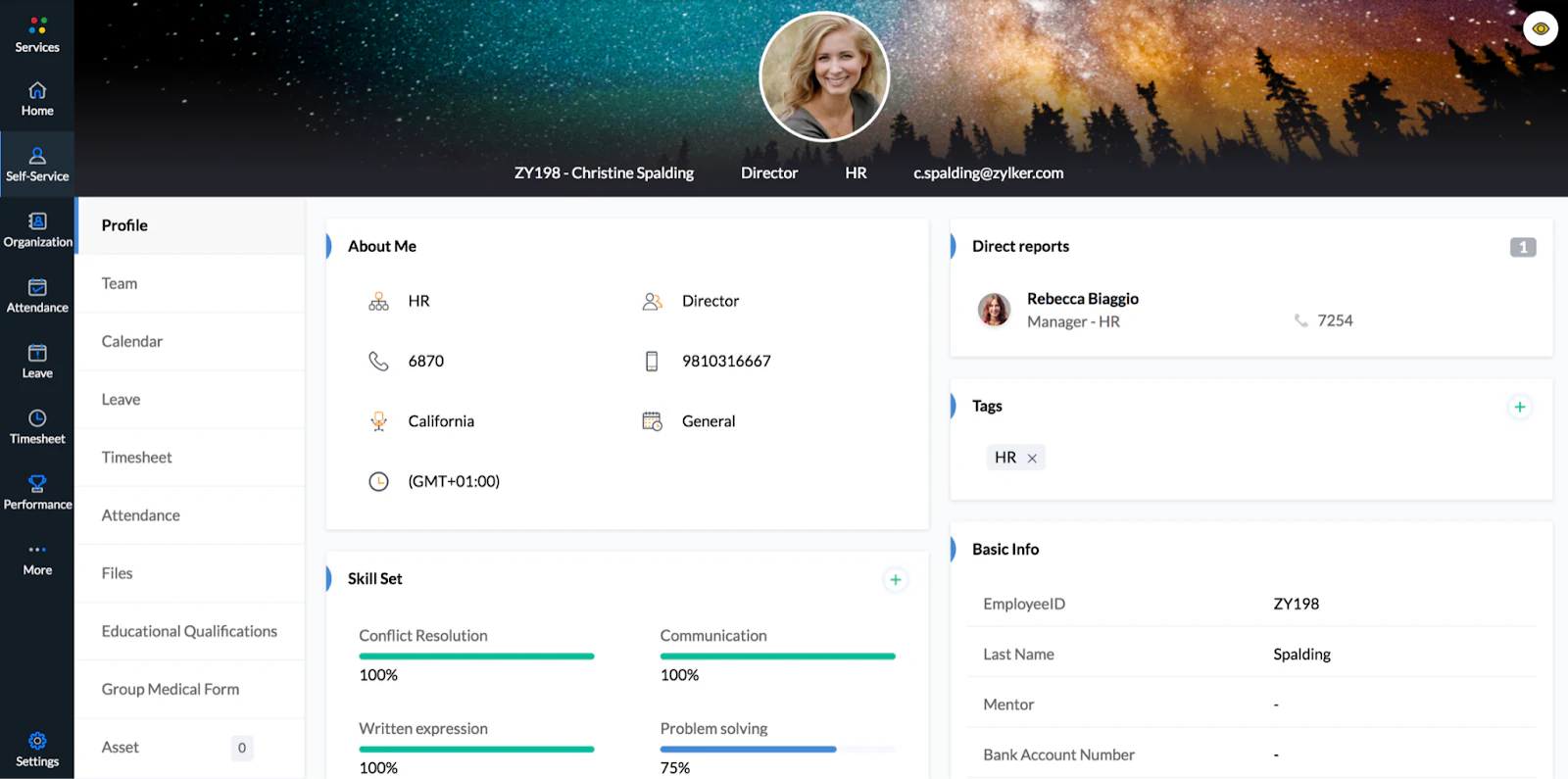
Zoho People is a full HR management platform helping teams manage employee records, attendance, leave, performance, and HR workflows in one place. It’s a strong option for companies already using other Zoho products or teams that want a broad HR feature set rather than a lightweight employee database.
Zoho People pros and cons
Pros:
- Zoho People offers a free plan for up to five users, which makes it accessible for very small teams.
- The platform covers a wide range of HR functions, from onboarding and attendance to performance and learning.
- A dedicated mobile app allows employees to manage requests and access HR information on the go.
Cons:
- The interface and feature depth can feel complex if you only need a simple employee database.
- Advanced reporting, analytics, and HR modules are locked behind higher pricing tiers.
Zoho People best features
- Centralized employee records: Zoho People stores employee profiles, documents, and HR data in a single system.
- Employee self-service portal: Employees can update personal details, request time off, and access HR services independently.
- Attendance and time tracking: Teams can track attendance for office or field staff, with options for shifts and overtime.
- HR workflows and approvals: Built-in workflows support onboarding, leave approvals, and other HR processes.
- AI-powered assistance: Zia, Zoho’s AI assistant, helps answer employee questions and surface HR data more quickly.
Zoho People pricing
- Zoho People offers a free plan for up to 5 users with basic HR features.
- Essential HR plan starts at around $1.25 per user per month when billed annually.
- Professional plan starts at around $2 per user per month when billed annually.
- Premium plan starts at around $3 per user per month when billed annually.
- Enterprise plan starts at around $4.50 per user per month when billed annually.
- Paid plans typically include a 30-day free trial.
4. BambooHR — best for small to mid-sized teams that need a full HR system
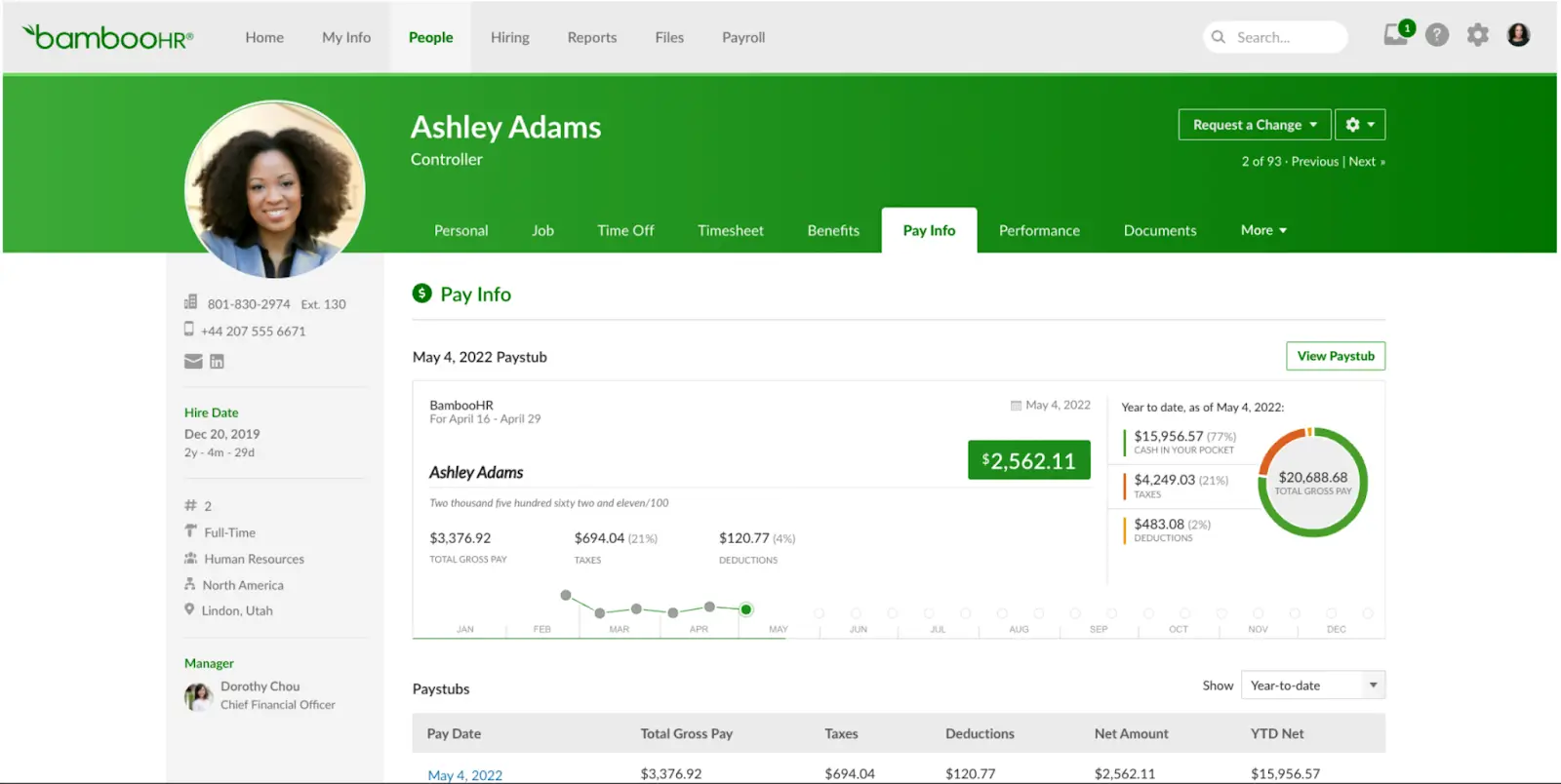
BambooHR is a cloud-based HR platform that helps companies centralize employee records, track time off, manage onboarding, and automate basic HR workflows. It’s designed for small and mid-sized businesses that want a traditional HRIS (human resource information system) with reporting, self-service, and performance tools.
BambooHR pros and cons
Pros:
- BambooHR has a clean, intuitive interface that makes core HR tasks easier to manage.
- Built-in reporting and dashboards help teams understand turnover, time-off trends, and HR metrics without manual spreadsheets.
- A dedicated mobile app lets employees check schedules, PTO, and personal info on the go.
Cons:
- BambooHR does not offer a free plan; you must contact sales for a custom quote.
- Pricing is based on company size and features, which can make costs hard to predict without a sales conversation.
- Many advanced modules like payroll, performance management, and time tracking are sold as add-ons.
BambooHR best features
- Centralized employee records: BambooHR stores all employee profiles, documents, and records in one central HR database.
- Custom fields and access controls: The platform lets you customize fields, workflows, and access controls for different roles.
- Built-in reporting: Built-in reporting tools help you visualize key HR metrics without manual work.
- Hiring and onboarding tools: Onboarding and applicant tracking simplify hiring and new-employee setup.
- Employee self-service: Employee self-service features let staff view and update their own info from desktop or mobile.
BambooHR pricing
- A free trial is available so you can explore the platform before purchase.
- BambooHR does not offer a free plan, and all paid plans require contacting sales for a quote.
- For small teams with 25 employees or fewer, pricing is typically a flat monthly fee.
- For larger teams with more than 25 employees, pricing follows a per-employee, per-month model with volume discounts.
- Optional add-ons like payroll, performance management, and time tracking are priced separately.
5. OrangeHRM — best for teams that want a free, open-source HR management system
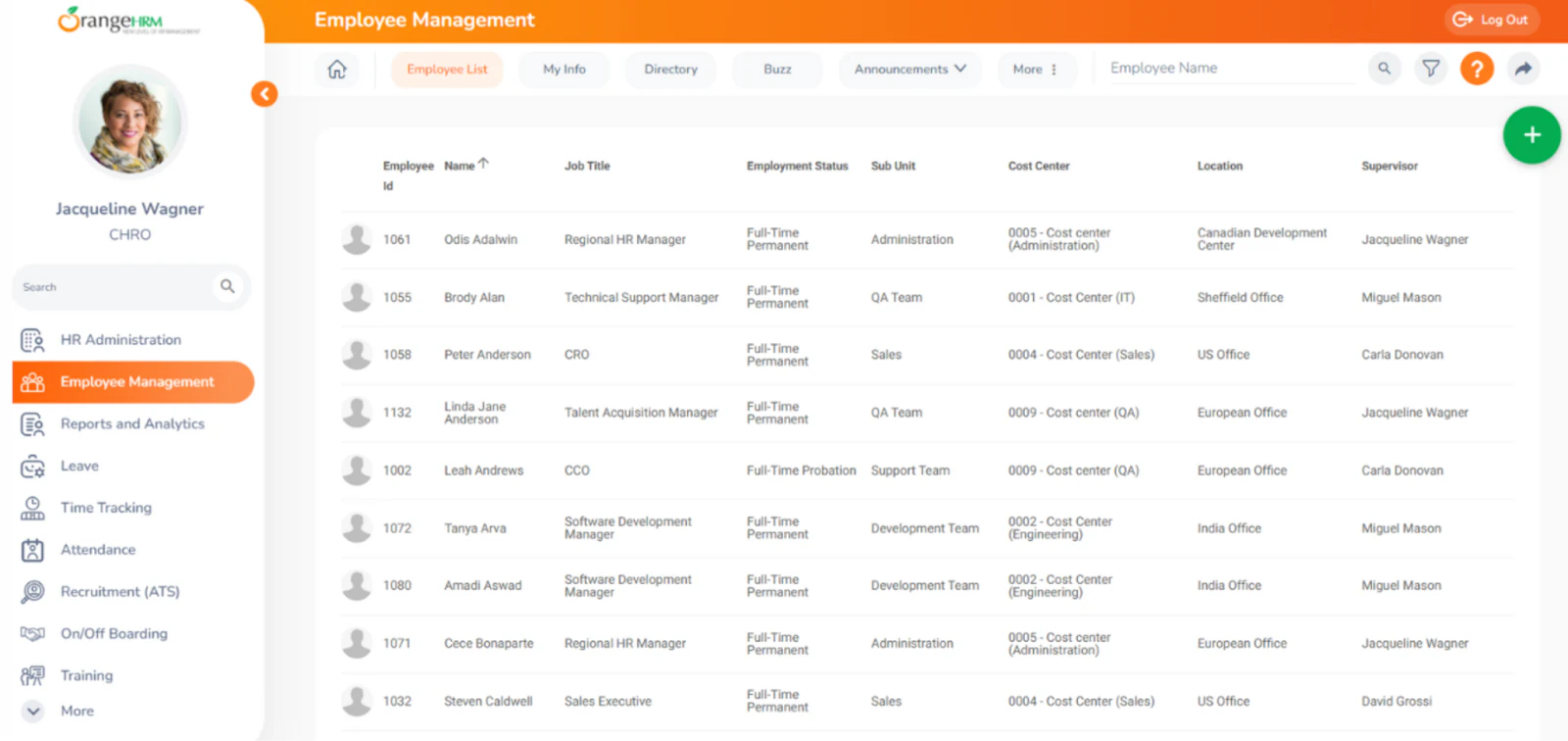
OrangeHRM is a free and open-source human resource management system that helps small and mid-sized teams organize employee data, automate basic HR processes, and deploy flexible HR workflows. It’s available as a free Starter edition you can self-host or use in the cloud, and you can upgrade to a paid Advanced version when you need more features or professional support.
OrangeHRM pros and cons
Pros:
- OrangeHRM Starter is free and open source, so you can use and modify the software without licensing fees.
- The platform includes core HR modules like employee management, leave tracking, time tracking, and reporting.
- You can customize the system extensively if you self-host, with access to source code and database.
Cons:
- Advanced HR functions and professional support are part of the paid Advanced edition, which requires contacting sales.
- The setup and customization process may require technical skills, especially for self-hosting.
OrangeHRM best features
- Employee and HR workflows: Track employee records, personal information, time off, and attendance in a centralized system.
- Leave and attendance tools: Built-in modules help manage PTO requests, leave balances, and attendance tracking.
- Reporting and analytics: Basic reporting tools help you generate insights on HR data like headcount and attendance.
- Recruitment and performance modules: Starter includes foundational modules for applicant tracking and performance reviews.
OrangeHRM pricing
- Free Starter edition: OrangeHRM Starter is free to download, deploy, and use for core HR functionality.
- Advanced edition: Paid plans with more features and support are available — pricing is custom and determined through a sales quote.
- Free trial: The Advanced edition typically includes a 30-day free trial so you can test capabilities before committing.
6. Apptivo — best for service teams that want a flexible, all-in-one CRM with basic HR data capabilities
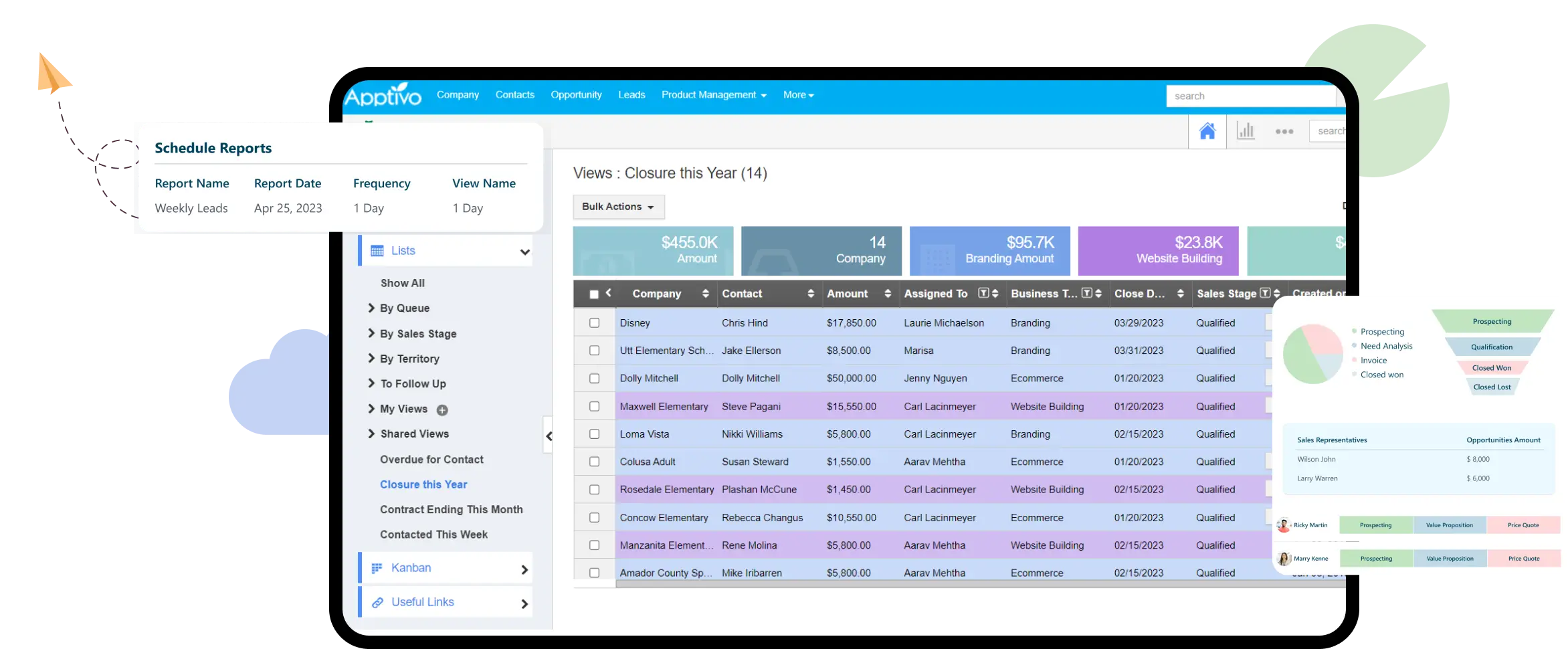
Apptivo is a cloud-based suite of integrated business apps that helps small and mid-sized teams manage data across CRM, projects, invoicing, help desk, and employee records. While it’s not a traditional HRIS, its Employees app lets you create and maintain employee profiles and team assignments inside a broader system of business applications.
Apptivo pros and cons
Pros:
- Apptivo offers a modular platform where you choose the apps you need, including employee management, CRM, and operations.
- The platform is customizable, letting you connect employee records with projects, contacts, support tickets, and workflows.
- Mobile apps and role-based access help teams manage records and tasks on the go.
Cons:
- Apptivo is not primarily an HR tool — its strength is CRM and business operations, so HR features are more basic.
- There’s no free forever plan; all options are paid, which can make it pricier for simple employee data use.
- Some users report a learning curve due to the number of integrated apps and customization options.
Apptivo best features
- Employee management app: You can add, import, and organize employee data, assign roles, set work shifts, and track responsibilities inside the platform.
- Modular app ecosystem: Connect HR data with CRM, project management, billing, help desk, and other apps to get a unified view of your operations.
- Custom workflows and automation: The platform supports configurable workflows across apps to automate repetitive tasks and processes.
- Mobile access: Teams can work from mobile devices with data synced across web and mobile apps.
- Integrations and expandability: Apptivo connects with external tools and lets you build processes that span CRM and internal operations.
Apptivo pricing
- Free trial: Apptivo offers a free trial so you can explore the platform before purchase.
- Lite: Starts around $15 per user per month when billed annually (core CRM and business apps).
- Premium: Starts around $25 per user per month when billed annually, with more apps and automation.
- Ultimate: Starts around $40 per user per month when billed annually with advanced features and integrations.
- Enterprise: Custom pricing for large teams or complex needs.
Find the free employee database software that fits your needs
Free employee database software can help you get organized, but not every tool will fit how your team works day to day. Some are built for simple record-keeping, while others expect you to adopt rigid HR processes or upgrade sooner than planned.
The best option is one that keeps your employee data in one place now and still works as your team grows. If you can start free, stay in control of your data, and add workflows only when you need them, your employee database becomes a useful part of your operations—not another system to manage.
If you want a flexible way to build an employee directory that works with your existing tools, offers smart automation and AI capabilities, you can start with Softr’s free employee directory template and adapt it as your team evolves.
Frequently asked questions
Which is the best free HR software?
How to create an employee database?
Is Excel an HRIS system?
Is OrangeHRM free or paid?


