Running a roofing business means handling leads, estimates, crews, materials, and payments across spreadsheets, inboxes, and disconnected tools. Roofing CRMs promise to fix that, then land teams with high costs, rigid workflows, long onboarding, and systems crews never adopt. Here’s what actually matters when choosing one for 2026.
Best roofing CRMs at a glance
| Tool | Best for | Standout features | Pricing |
|---|---|---|---|
| Softr | Roofers needing a custom, easy-to-build CRM with predictable costs | - No-code, custom CRM builder with 90+ templates to start with - Role-based permissions, - Built-in AI assistants - Flat pricing with no per-seat fees | Free plan available; Paid plans from $19/month |
| AccuLynx | Roofing companies that want a roofing-specific CRM with deep operations tools | - Roofing-focused CRM, - Estimating & proposals, - Job tracking & scheduling, - Mobile field access | Custom pricing only, no free trial |
| Leap CRM | Roofing companies wanting a sales-driven CRM | - Digital estimates & proposals, - E-signatures,Custom workflows & automations, - Supplier pricing & ordering, - Mobile field access | Free trial available; Plans from ~$79/month |
| Roofr | Roofers who want fast quoting, measurements, and a lightweight CRM | - Aerial roof measurements, - Instant Estimator lead capture, - Proposal builder, - Lightweight CRM & pipeline tracking | Free pay-as-you-go; Paid plans from ~$99/month |
| ServiceTitan | Larger roofing businesses needing full CRM + field service operations | - End-to-end CRM, - Scheduling & dispatch, - Estimating & pricebooks, - Mobile field app, - Advanced reporting & analytics | Custom pricing; Per-user/technician |
What is a roofing CRM?
A roofing CRM is software designed to help roofing companies manage leads, customers, jobs, and field operations in one system. They’re supposed to replace spreadsheets, emails, and paper-based processes.
Unlike generic CRMs, roofing CRMs support workflows like estimating, job tracking, crew coordination, document storage, and customer communication.
What to look for in roofing CRMs?
Here’s what non-tech roofing teams should evaluate when choosing the right roofing CRM.
- Ease of setup and daily use: The CRM should be simple enough to use without training sessions or technical help. If your team can’t figure it out quickly, they won’t use it.
- Lead and contact management: Look for a system that captures leads from calls, forms, and referrals and keeps all customer details in one place.
- Sales pipeline visibility: You should be able to see where every job stands from first call to signed contract, without digging through tabs or reports.
- Estimating and proposals: Built-in estimates and proposal tools help your team send quotes faster and close jobs on the spot.
- Mobile usability: Field teams need a mobile experience that works well for photos, updates, notes, and status changes while on site.
- Job and project tracking: The CRM should follow the full job lifecycle, including scheduling, crew assignments, and progress updates.
- Integrations with existing tools: Make sure it connects with accounting, payments, and measurement tools to avoid double entry.
- Automation and reminders: Automated follow-ups, task reminders, and status updates help prevent missed steps and lost jobs.
- Support and onboarding: Strong onboarding and responsive support matter when you don’t have in-house IT.
1. Softr — best for roofers needing a custom, easy-to-build CRM with a predictable cost and built-in automations
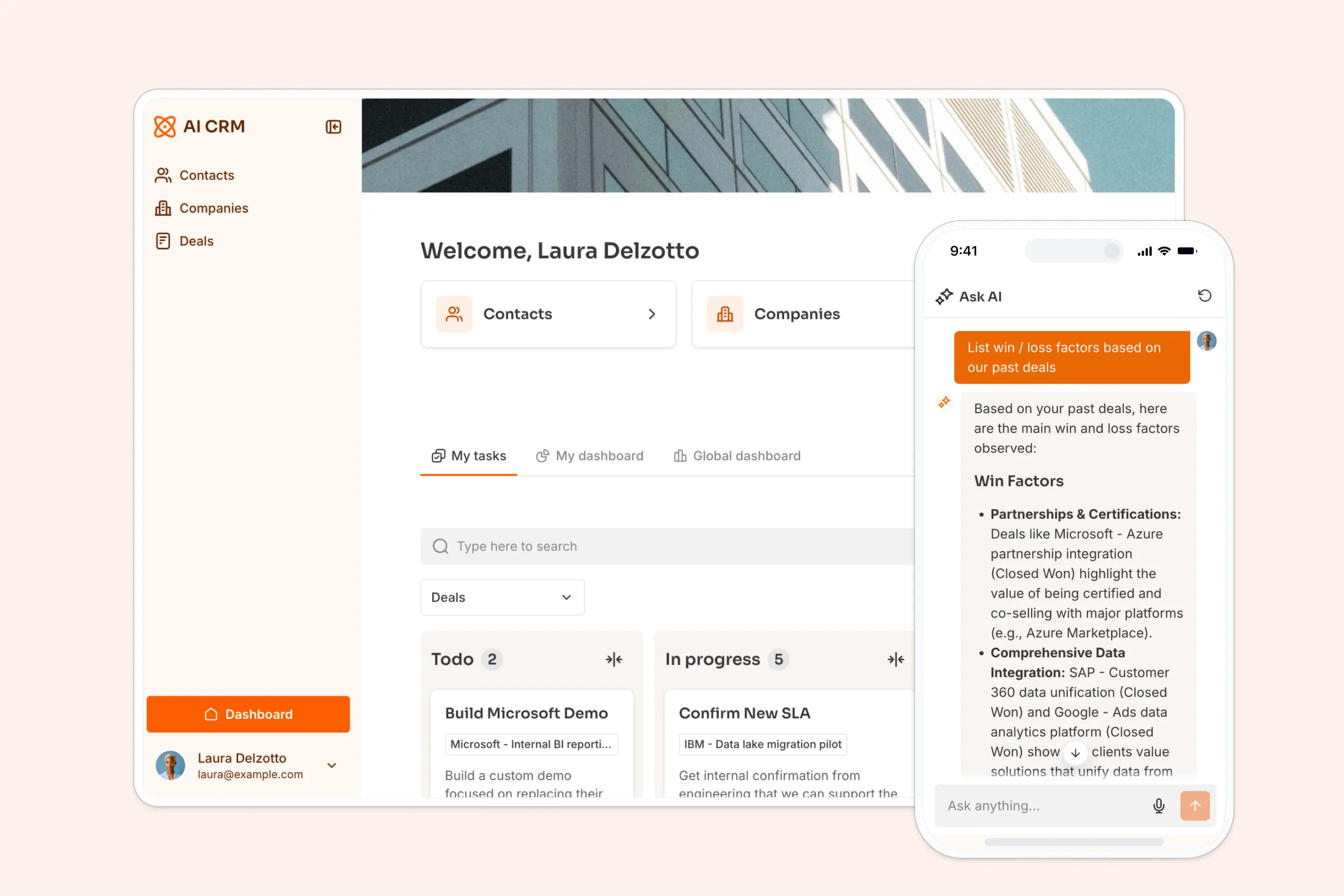
Softr isn’t a traditional, out-of-the-box roofing CRM with fixed modules. It’s a no-code platform that lets roofing businesses build a custom CRM and internal tools on top of their existing data—including Airtable, Google Sheets, Notion, monday.com, ClickUp, Coda, HubSpot, and other sources.
This makes Softr especially useful for roofers who are tired of expensive, hard-to-adopt systems and want to replace spreadsheets, PDFs, and separate tools with one clean interface. You can shape your CRM around how your roofing business actually runs—from lead intake and job tracking to crew coordination, documents, and reporting, all in one clean interface.
Softr also makes it easy to go beyond a basic CRM. You can add client or homeowner portals, internal job hubs, quote request forms, or document centers without buying separate tools. With built-in AI features like Ask AI (for answering questions from your CRM data) and Database AI Agents (to enrich records, update fields, or automate routine data work), teams can reduce manual admin without adding complexity.
Softr pros and cons
Pros:
- Fast to set up: Launch a CRM in minutes using 90+ templates and a drag-and-drop builder: no developers, onboarding calls, or complex setup required.
- Works with existing data: Airtable, Google Sheets, HubSpot, SQL, and more, any data source with Rest API (you can also plug into accounting systems like QuickBooks via Rest API). No migrations or data cleanup needed to get started.
- No per-seat pricing: Pricing is flat-tiered, making it easier to scale teams affordably. Ideal for small businesses on a budget.
- Built-in AI: Use Ask AI to help users find information faster by asking CRM data in plain English (“Which deals slipped this month?”) with permissions in place. And use Database AI Agents to automate data enrichment, deal summaries, and updates with a click of a button.
Cons:
- Not a plug-and-play roofing CRM out of the box
- No built-in email or marketing automation, though it can integrate with marketing tools that have these features (and much of this can be handled with Softr Workflows).
Softr best features
- Vibe Coding Block: Build your CRM structure, pipelines, dashboards, and views from scratch—and use AI prompts to instantly generate calculators, trackers, and performance widgets tailored to your process.
- Drag-and-drop CRM builder: Create lists, tables, forms, Kanban boards, and dashboards for leads, jobs, and customers.
- Role-based permissions: Set granular view and edit access for admins, reps, clients, contractors, or partners, so nobody ‘accidentally’ views something they shouldn’t have.
- Flexible data integrations: Connect to your existing database to build the CRM, or use Softr Databases to manage your data and apps in one platform. You get Airtable import that makes it easy to import your data (more options to come).
- Advanced lead capture: Build custom intake forms and estimate requests that feed directly into your pipeline
- Performance dashboards: Visualize pipeline health, revenue, and sales activity in real time
- Document & invoice handling: Upload contracts, attach files, manage documents, and collect payments using Stripe or PayPal.
- Client and subcontractor portals: Share job updates, documents, and approvals securely
- Task and job tracking: Move jobs through stages and track work without heavy project management software
- AI Co-builder(s): Whether you find building your database or automations challenging, you can just describe those to the AI inside Softr and it will create them for you.
- Ask AI: Add a built-in chat assistant that helps users search CRM data and get answers instantly.
- Live chat support + active community: Access live chat and a strong builder community for quick help and inspiration.
Softr pricing
Softr offers flat, transparent pricing with a generous free plan.
Pricing
- Free: Unlimited apps, with access to Softr Workflows, Softr Databases, Softr MCP, 5 app users, 5,000 database records, and 5 AI credits.
- Basic ($19/month): Unlimited apps with 42+ integrations, Team: 5 + Client: 5 app users, 50,000 database records, 10 AI credits, custom domain.
- Pro ($99/month): Unlimited apps with 45+ integrations and custom code, Team: 10 + Client: 50 app users, 500,000 database records, 50 AI credits, advanced forms, calling external APIs, and e-signatures.
- Business ($329/month): Unlimited apps with 52+ integrations, Team: 30 + Client: 100 app users, 1,000,000 database records, 100 AI credits, and advanced data sources.
- Enterprise (custom pricing, contact sales):, SSO, dedicated success manager, and tailored onboarding
2. Acculynx — best for roofing companies that want a roofing-specific CRM with deep operations tools
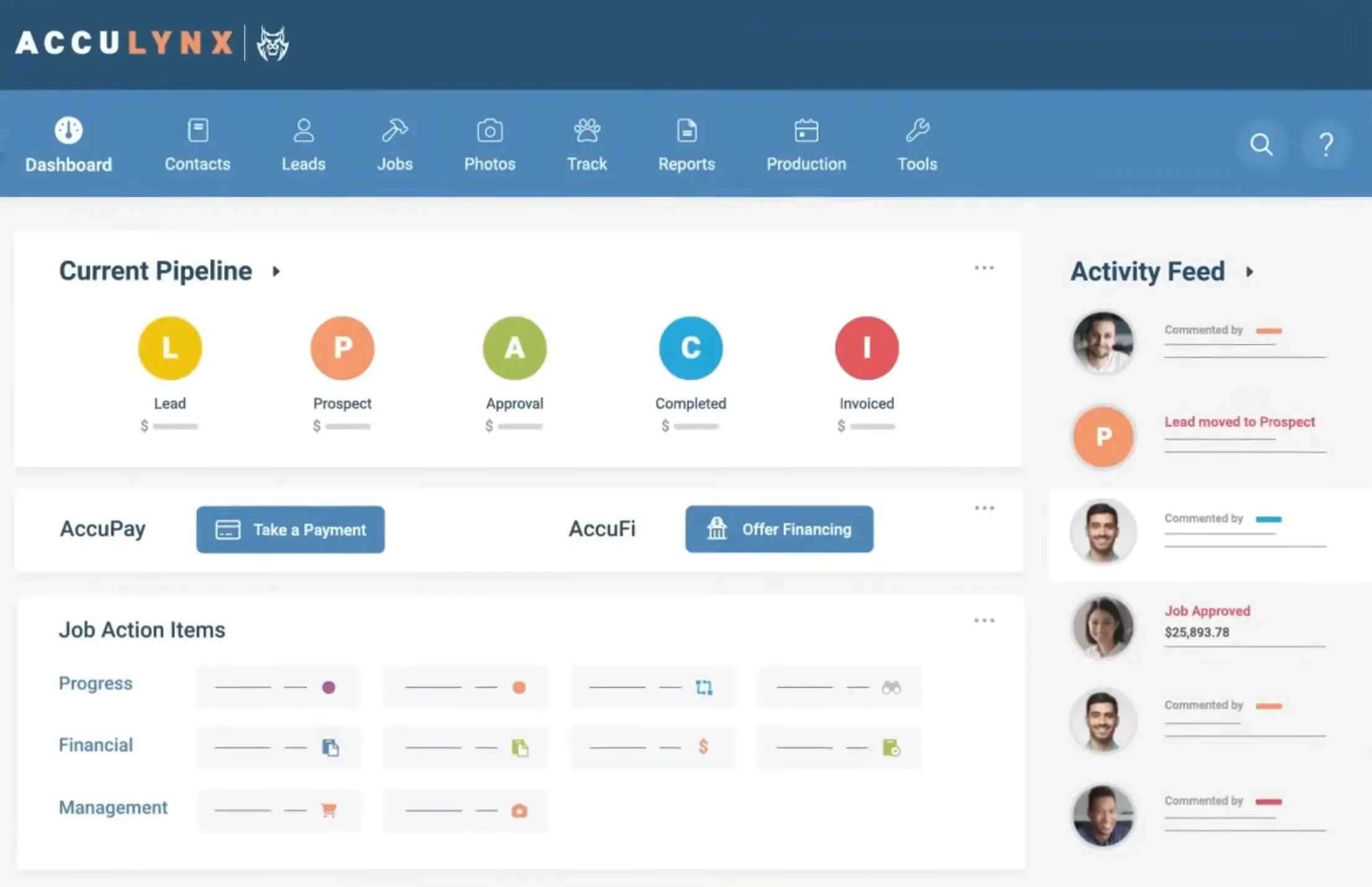
AccuLynx is a roofing CRM and business management platform built specifically for roofing contractors. It combines CRM, estimating, job tracking, scheduling, materials integrations, and team communication in one system designed for residential and restoration roofers. Thousands of roofing companies use it to manage leads, jobs, documents, and production workflows in a unified interface.
AccuLynx pros and cons
Pros:
- Roofing-focused features: Built for roofing workflows, not generic CRM — lead tracking, estimating, job milestones, and proposals are all included.
- Strong integrations: Works with key roofing tools and suppliers (EagleView, SRS, ABC Supply) as well as accounting systems like QuickBooks.
- Project visibility: Centralized job tracking, scheduling, and photo/document management help teams stay aligned across crews and sites.
- Cloud-based with mobile access: Field crews can access job info and photos from the app (though some users report limitations).
Cons:
- Custom pricing only: No flat plans are published; you request a custom quote from AccuLynx.
- Per-user costs can add up: Reviewers and third-party pricing sources note that overall cost tends to be on the higher side for smaller teams.
- Setup and adoption time: Powerful tools require configuration and training before teams fully use them.
AccuLynx best features
- CRM & lead tracking: Track leads from first contact through signed contracts and into active jobs.
- Estimating & proposals: Build accurate roof estimates, integrating aerial measurements and supplier pricing, then convert to signed contracts.
- Job and task management: Organize crews, milestones, and checklists for jobs in the field.
- Photo & document hub: Upload and organize unlimited job photos, reports, and documents in one place.
- Mobile access: Field and crew apps ensure real-time visibility on jobs and updates from the office.
AccuLynx pricing
AccuLynx does not publish flat pricing plans online. Pricing is based on the number of users and features your roofing business needs, and you receive a custom quote after contacting sales. Exact amounts depend on your plan, user count, and add-ons. Free trial is unavailable — only a demo request.
3. Leap CRM — best for roofing companies wanting a sales-driven CRM
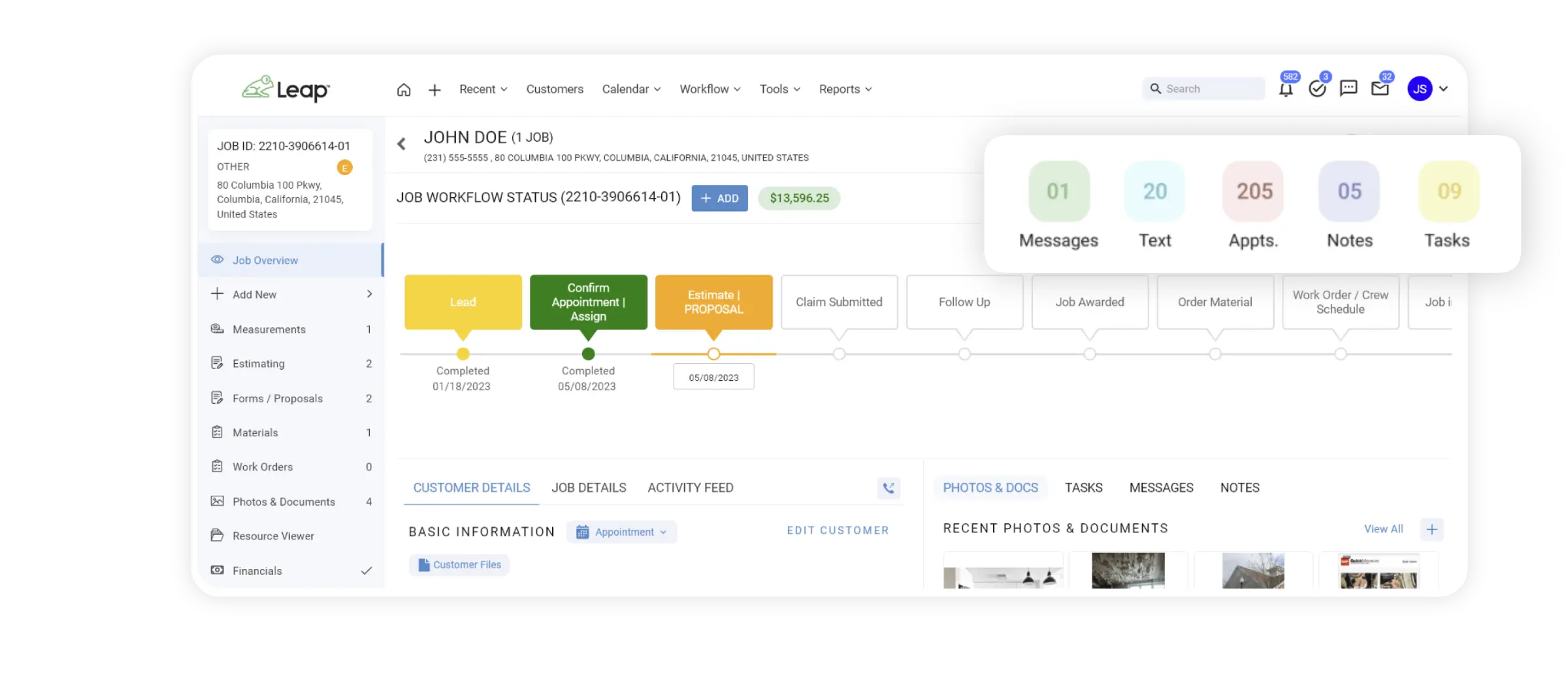
Leap CRM is a cloud-based CRM and business management platform built for roofing, remodeling, and home improvement contractors. It combines lead and customer management, digital estimates, customizable workflows, scheduling, field tracking, and materials ordering in one system designed to support jobs from first contact through completion.
Leap CRM pros and cons
Pros:
- Built for roofing and home improvement: Designed around contractor workflows, not generic CRM use cases
- Sales-first experience: Strong tools for digital estimates, proposals, pricing, and e-signatures
- Customizable workflows: Teams can tailor pipeline stages and job processes to match how they actually work
- Supplier integrations: Supports materials pricing and ordering through partners like ABC Supply
- Mobile access for field teams: Sales reps and crews can access job details and updates on site
Cons:
- Setup and configuration can take time, especially for teams new to structured CRMs
- Pricing can become expensive as teams add users and advanced features
- May feel heavier than needed for very small roofing businesses
Leap CRM best features
- Lead and customer management: Track prospects, homeowners, and interaction history in one system
- Digital estimates and proposals: Create quotes, present options, and collect signatures without separate tools
- Custom workflows and automations: Define stages for sales and jobs, and automate repetitive steps
- Custom workflows and automations: Define stages for sales and jobs, and automate repetitive steps
- Material pricing and ordering: Access supplier pricing and place orders directly from the platform
- Reporting and dashboards: Monitor pipeline health, sales activity, and job progress
Leap CRM pricing
Leap CRM uses tiered pricing, with plans designed for different business sizes and needs.
- Free trial: Available
- Essential: Starts around $79/month for basic CRM, estimates, scheduling, and workflows
- Team: Starts around $298/month and adds advanced workflows, field tools, and integrations
- SalesPro plans: Advanced sales features and enterprise options available via custom pricing
Exact pricing depends on user count, features, and contract terms.
4. RoofR — best for roofers who want fast quoting, measurements, and a lightweight CRM
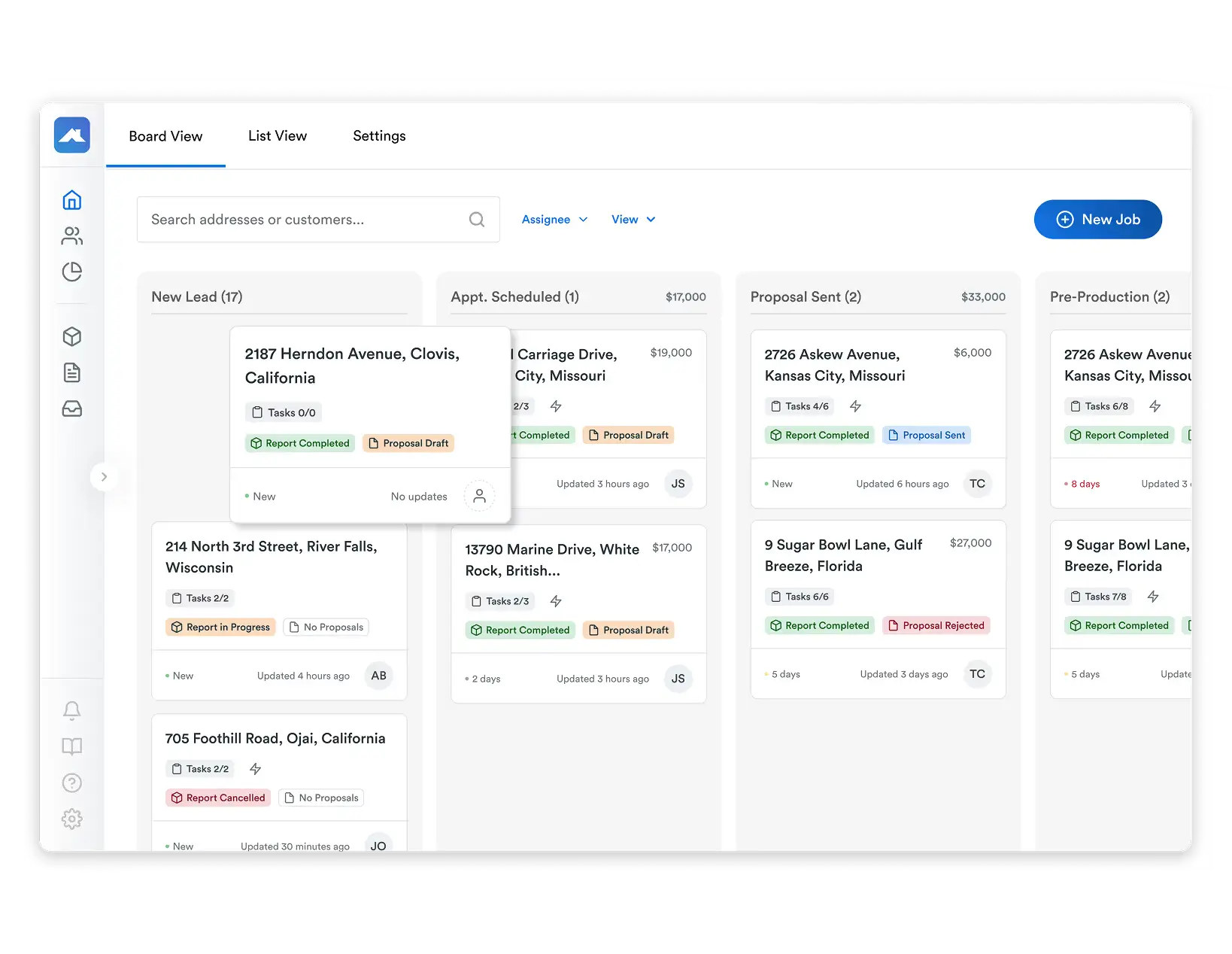
Roofr is cloud-based software designed specifically for roofing contractors that brings together roof measurement tools, digital proposals, CRM features, and job tracking in one browser-based platform. It lets roofers generate fast roof estimates from aerial imagery, turn those measurements into branded proposals, track jobs, and manage payments all in one place.
Roofr pros and cons
Pros:
- Fast, easy roof measurement + quotes: Generate detailed aerial measurement reports in hours, not days, and turn them into proposals instantly.
- Integrated sales workflow: From Instant Estimator lead capture to proposals and invoicing, Roofr takes you from first contact to payment in one platform.
- Affordable for growing teams: Free and paid tiers let smaller roofers get started affordably before upgrading.
- Designed specifically for roofing: Built around real contractor workflows — not repurposed from generic CRM.
Cons:
- Not as full-featured for project scheduling, crew dispatch, or deep operations management compared with tools like AccuLynx or Leap.
- Some features are actively evolving, so not every advanced CRM need is covered yet.
- Mobile app options are more limited than some competitors.
Roofr best features
- Instant Estimator & lead capture: Embed roof quote forms that send detailed leads into your CRM instantly.
- Roof measurement reports: Order professional measurement reports based on aerial data ($13/report for subscribers).
- Proposal builder: Create branded proposals straight from roof reports and pricing. roofr.com
- CRM features: Lead and pipeline tracking, custom job stages, job board view, and automated reminders.
- Invoicing and payments: Built-in invoicing and payment tracking in one place.
- Dashboard analytics: See job status, pipeline health, and business insights on a unified dashboard.
Roofr pricing
Roofr offers multiple ways to use the platform, including a free “Pay-As-You-Go” plan and paid subscription tiers:
- Free (Pay-As-You-Go): No monthly fee; basic CRM and job tracking; measurement reports available ($19 per report).
- Pro: ~$99/month,faster report turnaround, free material calculations, CRM features (invoicing, emails), unlimited proposals
- Premium: ~$169/month, faster measurement delivery with full branded proposal and CRM package.
- Elite: Contact vendor, most advanced features and fastest turnaround.
5. Service Titan — best for larger roofing businesses that want a full operations and CRM platform built for field service
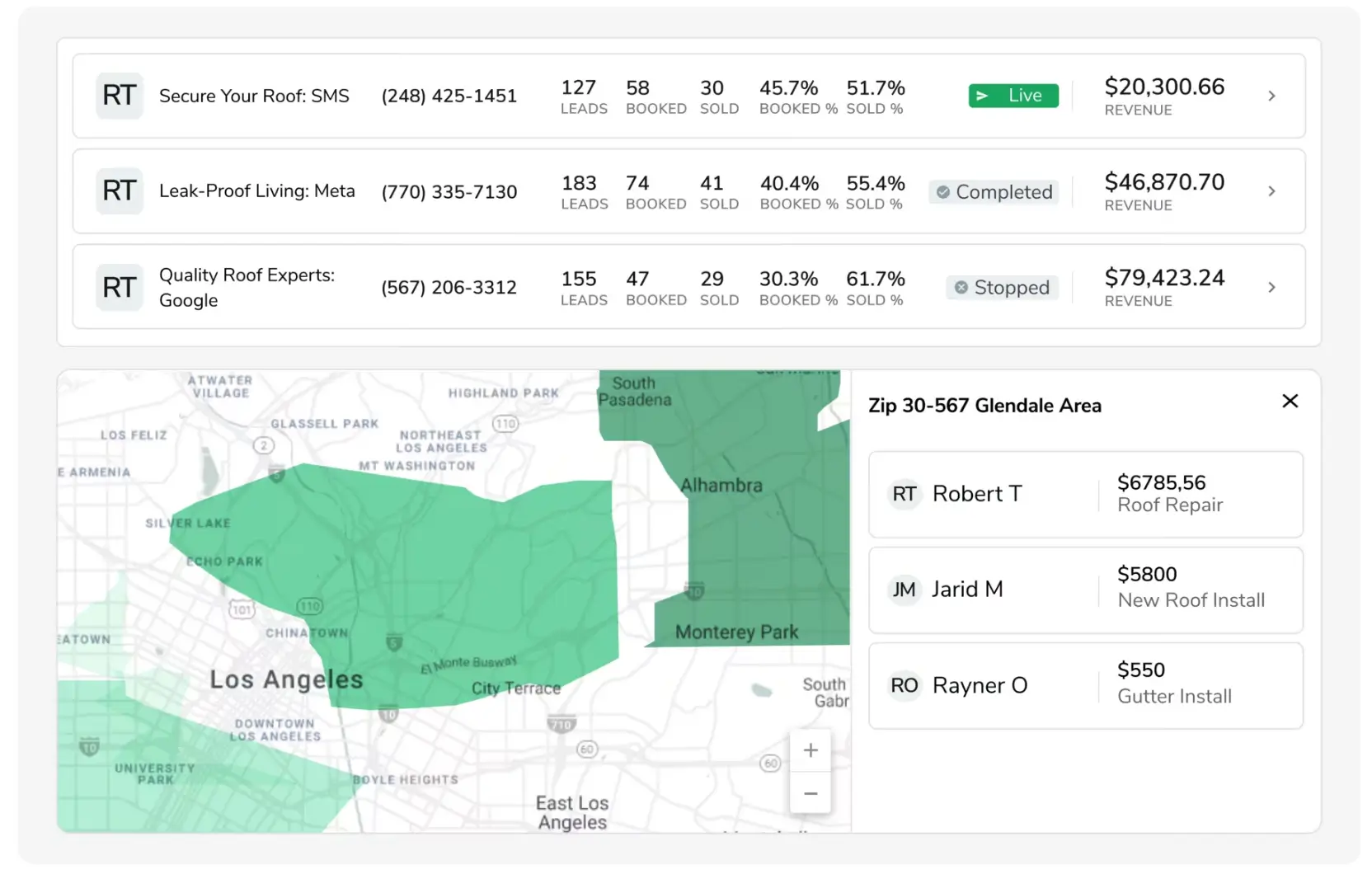
ServiceTitan is an enterprise-grade field service management platform that includes CRM capabilities tailored for contractors, including roofing companies. It combines lead management, customer tracking, scheduling, dispatching, estimating, invoicing, reporting, and integrations across the business. Roofing companies using ServiceTitan can capture calls, book jobs, manage pipelines, generate accurate estimates with pricing tools, schedule crews, track work orders, and keep payroll, commissions, and reporting in one system.
ServiceTitan pros and cons
Pros:
- All-in-one platform: Combines CRM, scheduling, estimates, dispatching, and invoicing into a unified system for field service businesses
- Strong mobile experience: Field teams can view customer history, work orders, and job details on iOS and Android devices
- Deep estimating & pricebooks: Built-in pricing tools help create accurate, consistent proposals and connect to supplier catalogs
- CRM + operations together: From first contact to job completion and payments, data flows through one platform
- Integrations: Works with key partners like accounting software, supplier catalogs, and field tools
Cons:
- Higher cost and complexity: Targets larger, structured teams; smaller roofing businesses may find the cost and setup heavier than needed
- Steeper implementation: Setup, training, and adoption take time and sometimes require dedicated support resources
- Per-user pricing: Plans are priced per technician/user with customization, so costs rise as teams scale
ServiceTitan best features
- End-to-end CRM: Track leads and customer history, from first call through scheduling, estimates, and job completion
- Estimates & pricebook: Integrated pricing tools help maintain accurate cost books and consistent proposals
- Scheduling & dispatch: Drag-and-drop calendars and dispatch tools keep crews aligned and on schedule
- Mobile app: Field access for crews to update jobs, capture notes, and view customer and job details
- Reporting & analytics: Pipeline, revenue, job costing, and performance reporting across sales and operations
- Integrated payments: Process credit card and financing options and sync invoicing with accounting back ends
ServiceTitan pricing
ServiceTitan’s pricing is custom and based on per-technician/user subscriptions with multiple tier options. ServiceTitan offers packages like Starter, Essentials, and The Works that bundle CRM, scheduling, dispatch, and reporting features, but exact costs require contacting sales for a custom quote.
Find a roofing CRM that fits your needs
The best roofing CRMs aren’t the ones with the most features. Your ideal tool is the one your team will actually easily use. Before choosing, ask yourself how much flexibility you need, whether you want an all-in-one system or something you can tailor over time, and how flexible your costs need to be as you grow.
If you’re a smaller roofing team, prioritize tools that are easy to set up, work with your existing data, and don’t lock you into rigid workflows or per-seat pricing. Start by narrowing down what matters most to your business today, then pick a CRM that can grow with you — not slow you down.
Not ready to commit yet? If you want a roofing CRM you can customize to your workflows without long setup or unpredictable costs, explore Softr’s free AI CRM template to test a spreadsheet-friendly setup.
Frequently asked questions
How much does a roof CRM cost?
What software do roofing companies use?
Who is the no. 1 CRM provider?
What is the best marketing for roofers?