


The 7 best ERP software for small manufacturing businesses in 2026

Manufacturing is a tough gig. You’re constantly juggling work orders and suppliers, often with no clear picture of what’s happening on the floor until it’s too late. Production lines grind to a halt when parts arrive late or inventory counts are off. Even a single quality slip can throw the whole schedule out of whack.
That’s where ERP (enterprise resource planning) systems can help. A strong ERP pulls operations into one platform so teams can track work orders and materials as they move through the system. Plus, (and this is the linchpin), it’ll give you a clear overview of production so problems can be caught before they snowball.
But not all ERP systems are built the same. Some are rigid and force manufacturers to bend their processes to fit the software. Others come with bloated features that make simple tasks slow and confusing. Choosing the right ERP will depend on a few critical things: how well it fits your existing workflows, how easily it connects to your current systems, how fast it can be set up and iterated on, and whether it can scale alongside your operations without adding complexity or cost.
Ready to find the perfect ERP for your manufacturing operations? Let's break down your best options.
What is an ERP for small manufacturing businesses?
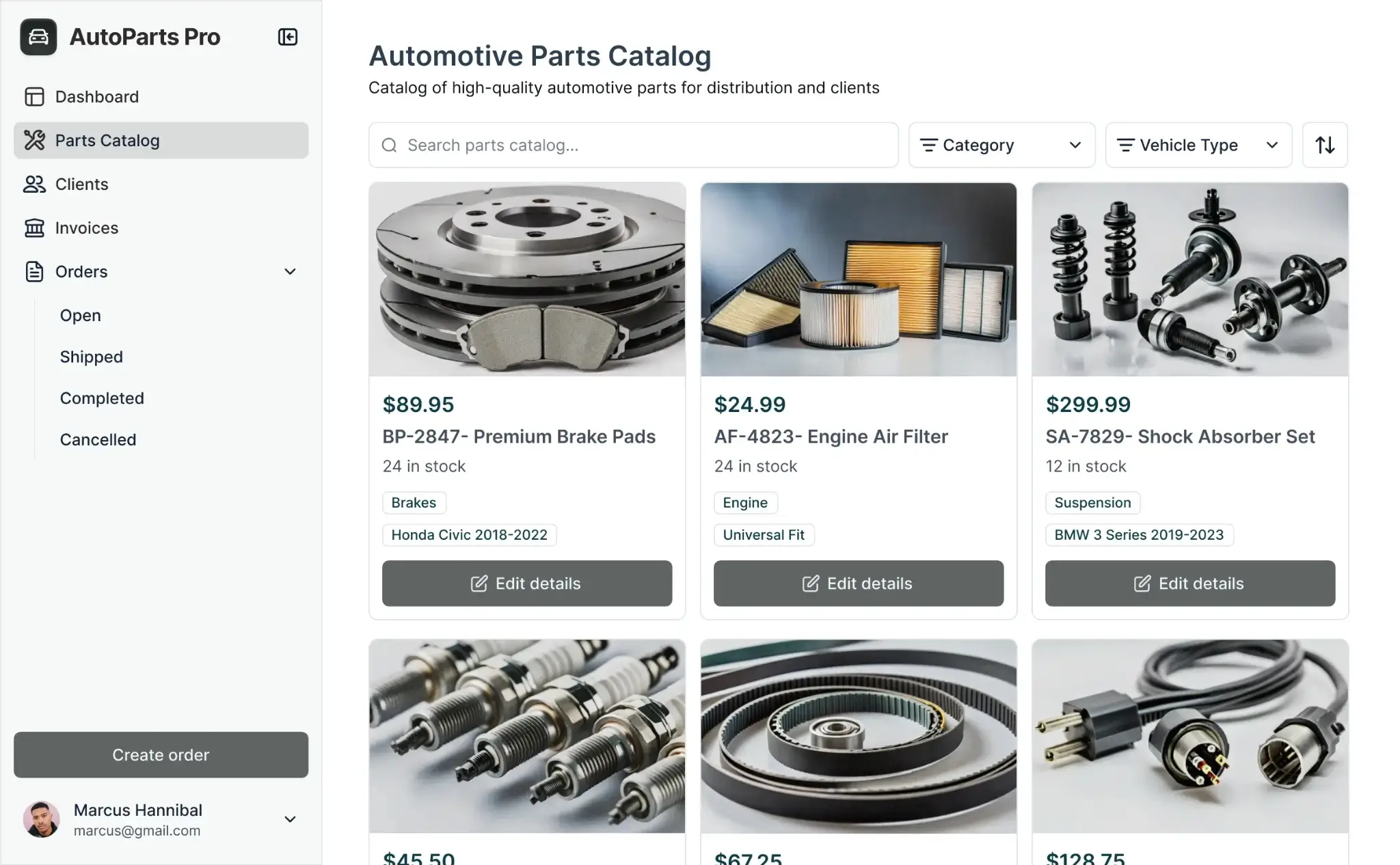
An ERP for small manufacturers is software that centralizes every core business function in one place. Instead of bouncing between spreadsheets, emails, and disconnected apps to manage inventory and track work orders, you get a single source of truth for your entire production process.
With the right ERP, you can monitor your shop floor in real time, track materials as they arrive, manage work orders, and catch potential bottlenecks before they become crises.
Most ERP platforms help teams with the following workflows:
- Financial management to track income, expenses, and generate reports in real time, without juggling multiple systems.
- Inventory & Supply Chain Management to keep production lines moving with accurate stock levels, incoming materials, and delivery tracking.
- A CRM (Customer Relationship Management) to manage customer data, orders, and sales pipelines in one place.
- Work order tracking to generate work orders for the shop floor, assign them to production staff, update statuses as tasks progress, and track completion in real-time.
- Project & Production Management to track work orders, production progress, and deadlines across teams.
- Reporting & Analytics to generate real-time insights on production performance, costs, margins, and workflow efficiency.
- Shipping & delivery management to plan and record outgoing shipments, print packing slips, track delivery status, and update customers on order fulfillment progress.
While those are core functions, not every ERP platform is built the same. Here are a few of the different routes you can take:
1. Purchase off-the-shelf ERP software
These are pre-built systems (like NetSuite or Zoho Creator) designed to cover standard manufacturing operations. These tools come with predefined modules for inventory, production purchasing, and so on, and are marketed as “ready to use” for manufacturers.
As with any off-the-shelf solution, they can be too rigid to match how your shop actually runs or overloaded with features you don’t need. When real workflows don’t fit the system, teams fall back to spreadsheets, manual workarounds, or bolt-on tools that don’t stay in sync—turning what should be a single ERP into a fragmented stack.
2. Hire a developer to build a custom solution
This approach involves commissioning a fully custom ERP or operations system tailored to your production workflows—and can include things like BOMs, work orders, inventory movement, and reporting.
While the result can match your processes exactly, development typically takes months, costs can rack up as time goes on, and makes ongoing changes dependent on developers. Even small tweaks—like adjusting a production step or report—often require additional time, budget, and technical support.
3. Build a custom solution with a no-code platform
With no-code tools like Softr, you can generate production-ready ERPs that combine databases to store company data, apps and interfaces that let users interact with it, and automation to streamline repetitive manufacturing tasks.
These are usually the quickest (and most cost-efficient) solutions, as they let you add features you want over time, set strict permissions and views, and have hosting, security, and infrastructure built in.
What to look for in ERP software (for manufacturers)
- Unifies apps, data, and workflows in one system: A strong manufacturing ERP should combine a centralized database, applications, and workflow automation in a single platform. That way, production, inventory, purchasing, and finance all operate on the same data and processes—without manual handoffs or disconnected tools.
- Eliminates data silos through integration: Integrates all business functions into a single platform so accounting, inventory, CRM, HR, and production management share the same data foundation. That means fewer errors, faster decisions, complete operational visibility.
- Automates manual tasks and reduces errors: Eliminates repetitive data entry so your team can focus on high-value work. Work orders automatically update inventory, production milestones trigger notifications, and purchasing workflows activate based on stock thresholds.
- Provides real-time insights for better decision-making: Gives immediate visibility through real-time dashboards and reporting to spot bottlenecks before they halt production, identify cost overruns, and track performance metrics without waiting for end-of-month reports.
- Scales seamlessly with business growth: Grows alongside you to support new production lines, products, locations, and transaction volume without system overhauls or exponentially increasing costs.
- Integrates with your existing tools: Connects seamlessly with your accounting software, communication platforms, spreadsheets, and industry-specific tools to keep data synchronized and eliminate migration headaches.
Best ERP software for small manufacturing businesses at a glance
| Tool | Best for | Top features | Pricing |
|---|---|---|---|
| Softr | Small to mid-sized businesses that need a custom ERP they can build, own, and evolve themselves - without developers. | - AI no-code app builder with customizable ERP templates - Connect to any existing data source in real time (QuickBooks, existing systems, APIs) - Set team permissions and views - Custom workflow automation - Real-time dashboards and reporting | Free (up to 5 users) Paid plans from $19/month (billed annually) |
| Zoho Creator | Best for startups wanting an integrated, affordable, cloud-based system without heavy IT | - Low-code app builder with drag-and-drop interface - Workflow automation engine - Custom dashboards for KPIs - Integrates with Zoho ecosystem and external tools - Cloud-based with no infrastructure management | Free: 1 user Paid from: $8/user/month (Standard plan, billed annually) |
| Microsoft dynamics | Manufacturing companies that already use Microsoft’s suite of products and need a scalable ERP + CRM with built-in AI. | - Unified ERP and CRM platform - AI-powered Copilot automation - Native Power BI integration - Deep Microsoft ecosystem integration - Enterprise-grade scalability | Free: Trial available Paid from: ~$70/user/month (Business Central Essentials) |
| Odoo | Small to mid-sized manufacturing businesses looking for a modular, open-source ERP that can grow with their operations. | - Open-source with modular architecture - Pre-built apps for manufacturing, CRM, HR, inventory - No-code/low-code customization tools - Third-party app marketplace - Strong community support | Free: Unlimited users (One App Free plan) Paid from: ~$25–30/user/month (Standard plan, billed annually) |
| Scoro | Small to mid-sized service and project-based businesses that need integrated project, finance, and CRM management | - Project management with Gantt charts - Time tracking and resource planning - Financial tracking and profitability insights - CRM and sales pipeline - Workflow automation | Free: 14 day trial Paid from: ~$26/user/month (Essential plan, billed annually) |
| Acumatica | Mid-sized businesses needing cloud-based ERP for manufacturing, construction, and distribution | - Clean, intuitive interface - Industry-specific manufacturing modules - Workflow automation and AI features - Flexible consumption-based licensing - Cloud and mobile access | Paid from: Custom pricing (usage-based, not per user) |
| ERP Next | SMBs looking for an open-source, highly customizable ERP | - Fully open-source with complete ERP coverage - Auto-sync across all modules - Native manufacturing and production features - Self-hosted or cloud options - Active community and partner ecosystem | Free: Unlimited users (self-hosted) Paid from: ~$50/month (cloud-hosted, unlimited users) |
1. Softr — best for SMB manufacturers that need a fully customizable ERP system

Here's the thing about most ERPs: they're built for everyone, which means they're perfect for no one. You end up with a massive system full of features you'll never use, forcing you to bend your proven processes to match someone else's idea of how manufacturing should work.
But when you break it down, all any ERP system needs are three main things to keep operations running. A database that stores your inventory data. Interfaces (portals, dashboards, internal tools) for manufacturing teams to interact with that data. And workflows to automate repetitive tasks related to stock levels, order intake, and work orders.
As an AI-powered solution, Softr gives you the three on a single platform, so they work together without you having to connect to third-party apps.
You can design your ERP around how your shop floor actually operates, with clear rules for who can access work orders, inventory, and operational records. Softr AI can configure both your database and your interfaces based on your prompts, providing you with a production-ready system. But there’s also a visual drag-and-drop builder if you need to customize anything down the line.
You can track work orders your way. Set up inventory actions that match your reorder process. Give vendors limited access while keeping production data locked down. You get the exact workflows, dashboards, and permissions your operation needs, no code required.
Softr pros
- Create self-service portals to facilitate customers, vendors, or business partners who need to access your products and services
- Ability to build core ERP systems that range across your operations (field service management, franchise management, inventory, HR, and more) without long implementation cycles
- Centralized operational data you can layer on top of Softr databases or your existing tech stack—wherever you manage your manufacturing data
- Secure, role-based access for operators, managers, partners, and external stakeholders
- Flexible workflows automation for work orders, approvals, status updates, and cross-team handoffs
- Real-time dashboards and reporting for production status, inventory levels, costs, and performance
- Scalable architecture that supports new processes, locations, products, and teams without re-platforming or per-seat pricing spikes
Softr cons:
- Not a fully packaged, out-of-the-box ERP but you can use AI or the dedicated ERP template so you don’t have to start from scratch.
Softr key features
- Role-based access and permissions: Create separate logins and permission levels for the different user groups that will access the app: operators, supervisors, production managers, finance teams, suppliers, and partners. Control exactly who can view, edit, or submit data across work orders, inventory, and reports to keep operations secure and organized.
- Centralized records for parts, suppliers, customers, and orders: Manage parts, SKUs, suppliers, customers, and production orders in one structured system. Keep records accurate, searchable, and always up to date across inventory, production, and fulfillment.
- Clean and intuitive interface: Softr lets you build sleek, user-friendly dashboards and portals that your teams will actually enjoy using.
- Notes, files, and activity history: Attach notes, documents, drawings, and updates directly to work orders, parts, or supplier records. Maintain a clear activity history so teams don’t rely on email threads or spreadsheets to understand what’s happening.
- Vibe coding: Build tools, dashboards, docs, and workflows instantly using AI with the vibe coding block. Build on top of your data sources, customize views, and set real permissions.
- Search, filtering, and AI-powered insights: Quickly find parts, orders, suppliers, or production issues using advanced filters. Use Ask AI to query your system in plain language, like “Which work orders are delayed?” or “Which materials are below reorder level?” and get instant answers.
- Workflow automation and integrations: Automate approvals, status changes, notifications, and handoffs using Softr’s built-in workflows. Connect to existing tools like spreadsheets, databases, accounting systems, or ERP components to keep data in sync without manual updates.
- Accessible across devices: Access your ERP from any browser or turn it into a downloadable app using Softr’s PWA feature, ideal for shop floor teams and managers on the move.
Softr pricing
Pricing is flat by plan, not per seat, making Softr predictable and cost-effective for growing teams.
- Free plan: Unlimited apps, with access to Softr Workflows and Softr Databases, 5 app users, 5,000 database records, 5 AI credits
- Basic: $19/month (billed annually), unlimited apps with 42+ integrations, Team: 5 + Client: 5 app users, 50,000 records, 10 AI credits.
- Pro: $99/month (billed annually), unlimited apps with 45+ integrations and custom code, Team: 10 + Client: 50 app users, 500,000 records, 50 AI credits.
- Business: $329/month (billed annually), unlimited apps with 52+ integrations, Team: 30 + Client: 100 app users, 1M records, custom user groups (up to 10), Webhook & API workflows.
- Enterprise: Custom pricing including everything in Business plus custom workflow execution limits & run history, unlimited workflows & steps, SSO (SAML/OpenID), custom billing, dedicated success manager, and team training.
2. Zoho Creator — best for small businesses that need an integrated, affordable, cloud-based system without heavy IT
.webp)
Zoho Creator is low-code done right for startups. The drag-and-drop interface genuinely works. With it, you can build simple manufacturing apps for inventory tracking, production workflows, or order routing without touching code. For basic needs, it's fast and intuitive.
The workflow automation engine handles the repetitive stuff like approvals and status updates. Custom dashboards give managers real-time production KPIs without the manual reporting grind. Everything lives in the cloud and scales as you grow.
Where things get trickier is depth. Creating simple apps is easy. But when you need advanced customization or complex logic, you'll be writing Deluge script (Zoho's proprietary language). It's not hard if you've got some technical chops, but non-technical teams often hit a wall here and need outside help.
The payoff is integration flexibility. Zoho Creator plays nicely with the entire Zoho ecosystem (Books, CRM, Inventory) plus external tools through APIs. For startups already in the Zoho world or planning to be, it's a solid bet.
Zoho Creator pros
- Strong integrations with ERPs, payment systems, and third-party tools
- Centralized data model for managing operations in one place
- Workflow automation to reduce manual processes and operational overhead
- Inventory visibility and traceability that support smoother order fulfillment
Zoho Creator cons:
- Initial setup can be complex for non-technical teams
- The interface itself doesn’t look modern
- Support quality varies for advanced issues
- Deep customization often requires scripting or external help
Zoho Creator key features
- Fully cloud-based app builder: Build and run custom ERP applications entirely in the cloud, without managing servers or on-prem infrastructure.
- Drag-and-drop interface and form builder: Create data entry forms, internal tools, and operational screens using visual builders. Teams can design how data is captured and updated without writing code for every change.
- Workflow builder: Automate internal processes such as approvals, status updates, and notifications using Zoho Creator’s built-in workflow engine. This helps reduce manual coordination between teams.
- Schema builder: Define your own data structures for records like inventory items, work orders, suppliers, or internal requests. A structured schema keeps data consistent as it flows through different apps.
- Customer portals: Create secure portals where external users can submit information, view records, or check status. Access is controlled through permissions so users only see what’s relevant to them.
Zoho Creator pricing
Zoho Creator uses a per-user pricing model with both a free tier and multiple paid plans. It’s flexible enough for small teams to start with basic capabilities and scale up as needs grow.
- Free — $0/month
- Zoho Creator has a forever free plan that includes 1 user, access to 1 application, limited storage, and up to 1,000 records — ideal for testing or small pilots.
- Standard — ~$8/user/month (billed annually)
- Entry-level paid tier providing core low-code app building and workflow automation with single-app access.
- Professional — ~$20/user/month (billed annually)
- Lets teams create an unlimited number of applications and is suited for broader internal deployment and more complex workflows.
- Enterprise — ~$25/user/month (billed annually)
- Popular tier with higher data limits, more automation capacity, and broader integration support for scaling needs.
- Flex / Custom — Contact sales
- For very large deployments or custom requirements, Zoho offers a flexible plan priced on request.
3. Microsoft Dynamics 365 — best for manufacturers already using Microsoft
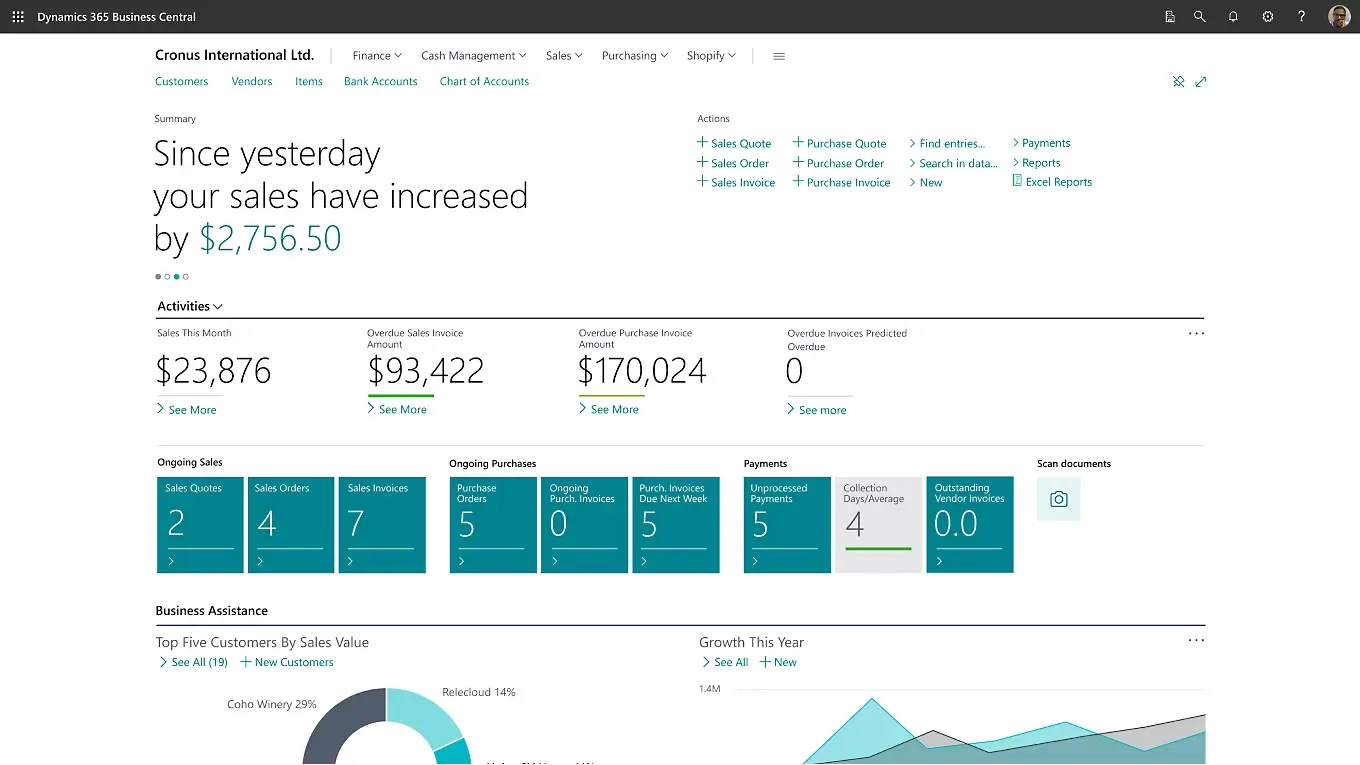
If your team already lives in Excel, Outlook, and Teams, Dynamics 365 is the natural next step. It's a modular ERP platform that combines operations (finance, supply chain, production) with CRM, all wrapped in the Microsoft ecosystem you already know.
Its selling point is AI automation through Copilot and analytics through Power BI. Dynamics 365 can automate reporting, flag production issues, forecast demand, and surface insights without you manually digging through data. It's powerful stuff (when it works).
There is a catch. Dynamics 365 is heavy. It needs serious infrastructure, the user experience can feel clunky without customization, and setup is no joke for small teams. It performs best when you're already deep in Microsoft's world and ready to commit to an enterprise-grade system.
Microsoft Dynamics 365 pros
- AI features through Copilot actually automate useful stuff
- Power BI integration delivers sophisticated analytics and forecasting
- ERP and CRM in one platform for complete operational visibility
- Perfect fit if you're already using Microsoft products everywhere
Microsoft Dynamics cons:
- Resource-hungry and requires solid infrastructure
- User experience needs work (or expensive customization)
- Setup and customization get complex fast for smaller teams
Microsoft Dynamics 365 key features
- ERP and CRM integration: Production, finance, sales, and customer data all connected in one system.
- Power BI reporting: Advanced dashboards and forecasting for operational and financial KPIs.
- AI-powered automation: Copilot helps with reporting, work orders, inventory decisions, and repetitive tasks.
- Microsoft ecosystem integration: Works seamlessly with Excel, Outlook, Teams, and other Microsoft tools.
Microsoft Dynamics 365 pricing
Pricing varies by module and deployment, but typically starts around:
- Business Central: ~$70–$100 per user/month
- Enterprise supply chain & finance modules: Custom pricing
4. Odoo — best for small to mid-sized manufacturing businesses looking for an open-source ERP that can grow with their operations
.webp)
Odoo takes the open-source route, which means you actually own your system instead of renting it forever. It's built around a collection of modular apps that snap together (think inventory, production, purchasing, etc) all sharing the same data foundation.
The sweet spot here is flexibility without starting from zero. Core manufacturing needs like bills of materials, work orders, and inventory tracking work right out of the box. Then you can extend or customize using Odoo's app studio tools, third-party marketplace modules, or straight-up code if you've got the technical chops.
Everything stays connected, so when a sales order comes in, it automatically flows through to production and updates your inventory. No manual syncing. No reconciling spreadsheets at month-end. The catch is that implementation matters: plan your processes upfront, and Odoo rewards you. Wing it, and you'll feel the pain later.
Odoo pros
- Open-source architecture supports deep customization and long-term control
- Broad suite of native apps covering manufacturing, inventory, accounting, CRM, and HR
- Inventory and order processing features work well for production-driven businesses
- Large community and third-party marketplace for extensions and integrations
- Relatively intuitive interface compared to many traditional ERPs
Odoo cons
- Customization and troubleshooting can be demanding for small IT teams
- Free community edition has limited functionality for advanced manufacturing needs
- Paid support and implementation services can add up quickly
- Ongoing maintenance and upgrades require technical oversight
Odoo key features
- Manufacturing & inventory management:
- Manage bills of materials, work orders, inventory movements, and production planning in a single, connected system.
- Broad suite of pre-built apps: Includes built-in tools for CRM, point of sale, HR operations, expenses, and internal communication, giving manufacturers a single platform to run both production and back-office work.
- Open-source customization:
- Adapt workflows, data models, and features through custom modules or configuration, rather than being locked into fixed processes.
- Third-party app marketplace:
- Extend functionality with community and partner-built apps for niche manufacturing or operational needs.
- Integrated operations & finance:
- Production, inventory, sales, and accounting data stay linked, making it easier to track costs, margins, and performance.
Odoo pricing
Odoo offers both free and paid options, depending on deployment and feature needs.
- Community (Free):
- Open-source, self-hosted version with core ERP functionality. Best for teams with technical resources.
- Standard (Paid):
- Hosted SaaS plan with access to all standard apps, updates, and maintenance. Pricing typically starts around $25–$30 per user/month (billed annually).
- Custom (Paid):
- Higher-tier plan that allows advanced customization, developer tools, and deeper configuration.
5. Scoro — best for manufacturers that combine operations, projects, and finance
.webp)
Scoro sits in an interesting middle ground between ERP and professional services platforms. It's designed for businesses that need to manage work, people, and money together without the weight of a full manufacturing ERP.
Instead of focusing on shop-floor execution, Scoro emphasizes visibility across projects, resources, and finances. You’ll be able to easily track work orders, timelines, budgets, and margins all in one place. The trade-off is depth. Scoro won't handle complex MRP requirements or deep bill-of-materials management. But if your manufacturing is more about managing custom projects than running high-volume production lines, it might be exactly what you need.
Scoro pros
- Strong blend of project management, financial tracking, and reporting
- Clear visibility into profitability, budgets, and team utilization
- Cleaner interface than traditional ERP systems
- Built-in time tracking and resource planning
Scoro cons
- Not built for complex manufacturing requirements like MRP or detailed BOMs
- Per-user pricing adds up as teams grow
- Limited flexibility for highly custom production workflows
Scoro key features
- Project and work order management: Plan, schedule, and track jobs, timelines, and deliverables from start to finish.
- Financial tracking and forecasting: Monitor costs, revenue, margins, and profitability in real time.
- Resource planning and time tracking: Allocate staff, track capacity, and understand utilization across teams.
- Reporting and dashboards: View operational and financial KPIs in one place without exporting data.
- Client and order management: Centralize customers, orders, invoices, and communication.
Scoro pricing
Scoro uses a per-user pricing model with multiple tiers:
- Free plan: No
- Essential: ~$26/user/month (billed annually)
- Standard: ~$37/user/month
- Pro: ~$63/user/month
- Ultimate: Custom pricing
6. Acumatica — best for manufacturers that want a modern ERP without enterprise sprawl
.webp)
Acumatica is cloud ERP done right for operational businesses invested in manufacturing, distribution, and construction. Where most ERPs either drown you in features or give you a terrible user experience, Acumatica actually tries to make things approachable while still covering the serious stuff.
The dashboards, workflows, and reporting are structured and predictable, which makes onboarding way easier than legacy systems. You also get solid automation and AI-assisted features for reporting and approvals. The interface won't blow your mind, but it won't frustrate your team either—and that's worth a lot.
The downside kicks in when you need heavy customization beyond standard manufacturing setups. That's when things get complicated and you'll likely need outside help from people who know the system.
Acumatica pros
- Intuitive interface that's easier to learn than most traditional ERPs
- Flexible licensing that isn't strictly per-user (rare win)
- Industry-specific modules built for manufacturing, distribution, and construction
- Strong automation and guided reporting features
Acumatica cons
- Customization gets complex for non-standard workflows
- Smaller integration ecosystem than the big ERP players
Acumatica key features
- Manufacturing-focused modules: Production management, inventory control, BOMs, and supply chain workflows built for operational teams.
- Workflow automation: Trigger-based approvals, task creation, and operational updates.
- Dashboards and reporting: Clean, structured reports with guided insights and KPI tracking.
- Cloud and mobile access: Use across devices without managing on-premises infrastructure.
Acumatica pricing
Acumatica uses custom, quote-based pricing based on deployment size, modules, and resource usage.
- Free plan: No
- Pricing: Custom (via sales)
- Typical fit: Growing manufacturers planning a long-term ERP investment
7. ERPNext — best for manufacturers that want a low-cost, open-source ERP with strong core features
.webp)
ERPNext is open-source ERP that doesn't compromise on features. It's free to self-host, or available as a low-cost cloud option—either way, you're looking at the best value in the ERP space.
Unlike platforms where you build apps piece by piece, ERPNext comes loaded with everything manufacturers need: bills of materials, work orders, production planning, inventory tracking, purchasing, accounting, HR, and customer support—all working together from day one. The system handles multi-currency operations, generates invoices automatically, and keeps data synchronized across modules so everyone works from the same information.
The interface is surprisingly user-friendly for open-source software, though it won't win design awards. What matters is that once you get it running, the features are quite robust. You get Kanban boards, Gantt charts, hierarchical BOMs, and real-time operational insights without paying for premium tiers.
The tradeoff? Implementation isn't plug-and-play. You'll need technical expertise to set it up properly. For manufacturers with IT capability or budget for one-time setup costs, ERPNext delivers comprehensive functionality without the ongoing per-seat fees.
ERPNext pros
- Fully open-source with self-hosted and affordable cloud options
- Broad ERP coverage including manufacturing, inventory, accounting, HR, and CRM
- Strong manufacturing features like BOMs, work orders, and production planning
- Automatic data syncing across modules reduces inconsistencies
- Active community and partner ecosystem for support and extensions
ERPNext cons:
- Implementation and customization require technical expertise
- Design is dated compared to modern ERPs, though functionality is solid
- Limited advanced enterprise features for very large or complex organizations
- Ongoing maintenance is the team's responsibility when self-hosted
ERPNext key features
- Manufacturing and production management: Manage bills of materials, production orders, workstations, and manufacturing workflows directly within native modules.
- Inventory and order management: Track stock levels, warehouses, purchases, and deliveries with real-time updates tied to production and sales.
- Integrated accounting: Automatically link inventory movements and production costs to financial records for accurate reporting and margins.
- All-in-one ERP modules: Includes built-in tools for CRM, HR, payroll, help desk, and project management without relying on add-ons.
- Real-time data consistency: Changes made in one module update across the system, giving teams a shared source of truth.
ERPNext pricing
ERPNext is one of the most affordable ERP options available.
- Self-hosted (Free): Open-source software with no license fees. Best for teams that can manage hosting and maintenance.
- Cloud-hosted: Paid hosting options typically start around $50/month for unlimited users, depending on storage and usage.
- Enterprise support: Optional paid support and implementation services are available through ERPNext partners.
Find the best ERP software for your manufacturing business
There's no one-size-fits-all ERP for manufacturing businesses. Some operations need deep bill-of-materials management and complex production scheduling. Others just want to track work orders, manage inventory, and stop juggling spreadsheets. What matters most is choosing a system that fits how your operation actually runs, whether that's high-volume production, custom project work, or hybrid manufacturing.
Softr is a strong fit for manufacturers who've outgrown spreadsheets but don't want to force their workflows into rigid, out-of-the-box software.
If you want to see what a customizable, no-code ERP looks like in practice, you can start with Softr’s free ERP template and shape it around your production workflows, inventory, and team structure.
Frequently asked questions
What are the essential components of an ERP system for manufacturers?
Can manufacturers build a custom ERP without coding or long implementation cycles?