[.blog-callout]
✨ TL;DR:
- Airtable and Asana solve different problems: Airtable manages structured data; Asana manages tasks, timelines, and team execution.
- This guide compares them across setup, customization, integrations, collaboration, use cases, and pricing so you can choose the right fit for your workflow.
- Airtable is best for teams that run on connected data: clients, projects, vendors, or inventory. Asana is best for teams that need clarity on owners, deadlines, and daily work.
- You’ll also see where their overlap creates extra complexity and when a unified platform makes more sense.
- Softr brings data, workflows, permissions, and user interfaces together, making it a strong alternative when you need both a database and a scalable app your team can actually run on.
[.blog-callout]
When you’re managing projects, clients, or data, Airtable vs Asana often come up as interesting options. They both help teams stay organized, but solve different problems.
Airtable is built for managing structured data (such as clients, projects, or inventory), while Asana focuses on tracking work, deadlines, and progress across teams.
This guide breaks down how the two tools compare in terms of setup, flexibility, automation, and pricing, so you can choose the one that best fits your workflow. You’ll also see when Softr makes the most sense if you need both a data layer and a workspace that scales with your operations.
Airtable vs Asana at a glance
| Feature | Airtable | Asana |
|---|---|---|
| Ease of use | Highly flexible but takes setup time; ideal for both builders and operators who like control. | Much easier to start with: ready for task tracking and collaboration out of the box. |
| Pricing model | Tiered per-seat pricing ($20–$45 per seat monthly billed annually). Limits by records and automations. | Per-user pricing ($10.99–$24.99 monthly billed annually). Scales with features and team size. |
| Best for | Data-driven teams that need relational structure, custom workflows, and automation. | Project-driven teams that need clarity on who’s doing what and when. |
| Integrations | 30 apps (Airtable Sync, Slack, Google Workspace, Jira, etc). | 200+ apps (Slack, Google Drive, HubSpot, Jira, Salesforce). |
| Workflow automation | Built-in simple automations + Omni AI assistants for creating tables and workflows from prompts. | Rules-based automations + Asana AI for suggested actions and task generation. |
{{cta-2}}
What is Airtable?
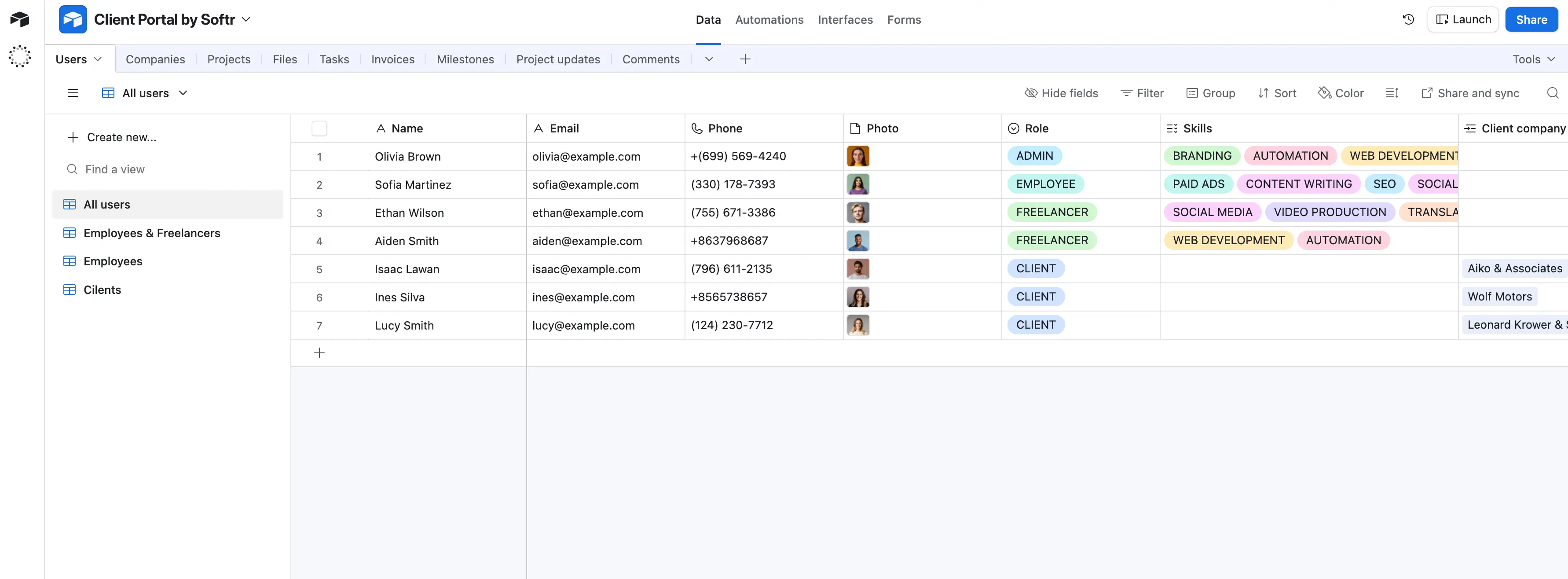
Airtable is a cloud platform for organizing and connecting data. It combines a spreadsheet’s familiarity with a database’s relational structure. With Airtable, teams can store, link, and manage information without code.
How it works and who it’s for
Each base holds related tables (like “Users” or “Companies”) with fields that define data types. Built-in tools like Automations, Extensions, Interface Designer, and AI agents (Omni and Field Agents) help you create dashboards, reports, and workflows in one system.
Airtable suits teams managing structured or recurring data, like client lists, inventory, or content pipelines.
Unlike Asana, which focuses on deadline-driven task tracking, Airtable acts as the data backbone of a workflow. If your operations depend on connecting data across teams or processes, Airtable keeps everything consistent and in sync.
What is Asana?
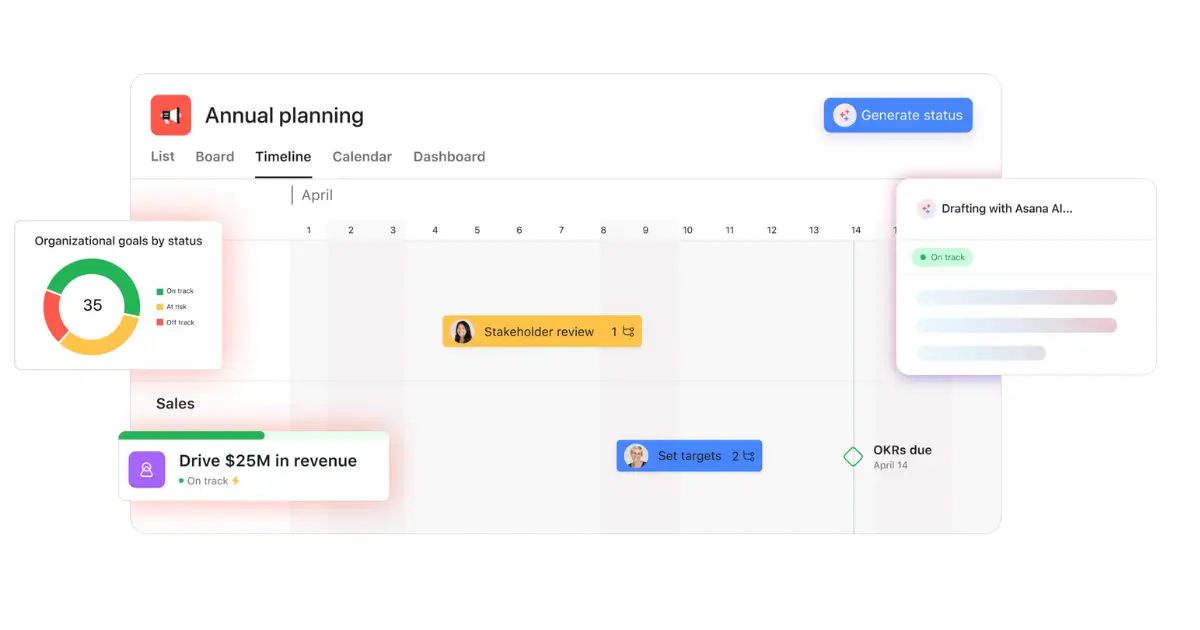
Asana is a cloud-based work management platform that helps teams plan, organize, and track work. It’s built around projects and tasks, showing exactly who’s doing what and when.
How it works and who it’s for
Each workspace organizes work into projects with tasks, subtasks, assignees, and dependencies. Built-in automation, including Rules, Workflow Builder, and AI assistance, handles routine updates and keeps tasks moving.
Asana fits teams managing projects or campaigns with clear deadlines: marketing, product, or operations. It keeps ownership, timelines, and progress visible across teams.
Unlike Airtable, which centers on managing and linking structured data, Asana focuses on executing work, coordinating people, tasks, and goals to deliver on time.
Airtable vs Asana: Features compared
Both tools help teams organize and execute work, but they approach it differently. Airtable is data-first, Asana is task-first. Below, we’ll break down how they compare across core features.
1. Which is easier to use and set up?
Asana offers a faster start for new users. Its templates and guided workflows make it easy to create projects, assign tasks, and start tracking progress right away. The interface is built for simplicity. Most users can get started with little setup.
Airtable used to take longer to configure, but that’s changing. It’s now AI-first, so you can describe what you want to build and get a ready-made database and interface in minutes, which makes setup faster. That said, many users still adjust or rebuild parts of what AI generates to fit their workflow.
Verdict: Asana is easier to start with; Airtable’s new AI setup makes it faster to start but may need extra fine-tuning.
2. Which offers more customization?
Airtable wins on flexibility. You can design your own database structure, switch between grid, Kanban, calendar, and Gantt views, and customize workflows with simple automations, formulas, and linked data.
Asana’s customization is focused on tasks: custom fields, forms, and rules that fit project tracking, not database design.
Verdict: Airtable offers deeper customization; Asana is simpler but more structured.
3. Which is best for integrations?
Both connect with major tools like Slack, Google Workspace, and Microsoft Teams.
Airtable integrates with data-driven platforms (like Google Sheets, HubSpot, Notion, and SQL databases) and offers advanced API support.
Asana focuses on productivity and communication tools, including Salesforce, Jira, and Power BI, and recently added native AI features to improve workflow automation.
Verdict: Airtable is stronger for data integrations; Asana wins at connecting task and communication tools.
4. Collaboration and team features
Asana is built around team visibility. Features like task comments, @mentions, project status updates, and shared dashboards keep everyone aligned.
Airtable also supports real-time collaboration, but is better suited to teams working on shared data sets. Its permissions system, down to field and table level, lets admins control who edits what.
Verdict: Asana is ideal for daily teamwork and communication. Airtable suits cross-functional teams managing shared data.
Popular use cases for Airtable vs Asana
Airtable and Asana’s functionalities often overlap, but their real strengths show up in different types of work.
When to use Airtable
Airtable fits best when your workflows revolve around data rather than daily task lists.
Teams use it to centralize and link operational information across multiple sources — clients, projects, vendors, or inventory — and then build automations around that data.
Common use cases include:
- Client or partner databases: track relationships, contracts, and deliverables.
- Content and marketing pipelines: manage ideas, drafts, and publishing calendars in connected views.
- Teams using spreadsheets but needing more structure and collaboration
- Inventory or asset tracking: link products, suppliers, and orders with real-time updates.
- Operations dashboards: connect data from multiple bases into reports for leadership visibility.
Airtable’s structure lets you treat your data as a living system with automations, reports, and lightweight internal tools. It’s less ideal for external tools (client portals, vendor portals, partner portals, membership portals, etc.)
[.blog-callout]
💡 Keep in mind: Airtable’s record limits and per-seat pricing can get expensive as your data and collaborators grow.
[.blog-callout]
When to use Asana
Asana is best when you’re managing projects and deliverables across teams. It gives clarity on ownership, deadlines, and priorities, making it ideal for execution-heavy teams.
Common use cases include:
- Project and task management: assign owners, track dependencies, and monitor progress.
- Team collaboration: manage marketing campaigns, product launches, or hiring workflows.
- Goal and performance tracking: link daily work to team or company objectives through Portfolios and Goals.
- Cross-department coordination: align multiple projects and teams under shared milestones.
Asana keeps everyone aligned on what’s next and when it’s due, making it strong for planning, visibility, and accountability.
[.blog-callout]
💡 Keep in mind: Asana doesn’t handle structured data or relational workflows well. You’ll need another tool to store or analyze project data.
[.blog-callout]
The overlap
In many teams, Airtable and Asana end up working together: Airtable as the data hub, Asana as the execution layer. But maintaining two systems can lead to duplicated effort and limited visibility.
That’s where a unified platform becomes necessary — one that brings structured data, workflows, and user access into a single place.
{{cta-1}}
Airtable vs Asana reviews on Reddit
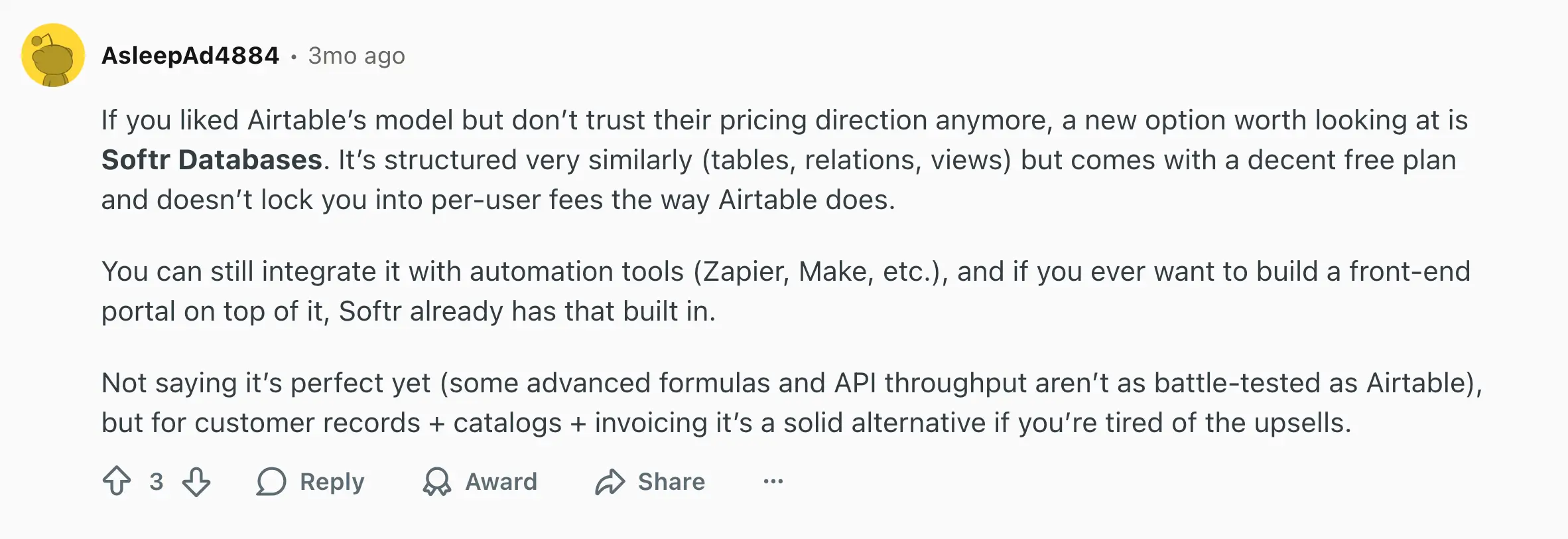
As mentioned above, many teams prefer using Asana and Airtable together (even combined with other tools as well). According to Redditors, using one tool over another comes down to the nature of the project:

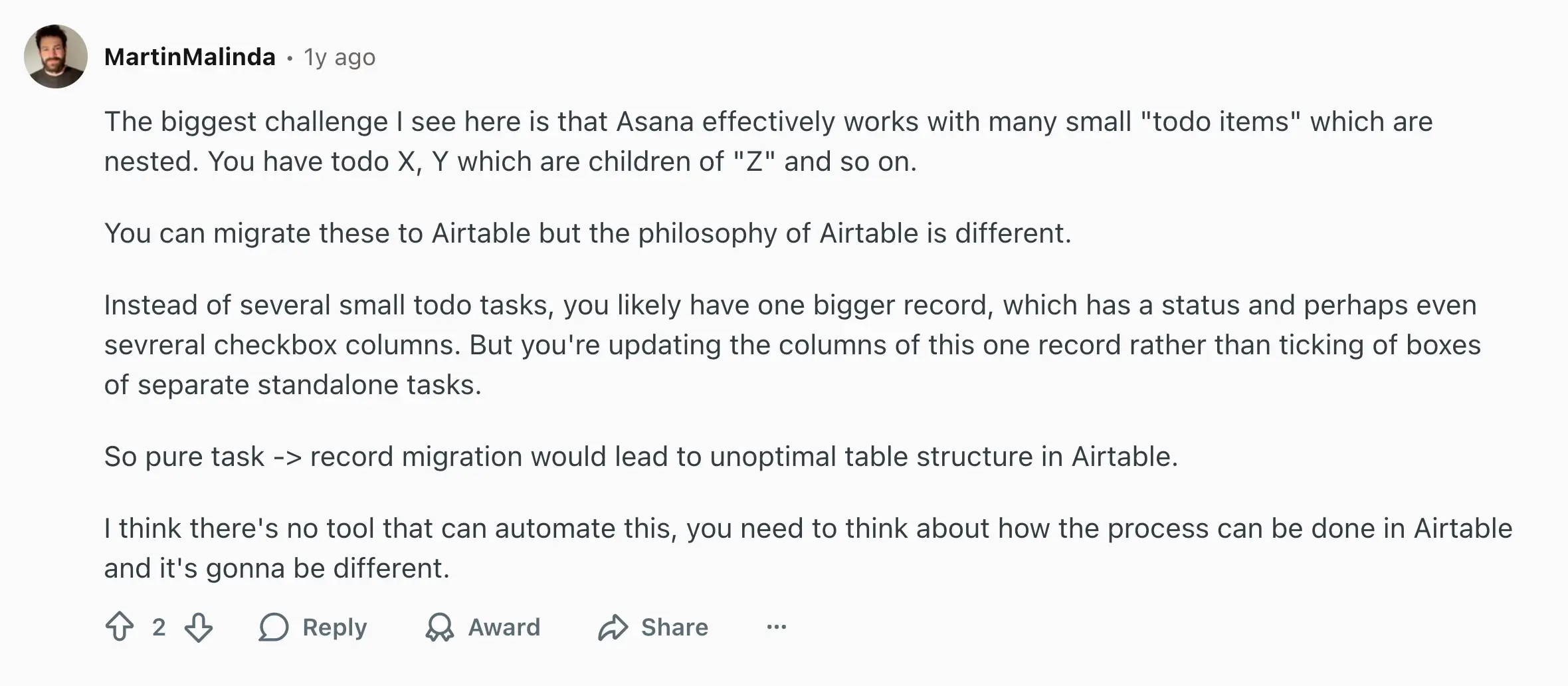
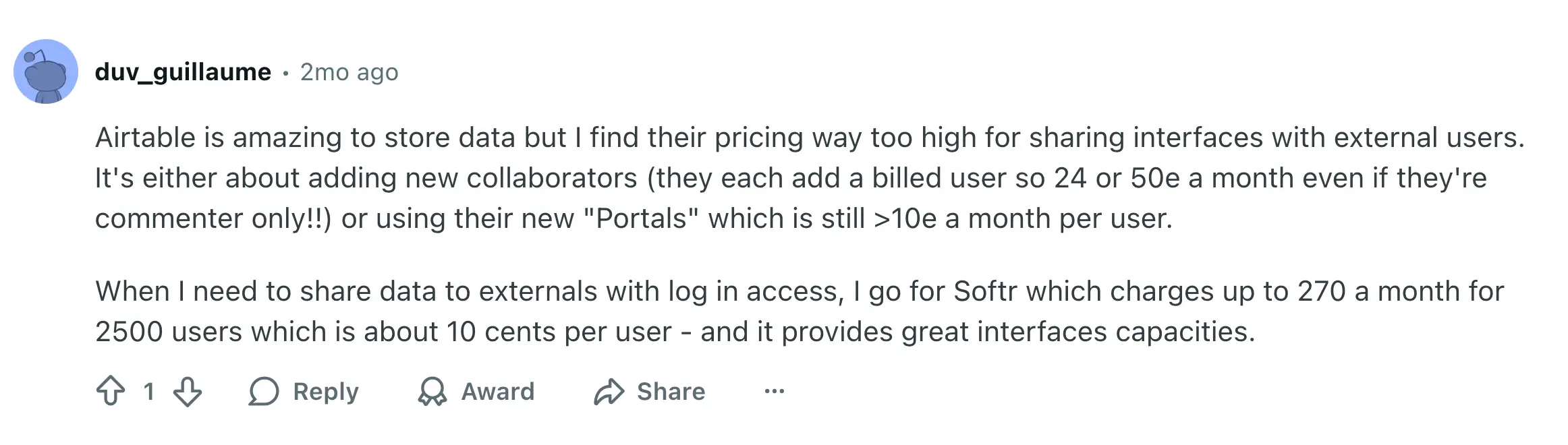
In addition, people on Reddit mention Airtable’s steep costs for sharing data or interfaces with external users, comparing it to Softr’s predictable pricing.
How pricing compares between Airtable vs Asana
Both Airtable and Asana offer free plans, but their paid tiers scale very differently. Airtable charges per seat with limits on records and automation runs.
Asana charges per user, with plan upgrades unlocking more management features rather than technical capacity.
| Plan | Airtable (2025) | Asana (2025) |
|---|---|---|
| Free | Unlimited bases, 1,000 records per base, 100 automation runs, Interface Designer. | Up to 10 teammates, unlimited tasks and projects, 100 MB file limit. |
| Mid-tier | Team: $20 /seat per month (billed annually): 50K records per base, 25K automation runs, Gantt and timeline views. | Starter: $10.99 /user per month (billed annually): AI tools, Timeline and Gantt views, Workflow Builder. |
| Advanced | Business: $45 /seat per month (billed annually): 125K records per base, 100K automation runs, verified data, admin panel. | Advanced: $24.99 /user per month (billed annually): Goals, Portfolios, Workload tracking, advanced security. |
| Enterprise | Custom pricing: SAML SSO, API access, audit logs, governance controls. | Custom pricing: SSO, SCIM, data residency, admin controls, 24/7 support. |
For example, a 20-person team would pay around $4,800/year for Airtable’s Team plan ($20/seat/month) versus $2,637/year for Asana’s Starter plan ($10.99/user/month). Asana stays cheaper, but Airtable offers more control over data and automations.
A 125-person team needing more than 50K records per base would move to Airtable’s Business plan, costing around $67.5K/year, compared to $37.5K/year for Asana’s Advanced plan.
Verdict: Asana is more affordable for small, project-driven teams and scales predictably per user. Airtable costs more upfront but gives database-level power for teams managing complex data, not just tasks.
Meet Softr: The best all-in-one alternative to Airtable and Asana for building secure, data-connected business apps
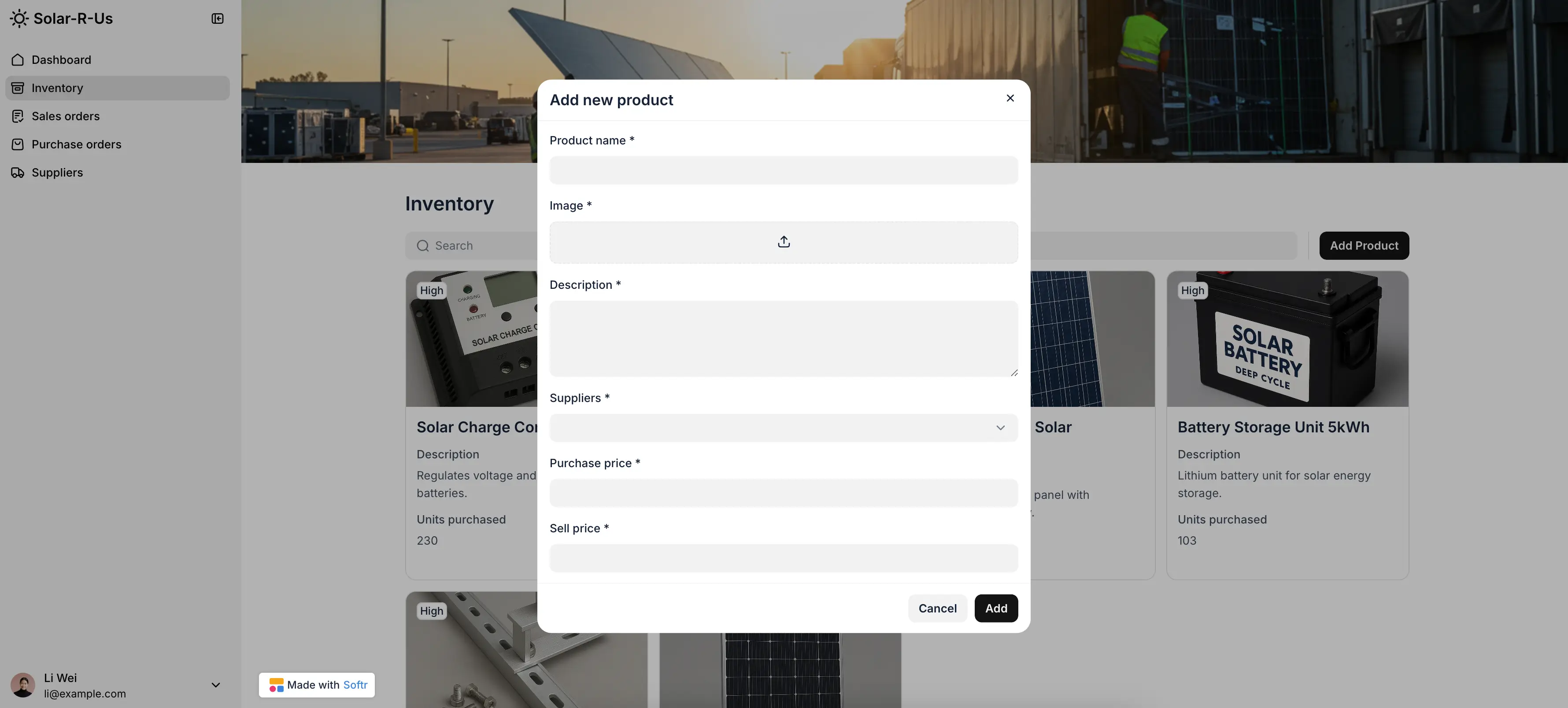
Softr is a full-stack, AI-powered business app creation platform that helps teams move beyond disconnected tools by combining the three core components needed to build apps:
- A database to store and organize your company’s data.
- An interface builder to design and customize how users interact with it.
- A workflow engine to automate actions and connect everything together.
All of this comes in one secure, scalable platform with built-in AI features, so teams can build apps like CRMs, client portals, or dashboards without writing code.
Unlike Airtable or Asana, which focus on either data or project tracking, Softr brings both together, letting teams build business apps that connect data, users, and workflows without code.
Why choose Softr over Airtable and Asana
Softr isn’t just for managing data or tasks. It’s for building complete systems that run your business: connecting structured data with real-time collaboration, automation, and AI.
Below are the key reasons teams choose Softr to replace or extend both Airtable and Asana.
1. All-in-one app building
Softr lets you build complete business apps that go beyond projects or spreadsheets.You can create CRMs, client portals, or internal or external dashboards where users can log in, interact with live data, and trigger actions: all without code or leaving the platformWhile Asana focuses on task tracking and Airtable on data views, Softr brings both worlds together to create tools your team can actually run on.
2. Control over who sees what with granular permissions
Define roles and visibility for clients, teammates, or external partners.
You can control access at the field, record, or page level, so each user only sees what’s relevant to them.
Neither Airtable nor Asana offers this level of in-app control across databases, workflows, and frontends.
3. Store and manage your data in Softr
Softr comes with a relational database that’s both intuitive and powerful.
You can store structured data, link records, and add formulas or rollups—all in a familiar spreadsheet-style interface. You can also connect to 21+ native data sources like Airtable, Google Sheets, HubSpot, Notion, ClickUp, SQL databases, and more (anything wth Rest API), syncing data both ways in real time. And with Airtable import, you can migrate your database into Softr easily.
Unlike Asana’s static task lists or Airtable’s capped bases, Softr’s databases scale to millions of records per workspace with transparent limits and built-in governance.
4. Automate workflows right inside your app
With Softr Workflows, you can automate tasks directly in your app, such as assigning a new project, approving a request, or sending a follow-up email.
Paired with Ask AI and Database AI Agents, you can also generate summaries, trigger decisions, or analyze trends from natural-language prompts.
Unlike Airtable Automations, which are limited to base-level triggers, or Asana Rules, which focus on task updates, Softr automations live inside your app’s data and user context.That means you can connect data changes, form submissions, or approvals across entire workflows, without relying on external automation tools.
5. What you can build with Softr
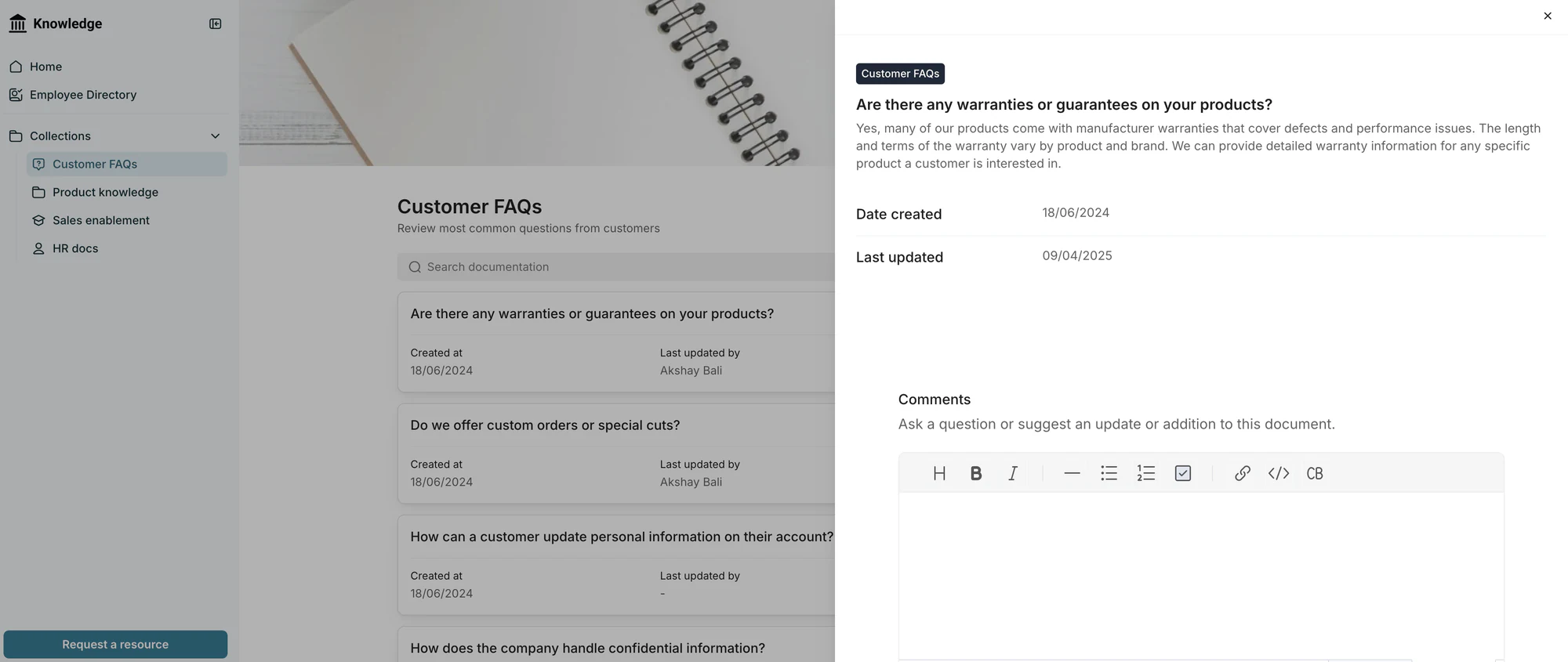
- CRMs and lead tracking systems
- Client and vendor portals
- Internal tools and company intranets
- Inventory or project management dashboards
- Automated reporting and approval workflows
Airtable vs Asana vs Softr: Which one should you choose?
If you’re comparing these three, it usually comes down to what you’re trying to manage (data, tasks, or operations). Each tool solves a different problem, so the right choice depends on how your team works day to day.
When to choose Airtable
Choose Airtable if you need a flexible, spreadsheet-like database for managing structured data. It’s great for teams that want to centralize records, organize information visually, and run lightweight automations, but are comfortable layering other tools for advanced permissions, reporting, or external client access.
When to choose Asana
Choose Asana if your main goal is task and project tracking. It’s great for managing deadlines, team assignments, and recurring workflows. However, Asana’s structure is better suited for project execution than data management, and it lacks the database flexibility or front-end customization growing operations often need.
When to choose Softr
Choose Softr if you’re ready to connect your data, workflows, and automations in one secure platform. It’s for operators who need more than simple tracking or data storage. Softr is ideal for teams that want to run their business through custom apps like CRMs, portals, and dashboards, without code.
With Softr, you can centralize operations, control permissions, and scale without facing per-seat pricing or record limits.
Conclusion
Airtable helps you structure your data. Asana helps you move projects forward. But when teams need both organization and execution to live in one place, Softr fills the gap.
If you’re ready to move from tracking work to actually running it, start building in Softr today.
Frequently asked questions
Is Airtable better than Asana?
Do people still use Airtable?
Is anything better than Asana?
What are the disadvantages of Airtable?