Zoho Inventory vs Sortly: Which inventory management tool is right for you? [2026]

[.blog-callout]
✨ TL;DR:
- Zoho Inventory handles the full order lifecycle: Inventory management is just the start. You also get multi-channel ecommerce integrations, order-to-fulfillment workflows, and multi-warehouse management. It's a strong fit for SMBs processing sales orders across channels, but it comes with a learning curve.
- Sortly only does inventory management: With its mobile-first interface, Sortly is designed for quick setup and easy adoption by non-technical teams. It's great for tracking physical items, tools, and supplies across multiple locations, but it's not particularly flexible and doesn't support order fulfillment.
- Softr is more flexible than either: You can keep your existing inventory data wherever it lives and build a custom inventory management app on top of it using Softr. Then, add automated workflows, AI agents, granular permissions, custom dashboards, and supplier portals.
[.blog-callout]
If you're comparing Zoho Inventory and Sortly, there's a good chance one of them is clearly wrong for your business and you don't know it yet.
Zoho Inventory—as you might guess from its name—is an inventory management platform, but it also handles everything you need for order fulfillment, including multichannel selling, sales orders, warehouse management, shipping labels, and real-time shipping costs. Sortly is a much simpler, easier-to-use platform built to help small businesses keep track of their physical inventory and materials.
We tested both platforms, dug into documentation, and surveyed the latest user feedback on Reddit to gauge the strengths and weaknesses of each app so you can figure out which makes sense for you. Here's what we found.
Zoho Inventory vs Sortly at a glance
| Zoho Inventory | Sortly | |
|---|---|---|
| Best for | SMBs managing multi-channel sales | Field teams tracking physical items |
| Ease of use | Steeper learning curve | Fast to set up and easy to learn |
| Inventory management | Real-time stock tracking, serial and batch tracking, composite items, bin-level location tracking, low-stock alerts, multi-warehouse transfers | Real-time stock tracking, photo-based item identification, custom fields and folders, low-stock alerts, barcode and QR code scanning |
| Order fulfillment | Full order lifecycle management including sales orders, purchase orders, backorders, and dropshipping; multichannel sync across Shopify, Amazon, eBay, and Etsy | Not supported; Sortly is designed for asset tracking rather than fulfilling customer orders |
| Mobile app | Solid iOS/Android mobile experience, but Zoho's complexity means it's better on desktop | Fast, intuitive iOS/Android app that field teams can use with minimal training; offline mobile access |
| Integrations | Zoho's suite of 50+ business apps; Shopify, Amazon, eBay, Etsy, Xero, QuickBooks, Avalara, Slack, UPS, FedEx, USPS, and various payment gateways | Amazon Business, QuickBooks, Slack, Microsoft Teams; you can only access integrations on Sortly's higher-tier plans |
| Pricing | Paid plans from $29/mo (billed annually); pricing increases based on how many transactions you have | Paid plans from ~$39/mo (billed annually); pricing increases based on how many items you have |
| Free plan | 50 orders/mo, 1 user, 2 locations | 100 unique items, 1 user |
What is Zoho Inventory?
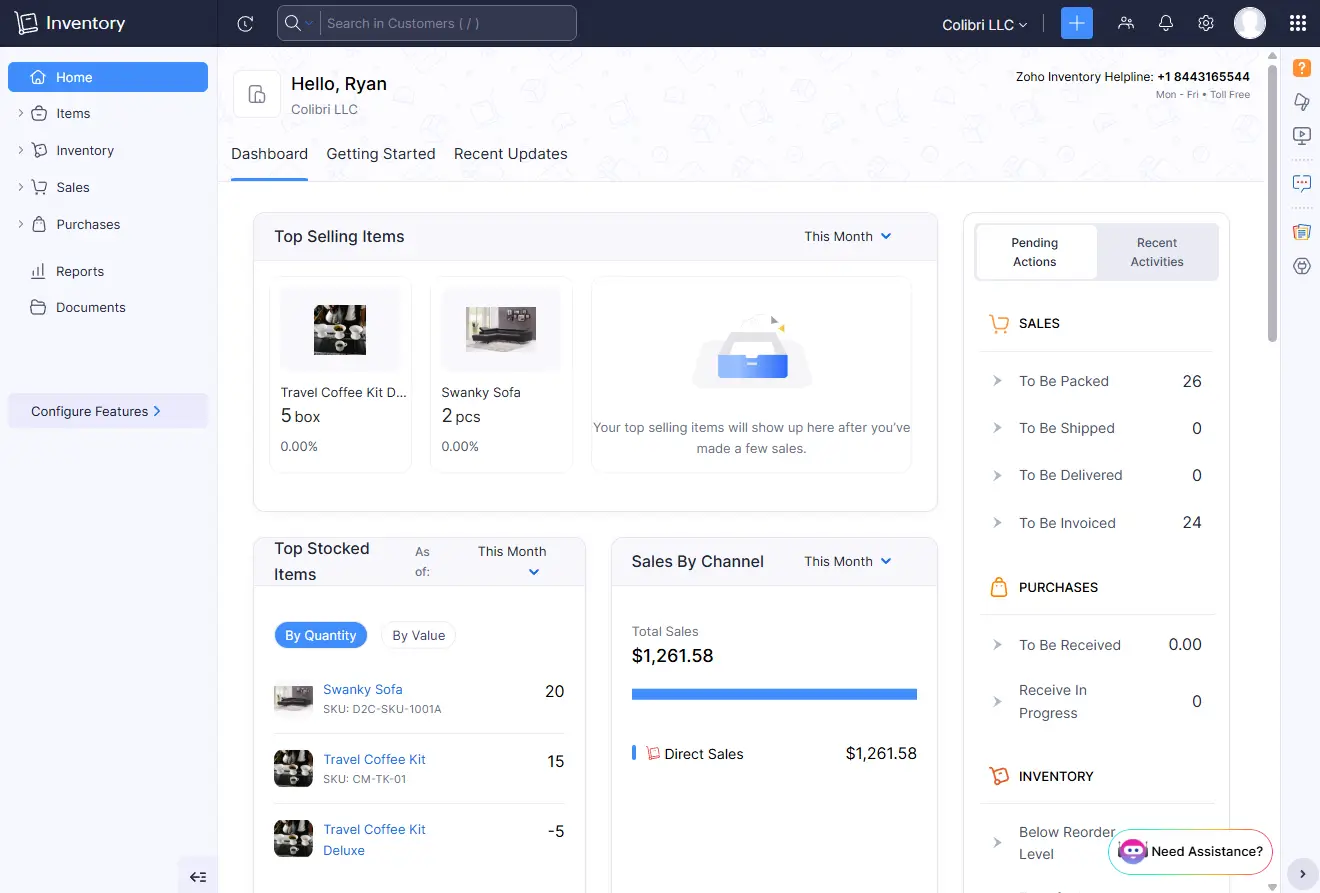
Zoho Inventory is an inventory and order management platform aimed at small and mid-sized businesses. Unlike many platforms in this price range, Zoho Inventory offers a full suite of fulfillment tools including multichannel selling, multi-warehouse management, real-time shipping rates, serial number and batch tracking, and composite items for bundling multiple products together.
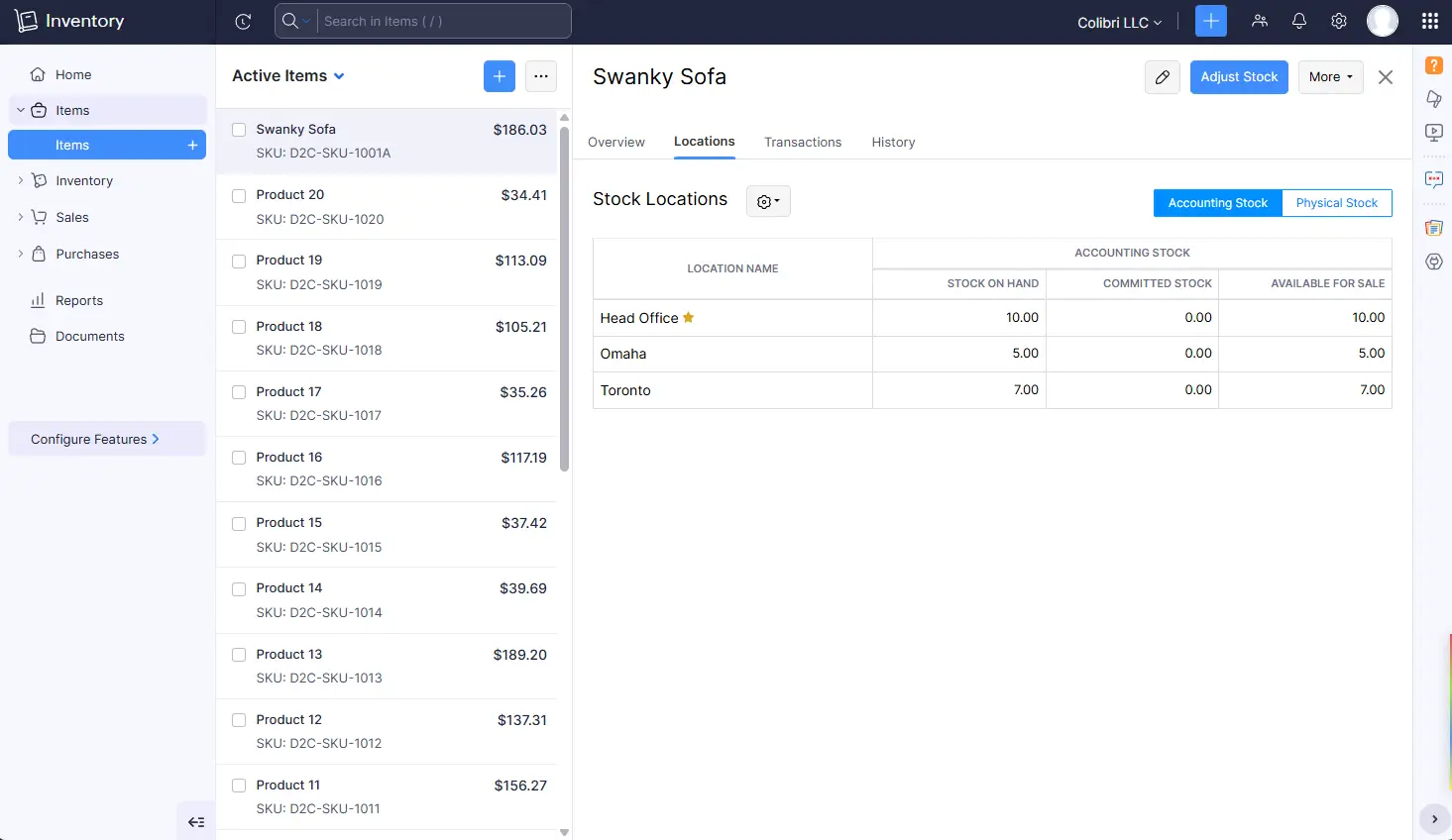
You can use Zoho Inventory to sync inventory across Shopify, Amazon, eBay, and Etsy, so a sale on one channel automatically updates stock everywhere. Purchase orders, sales orders, backorders, and dropshipping are all handled natively. On the warehouse side, you get multi-location management with bin-level tracking, transfer orders, picklists, and the ability to drill down at the item level to see exactly where your stock is located.
Another advantage of Zoho Inventory is that it's part of a broader ecosystem of 50+ Zoho business apps, all of which you can access by signing up for Zoho One, an optional bundle deal. Some of those apps, particularly for accounting and customer management, are natural extensions of Zoho Inventory, since customer records, invoices, sales orders and POs travel seamlessly between them. Zoho Inventory also connects to third-party platforms like Xero and QuickBooks.
Zoho Inventory does come with a steep learning curve compared to simpler tools like Sortly. Much of this is due to unintuitive setup hurdles like the 'track inventory' checkbox, which must be enabled shortly after creating an item. After the first transaction for that item happens, you're out of luck; you can no longer enable inventory tracking, and your only option is to start over and create a new item.
Data imports create friction too, with strict CSV formatting requirements and cryptic error messages (like "You cannot add items that are only Inventory Tracked to a Purchase Order transaction") that will send most casual users straight to the knowledge base.
Zoho Inventory's key features
- Multi-channel selling: Connect Shopify, Amazon, eBay, and Etsy so every sale automatically updates stock across all your channels, with no manual syncing required.
- Order lifecycle management: Handle sales orders, purchase orders, backorders, and dropshipments from one dashboard, from order placement to delivery confirmation.
- Multi-warehouse management: Track and move stock across multiple warehouses and bin locations, with auto-generated picklists and built-in stock counting tools for fulfillment teams.
- Serial and batch tracking: Assign serial numbers to individual units or group expiry-sensitive inventory into batches.
- Native Zoho integrations: Pairs natively with Zoho Books, Zoho CRM, and Zoho Analytics, so your accounting, customer data, and reporting stay in sync without extra setup.
Zoho Inventory cons
- Learning curve: Zoho Inventory is powerful but challenging to learn. Onboarding can be bumpy and new users may need weeks to get up to speed.
- Order limits: You'll have to upgrade as your order volume increases. Standard, Professional, Premium, and Enterprise plans cap monthly orders at 500, 3,000, 7,500, and 15,000 respectively.
- Weaker outside of the Zoho ecosystem: Zoho Inventory is at its best when you also use Zoho Books and Zoho CRM. While it's still a good option without them, relying on third-party integrations doesn't provide the same level of deep connectivity.
Zoho Inventory pricing
Zoho Inventory offers a solid free plan and competitive paid plans. All prices shown are billed annually.
- Free: 50 orders/month, 1 user, 2 locations
- Standard ($29/month): 500 orders/month, 2 users, 2 locations
- Professional ($79/month): 3,000 orders/month, 2 users, 4 locations
- Premium ($129/month): 7,500 orders/month, 2 users, 6 locations, 2,000 bins/location
- Enterprise ($249/month): 15,000 orders/month, 7 users, 10 locations, 5,000 bins/location
Worth noting: Zoho One bundles Zoho Inventory together with 50+ other Zoho apps (CRM, Books, Analytics, and more) under a single per-user subscription starting at $37/month per user.
What is Sortly?
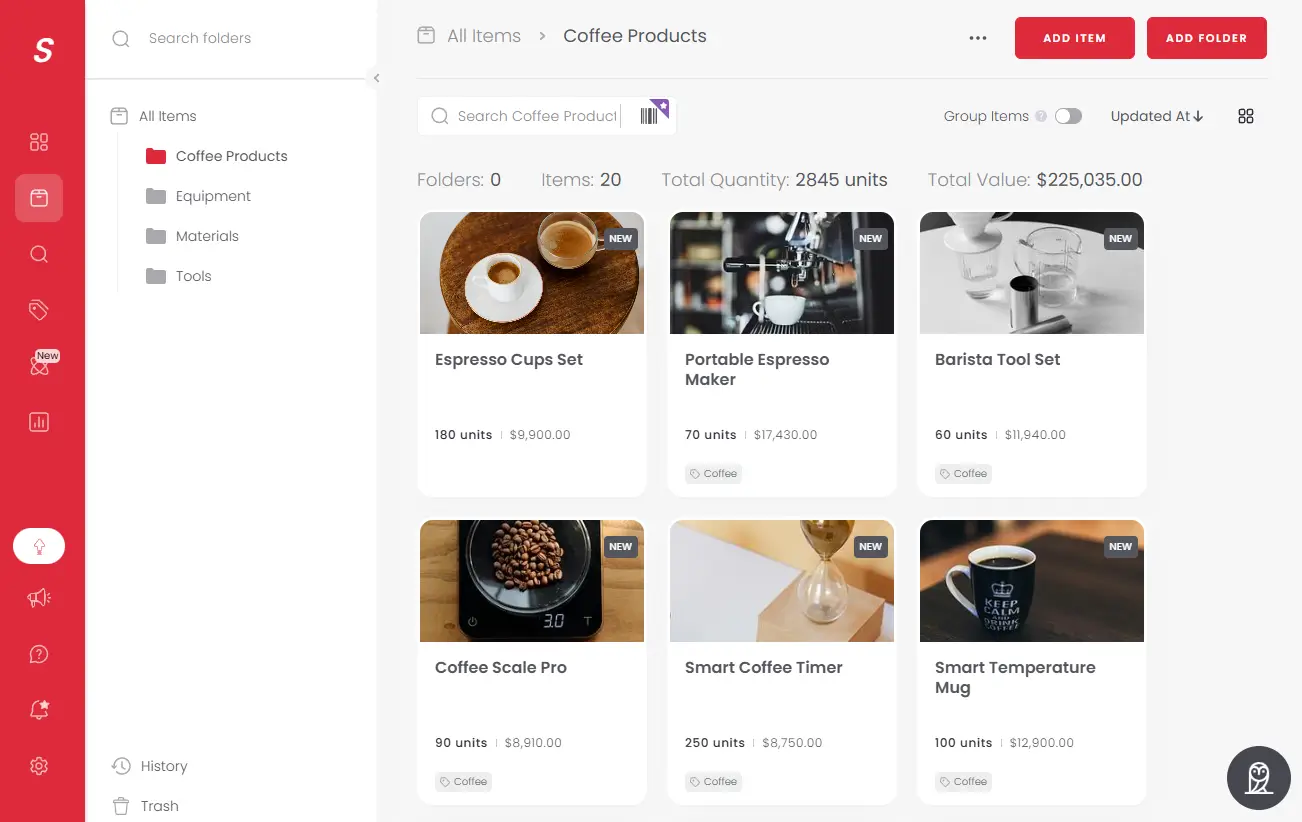
Sortly is an inventory management platform that helps businesses track and manage physical assets like materials, tools, and equipment. You can use Sortly to organize your inventory across multiple locations, set low-stock alerts, and give everyone in your organization real-time visibility into where supplies are. Construction firms use it to track tools and reduce waste, medical clinics use it to monitor supplies and equipment, and warehouses use it to build pick lists and prevent overstocking.
What makes Sortly especially practical is its mobile app. Anyone on your team can use their smartphone to add items, scan barcodes, upload photos, adjust quantities, and check items in and out. For businesses that rely on workers who aren't sitting at a desk, it's a fast, dependable way to keep inventory data accurate.
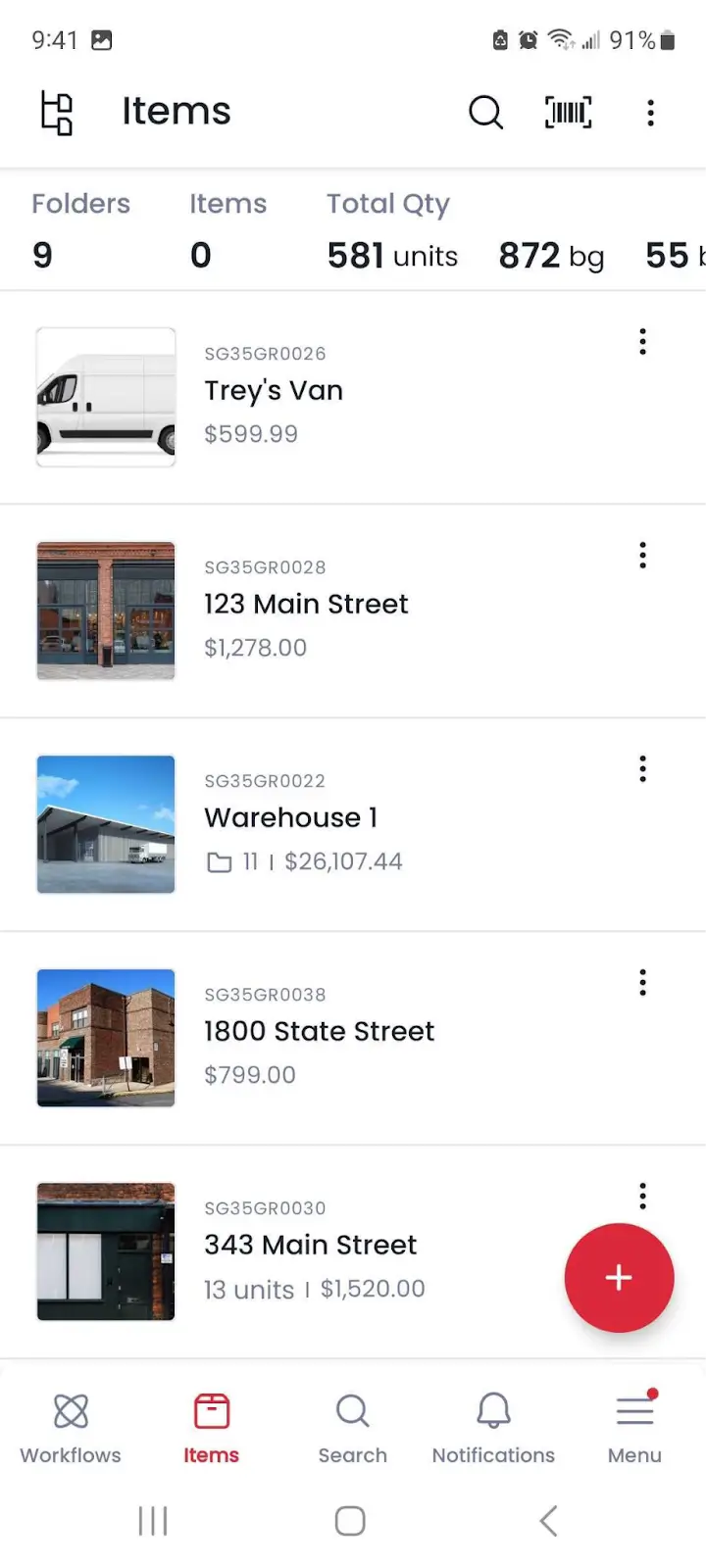
That said, Sortly has a somewhat narrow focus. Unlike Zoho Inventory, it isn't built to handle sales and fulfillment. Sortly doesn't sync with ecommerce platforms, it can't process sales orders, and the concept of a "customer" isn't built into the platform at all. If your main goal is fulfilling orders across multiple sales channels, Sortly isn't designed for that.
Sortly's key features
- Mobile-first design: Add, update, and audit inventory from any smartphone or tablet, even offline, with a simple interface that anyone on your team can use.
- Visual inventory management: Attach photos to inventory items so your team can identify products at a glance, then organize everything with custom folders, tags, and fields.
- QR code and barcode scanning: Scan existing barcodes or generate custom QR and barcode labels for any item.
- Built-in reporting: Generate low stock reports, inventory summaries, item flow reports, and custom saved reports, with automated email delivery available on a recurring schedule.
- POs and pick lists: Create purchase orders directly from your inventory and generate pick lists to make sure your team grabs the right items for every job or order.
Sortly cons
- Unpredictable pricing: Sortly's pricing has a history of fluctuating. In 2024 Sortly discontinued its legacy plans and moved all customers onto new plans, which more than doubled the annual costs for some long-term customers. Sortly also advertises headline prices that only apply for the first year of your subscription.
- Limited integrations: Apart from Amazon Business, QuickBooks Online, Slack, and Microsoft Teams, native integrations are limited (and API access requires the Enterprise plan).
- Restrictive item caps: Your business may need to upgrade as you track more items. You're limited to 500 unique items on the Advanced plan, 2,000 on Ultra, and 5,000 on Premium.
Sortly pricing
Sortly's free and Advanced plans work for basic inventory management. For barcode label creation, purchase orders, pick lists, stock counts, and restocking via Amazon Business, you'll need the Ultra plan or higher. All prices shown are billed annually.
- Free: 100 unique items, 1 user
- Advanced ($39/month): 500 unique items, 2 users
- Ultra ($119/month): 2,000 unique items, 5 users
- Premium ($239/month): 5,000 unique items
- Enterprise (custom): 10,000+ unique items, 12+ users
Sortly offers a temporary 50% discount on annual plans for the first year, before resetting to a 20% annual discount (per the pricing listed above) for renewals.
Zoho Inventory vs Sortly: pricing
Both Zoho Inventory and Sortly make it easy to get started with free plans, but their paid plans are structured in fundamentally different ways. Here's a breakdown of each platform's pricing structure:
- If you have thousands of items, Zoho Inventory is more cost-effective: Zoho Inventory scales its plans based on your transaction volume, including how many orders, invoices, and purchase orders you can process each month, but it doesn't limit the number of items you can track. Sortly scales pricing based on how many items you have. As a result, Zoho Inventory can be cost-efficient if you have lots of items: for 5,000 items, you'd pay $239/month for Sortly but just $29/month for Zoho Inventory.
- Zoho Inventory's free plan is stronger: Zoho's free tier supports 50 orders/month across two locations, which makes it a practical option for small businesses with low transaction volumes. Sortly's free plan only allows 100 unique items, making it more of a trial experience than a working free tier for most businesses.
- Sortly offers a 50% discount for annual plans, but it's only valid for one year: Sortly offers 50% off annual plans for the first year, but after that the annual discount drops to 20%. That means a business signing up for Sortly Ultra at the promo rate of $888/year will renew at $1,428/year.
- Zoho Inventory lets you increase limits without upgrading tiers: With Zoho Inventory, you can buy add-ons for additional users, locations, and order volume, so you can bypass specific limits without jumping to the next tier. Sortly's plan limits are fixed per tier with no equivalent flexibility.
- You get more value at a similar price point with Zoho Inventory: At $79/month, Zoho Inventory's Professional plan offers a full inventory and order fulfillment suite including serial and batch tracking, a vendor portal, four warehouse locations, shipping labels, and 3,000 orders/month. Sortly's $119/month Ultra plan offers inventory tracking for 2,000 items and warehouse-friendly features like pick lists, but its scope is far more limited than Zoho Inventory.
The verdict: If you're managing lots of inventory and transactions, Zoho offers better value at every comparable price point. Sortly is worth it if you don't need order fulfillment features and want to make it as easy as possible to track physical inventory.
Zoho Inventory vs Sortly: on Reddit
Sortly is popular for small businesses, Etsy sellers, and even people moving from one house to another who need to keep track of which boxes their stuff is in. Reddit users say it's great for visual inventory tracking, barcode scanning, reporting, and organizing with folders and subfolders.
But the majority of recent Reddit commentary on Sortly is in response to its 2024 price changes, which abruptly retired legacy plans and required existing users to either remove SKUs or upgrade to much pricier plans. It's not uncommon to find examples of Sortly's price changes increasing costs for users by 2-4x.
That said, Sortly is still a relatively affordable option even after these price changes, and other Redditors continue to recommend it when asked about affordable inventory management apps.

For Zoho Inventory, Redditors say it’s powerful for its price point and works well for complex multi-warehouse and multi-vendor environments. Its integration with the rest of the Zoho software suite also comes up frequently.
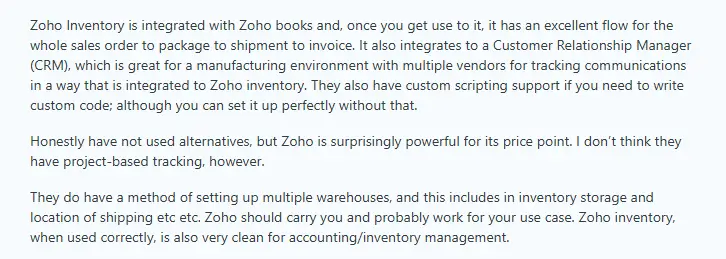
There's also a lot of troubleshooting commentary on Reddit from users looking for ways around Zoho Inventory bugs or limitations.
For example, Zoho's low-stock notifications can present challenges for multi-warehouse operations: since they're based on your overall stock levels, you won't necessarily get an alert if your stock drops to zero at a particular warehouse.

Zoho Inventory vs Sortly: a summary
Zoho Inventory and Sortly serve different kinds of businesses, and for most businesses the choice between them will be pretty straightforward once you know what each tool does well.
- Zoho Inventory is better if you need to fulfill orders. If you're managing stock across multiple sales channels, processing purchase orders, and shipping to customers, it covers the whole workflow in one place — and it's even more useful if you use other Zoho products. The downside is that the platform is fairly complex and new users need time to get comfortable with how everything works.
- Sortly works well if you only need to track physical assets. Field teams love the mobile app, and Sortly's simple design makes it easy for anyone on your team to find what they need without training. What it doesn't do is connect to your sales channels or handle order fulfillment in any meaningful way.
Your decision gets a bit more challenging if you're tracking inventory across multiple locations, if you have a field team, and if you don't need order fulfillment. Sortly is easier to implement across your team and simpler to use on a daily basis. Zoho Inventory is cheaper if you're managing lots of items, and some of its features—like unit of measure conversion and batch tracking—are more sophisticated than Sortly's.
Thankfully, both tools offer free plans, so they’re easy to test before you commit to either one.
Softr — the best Zoho Inventory and Sortly alternative for building a custom inventory system
Sortly and Zoho Inventory are both solid inventory management options, and either option could work if your business has boilerplate needs. But they also share similar limitations. If you want to connect to existing data sources, add AI features, or create a custom inventory management app that fits your business's workflow, neither platform is a great fit.
Softr is a no-code, AI-powered platform for building production-ready business apps with native relational databases and workflow automation. For inventory management, that means you can create exactly the system you need, whether that's a simple item tracker or a multi-warehouse operation with vendor portals and approval workflows.
Start from a prebuilt inventory management template, which includes stock tracking, supplier records, purchase orders, and order management out of the box, and adapt it from there. Connect to Softr's built-in database, or sync with the tools you already use (like Airtable, Google Sheets, HubSpot, SQL databases, or any REST API). You can add fields, views, and workflows as your process evolves, without rebuilding from scratch.
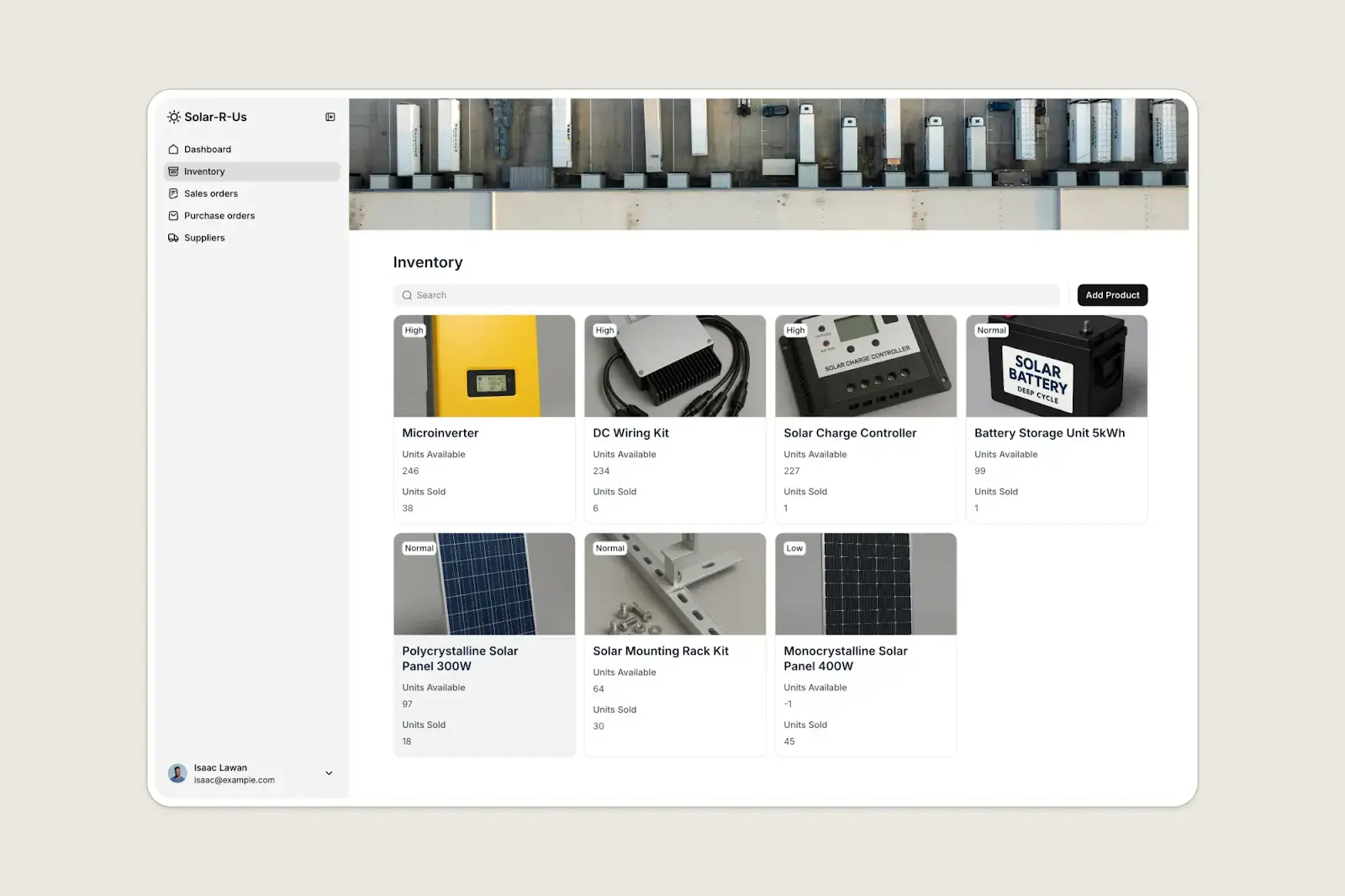
Best for: Businesses of all sizes that need a custom inventory system that fits their real workflows. Softr is ideally suited to create:
- Apps built on existing inventory data, wherever it lives: Softr builds on top of data you already own rather than requiring you to migrate into a new platform.
- External access for suppliers or contractors: Give suppliers a login to view open POs and submit delivery updates, or let contractors update stock at job sites without accessing anything else.
- Unique views for each user role: Rather than just adjusting permissions, you can create entirely different experiences for each user. Warehouse workers who need to update quantities and upload photos might get a simple mobile view, while managers get access to a fuller dashboard with charts, edit access, and admin controls.
- Automated inventory workflows: Configure multi-step processes like purchase order approvals, custom reorder triggers, or status tracking that moves stock through your specific stages, without being constrained by what Zoho or Sortly decided those workflows should look like.
Why teams choose Softr over Zoho Inventory and Sortly
- Keep your data where it already lives: Both Zoho Inventory and Sortly require you to migrate your inventory data into their platform. Softr lets you store data natively in Softr Databases, but it also connects to 21+ external data sources, so your inventory system is a layer on top of data you already own rather than a new silo to maintain.
- Control exactly who sees and does what: Zoho Inventory and Sortly both offer basic user roles, but the control isn't particularly granular. Softr lets you define exactly what each user group can see, create, edit, and delete, down to individual fields and actions.
- Give suppliers and vendors their own secure portal: Neither Zoho Inventory nor Sortly supports external user access natively. With Softr you can give suppliers their own secure login to view open purchase orders, submit delivery updates, or upload documents, without any visibility into the rest of your system.
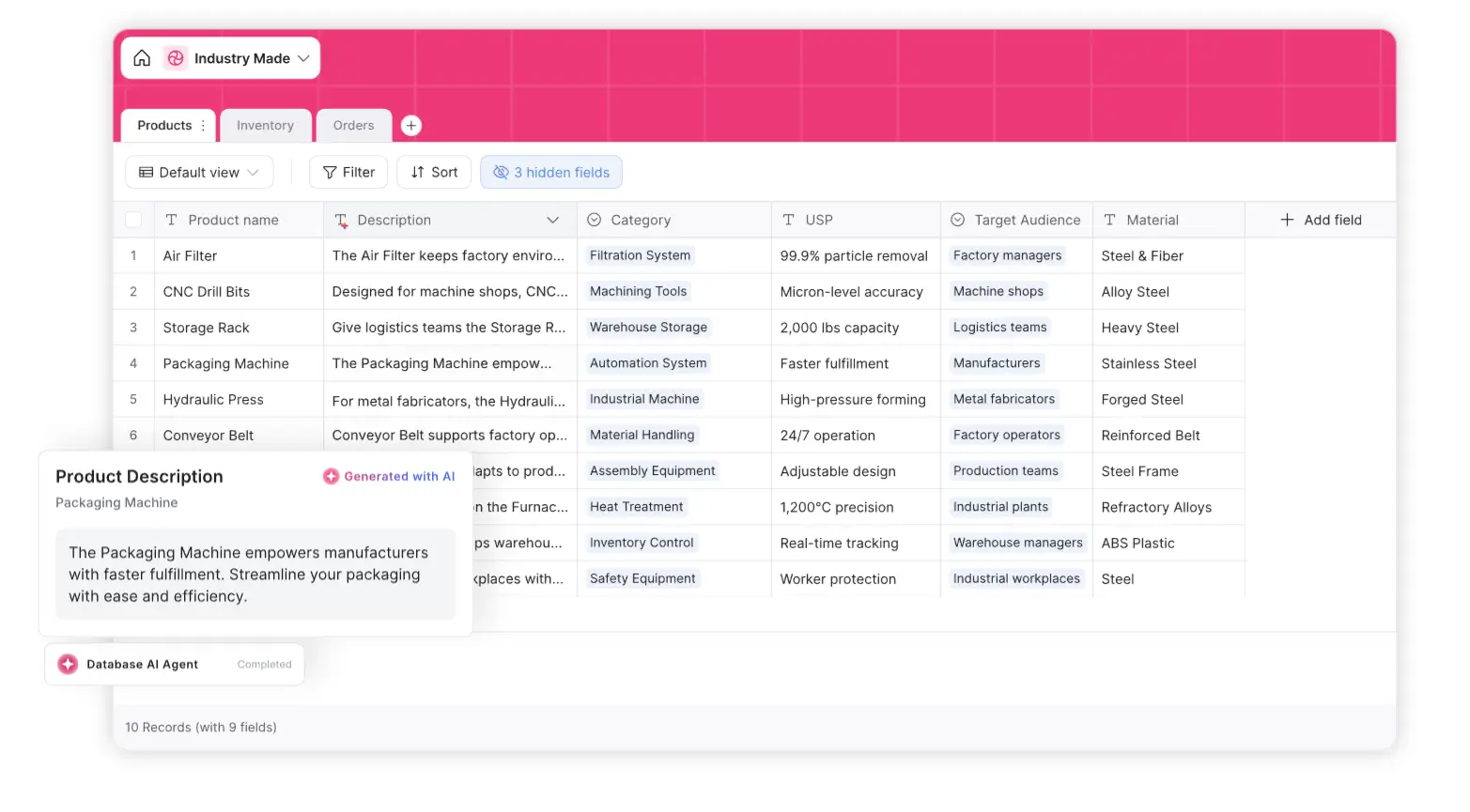
- Use AI to get instant answers and automatically fill in fields: Softr's built-in AI assistant lets your team get immediate answers to questions like, "Which SKUs are below minimum stock?" without building reports or digging through dashboards. Softr also has database AI agents that can automatically populate fields when records are created or updated. When you add a new product, your AI agent can generate the product description, tag it by category, run a web search to add supplier details, or summarize the contents of a spec sheet or supplier contract.
- Automate workflows beyond basic low-stock alerts: Zoho Inventory and Sortly both offer basic notifications, but Softr's built-in workflows let you automate custom multi-step processes. For example, you can trigger a reorder request when stock drops below a threshold, route a purchase order to a manager for approval, or update a supplier record when a delivery is marked received.
- Scale flexibly and affordably: Because Softr is a flexible no-code platform, you can add new workflows, user roles, pages, and integrations as your business grows. And with paid plans starting at $19/month for 50,000 database records and Team: 5 + Client: 5 app users, it’s also cost-efficient.
Zoho Inventory, Sortly, or Softr
Zoho Inventory and Sortly are both solid tools for the right business. If you're fulfilling orders across multiple sales channels, Zoho Inventory is hard to beat at its price point. If you just need a clean, easy way for your team to track tools or supplies, Sortly is worth considering.
Neither option is particularly flexible or customizable, however. Softr is a better choice if you want to build end-to-end inventory management systems, define your own workflows, use AI to enrich your inventory data, or give external users like suppliers controlled access to your system.
Try Softr for free and start building an inventory system today.
Frequently asked questions
Is Zoho Inventory better than Sortly?
Does Sortly work for multi-location inventory tracking?
What's the best free inventory management software for small businesses?