What is workflow automation? A complete guide

Automation typically follows a pretty straightforward scenario: an event happens in one of your business apps, and that triggers another action in another. Simple commands to make you gain a windfall of saved hours automatically.
With logic, conditional steps, loops, and AI actions, you can create complex, multi-step processes that handle decision-making, coordinate across multiple systems, and adapt to different scenarios—all automatically. That's workflow automation at its finest, the engine that turns all your business tools into scalable systems.
Whether you’re dabbling in workflow automation for the first time or you need a brief refresher, we’ll break down what it is, how it works, and how to get started.
What is workflow automation?
Workflow automation is the process of automating a series of tasks or multiple steps between your business tools, databases, and third-party applications.
Most companies rely on a growing stack of tools—CRMs, forms, spreadsheets, project management apps, databases, and communication platforms. Each one works well on its own, but the real friction happens when you move information between them. Data has to be moved manually, tasks need to be triggered by people, and processes slow down as teams grow.
With workflow automation, you automate those tasks between the apps in your tech stack so work moves forward automatically, faster, more accurately, and with less effort. Instead of people manually transferring information, triggering actions, or updating records, automation ensures each step happens in sequence based on predefined rules.
For example, when a customer submits a form, workflow automation can automatically create a contact in your CRM, send a confirmation email, assign a task to a sales representative, and update a database record—all without manual input. The form submission acts as the trigger, while each automated action moves the workflow forward.
This is what turns individual business tools into scalable systems: work progresses automatically, consistently, and with far less human intervention.
How does workflow automation work?
At its core, automation follows a simple pattern: something happens, rules are applied, and actions follow automatically. Each workflow is made up of a few building blocks that define when automation starts and what happens next.
Here are the key terms you’ll encounter:
- Workflow: A workflow is the complete automated process—from start to finish. It defines how work moves between systems, what steps happen along the way, and what outcomes are produced. For example, a customer onboarding workflow might begin when a form is submitted and end when an account is created and a welcome email is sent.
- Trigger: A trigger is the event that starts a workflow. It tells the system when automation should begin. Triggers can come from user actions, system updates, or scheduled events. Examples include a form submission, new database record, status change in a project tool, a scheduled time or date, etc. No trigger means no workflow—this is always the starting point.
- Action: An action is what the workflow does after it’s triggered. Actions are the automated steps performed by the system, such as creating records, sending emails, updating fields, or notifying team members. A single workflow can contain one action or dozens of actions performed in sequence.
- Logic: Logic defines the rules that control how a workflow behaves. It determines what should happen under certain conditions and allows workflows to adapt instead of running the same way every time. Logic turns automation from a simple sequence into a decision-making system.
- AI actions: AI actions use artificial intelligence to perform steps that normally require human judgment, such as summarizing text, classifying information, extracting data, or generating content. Instead of just moving data, workflows can now interpret and transform it.
- AI agents: AI agents go a step further than AI actions. Rather than completing a single task, an AI agent can make decisions, perform multiple steps, and respond dynamically based on context or goals defined in the workflow. They act more like autonomous assistants operating within an automated process.
- Webhook: A webhook is a way for one application to instantly send data to another when an event occurs. Instead of constantly checking for updates, a webhook pushes information in real time—allowing workflows to start immediately when something changes in an external system.
- One-time schedule: A one-time schedule triggers a workflow at a specific date and time. This is useful for time-based automations like sending reminders, launching campaigns, or running scheduled updates.
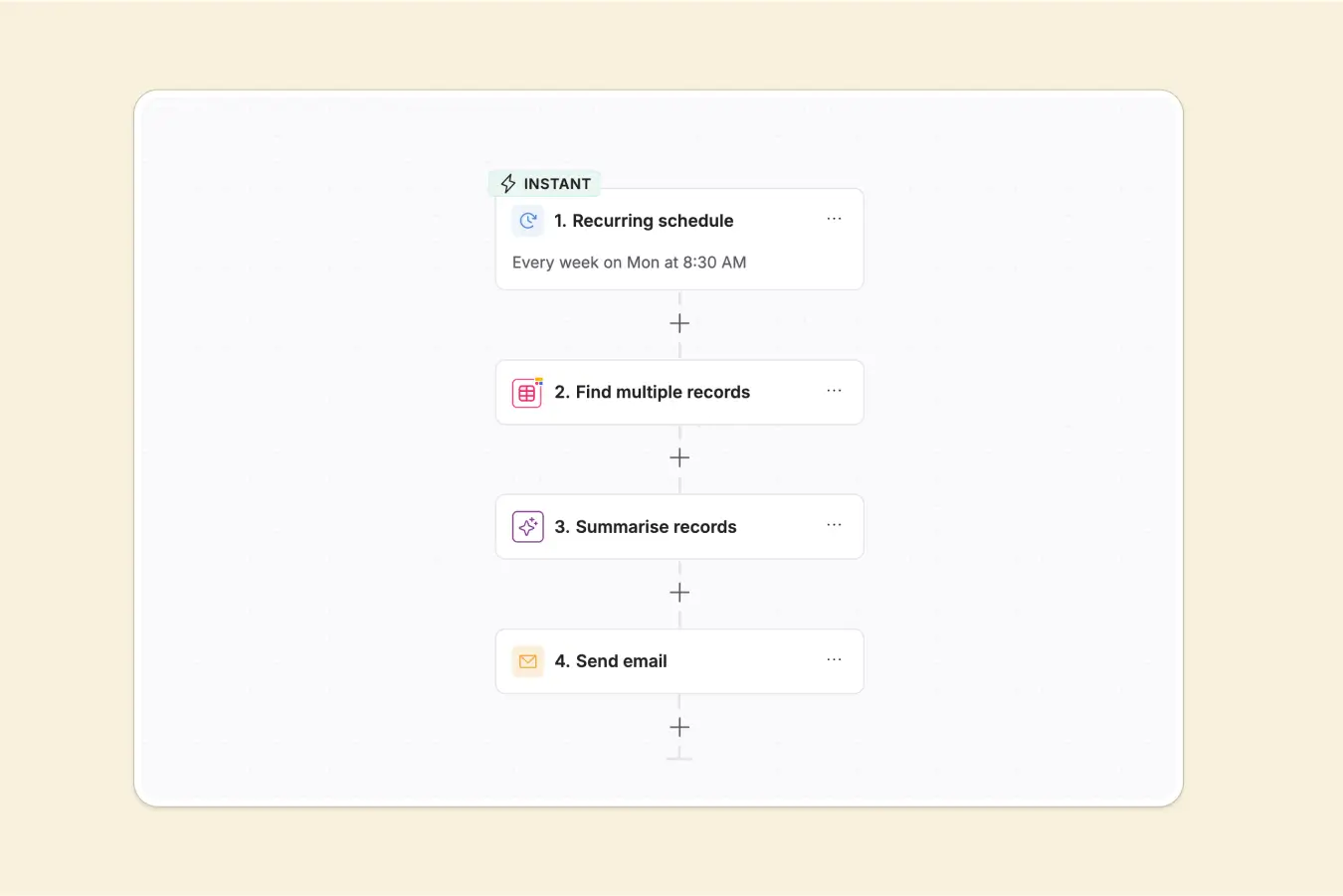
- Recurring schedule: A recurring schedule runs a workflow repeatedly at set intervals, such as every day, week, or month. Common examples include generating reports, syncing data, or sending recurring notifications.
- Wait times: Wait times pause a workflow for a defined period before continuing. This allows automations to space out actions, such as sending a follow-up email three days after a signup or waiting for approval before moving forward.
- API calls: An API call allows a workflow to communicate directly with another application’s system. APIs make it possible to send, retrieve, or update data even when a native integration doesn’t exist, greatly expanding what workflows can automate.
- Conditional logic (filters and branches): Conditional logic allows workflows to take different paths depending on specific conditions. Filters check whether criteria are met, while branches direct the workflow down different routes based on the result. For example, if a deal value is high, you might automatically notify the sales manager. Otherwise, continue the standard process.
- Looping: Looping allows you to run the same actions for each item in a list or record set, and automate bulk updates or repetitive steps across your data in one go.
- Custom code: Most automation tools should let developers add custom JavaScript or Python code blocks for advanced logic or integrations.
What is an example of workflow automation?
Workflow automation tools generally fall into three categories. Third-party platforms like Zapier, Make, and n8n connect existing apps together, acting as middleware that passes data between tools when events occur. Many SaaS products also offer native integrations, which work well for automating common actions between connected tools but often become limiting when workflows require complex logic or coordination across multiple systems.
On the other hand, platforms like Softr let you build real business software with AI that combines apps, databases, and workflow automation all in one platform, allowing workflows to operate as a native part of the system rather than a layer added afterward.
Softr’s automated workflows
With Softr, build automations, user interactions, and AI agents that handle everything from simple tasks to advanced multi-step processes—across your apps, databases, and connected tools—all inside Softr.
That’s what makes Softr a complete full-stack platform:
- Apps and interfaces (portals and internal tools) for end users
- Databases to manage your data in one place (on top of which your apps live)
- Workflows to automate the processes that run your business (onboarding clients, routing support tickets, enriching leads, etc)
Because these layers are native to one another, workflows can respond instantly to user actions, database changes, or scheduled events while maintaining full visibility across your system.
Whether you’re automating a single repetitive task or orchestrating an entire operational process, Softr Workflows lets you design, run, and manage automation where your work already lives—without relying on separate third-party automation tools. With Softr Workflows, you can:
- Use a drag-and-drop with AI co-builder: Build workflows visually by dragging and arranging steps on a canvas, or generate complete automations instantly from a text prompt using the AI co-builder. Easily move from simple automations to complex, multi-step processes without writing code.
.webp)
- Connect your tech stack: Link your Softr apps and databases with the rest of your tools, or automate workflows across multiple platforms (including Zapier and Make) without switching between services.
- Trigger workflows from user actions: Start automations when users interact with your app, such as clicking buttons or submitting forms, and guide them through the process with progress screens, confirmations, and conditional routing.
- Automate your Softr databases: Launch workflows automatically when records are created, updated, or when specific field values change, and update data as workflows run to keep processes synchronized from start to finish.
- Deploy AI agents: Add intelligent automation directly into your workflows, allowing AI to analyze data, generate content, and carry out tasks dynamically based on context.
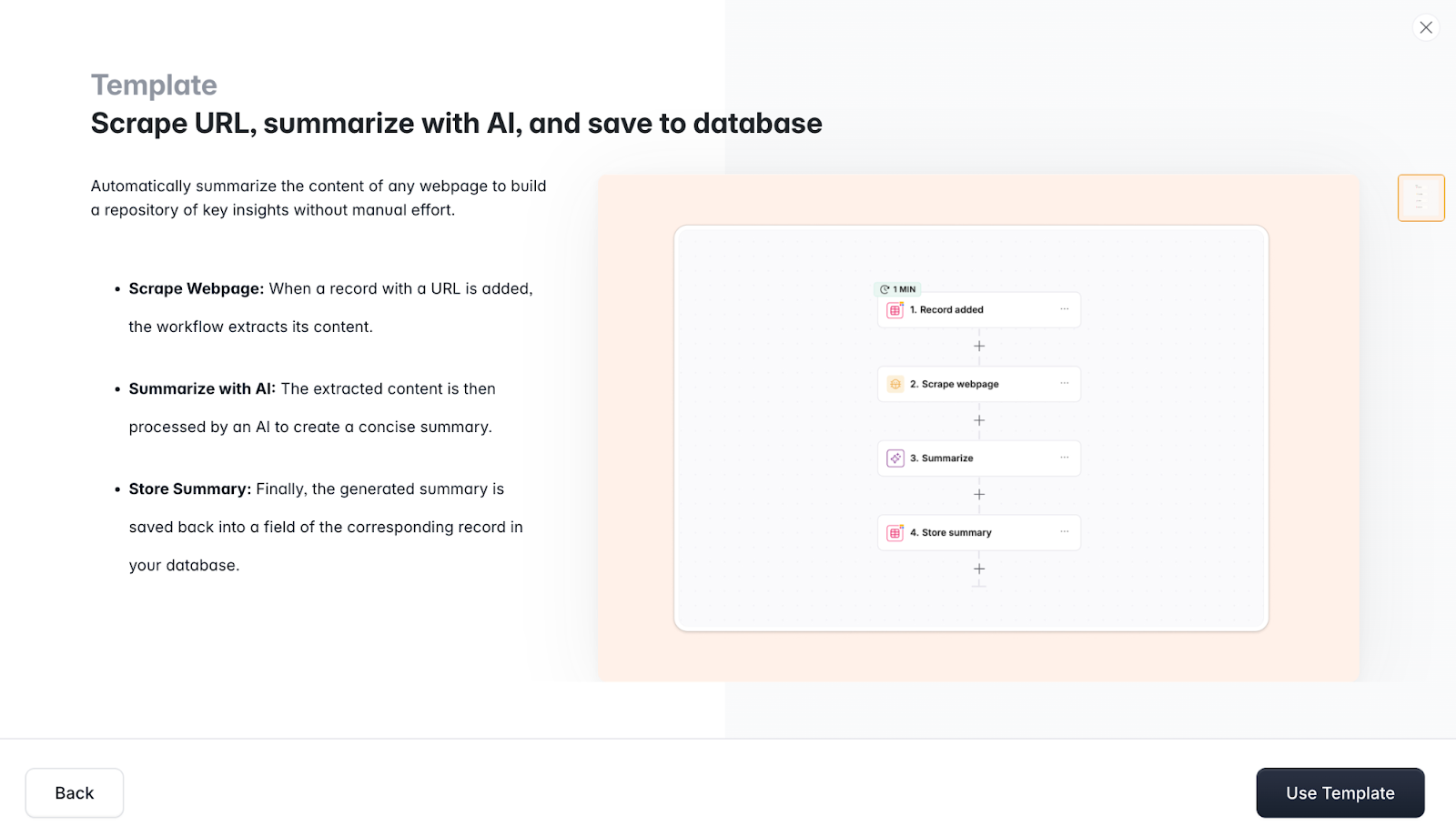
Now let’s take a look at an example of one of Softr’s templated workflows.
This multi-step workflow automatically summarizes the content of any webpage to build a repository of key insights—without manual effort. It’s a simple way to capture and organize information from the web, all within your Softr system.
Here’s how it works step by step:
- Database record: The workflow triggers whenever a new record is added to your Softr database. Remember, you can also connect to 17+ data sources like Notion, Google Sheets, HubSpot, and more.
- Scrape webpage: When that record (in this case, a website URL) is added, the workflow automatically extracts the content of that page. No copy-pasting or manual reading required.
- Summarize with AI: The extracted content is then processed by an AI action, which generates a concise summary. This step condenses the key points of the page into a digestible form.
- Store summary: Finally, the generated summary is saved directly into a field of the corresponding record in your database. From there, it can be searched, filtered, or used in other workflows.
This template demonstrates how workflows in Softr combine multiple steps—scraping, AI processing, and database updates—into a single, automated process. Add a new URL, and the system handles everything else, saving time, reducing errors, and keeping your database organized and up to date. But remember: there are tons of different use cases, from onboarding customers and routing support requests to enriching leads, generating reports, or syncing data across your entire tech stack.
Benefits of workflow automation
If it isn’t already clear, workflow automation offers some major advantages over manual, step-by-step processes. Instead of relying on people to move information, trigger tasks, or keep systems in sync, automation ensures work progresses consistently in the background.
Here are some of the most notable benefits:
- Reduced manual work: Repetitive tasks like data entry, status updates, notifications, and follow-ups happen automatically across different industry use cases, freeing teams to focus on higher-value work instead of administrative overhead.
- Faster processes: Workflows run instantly when triggered, eliminating delays caused by handoffs or human intervention. Tasks that once took hours—or days—can happen in seconds.
- Fewer errors: Manual processes introduce mistakes, especially when data is copied between systems. Automation ensures actions follow predefined rules, keeping records accurate and consistent.
- Better visibility across systems: Automated workflows create clear, repeatable processes. Teams can see how work moves from one step to the next instead of relying on informal handoffs or undocumented procedures.
- Improved scalability: As your business grows, manual processes become bottlenecks. Automation allows operations to scale without needing to proportionally increase headcount.
- Consistent customer and team experiences: Every onboarding flow, approval process, or notification follows the same logic, ensuring reliable outcomes regardless of who initiates the process.
- Stronger system integration: Workflow automation connects tools into a unified system, allowing data and actions to flow seamlessly between apps, databases, and external platforms.
- Foundation for AI-powered operations: With AI actions and agents built into workflows, businesses can move beyond simple automation into intelligent processes that analyze information, make decisions, and adapt dynamically.
Build automated workflows in Softr
Workflow automation becomes most powerful when your apps, data, and processes live in the same system. Instead of stitching together multiple tools, Softr lets you build apps, manage databases, and automate workflows in one unified platform.
Start with a template, generate workflows using AI, or design processes visually to match how your business actually operates—without writing code or managing complex integrations.
👉 Try Softr free and get started with workflow automation today.


Elena is an experienced writer, content marketer, and blog savant based in London, UK.
Frequently asked questions
- What types of workflows can be automated?
- Do you need coding skills to build workflow automation?
- What’s the difference between workflow automation and integrations?