If you’re trying to automate more of your work or feel like your current setup is too limited, you’ve probably seen a few “n8n vs Zapier” results in your search.
That makes sense. Both tools are popular workflow automation platforms with AI features, but they’re designed for different kinds of teams and work setups.
n8n is built for teams that want to control every step of their workflows, add custom logic, and even self-host their automations. Zapier focuses on simplicity, with pre-built templates and thousands of app connectors that non-technical teams can set up quickly.
In this guide, we’ll compare both platforms so you can see what each tool does well, where they have limits, what real users like and dislike about them, and when Softr might be a better fit for your workflows.
n8n vs Zapier comparison at a glance
| Feature | n8n | Zapier |
|---|---|---|
| Ease of use | Has a steeper learning curve and usually needs technical knowledge. | Very beginner-friendly and requires no coding knowledge. |
| Pricing model | Cloud plans are based on workflow executions. | Based on tasks. Every action in a workflow counts as a task. |
| Best for | Technical users and teams that want more control and the option to self-host. | Non-technical teams that want plug-and-play automation without writing code. |
| Integrations | 400+ built-in nodes, plus you can also connect any API with an HTTP request node. | 8,000+ app integrations with preset triggers and actions that work out of the box. |
| Workflow automation | Uses a visual canvas with loops, branches, and conditional logic. | It lets you create multi-step Zaps with filters, paths, and delays. |
| Deployment options | Can be self-hosted on your own server or run on n8n Cloud. | Cloud only. Fully hosted and managed by Zapier. |
| AI capabilities | Has native AI nodes for OpenAI, LangChain, Hugging Face, and local models like Ollama. Also supports vector databases. | Includes AI steps with ChatGPT and Claude, plus Zapier Agents for complex tasks and AI chatbots for customer interactions. |
What is n8n?

n8n is an AI workflow automation platform that helps you connect apps and build workflows. It uses no-code building blocks but also lets you add custom JavaScript or Python code when needed. And n8n now includes native data tables, so you can store and manage data directly inside n8n instead of relying only on external tools.
Who it’s for and how it works
n8n is best for developers and technical teams that want a lot of control over how their automations run and how their data is handled.
It uses visual building blocks called “nodes” to show each step in a workflow. Triggers define when a workflow should start, and actions define what happens next, like moving data between tools or running a task automatically based on simple rules.
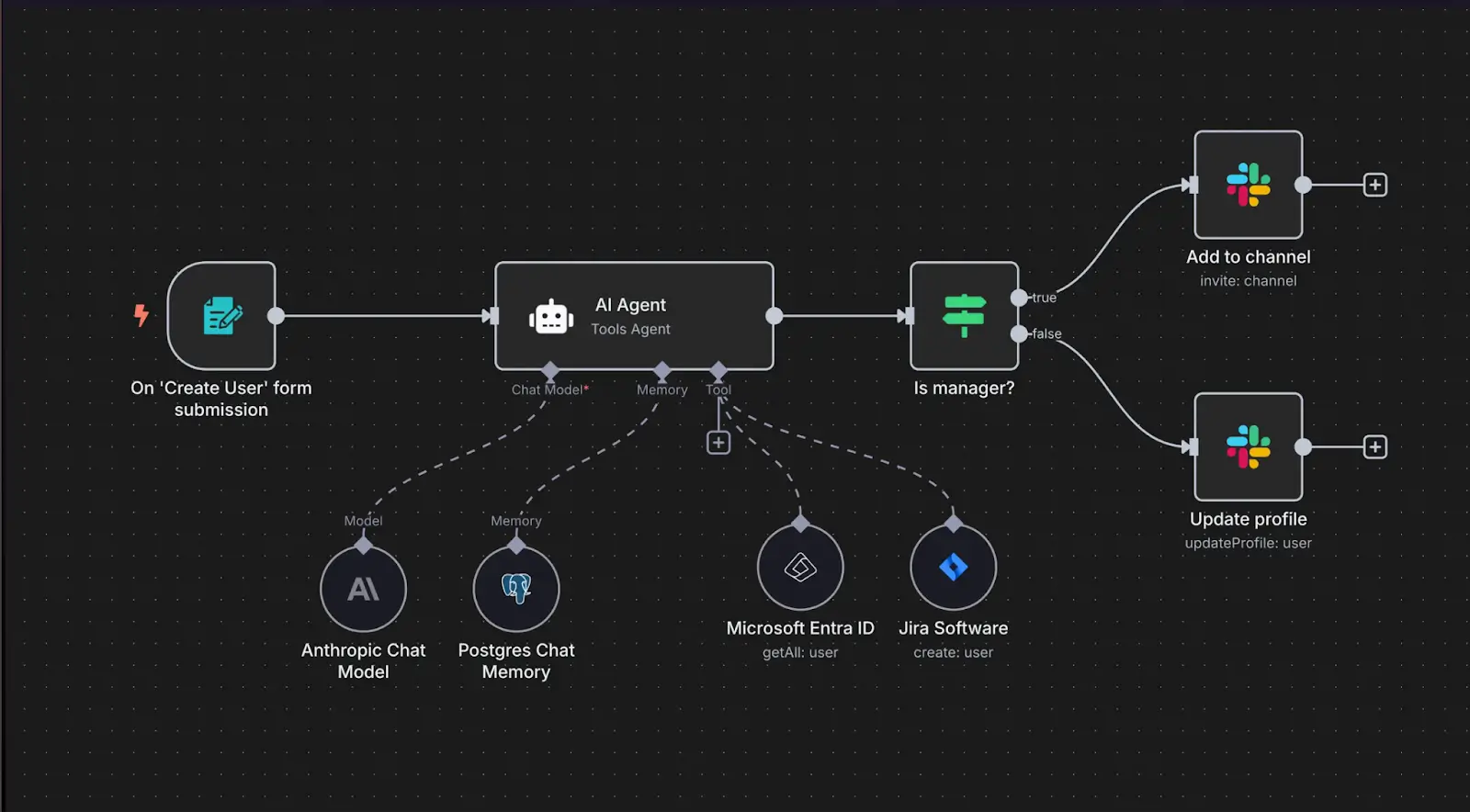
Unlike Zapier, which runs entirely in the cloud, you can host n8n on your own server for full control over your data and setup, or use the managed cloud version to get started faster.
What is Zapier?
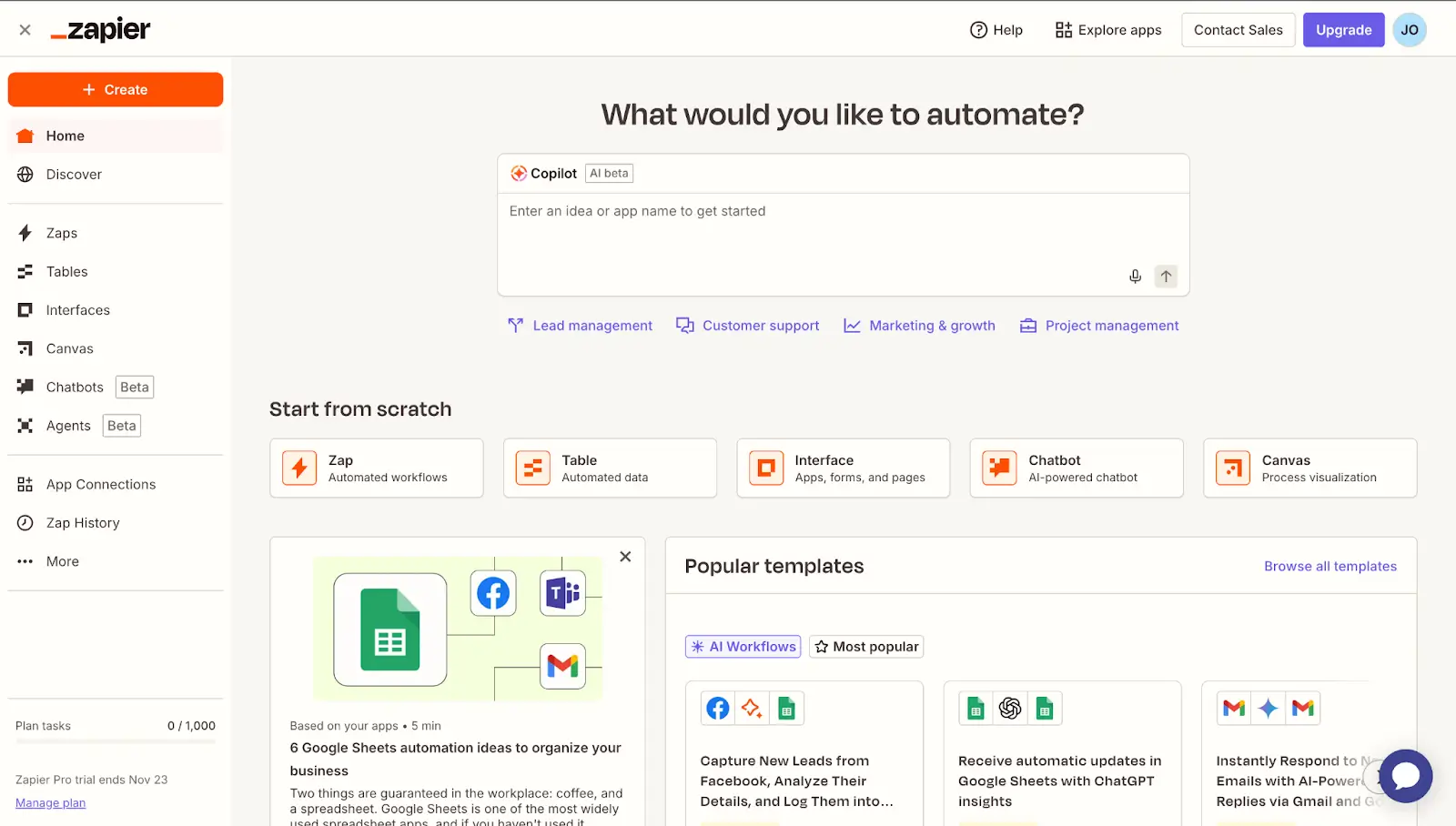
Zapier is a cloud-based automation platform with AI features that help you connect apps and automate tasks without coding. Unlike n8n, Zapier lets non-technical teams build simple internal tools and dashboards using Zapier Interfaces, on top of the automations they’ve already set up.
Who it’s for and how it works
Zapier is best for non-technical teams at startups, small and medium-sized businesses, and enterprises that want to automate work quickly without writing code.
It uses workflows called “Zaps” to connect apps and run tasks for you. Each Zap has a trigger, like getting a new lead or a payment, and one or more actions, like sending an email, adding a contact to your CRM, or updating a spreadsheet. You set up a workflow by choosing the apps you want to connect, picking the trigger, and then defining what should happen next.

n8n vs Zapier: Features compared
Both tools help you automate work, but they do it in different ways. Let’s see how they compare across key features.
Which platform is better for non-technical users, and why?
n8n takes longer to learn and set up for non-technical teams. To build and maintain your workflows, you need to know a bit about APIs, JSON, JavaScript, and basic if/then logic rules.
Zapier’s visual, drag-and-drop style builder and prebuilt templates are what many non-technical users love most about the platform. It allows them to start automating their workflows right away, without dealing with complex setup or needing technical expertise.
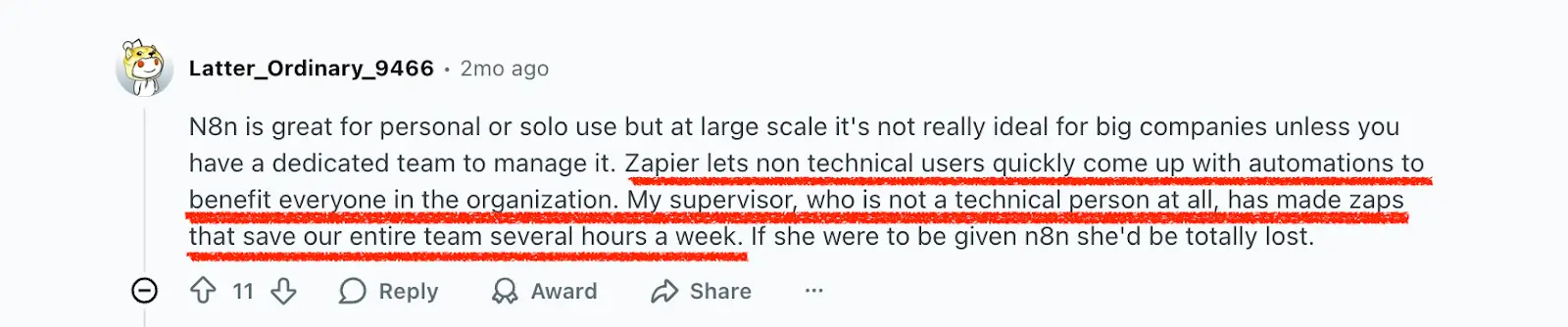
Verdict: Zapier is the better choice for non-technical users because almost anyone on your team can automate everyday tasks. Here’s how one user compared the two on Reddit:
How do self-hosted n8n and cloud Zapier compare for security?
Self-hosted n8n gives you control over where your data lives, but that depends on the version you use.
With the free Community Edition, you run n8n on your own infrastructure, but you don’t get built-in collaboration, advanced user management, secure secrets storage, or detailed audit/logging features. Execution data retention is also limited unless you configure and maintain storage yourself. So while you control data residency, you’re also responsible for security configuration, backups, and infrastructure management.
With paid n8n plans (self-hosted or cloud), you unlock team collaboration, better access control, Git versioning, secret management, and more enterprise-grade governance features, giving you both data control and operational security at scale.
Zapier, by contrast, is fully cloud-hosted. All workflows and data run on Zapier’s infrastructure. Zapier handles encryption, infrastructure security, and compliance (including SOC 2 Type II), but you have less visibility and control over where and how your data is stored behind the scenes.
Verdict:
If you need infrastructure and data residency control and are willing to manage security yourself, self-hosted n8n (especially its paid plans) is the stronger option. If you want a managed, compliance-ready platform with minimal security overhead, Zapier is the safer and simpler choice.
What AI or LLM integrations do Zapier and n8n support?
n8n has native AI nodes and integrations for tools like OpenAI and LangChain, and can also connect to other AI or LLM providers, including local models such as Ollama, through APIs.
Zapier offers built-in AI actions that connect to models like ChatGPT and Claude and can also call other AI or LLM tools through app integrations or webhooks.
Verdict: Zapier’s AI integrations are easier to set up and use for most teams. n8n gives technical teams more flexibility to connect different AI providers and even run local models, but it takes more setup.
How do n8n and Zapier differ in pricing and cost transparency?
n8n Cloud uses an execution-based pricing model: you pay for each workflow run, regardless of how many steps it has. Its self-hosted Community Edition is free, but you cover server and infrastructure costs yourself. n8n also offers paid self-hosted plans (Business and Enterprise), which add features like higher execution limits, collaboration, SSO, longer data retention, and advanced controls — billed separately from your hosting costs.
Zapier, on the other hand, uses a task-based model. Each action inside a workflow counts toward your monthly task limit.
Verdict: n8n’s execution-based pricing is often more predictable for complex or high-volume automations. Zapier works better for simple workflows that don’t run very often. Otherwise, costs can rise quickly.
Popular use cases for n8n vs Zapier
n8n and Zapier both help teams automate workflows, but their strengths show up in different types of setups.
When to use n8n
n8n fits best when your workflows involve custom data-handling, internal systems, or advanced logic that can’t be built with simple, plug-and-play tools. Teams use it to build automations and AI agents that connect their apps, internal databases, and AI tools, so information can move smoothly between them.
Common use cases include:
- Marketing and customer experience: automate personalized campaigns and customer onboarding across your CRM, CMS, email, and chat tools.
- IT operations: run regular backups, monitor workflows for errors, and alert the IT team when something breaks.
- E-commerce: manage product data, customer chats, and order processing between your store, payments, and internal tools.
- Personal productivity: track and update things like job applications from a central sheet, with automatic status changes and reminders.
[.blog-callout]
💡 Keep in mind: n8n is great for connecting apps and data behind the scenes, but you’ll need another tool if you want to build full web apps or user-facing interfaces.
[.blog-callout]
When to use Zapier
Zapier is best when your team wants no-code automations across popular cloud tools and simple internal tools on top of those automations, without writing code or setting up servers.
Common use cases include:
- Marketing and sales: add new leads from ads and forms to a CRM or sheet, score them with AI, and trigger follow-up emails or Slack alerts.
- Project and task management: create tasks in tools like Asana or Trello from new emails, form fills, or calendar events.
- Customer support: send automatic replies to new tickets, route important requests to the right team, and notify channels like Slack.
- Internal tools and mini apps: build simple forms, portals, and dashboards on top of your Zaps with Zapier Interfaces.
[.blog-callout]
💡 Keep in mind: Zapier Interfaces works well for simple internal tools, forms, and dashboards, but it’s not meant for very complex or highly customized business apps.
[.blog-callout]
n8n vs Zapier reviews on Reddit
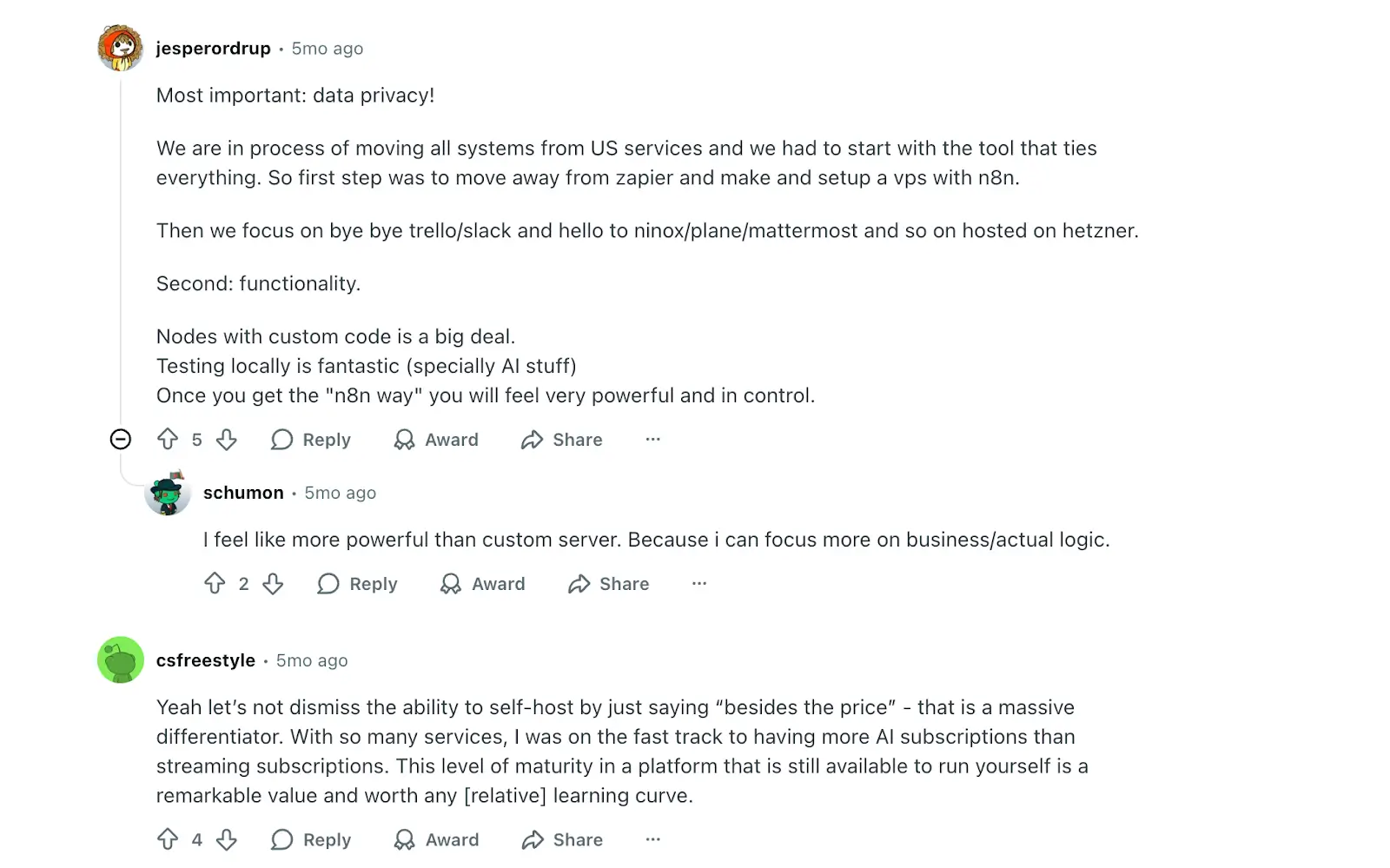
According to Reddit users, many people choose n8n because they can self-host it and keep tighter control over their data. In one comment, a user says data privacy and the ability to run n8n on their own server are the reasons they moved away from Zapier and other cloud tools.
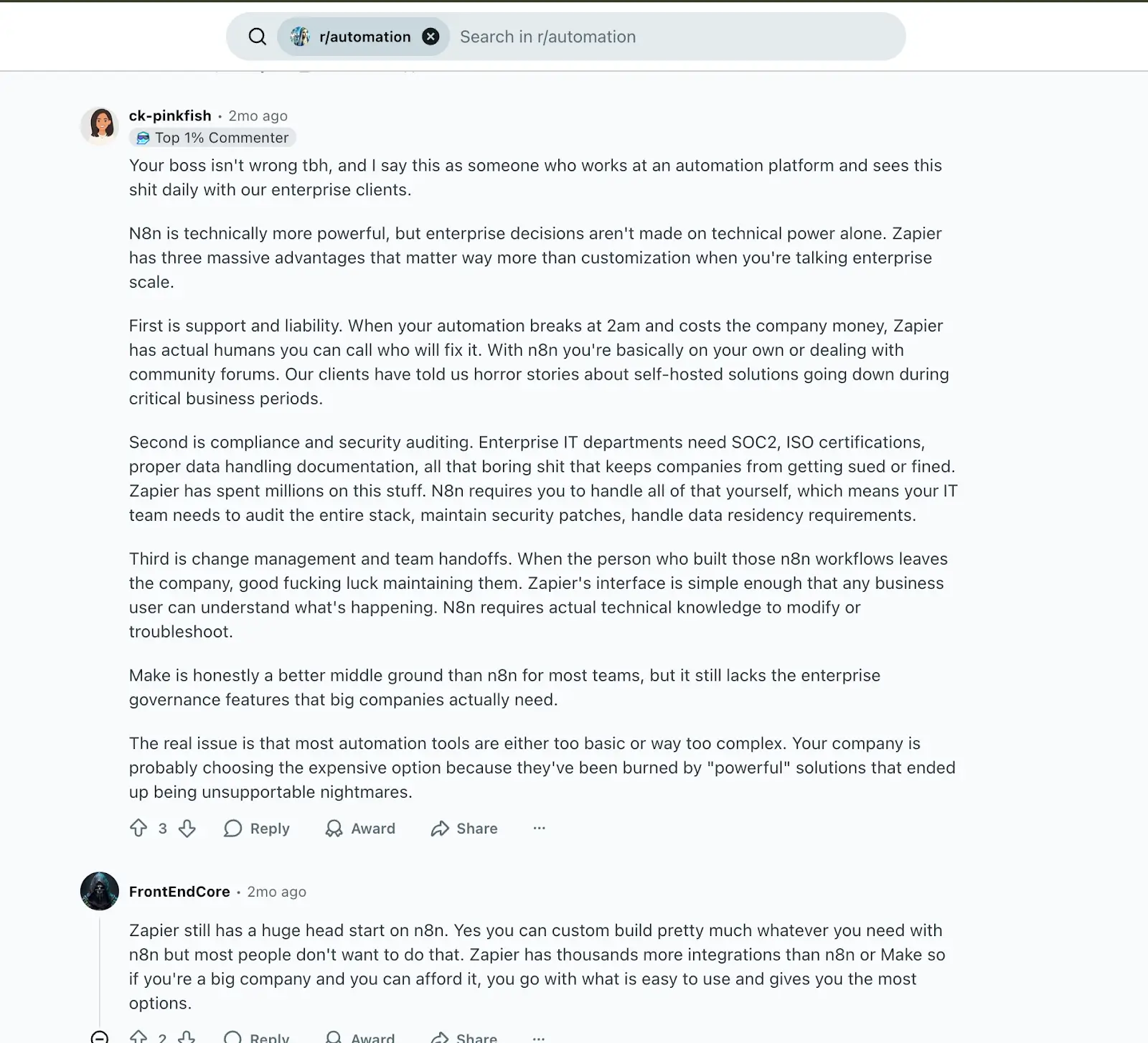
Other Redditors point out that while Zapier can cost more as you scale, the higher price includes things like support, compliance, and security auditing, and easier handovers when team members leave. For teams that don’t want to manage servers or fix self-hosted workflows themselves, that peace of mind is a major reason to choose Zapier, like this user:
How pricing compares between n8n vs Zapier
n8n and Zapier have free plans, but their paid plans are structured differently.
| Plan | n8n | Zapier |
|---|---|---|
| Free | Community Edition (self-hosted): $0 license, unlimited users, and workflows. You pay only for your own server and database. | Free: $0, 100 tasks/month, unlimited Zaps, 2-step Zaps, access to Tables, Interfaces, and AI tools. |
| Mid-tier | Starter (Cloud): $20/month billed annually for 2.5K workflow executions with unlimited steps, 1 shared project, and unlimited users. | Pro: $19.99/month billed annually for 750 tasks/month, multi-step Zaps, premium apps, and email support. |
| Advanced | Pro (Cloud): $50/month billed annually for 10K executions, 3 shared projects, higher concurrency, 7-day insights, admin roles. | Team: $69/month billed annually for 2,000 tasks/month, up to 25 users, shared folders, SAML SSO, and priority support. |
| Enterprise | Business & Enterprise: Business starts at $667/month (self-hosted) with 40K executions, SSO/SAML/LDAP, version control with Git, and 30-day insights. Self-hosted. Enterprise is custom-priced, with higher execution limits and 200+ concurrent executions. Self-hosted or Cloud-based. |
Enterprise: Custom pricing, unlimited users, advanced admin controls, observability, and a dedicated technical account manager. |
For example, imagine a workflow that runs 10,000 times per month and has 5 actions. In n8n Cloud, that counts as 10,000 executions, so it fits within a 10K-execution plan. In Zapier, the same workflow would use about 50,000 tasks per month (5 tasks per run), which is well above the limits on lower-tier plans and would require you to pay for extra tasks as you scale.
Verdict: n8n is usually more cost-effective for complex or high-volume automations, while Zapier stays affordable for lighter, low-volume workflows that don’t run very often.
Meet Softr: The best alternative to n8n and Zapier for building automated AI workflows and connected business apps

Softr is a full-stack no-code app builder that combines:
- Built-in database to organize and manage your data
- Interface builder to create secure apps and portals
- Workflows that let you build automations that run directly inside Softr
Unlike n8n and Zapier, which focus on running automations in the background and connecting tools you already use, Softr gives you everything in one place, so you don’t have to jump between different platforms.
Instead of just moving data between apps, you can build the actual business apps and portals your team and customers log into, with data, AI, and automations all inside Softr.
Why choose Softr over n8n and Zapier
Here are the top 4 reasons teams choose Soft over n8n and Zapier.
1. Build fully secure, complete business apps

Softr lets you turn your data into full business apps that your team and customers can log into, instead of just connecting tools in the background.
Zapier Interfaces is helpful for building simple internal pages on top of Zaps and Tables, but it’s more limited. Softr gives you a more powerful interface builder with a large library of prebuilt blocks, so you can put pages together in minutes without a designer or developer.
Small, medium, and enterprise teams use Softr to create custom business apps such as:
- CRMs to manage leads and customer data
- Dashboards and reports that update automatically
- Client portals that share real-time updates securely
- Internal tools for tracking projects, requests, or team operations
- Inventory or asset management systems that connect to your data
- Company intranets to centralize resources and communication
You can build from scratch or start from a free template and adjust it to your needs.
2. Store data natively with Softr databases
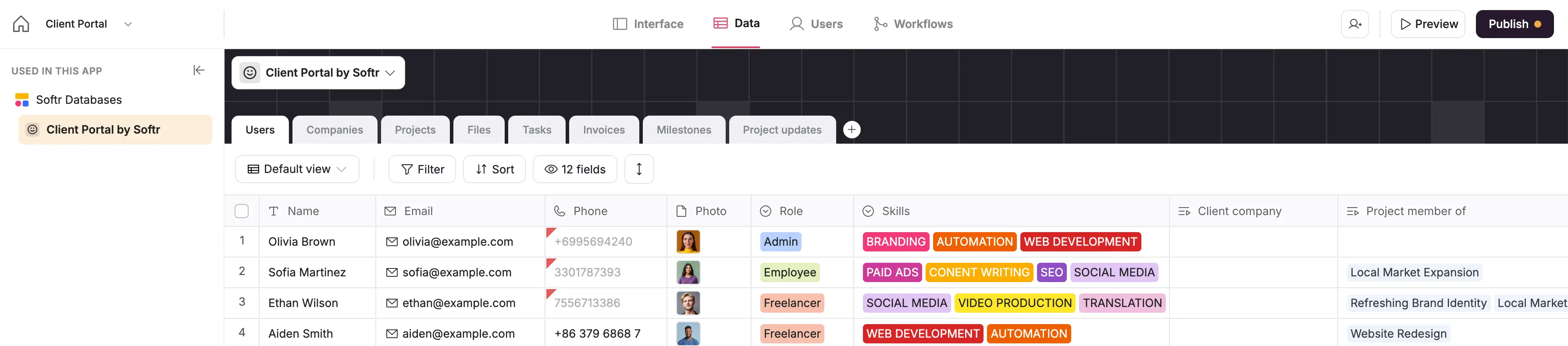
Softr Databases let you store and manage your app data directly in Softr, so you don’t need a separate database tool. You can track records like customers, projects, or inventory and see them in clear tables that your whole team can understand.
Zapier Tables and n8n’s data tables also let you store information, but they’re primarily designed to power automations and simple internal tools, not full business apps. But with Softr, your database is part of the app itself. You get:
- Linked records: connect related data across tables, like clients, projects, and tasks, so everyone works from one source of truth.
- Custom views: create different table views for different teams using filters, sorting, and field visibility.
- Flexible field types: use formulas, lookups, single and multi-select fields, attachments, and more to structure your data properly.
- Instant, native sync: updates happen in real time because your data and app live in the same system.
You can also connect Softr to tools you already use, such as Google Sheets, Airtable, or HubSpot, just like with n8n and Zapier. That way, you can pull data in from existing systems, keep it in sync, and still give your users a clean app experience on top of it.
3. Control access with granular permissions
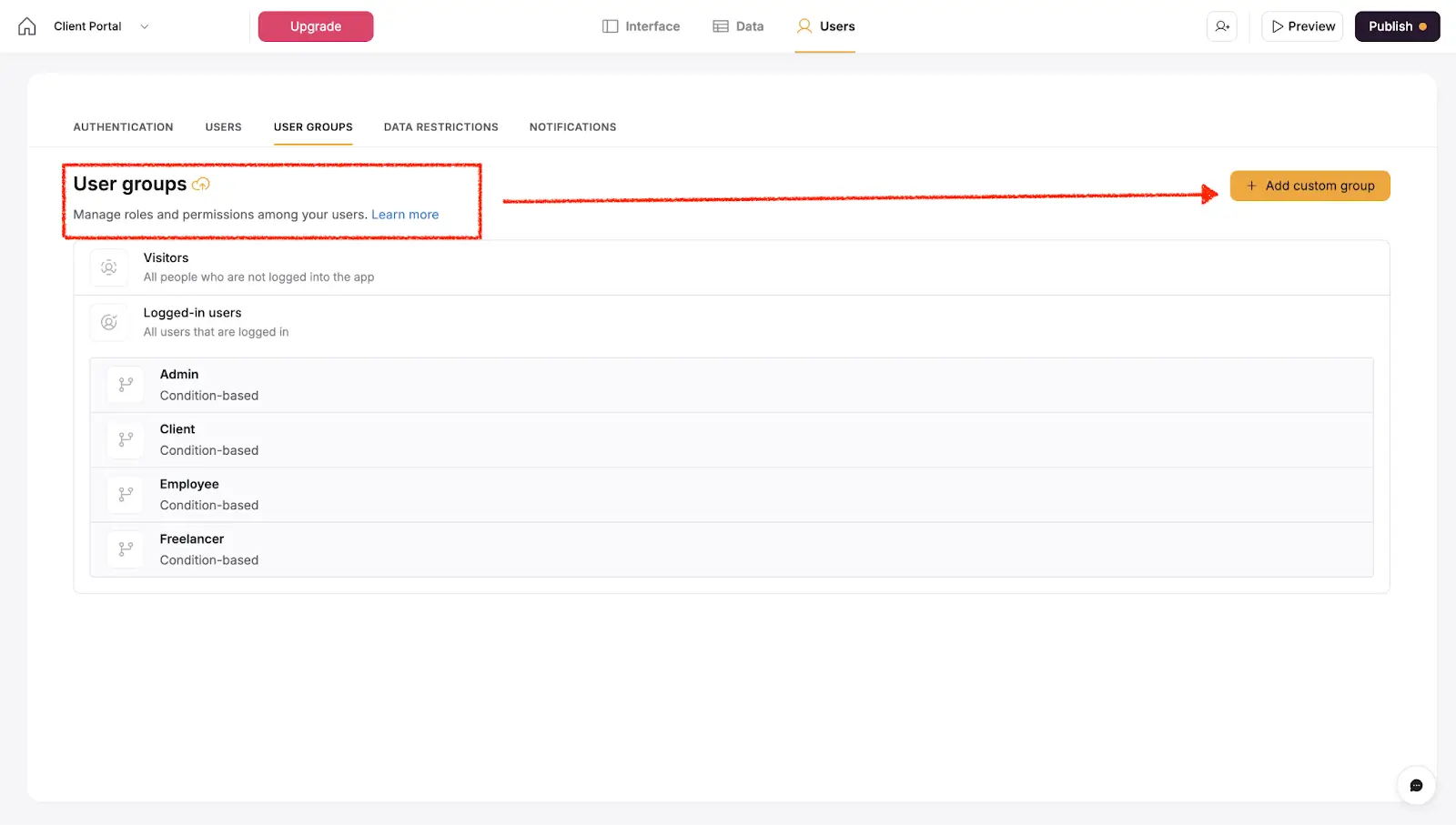
Softr gives you full control over who can see or do what inside your app. You can:
- Define user roles (for example, admin, manager, client)
- Decide which data each person can view or update
- Limit access to specific pages, views, or even individual records
n8n and Zapier mainly let you control access for teammates who build and manage automations and data. They don’t offer the same built-in, record-level permissions for end users. For example, it’s not as straightforward to let each client log in and see only their own records, while managers see all records for their team.
Softr’s permissions help you manage secure access right where your app, data, and workflows live, so you can safely support multiple roles in the same business app.
4. Automate actions with Softr Workflows
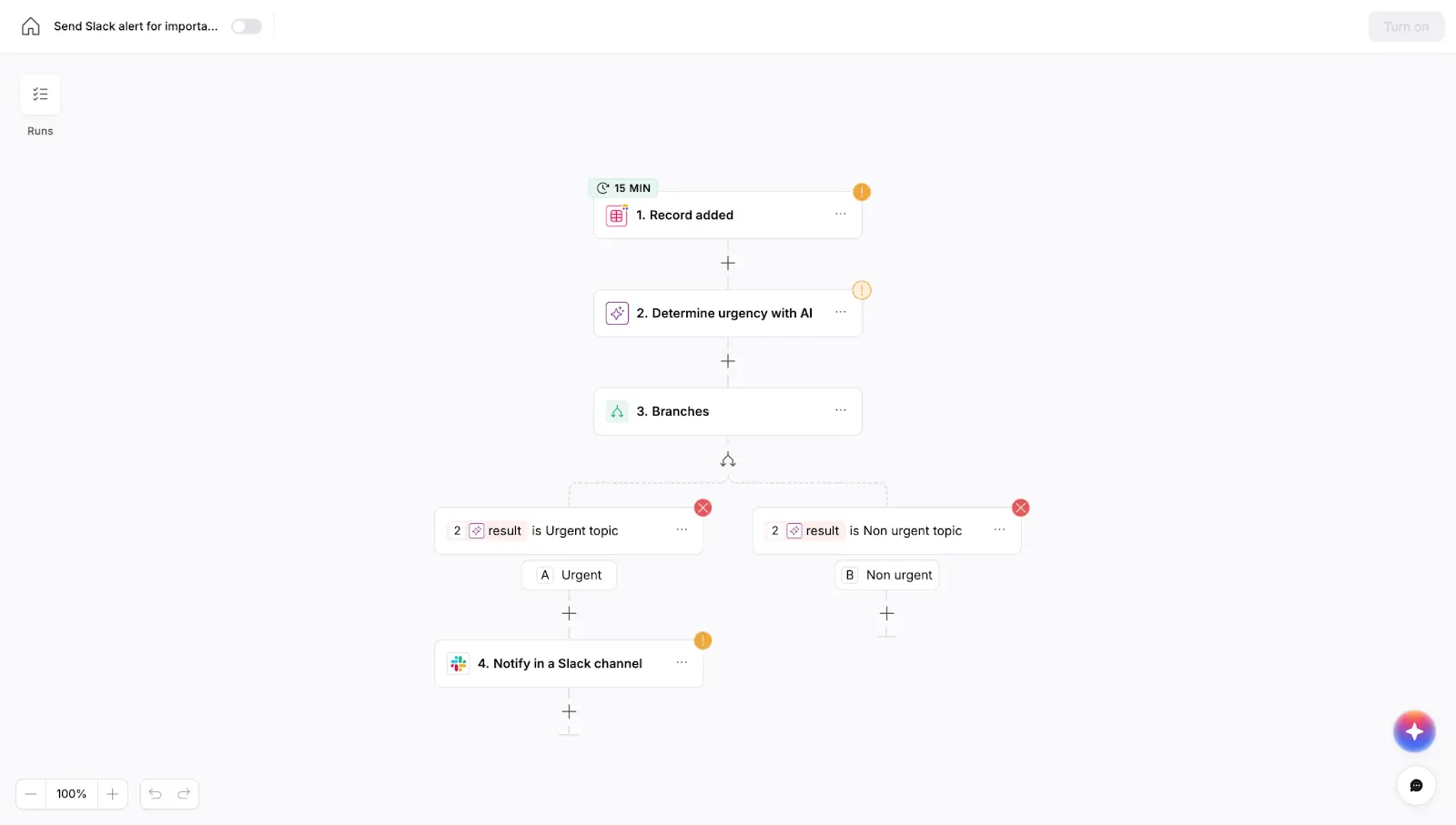
Softr Workflows let you automate what happens across your apps, databases, and connected tools without needing a separate tool. You can set up a workflow to update records in your Softr Databases or other data sources, call external APIs to sync data with other systems.
n8n and Zapier now have their own tables to store data, but they still focus mostly on running automations in the background between many different tools. In Softr, workflows run in the same place as your apps and databases, together with Ask AI, and Database AI Agents. These AI tools let you type simple prompts in natural language, so Softr can generate summaries, draft replies, decide what should happen next, or analyze trends in your data.
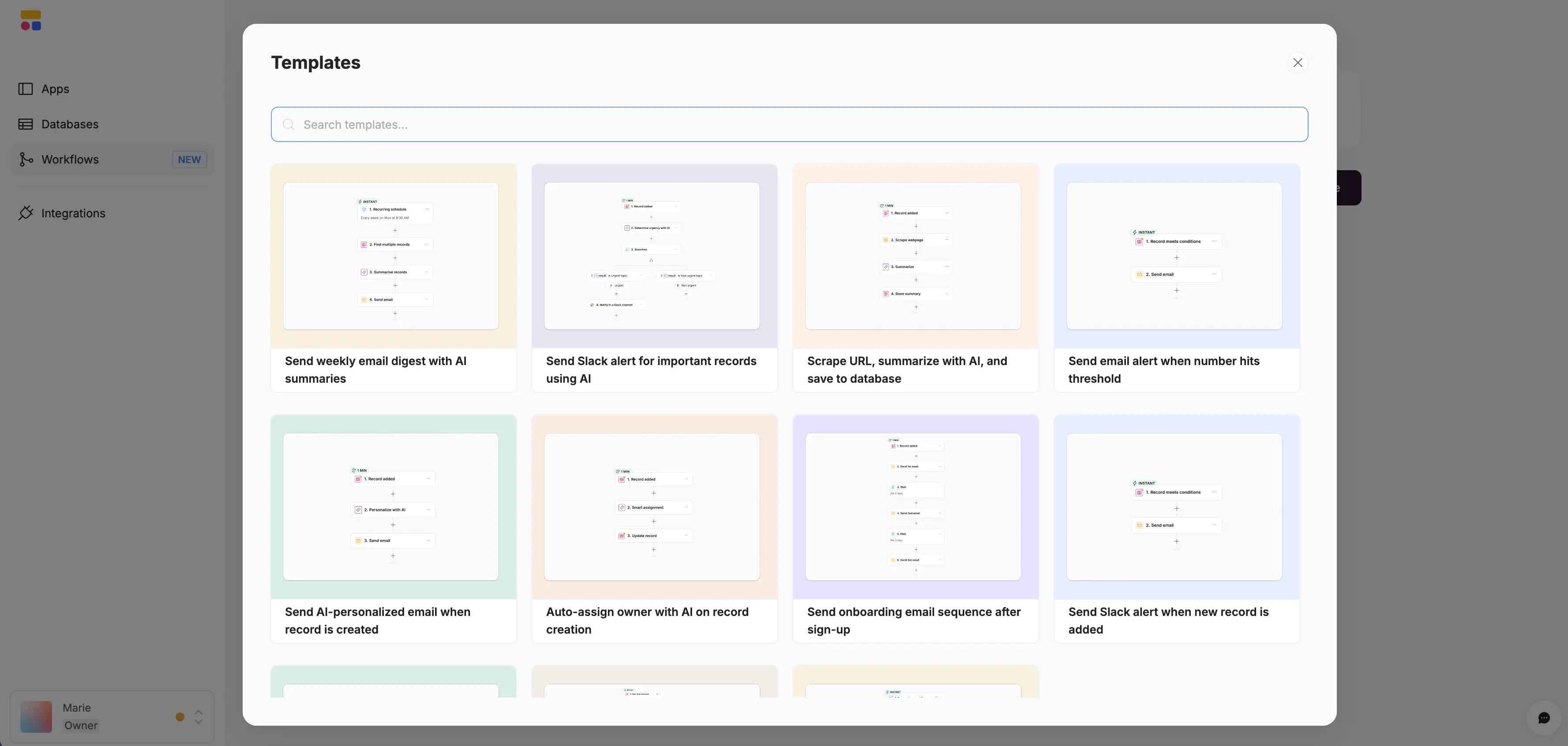
Softr also offers workflow templates you can start with, or you can describe what you want in plain English and let Softr’s AI co-builder create a first version for you to edit.
n8n vs Zapier vs Softr: Which one should you choose?
If you’re comparing these three workflow automation platforms, it usually comes down to your level of technical expertise and your overall goal.
When to choose Zapier
Choose Zapier if you want a plug-and-play automation tool that connects your favorite apps fast. It is best for teams that do not want to worry about setup and just need straightforward automations between tools like Gmail, Slack, and Notion. Just keep in mind that Zapier’s task-based pricing can get expensive as your automations scale.
When to choose n8n
Choose n8n if you want more control over how your automations work. It is open-source, flexible, and great for technical users who want to host workflows, add custom logic, or build complex multi-step processes. In return for that flexibility, n8n can take longer to set up and maintain unless you have technical support.
When to choose Softr
Choose Softr if you want to go beyond automating tasks and actually build the app your business runs on. Softr is easy to set up and brings your data, automations, and interfaces into one place and turns that same data into full-stack business apps that your team and clients can actually use.
Conclusion
Zapier is perfect for quick, lightweight automation. n8n gives you technical flexibility and control. When you need to build AI-powered business apps that your team and customers actually use, without writing code, pick Softr.
If you are ready to move from automating tasks to running your business in one connected system, start building with Softr today.
Frequently asked questions
How does n8n compare to Zapier?
Is there anything better than n8n?
Why is n8n so popular?
Is there a better alternative to Zapier?