While n8n lets you self-host and build highly customizable workflows, it can get overwhelming. Between setting up and maintaining your own servers—plus the steep learning curve, limited support to lean on when things break, and cloud pricing that can rack up costs—n8n requires technical expertise many teams just don’t have. We’ve rounded up the five best alternatives on ease of use, pricing, and key features.
Best n8n alternatives at a glance
| Tool | Best for | Key features | Pricing |
|---|---|---|---|
| Softr | Non-technical teams building business apps with built-in automation | • Native automations inside apps and databases • Advanced multi-step logic without coding • Built-in AI agents and AI workflow co-builder • No-code visual editor | Free plan available; paid plans from $19/month |
| Zapier | Plug-and-play automation | • 8,000+ app integrations • Thousands of automation templates • Built-in AI steps for text and data tasks | Free plan available; paid plans from $19.99/month |
| Activepieces | Open-source or self-hosted automation | • Visual drag-and-drop workflow builder • Open-source with cloud or self-host options • AI-powered workflow steps | Free plan available; paid plans from $25/month |
| Make | User-friendly visual workflow automation | • No-code visual builder • Large integration library • Advanced conditional logic | Free plan available; paid plans from $9/month |
| Lindy | AI agent-powered automation | • AI agents built with natural language instructions • Multi-step automation with AI reasoning • Pre-built agent templates | Free plan available; paid plans from $39.99/month |
Why look for an n8n alternative?
n8n is a flexible workflow automation platform that lets you connect multiple tools into one automated flow. For example, when someone fills out a form, n8n can run an AI check, pull their details from your CRM, determine what should happen next, and notify your team in Slack.
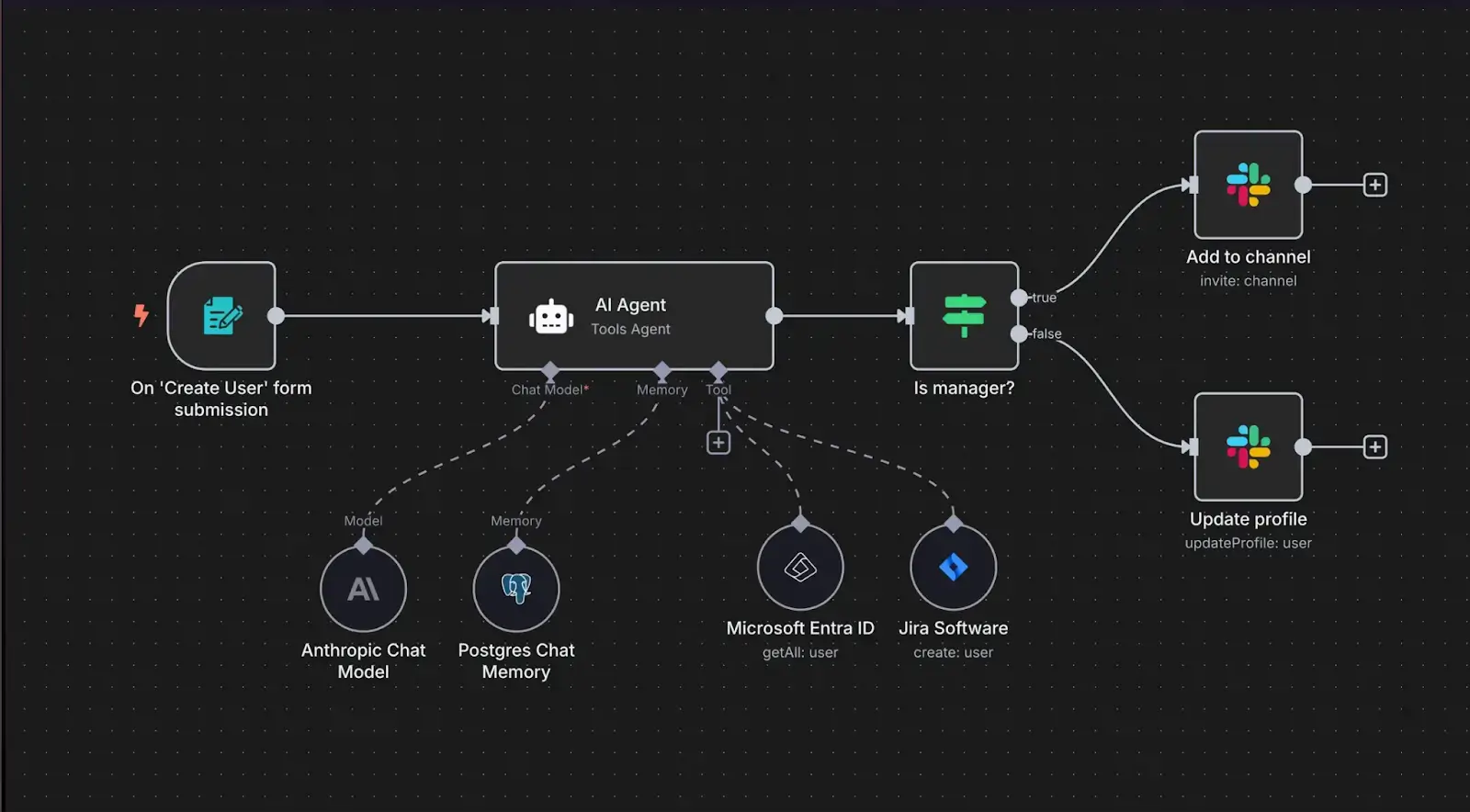
But n8n works best when you have technical support or you're personally comfortable with APIs, writing custom JavaScript, and troubleshooting. If that's not you, you may want to consider an alternative platform.
What to look for in an n8n alternative
Here are six key features to keep an eye out for in workflow automation tools:
- Easy to use without limiting what you can automate: Look for a platform that lets you build workflows with drag-and-drop tools and advanced options like APIs, webhooks, or custom code when you need more control.
- Integrations with the tools you already use: Look beyond the number of integrations and focus on how well they work. Choose a platform that supports your core tools and custom connections when needed.
- Transparent pricing that’s easy to predict as you grow: Choose tools with clear pricing so you can estimate costs easily. Avoid platforms where costs shoot up unexpectedly or key features are locked behind expensive upgrades.
- Built-in tools and resources for troubleshooting: Prioritize alternatives that show clear step-by-step logs and explain where workflows fail in plain language, let you test individual steps before running full automations, and offer helpful documentation, templates, and tutorials for common use cases
- Secure hosting without the technical burden: Unless you have technical staff to manage servers and security, cloud-based tools with built-in compliance are usually the better option.
- Collaboration features for teams of any size: Look for a platform with features like shared workflows, role-based permissions, and version tracking, so your team can collaborate with ease.
1. Softr Workflows — best no-code n8n alternative for building business apps with built-in automation
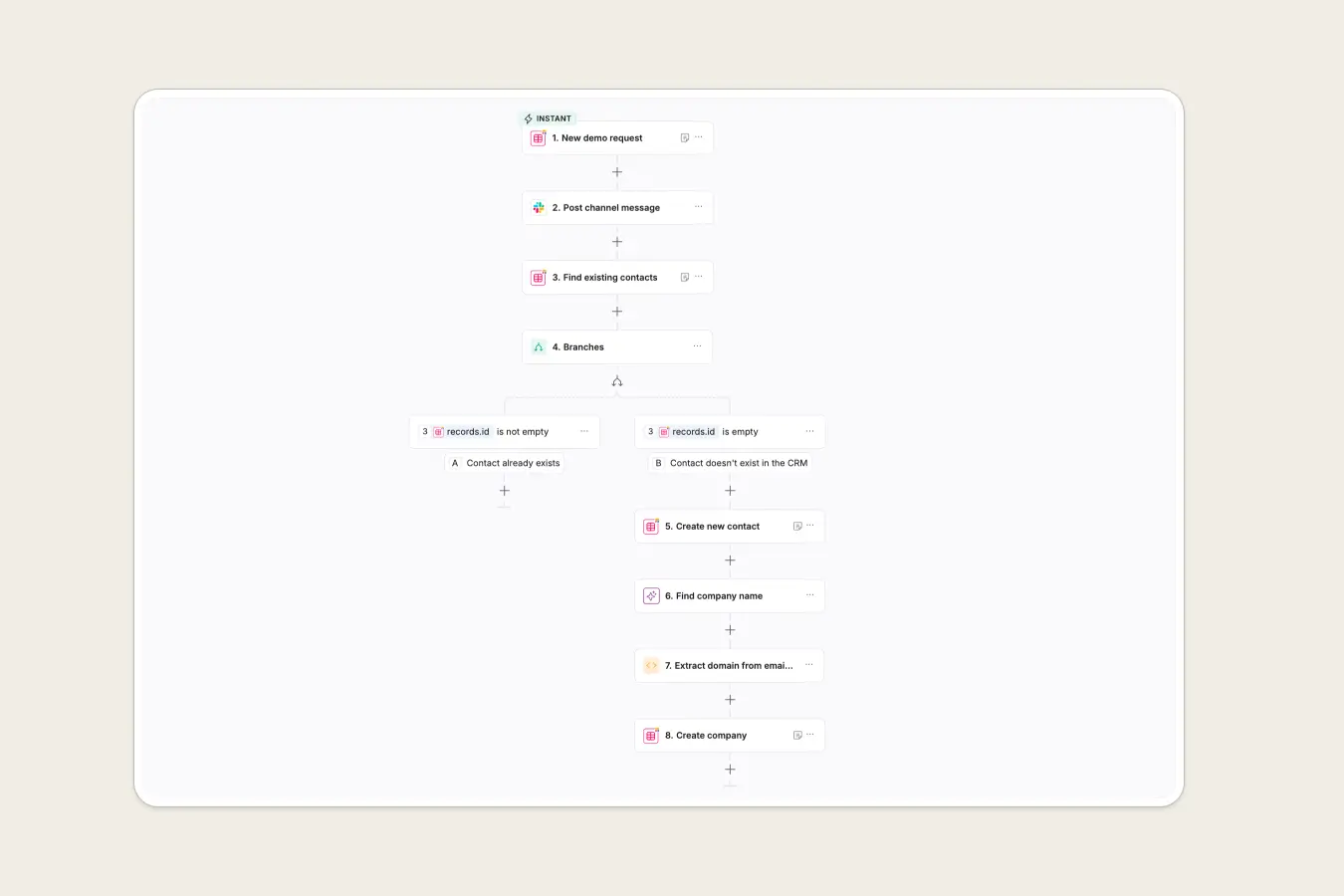
Softr is a no-code AI platform that lets you automate workflows, manage data, and build full-stack apps in one place, without needing multiple tools or subscriptions.
While n8n can automate the existing tools in your tech stack, Softr Workflows runs natively inside Softr and connects directly to your database and the apps you build on top of that data (like customer portals, CRMs, help desks, or dashboards).
Trigger complex workflows whenever a user takes action in your app, when a record is added or updated in your database, when form submissions come through, or when an event happens in a connected tool. You can automate actions like updating and enriching data, sending notifications, or syncing with other tools in real time.
For example, when someone submits a demo request through a lead intake form or client portal you built in Softr, a workflow can automatically check for duplicate contacts, enrich the lead with company details using AI, create or update company records, and notify your team in Slack so they can follow up.
You also have the option of using Workflows as a standalone automation tool, even if you’re not using Softr Databases, forms, or apps. It can connect to tools in your tech stack (Airtable, Google Sheets, Slack, HubSpot, and more) and run workflows when events happen in those tools.
Softr Workflows pros and cons
Pros:
- Automate end-to-end business systems across apps, databases, and external tools
- Easy for non-technical teams to use, with advanced logic like conditions, branches, loops, and API calls
- Works natively inside Softr apps and databases—or as a standalone automation solution connected to your tech stack
- Build AI agent-powered steps into workflows and configure them to handle tasks without manual input
- Generate workflows with the AI Co-builder and use local AI helpers to write formulas or code in a data processing module
- Share apps and workflows securely with teammates using roles and permissions, without needing expensive enterprise plans
- Integrates with 3rd-party tools like calendars, email, Slack, Airtable, Notion, or any other tools via APIs
Cons:
- Smaller native integration library compared to n8n
Key Softr Workflows features
- Visual workflow builder: Design end-to-end automations with an intuitive visual editor — or use AI to generate workflows instantly with a text prompt.
- Deep logic control: Add conditions to control when actions run, branches to handle different outcomes, loops to process multiple records at once, and wait steps to time actions properly. Preview and test each workflow to make sure every step runs as expected.
- Automations that trigger workflows directly from your apps and data: Trigger workflows when records are created or updated in Softr Databases, Airtable, Google Sheets, or SQL databases, or via webhooks and APIs for external tools.
- Workflow templates to get started fast: Access a growing library of pre-built (but customizable) workflow templates for common business processes like lead handling and notifications.
- AI agents for smart automation: Add AI-powered steps directly into your workflows, then configure them to automate tasks like analyzing information, enriching records, summarizing content, and generating responses.
- Team permissions and access control: Control who can view, edit, or manage workflows using workspace collaboration, user groups, and granular permissions.
- Enterprise-grade security: Secure your apps and workflows with enterprise-grade security, including SOC 2 and GDPR compliance.
Softr Workflows pricing
Softr offers flat, predictable pricing and an extensive free plan to get you started.
- Free: Unlimited apps, with access to Softr Workflows and Softr Databases, 5 app users, 5,000 records, and 5 AI credits.
- Basic ($19/month): Unlimited apps with 42+ integrations, Team: 5 + Client: 5 app users, a custom domain, the Softr API & MCP, conditional section visibility on forms, and 2 form-logic branches.
- Pro ($99/month): Unlimited apps with 45+ integrations and custom code, Team: 10 + Client: 50 app users, advanced forms, API access, and e-signatures.
- Business ($329/month): Unlimited apps with 52+ integrations, Team: 30 + Client: 100 app users, 1M records, and advanced data sources.
- Enterprise (custom pricing, contact sales):, SSO, dedicated success manager, and tailored onboarding.
Verdict: Softr Workflows vs n8n
Choose Softr Workflows if you want an all-in-one platform for automating workflows, building apps, and managing data and user interactions without the coding or development requirements of n8n.
2. Zapier — best for plug-and-play workflow automation
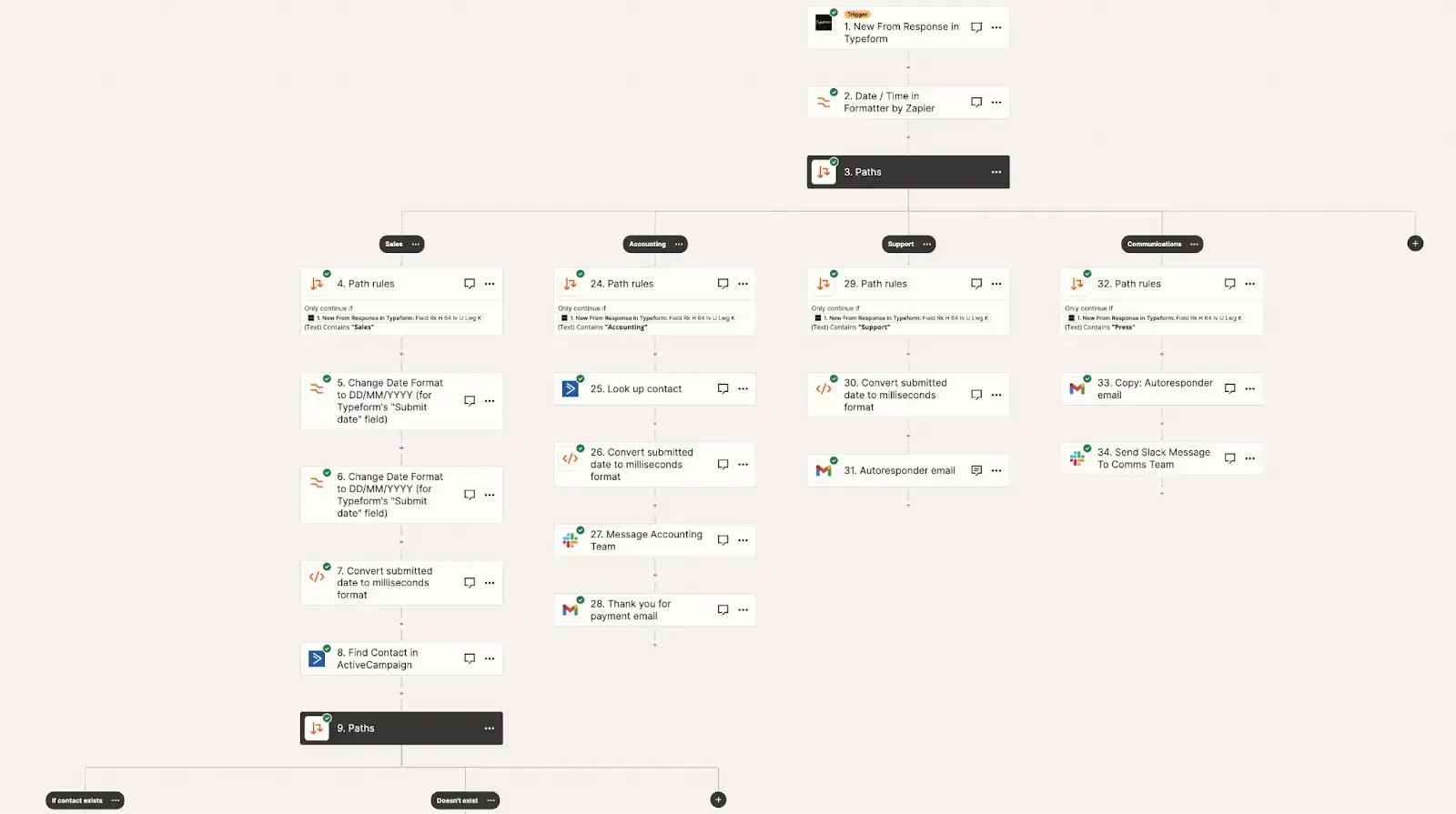
Zapier is a cloud-based automation tool for non-technical teams who want to connect apps and automate repetitive tasks without coding or managing servers. Its workflows, called Zaps, consist of a trigger and one or more actions. For instance, when a new lead completes a form, Zapier can automatically add them to your CRM, send a follow-up email, and notify your team in Slack.
Zapier pros and cons
Pros:
- Easy for non-technical users to learn
- Integrates with over 8,000 apps
- Fully cloud-based with no servers or back-end infrastructure to manage
- Pre-built templates let you launch common automations in minutes
- Clear activity logs that make basic troubleshooting easier
Cons:
- Less flexible than n8n for complex workflows
- Limited advanced API control on lower plans
- Costs can rise quickly as automation volume grows
Key Zapier features
- Large library of ready-to-use integrations: Connect 8,000+ popular tools like Google Sheets, Gmail, Slack, Notion, and Airtable.
- User-friendly trigger-and-action workflow builder: Create automations by choosing what starts the workflow and what should happen next. For advanced setups, Zapier supports multiple steps, conditional paths, filters, and delays.
- Automation templates for common use cases: Access thousands of pre-made templates for tasks like lead routing, onboarding emails, and invoice follow-ups, to name just a few examples.
- Zapier Interfaces for lightweight internal tools (not full business apps): Build simple forms, dashboards, and pages that live on top of your automations.
- Built-in AI features: Include AI steps in Zaps to summarize text, extract information, sort data, generate content, and make decisions inside workflows.
Zapier pricing
- Free: Up to 100 tasks/month
- Pro: $19.99/month (billed annually)
- Team: $69/month (billed annually)
- Enterprise: Custom pricing
Verdict: Zapier vs n8n
Choose Zapier if you want a plug-and-play, no-code automation tool for quickly connecting popular apps and automating workflows with minimal setup.
[.blog-callout]
👉 See a more in-depth comparison on our n8n vs Zapier page.
[.blog-callout]
3. Activepieces — best for open-source automation with the option to self-host
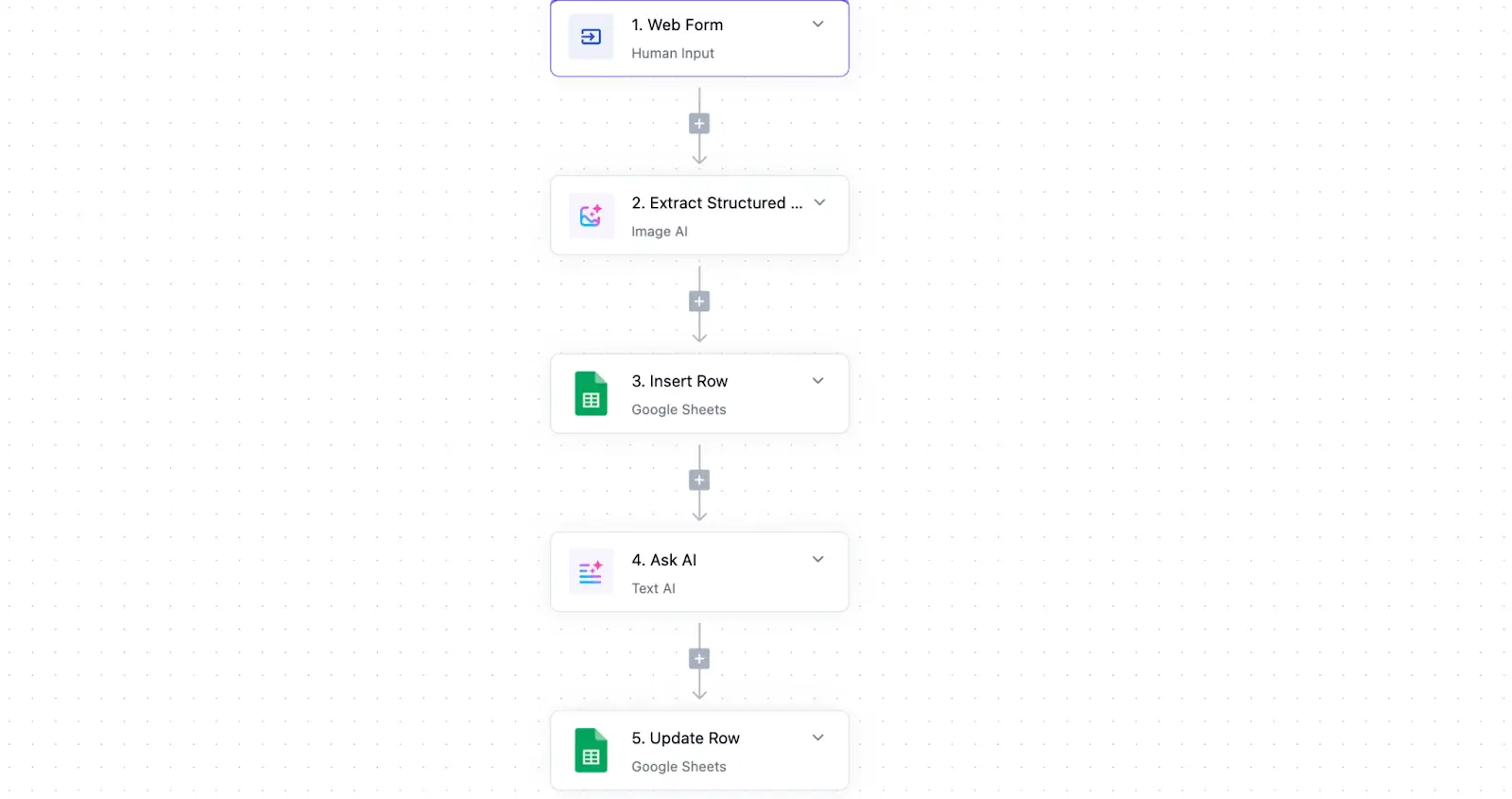
Activepieces is an open-source workflow automation platform with a drag-and-drop builder for creating multi-step workflows. Like n8n, it offers the option to self-host or connect custom APIs when needed, giving teams deep control without the complexity of a more technical setup.
Activepieces pros and cons
Pros:
- Easier to learn than n8n for most teams
- Open-source with the option to self-host
- No per-task pricing on paid plans
- Active community contributing new integrations and features
Cons:
- Smaller number of integrations than Zapier, Make, or n8n
- Not ideal for very complex developer-heavy workflows
Key Activepieces features
- Open-source with cloud and self-host options: Deploy Activepieces on your own servers for full control over data and infrastructure, or run it in the cloud for quicker setup.
- Visual workflow builder: Build multi-step automations with a drag-and-drop interface, including triggers, actions, logic rules, branches, loops, delays, and webhooks.
- Integrations with external tools: Connect tools like Gmail, Slack, Airtable, Google Sheets, HubSpot, ClickUp, and more, with the ability to extend connections via APIs or webhooks.
- AI-powered workflow steps: Integrate AI actions into flows to do things like summarize text, enrich data, or classify information.
Activepieces pricing
- Free (Self-hosted): Open-source, core features only
- Free (Cloud): Includes 10 free active flows; additional flows $5/month each
- Ultimate: Custom pricing
Verdict: Activepieces vs n8n
Choose Activepieces if you want an open-source automation tool with a simpler setup than n8n, predictable pricing, and the option to self host.
4. Make — best for user-friendly visual automation
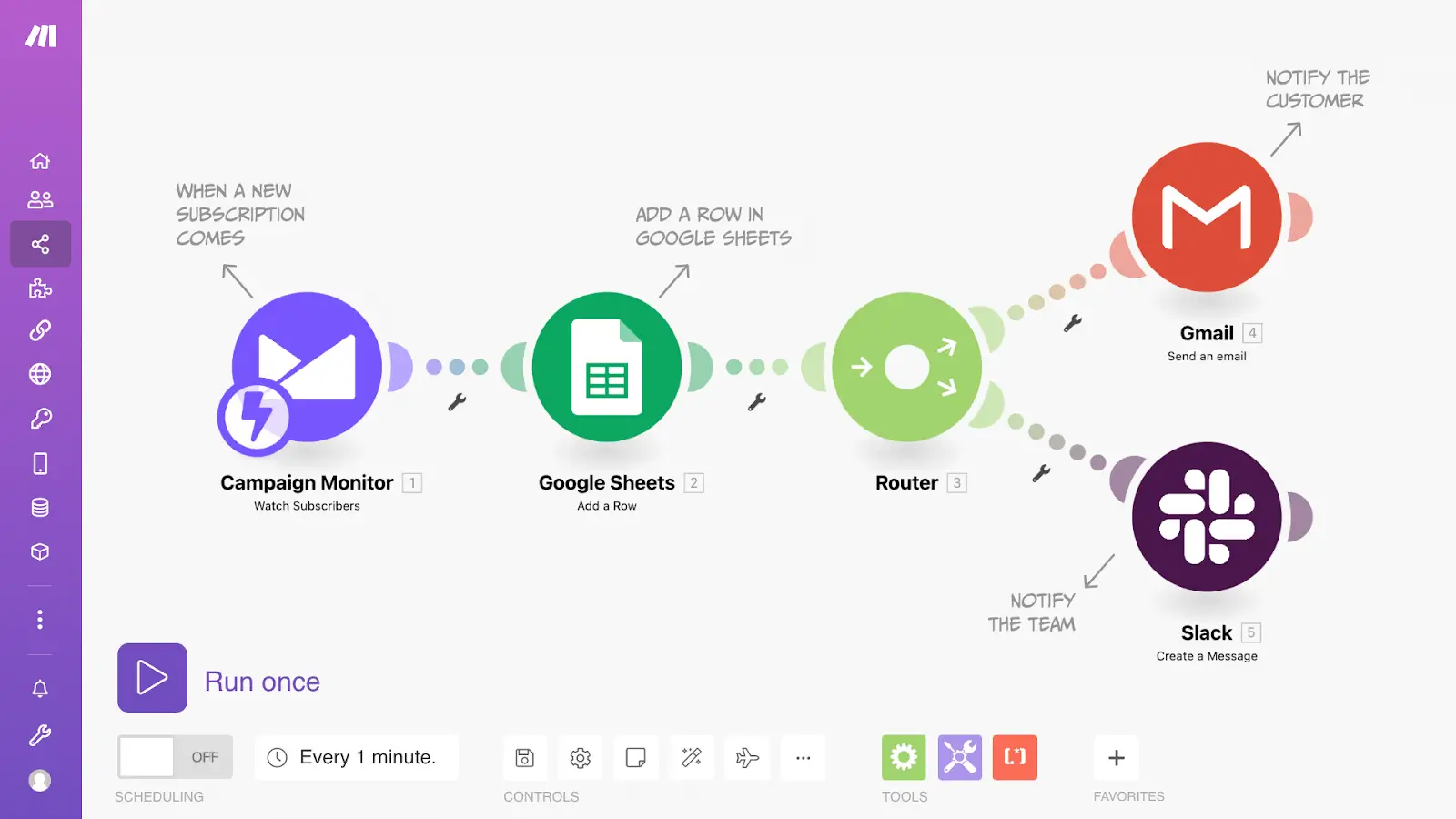
Make is a cloud-based automation platform built around visual scenario design: workflows appear as interactive flowcharts where you can see exactly how data flows between apps and transforms at each step. Unlike linear automation builders, Make's canvas lets you map complex logic with multiple paths, conditional routing, and parallel processing, making it easier to understand and debug sophisticated workflows at a glance.
Make pros and cons
Pros:
- Visual flowchart interface makes complex logic easier to understand
- Handles sophisticated scenarios with parallel processing, multiple conditional paths, and error routing
- Extensive app library with 3,000+ integrations
- Granular control over data mapping between steps shows exactly what information passes through
Cons:
- Credit-based pricing means costs can increase quickly with heavy usage
- No self-hosting option for teams requiring on-premise deployment
Key Make features
- Visual workflow builder: Create multi-step automations using a drag-and-drop interface, with triggers, actions, branches, and logic all laid out visually.
- Advanced logic without coding: Use conditions, branches, filters, loops, and more to build sophisticated workflows without writing any code.
- Built-in data transformation tools: Filter, format, and map data between steps directly in your automation flows.
- AI and automation tools built in: Apply AI modules and Make AI agents to handle tasks like data processing, sentiment analysis, and content classification.
Make pricing
- Free: For up to 1,000 credits/month
- Core: $9/month (billed annually)
- Pro: $16/month (billed annually)
- Teams: $29/month (billed annually)
- Enterprise: Custom pricing
Verdict: Make vs n8n
Choose Make if you want advanced visual automation without managing infrastructure. It can be a good option when you need complex data transformations and multi-path logic but lack the technical resources for server management.
5. Lindy — best for AI agent-powered automation
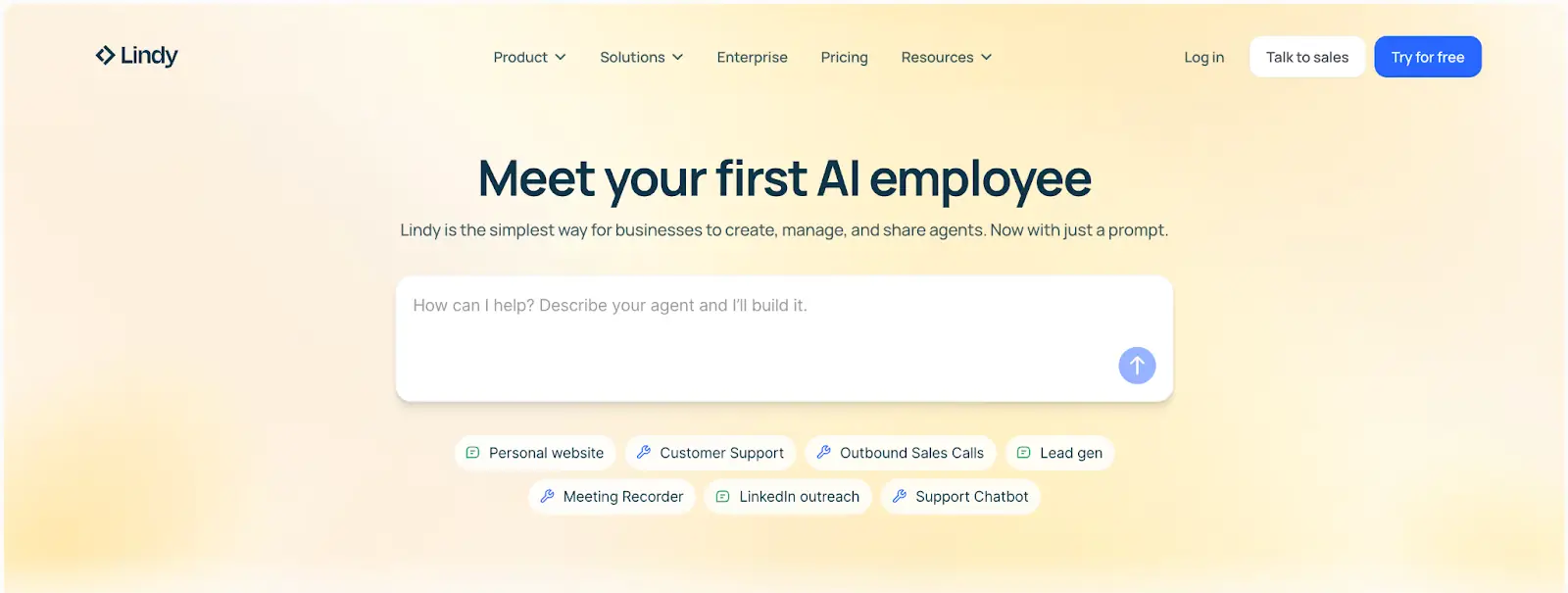
Lindy is an AI-first automation platform where you delegate work to autonomous agents rather than building workflows manually. Create agents to handle tasks across tools like email, calendars, CRMs, and more using natural language prompts. Instead of building step-by-step automations, you describe what you want done, and Lindy’s AI figures out how to execute.
Lindy pros and cons
Pros:
- Faster setup than most automation tools on the market
- AI agents can handle tasks that need judgment, not just repetition
- Agents improve over time by learning from your feedback and past interactions
- Natural language interface eliminates the learning curve of visual builders
Cons:
- Credit consumption can be unpredictable for complex or high-frequency agent tasks
- Less transparency and control compared to visual workflow builders—harder to debug when agents behave unexpectedly
- Agent performance depends heavily on how well you communicate instructions and context
Key Lindy features
- Natural language agent creation: Describe what you want automated in plain English—like “Follow up with new leads and update my CRM”—and Lindy builds the automation logic for you.
- Multi-step workflows with AI reasoning: Agents make decisions, classify requests, summarize content, and choose next actions based on the context you provide.
- Pre-built templates and agents: While you can always start from a prompt, you can also use pre-made agents for common tasks like taking meeting notes, running outreach, handling customer support requests, and scheduling.
- Conversational memory and learning: Agents remember your preferences, past decisions, and feedback, refining their behavior to match your processes over time.
Lindy pricing
- Free: 400 credits/month
- Pro: $19.99/month
- Business: $199.99/month
- Enterprise: Custom pricing
Verdict: Lindy vs n8n
Choose Lindy if you're a small team or solopreneur and want automation powered by AI agents built on natural language prompts rather than a visual workflow interface.
Invest in the right n8n alternative for your team
While n8n can work well for technical teams who want full control and self-hosting, it's not always a fit for businesses who just want to get work done. When it comes to alternatives, any app on this list will make it easier to automate your existing tech stack.
But if you're tired of stitching together separate tools for data, automation, and interfaces, Softr lets you build everything in one place — eliminating the need for Zapier, Make, or other third-party tools.
With Softr, small and enterprise organizations alike can create portals, databases, dashboards, and internal tools with automation built in directly. Streamline end-to-end workflows tailored to your actual business processes, not generic templates.
Try Softr for free and start building workflows today.
Frequently asked questions
Is n8n the best tool for AI agents?
Is there a free alternative to n8n?
Is n8n worth paying for?