
Insurance agents don’t lose business because they lack leads. They lose it because follow-ups slip, renewals get tracked in spreadsheets, and CRMs don’t match how insurance work actually runs day to day. Many tools are built for generic sales teams, not for policies, long sales cycles, and time-sensitive renewals. The result is manual work, broken automations, and systems that agents slowly stop using.
That’s where the right CRM makes a real difference. The best CRM for insurance agents keeps client data, follow-ups, and renewal timelines in one place and works without weeks of setup or ongoing admin work.
In this guide, we break down what to look for in CRM software for insurance agents in 2026 and compare tools that they can actually run and scale.
Best CRMs for insurance agents at a glance
| Tool | Best for | Standout features | Pricing |
|---|---|---|---|
| Softr | Insurance agencies that need flexible workflows, renewals, and shared systems without per-seat costs | • An AI-Co Builder to build databases + app + business logic already connected • Renewal-based automations and custom insurance fields • Role-based access and client/partner portals • Flat pricing with no per-seat fees for external users | Free plan available; Paid plans from $19/month |
| HubSpot Sales Hub | Sales-driven insurance firms focused on lead tracking and outbound activity | • Contact & deal timelines with full activity history • Sales pipelines and follow-up sequences • Strong reporting and forecasting • Large integration ecosystem | Free plan available; Paid plans from ~$15–$100+/user/month |
| Zoho CRM | Structured insurance teams that want deep automation and custom modules | • Custom fields and modules for policy data• Workflow rules and automation • Multi-pipeline support • Reporting and dashboards | Free plan available; Paid plans from ~$14/user/month |
| Salesmate | Insurance teams that want built-in calling, SMS, and automated follow-ups | • Built-in calling, SMS, and email tracking • Custom pipelines and Smart Flows automation • AI-assisted productivity tools • Activity-based reminders | Paid plans from ~$23/user/month |
| Shape CRM | Agencies prioritizing multi-channel outreach and AI-driven engagement | • Built-in calling, SMS/MMS, and email • AI lead scoring and automated follow-ups • Custom pipelines and dashboards • Centralized communication hub | Paid plans from ~$119/user/month |
| Decerto Agent Portal | Insurers, MGAs, and agencies needing an insurance-first CRM and policy lifecycle system | • Native support for quoting, policies, renewals, and claims • Centralized customer and policy data • Renewal and service automation • Integration with core insurance systems | Custom pricing only |
What is CRM software for insurance agents?
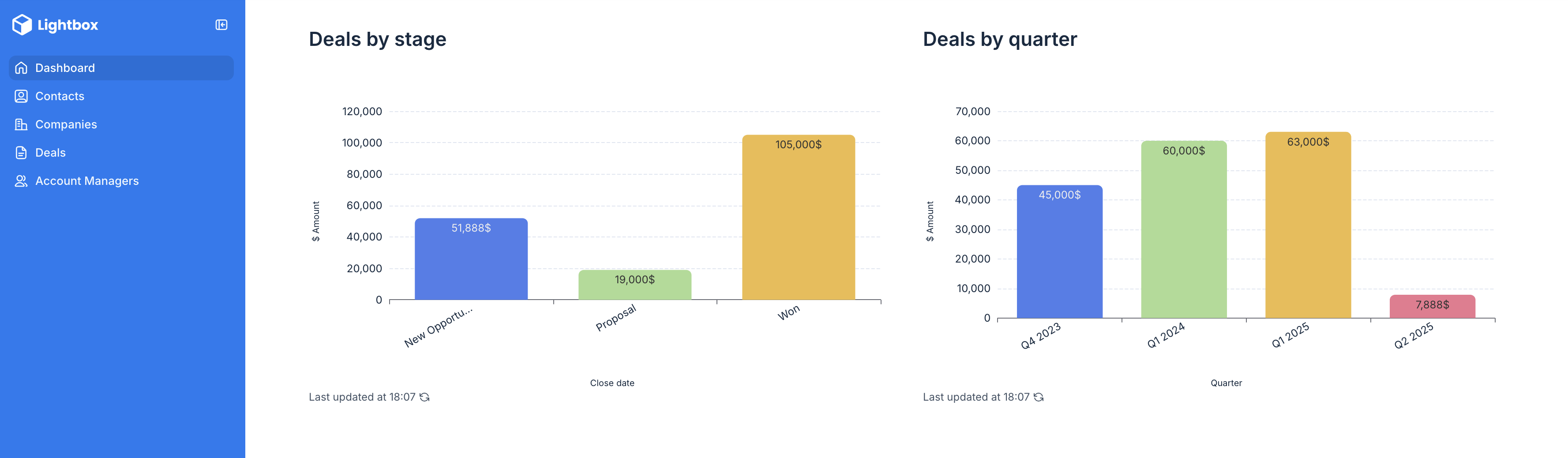
CRM software for insurance agents helps agents manage the full client lifecycle—from first lead to active policy to renewal—inside one shared system. Beyond contacts and deals, this type of CRM tracks follow-ups, policy timelines, interactions, and team activity, so nothing falls through the cracks.
Unlike generic sales CRMs, insurance-focused setups need to support renewals, long sales cycles, and service-driven workflows.
What to look for in CRM software for insurance agents
Here’s what matters most for insurance teams evaluating CRM tools today:
- Flexible pipelines and stages: Look for a CRM that adapts to your sales and renewal process, not one that forces generic deal stages.
- Reliable follow-up and reminders: Missed follow-ups are a common struggle. The right tool should make tasks and reminders impossible to forget.
- Easy setup without technical overhead: Avoid CRMs that require weeks of configuration, onboarding, or paid consultants just to get started.
- Custom fields for insurance data: Look for software that lets you set custom fields tailored to your insurance business, like policy type, carrier, renewal date, and notes.
- Clear visibility for teams: Agents, managers, and admins should see only the clients, data, and tasks they need to see.
- Integrations with existing tools: Your CRM should work with your existing data and workflows, regardless of what software you were using before.
- Automation that reflects real workflows: Automations should trigger based on real insurance events, like renewals or status changes, not generic sales activity.
- Scalability without enterprise pricing: The best tools grow with your agency without locking essential features behind expensive tiers.
1. Softr — best CRM for insurance agents who need flexible workflows
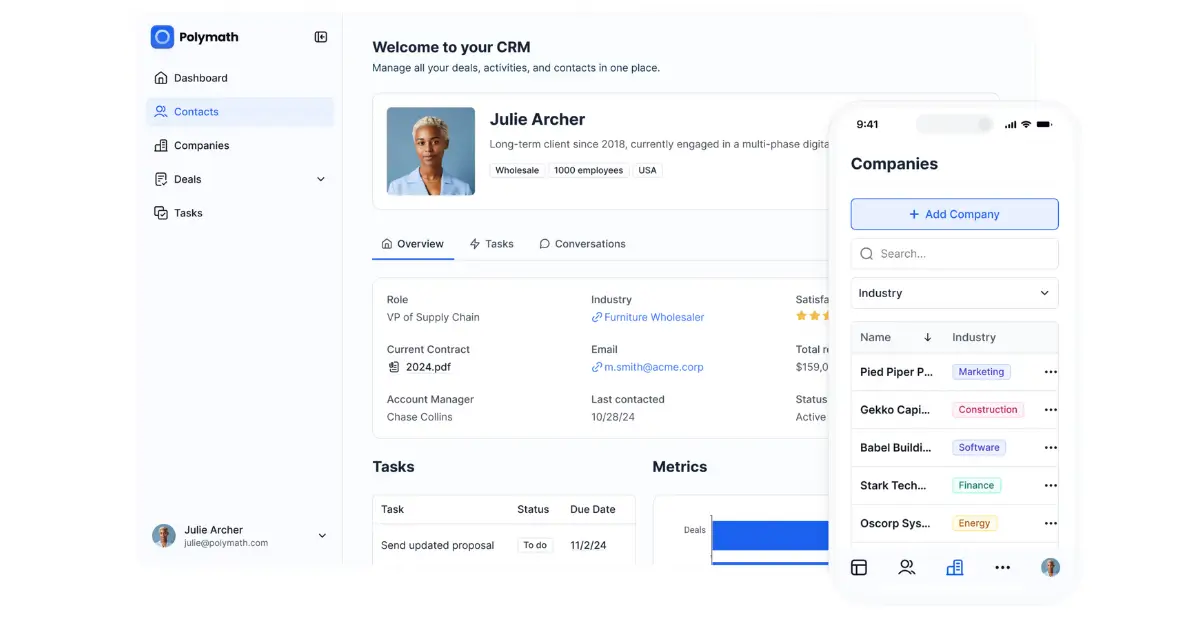
Insurance agencies often struggle with CRMs built for fast-moving sales teams. Softr solves this by letting anyone (with or without technical expertise) build custom CRMs that make sense for the way their business operates. All you have to do is tell Softr’s [AI-Co Builder](https://AI Co-Builder) what you’re after, and it puts together a fully secure system that’s ready to go, with a relational database, app, and business logic all built in.
Agents can track leads, active policies, renewal dates, carriers, and communication history in one shared system. With the visual builder, you can change, add, or remove features and pages without having to re-prompt the AI if you don’t want to.
Plus, to keep your business moving swiftly, teams can trigger reminders when renewals are coming up, assign follow-ups automatically, and stay on top of expiring policies, outstanding quotes, and claim deadlines. No consultants, reimplementation, or technical debt is necessary.
Softr pros and cons
Pros:
- Fast to set up: Launch an insurance CRM in minutes using 90+ templates and a drag-and-drop builder; no developers, onboarding calls, or complex setup required.
- Data flexibility: Store and manage insurance data in Softr's built-in database, or connect to existing tools like Airtable, Google Sheets, HubSpot, Notion, monday.com, BigQuery, and more.
- Built around renewals and long sales cycles: Customize your pipelines and automations to reflect real insurance timelines, not generic deal stages.
- Custom fields for insurance data: Track policy type, carrier, renewal date, coverage notes, and claim history as primary data.
- Automation without complexity: Trigger reminders, task assignments, and status changes based on real events like renewals, new claims, or policy updates.
- Clear role-based access: Agents, admins, and managers see only what they need, reducing errors and noise.
- No per-seat fees for external users: Insurance teams can share portals with partners or clients without expensive licenses.
Cons:
- Not a plug-and-play insurance CRM out of the box
Best features for insurance agencies
- Vibe Coding Block: Build an insurance CRM structure, pipelines, dashboards, and views from scratch. Use AI prompts to instantly generate trackers, commission calculators, policy dashboards, and performance widgets tailored to how your agency operates.
- Conditional forms: Capture leads with conditional logic (policy type, coverage needs, carrier, state). Or use forms to log service requests, endorsements, or claims so follow-ups are tracked and assigned automatically.
- Reporting & dashboards: Use chart blocks to create real-time dashboards for renewals due, expiring policies, outstanding quotes, and agent workload. Or embed reports from other tools.
- Workflow automation: Send renewal reminders, assign follow-ups, and update statuses automatically based on dates or changes.
- Flexible pipelines: Separate new business, renewals, and service workflows so policy management doesn’t get buried inside a single sales funnel.
- Client and partner portals: Securely share policy details, documents, or updates with brokers and partners.
- Invoice management: Securely store and share quotes, proposals, or invoices with other agents and partners using native blocks or integrations with Stripe, QuickBooks, Paypal, and more.
- Ask AI: Add a built-in chat assistant that helps users search CRM data and get answers instantly, like “What renewals are due this month?” or “Which clients need follow-ups?”, without digging through records or reports.
- 24/7 support + active community: Access live chat and a strong builder community for quick help and inspiration.
Softr Pricing
Softr offers a free plan for testing and small internal setups and flexible pricing with paid plans that scale as agencies grow.
- Free: Unlimited apps, with access to Softr Workflows and Softr Databases, 5 app users, 5 AI credits, and 5,000 database records
- Basic: $19/month for unlimited apps with 42+ integrations, Team: 5 + Client: 5 app users, 10 AI credits, and 50K records
- Pro: $99/month for unlimited apps with 45+ integrations and custom code, Team: 10 + Client: 50 app users, 50 AI credits, and 500K records
- Business: $329/month for unlimited apps with 52+ integrations, Team: 30 + Client: 100 app users, 100 AI credits, and 1M records
- Enterprise (custom pricing, contact sales)
2. Hubspot Sales Hub — best CRM for sales-driven insurance firms
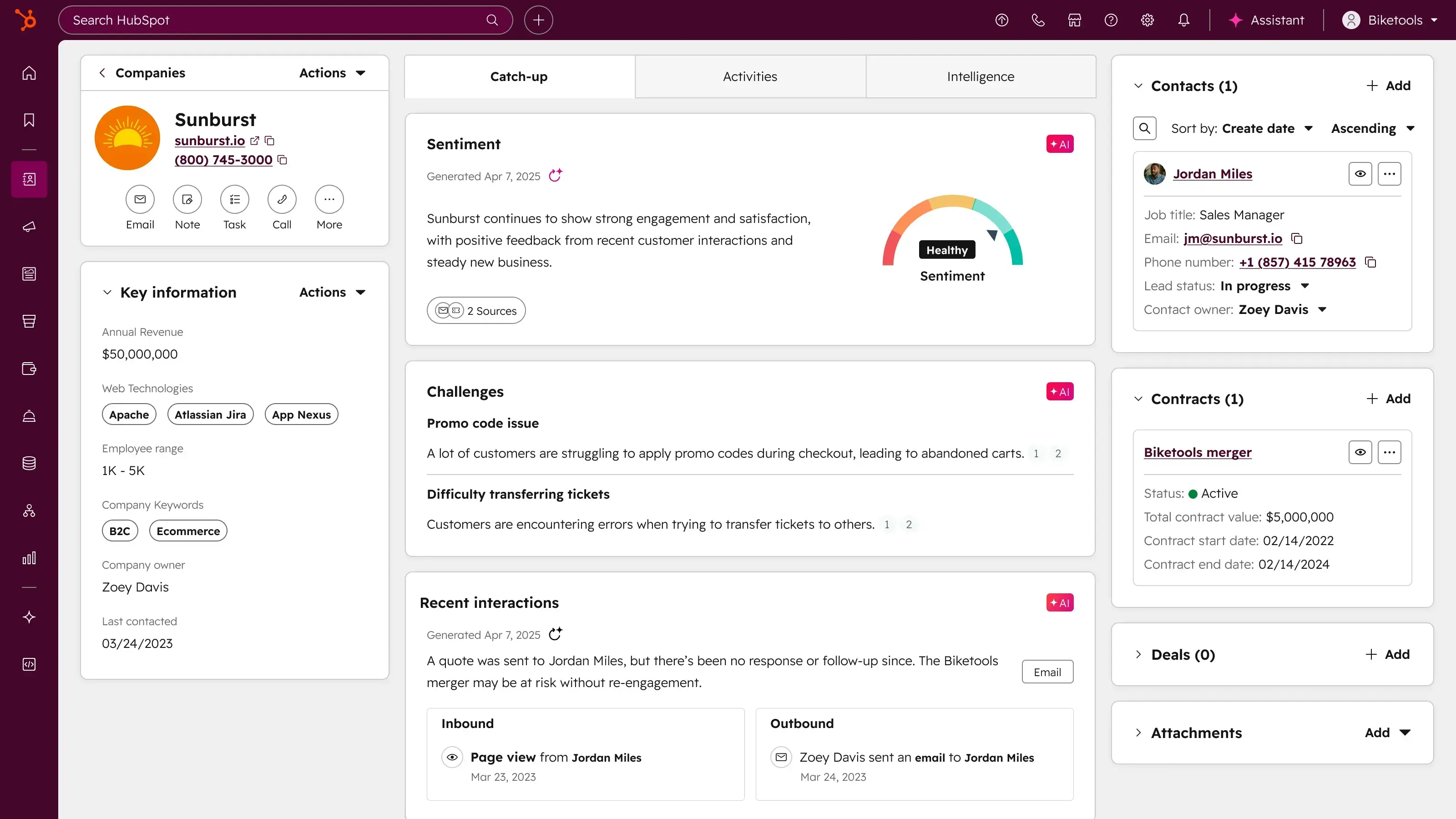
HubSpot Sales Hub is a well-known CRM built to manage contacts, deals, and sales activity in one centralized system. It’s designed for teams that want structured pipelines, consistent follow-ups, and visibility into sales performance through built-in tracking and reporting.
For insurance agencies, HubSpot works best when the primary need is organizing leads, tracking outreach, and managing active opportunities. Calls, emails, and meetings are logged automatically, giving agents and managers a clear record of client interactions over time.
However, HubSpot is fundamentally a sales-first CRM. Modeling insurance-specific workflows, like renewals, policy lifecycle tracking, or service-driven follow-ups, often requires additional customization, integrations, or higher-tier plans.
HubSpot pros and cons
Pros:
- Reliable pipeline and contact management: Track leads, deals, and communication history in a single CRM.
- Built-in sales automation: Use sequences, tasks, and reminders to support consistent follow-ups.
- Strong reporting: Dashboards and forecasts give managers visibility into pipeline health and performance.
- Large integration ecosystem: Connect HubSpot with marketing, support, and third-party tools as needed.
Cons:
- Sales-focused by design: Not built specifically for renewals, long policy cycles, or service workflows.
- Per-seat pricing: Costs increase as teams grow, especially on higher tiers.
- Advanced automation requires upgrades: Many customization and automation features sit behind Professional and Enterprise plans.
Best features for insurance agencies
- Contact & deal records with full activity history: Every client record shows calls, emails, meetings, notes, and deal updates in one timeline, so agents always know the full context before following up.
- Visual sales pipelines: Track prospects as they move through defined stages (lead → quoted → closed), with drag-and-drop updates that keep pipelines organized and visible to managers.
- Sequences for follow-ups: Create step-by-step follow-up sequences that automatically generate tasks or emails, helping agents stay consistent without relying on memory or spreadsheets.
- Email and call tracking: Automatically log emails and calls to the right contact and deal, so communication doesn’t get lost across inboxes or phones.
- Reporting and forecasting dashboards: Monitor deal volume, conversion rates, and pipeline value to understand what’s likely to close and where deals are stalling.
HubSpot pricing (Sales Hub)
HubSpot uses per-user pricing that scales by feature tier:
- Free: $0 — basic CRM with contact and deal tracking.
- Starter: ~$15–$20/user/month — adds simple automation and reporting.
- Professional: ~$90–$100/user/month — advanced automation, multiple pipelines, forecasting.
- Enterprise: ~$150+/user/month — deeper customization and advanced permissions.
Pricing is typically billed annually and increases with the number of users.
3. Zoho — best CRM with deeper automation for structured teams
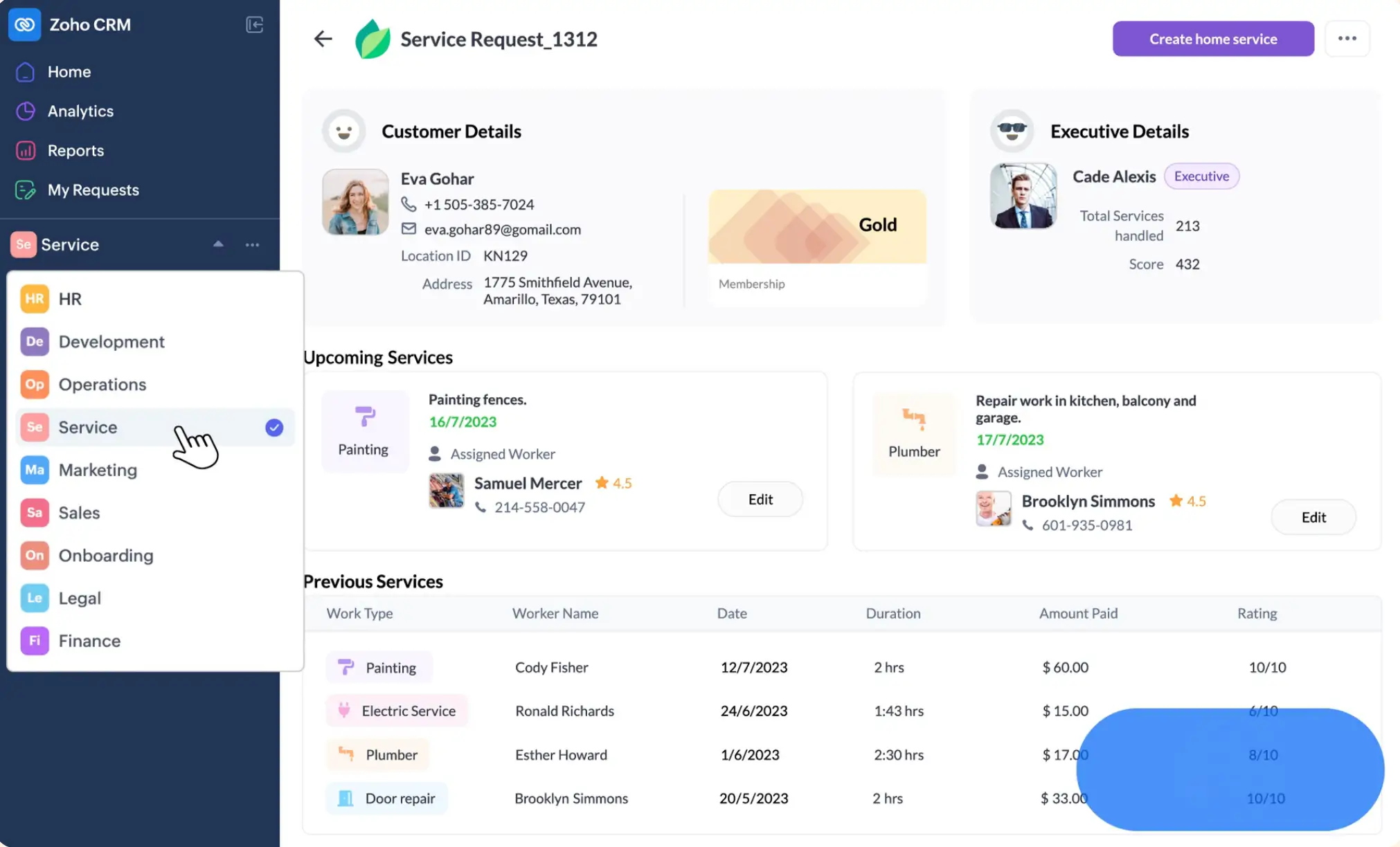
Zoho CRM is a full-featured customer relationship management platform that helps teams centralize contacts, leads, deals, and activity across a structured CRM system. It’s part of Zoho’s broader suite of business tools, and its customization options make it a good fit for insurance agencies that want detailed control over how data and processes are tracked — from custom fields to automated rules and reporting.
In an insurance context, Zoho can handle client and policy details, set reminders, and support workflow automation tied to status changes. It works well when teams are willing to spend a bit more time configuring modules and automation to match insurance-specific milestones like renewals or service tasks.
Zoho CRM pros and cons
Pros:
- Custom data and modules: Build custom fields and modules for insurance-specific data (policy type, renewal date, carrier, claim details), not just basic contact info.
- Workflow automation: Use built-in rules and automation to trigger tasks, reminders, or alerts when certain policy or renewal conditions are met.
- Reporting and dashboards: Generate custom reports to show pipeline status, team performance, and activity trends.
- Integration ecosystem: Works with other Zoho apps (like helpdesk, campaigns, analytics) and many third-party extensions.
Cons:
- Per-user pricing model: Every user adds to the cost, which can grow fast for larger teams.
- More setup overhead: Customizing modules and automation to reflect insurance work often requires planning and admin time.
- Feature depth varies by plan: Advanced automation, AI-driven insights, and multi-user portals are available only on higher tiers.
Best features for insurance agencies
- Custom fields & modules: Track insurance-specific information like policy details, carriers, renewal dates, and coverage notes in tailored record types.
- Workflow rules & automation: Automatically create follow-up tasks or alerts based on field changes or dates, helping teams stay on top of renewals and service commitments.
- Multi-pipeline support: Build separate pipelines for new business and renewals so you can see progress without mixing different types of work.
- Activity tracking: Log calls, emails, meetings, and notes directly on client or deal records so all interactions stay tied to the right context.
- Dashboards & reports: Visualize key metrics like conversion rates, renewal timelines, and agent performance at a glance.
Zoho CRM pricing (core CRM)
Zoho uses a per-user pricing model with multiple tiers:
- Free: $0 — up to 3 users
- Standard: ~$14/user/month (billed annually)
- Professional: ~$23/user/month
- Enterprise: ~$40/user/month
- Ultimate: ~$52/user/month
Pricing is billed annually and increases with additional users and higher tiers.
4. Salesmate — best for sales automation that fits structured insurance pipelines
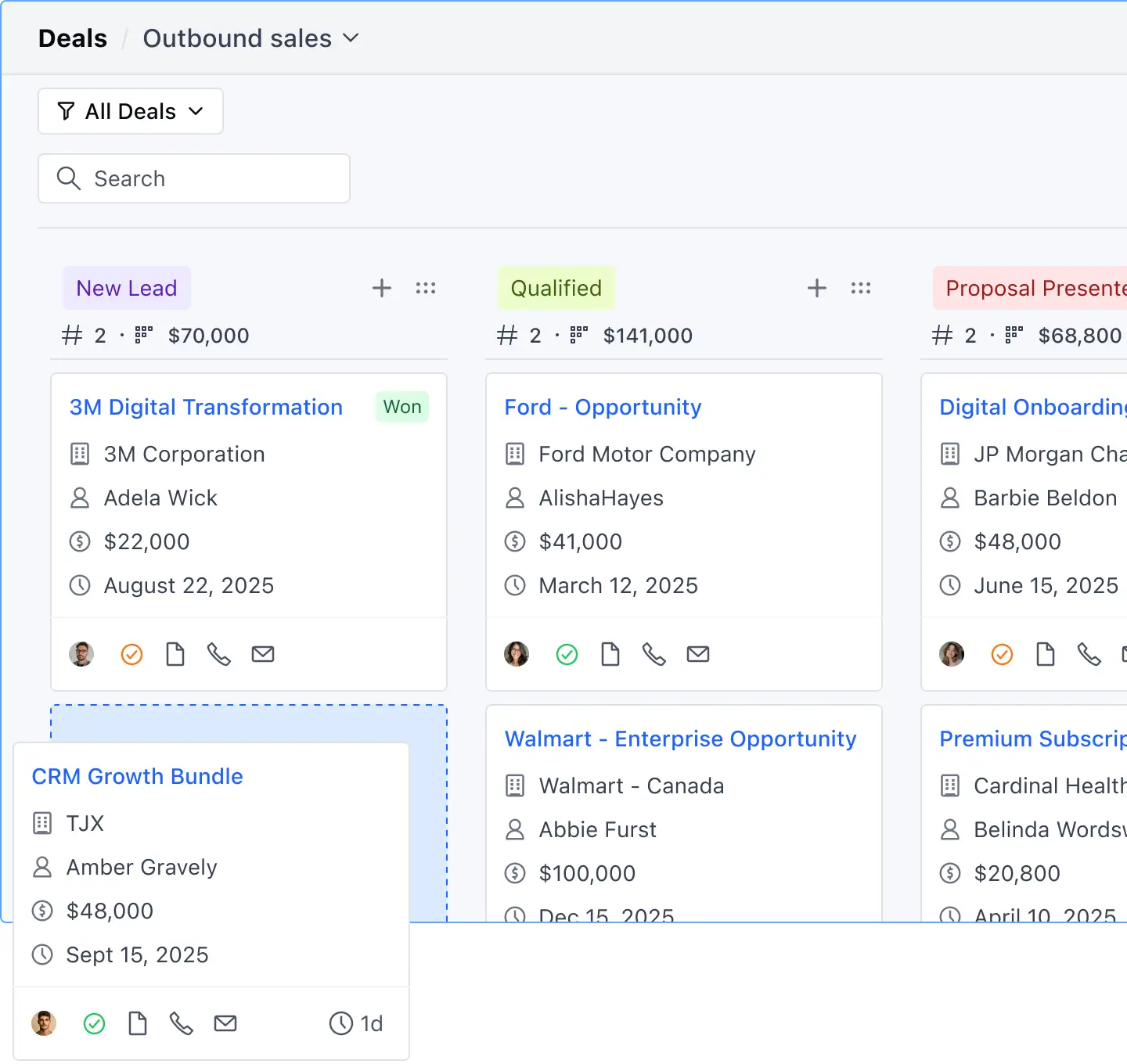
Salesmate is a sales-focused CRM that combines contact management, pipeline tracking, and workflow automation into a unified system. It’s built to help teams standardize processes and stay on top of leads, follow-ups, and policy-related tasks. It’s designed with features that can be tuned to support insurance workflows like renewals and service reminders.
Salesmate also emphasizes AI-powered assistance and multi-channel communication directly inside the CRM, giving teams a consolidated view of customer activity. For insurance teams that want automated reminders, unified pipelines, and built-in calling/texting, Salesmate provides a clear framework to manage prospects and policyholders without switching between tools. That said, its out-of-the-box setup is more sales-centric than industry-specific. Deeper insurance workflows often require manual configuration or integrations.
Salesmate pros and cons
Pros:
- Multi-channel communication built in: Includes calling, SMS, and email tracking from a single dashboard so interactions are logged and accessible.
- Customizable pipelines: Create tailored pipelines for quote-to-bind, renewals, or service tasks, helping insurance agents track progress in ways that match real workflows.
- Workflow automation (Smart flows): Trigger task assignments, reminders, and routing based on activity or dates to reduce manual follow-ups.
- AI-assisted productivity: Built-in AI tools help draft messages, suggest next steps, and support routine outreach.
- Good reporting and dashboards: See pipeline health, engagement trends, and team performance in customizable views.
Cons:
- Per-user pricing can scale quickly: Costs rise with each user and higher tiers if your team grows.
- Insurance-specific setup isn’t native: While flexible, you’ll likely need to tailor fields, reminders, and workflows to reflect renewals and policy lifecycles.
- Advanced features on higher plans: Some automations, dashboards, and workflow credits require mid-tier or above subscriptions.
Best features for insurance agencies
- Unified client timeline: See calls, emails, texts, and tasks for each contact in one place so nothing slips through.
- Custom pipelines & Smart flows: Map separate journeys like new business, renewals, and service cases with task automation tied to key dates.
- Built-in calling and SMS: Call or text clients from the CRM and log interactions automatically.
- Activity reminders & task automation: Set reminders tied to renewal dates or policy events so follow-ups aren’t forgotten.
- Dashboards & analytics: Monitor conversion trends, activity levels, and pipeline health at a glance.
Salesmate pricing
Salesmate also uses per-user pricing, with a free trial available:
- Basic: ~$23/user/month
- Pro: ~$39/user/month
- Business: ~$63/user/month
- Enterprise: Custom pricing
Annual billing offers the best rates; monthly plans are available at a higher cost.
5. Shape CRM — best sales-centric CRM with built-in communication and AI tools
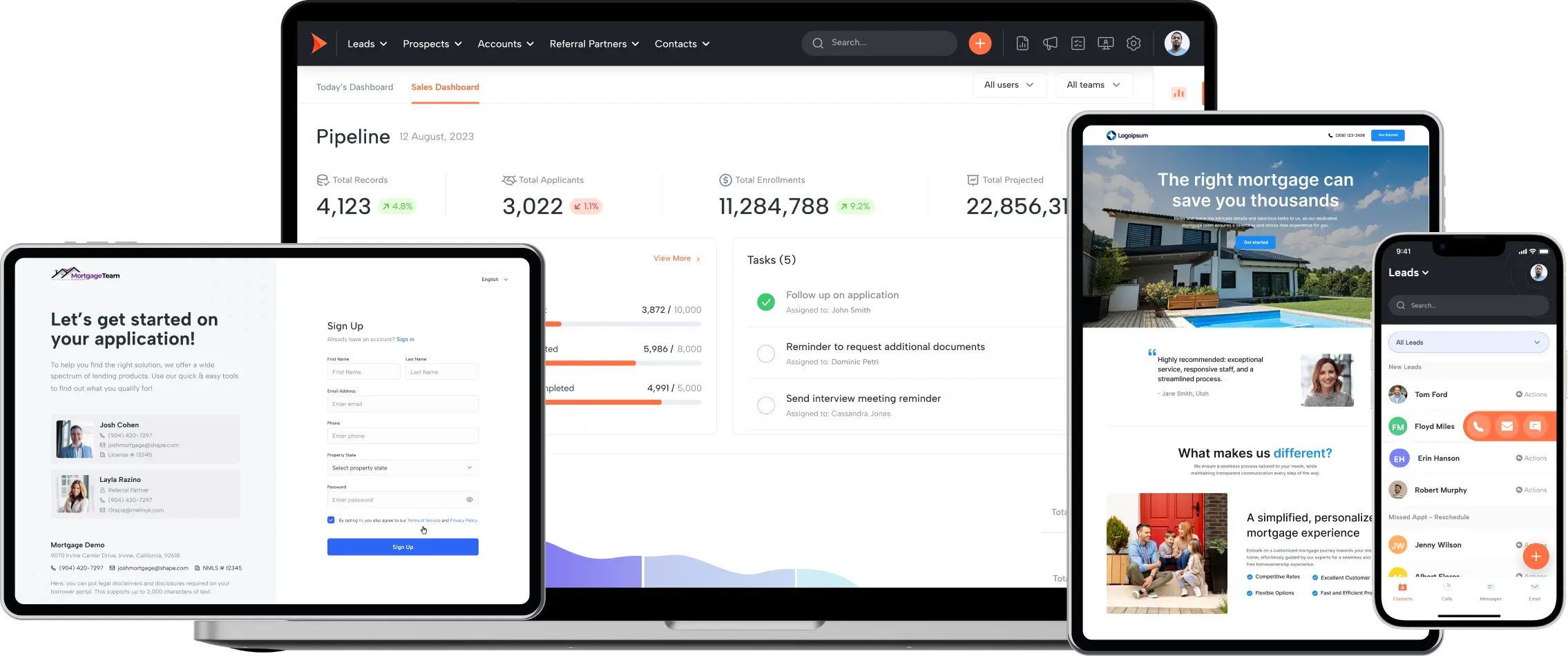
Shape CRM (by Shape Software) is an all-in-one sales and marketing automation platform that brings CRM, pipeline management, built-in calling/texting, and AI-assisted features into a single workspace. It aims to help small and mid-sized teams capture leads, automate follow-ups, and keep communication centralized without stitching together different tools.
For insurance agencies that want multi-channel communication and automation under one roof, Shape makes it easy to track calls, texts, emails, tasks, and leads from a shared system. Its AI-driven tools can help prioritize leads and suggest next steps, and built-in pipelines make it straightforward to visualize opportunities and activity. That said, Shape’s focus is general sales and engagement workflows, not insurance-specific processes, so teams often need to tailor fields and workflows to fit renewals, policy data, and long-term customer service needs.
Shape CRM pros and cons
Pros:
- Built-in calling, SMS/MMS, and email: Manage phone calls, two-way texts, and emails inside the CRM with tracking and engagement metrics — no separate telephony tool needed.
- AI assistance and automation: AI-powered lead prioritization, automated follow-ups, task triggers, and engagement insights help teams stay on top of outreach without manual effort.
- Custom pipelines & lead routing: Create pipelines that match your sales and service journeys, and route leads automatically based on rules you define.
- Real-time dashboards & reporting: Visualize performance trends, conversion activity, and team engagement in configurable views.
Cons:
- General sales focus: Shape CRM isn’t built specifically for insurance workflows, so fields like policy renewals, carriers, and long-term service cycles require setup or integration.
- Per-user pricing: Most implementations are priced per user and can add up for larger teams.
- Learning curve for customization: The wide feature set can feel overwhelming without dedicated time for configuration and onboarding.
Best features for insurance agencies
- Unified communication hub: Log calls, texts, and emails directly on contact records so all outreach stays connected to the right client.
- AI lead scoring & insights: Prioritize leads and follow-ups based on engagement signals instead of manual guesswork.
- Automated follow-up sequences: Set actions to trigger based on time or activity so policy reminders and outreach happen automatically.
- Pipeline management: Track prospect movement through opportunity stages (e.g., quote → bind → renew) in customizable views.
- Reporting dashboards: Monitor engagement metrics, team activity, and conversion trends from one place.
Shape CRM pricing
Shape CRM generally offers a single paid plan around $119 per user per month with most features included, plus a free trial to test before committing.
Shape’s pricing is typically billed monthly and is per user; if your team grows or you add advanced integrations, total costs rise with seats.
6. Decerto Agent Portal — best for agencies that need an insurance-centric CRM and policy lifecycle workspace
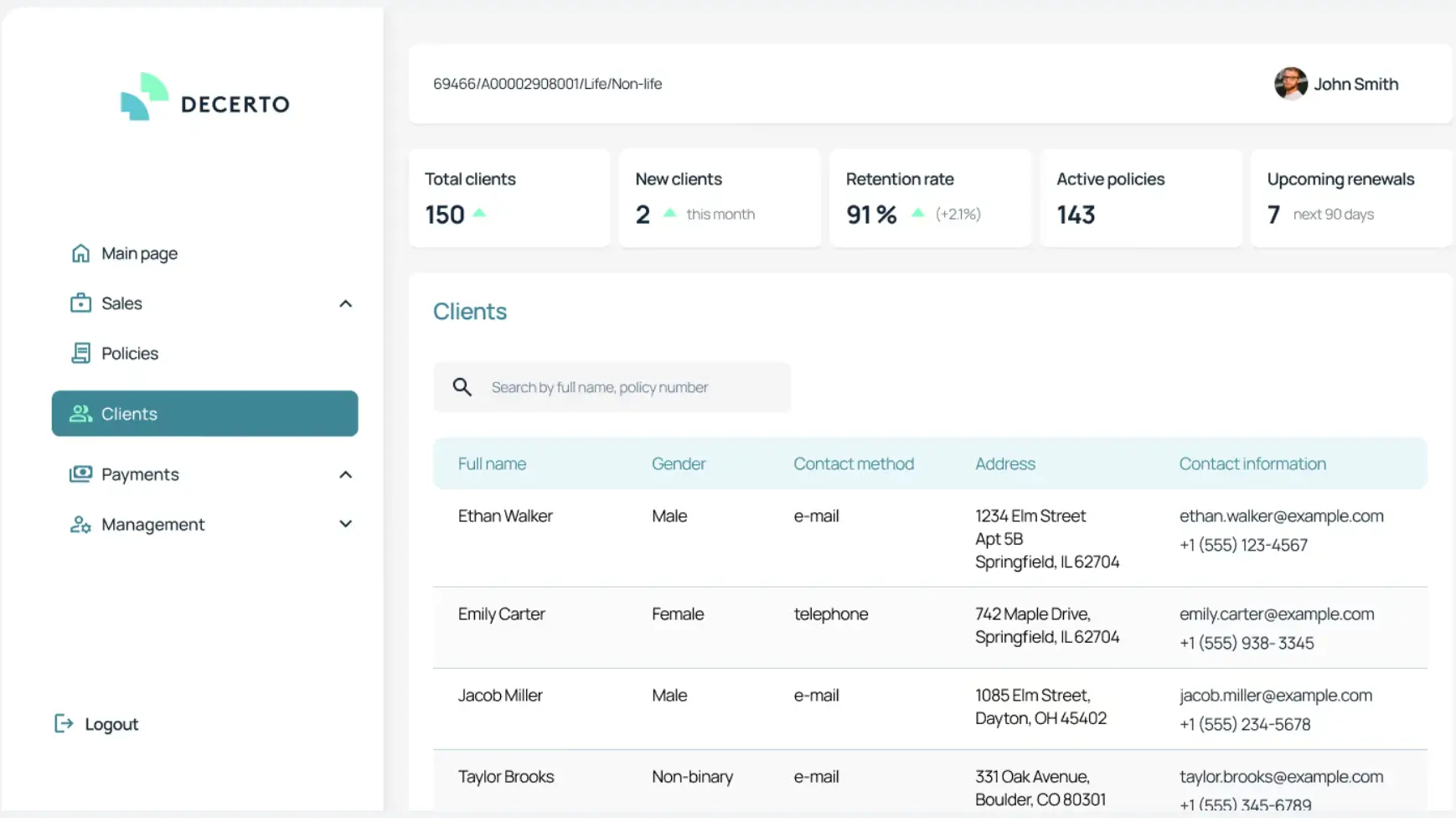
Decerto Agent Portal is a purpose-built insurance CRM and agent workspace designed specifically to support the full lifecycle of insurance sales, policy management, and client service. Unlike generic CRMs, it integrates core insurance functions, from quoting and policy creation to renewals and claims.
The system aims to streamline everyday work for agents and brokers. It centralizes customer profiles, policy details, sales activity, claims history, and reporting. It also supports integrations with existing policy administration systems and third-party applications, making it easier to pull data together and reduce administrative overhead.
Decerto Agent Portal pros and cons
Pros:
- Built for insurance workflows: Core features are aligned with real insurance tasks — quoting, policy issuance, renewals, and claims — rather than generic sales processes.
- Centralized customer and policy data: Agents can access client records, policy history, claims, and interactions in one place, reducing context-switching.
- Automation for renewals and tasks: Built-in automation can handle reminders and routine work tied to policy milestones and sales triggers.
- Seamless integration with insurance systems: Designed to connect with existing tools like policy administration, underwriting, or e-signature systems.
Cons:
- Not an out-of-the-box SaaS CRM: Implementation typically requires initial setup and configuration tailored to your agency’s products, data, and workflows.
- Enterprise-oriented pricing and sales process: Pricing isn’t published publicly — you typically engage with the vendor for a customized quote based on your needs and integrations.
- Focused on insurance distribution vs. general sales: While strong for insurer or MGA use cases, it doesn’t replace broader tool ecosystems that smaller independent agents might prefer for daily outreach workflows.
Best features for insurance agencies
- Policy and quoting engine: Agents can configure products, calculate premiums, and generate compliant offers from a single interface — often with real-time pricing logic integrated.
- Client and policy dashboards: Unified views show all active and historical policies, customer interactions, and service tasks.
- Renewal automation: Built-in support for notifications and automated tasks tied to policy renewal dates.
- Claims and service tracking: Manage and log claims status and related documents alongside policy records.
- Reporting and analytics: Track performance, pipeline health, commissions, and customer behavior with customizable reports.
Decerto pricing
Decerto Agent Portal does not offer publicly listed pricing. Costs vary based on deployment, features, number of users, and system integrations. It’s typically sold through a custom quote process with technical discovery and implementation planning.
Find a CRM for insurance agents that fits your needs
There’s no single “best” CRM for insurance agents — only the best fit for how your agency runs day to day. If your focus is pure sales activity, tools like HubSpot or Salesmate can cover pipeline tracking and outreach. If you need deeper structure and automation and don’t mind heavier setup, Zoho or insurance-first platforms like Decerto may make sense.
But many agencies aren’t just selling policies. They’re managing renewals, service follow-ups, shared ownership, and external access across teams and partners. In those cases, the real requirement isn’t a sales CRM, but a flexible system of record that connects data, automates real insurance workflows, and can evolve without constant rework. That’s where Softr stands out as the top solution.
👉 Explore the Softr CRM template and see how it adapts to your agency’s workflows.
Frequently asked questions
What is the best CRM for an insurance agency?
What CRM do most realtors use?
Is HubSpot good for insurance agents?