


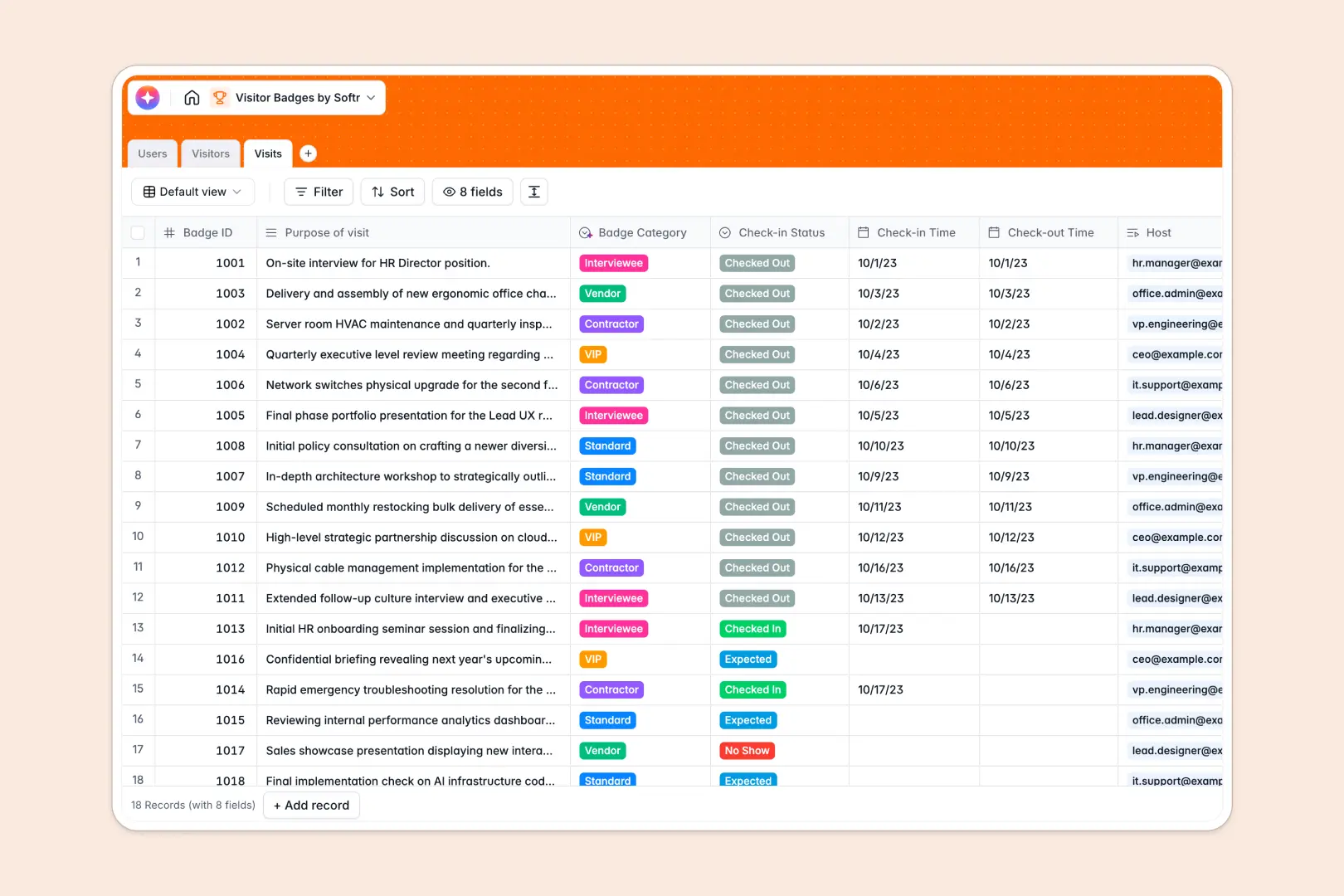
Your Visitor Badges Database at a glance
This template tracks visitors, hosts, and check-in logs to keep your workplace completely secure.
It cleanly connects external guests to internal employees, creating an organized history of every visit. When someone arrives, you can effortlessly log their check-in time and assign a specific badge ID.
Built-in AI runs behind the scenes to quickly summarize the guest's company background using live web research. It also actively reads the purpose of the visit to instantly categorize the required badge type.
Why managing visitor badges in spreadsheets breaks down
Tracking guests coming and going gets messy blindly relying on static spreadsheet rows.
What a structured database changes
Using a structured data model ensures strict rules and prevents disorganized, overflowing lists. Dates stay cleanly formatted and external guests link explicitly to their internal host employees without copying and pasting names.
This is exactly what Softr Databases are built uniquely to handle gracefully. They provide a scalable, error-free foundation for your security and facility operations.
What you can do with this template
You can effortlessly maintain an accurate, searchable history of all arriving guests and easily review total visit counts.
Automated AI helpers instantly search the web for corporate details and determine if an arrival requires a VIP, standard, or vendor badge.
This grants your reception desk a ready-to-use tool that eliminates manual data entry and builds workplace safety instantly.
-
Users
Manage internal staff roles and hosts who authorize guest site access
-
Visitors
Store guest profiles with AI-generated company background and history
-
Visits
Log session data with AI-assisted categorization of guest badge types
Who is this Visitor Badges database for
This ready-to-use system helps administrative teams manage physical security and guest experiences flawlessly.
- Office Managers: Oversee daily arrivals, vendor check-ins, and building traffic safely with strict structure.
- Receptionists: Instantly log arrivals, verify hosts, and issue accurate categorized badges in real time.
- Security Teams: Maintain a continuously reliable, searchable audit trail of who is currently in the facility.
How to take it further
This template is completely customizable to align exactly with your operational building rules. You can easily add fresh badge categories, adjust check-in statuses, or insert specific fields to track license plates.
If you already maintain a list of upcoming expected guests, you can seamlessly import bulk lists via CSV. This lets your front desk team transition into the new system natively in seconds.
When your organization is prepared to scale, you can easily deploy a custom tablet experience for the physical front desk. Leveraging a fundamentally structured database makes developing customized internal systems incredibly straightforward.
By configuring strict permissions, you naturally ensure front desk staff process check-ins while standard employees singularly oversee their own personal meeting schedules.
-
1
-
2
-
3
-
4
Frequently asked questions
-
What is a visitor badges database?
-
Why use a no-code database to build a visitor management system?
-
How can AI help managing data for visitor badges?
-
Can I build an app with this visitor badges database?
-
Is this Visitor Badges database free?
-
How does this template connect visitors to internal employees?
Start building today. It's free!
Build and launch your first app in under 30 minutes.