


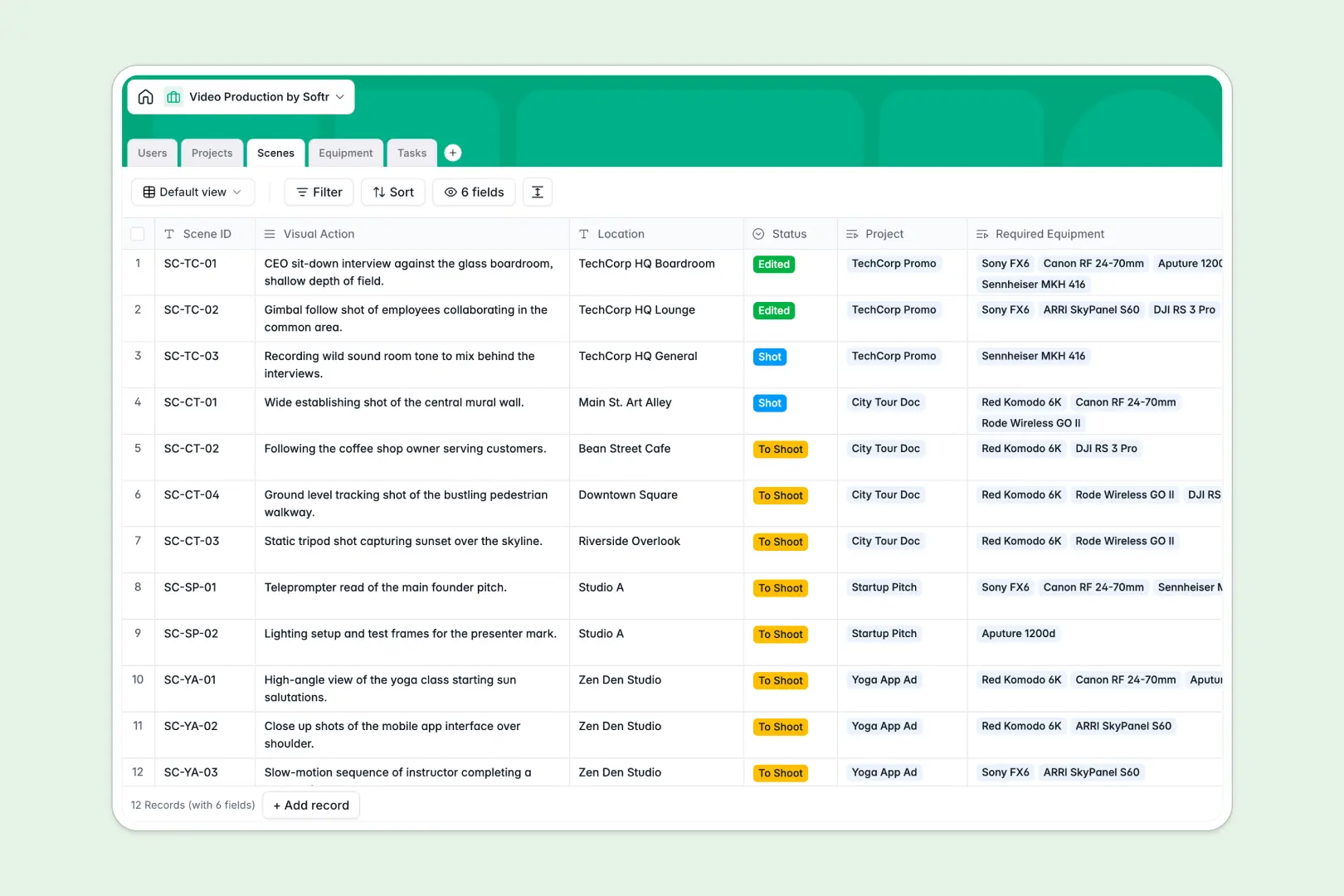
Your Video Production database at a glance
This template gives your team a centralized system to coordinate every stage of video production, from initial concept to final export.
It connects your Projects, Scenes, Equipment, Tasks, and Users tables so shot lists automatically link to required cameras, crew members, and editing schedules.
Built-in AI fields automatically summarize long project briefs, look up gear specifications from manufacturer links, and categorize production tasks.
Why shot lists and gear rosters break outside a relational database
Managing video production with isolated rows quickly falls apart when gear gets double-booked, shot lists drift from client briefs, and task updates get buried across tabs.
What a structured database changes
A structured database enforces clean relationships across your entire workflow. Scenes link directly to specific camera packages, tasks connect to assignees, and project due dates stay tied to active milestones without broken formulas.
This is exactly what Softr Databases are designed for, giving you typed fields, relational lookups, and clear visibility across multiple shoot schedules.
What you can do with this template
You can track scene locations alongside required lighting equipment, allocate tasks to crew roles, and monitor shoot milestones across all active projects in one place.
Native Database AI agents research technical equipment specs directly from manufacturer websites and extract punchy summaries from complex creative briefs.
-
Users
Manage production crew, staff, and clients with roles and assigned tasks
-
Projects
Track video projects with timelines, scenes, and AI-powered brief summaries
-
Scenes
Organize individual shots, visual actions, locations, and gear needs
-
Equipment
Inventory gear availability and retrieve technical specs using web AI
-
Tasks
Coordinate production to-dos with assignees, dates, and AI classification
Who is this Video Production database for
This system is built for creative teams that need structured coordination across shoots, gear, and crew.
- Video Production Agencies: Track multiple client campaigns, assign crew members, and maintain accurate delivery timelines.
- In-House Media Teams: Manage internal video requests, coordinate shoot schedules, and maintain gear inventory.
- Independent Producers: Organize scene breakdowns, track gear availability, and share progress with clients.
- Post-Production Supervisors: Oversee editing rounds, monitor task statuses, and keep review notes attached to projects.
How to take it further
1. Customize the database
Adjust project statuses, add custom categories for specialized gear like drones or gimbal rigs, or add custom fields to track scene shooting times and location permits.
2. Import your existing data
Upload your current gear inventories, crew contact lists, or active shot sheets via CSV import in seconds, or sync records directly through the API.
3. Build a full app around it
When your team is ready, use the AI app generator to generate a client review portal or crew dashboard on top of this database in one prompt. Configure granular users and permissions so clients only see their project milestones while crew members access daily call sheets and equipment lists.
-
1
-
2
-
3
-
4
Frequently asked questions
-
What is a video production database?
-
Why use a no-code database to build a video production system?
-
How can AI help managing data for video production?
-
Can I build an app with video production database?
-
Is this Video Production database free?
-
Can I link equipment directly to specific scenes?
Start building today. It's free!
Build and launch your first app in under 30 minutes.