


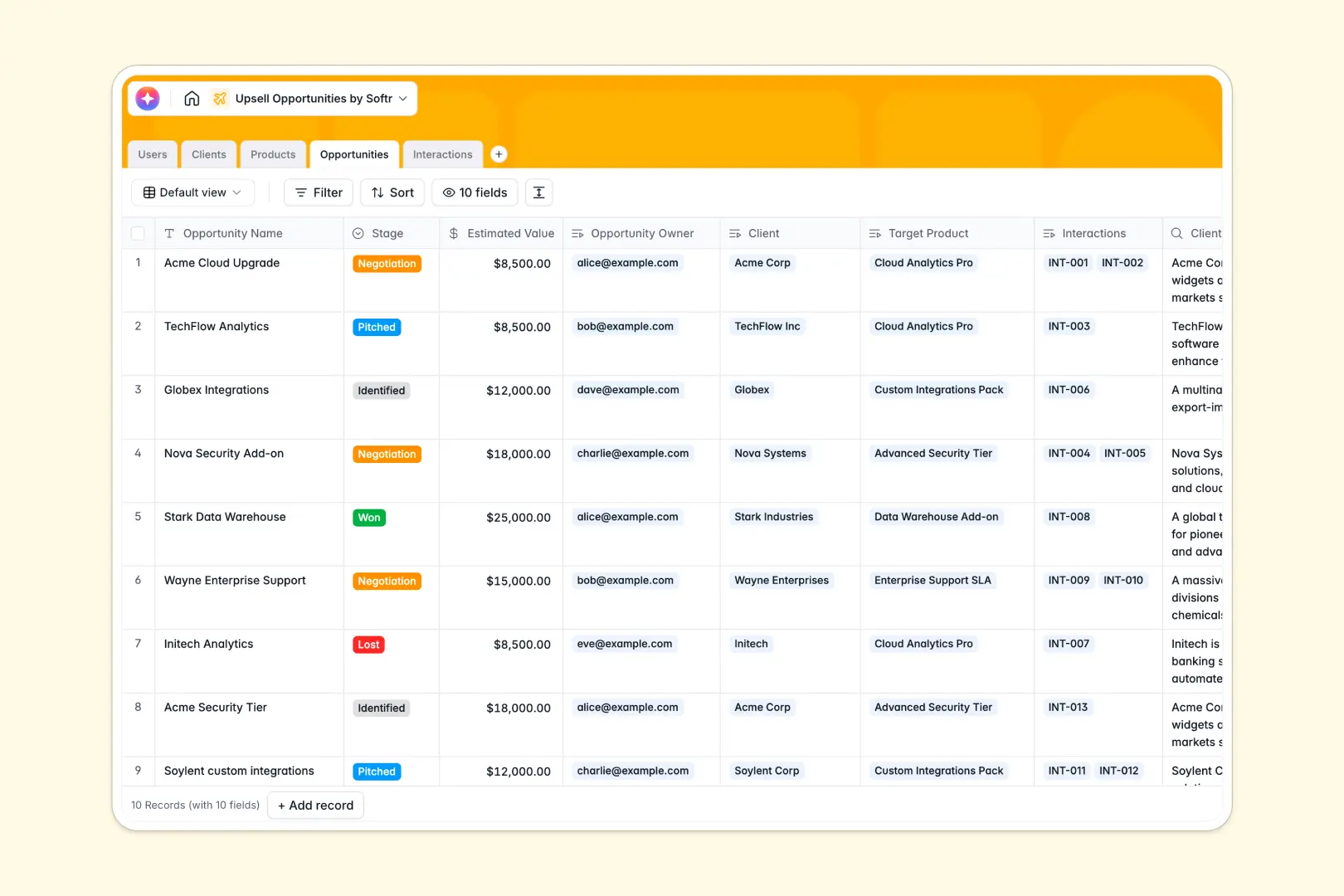
Your Upsell Opportunities database at a glance
This template gives your team a clear view of expansion deals so you can strategically grow account revenue. It helps you identify target clients, track active pitches, and log important interactions seamlessly.
It connects existing clients to various product tiers and activity logs automatically. When an account manager views a client record, they see past interactions and ongoing negotiations in one unified space.
Built-in native AI automatically researches company backgrounds and drafts personalized pitches based on the profile. Your team spends less time digging for context and more time accelerating cycle times.
Why tracking upsell opportunities in spreadsheets breaks down
Monitoring expansion deals across hundreds of accounts quickly turns a simple spreadsheet into a mess. Unconnected lists make it nearly impossible to see which products you have already pitched to whom.
What a structured database changes
In a relational system, your data stays perfectly organized as your client base naturally scales. You can link a single client to multiple products, deals, and interactions without copying their details across rows.
This is exactly what Softr Databases are designed for. Every column enforces a strict data type, so pipeline statuses remain consistent and estimated revenue numbers are always properly formatted.
What you can do with this template
You can immediately track pipeline stages from identified targets all the way to won deals. Every discovery call or email follow-up is logged cleanly against the specific opportunity it belongs to.
Automated fields can even extract specific action items straight from your written meeting notes. This setup gives your revenue team an immediate operational advantage without any administrative drag.
-
Users
Manage internal team roles, contact info, and track assigned upsell revenue
-
Clients
Store client profiles with AI-generated background summaries and current tiers
-
Products
Catalog available service tiers and product pricing for upsell targeting
-
Opportunities
Track active deals with AI-generated outreach pitches based on client data
-
Interactions
Log sales activities and use AI to extract action items from meeting notes
Who is this Upsell Opportunities database for
This template is perfect for revenue teams focused on expanding existing customer accounts.
- Account Managers: Track which clients are ready for an upgrade and seamlessly manage active pitches.
- Sales Leaders: Monitor pipeline health, forecasted expansion revenue, and individual deal progress.
- Customer Success: Log discovery calls and seamlessly hand off qualified expansion leads.
- Sales Operations: Maintain a clean, accurate catalog of product tiers and historical team interactions.
How to take it further
Customizing this database is extremely simple and requires no technical effort. You can easily adjust the product catalog prices, modify your pipeline stages, or add new dropdown options for interaction types.
Getting started is fast because you can bulk upload your existing clients and opportunities via a simple CSV. If your customer data lives in another system, you can quickly import it via API to centralize your operations immediately.
When your team grows, you can easily transform this database into a complete internal tool. Rather than sharing a raw database, you can automatically build a personalized list view for your sales reps.
By leveraging users and permissions, you ensure that reps only see their assigned accounts and cannot edit restricted product catalogs. Starting with a properly structured data foundation makes building these custom internal apps completely frictionless.
-
1
-
2
-
3
-
4
Frequently asked questions
-
What is an upsell opportunities database?
-
Why use a no-code database to track upsell opportunities?
-
How can AI help manage upsell opportunities?
-
Can I build an app with this upsell opportunities database?
-
Is this Upsell Opportunities template free?
-
How is this database different from tracking deals in spreadsheets?
Start building today. It's free!
Build and launch your first app in under 30 minutes.