


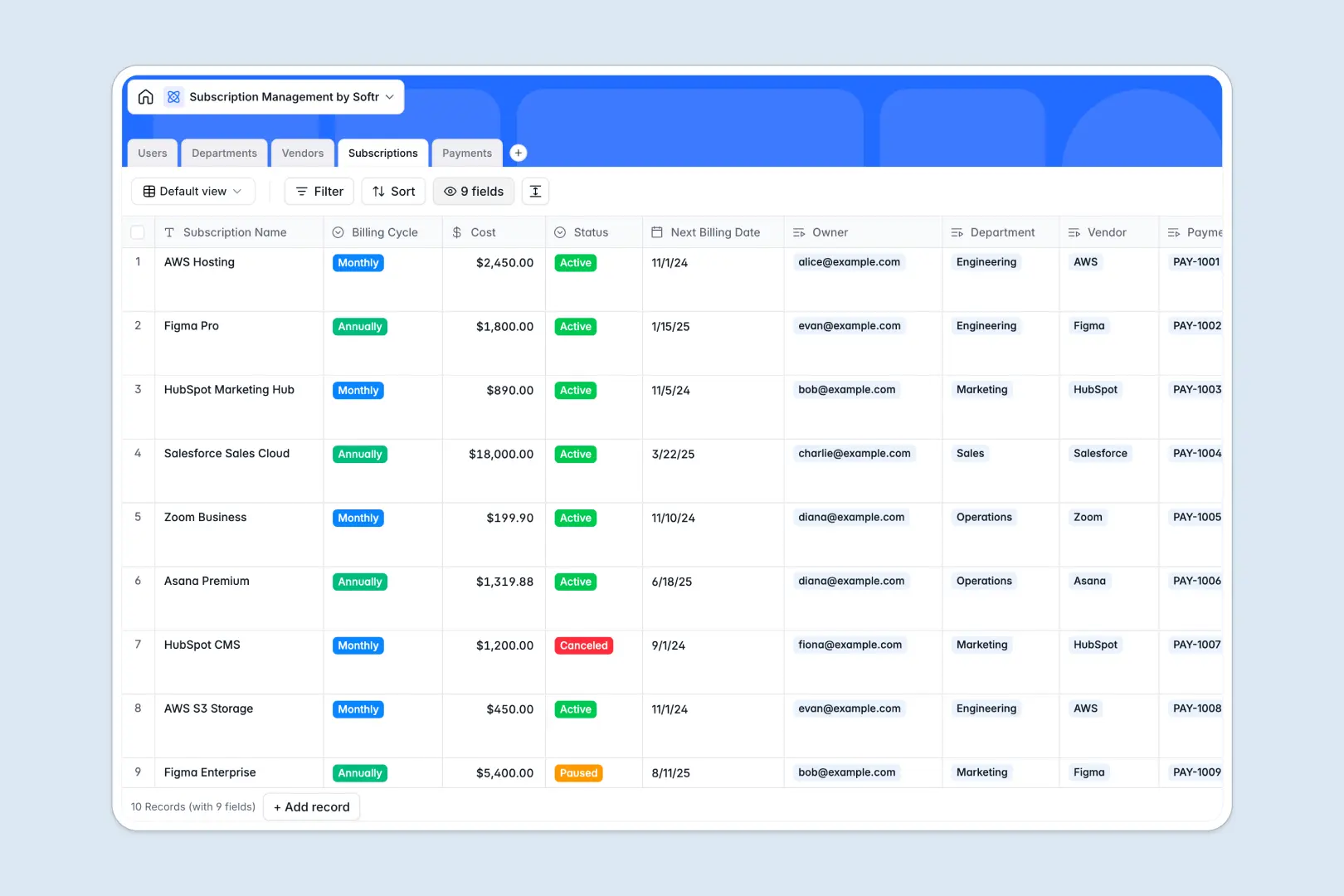
Your Subscription Management database at a glance
This template tracks all your company's software tools, stopping ghost subscriptions and giving you clear visibility into tech spend.
It works by natively linking your users, departments, vendors, active subscriptions, and payments together so you always know who owes what and when.
Built-in AI automatically categorizes your web vendors, writes company descriptions, and instantly flags irregular payment amounts as invoices are logged.
Why managing software subscriptions in spreadsheets breaks down
Keeping track of recurring costs, billing cycles, and owners in a spreadsheet quickly turns into chaos as your tech stack grows.
What a structured database changes
Every column has a strict purpose, meaning payment dates stay dates and costs stay numbers safely protected from accidental deletion.
You can effortlessly link a single vendor to multiple subscriptions and payments without relying on fragile formulas that break easily. This is exactly what Softr Databases are designed for—keeping data clean and connected as you scale.
What you can do with this template
Instantly log new software subscriptions, assign them to specific users, and track upcoming billing dates across the entire company.
Leverage AI to automatically research new vendors, group them by department, and track your ongoing payments without manual heavy lifting.
-
Users
Manage employee profiles, access roles, and subscription ownership
-
Departments
Organize business units and track their total allocated subscriptions
-
Vendors
Maintain service providers with AI-generated categories and descriptions
-
Subscriptions
Monitor active software plans including billing cycles and ownership
-
Payments
Track invoice statuses using AI to summarize results and flag issues
Who is this Subscription Management database for
This template provides immediate visibility into tech spend for any growing team managing software.
- IT & Operations Managers: Consolidate your company's tech stack and eliminate duplicate or unused tools effortlessly.
- Finance & Accounting Teams: Track invoice payments, monitor department budgets, and forecast upcoming subscription costs easily.
- Department Heads: Keep an eye on the specific software budgets and subscriptions owned by your local team members.
How to take it further
Customize this database directly to match your exact procurement workflows. You can easily add new billing cycle options or adjust the vendor categories to reflect your internal structure.
Bring in your existing tech stack instantly via CSV import to get started immediately. You can also connect via API to automatically sync successful payments straight from your accounting software.
When your team is ready, you can build a secure internal portal where employees log in to request new tools. By setting up proper users and permissions, you ensure department heads only see their own team's budgets while finance sees everything. Building these apps becomes straightforward when starting with a well-structured database.
-
1
-
2
-
3
-
4
Frequently asked questions
-
What is a subscription management database?
-
Why use a no-code database to build a subscription tracker?
-
How can AI help managing data for subscriptions?
-
Can I build an app with this subscription management database?
-
Is this subscription management template free?
-
How is a subscription database different from Google Sheets?
Start building today. It's free!
Build and launch your first app in under 30 minutes.