


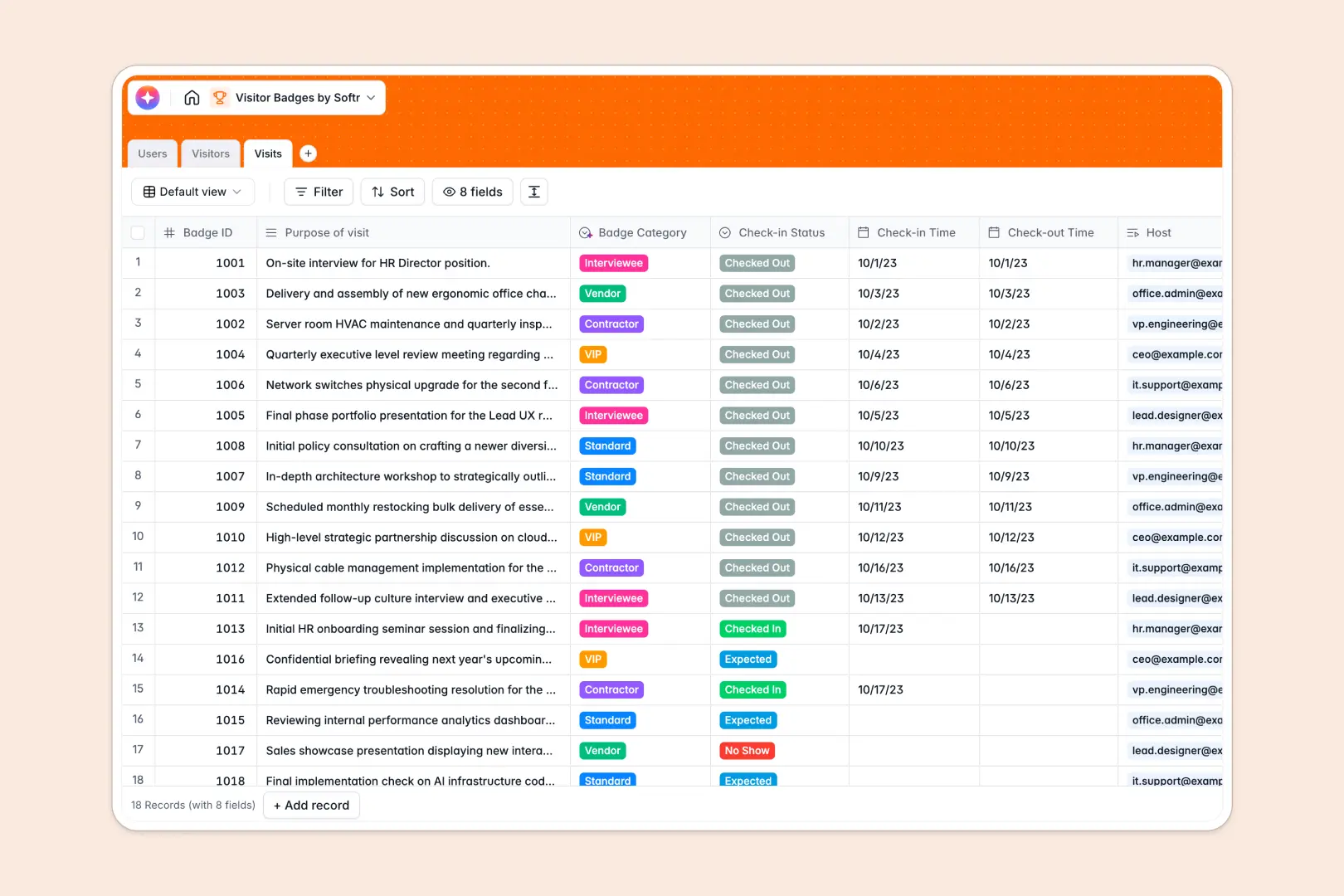
Your Visitor Badges database at a glance
This template replaces messy spreadsheets with a structured, automated system for tracking external guests and facility check-ins. It ensures every visitor is logged securely and mapped directly to the correct internal host.
The database connects three simple tables: Users, Visitors, and Visits. When a guest arrives, their check-in is natively linked to both their persistent visitor profile and the employee hosting them, eliminating duplicate data entry.
Built-in AI automatically researches a visitor's company background from the web and dynamically classifies the badge category based on the purpose of their visit.
Why tracking visitor badges in spreadsheets breaks down
Spreadsheets get dangerously messy when you have dozens of people checking in and out every day. You end up with lost rows, mixed data formats, and disconnected visitor logs that create serious security blind spots.
What a structured database changes
Instead of fragile formulas trying to connect a guest to a host, a structured system uses strict column types. Check-in times stay as dates, badge IDs stay as numbers, and visitor photos stay securely attached without breaking layout dimensions.
You easily link one external visitor to all their past visits without manually copying their contact details across multiple rows. This is exactly what Softr Databases are designed to handle effortlessly as your visitor volume scales.
What you can do with this template
You can instantly log precise check-in and check-out times, associate guests with their internal hosts, and track whether a visitor is expected or physically on-site. Powerful rollup fields automatically count a guest's total lifetime visits for better oversight.
Thanks to Database AI agents, the template will even assign the correct badge type—like VIP or Contractor—just by analyzing the visit's purpose. It is completely ready to streamline your front desk operations from day one.
-
Users
Manage internal staff profiles, roles, and authorized meeting hosts
-
Visitors
Track guests with contact details and AI-powered company descriptions
-
Visits
Log guest sessions using AI to categorize badges based on visit purpose
Who is this Visitor Badges database for
This template provides a reliable, secure check-in foundation for any team managing facility access.
- Office Managers: Keep accurate daily logs of who is in the building and why.
- Front Desk Receptionists: Quickly check guests in, classify badges, and notify internal hosts.
- Security Teams: Review historical access logs, track total visits, and maintain strict facility compliance.
How to take it further
Customizing the database is simple, allowing you to add new badge categories or track custom visitor IDs. Because it is a native structure, you can seamlessly add new columns or tweak the AI prompts without writing scripts.
You can quickly bulk import your existing visitor lists or historical check-in logs directly via CSV. This immediately populates your database and gives you instant visibility into past facility access.
When your front-desk team is ready, you can use an interface builder to turn this database into a full check-in portal. By applying smart permissions, you can ensure employees only see their own expected guests while receptionists view the entire daily log. A well-organized, relational structure makes building these secure custom apps completely frictionless.
-
1
-
2
-
3
-
4
Frequently asked questions
-
What is a visitor badges database?
-
Why use a no-code database to build a visitor check-in system?
-
How can AI help managing data for visitor badges?
-
Can I build an app with this visitor badges database?
-
Is this visitor badges template free?
-
How is a visitor badges database different from a spreadsheet?
Start building today. It's free!
Build and launch your first app in under 30 minutes.