


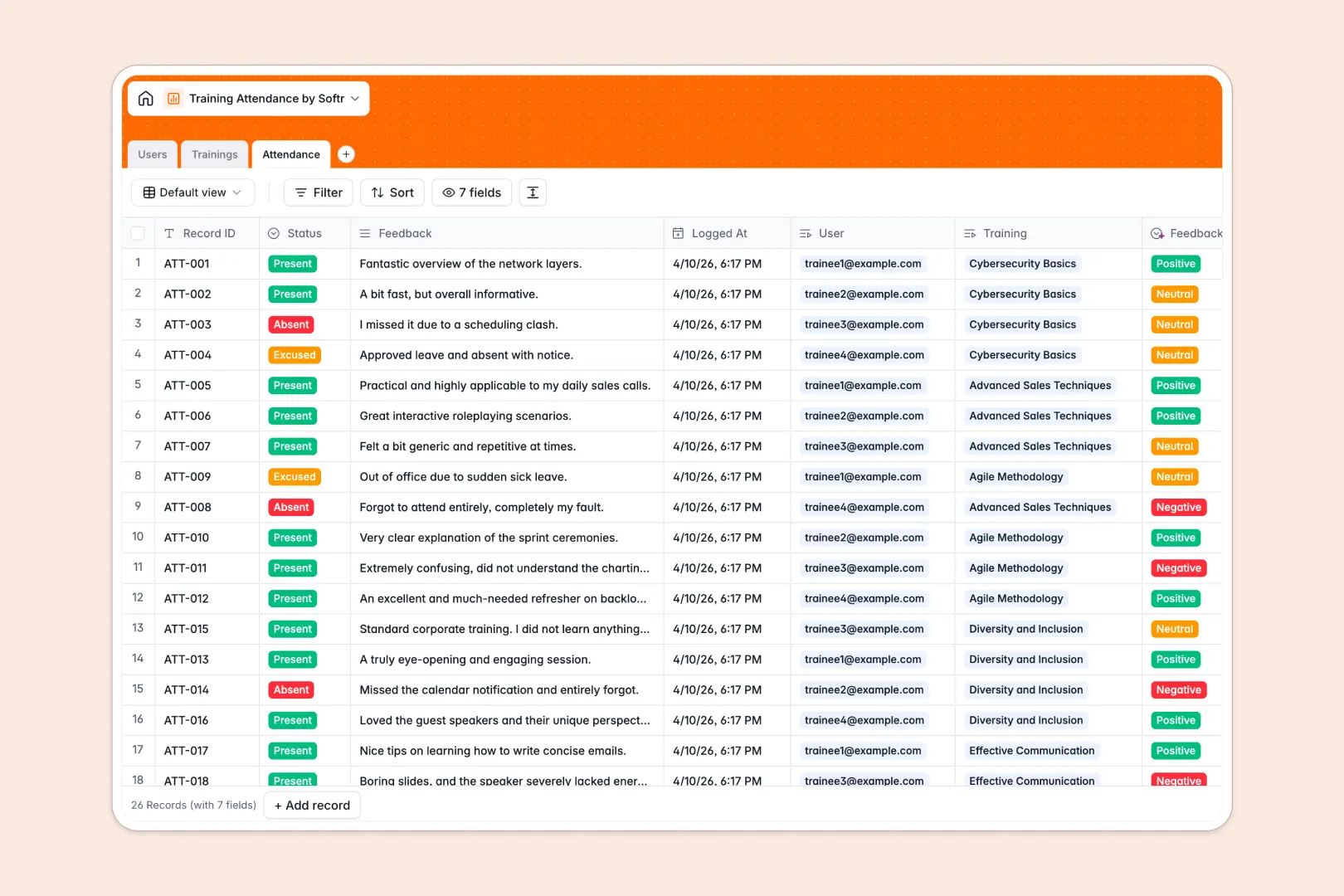
Your Training Attendance Database at a glance
This template helps you organize training sessions, monitor attendance, and collect trainee feedback in one unified system.
It automatically connects specific users to the trainings they attend through dedicated tables. This means you can view a trainer's schedule or a trainee's attendance history without duplicating data.
Built-in AI automatically drafts training syllabuses based on session titles and classifies attendee feedback sentiment to highlight areas for improvement.
Why tracking training attendance in spreadsheets gets messy
Managing multiple training sessions, RSVPs, and feedback across endless spreadsheet tabs quickly becomes a navigational nightmare.
What a structured database changes
In a spreadsheet, linking one trainer to multiple classes or tracking individual student attendance requires fragile formulas that frequently break.
A structured approach means dates stay dates, dropdowns remain consistent, and tables connect naturally without messy VLOOKUPs.
This is exactly what Softr Databases are designed for—giving you clean, reliable data that scales as your organization grows.
What you can do with this template
Instantly log who was present, absent, or excused for any specific session while capturing their feedback directly into their profile.
You can leverage native AI capabilities to automatically categorize qualitative feedback as positive, neutral, or negative the moment it gets submitted.
You can easily see rollups of total class registrations and keep track of departmental participation without any manual tallying.
-
Users
Manage trainees, trainers, and admins with roles and department details
-
Trainings
Schedule sessions with AI generating syllabus and descriptions automatically
-
Attendance
Track session presence with AI analyzing participant feedback sentiment
Who is this Training Attendance database for
This system is built for teams that need to ensure compliance and track educational growth effortlessly.
- HR Managers: Monitor compliance training completion and track absences by department.
- L&D Specialists: Analyze course feedback sentiment and manage trainer assignments in one view.
- Department Heads: Verify that team members are actively attending required skill-building sessions.
How to take it further
You can easily customize this database to match your exact processes by editing dropdowns like department names or attendance statuses. Since it is a native database, adding new columns takes only seconds.
Bring your existing training logs to life effortlessly. Use a simple CSV import or connect via API to sync your historical attendance data immediately.
When your team is ready, you can easily turn this data into a self-serve employee portal. A well-structured database makes launching a powerful employee app remarkably simple.
Softr lets you add users and permissions so trainers only view their own assigned classes, and students can confidentially log their own feedback.
-
1
-
2
-
3
-
4
Frequently asked questions
-
What is a training attendance database?
-
Why use a no-code database to build a training system?
-
How can AI help managing data for training attendance?
-
Can I build an app with this training attendance database?
-
Is this Training Attendance database free?
-
Why is a database better than a training attendance spreadsheet?
Start building today. It's free!
Build and launch your first app in under 30 minutes.