


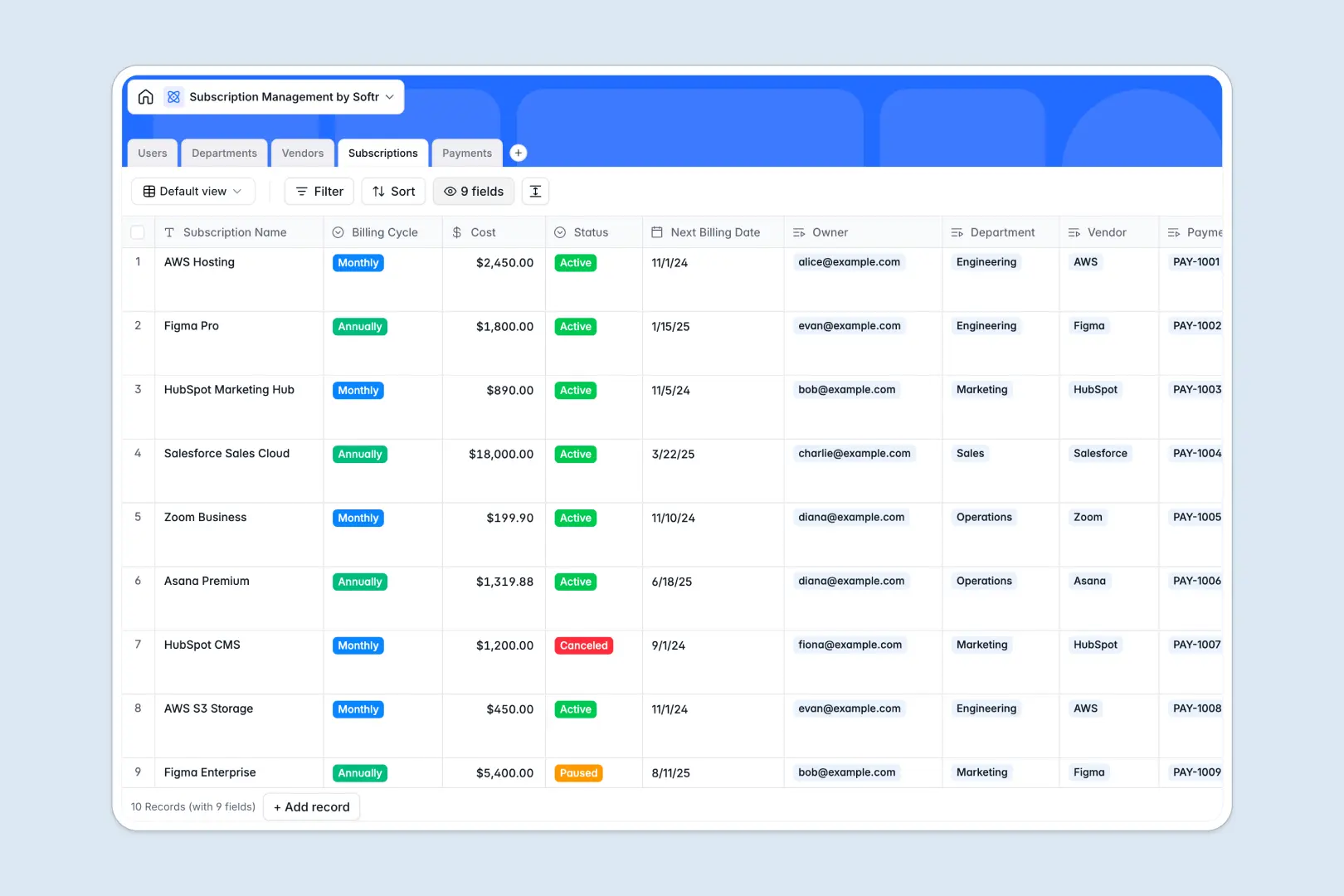
Your Subscription Management Database at a glance
This subscription management template centralizes your software stack so you can track costs, owners, and upcoming renewals. It eliminates blind spots and prevents you from paying for unused licenses.
Record every tool in the Subscriptions table and seamlessly link them to specific Vendors, Departments, and internal Owners. This relational structure automatically ties historical payments and invoices directly to their active subscriptions without manual data entry.
Built-in AI agents automatically categorize new vendors and pull company descriptions directly from their website. It even generates instant payment summaries to help you flag spending irregularities without manual review.
Why your subscription management spreadsheet gets messy
Keeping track of software renewals, changing prices, and various invoice files quickly turns a simple subscription management spreadsheet into chaos. Eventually, rows get mixed up, files cannot be stored properly, and teams lose track of who actually owns which tool.
What a structured database changes
A structured approach enforces strict data types, ensuring your renewal dates always trigger correctly and costs stay formatted as currency. Instead of relying on fragile VLOOKUPs, you can effortlessly map multiple software payments to a single vendor or department.
This ensures your technology stack remains perfectly organized even as your company scales. This is exactly what Softr Databases are designed for, giving you a completely clean, interconnected view of your operations without the spreadsheet clutter.
What you can do with this template
Instantly log payments, upload invoice attachments safely, and relate them directly to the correct subscription record. You can also track total active subscriptions per department through automatic rollups.
Best of all, native Database AI agents do the heavy lifting by scanning vendor websites to enrich your data instantly. Your team gets a ready-to-use directory that practically maintains itself.
-
Users
Manage employee profiles, access roles, and subscription ownership
-
Departments
Organize business units and track their total software budget spend
-
Vendors
Monitor service providers with AI-powered categorization and profiles
-
Subscriptions
Track active plans, renewal dates, and costs across the organization
-
Payments
Log invoices and use AI to summarize status or flag irregularities
Who is this Subscription Management Database for
This template is built for teams that need strict visibility over their software stack and ongoing budgets.
- IT Managers: Centralize software requests, track usage, and monitor active subscriptions globally.
- Finance Teams: Log payments, verify invoices against actual costs, and catch billing irregularities instantly.
- Department Heads: Manage their specific team budgets and oversee the tools their direct reports use.
How to take it further
Adjusting this template to fit your exact budget oversight process takes just a few clicks. As a native database, you can easily add new billing cycles, modify select fields, or create custom formulas to calculate annual spend.
If your current tech stack is scattered across different tools or trackers, simply import your existing list via CSV. You can also connect via API to sync payment data straight from your financial software.
Once your data is clean, you can build an app to give your entire company a secure software portal. By leveraging users and permissions, you can ensure that department heads only see and manage subscriptions belonging to their specific teams. A well-structured database makes launching custom internal tools completely effortless.
-
1
-
2
-
3
-
4
Frequently asked questions
-
What is a subscription management database?
-
Why use a no-code database to build a subscription management system?
-
How can AI help managing data for subscriptions?
-
Can I build an app with this subscription management database?
-
Is this Subscription Management database free?
-
Why is a database better than a subscription management spreadsheet?
Start building today. It's free!
Build and launch your first app in under 30 minutes.