


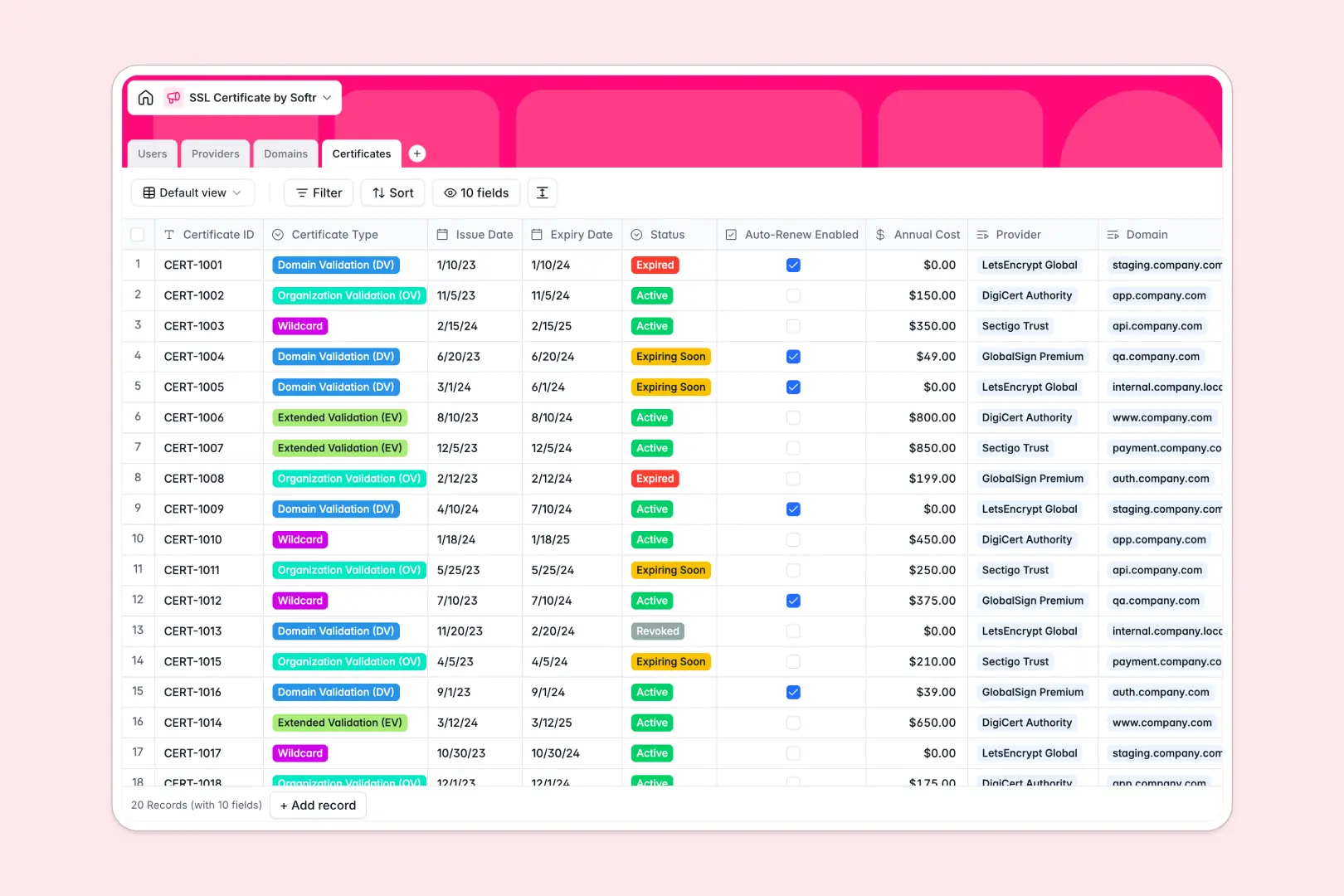
Your SSL Certificate Database at a glance
Centralize your domain security by tracking all SSL certificates, expiration dates, and providers in one clear view.
Link individual certificates directly to their corresponding domains and assign IT managers responsible for renewals. Everything stays organized across dedicated tables for domains, certificates, providers, and users.
Built-in AI automatically researches provider details, summarizies domain purposes, and generates step-by-step renewal action plans based on certificate statuses.
Why an SSL certificate spreadsheet breaks down
Managing expiration dates across dozens of domains gets messy fast in a flat grid. Alerts are easily missed, and linking a certificate to the right IT manager requires endless manual data entry.
What a structured database changes
A structured database enforces column types so your expiration dates stay properly formatted and automated statuses remain accurate. You can link a certificate to its provider without copying and pasting the same vendor support emails repeatedly across rows.
This is exactly what Softr Databases are designed for. When you map out one table per object, your web security data becomes scalable and completely error-proof.
What you can do with this template
Instantly spot which certificates are active, expiring soon, or revoked using color-coded status fields. Track your annual costs and see exactly who is responsible for each domain environment.
You can also leverage AI to orchestrate the busywork naturally. The database automatically searches the web to enrich provider info and auto-generates exact renewal procedures when a certificate nears expiry.
-
Users
Manage system administrators and staff monitoring domain security health
-
Providers
Store certificate authorities using AI to research and describe vendors
-
Domains
Track protected websites while AI analyzes and identifies domain purpose
-
Certificates
Monitor SSL lifecycles with AI-generated renewal procedures and plans
Who is this SSL Certificate database for
This template is built for teams that manage web infrastructure and need to ensure compliance without missing renewal deadlines.
- IT Managers: Monitor upcoming expiry dates across staging and production environments to prevent downtime.
- Web Administrators: Keep provider credentials, domain purposes, and auto-renew statuses perfectly organized.
- DevOps Teams: Generate automated renewal action plans instantly based on exact validation types.
How to take it further
You can easily modify the certificate status values or add custom roles for your users. Everything is fully editable so the structure fits your exact IT infrastructure workflows.
Use a quick CSV import to upload your current domains and active certificates in bulk. Alternatively, connect via API to sync issuance records directly from your certificate authorities.
When your operations grow, you might need an internal portal for your tech team. You can easily connect this database to a platform for building an app to create a custom dashboard.
By configuring custom users and permissions, you can ensure IT managers only see the domains they are assigned to manage. A well-structured backend makes launching these customized portals effortless.
-
1
-
2
-
3
-
4
Frequently asked questions
-
What is an SSL certificate database?
-
Why use a no-code database to build an SSL management tool?
-
How can AI help managing data for SSL certificates?
-
Can I build an app with this SSL certificate database?
-
Is this SSL Certificate Database free?
-
How is a database different from an SSL certificate spreadsheet?
Start building today. It's free!
Build and launch your first app in under 30 minutes.