


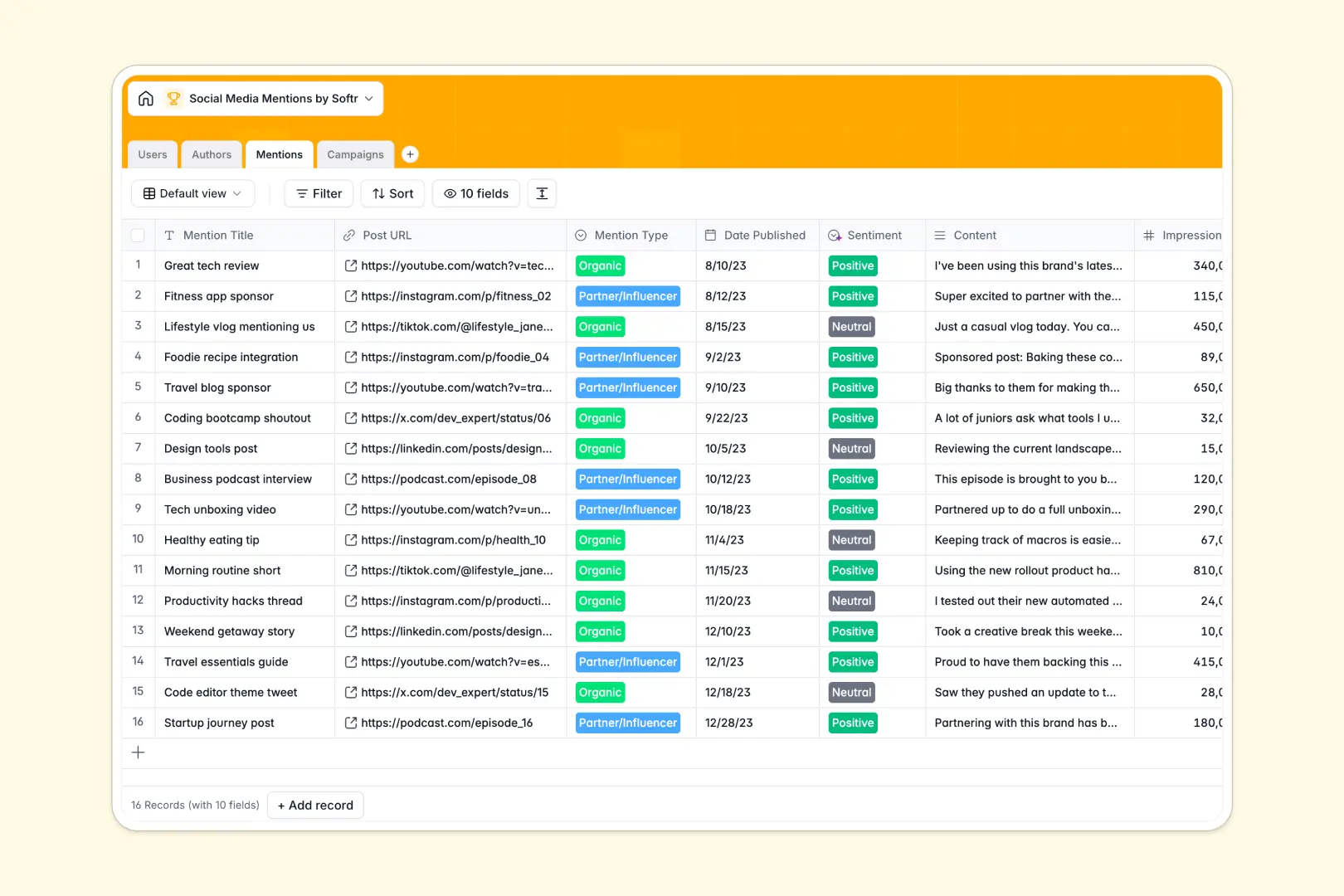
Your Social Media Mentions database at a glance
Track what people are saying about your brand automatically and manage your influencer outreach securely. This template gives you a concrete system for gathering mentions without the chaos of a traditional tracker.
This relational system connects individual social mentions directly to overarching Campaigns and exact Authors. You simply log a post, and the data instantly updates your total campaign impressions and creator tracking without manual data entry.
Built-in AI features automatically analyze the sentiment of every mention by categorizing the content as positive, neutral, or negative. They even search the public web to summarize an author's public persona from their profile link.
Why tracking social media mentions in spreadsheets breaks down
Logging social media shoutouts in Google Sheets or Excel quickly becomes a messy chore. As your marketing campaigns grow, you end up copy-pasting influencer details across dozens of rows, leading to broken formulas and scattered data.
What a structured database changes
A true database keeps your data strictly organized. Instead of duplicating creator statistics repeatedly, you securely store an author once and dynamically link all of their mentions natively.
Every column type is enforced, meaning URLs stay clickable and dates remain formatted properly. This is exactly what Softr Databases are designed for.
They replace fragile VLOOKUPs with clean, unbreakable connections between your campaigns, authors, and individual social posts.
What you can do with this template
Add a new mention and instantly see its impressions roll up into your total marketing campaign metrics. Track internal team members, label organically generated posts versus partner content, and easily filter data.
With native Database AI agents, you can stop manually rating posts. The system will automatically generate executive summaries of your connected campaigns and dynamically classify daily mentions by sentiment.
-
Users
Manage internal team members, their system roles and linked mention logs
-
Authors
Track social profiles with AI-generated persona summaries from web data
-
Mentions
Log individual brand mentions with AI-powered sentiment analysis and metrics
-
Campaigns
Organize marketing initiatives with AI-distilled executive summaries and ROI
Who is this Social Media Mentions database for
This database is built for marketing teams and community managers who need to confidently scale their social listening.
- Social Media Managers: Track individual post performance and accurately analyze audience sentiment without manual data entry.
- Influencer Marketing Leads: Maintain a robust directory of content creators, their follower counts, and their public personas.
- Campaign Directors: Roll up individual mention impressions into overarching campaign records to effortlessly monitor total ROI.
- PR Professionals: Monitor brand reputation by quickly identifying and filtering negative, neutral, or positive shoutouts.
How to take it further
Customize this database to fit your exact social workflow in seconds. You can easily add new tracking platforms to the selection fields or tweak the AI prompts to isolate specific product keywords from posts.
Import your existing spreadsheet records via CSV to populate your author directory and past campaign data instantly. You can also connect via API to sync real-time mentions directly from dedicated social listening tools.
When your team is ready to scale, utilize Softr's interface builder to turn this database into a robust tracking application. You can leverage strict users and permissions to control exactly what internal teams or external partners see.
Let partner agencies log their secured placements directly while hiding your broader, internal campaign strategy. A cleanly structured database foundation guarantees simple, secure app building.
-
1
-
2
-
3
-
4
Frequently asked questions
-
What is a social media mentions database?
-
Why use a no-code database to build a social media tracking tool?
-
How can AI help managing data for social media mentions?
-
Can I build an app with this mentions database?
-
Is this Social Media Mentions template free?
-
How is this database different from a social media mentions spreadsheet?
Start building today. It's free!
Build and launch your first app in under 30 minutes.