


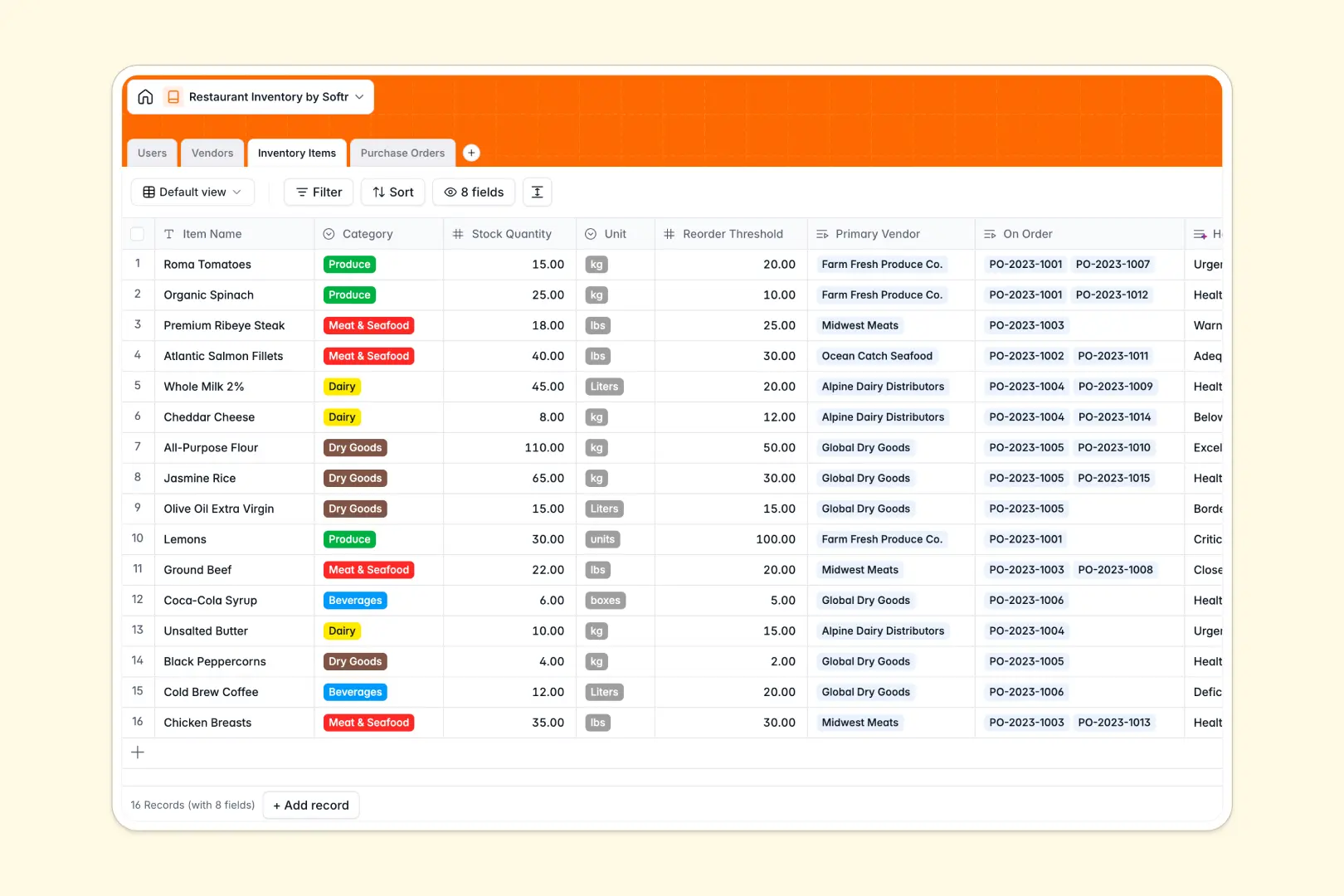
Your Restaurant Inventory database at a glance
Manage your entire back-of-house operations from a single source of truth. This template tracks ingredients, vendor relationships, and purchase orders so you never run out of critical supplies during a rush.
Instead of isolated tabs, everything is connected seamlessly. When you look at an inventory item, you instantly see its primary vendor and any open purchase orders linked to it.
Built-in native AI automatically evaluates your stock health to flag reorder deficits, while smart agents search vendor websites to auto-populate supplier descriptions for you.
Why tracking restaurant inventory gets messy in spreadsheets
Spreadsheets start simple, but as your menu and vendor list grow, they quickly turn into a chaotic web of broken VLOOKUPs and outdated manual entries.
What a structured database changes
In a real database, every column enforces a specific data type safely and reliably. Your unit quantities stay as numbers, receipts are securely attached as files, and ingredients neatly link to vendors without copy-pasting across rows.
This structure guarantees your stock counts are always accurate and ready to scale. This is exactly what Softr Databases are designed for.
What you can do with this template
Log real-time stock quantities and compare them against custom reorder thresholds effortlessly. You can also generate and track purchase orders from draft to received status in one unified view.
Thanks to built-in Database AI agents, this template proactively writes health summaries for your stock levels and researches new suppliers for you automatically.
-
Users
Manage restaurant staff and administrators with specific roles and access
-
Vendors
Store supplier profiles with AI-generated descriptions of their primary goods
-
Inventory Items
Track stock levels with AI-powered health evaluations for reorder urgency
-
Purchase Orders
Log replenishment orders to vendors with status tracking and cost analysis
Who is this Restaurant Inventory database for
This template provides a reliable foundation for anyone managing food and beverage operations.
- Restaurant Managers: Monitor live stock quantities and prevent costly 86'd items before service begins.
- Kitchen Staff: Quickly check what ingredients are currently on order or in transit to plan prep schedules.
- Administrators: Centralize vendor contact details and oversee total costs across all restaurant purchase orders.
How to take it further
You can easily adapt this tracking system to fit your exact menu and supplier network. Add new category groups, modify the units of measurement, or attach internal prep guides to inventory items.
Bring your current ingredient lists securely into the system in seconds. You can drag and drop your existing CSV files to instantly migrate your entire catalog of vendors and stock.
When your team is ready, you can easily transform this data into a secure internal application. By using the interface builder, you give kitchen staff a simple mobile view to log daily prep without accessing backend settings.
Native users and permissions ensure your line cooks only see what they need to prep, while managers can safely approve purchase orders and review total vendor costs.
-
1
-
2
-
3
-
4
Frequently asked questions
-
What is a restaurant inventory database?
-
Why use a no-code database to build a restaurant inventory tool?
-
How can AI help managing data for restaurant inventory?
-
Can I build an app with this restaurant inventory database?
-
Is this Restaurant Inventory template free?
-
How is a restaurant inventory database different from an Excel spreadsheet?
Start building today. It's free!
Build and launch your first app in under 30 minutes.